alarm LEXUS NX300h 2020 Owners Manual
[x] Cancel search | Manufacturer: LEXUS, Model Year: 2020, Model line: NX300h, Model: LEXUS NX300h 2020Pages: 484, PDF Size: 15.45 MB
Page 2 of 484
2
LEXUS NX300h Owners Manual_USA_M78530_enTABLE OF CONTENTS
For your information ......................................
6
Reading this manual .................................... 10
How to search ................................................. 11
Pictorial index ................................................. 12
1-1. For safe use Before driving .................................... 24
For safe driving.................................. 25
Seat belts ............................................. 26
SRS airbags ........................................ 32
Front passenger occupant classifi- cation system ................................... 41
Exhaust gas precautions .............. 46
1-2. Child safety Riding with children......................... 47
Child restraint systems .................. 47
1-3. Lexus Enform Lexus Enform Safety Connect .. 60
Lexus Enform Remote .................. 65
Lexus Enform Service Connect 66
1-4. Hybrid system Hybrid system features ................. 67
Hybrid system precautions ......... 70
1-5. Theft deterrent system Immobilizer sy stem ........................ 75
Alarm..................................................... 772-1. Instrument cluster
Warning lights and indicators.... 80
Gauges and meters ........................ 84
Multi-information display ............ 89
Head-up display ............................... 94
Energy monitor/fuel consumption screen ................................................ 99
3-1. Key information Keys .................................................... 106
3-2. Opening, closing and locking the doors
Side doors ......................................... 110
Back door........................................... 114
Smart access system with push-but- ton start ........................................... 126
3-3. Adjusting the seats Front seats......................................... 132
Rear seats......................................... 133
Driving position memory ........... 138
Head restraints ................................ 141
3-4. Adjusting the steering wheel and mirrors
Steering wheel ................................ 143
Inside rear view mirror ................ 144
Outside rear view mirrors......... 146
3-5. Opening, closing the windows and moon roof
Power windows ............................. 148
Moon roof ........................................ 150
1For safety and security
2Vehicle status information and
indicators
3Before driving
Page 23 of 484
23
LEXUS NX300h Owners Manual_USA_M78530_en
1
1
For safety and security
For safety and security
1-1. For safe useBefore driving ................................. 24
For safe driving.............................. 25
Seat belts ......................................... 26
SRS airbags .................................... 32
Front passenger occupant classifi- cation system ................................ 41
Exhaust gas precautions ........... 46
1-2. Child safety Riding with children..................... 47
Child restraint systems .............. 47
1-3. Lexus Enform Lexus Enform Safety Connect 60
Lexus Enform Remote ............... 65
Lexus Enform Service Connect ........................................................... 66
1-4. Hybrid system Hybrid system features .............. 67
Hybrid system precautions ...... 70
1-5. Theft deterrent system Immobilizer sy stem ..................... 75
Alarm................................................. 77
Page 77 of 484

771-5. Theft deterrent system
LEXUS NX300h Owners Manual_USA_M78530_en
1
For safety and security
■Items to check before locking the
vehicle
To prevent unexpected triggering of
the alarm and vehicle theft, make sure
of the following:
Nobody is in the vehicle.
The windows and moon roof (if
equipped) are closed before the
alarm is set.
No valuables or other personal
items are left in the vehicle.
■Setting
Close the doors and hood, and lock all
the doors. The system will be set auto-
matically after 30 seconds.
The indicator light changes from being on
to flashing when the system is set.
■Canceling or stopping
Do one of the following to deactivate
or stop the alarms:
Unlock the doors.
Turn the power switch to ACCES-
SORY or ON mode, or start the
hybrid system. (The alarm will be
deactivated or stopped after a few
seconds.)
■System maintenance
The vehicle has a maintenance-free type
alarm system.
■Triggering of the alarm
The alarm may be triggered in the following
situations:
(Stopping the alarm deactivates the alarm
system.)
●A person inside the vehicle opens a door
or hood, or unlocks the vehicle using an
inside lock button.
●The 12-volt battery is recharged or
replaced when the vehicle is locked.
( P.414)
Alarm
The alarm uses light and sound to
give an alert when an intrusion is
detected.
The alarm is triggered in the follow-
ing situations when the alarm is set:
A locked door is unlocked or
opened in any way other than
using the entry function, wireless
remote control or mechanical
key. (The doors will lock again
automatically.)
The hood is opened.
Setting/canceling/stopping the
alarm system
Page 78 of 484
781-5. Theft deterrent system
LEXUS NX300h Owners Manual_USA_M78530_en
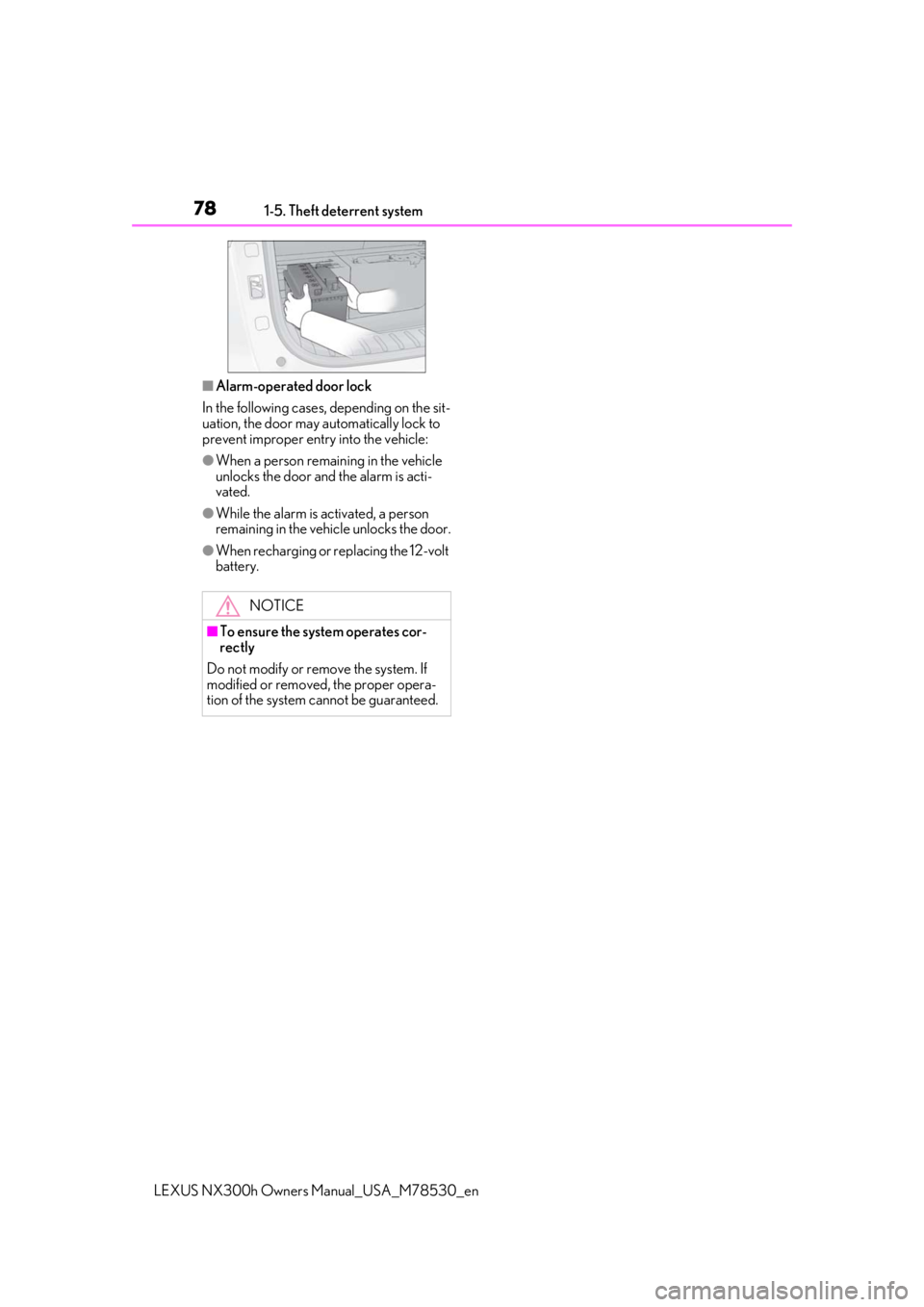
■Alarm-operated door lock
In the following cases, depending on the sit-
uation, the door may automatically lock to
prevent improper entry into the vehicle:
●When a person remaining in the vehicle
unlocks the door and the alarm is acti-
vated.
●While the alarm is activated, a person
remaining in the vehicle unlocks the door.
●When recharging or replacing the 12-volt
battery.
NOTICE
■To ensure the system operates cor-
rectly
Do not modify or remove the system. If
modified or removed, the proper opera-
tion of the system cannot be guaranteed.
Page 106 of 484

1063-1. Key information
LEXUS NX300h Owners Manual_USA_M78530_en
3-1.Key information
The following keys are provided with
the vehicle.
Electronic keys
• Operating the smart access system with push-button start ( P.126)
• Operating the wireless remote control function
Mechanical keys
Key number plate
Card key (electronic key) (if
equipped)
Operating the smart access system with
push-button start ( P.126)
■Card key (if equipped)
●The mechanical key that is stored inside
the card key should be used only if a
problem arises, such as when the card
key does not operate properly.
●If the battery cover is not installed and the
battery falls out or if the battery was
removed because the key got wet, rein-
stall the battery with the positive terminal
facing the Lexus emblem.
●The card key is not waterproof.
■When riding in an aircraft
When bringing an electronic key onto an
aircraft, make sure you do not press any
buttons on the electronic key while inside
the aircraft cabin. If you are carrying an
electronic key in your bag, etc., ensure that
the buttons are not likely to be pressed acci-
dentally. Pressing a button may cause the
electronic key to emit radio waves that
could interfere with the operation of the air-
craft.
■Electronic key battery depletion
●The standard battery life is 1 to 2 years.
(The card key battery life is about a year
and a half.)
●If the battery becomes low, an alarm will
sound in the cabin wh en the hybrid sys-
tem stops.
●As the electronic key always receives
radio waves, the battery will become
depleted even if the electronic key is not
used. The following symptoms indicate
that the electronic key battery may be
depleted. Replace the battery when nec-
essary.
• The smart access system with push-but- ton start or the wireless remote control
does not operate.
• The detection area becomes smaller.
• The LED indicator on the key surface does not turn on.
●To avoid serious dete rioration, do not
leave the electronic key within 3 ft. (1 m)
of the following electrical appliances that
produce a magnetic field:
Keys
Key types
A
B
C
D
Page 108 of 484

1083-1. Key information
LEXUS NX300h Owners Manual_USA_M78530_en
the following wireless remote control:Locks all the doors ( P.110)
Unlocks all the doors ( P.110)
Opens the windows and moon
roof
*1, 2 ( P.110)
Opens and closes the power back
door
*1 ( P.117)
Sounds the alarm ( P.108)
*1: If equipped
*2: This setting must be customized at your
Lexus dealer.
■Theft deterrent panic mode
When is pressed for longer than
about 1 second, an alarm will sound inter-
mittently and the vehicle lights will flash to
deter any person from trying to break into
or damage your vehicle.
To stop the alarm, press any button on the
electronic key.
■Back door reserve lock function (vehi-
cles with power back door)
This function is a function which reserves
locking of all doors, beforehand, when the
back door is open. When the follow is done,
all the doors except the back door are
locked and then back door will also be
locked at the same time it is closed.
1 Close all doors, except the back door.
2 Push the wireless lock button during the
automatic closing operation of the back
door.
To take out the mechanical key, push
the release button and take the key out.
The mechanical key can only be inserted in
one direction, as the key only has grooves
on one side. If the key cannot be inserted in
a lock cylinder, turn it over and re-attempt
to insert it.
After using the mechanical key, store it in
the electronic key. Carry the mechanical
key together with the electronic key. If the
electronic key battery is depleted or the
entry function does not operate properly,
you will need the mechanical key.
( P.410)
A
B
C
D
E
Using the mechanical key
Page 111 of 484

1113-2. Opening, closing and locking the doors
LEXUS NX300h Owners Manual_USA_M78530_en
3
Before driving
For vehicles with alarm: To prevent unin-
tended triggering of the alarm, unlock the
doors using the wirele ss remote control and
open and close a door once after the set-
tings have been changed. (If a door is not
opened within 60 seconds after is
pressed, the doors will be locked again and
the alarm will automatically be set.)
In a case that the alarm is triggered, imme-
diately stop the alarm. ( P.77)
■Locking the doors from the outside with-
out a key
1 Move the inside lock button to the lock
position.
2 Close the door.
The door cannot be locked if the power
switch is in ACCESSORY or ON mode, or
the electronic key is le ft inside the vehicle.
The key may not be detected correctly and
the door may be locked.
■Impact detection door lock release sys-
tem
In the event that the vehicle is subject to a
strong impact, all the doors are unlocked.
Depending on the force of the impact or the type of accident, however, the system may
not operate.
■Operation signals
Doors:
A buzzer sounds and the emergency flash-
ers flash to indicate that the doors have
been locked/unlocked. (Locked: Once;
Unlocked: Twice)
Windows and moon roof:
A buzzer sounds to indicate that all win-
dows and moon roof are opening.
■Security feature
If a door is not opened within approximately
60 seconds after the vehicle is unlocked,
the security feature automatically locks the
vehicle again.
■Open door warning buzzer
If the vehicle speed reaches 3 mph (5
km/h), the master warning light flashes and
a buzzer sounds to indicate that door(s) or
the hood in not fully closed.
The open door(s) or hood is displayed on
the multi-information display.
■Welcome light illumination control
The side marker, parking, tail and license
plate lights automatically turn on at night
when the doors are unlocked using the
entry function or wireless remote control if
the light switch is in the position.
■When the door cannot be locked by the
lock sensor on the surface of the door
handle
When the door cannot be locked even if the
lock sensor on the surface of the door han-
dle is touched by a finger, touch the lock
sensor with the palm.
When gloves are being worn, remove the
gloves.
Multi-information display/BeepUnlocking function
Exterior: Beeps 3 times
Interior: Pings once
Holding the driver’s
door handle unlocks
only the driver’s door.
Holding any of the
passenger door han- dles unlocks all the doors.
Exterior: Beeps twice
Interior: Pings once
Holding a door han-dle unlocks all the doors.
Page 112 of 484

1123-2. Opening, closing and locking the doors
LEXUS NX300h Owners Manual_USA_M78530_en
■Door lock buzzer
If an attempt to lock the doors is made when
a door is not fully closed, a buzzer sounds
continuously for 5 seconds. Fully close the
door to stop the buzzer, and lock the vehi-
cle once more.
■Setting the alarm
Locking the doors will set the alarm system.
( P.77)
■Conditions affecting the operation of
the smart access system with push-but-
ton start or wireless remote control
P.128
■If the smart access system with push-
button start or the wireless remote con-
trol does not operate properly
●Use the mechanical key to lock and
unlock the doors. ( P.410)
●Replace the key battery with a new one if
it is depleted.
■Customization
Settings (e.g. unloc king function using a
key) can be changed. (Customizable fea-
tures: P.441)
■Using the door lock switches
1 Locks all the doors
2 Unlocks all the doors
WARNING
■To prevent an accident
Observe the following precautions while
driving the vehicle.
Failure to do so may result in a door
opening and an occupant falling out,
resulting in death or serious injury.
●Ensure that all doors are properly
closed and locked.
●Do not pull the inside handle of the
doors while driving.
Be especially care ful for the front
doors, as the door s may be opened
even if the inside lock buttons are in
locked position.
●Set the rear door ch ild-protector locks
when children are seated in the rear
seats.
■When opening or closing a door
Check the surroundings of the vehicle
such as whether the vehicle is on an
incline, whether there is enough space
for a door to open and whether a strong
wind is blowing. When opening or clos-
ing the door, hold the door handle tightly
to prepare for any unpredictable move-
ment.
■When using the wireless remote con-
trol and operating the power windows
or moon roof (if equipped)
Operate the power window or moon
roof after checking to make sure that
there is no possibility of any passenger
having any of their body parts caught in
the window or moon roof. Also do not let
a child operate window by the mechani-
cal key. It is possible for children and
other passengers to get caught in the
power window or moon roof.
Unlocking and locking the doors
from the inside
Page 127 of 484

1273-2. Opening, closing and locking the doors
LEXUS NX300h Owners Manual_USA_M78530_en
3
Before driving
■Effective range (areas within which the
electronic key is detected) When locking or unlocking the doors
The system can be operated when the
electronic key is within about 2.3 ft. (0.7
m) of an outside door handle. (Only the
doors detecting the key can be oper-
ated.)
When starting the hybrid system or
changing power switch modes
The system can be operated when the elec-
tronic key is inside the vehicle.
■If an alarm sounds or a warning message
is displayed
A combination of exterior and interior
alarms as well as warning messages shown
on the multi-information display are used to
prevent theft of the vehicle and accidents
resulting from erroneous operation. Take
appropriate measures in response to any
warning message on the multi-information
display. ( P.396)
When only an alarm sounds, circumstances
and correction procedures are as follows.
●When an exterior alarm sounds once for
5 seconds
●When an Interior alarm pings repeatedly
■When “Smart Access System Malfunc-
tion See Owner’s Manual” will be dis-
played on the multi-information display
The system may be ma lfunctioning. Have
the vehicle inspected by your Lexus dealer
immediately.
■Battery-saving function
The battery-saving function will be acti-
vated in order to prevent the electronic key
battery and the 12-volt battery from being
discharged while the vehicle is not in opera-
tion for a long time.
●In the following situations, the smart
access system with pu sh-button start may
take some time to unlock the doors.
• The electronic key has been left in an area of approximately 6 ft. (2 m) of the
outside of the vehicle for 10 minutes or
longer.
• The smart access system with push-but- ton start has not been used for 5 days or
longer.
●If the smart access system with push-but-
ton start has not been used for 14 days or
longer, the doors cann ot be unlocked at
any doors except the dr iver’s door. In this
case, take hold of the driver’s door han-
dle, or use the wireless remote control or
the mechanical key, to unlock the doors.
■Turning an electronic key to battery-
saving mode
When battery-saving mode is set, battery
depletion is minimized by stopping the elec-
SituationCorrection proce- dure
An attempt was
made to lock the
vehicle while a door was open.Close all of the
doors and lock the doors again.
A
B
SituationCorrection proce- dure
The power switch was turned to
ACCESSORY mode while the
driver’s door was
open (The driver’s door was opened when the power switch was in
ACCESSORY mode).
Turn the power
switch off and close the driver’s door.
Page 129 of 484

1293-2. Opening, closing and locking the doors
LEXUS NX300h Owners Manual_USA_M78530_en
3
Before driving
of water splashes on the door handle,
such as in the rain or in a car wash when
the electronic key is within the effective
range. (The door will automatically be
locked after approximately 60 seconds if
the doors are not opened and closed.)
●If the wireless remote control is used to
lock the doors when the electronic key is
near the vehicle, there is a possibility that
the door may not be unlocked by the
entry function. (Use the wireless remote
control to unlock the doors.)
●Touching the door lock sensor while
wearing gloves may delay or prevent lock
operation. Remove the gloves and touch
the lock sensor again.
●When the lock operation is performed
using the lock sensor, recognition signals
will be shown up to two consecutive
times. After this, no recognition signals
will be given.
●If the door handle becomes wet while the
electronic key is within the effective
range, the door may lock and unlock
repeatedly. In that ca se, follow the follow-
ing correction procedures to wash the
vehicle:
• Place the electronic key in a location 6 ft. (2 m) or more away from the vehicle.
(Take care to ensure that the key is not
stolen.)
• Set the electronic key to battery-saving
mode to disable the smart access system
with push-button start. ( P.127)
●If the electronic key is inside the vehicle
and a door handle becomes wet during a
car wash, a message may be shown on
the multi-information display and a
buzzer will sound outside the vehicle. To
turn off the alarm, lock all the doors.
●The lock sensor may not work properly if
it comes into contact with ice, snow, mud,
etc. Clean the lock sensor and attempt to
operate it again.
●A sudden approach to the effective
range or door handle may prevent the
doors from being unlocked. In this case,
return the door handle to the original
position and check that the doors unlock
before pulling the door handle again.
●If there is another electronic key in the detection area, it may
take slightly longer
to unlock the doors after the door handle
is gripped.
■When the vehicle is not driven for
extended periods
●To prevent theft of the vehicle, do not
leave the electronic key within 6 ft. (2 m)
of the vehicle.
●The smart access system with push-but-
ton start can be deactivated in advance.
■To operate the system properly
Make sure to carry the electronic key when
operating the system. Do not get the elec-
tronic key too close to the vehicle when
operating the system from the outside of the
vehicle.
Depending on the position and holding
condition of the electronic key, the key may
not be detected correctly and the system
may not operate properly. (The alarm may
go off accidentally, or the door lock preven-
tion may not operate.)
■If the smart access system with push-
button start does not operate properly
●Locking and unlockin g the doors: Use
the mechanical key. ( P.410)
●Starting the hybrid system: P.411
■Customization
Settings (e.g. smart access system with
push-button start) can be changed. (Cus-
tomizable features: P.441)
If the smart access system with push-button
start has been deactivated by a customized
setting, refer to the explanations for the fol-
lowing operations.
●Locking and unlo cking the doors:
Use the wireless remote control or
mechanical key. ( P.110, 410)
●Starting the hybrid system and changing
power switch modes: P.411
●Stopping the hybrid system: P.176