audio LEXUS NX300h 2020 Owners Manual
[x] Cancel search | Manufacturer: LEXUS, Model Year: 2020, Model line: NX300h, Model: LEXUS NX300h 2020Pages: 484, PDF Size: 15.45 MB
Page 16 of 484

16Pictorial index
LEXUS NX300h Owners Manual_USA_M78530_en
When the warning messages are displayed.......................................................... P.396
Turn signal lever ......................................................................................................P.182
Headlight switch......................................................................................................P.189
Headlights/parking lights/tail lights/license plate lig hts/daytime running lights
............................................................................................................................... .................... P.189
Fog lights ..................................................................................................................... .......... P.195
Windshield wiper and washer switch ..................................................... P.195, 200
Usage.......................................................................................................................... P.195, 200
Adding washer fluid .......................................................................................................... P. 351
Warning messages .......................................................................................................... P.396
Emergency flasher switch ...................................................................................P.378
Hood lock release lever .......................................................................................P.344
Tilt and telescopic steering control switch
*1................................................... P.143
Adjustment ..................................................................................................................... ...... P.143
Driving position memory
*1............................................................................................. P.138
Tilt and telescopic steeri ng lock release lever
*1............................................ P.143
Adjustment ..................................................................................................................... ...... P.143
Air conditioning system ...................................................................................... P.289
Usage.......................................................................................................................... ...........P.289
Rear window defogger...................................................................................................P.290
Audio system
*2
*1
: If equipped
*2: Refer to “NAVIGATION AND MULTIMEDIA SYSTEM OWNER’S MANUAL”.
E
F
G
H
I
J
K
L
Page 18 of 484

18Pictorial index
LEXUS NX300h Owners Manual_USA_M78530_en
Power window switches ........................................................................................P.148
Window lock switch ............................................................................................... P.149
Outside rear view mirror switches .................................................................... P.146
Door lock switch....................................................................................................... P.112
Driving position memory switches
*...................................................................P.138
HUD (Head-up display) switches
*.......................................................................P.94
ASC (Active Sound Control) dial
*..................................................................... P.187
*:If equipped
Audio remote control switches
*1
A
B
C
D
E
F
G
A
Page 89 of 484

892-1. Instrument cluster
LEXUS NX300h Owners Manual_USA_M78530_en
2
Vehicle status information and indicators
■Display
■Menu icons
■Liquid crystal display
P.87
The multi-information display is oper-
ated using the meter control switches.
Select an item/change pages
Enter/set
Return to the previous screen
Press: Displays the screen regis-
tered to When no screen has
been registered, the drive informa-
tion screen will be displayed. Press
and hold: Registers the currently
displayed screen to
The registration confirmation screen is dis-
played. If the selected screen cannot be
registered, a registra tion failure message
Multi-information display
The multi-information display pres-
ents the driver with a variety of
vehicle data.
Display and menu icons
Drive information (P.90)
Navigation system-linked dis-
play (if equipped) ( P.91)
Audio system-linked display (if
equipped) (P.91)
Driving assist system informa-
tion (P.91)
Warning message display
( P.91)
Settings display ( P.91)
NOTICE
■The multi-information display at low
temperatures
Allow the interior of the vehicle to warm
up before using the liquid crystal infor-
mation display. At extremely low tem-
peratures, the information display
monitor may respond slowly, and display
changes may be delayed.
Changing the meter display
A
B
C
D
Page 91 of 484

912-1. Instrument cluster
LEXUS NX300h Owners Manual_USA_M78530_en
2
Vehicle status information and indicators
■Vehicle sway warning
Detects the sway of the vehicle within a
lane, which is often associated with a
decrease in the driver’s attention level,
and displays the decrease in attention
using a bar display.
The shorter the bar length, the more
the driver may need to rest.
This display is a part of the LTA (Lane
Tracing Assist) system or LDA (Lane
Departure Alert with steering control)
system. The display is enabled when
the operating conditions of the vehicle
sway warning are met. ( P.221, 230)
■Display off
A blank screen is displayed.
■Tire inflation pressure
●It may take a few minutes to display the
tire inflation pressure after the power
switch is turned to ON mode. It may also
take a few minutes to display the tire infla-
tion pressure after inflation pressure has
been adjusted.
●“--” may be displayed if the tire informa-
tion cannot be determined due to unfa-
vorable radio wave conditions.
●Tire inflation pressure changes with tem-
perature. The displayed values may also
be different from the values measured
using a tire pressure gauge.
■When disconnecting and reconnecting
12-volt battery terminals
The drive information will be reset.
Select to display the following naviga-
tion system-linked information.
Route guidance
Compass display (heading-up dis-
play)
Select to enable se lection of an audio
source or track on the display using the
meter control switches.
Select to display the operational status
of the following systems:
LTA (Lane Tracing Assist) ( P.217)
LDA (Lane Departure Alert with
steering control) ( P.226)
Dynamic radar cruise control with
full-speed range ( P.236)
RSA (Road Sign Assist) ( P. 234)
The displayed icon changes depending
on the system used.
Select to display warning messages
and measures to be taken if a malfunc-
tion is detected. ( P.396)
The settings of the following items can
be changed using the meter control
switches.
For functions that can be enabled or
disabled, the function switches
between on and off each time is
pressed.
Navigation system-linked dis-
play (if equipped)
Audio system-linked display
Driving assist system information
Warning message display
Settings display
Page 95 of 484

952-1. Instrument cluster
LEXUS NX300h Owners Manual_USA_M78530_en
2
Vehicle status information and indicators
Vehicle speed
Hybrid System Indicator ( P.97)
Tachometer
Shift position and shift range
Displays the selected shift position or
selected shift range ( P.179)
Audio display
Displays audio info rmation for approxi-
mately 3 seconds when the audio system is
operated
Route guidance display (vehicles
with navigation system) ( P.97)
When approaching an intersection while
the navigation system is giving route guid-
ance, an arrow will automatically be dis-
played to indicate the direction of travel.
Lane departure warning display
(LTA [Lane Tracing Assist]) (if
equipped) ( P.217)
Lane departure warning display
(LDA [Lane Departure Alert with
steering control]) ( P.226)
Approach warning display
(Dynamic radar cruise control with
full speed range) ( P.242)
Road signs (RSA [Road Sign
Assist]) (if equipped) ( P. 234)
Pre-collision warnin g message (Pre-
Collision System) ( P.210)
Speed limit display (vehicles with
navigation system) ( P.97)
Parking Support Brake function (for
static objects) ( P.252)
Brake Override System ( P.157)
Drive-Start Control ( P.157)
■“HUD” button
Pressing the button turns the head-up
display on/off and changes the vehicle
speed display units as follows:
U.S.A.
OFF ON (MPH) ON
(km/h) OFF
Canada
OFF ON (km/h) ON
(MPH) OFF
■“DISP” button
Pressing the button changes the dis-
play items (except vehicle speed) as
follows:
•Off
• Hybrid System Indicator
•Tachometer
Head-up display contents
Switching the head-up display
A
Page 98 of 484
982-1. Instrument cluster
LEXUS NX300h Owners Manual_USA_M78530_en
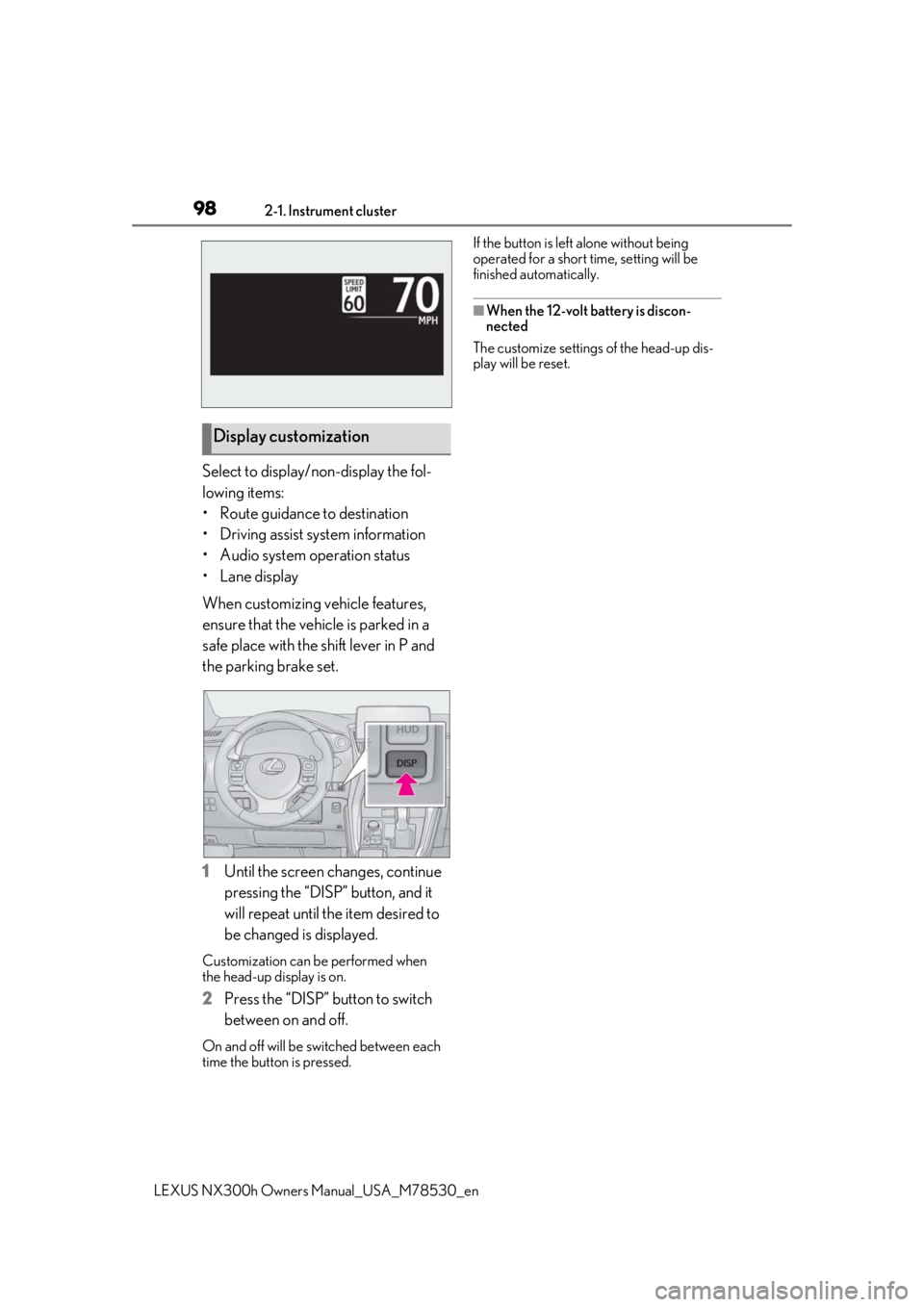
Select to display/non-display the fol-
lowing items:
• Route guidance to destination
• Driving assist system information
• Audio system operation status
•Lane display
When customizing vehicle features,
ensure that the vehicle is parked in a
safe place with the shift lever in P and
the parking brake set.
1Until the screen changes, continue
pressing the “DISP” button, and it
will repeat until the item desired to
be changed is displayed.
Customization can be performed when
the head-up display is on.
2 Press the “DISP” button to switch
between on and off.
On and off will be switched between each
time the button is pressed. If the button is left alone without being
operated for a short time, setting will be
finished automatically.
■When the 12-volt battery is discon-
nected
The customize settings of the head-up dis-
play will be reset.
Display customization
Page 107 of 484

1073-1. Key information
LEXUS NX300h Owners Manual_USA_M78530_en
3
Before driving
•TVs
• Personal computers
• Cellular phones, cordless phones and battery chargers
• Recharging cellular phones or cordless
phones
• Induction cookers
• Table lamps
■Replacing the battery
P.368
■Confirmation of the registered key
number
The number of keys already registered to
the vehicle can be confirmed. Ask your
Lexus dealer for details.
The electronic keys are equipped with
NOTICE
■To prevent key damage
●Do not drop the keys, subject them to
strong shocks or bend them.
●Do not expose the keys to high tem-
peratures for long periods of time.
●Do not get the keys wet or wash them
in an ultrasonic washer, etc.
●Do not attach metallic or magnetic
materials to the keys or place the keys
close to such materials.
●Do not disassemb le the keys.
●Do not attach a sticker or anything else
to the surface of the electronic key.
●Do not place the keys near objects that
produce magnetic fields, such as TVs,
audio systems and induction cookers,
or medical electrical equipment, such
as low-frequency therapy equipment.
■Carrying the electronic key on your
person
Carry the electronic key 3.9 in. (10 cm)
or more away from electric appliances
that are turned on. Radio waves emitted
from electric applianc es within 3.9 in. (10
cm) of the electronic key may interfere
with the key, causing the key to not func-
tion properly.
■In case of a smart access system with
push-button start malfunction or
other key related problems
P.410
■When an electronic key is lost
P.409
■Handling the card key
●If the battery or card key terminals get
wet, the battery may corrode and the
card key may stop working.
If the key is dropped into water, or if
drinking water, etc., is spilled on the
key, immediately remove the battery
cover and wipe the battery and termi-
nals. (To remove the battery cover,
lightly grasp and pull it.) If the battery is
corroded, have your Lexus dealer
replace the battery.
●Do not crush the battery cover or use
a screwdriver to remove the battery
cover.
Forcibly removing the battery cover
may bend or damage the key.
●If the battery cover is frequently
removed, the battery cover may
become loose.
●When installing the battery, make sure
to check the direction of the battery.
Installing the battery in the wrong
direction may cause the battery to
deplete rapidly.
●The surface of the card key may be
damaged, or its coating may peel off in
the following situations:
• The card key is ca rried together with
hard objects, such as coins and keys.
• The card key is scraped with a sharp object, such as the tip of a mechanical
pencil.
• The surface of the card key is wiped with thinner or benzene.
Wireless remote control
Page 128 of 484

1283-2. Opening, closing and locking the doors
LEXUS NX300h Owners Manual_USA_M78530_entronic key from re
ceiving radio waves.
Press twice while pressing and
holding .
Confirm that the elec tronic key indicator
flashes 4 times. While the battery-saving
mode is set, the smar t access system with
push-button start cannot be used. To cancel
the function, press any of the electronic key
buttons.
■Conditions affe cting operation
The smart access system with push-button
start, wireless remote control and immobi-
lizer system use weak radio waves. In the
following situations, the communication
between the electronic key and the vehicle
may be affected, preventing the smart
access system with push -button start, wire-
less remote control and immobilizer system
from operating properly. (Ways of coping:
P.410)
●When the electronic key battery is
depleted
●Near a TV tower, electric power plant,
gas station, radio stat ion, large display,
airport or other faci lity that generates
strong radio waves or electrical noise
●When the electronic key is in contact
with, or is covered by the following metal-
lic objects
• Cards to which aluminum foil is attached
• Cigarette boxes that have aluminum foil
inside
• Metallic wallets or bags
•Coins
• Hand warmers made of metal
• Media such as CDs and DVDs
●When other wireless ke ys (that emit radio
waves) are being used nearby
●When carrying the electronic key together with the following devices that
emit radio waves
• Portable radio, cellular phone, cordless
phone or other wireless communication
devices
• Another vehicle’s electronic key or a
wireless key that emits radio waves
• Personal computers or personal digital assistants (PDAs)
• Digital audio players
• Portable game systems
●If window tint with a metallic content or
metallic objects are attached to the rear
window
●When the electronic key is placed near a
battery charger or electronic devices
■Note for the entry function
●Even when the electronic key is within the
effective range (detection areas), the sys-
tem may not operate properly in the fol-
lowing cases:
• The electronic key is too close to the win-
dow or outside door handle, near the
ground, or in a high place when the doors
are locked or unlocked.
• The electronic key is near the ground or in a high place, or too close to the rear
bumper center when the back door is
opened.
• The electronic key is on the instrument panel, luggage room, floor, or in the door
pockets or glove box when the hybrid
system is started or power switch modes
are changed.
●Do not leave the electronic key on top of
the instrument panel or near the door
pockets when exiting the vehicle.
Depending on the radio wave reception
conditions, it may be detected by the
antenna outside the cabin and the door
will become lockable from the outside,
possibly trapping the electronic key
inside the vehicle.
●As long as the electronic key is within the
effective range, the doors may be locked
or unlocked by anyone.
●Even if the electronic key is not inside the
vehicle, it may be po ssible to start the
hybrid system if the el ectronic key is near
the window.
●The doors may unlock if a large amount
Page 176 of 484

1764-2. Driving procedures
LEXUS NX300h Owners Manual_USA_M78530_en
4Release the brake pedal and check
that the display on the instrument
cluster is off.
Modes can be changed by pressing
the power switch with brake pedal
released. (The mode changes each
time the switch is pressed.) 1
Off
*
The emergency flashers can be used.
2ACCESSORY mode
Some electrical components such as the
audio system can be used.
“ACCESSORY” will be displayed on the
multi-information display.
3ON mode
All electrical components can be used.
“IGNITION ON” will be displayed on the
multi-information display.
*: If the shift lever is in a position other than
P when turning off the hybrid system, the
power switch will be turned to ACCES-
SORY mode, not to off.
■Auto power off function
If the vehicle is left in ACCESSORY mode
for more than 20 minutes or ON mode (the
hybrid system is not operating) for more
than an hour with the shift lever in P, the
power switch will automatically turn off.
However, this function cannot entirely pre-
vent 12-volt battery discharge. Do not leave
the vehicle with the power switch in
ACCESSORY or ON mode for long peri-
WARNING
■Stopping the hybrid system in an
emergency
If you want to stop the hybrid system in an
emergency while driving the vehicle,
press and hold the power switch for more
than 2 seconds, or press it briefly 3 times
or more in succession. ( P.378)
However, do not touch the power switch
while driving except in an emergency.
Turning the hybrid sy stem off while driv-
ing will not cause loss of steering or brak-
ing control, however, power assist to the
steering will be lost. This will make it
more difficult to steer smoothly, so you
should pull over and stop the vehicle as
soon as it is safe to do so.
Changing power switch modes
Page 224 of 484
2244-5. Using the driving support systems
LEXUS NX300h Owners Manual_USA_M78530_enlowing conditions are me
t in addition to the
operation conditions for the lane departure
alert function.
•Setting for “Steering Assist” in of the
multi-information display is set to “On”.
( P. 89)
• Vehicle is not accelerated or decelerated
by a fixed amount or more.
• Steering wheel is not operated with a
steering force level su itable for changing
lanes.
• ABS, VSC, TRAC and PCS are not oper-
ating.
• TRAC or VSC is not turned off.
• Hands off steering wheel warning is not displayed. ( P.225)
●Vehicle sway warning function
This function operates when all of the fol-
lowing conditions are met.
• Setting for “Sway Warning” in of the
multi-information display is set to “On”.
( P.89)
• Vehicle speed is approximately 32 mph
(50 km/h) or more.
• Width of traffic lane is approximately 9.8
ft. (3 m) or more.
• No system malfunctions are detected. ( P.225)
●Lane centering function
This function operates when all of the fol-
lowing conditions are met.
• LTA is turned on.
• Setting for “Steering Assist” and “Lane
Center” in of th e multi-information
display are set to “On”. ( P.89)
• This function recognizes white (yellow)
lane lines or the position of a preceding
vehicle (except when the preceding vehi-
cle is small, such as a motorcycle).
• The dynamic radar cruise control with full-speed range is operating in vehicle-
to-vehicle distance control mode.
• Width of traffic lane is approximately 10 to 13 ft. (3 to 4 m).
• Turn signal lever is not operated.
• Vehicle is not being driven around a sharp curve.
• No system malfunctions are detected. (
P.225)
• Vehicle does not ac celerate or deceler-
ate by a fixed amount or more.
• Steering wheel is not operated with a steering force level su itable for changing
lanes.
• ABS, VSC, TRAC and PCS are not oper- ating.
• TRAC or VSC is not turned off.
• Hands off steering wheel warning is not
displayed. ( P.225)
• The vehicle is being driven in the center
of a lane.
• Steering assist function is not operating.
■Temporary cancelation of functions
●When operation condit ions are no longer
met, a function may be temporarily can-
celed. However, when the operation con-
ditions are met again, operation of the
function is automatically restored.
( P.223)
●If the operation conditions ( P.223) are
no longer met while the lane centering
function is operating, the steering wheel
may vibrate and the buzzer may sound to
indicate that the function has been tem-
porarily canceled. Howe ver, if the “Alert”
customization setting is set to ,
the system will notify the driver by vibrat-
ing the steering whee l instead of sound-
ing the buzzer.
■Steering assist function/lane centering
function
●Depending on the vehicle speed, lane
departure situation, road conditions, etc.,
the driver may not feel the function is
operating or the function may not oper-
ate at all.
●The steering control of the function is
overridden by the driver’s steering wheel
operation.
●Do not attempt to test the operation of
the steering assist function.
■Lane departure alert function
●The warning buzzer may be difficult to
hear due to external noise, audio play-
back, etc. Also, it may be difficult to feel
steering wheel vibrations due to the road