oil change LEXUS NX300h 2020 Owners Manual
[x] Cancel search | Manufacturer: LEXUS, Model Year: 2020, Model line: NX300h, Model: LEXUS NX300h 2020Pages: 484, PDF Size: 15.45 MB
Page 85 of 484

852-1. Instrument cluster
LEXUS NX300h Owners Manual_USA_M78530_en
2
Vehicle status information and indicators
Presents the driver with a variety of vehicle data ( P.89)
Displays warning messages in case of a malfunction (P.396)
Speedometer
Displays the vehicle speed
Fuel gauge
Displays the quantity of fuel remaining in the tank
Shift position and shift range
Displays the selected shift posi tion or selected shift range (P.179)
Odometer, trip meter and maintena nce required information display
Odometer:
Displays the total distance the vehicle has been driven
Trip meter:
Displays the distance the vehicle has been driven since the meter was last reset.
Trip meters “A” and “B” can be used to record and display different distances inde-
pendently.
Maintenance required information:
Displays the remaining distance until the engine oil should be changed.
• Displays the maintenance requ ired information when the power switch is ON mode.
• It can be reset on of the multi-information display. ( P.91)
When driving mode is in Sport mode ( P.269)
The units used on the meters may differ depending on the target region.
Engine coolant temperature gauge
Displays the engine coolant temperature
Tachometer
Displays the engine speed in revolutions per minute
G
H
I
J
A
B
Page 86 of 484

862-1. Instrument cluster
LEXUS NX300h Owners Manual_USA_M78530_en
Outside temperature
Displays the outside temperature within the range of -40°F (-40°C) to 122°F (50°C). Low
outside temperature indicator comes on when the ambient temperature is 37°F (3°C) or
lower.
Background color of driving mode
Background color changes according to the driving mode. (P.269)
•Sport mode: Red
•Eco mode: Blue
When in Normal mode, the background color is black.
Clock
Time displayed is linked to the analog clock on the instrument panel. (P.310)
Multi-information display
Presents the driver with a variety of vehicle data ( P.89)
Displays warning messages in case of a malfunction (P.396)
Speedometer
Displays the vehicle speed
Fuel gauge
Displays the quantity of fuel remaining in the tank
Shift position and shift range
Displays the selected shift posi tion or selected shift range (P.179)
Odometer, trip meter and maintena nce required information display
Odometer:
Displays the total distance the vehicle has been driven
Trip meter:
Displays the distance the vehicle has been driven since the meter was last reset.
Trip meters “A” and “B” can be used to record and display different distances inde-
pendently.
Maintenance required information:
Displays the remaining distance until the engine oil should be changed.
• Displays the maintenance requ ired information when the power switch is ON mode.
• It can be reset on of the multi-information display. ( P.91)
■Operating condition
The power switch is in ON mode.
C
D
E
F
G
H
I
J
Page 93 of 484

932-1. Instrument cluster
LEXUS NX300h Owners Manual_USA_M78530_en
2
Vehicle status information and indicators
Select to set the over speed alert on/off.
Level of Over Speed
Select to set the over speed alert level.
Others
Select to set the other road sign assist.
■Clock
Select to switch between 12-hour dis-
play and 24-hour display.
■Vehicle Settings
PBD (Power Back Door)
*1
( P.114)
Select to set up the following items.
•System settings
Select to enable/dis able the power back
door system.
•Volume
Select to set the volume of the buzzer
which sounds when the power back door
system.
• Kick Sensor
*2
Select to enable/dis able the kick sensor.
*1: Vehicles with power back door
*2: Vehicles with Hands Free Power Back
Door
TPMS (Tire Pressure Warning Sys-
tem) ( P.357)
Select to initialize the tire pressure warning
system.
Scheduled Maintenance ( P.337)
Select to initialize the scheduled mainte-
nance.
Oil maintenance ( P.348)
Select to reset the en gine oil maintenance
information (message indicating mainte-
nance is required and distance until the
next oil change) after engine oil mainte- nance is performed.
■Meter settings
Language
Select to change the language on the dis-
play.
Units
Select to change the unit of measure for
fuel consumption.
EV Indicator ( P.68)
Select to set the EV indicator on/off.
Switch settings ( P.89)
Displays a procedure to register a desired
screen to
.
You can register 1 screen as a shortcut,
which can be displayed by pressing
.
Drive information screen ( P.90)
Select to choose between 2 items that will
be displayed on each drive information
screen (“
Drive info 1”, “Drive info 2” and
“Drive info 3
”) respectively.
Pop-up display ( P.87)
Select to set the following pop-up displays,
which may appear in some situations,
on/off.
• Intersection guidance display of the nav-
igation system-linked system
• Incoming call display of the hands-free phone system
• Instrument panel brightness adjustment display
Accent color
Select to change the accent colors on the
screen, such as the cursor color.
Tachometer settings
Page 128 of 484

1283-2. Opening, closing and locking the doors
LEXUS NX300h Owners Manual_USA_M78530_entronic key from re
ceiving radio waves.
Press twice while pressing and
holding .
Confirm that the elec tronic key indicator
flashes 4 times. While the battery-saving
mode is set, the smar t access system with
push-button start cannot be used. To cancel
the function, press any of the electronic key
buttons.
■Conditions affe cting operation
The smart access system with push-button
start, wireless remote control and immobi-
lizer system use weak radio waves. In the
following situations, the communication
between the electronic key and the vehicle
may be affected, preventing the smart
access system with push -button start, wire-
less remote control and immobilizer system
from operating properly. (Ways of coping:
P.410)
●When the electronic key battery is
depleted
●Near a TV tower, electric power plant,
gas station, radio stat ion, large display,
airport or other faci lity that generates
strong radio waves or electrical noise
●When the electronic key is in contact
with, or is covered by the following metal-
lic objects
• Cards to which aluminum foil is attached
• Cigarette boxes that have aluminum foil
inside
• Metallic wallets or bags
•Coins
• Hand warmers made of metal
• Media such as CDs and DVDs
●When other wireless ke ys (that emit radio
waves) are being used nearby
●When carrying the electronic key together with the following devices that
emit radio waves
• Portable radio, cellular phone, cordless
phone or other wireless communication
devices
• Another vehicle’s electronic key or a
wireless key that emits radio waves
• Personal computers or personal digital assistants (PDAs)
• Digital audio players
• Portable game systems
●If window tint with a metallic content or
metallic objects are attached to the rear
window
●When the electronic key is placed near a
battery charger or electronic devices
■Note for the entry function
●Even when the electronic key is within the
effective range (detection areas), the sys-
tem may not operate properly in the fol-
lowing cases:
• The electronic key is too close to the win-
dow or outside door handle, near the
ground, or in a high place when the doors
are locked or unlocked.
• The electronic key is near the ground or in a high place, or too close to the rear
bumper center when the back door is
opened.
• The electronic key is on the instrument panel, luggage room, floor, or in the door
pockets or glove box when the hybrid
system is started or power switch modes
are changed.
●Do not leave the electronic key on top of
the instrument panel or near the door
pockets when exiting the vehicle.
Depending on the radio wave reception
conditions, it may be detected by the
antenna outside the cabin and the door
will become lockable from the outside,
possibly trapping the electronic key
inside the vehicle.
●As long as the electronic key is within the
effective range, the doors may be locked
or unlocked by anyone.
●Even if the electronic key is not inside the
vehicle, it may be po ssible to start the
hybrid system if the el ectronic key is near
the window.
●The doors may unlock if a large amount
Page 161 of 484

1614-1. Before driving
LEXUS NX300h Owners Manual_USA_M78530_en
4
Driving
NOTICE
●The vehicle will make abnormal
sounds or vibrations.
●The vehicle will lean abnormally.
Information on what to do in case of a flat
tire ( P.400)
■When encountering flooded roads
Do not drive on a road that has flooded
after heavy rain, etc. Doing so may cause
the following serious damage to the vehi-
cle:
●Engine stalling
●Short in electrical components
●Engine damage caused by water
immersion
In the event that you drive on a flooded
road and the vehicle is flooded, be sure
to have your Lexus dealer check the fol-
lowing:
●Brake function
●Changes in quantity and quality of oil
and fluid used for the engine, hybrid
transmission, etc.
●Lubricant condition for the bearings
and suspension joints (where possi-
ble), and the function of all joints, bear-
ings, etc.
■When parking the vehicle
Always set the parking brake, and shift
the shift lever to P. Failure to do so may
cause the vehicle to move or the vehicle
may accelerate sudden ly if the accelera-
tor pedal is accidentally depressed.
Cargo and luggage
Take notice of the following infor-
mation about storage precautions,
cargo capacity and load.
WARNING
■Things that must not be carried in the
luggage compartment
The following things may cause a fire if
loaded in the luggage compartment:
●Receptacles containing gasoline
●Aerosol cans
■Storage precautions
Observe the following precautions.
Failure to do so may prevent the pedals
from being depressed properly, may
block the driver’s vision, or may result in
items hitting the driver or passengers,
possibly causing an accident.
●Stow cargo and luggage in the lug-
gage compartment whenever possi-
ble.
●Do not stack cargo and luggage in the
luggage compartment higher than the
seatbacks.
●When you fold down the rear seats,
long items should not be placed
directly behind the front seats.
●Never allow anyone to ride in the lug-
gage compartment. It is not designed
for passengers. They should ride in
their seats with thei r seat belts prop-
erly fastened.
●Do not place cargo or luggage in or on
the following locations.
• At the feet of the driver
• On the front passenger or rear seats (when stacking items)
•On the luggage cover
• On the instrument panel
•On the dashboard
Page 220 of 484

2204-5. Using the driving support systems
LEXUS NX300h Owners Manual_USA_M78530_en
■Lane departure alert function
When the system determines that the
vehicle might depart from its lane or
course
*, a warning is displayed on the
multi-information display, and either a
warning buzzer will sound or the steer-
ing wheel will vibrate to alert the driver.
When the warning buzzer sounds or the
steering wheel vibrates, check the area
around your vehicle and carefully operate
the steering wheel to move the vehicle
back to the center of the lane.
*: Boundary between asphalt and the side of the road, such as grass, soil, or a curb
■Steering assist function
When the system determines that the
vehicle might depart from its lane or
course
*, the system provides assis-
tance as necessary by operating the
steering wheel in small amounts for a
short period of time to keep the vehicle
in its lane.
If the system detects that the steering
wheel has not been operated for a fixed
amount of time or the steering wheel is not
being firmly gripped, a warning is displayed
on the multi-informat ion display and the
function is temporarily canceled.
*: Boundary between asphalt and the side of the road, such as grass, soil, or a curb
WARNING
●The vehicle is affected by wind from a
vehicle driven in a nearby lane.
●The vehicle has just changed lanes or
crossed an intersection.
●Tires which differ by structure, manu-
facturer, brand or tread pattern are
used.
●Snow tires, etc. are equipped.
●The vehicle is being driven at
extremely high speeds.
Functions included in LTA system
Page 226 of 484

2264-5. Using the driving support systems
LEXUS NX300h Owners Manual_USA_M78530_endealer.
●“LTA Unavailable”
The system is temporarily canceled due to a
malfunction in a sensor other than the front
camera. Turn the LTA system off, wait for a
little while, and then turn the LTA system
back on.
●“LTA Unavailable at Current Speed”
The function cannot be used as the vehicle
speed exceeds the LTA operation range.
Drive slower.
■Customization
Function settings can be changed. (Cus-
tomizable features: P.441)
*: If equipped
LDA (Lane Departure Alert
with steering control)*
When driving on highways and
freeways with white (yellow) lane
lines, this function alerts the driver
when the vehicle might depart from
its lane or course
* and provides
assistance by operating the steer-
ing wheel to keep the vehicle in its
lane or course
*.
The LDA system recognizes white
(yellow) lane lines or a course
*
using the front camera. Addition-
ally, it detects preceding vehicles
using the front camera and radar.
*: Boundary between asphalt and the side of the road, such as grass, soil, or
a curb
Page 229 of 484
2294-5. Using the driving support systems
LEXUS NX300h Owners Manual_USA_M78530_en
4
Driving
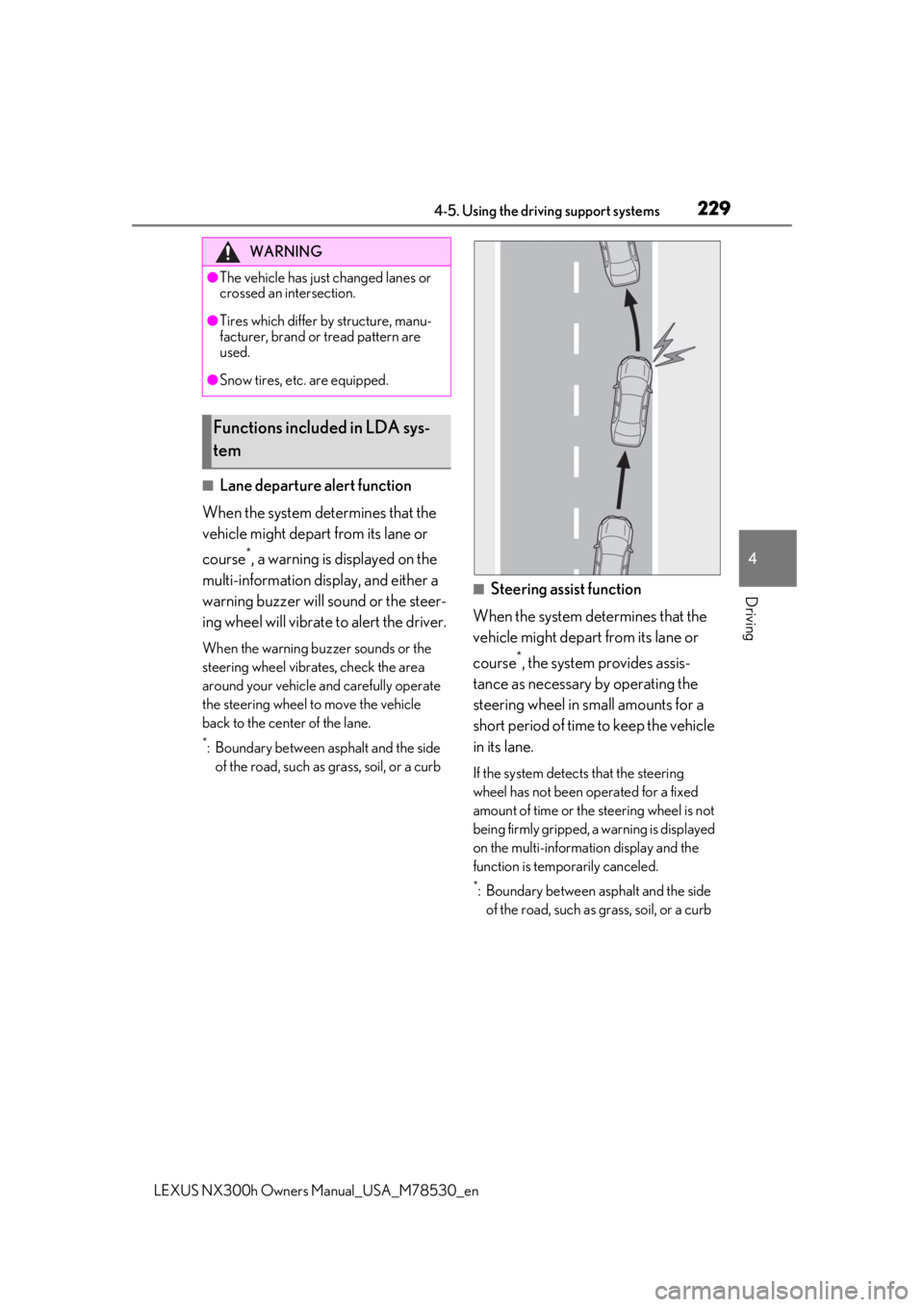
■Lane departure alert function
When the system determines that the
vehicle might depart from its lane or
course
*, a warning is displayed on the
multi-information display, and either a
warning buzzer will sound or the steer-
ing wheel will vibrate to alert the driver.
When the warning buzzer sounds or the
steering wheel vibrates, check the area
around your vehicle and carefully operate
the steering wheel to move the vehicle
back to the center of the lane.
*: Boundary between asphalt and the side of the road, such as grass, soil, or a curb
■Steering assist function
When the system determines that the
vehicle might depart from its lane or
course
*, the system provides assis-
tance as necessary by operating the
steering wheel in small amounts for a
short period of time to keep the vehicle
in its lane.
If the system detects that the steering
wheel has not been operated for a fixed
amount of time or the steering wheel is not
being firmly gripped, a warning is displayed
on the multi-informat ion display and the
function is temporarily canceled.
*: Boundary between asphalt and the side of the road, such as grass, soil, or a curb
WARNING
●The vehicle has just changed lanes or
crossed an intersection.
●Tires which differ by structure, manu-
facturer, brand or tread pattern are
used.
●Snow tires, etc. are equipped.
Functions included in LDA sys-
tem
Page 281 of 484

2814-6. Driving tips
LEXUS NX300h Owners Manual_USA_M78530_en
4
Driving
restrict travel.
Stay on established roads. When
conditions are wet, driving tech-
niques should be changed or travel
delayed to prevent damage to
roads.
Avoid driving on very steep, slippery
roads and other surfaces, such as
sand, where the tires are liable to
lose traction. Your vehicle may not
perform as well as conventional
AWD on-road vehicles on these
surfaces.
■Additional informatio n for off-road driv-
ing
For owners in U.S. mainland, Hawaii and
Puerto Rico:
To obtain additional information pertaining
to driving your vehicle off-road, consult the
following organizations.
●State and Local Parks and Recreation
Departments
●State Motor Vehicle Bureau
●Recreational Vehicle Clubs
●U.S. Forest Service and Bureau of Land
Management
WARNING
■Off-road driving precautions
Always observe the following precau-
tions to minimize the risk of death or seri-
ous injury or damage to your vehicle:
●Drive carefully when off the road. Do
not take unnecessary risks by driving in
dangerous places.
●Do not grip the steering wheel spokes
when driving off-road. A bad bump
could jerk the wheel and injure your
hands. Keep both hands and especially
your thumbs on the outside of the rim.
●Always check your brakes for effec-
tiveness immediately after driving in
sand, mud, water or snow.
●After driving through tall grass, mud,
rock, sand, water, et c., check that there
is no grass, bush, paper, rags, stone,
sand, etc. adhering or trapped to the
underbody. Clear of f any such matter
from the underbody. If the vehicle is
used with these materials trapped or
adhering to the underbody, a break-
down or fire could occur.
●When driving off-road or in rugged
terrain, do not drive at excessive
speeds, jump, make sharp turns, strike
objects, etc. This may cause loss of
control or vehicle rollover causing
death or serious injury. You are also
risking expensive damage to your
vehicle’s suspension and chassis.
NOTICE
■To prevent water damage
Take all necessary safety measures to
ensure that water damage to the hybrid
battery (traction battery), hybrid system
or other components does not occur.
●Water entering the engine compart-
ment may cause seve re damage to the
hybrid system. Water entering the inte-
rior may cause the hybrid battery
stowed under the re ar seats to short
circuit.
●Water entering the hybrid transmis-
sion and rear electric motor (traction
motor) will cause deterioration in
transmission quality. The malfunction
indicator may come on, and the vehi-
cle may not be drivable.
●Water can wash the grease from wheel
bearings, causing rusting and prema-
ture failure, and may also enter the
hybrid transmission case, reducing the
gear oil’s lubricating qualities.
Page 398 of 484

3987-2. Steps to take in an emergency
LEXUS NX300h Owners Manual_USA_M78530_enpedal has been depressed and the shift
lever is in N. Release the accelerator pedal
and shift the shift lever to D, S or R.
■If “Depress Brake When Vehicle Is
Stopped Hybrid Syst
em May Overheat”
is shown
Message is displayed when the accelerator
pedal is depressed to maintain the vehicle
position when stopped on a upward slope,
etc.
If this continues, th e hybrid system may
overheat.
Release the accelerator pedal and depress
the brake pedal.
■If “Front Camera Unavailable” or “Front
Camera Unavailable See Owner’s
Manual” is displayed
The following systems may be suspended
until the problem shown in the message is
resolved. ( P.208, 389)
●PCS (Pre-Collision System)
●LTA (Lane Tracing Assist)
●LDA (Lane Departure Alert with steering
control)
●Automatic High Beam
●RSA (Road Sign Assist)
●Dynamic radar cruise control with full-
speed range
■If “RSA malfunction Visit Your Dealer” is
shown
The system may be malfunctioning. Have
the vehicle inspected by your Lexus dealer.
■If “Radar Cruise Control Unavailable
See Owner’s Manual” is shown
The dynamic radar cruise control with full-
speed range system is suspended tempo-
rarily or until the problem shown in the mes-
sage is resolved. (causes and coping
methods: P.208)
■If “Radar Cruise Control Unavailable” is
shown
The dynamic radar cruise control with full-
speed range system cannot be used tempo-
rarily. Use the system when it becomes
available again.
■If “Oil Maintenance Required Soon” is
shown
Indicates that the engine oil is scheduled to
be changed. (The indicator will not work
properly unless the oil maintenance data
has been reset.)
Check the engine oil, and change if neces-
sary. After changing th e engine oil, the oil
change system should be reset. ( P.348)
■If “Oil Maintenance Required” is shown
Indicates that the engine oil should be
changed. (After the engine oil is changed
and the oil maintenance data has been
reset.)
Check and change the en gine oil, and oil fil-
ter by your Lexus dealer. After changing the
engine oil, the oil change system should be
reset. ( P.348)
■If “See Owner’s Manual” is shown
●If the following messages are shown, fol-
lowing the instruct ions, accordingly.
• “Engine Coolant Temp High” ( P.416)
●If the following messages are shown,
there may be a malfunction.
Immediately have the vehicle inspected
by your Lexus dealer.
• “Hybrid System Malfunction”
•“Check Engine”
• “Hybrid Battery System Malfunction”
• “Accelerator System Malfunction”
• “Braking Power Low”
• “Smart Access System Malfunction”
●If “Aux Battery Low” is shown
• When the display goes off after several
seconds
*
Maintain the hybrid system operation for
more than 15 minutes and charge the 12-
volt battery.
• When the display does not go off Start up the hybrid system using the pro-
cedures for “If the 12-volt battery is dis-
charged” ( P.412).
*: Displays for about 6 seconds
●If “Maintenance required for Traction bat-
tery cooling parts” is shown, the filters
may be clogged, the air intake vents may
be blocked, or there may be a gap in the
duct. Therefore, perform the following
correction procedure.
• If the air intake vents of the hybrid battery