park assist LEXUS NX300h 2020 Owners Manual
[x] Cancel search | Manufacturer: LEXUS, Model Year: 2020, Model line: NX300h, Model: LEXUS NX300h 2020Pages: 484, PDF Size: 15.45 MB
Page 3 of 484
3TABLE OF CONTENTS
LEXUS NX300h Owners Manual_USA_M78530_en
1
2
3
4
5
6
7
8
9
4-1. Before driving Driving the vehicle ........................ 156
Cargo and luggage ....................... 161
Vehicle load limits ......................... 164
Trailer towing (vehicles with towing package) ........................................ 165
Trailer towing (vehicles without towing package) ......................... 173
Dinghy towing ................................ 173
4-2. Driving procedures Power (ignition) switch ............... 174
EV drive mode ............................... 177
Hybrid transmission ..................... 179
Turn signal lever............................. 182
Parking brake ................................. 183
Brake Hold....................................... 186
ASC (Active Sound Control) .. 187
4-3. Operating the lights and wipers Headlight switch ............................ 189
Automatic High Beam ................ 192
Fog light switch .............................. 195
Windshield wipers and washer 195
Rear window wiper and washer ........................................................... 200
4-4. Refueling Opening the fuel tank cap........ 2024-5. Using the driving support systems
Lexus Safety System+ 2.0........ 204
PCS (Pre-Collision System) .... 210
LTA (Lane Tracing Assist) ......... 217
LDA (Lane Departure Alert with steering control) ......................... 226
RSA (Road Sign Assist)............. 234
Dynamic radar cruise control with full-speed range......................... 236
PKSA (Parking Support Alert) 246
Intuitive parking assist ................. 247
Parking Support Brake function (for static objects)............................... 252
BSM (Blind Spot Monitor) ......... 261
Driving mode select switch ..... 269
Driving assist systems ................ 270
4-6. Driving tips Hybrid vehicle driving tips ....... 275
Winter driving tips ........................ 277
Utility vehicle precautions........ 280
5-1. Remote Touch Remote Touch............................... 284
5-2. Using the air conditioning system and defogger
Automatic air conditioning system.......................................................... 289
Heated steering wheel/seat heat- ers/seat ventilators................... 297
5-3. Using the interior lights Interior lights list ........................... 300
5-4. Using the storage features List of storage features .............. 303
4Driving
5Interior features
Page 19 of 484

19Pictorial index
LEXUS NX300h Owners Manual_USA_M78530_en
Paddle shift switches ............................................................................................... P.181
Meter control switches .......................................................................................... P.89
Vehicle-to-vehicle distance switch ................................................................... P.241
Cruise control switch
Dynamic radar cruise control with full-spee d range ......................................... P.236
LDA (Lane Departure Alert with steering control) switch
*2.................. P.230
LTA (Lane Tracing Assist) switch
*2..................................................................P.222
Talk switch
*1
Telephone switches*1
*1
: Refer to “NAVIGATION AND MULTIMEDIA SYSTEM OWNER’S MANUAL”.
*2: If equipped
EV drive mode switch ............................................................................................ P.177
Driving mode select switch ................................................................................. P.269
VSC off switch.......................................................................................................... P.271
Parking brake switches .........................................................................................P.183
Applying/releasing ........................................................................................................... P. 183
Precautions against winter season ................... ......................................................... P.278
Warning buzzer/message..................................................................................P.184, 396
B
C
D
E
F
G
H
A
B
C
D
Page 82 of 484

822-1. Instrument cluster
LEXUS NX300h Owners Manual_USA_M78530_en
The indicators inform the driver of the
operating state of the vehicle’s various
systems.
Indicators
Turn signal indicator (P.182)
(U.S.A.)
Headlight indicator ( P.189)
(Canada)
Tail light indicator ( P.189)
Headlight high beam indicator
( P.191)
Automatic High Beam indica-
tor ( P.192)
Fog light indicator ( P.195)
“READY” indicator ( P.174)
EV indicator ( P.68)
EV drive mode indicator
*2
( P.177)
“Eco” indicator
*2 ( P.269)
“Sport” indicator
*2 ( P.269)
Dynamic radar cruise control
indicator
*2 ( P.236)
Cruise control “SET” indica-
tor
*2 ( P.236)
Cruise control indicator
*2
( P.236)
(White)
LTA indicator*2 (if equipped)
( P.222)
LDA indicator
*2 (if equipped)
( P.231)
(Green)
LTA indicator*2 (if equipped)
( P.222)
LDA indicator
*2 (if equipped)
( P.231)
(Orange)
LTA indicator*2, 3 (if equipped)
( P.222)
LDA indicator
*2, 3 (if
equipped) ( P.231)
Intuitive parking assist indica-
tor (if equipped) ( P.247)
PKSB OFF indicator
*1, 4 (if
equipped) ( P.253)
Slip indicator light
*1, 3
( P.271)
VSC off indicator
*1, 4
( P.271)
PCS warning light
*1, 4
( P.212)
(U.S.A.)
Parking brake indicator
( P.183)
(Canada)
Parking brake indicator
( P.183)
Brake hold standby indicator
*1
( P.186)
Brake hold operated indica-
tor
*1 ( P.186)
Low outside temperature indi-
cator
*2, 5 ( P.84)
BSM outside rear view mirror
indicators
*6, 7 (if equipped)
( P.261)
Page 92 of 484

922-1. Instrument cluster
LEXUS NX300h Owners Manual_USA_M78530_en
■ LTA (Lane Tracing Assist) (if
equipped) ( P.217)
Select to set up the following items.
Lane centering
Select to enable/disab le the lane centering
function.
Steering Assist
Select to enable/disable steering wheel
assistance.
Alert
Select to change the alert types.
Alert sensitivity
Select to set the warning sensitivity.
Sway warning
Select to enable/disab le the vehicle sway
warning.
Sway sensitivity
Select to set the vehicle sway warning sen-
sitivity.
■LDA (Lane Departure Alert
with steering control) (if equipped)
( P.226)
Select to set up the following items.
Steering Assist
Select to enable/disable steering wheel
assistance.
Alert
Select to change the alert types.
Alert sensitivity
Select to set the warning sensitivity.
Sway warning
Select to enable/disab le the vehicle sway
warning.
Sway sensitivity
Select to set the vehicle sway warning sen-
sitivity.
■ PCS (Pre-Collision System)
( P.210)
Select to set up the following items.
PCS on/off
Select to enable/disable the pre-collision
system.
PCS sensitivity
Select to change the warning timing.
■PKSA (Parking Support Alert) (if
equipped) ( P.246)
Select to set up the following items.
Intuitive parking assist sensor
Select to enable/disab le the intuitive park-
ing assist sensor.
Volume
Select to set the volume of the buzzer
which sounds when the parking support
alert is operated.
■ PKSB (Parking Support
Brake function) (if equipped)
( P.252)
PKSB on/off
Select to enable/disable the parking sup-
port brake function (f or static objects).
■ RSA (Road Sign Assist) (if
equipped) ( P. 234)
Select to set up the following items.
Road Sign Assist
Select to enable/disab le road sign assist.
Over Speed
Page 94 of 484

942-1. Instrument cluster
LEXUS NX300h Owners Manual_USA_M78530_enSelect to set the display of the tachometer
or Hybrid System Indicator to automati-
cally change according to the driving
mode or static.
Initialization
Select to reset the me ter display settings.
■Suspension of the settings display
In the following situations, the settings dis-
play using the meter control switches will be
suspended.
●When a warning message appears on the
multi-information display
●When the vehicle begins to move
Automatically displayed when the sys-
tem is used. ( P.247)
*: If equipped
Head-up display
Display brightness will change automati-
cally according to the brightness of the sur-
rounding area.
Display position adjustment switch
Display brightness adjustment
switch
Display brightness can be adjusted to the
desired level.
“HUD” button
“DISP” button
WARNING
■Cautions during setting up the dis-
play
As the hybrid system needs to be operat-
ing during setting up the display, ensure
that the vehicle is parked in a place with
adequate ventilation. In a closed area
such as a garage, exhaust gases includ-
ing harmful carbon monoxide (CO) may
collect and enter the vehicle. This may
lead to death or a serious health hazard.
NOTICE
■During setting up the display
To prevent 12-volt battery discharge,
ensure that the hybrid system is operat-
ing while setting up the display features.
Intuitive parking assist (if
equipped)
Head-up display*
The head-up display can be used to
project vehicle speed and other
information onto the windshield.
System components
A
B
C
D
E
Page 95 of 484

952-1. Instrument cluster
LEXUS NX300h Owners Manual_USA_M78530_en
2
Vehicle status information and indicators
Vehicle speed
Hybrid System Indicator ( P.97)
Tachometer
Shift position and shift range
Displays the selected shift position or
selected shift range ( P.179)
Audio display
Displays audio info rmation for approxi-
mately 3 seconds when the audio system is
operated
Route guidance display (vehicles
with navigation system) ( P.97)
When approaching an intersection while
the navigation system is giving route guid-
ance, an arrow will automatically be dis-
played to indicate the direction of travel.
Lane departure warning display
(LTA [Lane Tracing Assist]) (if
equipped) ( P.217)
Lane departure warning display
(LDA [Lane Departure Alert with
steering control]) ( P.226)
Approach warning display
(Dynamic radar cruise control with
full speed range) ( P.242)
Road signs (RSA [Road Sign
Assist]) (if equipped) ( P. 234)
Pre-collision warnin g message (Pre-
Collision System) ( P.210)
Speed limit display (vehicles with
navigation system) ( P.97)
Parking Support Brake function (for
static objects) ( P.252)
Brake Override System ( P.157)
Drive-Start Control ( P.157)
■“HUD” button
Pressing the button turns the head-up
display on/off and changes the vehicle
speed display units as follows:
U.S.A.
OFF ON (MPH) ON
(km/h) OFF
Canada
OFF ON (km/h) ON
(MPH) OFF
■“DISP” button
Pressing the button changes the dis-
play items (except vehicle speed) as
follows:
•Off
• Hybrid System Indicator
•Tachometer
Head-up display contents
Switching the head-up display
A
Page 98 of 484
982-1. Instrument cluster
LEXUS NX300h Owners Manual_USA_M78530_en
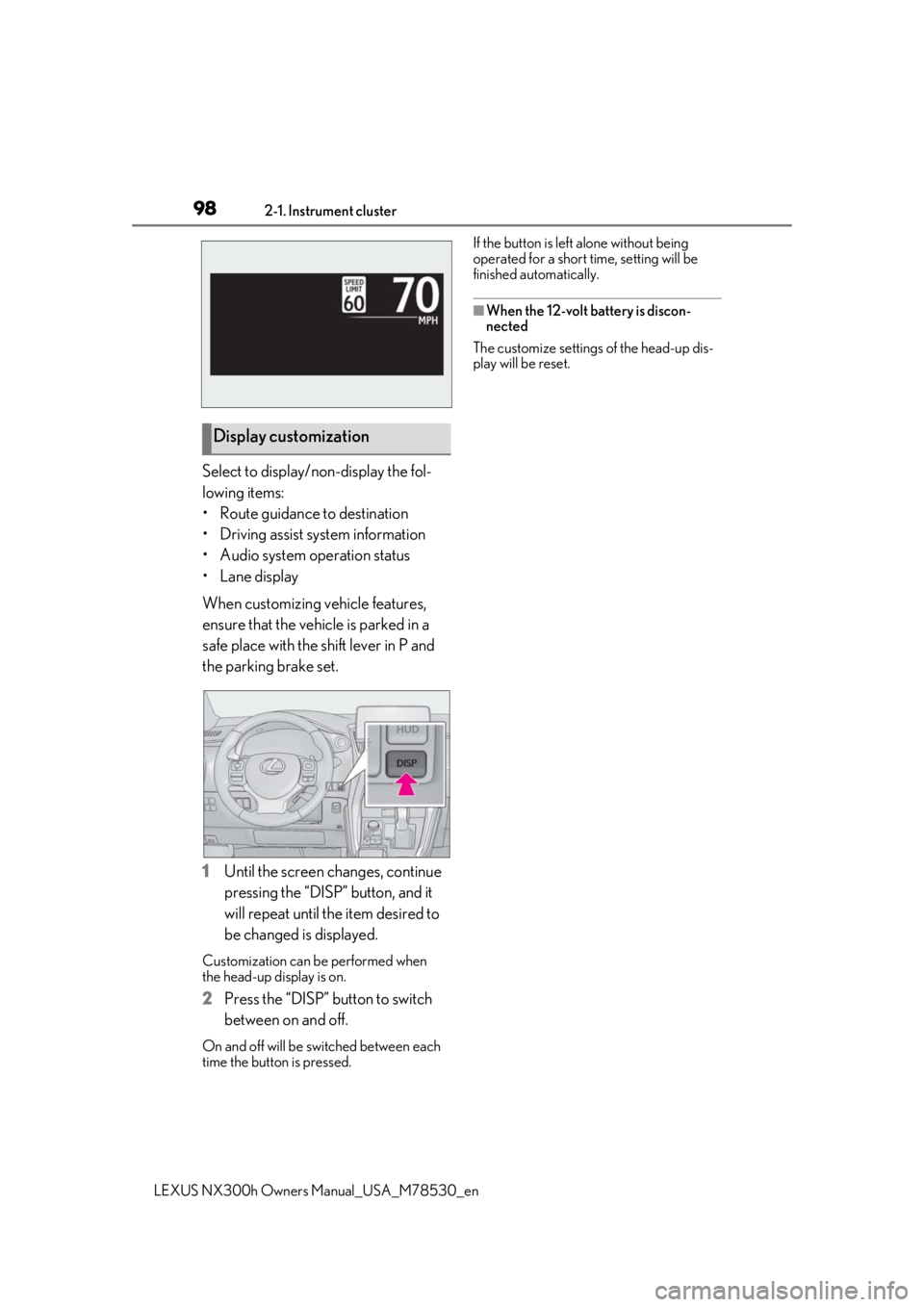
Select to display/non-display the fol-
lowing items:
• Route guidance to destination
• Driving assist system information
• Audio system operation status
•Lane display
When customizing vehicle features,
ensure that the vehicle is parked in a
safe place with the shift lever in P and
the parking brake set.
1Until the screen changes, continue
pressing the “DISP” button, and it
will repeat until the item desired to
be changed is displayed.
Customization can be performed when
the head-up display is on.
2 Press the “DISP” button to switch
between on and off.
On and off will be switched between each
time the button is pressed. If the button is left alone without being
operated for a short time, setting will be
finished automatically.
■When the 12-volt battery is discon-
nected
The customize settings of the head-up dis-
play will be reset.
Display customization
Page 155 of 484

155
LEXUS NX300h Owners Manual_USA_M78530_en
4
4
Driving
Driving
4-1. Before drivingDriving the vehicle ..................... 156
Cargo and luggage .................... 161
Vehicle load limits ...................... 164
Trailer towing (vehicles with tow- ing package).............................. 165
Trailer towing (vehicles without towing package) ...................... 173
Dinghy towing ............................. 173
4-2. Driving procedures Power (ignition) switch ............ 174
EV drive mode ............................ 177
Hybrid transmission .................. 179
Turn signal lever.......................... 182
Parking brake .............................. 183
Brake Hold.................................... 186
ASC (Active Sound Control)187
4-3. Operating the lights and wipers Headlight switch ......................... 189
Automatic High Beam ............. 192
Fog light switch ........................... 195
Windshield wipers and washer ......................................................... 195
Rear window wiper and washer ........................................................ 200
4-4. Refueling Opening the fuel tank cap..... 2024-5. Using the driving support sys-
tems
Lexus Safety System+ 2.0..... 204
PCS (Pre-Collision System) . 210
LTA (Lane Tracing Assist) ...... 217
LDA (Lane Departure Alert with steering control) ..................... 226
RSA (Road Sign Assist).......... 234
Dynamic radar cruise control with full-speed range...................... 236
PKSA (Parking Support Alert) ....................................................... 246
Intuitive parking assist ............. 247
Parking Support Brake function (for static objects) .................. 252
BSM (Blind Spot Monitor) ..... 261
Driving mode select switch .. 269
Driving assist systems.............. 270
4-6. Driving tips Hybrid vehicle driving tips .... 275
Winter driving tips .................... 277
Utility vehicle precautions..... 280
Page 156 of 484

1564-1. Before driving
LEXUS NX300h Owners Manual_USA_M78530_en
4-1.Before driving
■Starting the hybrid system
P.174
■Driving
1 With the brake pedal depressed,
shift the shift lever to D. ( P.179)
2 Release the parking brake.
(P.184)
If the parking brake is in automatic mode,
the parking brake is released automatically
when shifting the shift lever to any position
other than P. ( P.183)
3 Gradually release the brake pedal
and gently depress the accelerator
pedal to accelerate the vehicle.
■Stopping
1 With the shift lever in D, depress the
brake pedal.
2 If necessary, set the parking brake.
(P.184)
If the vehicle is to be stopped for an
extended period of time, shift the shift lever
to P. ( P.179)
■Parking the vehicle
1 With the shift lever in D, depress the
brake pedal.
2 Set the parking brake ( P.184),
and shift the shift lever to P
( P.179).
3 Press the power switch to stop the
hybrid system. 4
Lock the door, making sure that you
have the electronic key on your
person.
If parking on a hill, block the wheels as
needed.
■Starting off on an uphill
1 With the brake pedal depressed,
shift the shift lever to D. ( P.179)
2 Pull the parking brake switch and
parking brake is set manually.
(P.184)
3 Release the brake pedal and gently
depress the accelerator pedal to
accelerate the vehicle.
4 Press the parking brake switch and
parking brake is released manually.
(P.184)
■When starting off on an uphill
The hill-start assist control will activate.
( P.270)
■For fuel-efficient driving
Keep in mind that hybr id vehicles are similar
to conventional vehicles, and it is necessary
to refrain from activi ties such as sudden
acceleration. ( P.275)
■Driving in the rain
●Drive carefully when it is raining, because
visibility will be reduced, the windows
may become fogged-up, and the road
will be slippery.
●Drive carefully when it starts to rain,
because the road surface will be espe-
cially slippery.
●Refrain from high speeds when driving on
an expressway in the rain, because there
may be a layer of wa ter between the tires
and the road surface, preventing the
steering and brakes from operating prop-
erly.
Driving the vehicle
The specified procedures should be
observed to ensure safe driving:
Driving procedure
Page 246 of 484

2464-5. Using the driving support systems
LEXUS NX300h Owners Manual_USA_M78530_en
*:If equipped
■Intuitive parking assist (if
equipped)
Ultrasonic sensors are used to detect
static objects in the detection area
when driving at a low speed or backing
up. ( P.247)
■Adjusting the buzzer volume
The buzzer volume can be adjusted on
the multi-information display.
Use the meter control switches to
change settings. ( P.89)
1 Press or to select .
2 Press or to select “PKSA”
and then press .
3 Press or to select and
then press .
Each time the switch is pressed, the volume
level change between 1, 2, and 3.
■Muting buzzer
P.248
PKSA (Parking Support
Alert)*
The Parking Support Alert system
consists of the following functions
that operate when driving at a low
speed or backing up, such as when
parking. When the system deter-
mines that a collision with a
detected object, such as a wall is
high, a warning operates to urge
the driver to take evasive action.
PKSA (Parking Support Alert)
system
Setting the buzzer volume