light LEXUS NX300h 2021 Owners Manual
[x] Cancel search | Manufacturer: LEXUS, Model Year: 2021, Model line: NX300h, Model: LEXUS NX300h 2021Pages: 484, PDF Size: 10.53 MB
Page 229 of 484
2294-5. Using the driving support systems
LEXUS NX300h Owners Manual_USA_M78578_en
4
Driving
WARNING
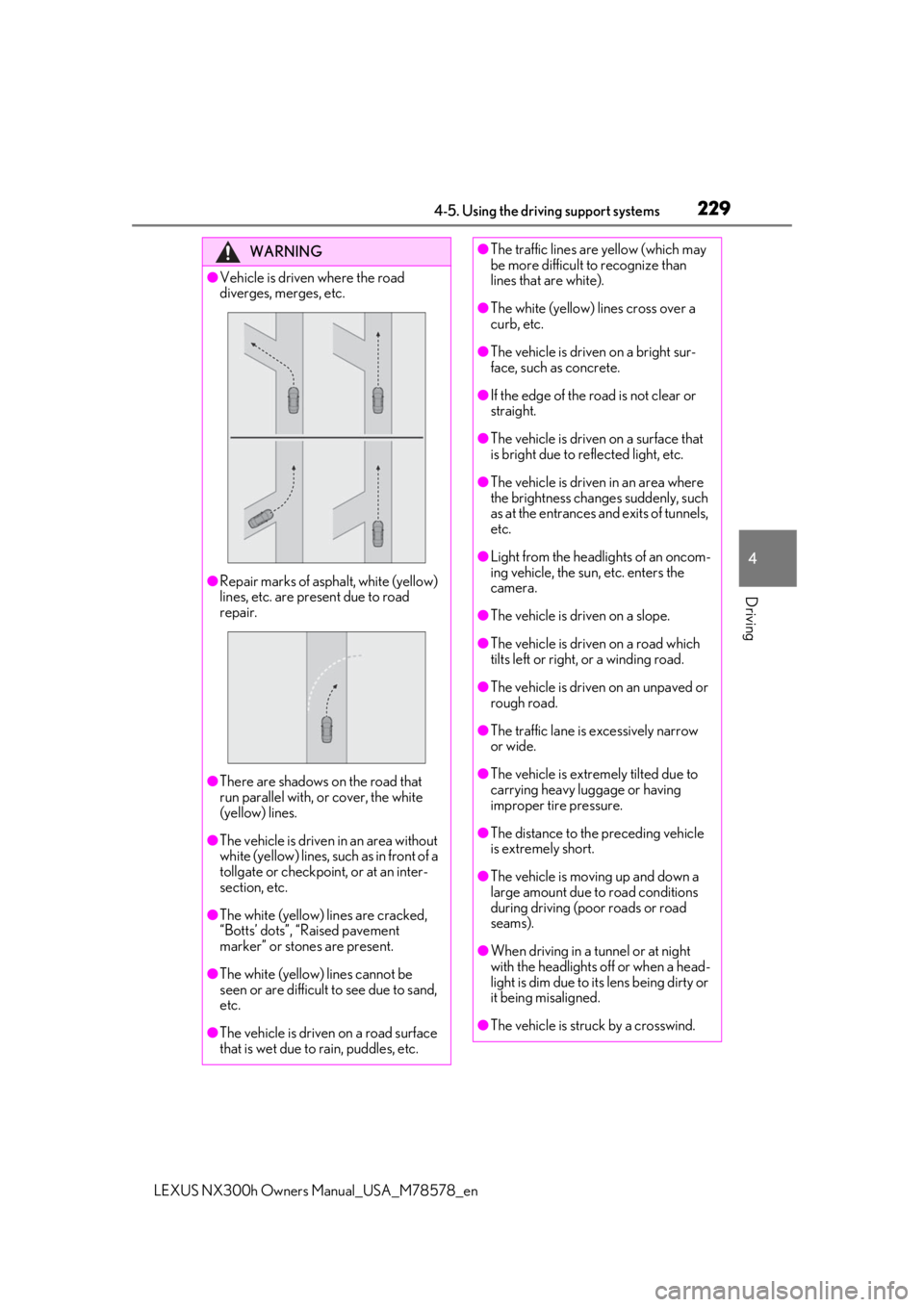
●Vehicle is driven where the road
diverges, merges, etc.
●Repair marks of asphalt, white (yellow)
lines, etc. are present due to road
repair.
●There are shadows on the road that
run parallel with, or cover, the white
(yellow) lines.
●The vehicle is driven in an area without
white (yellow) lines, su ch as in front of a
tollgate or checkpoint, or at an inter-
section, etc.
●The white (yellow) lines are cracked,
“Botts’ dots”, “Raised pavement
marker” or stones are present.
●The white (yellow) lines cannot be
seen or are difficult to see due to sand,
etc.
●The vehicle is driven on a road surface
that is wet due to rain, puddles, etc.
●The traffic lines are yellow (which may
be more difficult to recognize than
lines that are white).
●The white (yellow) lines cross over a
curb, etc.
●The vehicle is driven on a bright sur-
face, such as concrete.
●If the edge of the road is not clear or
straight.
●The vehicle is driven on a surface that
is bright due to reflected light, etc.
●The vehicle is driven in an area where
the brightness change s suddenly, such
as at the entrances and exits of tunnels,
etc.
●Light from the headlights of an oncom-
ing vehicle, the sun, etc. enters the
camera.
●The vehicle is driven on a slope.
●The vehicle is driven on a road which
tilts left or right, or a winding road.
●The vehicle is driven on an unpaved or
rough road.
●The traffic lane is excessively narrow
or wide.
●The vehicle is extremely tilted due to
carrying heavy luggage or having
improper tire pressure.
●The distance to the preceding vehicle
is extremely short.
●The vehicle is moving up and down a
large amount due to road conditions
during driving (poor roads or road
seams).
●When driving in a tunnel or at night
with the headlights off or when a head-
light is dim due to its lens being dirty or
it being misaligned.
●The vehicle is struck by a crosswind.
Page 236 of 484

2364-5. Using the driving support systems
LEXUS NX300h Owners Manual_USA_M78578_en
A non-official or a rece
ntly introduced traf-
fic sign may not be recognized.
: Speed limit
: Do Not Enter
: Stop
: Yield
In the following situations, the RSA sys-
tem will notify the driver.
When the vehicle speed exceeds
the speed notification threshold of
the speed limit sign displayed, the
sign display will be emphasized and
a buzzer will sound.
When the RSA system recognizes a
do not enter sign and determines
that your vehicle has entered a no-
entry area, the displayed sign will
flash and a buzzer will sound.
Depending on the situation, a notifica-
tion function may not operate properly.
■Setting procedure
1 Press or of the meter control
switches and select 2
Press or of the meter control
switches and select , then press
3 Press or of the meter control
switches, select the desired setting, and
then press
■Automatic turn-off of RSA sign display
In the following situations a displayed speed
limit sign and/or do not enter signs will stop
being displayed automatically:
●No sign has been recognized for a cer-
tain distance.
●The road changes due to a left or right
turn, etc.
In the following situations, stop and yield
signs will stop being displayed automati-
cally:
●The system determines that your vehicle
has passed the sign.
●The road changes due to a left or right
turn, etc.
■Conditions in which the function may
not operate or detect correctly
In the following situations, RSA does not
operate normally and may not recognize
signs, display the incorrect sign, etc. How-
ever, this does not indicate a malfunction.
●The front camera is misaligned due to a
strong impact being applied to the sen-
sor, etc.
●Dirt, snow, stickers, etc. are on the wind-
shield near the front camera.
●In inclement weather such as heavy rain,
fog, snow or sand storms
●Light from an oncoming vehicle, the sun,
etc. enters the front camera.
●The sign is dirty, faded, tilted or bent.
●The contrast of electronic sign is low.
●All or part of the sign is hidden by the
leaves of a tree, a pole, etc.
●The sign is only visible to the front camera
for a short amount of time.
Notification function
Page 240 of 484

2404-5. Using the driving support systems
LEXUS NX300h Owners Manual_USA_M78578_en
This mode employs a radar to detect the pr esence of vehicles up to approximately
328 ft. (100 m) ahead, determines the cu rrent vehicle-to-vehicle following dis-
tance, and operates to maintain a suitab le following distance from the vehicle
ahead. The desired vehicle-to-vehicle distance can also be set by operating the
vehicle-to-vehicle distance switch.
When driving on downhill slopes, the vehicl e-to-vehicle distance may become shorter.
Example of constant speed cruising
When there are no vehicles ahead
The vehicle travels at the speed set by the driver.
Example of deceleration cruising and follow-up cruising
When a preceding vehicle driving slower than the set speed appears
When a vehicle is detected running ahead of you, the system automatically decelerates
your vehicle. When a greater reduction in vehicle speed is necessary, the system applies
the brakes (the stop lights will come on at this time). The system will respond to changes in
the speed of the vehicle ahead in order to maintain the vehicle-to-vehicle distance set by
the driver. Approach warning warns you when th e system cannot decelerate sufficiently to
prevent your vehicle from closing in on the vehicle ahead.
When the vehicle ahead of you stops, your vehi cle will also stop (vehicle is stopped by sys-
tem control). After the vehicle ahead starts off, pushing the cruise control lever up or
depressing the accelerator pedal (start-off operation) will resume follow-up cruising. If the
start-off operation is not performed, system control continues to keep your vehicle
stopped.
When the turn signal lever is operated and yo ur vehicle moves to an overtaking lane while
driving at 50 mph (80 km/h) or more, the vehicle will accelerate to help to overtake a
passing vehicle.
Driving in vehicle-to-vehicle distance control mode
A
B
Page 250 of 484

2504-5. Using the driving support systems
LEXUS NX300h Owners Manual_USA_M78578_en
Lexus dealer.
■Sensor detectio
n information
●The sensor’s detection areas are limited
to the areas around the vehicle’s bumper.
●Certain vehicle conditions and the sur-
rounding environment may affect the
ability of a sensor to correctly detect an
obstacle. Particular instances where this
may occur are listed below.
• There is dirt, snow or ice on the sensor. (Wiping the sensors will resolve this
problem.)
• The sensor is frozen. (Thawing the area will resolve this problem.)
In especially cold weather, if a sensor is
frozen the screen may show an abnormal
display, or obstacles may not be
detected.
• The sensor is covered in any way.
• The vehicle is leaning considerably to one side.
• On an extremely bumpy road, on an incline, on gravel, or on grass.
• The vicinity of the vehicle is noisy due to vehicle horns, motorcycle engines, air
brakes of large vehicles, or other loud
noises producing ultrasonic waves.
• There is another vehicle equipped with parking assist sensors in the vicinity.
• The sensor is coated with a sheet of spray or heavy rain.
• The vehicle is equipped with a fender
pole or wireless antenna.
• Towing eyelets are installed.
• The bumper or sensor receives a strong impact.
• A backlit license plate, license plate holder, etc., are installed.
• The vehicle is approaching a tall or curved curb.
• In harsh sunlight or intense cold weather.
• The area directly under the bumpers is
not detected.
• If obstacles draw too close to the sensor.
• A non-genuine Lexus suspension (low- ered suspension etc.) is installed.
• People may not be detected if they are wearing certain types of clothing.
In addition to the examples above, there are
instances in which, because of their shape,
signs and other objects may be judged by a
sensor to be closer than they are.
●The shape of the obstacle may prevent a
sensor from detecting it. Pay particular
attention to the following obstacles:
• Wires, fences, ropes, etc.
• Cotton, snow and other materials that absorb sound waves
• Sharply-angled objects
• Low obstacles
• Tall obstacles with upper sections pro- jecting outwards in the direction of your
vehicle
●The following situations may occur
during use.
• Depending on the shape of the obstacle
and other factors, the detection distance
may shorten, or detection may be impos-
sible.
• Obstacles may not be detected if they are too close to the sensor.
• There will be a short delay between
obstacle detection and display. Even at
slow speeds, there is a possibility that the
obstacle will come within the sensor’s
detection areas befo re the display is
shown and the buzzer sounds.
• Thin posts or object s lower than the sen-
sor may not be detected when
approached, even if they have been
detected once.
• It might be difficult to hear beeps due to the volume of audio system or air flow
noise of the air conditioning system.
■Customization
Some functions can be customized.
(Customizable features: P.443)
WARNING
■When using the intuitive parking
assist
Observe the following precautions.
Failure to do so may result in the vehicle
being unable to be driven safely and pos-
sibly cause an accident.
●Do not use the sensor at speeds in
excess of 6 mph (10 km/h).
Page 258 of 484

2584-5. Using the driving support systems
LEXUS NX300h Owners Manual_USA_M78578_en
clothing they are wearing.)
●Objects not perpendicular with the
ground, objects not at a right angle to the
traveling direction of the vehicle, uneven
objects or waving objects
●Low objects
●Thin objects such as wires, fences, ropes
and signposts
●Objects that are extremely close to the
bumper
●Sharply-angled objects
●Tall objects with upper sections project-
ing outwards in the direction of your vehi-
cle
■Situations in which the Parking Support
Brake function (for static objects) may
not operate
When driving with the shift lever in N
■Situations when the system may operate
even though there is no possibility of a
collision
In the following situations, the system may
operate even though there is no possibility
of a collision.
●Environmental influence
• The vehicle is driven on a narrow road
• The vehicle is driven on a gravel road or in an area with tall grass
• The vehicle is driven toward a banner or flag, a low-hanging branch or a boom barrier (such as thos
e used at railroad
crossings, toll gates and parking lots).
• There is a static object on the shoulder of
the road (when the vehicle is driven in a
narrow tunnel, on a narrow bridge or on a
narrow road)
• The vehicle is be ing parallel parked
• There is a rut or hole in the surface of the road
• When the vehicle is driven on a metal cover (grating), such as those used for
drainage ditches
• The vehicle is driven on a steep slope
• The sensor is covered by water on a flooded road
●Influence from the weather
• Ice, snow, dirt, etc., has adhered to the
sensor (if removed, the system returns to
normal)
• Heavy rain or water strikes the vehicle
• In severe weather such as fog, snow or a
sand storm
●Influence from other sonic waves
• An ultrasonic wave source is nearby, such as the horn or clearance sonar of another
vehicle, a vehicle detector, a motorcycle
engine or the air brake of a large vehicle
• Electronic components (such as a backlit
license plate (especially fluorescent
types), fog lights, a fe nder pole or a wire-
less antenna) are installed near the sen-
sors
●Changes in the vehicle
• The vehicle is tilted a large amount
• The height of the vehicle has drastically changed due to the carried load (the
nose tilts up or down)
• The direction of the sensor has deviated due to a collision or other impact
■Situations in which the system may not
operate normally
In the following situations, the system may
not operate normally.
●Environmental influence
• There is a static object that cannot be
detected between the vehicle and
another static object that can be
detected
• A static object such as another vehicle, a motorcycle, a bicycle or a pedestrian cuts
in front of the vehicle or jumps out from
Page 259 of 484

2594-5. Using the driving support systems
LEXUS NX300h Owners Manual_USA_M78578_en
4
Driving
the side.
●Influence from the weather
• The area around the sensor is extremely hot or cold
• The wind is strong
• Ice, snow, dirt, etc., has adhered to the sensor (if removed, the system returns to
normal)
• Heavy rain or water strikes the vehicle
• In severe weather such as fog, snow or a
sand storm
●Influence from other sonic waves
• An ultrasonic wave source is nearby, such as the horn or clearance sonar of another
vehicle, a vehicle detector, a motorcycle
engine or the air brake of a large vehicle
• Electronic components (such as a backlit
license plate (especially fluorescent
types), fog lights, a fender pole or a wire-
less antenna) are inst alled near the sen-
sors
●Changes in the vehicle
• The vehicle is tilted a large amount
• The height of the vehicle has drastically changed due to the carried load (the
nose tilts up or down)
• The direction of the sensor has deviated due to a collision or other impact
■When “Parking Support Brake Unavail-
able” is displayed on the multi-informa-
tion display and the PKSB OFF indicator
flashes
●Ice, snow, dirt, etc., may have adhered to the sensor. If this occurs, remove the ice,
snow, dirt, etc., from the sensor to return
the system to normal.
Also, a warning message may be dis-
played at low temperatures due to ice
forming on the sensor, and the sensor
may not detect static objects. Once the
ice melts, the system will return to normal.
●If this message is shown even after
removing dirt from the sensor, or shown
when the sensor was not dirty to begin
with, have the vehicle inspected by your
Lexus dealer.
●System initialization may not have been
performed after remova
l and installation
of the 12-volt battery. Perform system ini-
tialization.
■When removing and installing the 12-
volt battery
The system needs to be initialized.
The system can be init ialized by driving the
vehicle straight ahead for 5 seconds or
more at a speed of approximately 22 mph
(35 km/h) or higher.
■When “Parking Support Brake Mal-
function Visit Your Dealer” is displayed
on the multi-information display, the
PKSB OFF indicator flashes and the
buzzer sounds
The system may not be operating properly.
Have the vehicle inspected by your Lexus
dealer.
WARNING
■In order for the system to operate
properly
Make sure to observe the following pre-
cautions regarding the sensors
( P.251). Failure to observe these pre-
cautions may cause the sensors not to
operate properly, and may result in an
unexpected accident.
●Do not perform work such as modifi-
cation, disassembly or painting
●Only perform replacements using
genuine parts
Page 263 of 484

2634-5. Using the driving support systems
LEXUS NX300h Owners Manual_USA_M78578_en
4
Driving
off. When the switch is set to on, the
switch’s indicator illuminates and the
buzzer sounds. This switch is for both Blind
Spot Monitor function and Rear Cross
Traffic Alert function.
BSM outside rear view mirror indi-
cators
Blind Spot Monitor function:
When a vehicle is detected in a blind spot
of the outside rear view mirrors or
approaching rapidly from behind into a
blind spot, the outside rear view mirror
indicator on the detected side will illumi-
nate. If the turn signal lever is operated
toward the detected side, the outside rear
view mirror indicator will flash.
Rear Cross Traffic Alert function:
When a vehicle approaching from the right
or left at the rear of the vehicle is detected,
both outside rear view mirror indicators
will flash.
Rear Cross Traffic Alert buzzer
(Rear Cross Traffic Alert function
only)
When a vehicle approaching from the right
or left rear of the vehicle is detected, a
buzzer sounds from behind the right-hand
rear seat.
Navigation/multimedia system
screen (Rear Cross Traffic Alert
function only)
If a vehicle approaching from the right or
left at the rear of the vehicle is detected,
the Rear Cross Traffic Alert icon ( P.267)
for the detected side will be displayed.
■The BSM outside rear view mirror indi-
cators visibility
When under strong sunlight, the BSM out-
side rear view mirror indicator may be diffi-
cult to see.
■Rear Cross Traffic Alert buzzer hearing
Rear Cross Traffic Alert function may be
difficult to hear over loud noises such as
high audio volume.
■When “Blind Spot Monitor Unavailable”
is shown on the multi-information dis-
play
Water, snow mud, etc., may be built up in
the vicinity of the sensor area of bumper.
( P.265) Removing the water, snow, mud,
etc., from the vicinity of the sensor area
bumper should return it to normal. Also, the
sensor may not function normally when
used in extremely hot or cold weather.
■When “Blind Spot Monitor System Mal-
function Visit Your Dealer” is shown on
the multi-information display
There may be a sensor malfunction or volt-
age abnormality. Have the vehicle
inspected at a Lexus dealer.
B
C
D
Page 265 of 484
2654-5. Using the driving support systems
LEXUS NX300h Owners Manual_USA_M78578_en
4
Driving
The Blind Spot Monitor function uses
radar sensors to detect vehicles that
are traveling in an adjacent lane in the
area that is not reflected in the outside rear view mirror (the blind spot), and
advises the driver of the vehicles exis-
tence via the BSM outside rear view
mirror indicator.
■The Blind Spot Monitor function
detection areas
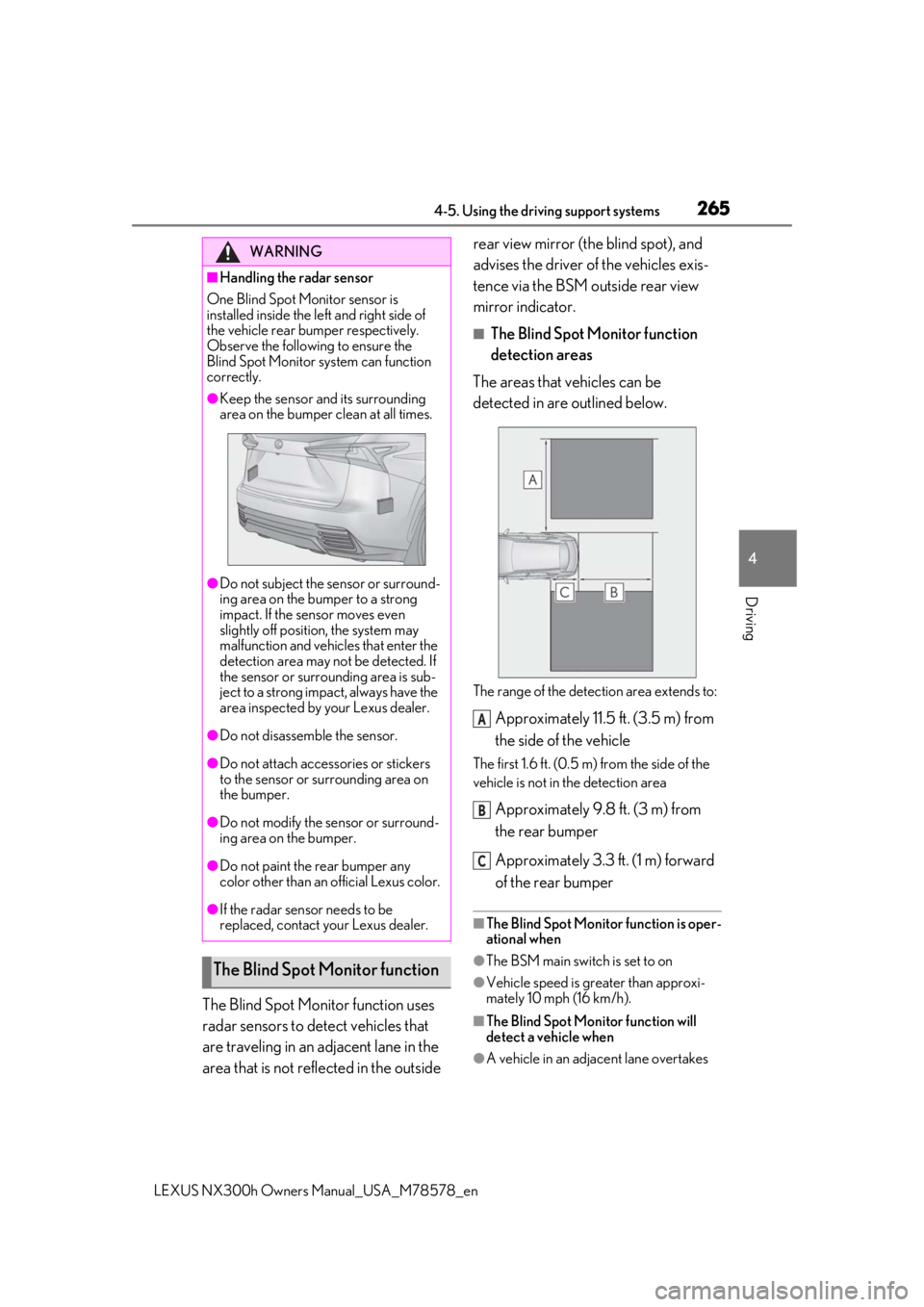
The areas that vehicles can be
detected in are outlined below.
The range of the detection area extends to:
Approximately 11.5 ft. (3.5 m) from
the side of the vehicle
The first 1.6 ft. (0.5 m) from the side of the
vehicle is not in the detection area
Approximately 9.8 ft. (3 m) from
the rear bumper
Approximately 3.3 ft. (1 m) forward
of the rear bumper
■The Blind Spot Monitor function is oper-
ational when
●The BSM main switch is set to on
●Vehicle speed is greater than approxi-
mately 10 mph (16 km/h).
■The Blind Spot Monitor function will
detect a vehicle when
●A vehicle in an adjacent lane overtakes
WARNING
■Handling the radar sensor
One Blind Spot Monitor sensor is
installed inside the le ft and right side of
the vehicle rear bumper respectively.
Observe the following to ensure the
Blind Spot Monitor system can function
correctly.
●Keep the sensor and its surrounding
area on the bumper clean at all times.
●Do not subject the sensor or surround-
ing area on the bumper to a strong
impact. If the sensor moves even
slightly off position, the system may
malfunction and vehicles that enter the
detection area may not be detected. If
the sensor or surrounding area is sub-
ject to a strong impact, always have the
area inspected by your Lexus dealer.
●Do not disassemb le the sensor.
●Do not attach accessories or stickers
to the sensor or surrounding area on
the bumper.
●Do not modify the sensor or surround-
ing area on the bumper.
●Do not paint the rear bumper any
color other than an official Lexus color.
●If the radar sensor needs to be
replaced, contact your Lexus dealer.
The Blind Spot Monitor function
A
B
C
Page 273 of 484
2734-5. Using the driving support systems
LEXUS NX300h Owners Manual_USA_M78578_en
4
Driving
Helps to maintain directional stability
when swerving on slippery road sur-
faces by controlling steering perfor-
mance.
■Trailer Sway Control
Helps the driver to control trailer sway
by selectively applying brake pressure
for individual wheels and reducing
driving torque when trailer sway is
detected.
■TRAC (Traction Control)
Helps to maintain drive power and pre-
vent the drive wheels from spinning
when starting the vehicle or accelerat-
ing on slippery roads
■Active Cornering Assist (ACA)
Helps to prevent the vehicle from drift-
ing to the outer side by performing
inner wheel brake control when
attempting to accelerate while turning
■Hill-start assist control
Helps to reduce the backward move-
ment of the vehicle when starting on an
uphill
■EPS (Electric Power Steering)
Employs an electric motor to reduce
the amount of effort needed to turn the
steering wheel
■E-Four
Electronic On-Demand AWD system.
Automatically switches from front-
wheel drive to all-wheel drive (AWD)
according to the driving conditions,
helping to ensure reliable handling and
stability. Examples of conditions where
the system will switch to AWD are when cornering, going uphill, starting
off or accelerating, and when the road
surface is slippery due to snow, rain,
etc.
■AVS (Adaptive Variable Suspen-
sion system) (if equipped)
By independently controlling the
damping force of th e shock absorbers
for each of the 4 wheels according to
the road and driving conditions, this
system helps riding comfort with supe-
rior vehicle stability, and helps good
vehicle posture. If Sport S+ mode is
selected using the driving mode select
switch, the damping force will become
more suitable for sporty driving.
( P.270)
■PCS (Pre-Collision System)
P.211
■BSM (Blind Spot Monitor) (if
equipped)
P.262
■When the TRAC/VSC/ABS/Trailer
Sway Control systems are operating
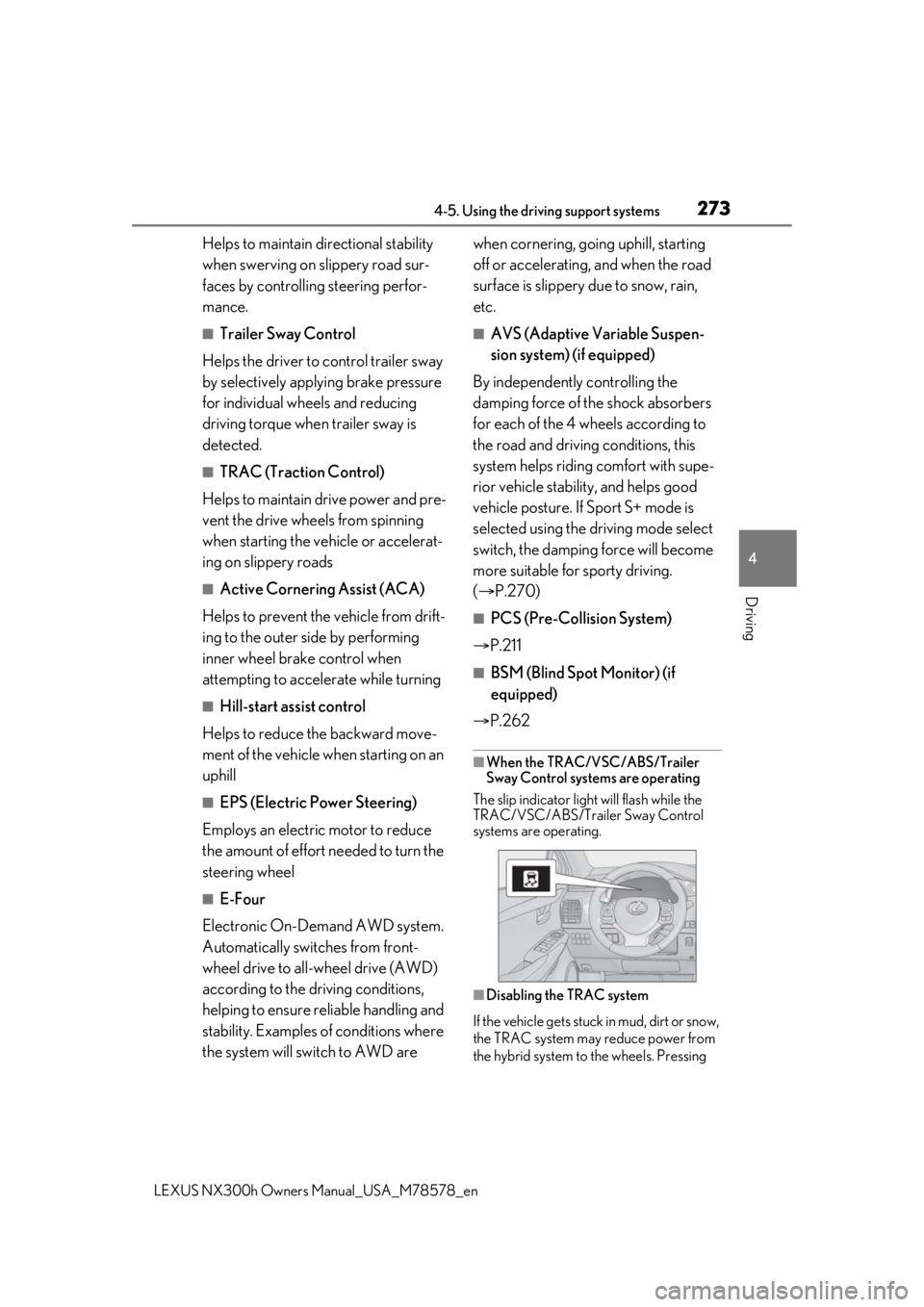
The slip indicator light will flash while the
TRAC/VSC/ABS/Trailer Sway Control
systems are operating.
■Disabling the TRAC system
If the vehicle gets stuck in mud, dirt or snow,
the TRAC system may reduce power from
the hybrid system to the wheels. Pressing
Page 274 of 484

2744-5. Using the driving support systems
LEXUS NX300h Owners Manual_USA_M78578_en
to turn the system off may make it eas-
ier for you to rock the vehicle in order to
free it.
To turn the TRAC system off, quickly press
and release .
The “Traction Control Turned Off” will be
shown on the multi-information display.
Press again to turn the system back on.
■Turning off both TR AC, VSC and Trailer
Sway Control systems
To turn the TRAC, VSC and Trailer Sway
Control systems off, press and hold for
more than 3 seconds while the vehicle is
stopped. The VSC OFF indicator light will
come on and the “Tra ction Control Turned
Off” will be shown on the multi-information
display.
* Press again to turn the system
back on.
*: On vehicles with pre-collision system, pre-collision brake assist and pre-colli-
sion braking will also be disabled. The
PCS warning light will come on and the
message will be shown on the multi-infor-
mation display. ( P.217)
■When the message is displayed on the
multi-information display showing that
TRAC has been disabled even if has
not been pressed
TRAC is temporary deactivated. If the infor-
mation continues to show, contact your
Lexus dealer.
■Sounds and vibrations caused by the
ABS, brake assist, VSC, Trailer Sway
Control, TRAC and hill-start assist con-
trol systems
●A sound may be heard from the engine
compartment when the brake pedal is
depressed repeatedly, when the hybrid
system is started or just after the vehicle
begins to move. This sound does not indi-
cate that a malfunction has occurred in
any of these systems.
●Any of the following conditions may
occur when the above systems are oper-
ating. None of these indicates that a mal-
function has occurred.
• Vibrations may be felt through the vehicle body and steering.
• A motor sound may be heard also after
the vehicle comes to a stop.
■ECB operating sound
ECB operating sound may be heard in the
following cases, but it does not indicate that
a malfunction has occurred.
●Operating sound heard from the engine
compartment when the brake pedal is
operated.
●Motor sound of the brake system heard
from the front part of the vehicle when
the driver’s door is opened.
●Operating sound heard from the engine
compartment when one or two minutes
passed after the stop of the hybrid sys-
tem.
■Active Cornering Assist operation
sounds and vibrations
When the Active Cornering Assist is oper-
ated, operation sounds and vibrations may
be generated from the brake system, but
this is not a malfunction.