reset LEXUS NX300h 2021 User Guide
[x] Cancel search | Manufacturer: LEXUS, Model Year: 2021, Model line: NX300h, Model: LEXUS NX300h 2021Pages: 484, PDF Size: 10.53 MB
Page 103 of 484

1032-1. Instrument cluster
LEXUS NX300h Owners Manual_USA_M78578_en
2
Vehicle status information and indicators
■Resetting the data
The fuel consumption data can be deleted
by selecting “Clear”.
■Cruising range
Displays the estimated maximum distance
that can be driven with the quantity of fuel
remaining.
This distance is comp uted based on your
average fuel consumption.
As a result, the actual distance that can be
driven may differ from that displayed.
Display the vehicle information on the
side display ( P.289), and then select
or to display the desired
screen.
■Trip information (type A)
Displays the average fuel consumption
and regenerated energy for the past 10
minutes in 1 minute intervals, as well as
the cruising range.
The image is an example only, and may
vary slightly from actual conditions.
Use the displayed average fuel consump-
tion as a reference.
■Trip information (type B)
Displays the cruising range, latest fuel
consumption and the amount of time elapsed since the hybrid system was
started.
The image is an example only, and may
vary slightly from actual conditions.
Use the displayed average fuel consump-
tion as a reference.
■History
Displays the average fuel consumption
and highest fuel consumption.
The image is an example only, and may
vary slightly from actual conditions.
Use the displayed average fuel consump-
tion as a reference.
■Energy monitor
Displays the hybrid system operation
and energy recovery states.
Displayed content is th e same as that dis-
played on the multi-information display.
( P.100)
Using the side display (vehicles
with navigation system)
Page 138 of 484
1383-3. Adjusting the seats
LEXUS NX300h Owners Manual_USA_M78578_en
*:If equipped
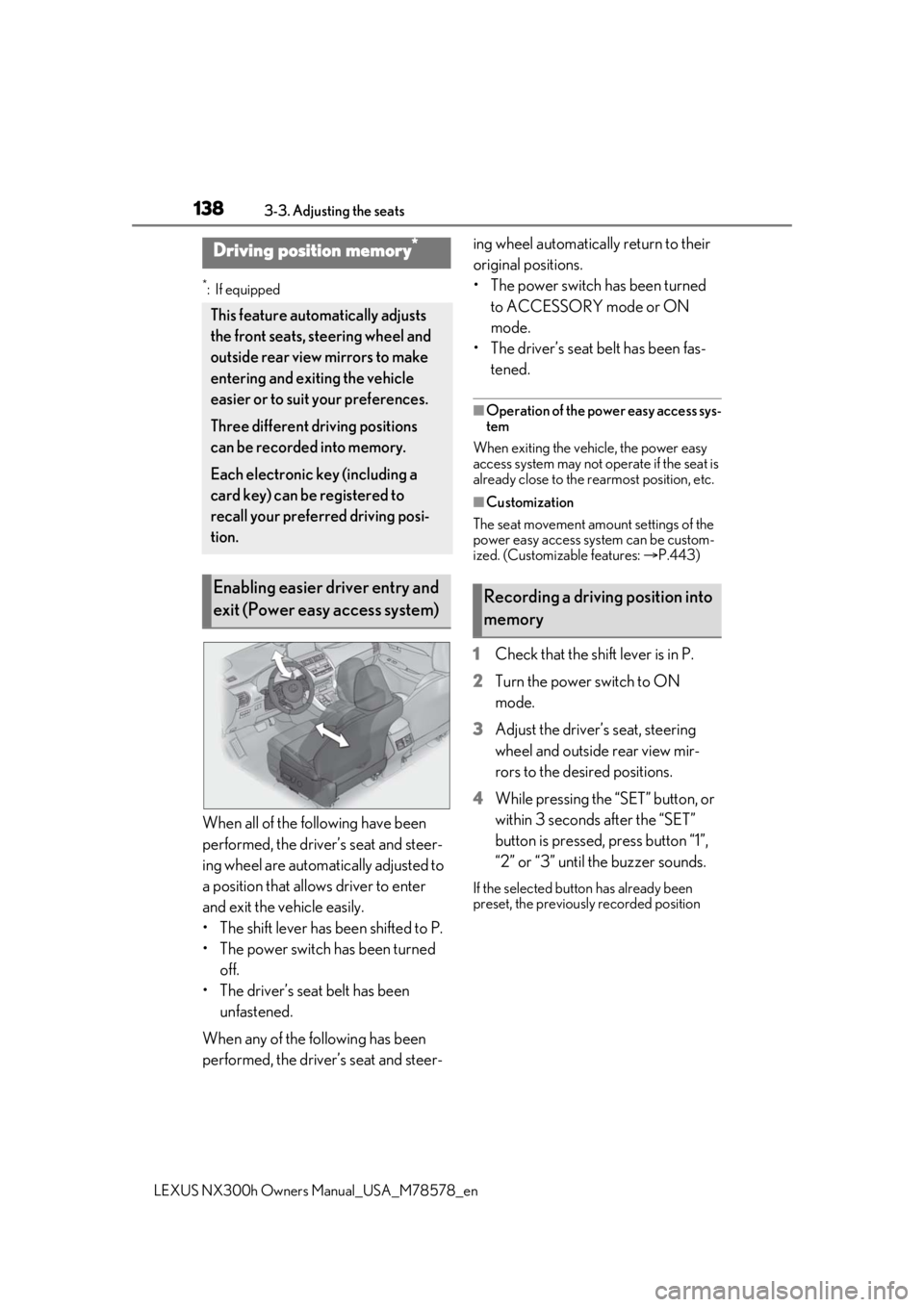
When all of the following have been
performed, the driver’s seat and steer-
ing wheel are automatically adjusted to
a position that allows driver to enter
and exit the vehicle easily.
• The shift lever has been shifted to P.
• The power switch has been turned
off.
• The driver’s seat belt has been unfastened.
When any of the following has been
performed, the driver’s seat and steer- ing wheel automatically return to their
original positions.
• The power switch has been turned
to ACCESSORY mode or ON
mode.
• The driver’s seat belt has been fas- tened.
■Operation of the power easy access sys-
tem
When exiting the vehicle, the power easy
access system may not op erate if the seat is
already close to the rearmost position, etc.
■Customization
The seat movement amou nt settings of the
power easy access system can be custom-
ized. (Customizable features: P.443)
1 Check that the shift lever is in P.
2 Turn the power switch to ON
mode.
3 Adjust the driver’s seat, steering
wheel and outside rear view mir-
rors to the desired positions.
4 While pressing the “SET” button, or
within 3 seconds after the “SET”
button is pressed, press button “1”,
“2” or “3” until the buzzer sounds.
If the selected button has already been
preset, the previously recorded position
Driving position memory*
This feature auto matically adjusts
the front seats, steering wheel and
outside rear view mirrors to make
entering and exiting the vehicle
easier or to suit your preferences.
Three different driving positions
can be recorded into memory.
Each electronic key (including a
card key) can be registered to
recall your preferred driving posi-
tion.
Enabling easier driver entry and
exit (Power easy access system)Recording a driving position into
memory
Page 176 of 484

1764-2. Driving procedures
LEXUS NX300h Owners Manual_USA_M78578_en
4Release the brake pedal and check
that the display on the instrument
cluster is off.
■Automatic hybrid system shut off fea-
ture
●The vehicle is equipped with a feature
that automatically shuts off the hybrid sys-
tem when the shift lever is in P with the
hybrid system operating for an extended
period.
●The hybrid system will automatically shut
off after approximately 1 hour if it has
been left running while the shift lever is in
P.
●The timer for the automatic hybrid system
shut off feature will reset if the brake
pedal is depressed or if the shift lever is in
a position other than P.
●After the vehicle is parked, if the door is
locked with the door lock switch ( P.112)
from the inside or the mechanical key
from the outside, the automatic hybrid
system shut off feature will be disabled.
The timer for the automatic hybrid system
shut off feature will be re-enabled if the
driver’s door is opened.
■Locking the door from outside with the
hybrid system operating
1 With the driver’s door open, pull the
driver’s door handle and insert the
mechanical key.
2 Turn the mechanical key counterclock-
wise. 3
Pull out the mechanical key and close
the door.
WARNING
■Stopping the hybrid system in an
emergency
If you want to stop the hybrid system in an
emergency while driving the vehicle,
press and hold the power switch for more
than 2 seconds, or pr ess it briefly 3 times
or more in succession. ( P.380)
However, do not touch the power switch
while driving except in an emergency.
Turning the hybrid system off while driv-
ing will not cause loss of steering or brak-
ing control, however, power assist to the
steering will be lost. This will make it
more difficult to steer smoothly, so you
should pull over and stop the vehicle as
soon as it is safe to do so.
WARNING
■When parking
Exhaust gases include harmful carbon
monoxide (CO), which is colorless and
odorless. Observe the following precau-
tions.
Failure to do so may cause exhaust gases
to enter the vehicle and may lead to an
accident caused by light-headedness, or
may lead to death or a serious health
hazard.
●If the vehicle is in a poorly ventilated
area or a closed area, such as a
garage, stop the hybrid system.
Page 339 of 484

3396-2. Maintenance
LEXUS NX300h Owners Manual_USA_M78578_en
6
Maintenance and care
6-2.Maintenance
■Repair and replacement
It is recommended that genuine Lexus parts
be used for repairs to ensure performance
of each system. If non-Lexus parts are used
in replacement or if a repair shop other than
a Lexus dealer perfor ms repairs, confirm
the warranty coverage.
■Allow inspection and repairs to be per-
formed by a Lexus dealer
●Lexus technicians are well-trained spe-
cialists and are kept up to date with the
latest service information. They are well
informed about the operation of all sys-
tems on your vehicle.
●Keep a copy of the repa ir order. It proves
that the maintenance that has been per-
formed is under warra nty coverage. If any
problem should arise while your vehicle is
under warranty, your Lexus dealer will
promptly take care of it.
General maintenance should be per-
formed on a daily basis. This can be
done by yourself or by a Lexus dealer.
Scheduled maintenance should be
performed at specified intervals
according to the maintenance sched-
ule.
For details about ma intenance items and
schedules, refer to the “Warranty and Ser-
vice Guide”, “Owner’s Manual Supple-
ment” or “Scheduled Maintenance”.
■Resetting the message indicating main-
tenance is required (Except for Can-
ada)
After the required maintenance is pre-
formed according to the maintenance
schedule, please reset the message.
To reset the message, follow the procedures
described below:
1 Press or of the meter control
switches and select .
Maintenance requirements
To ensure safe and economical driv-
ing, day-to-day care and regular
maintenance are essential. It is the
owner’s responsibility to perform
regular checks. Lexus recommends
the following maintenance:
WARNING
■If your vehicle is not properly main-
tained
Improper maintenanc e could result in
serious damage to the vehicle and possi-
ble death or serious injury.
■Handling of the 12-volt battery
●Engine exhaust, some of its constitu-
ents, and a wide variety of automobile
components contain or emit chemicals
known to the State of California to
cause cancer and birth defects and
other reproductive harm. Work in a
well ventilated area.
●Oils, fuels and fluids contained in vehi-
cles as well as waste produced by
component wear contain or emit
chemicals known to the State of Cali-
fornia to cause cancer and birth
defects or other re productive harm.
Avoid exposure and wash any affected
area immediately.
●12-volt Battery post s, terminals and
related accessories contain lead and
lead compounds which are known to
cause brain damage. Wash your hands
after handling. ( P.354)
General maintenance
Scheduled maintenance
Page 340 of 484

3406-2. Maintenance
LEXUS NX300h Owners Manual_USA_M78578_en
2
Press or of the meter control
switches, sele ct the “Vehicle Settings”
and then press .
3 Press or of the meter control
switches, select the “Scheduled Mainte-
nance” and then press and hold the .
4 Select the “Yes” and push .
“The Data Has Been Reset” is displayed
on the multi-information display.
You can perform some maintenance
procedures by yourself.
Please be aware that do-it-yourself
maintenance may affect warranty cov-
erage.
The use of Lexus repair manuals is recom-
mended.
For details about warra nty coverage, refer
to the separate “Owner’s Guide”, “War-
ranty and Service Guide”, “Owner’s Man-
ual Supplement” or “Warranty Booklet”.
Do-it-yourself maintenance
General maintenance
Listed below are the general main-
tenance items that should be per-
formed at the intervals specified in
the “Warranty and Service Guide”
or “Owner’s Manual Supplement”.
It is recommended that any prob-
lem you notice should be brought to
the attention of your Lexus dealer
or qualified service shop for advice.
WARNING
■If the hybrid system is operating
Turn the hybrid system off and ensure
that there is adequate ventilation before
performing maintenance checks.
Engine compartment
ItemsCheck points
Brake fluidIs the brake fluid at the
correct level? ( P.353)
Engine/power
control unit
coolantIs the engine/power con-
trol unit coolant at the cor-
rect level? ( P.351)
Engine oilIs the engine oil at the cor-
rect level? ( P.349)
Exhaust sys-
temThere should not be any
fumes or strange sounds.
Radiator/con-
denserThe radiator and con-
denser should be free from
foreign objects. ( P.352)
Washer fluidIs there sufficient washer
fluid? (P.353)
Page 350 of 484

3506-3. Do-it-yourself maintenance
LEXUS NX300h Owners Manual_USA_M78578_en
5Holding a rag under the end, pull
the dipstick out and check the oil
level.
Low
Normal
Excessive
Measuring side
6 Wipe the dipstick and reinsert it
fully.
■Checking the oil type and prepar-
ing the items needed
Make sure to check the oil type and
prepare the items needed before add-
ing oil.
Engine oil selection
P.426
Oil quantity (Low Full)
1.6 qt. (1.5 L, 1.3 Imp.qt.)
Items
Clean funnel
■Adding engine oil
If the oil level is below or near the low
level mark, add engine oil of the same
type as that already in the engine. 1
Remove the oil filler cap by turning
it counterclockwise.
2 Add engine oil slowly, checking the
dipstick.
3 Install the oil filler cap by turning it
clockwise.
■Engine oil consumption
A certain amount of engine oil will be con-
sumed while driving. In the following situa-
tions, oil consumption may increase, and
engine oil may need to be refilled in
between oil maintenance intervals.
●When the engine is new, for example
directly after purchasing the vehicle or
after replacing the engine
●If low quality oil or oil of an inappropriate
viscosity is used
●When driving at high engine speeds or
with a heavy load, when towing, or when
driving while accelerating or decelerat-
ing frequently
●When leaving the engine idling for a long
time, or when driving frequently through
heavy traffic
■After changing the engine oil
The engine oil maintenance data should be
reset. Perform the following procedures:
1 Press or of the meter control
switches and select .
A
B
C
D
Page 351 of 484

3516-3. Do-it-yourself maintenance
LEXUS NX300h Owners Manual_USA_M78578_en
6
Maintenance and care
2Press or of the meter control
switches, sele ct the “Vehicle Settings”
and then press .
3 Press or of the meter control
switches, select the “Oil Maintenance”
and then press and hold .
4 Select the “Yes” and push .
“The Data Has Been Reset” is displayed
on the multi-information display.
The coolant level is satisfactory if it is
between the “FULL” and “LOW” lines
on the reservoir when the hybrid sys-
tem is cold.
■Engine coolant reservoir
Reservoir cap
“FULL” line
“LOW” line
If the level is on or below the “LOW” line,
add coolant up to the “FULL” line.
( P.418)
WARNING
■Used engine oil
●Used engine oil contains potentially
harmful contaminants which may
cause skin disorders such as inflamma-
tion and skin cancer, so care should be
taken to avoid prolonged and
repeated contact. To remove used
engine oil from your skin, wash thor-
oughly with soap and water.
●Dispose of used oil and filters only in a
safe and acceptable manner. Do not
dispose of used oil and filters in house-
hold trash, in sewers or onto the
ground. Call your Lexus dealer, ser-
vice station or auto parts store for
information concerning recycling or
disposal.
●Do not leave used engine oil within the
reach of children.
NOTICE
■To prevent serious engine damage
Check the oil level on a regular basis.
■When replacing the engine oil
●Be careful not to spill engine oil on the
vehicle components.
●Avoid overfilling, or the engine could
be damaged.
●Check the oil level on the dipstick
every time you re fill the vehicle.
●Be sure the engine o il filler cap is prop-
erly tightened.
Checking the coolant
A
B
C
Page 363 of 484

3636-3. Do-it-yourself maintenance
LEXUS NX300h Owners Manual_USA_M78578_en
6
Maintenance and care
■The tire pressure warning system
must be initialized in the following
circumstances:
When adjusting the tire inflation
pressure.
When the tire inflation pressure is
changed such as when changing
traveling speed.
When rotating the tires.
When changing the tire.
When the tire pressure warning system
is initialized, the cu rrent tire inflation
pressure is set as the benchmark pres-
sure.
■How to initialize the tire pressure
warning system
1 Park the vehicle in a safe place and
turn the power switch off.
Initialization cannot be performed while
the vehicle is moving.
2 Adjust the tire inflation pressure to
the specified cold tire inflation pres-
sure level.
Make sure to adjust th e tire pressure to the
specified cold tire infl ation pressure level.
The tire pressure warning system will oper-
ate based on this pressure level.
3 Turn the power switch to ON
mode. 4
Press or of the meter con-
trol switches and select .
5 Press or of the meter con-
trol switches, select the “Vehicle
Settings” and then press .
6 Press or of the meter con-
trol switches, select the “TPMS”
and then press and hold the .
The “Tire Pressure Recalibrating. Please
Wait Until Complete” will be displayed on
the multi-information display and the tire
pressure warning light will blink slowly 3
times.
When the message di sappears, initializa-
tion is complete.
■Initializing the tire pressure warning sys-
tem
Initialize the system wi th the tire inflation
pressure adjusted to the specified level
■The initialization operation
●Make sure to carry out initialization after
adjusting the tire inflation pressure. Also,
make sure the tires are cold before carry-
ing out initialization or tire inflation pres-
sure adjustment.
●If you have accidentally turned the power
switch off during initialization, it is not
necessary to press the reset switch again
as initialization will restart automatically
when the power switch has been turned
to ON mode for the next time.
Initializing the tire pressure
warning system
Page 364 of 484
3646-3. Do-it-yourself maintenance
LEXUS NX300h Owners Manual_USA_M78578_en
●If you accidentally press the reset switch
when initialization is not necessary, adjust
the tire inflation pres sure to the specified
level when the tires are cold, and conduct
initialization again.
■Warning performance of the tire pres-
sure warning system
The warning of the tire pressure warning
system will change in accordance with the
conditions under which it was initialized. For
this reason, the system may give a warning
even if the tire pressure does not reach a
low enough level, or if the pressure is higher
than the pressure that was adjusted to when
the system was initialized.
■When initialization of the tire pressure
warning system has failed
Initialization can be completed in a few min-
utes. However, in the following cases, the
settings have not been recorded and the
system will not operate properly. If repeated
attempts to record tire inflation pressure
settings are unsuccessful, have the vehicle
inspected by your Lexus dealer.
●When initializing the tire pressure warn-
ing system, the tire pressure warning light
does not blink 3 times.
●After carrying out the initialization proce-
dure, the tire pressure warning light
blinks for 1 minute then stays on after
driving for 20 minutes.
The tire pressure warning valve and
transmitter is equipped with a unique
ID code. When replacing a tire pres- sure warning valve and
transmitter, it is
necessary to register the ID code.
Have the ID code registered by your
Lexus dealer.
WARNING
■When initializing the tire pressure
warning system
Do not initializing tire inflation pressure
without first adjusting the tire inflation
pressure to the spec ified level. Other-
wise, the tire pressure warning light may
not come on even if the tire inflation pres-
sure is low, or it may come on when the
tire inflation pressure is actually normal.
Registering ID codes
Page 400 of 484

4007-2. Steps to take in an emergency
LEXUS NX300h Owners Manual_USA_M78578_en
pedal has been depressed and the shift
lever is in N. Release the accelerator pedal
and shift the shift lever to D, S or R.
■If “Depress Brake When Vehicle Is
Stopped Hybrid Syst
em May Overheat”
is shown
Message is displayed when the accelerator
pedal is depressed to maintain the vehicle
position when stopped on a upward slope,
etc.
If this continues, th e hybrid system may
overheat.
Release the accelerator pedal and depress
the brake pedal.
■If a message that indicates the malfunc-
tion of front camera is displayed
The following systems may be suspended
until the problem shown in the message is
resolved. ( P.209, 391)
●PCS (Pre-Collision System)
●LTA (Lane Tracing Assist) (if equipped)
●LDA (Lane Departure Alert with steering
control) (if equipped)
●Automatic High Beam
●RSA (Road Sign Assist) (if equipped)
●Dynamic radar cruise control with full-
speed range
■If “RSA malfunction Visit Your Dealer” is
shown
The system may be malfunctioning. Have
the vehicle inspected by your Lexus dealer.
■If “Radar Cruise Control Unavailable
See Owner’s Manual” is shown
The dynamic radar cruise control with full-
speed range system is suspended tempo-
rarily or until the problem shown in the mes-
sage is resolved. (causes and coping
methods: P.209)
■If “Radar Cruise Control Unavailable” is
shown
The dynamic radar cruise control with full-
speed range system cannot be used tempo-
rarily. Use the system when it becomes
available again.
■If “Oil Maintenance Required Soon” is
shown
Indicates that the engine oil is scheduled to
be changed. (The indicator will not work
properly unless the oil maintenance data
has been reset.)
Check the engine oil, and change if neces-
sary. After changing th e engine oil, the oil
change system should be reset. ( P.350)
■If “Oil Maintenance Required” is shown
Indicates that the engine oil should be
changed. (After the engine oil is changed
and the oil maintenance data has been
reset.)
Check and change the en gine oil, and oil fil-
ter by your Lexus dealer. After changing the
engine oil, the oil change system should be
reset. ( P.350)
■If “See Owner’s Manual” is shown
●If the following messages are shown, fol-
lowing the instruct ions, accordingly.
• “Engine Coolant Temp High” ( P.418)
●If the following messages are shown,
there may be a malfunction.
Immediately have the vehicle inspected
by your Lexus dealer.
• “Hybrid System Malfunction”
•“Check Engine”
• “Hybrid Battery System Malfunction”
• “Accelerator System Malfunction”
• “Braking Power Low”
• “Smart Access System Malfunction”
●If “Aux Battery Low” is shown
• When the display goes off after several
seconds
*
Maintain the hybrid system operation for
more than 15 minutes and charge the 12-
volt battery.
• When the display does not go off Start up the hybrid system using the pro-
cedures for “If the 12-volt battery is dis-
charged” ( P.414).
*: Displays for about 6 seconds
●If “Maintenance required for Traction bat-
tery cooling parts” is shown, the filters
may be clogged, the air intake vents may
be blocked, or there may be a gap in the
duct. Therefore, perform the following
correction procedure.
• If the air intake vents of the hybrid battery