cruise control LEXUS NX300h 2021 Owners Manual
[x] Cancel search | Manufacturer: LEXUS, Model Year: 2021, Model line: NX300h, Model: LEXUS NX300h 2021Pages: 484, PDF Size: 10.53 MB
Page 3 of 484

3TABLE OF CONTENTS
LEXUS NX300h Owners Manual_USA_M78578_en
1
2
3
4
5
6
7
8
9
4-1. Before driving
Driving the vehicle ........................ 156
Cargo and luggage ....................... 161
Vehicle load limits ......................... 164
Trailer towing (vehicles with towing package) ........................................ 165
Trailer towing (vehicles without towing package) ......................... 173
Dinghy towing ................................ 173
4-2. Driving procedures Power (ignition) switch ............... 174
EV drive mode ............................... 178
Hybrid transmission ..................... 180
Turn signal lever............................. 183
Parking brake ................................. 184
Brake Hold....................................... 187
ASC (Active Sound Control) .. 188
4-3. Operating the lights and wipers Headlight switch ............................ 190
Automatic High Beam ................ 193
Fog light switch .............................. 196
Windshield wipers and washer 196
Rear window wiper and washer ............................................................ 201
4-4. Refueling Opening the fuel tank cap........ 2034-5. Using the driving support systems
Lexus Safety System + 2.0....... 205
PCS (Pre-Collision System) ...... 211
LTA (Lane Tracing Assist) ........ 218
LDA (Lane Departure Alert with steering control) ......................... 227
RSA (Road Sign Assist)............. 235
Dynamic radar cruise control with full-speed range......................... 237
PKSA (Parking Support Alert) 247
Intuitive parking assist ................ 248
Parking Support Brake function (for static objects).............................. 253
BSM (Blind Spot Monitor) ........262
Driving mode select switch ..... 270
Driving assist systems ................. 272
4-6. Driving tips Hybrid vehicle driving tips ........ 277
Winter driving tips ....................... 279
Utility vehicle precautions........ 282
5-1. Remote Touch Remote Touch............................... 286
5-2. Using the air conditioning system and defogger
Automatic air conditioning system............................................................ 291
Heated steering wheel/seat heat- ers/seat ventilators................... 299
5-3. Using the interior lights Interior lights list ........................... 302
5-4. Using the storage features List of storage features .............. 305
4Driving
5Interior features
Page 19 of 484

19Pictorial index
LEXUS NX300h Owners Manual_USA_M78578_en
Paddle shift switches ..............................................................................................P.182
Meter control switches .......................................................................................... P.89
Vehicle-to-vehicle distance switch ..................................................................P.242
Cruise control switch
Dynamic radar cruise control with full-spee d range ......................................... P.237
LDA (Lane Departure Alert with steering control) switch
*2....................P.231
LTA (Lane Tracing Assist) switch
*2................................................................. P.223
Talk switch
*1
Telephone switches*1
*1
: Refer to “NAVIGATION AND MULTIMEDIA SYSTEM OWNER’S MANUAL”.
*2: If equipped
EV drive mode switch ............................................................................................ P.178
Driving mode select switch .................................................................................P.270
VSC off switch......................................................................................................... P.274
Parking brake switches .........................................................................................P.184
Applying/releasing ........................................................................................................... P. 184
Precautions against winter season ................... .........................................................P.280
Warning buzzer/message................................................................................. P.185, 398
B
C
D
E
F
G
H
A
B
C
D
Page 82 of 484
822-1. Instrument cluster
LEXUS NX300h Owners Manual_USA_M78578_en
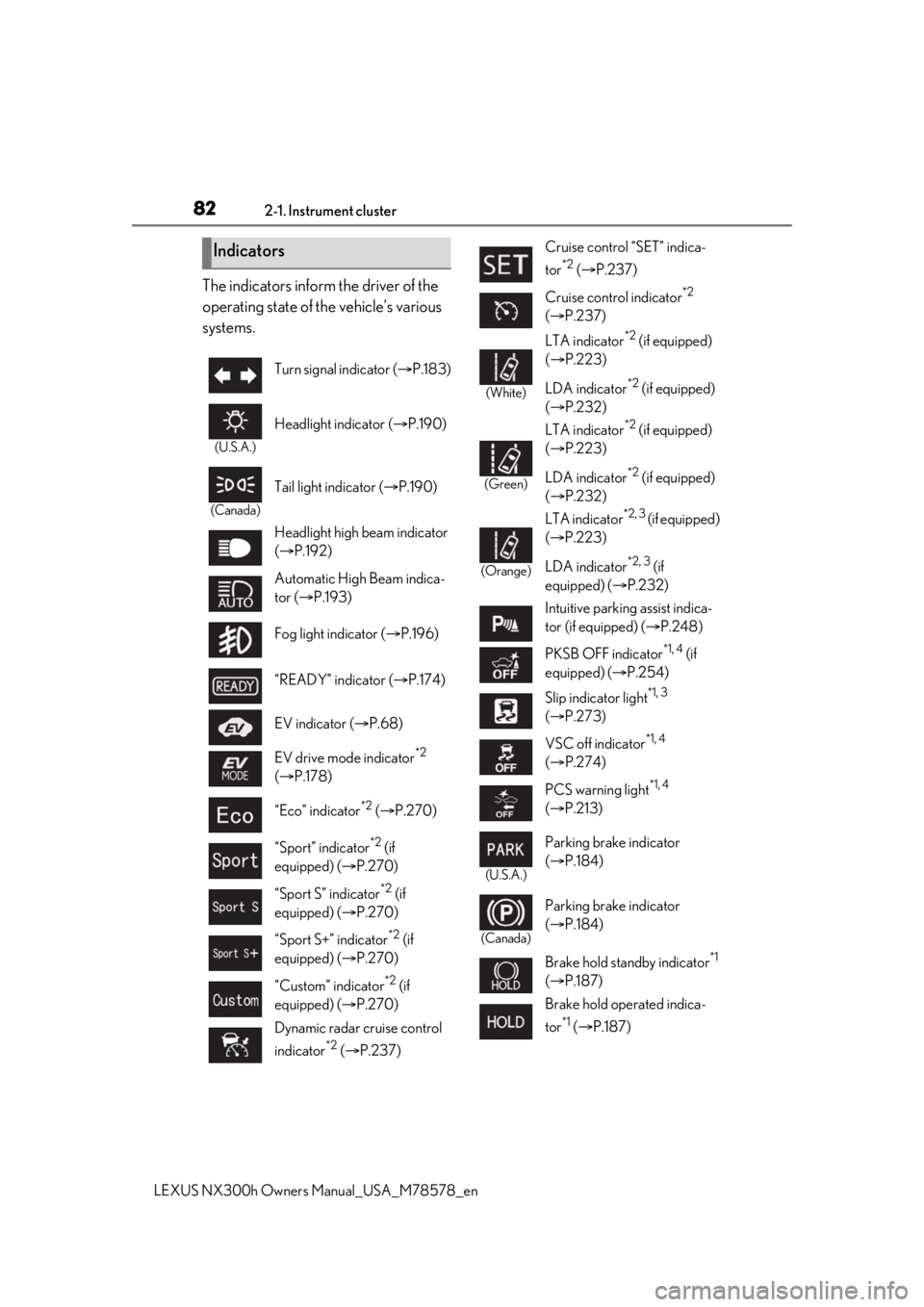
The indicators inform the driver of the
operating state of the vehicle’s various
systems.
Indicators
Turn signal indicator (P.183)
(U.S.A.)
Headlight indicator ( P.190)
(Canada)
Tail light indicator ( P.190)
Headlight high beam indicator
( P.192)
Automatic High Beam indica-
tor ( P.193)
Fog light indicator ( P.196)
“READY” indicator ( P.174)
EV indicator ( P.68)
EV drive mode indicator
*2
( P.178)
“Eco” indicator
*2 ( P.270)
“Sport” indicator
*2 (if
equipped) ( P.270)
“Sport S” indicator
*2 (if
equipped) ( P.270)
“Sport S+” indicator
*2 (if
equipped) ( P.270)
“Custom” indicator
*2 (if
equipped) ( P.270)
Dynamic radar cruise control
indicator
*2 ( P.237)
Cruise control “SET” indica-
tor
*2 ( P.237)
Cruise control indicator
*2
( P.237)
(White)
LTA indicator*2 (if equipped)
( P.223)
LDA indicator
*2 (if equipped)
( P.232)
(Green)
LTA indicator*2 (if equipped)
( P.223)
LDA indicator
*2 (if equipped)
( P.232)
(Orange)
LTA indicator*2, 3 (if equipped)
( P.223)
LDA indicator
*2, 3 (if
equipped) ( P.232)
Intuitive parking assist indica-
tor (if equipped) ( P.248)
PKSB OFF indicator
*1, 4 (if
equipped) ( P.254)
Slip indicator light
*1, 3
( P.273)
VSC off indicator
*1, 4
( P.274)
PCS warning light
*1, 4
( P.213)
(U.S.A.)
Parking brake indicator
( P.184)
(Canada)
Parking brake indicator
( P.184)
Brake hold standby indicator
*1
( P.187)
Brake hold operated indica-
tor
*1 ( P.187)
Page 91 of 484

912-1. Instrument cluster
LEXUS NX300h Owners Manual_USA_M78578_en
2
Vehicle status information and indicators
screen, depending on the road con-
ditions, outside temperature, vehicle
speed, etc. Use the display screen
as a reference.
If a 12-volt battery terminal is dis-
connected and re connected, the
steering amount display may be dis-
abled temporarily. After driving the
vehicle for a while, the display will be
enabled.
■Speedometer
Displays the vehicle speed.
■Tire inflation pressure
Displays inflation pressure of each tire.
The inflation pressure of the spare tire will
not be displayed.
■Vehicle sway warning
Detects the sway of the vehicle within a
lane, which is often associated with a
decrease in the driver’s attention level
and alerts the driver.
This display is a part of the LTA (Lane
Tracing Assist) system or LDA (Lane
Departure Alert with steering control)
system. The display is enabled when
the operating conditions of the vehicle
sway warning are met. ( P.222, 231)
■Display off
A blank screen is displayed.
■Tire inflation pressure
●It may take a few minutes to display the
tire inflation pressure after the power
switch is turned to ON mode. It may also
take a few minutes to display the tire infla-
tion pressure after inflation pressure has
been adjusted.
●“--” may be displayed if the tire informa-
tion cannot be determined due to unfa- vorable radio wave conditions.
●Tire inflation pressure changes with tem-
perature. The displaye
d values may also
be different from the values measured
using a tire pressure gauge.
■When disconnecting and reconnecting
12-volt battery terminals
The drive information will be reset.
Select to display the following naviga-
tion system-linked information.
Route guidance
Compass display (heading-up dis-
play)
Select to enable se lection of an audio
source or track on the display using the
meter control switches.
Select to display the operational status
of the following systems:
LTA (Lane Tracing Assist) (if
equipped) ( P.218)
LDA (Lane Departure Alert with
steering control) (if equipped)
( P.227)
Dynamic radar cruise control with
full-speed range ( P.237)
RSA (Road Sign Assist) (if
equipped) ( P.235)
The displayed icon changes depending
on the system used.
Navigation system-linked dis-
play (if equipped)
Audio system-linked display
Driving assist system information
Page 95 of 484

952-1. Instrument cluster
LEXUS NX300h Owners Manual_USA_M78578_en
2
Vehicle status information and indicators
*:If equipped
Head-up display
Display brightness will change automati-
cally according to the brightness of the sur-
rounding area.
Display position adjustment switch
Display brightness adjustment
switch
Display brightness can be adjusted to the
desired level.
“HUD” button
“DISP” button
Vehicle speed
Hybrid System Indicator ( P.97)
Tachometer
Shift position and shift range
Displays the selected shift position or
selected shift range ( P.180)
Audio display
Displays audio information for approxi-
mately 3 seconds when the audio system is
operated
Route guidance display (vehicles
with navigation system) ( P.98)
When approaching an intersection while
the navigation system is giving route guid-
ance, an arrow will automatically be dis-
played to indicate the direction of travel.
Lane departure warning display
(LTA [Lane Tracing Assist]) (if
equipped) ( P.218)
Lane departure warning display
(LDA [Lane Departure Alert with
steering control]) (if equipped)
( P.227)
Approach warning display
(Dynamic radar cruise control with
full speed range) ( P.243)
Road signs (RSA [Road Sign
Assist]) (if equipped) ( P.235)
Pre-collision warning message (Pre-
Collision System) ( P.211)
Speed limit display (vehicles with
navigation system) ( P.98)
Parking Support Brake function (for
static objects) (if equipped)
( P.253)
Head-up display*
The head-up display can be used to
project vehicle speed and other
information onto the windshield.
System components
A
B
C
D
E
Head-up display contents
Page 155 of 484
155
LEXUS NX300h Owners Manual_USA_M78578_en
4
4
Driving
Driving
4-1. Before driving
Driving the vehicle ..................... 156
Cargo and luggage .................... 161
Vehicle load limits ...................... 164
Trailer towing (vehicles with tow- ing package).............................. 165
Trailer towing (vehicles without towing package) ...................... 173
Dinghy towing ............................. 173
4-2. Driving procedures Power (ignition) switch ............ 174
EV drive mode ............................ 178
Hybrid transmission .................. 180
Turn signal lever.......................... 183
Parking brake .............................. 184
Brake Hold.................................... 187
ASC (Active Sound Control) 188
4-3. Operating the lights and wipers Headlight switch ......................... 190
Automatic High Beam ............. 193
Fog light switch ........................... 196
Windshield wipers and washer ......................................................... 196
Rear window wiper and washer ......................................................... 201
4-4. Refueling Opening the fuel tank cap..... 2034-5. Using the driving support sys-
tems
Lexus Safety System + 2.0.... 205
PCS (Pre-Collision System) ... 211
LTA (Lane Tracing Assist) ..... 218
LDA (Lane Departure Alert with steering control) ...................... 227
RSA (Road Sign Assist).......... 235
Dynamic radar cruise control with full-speed range...................... 237
PKSA (Parking Support Alert) ....................................................... 247
Intuitive parking assist ............. 248
Parking Support Brake function (for static objects) .................. 253
BSM (Blind Spot Monitor) .... 262
Driving mode select switch .. 270
Driving assist systems............... 272
4-6. Driving tips Hybrid vehicle driving tips .... 277
Winter driving tips .................... 279
Utility vehicle precautions..... 282
Page 167 of 484

1674-1. Before driving
LEXUS NX300h Owners Manual_USA_M78578_en
4
Driving
■GCWR (Gross Combination
Weight Rating)
The maximum allowable gross combi-
nation weight. The gross combination
weight is the sum of the total vehicle
weight (including the occupants, cargo
and any optional equipment installed
on the vehicle) and the weight of the
trailer being towed (including the
cargo in the trailer).
WARNING
●Do not apply the brakes suddenly as
you may skid, resulting in jackknifing
and loss of vehicle control. This is
especially true on wet or slippery sur-
faces.
●Do not exceed the trailer hitch assem-
bly weight, gross vehicle weight, gross
axle weight and trailer tongue weight
capacities.
●Do not use the dynamic radar cruise
control system when trailer towing.
●Slow down and downshift before
descending steep or long downhill
grades. Do not make sudden down-
shifts while descending steep or long
downhill grades.
●Vehicle-trailer instabil ity is more likely
on steep long downhills. Before
descending steep or long downhill
grades, slow down and downshift. Do
not make sudden downshifts when
descending steep or long downhill
grades. Avoid holding the brake pedal
down too long or applying the brakes
too frequently. This could cause the
brakes to overheat and result in
reduced braking efficiency.
●Do not tow a trailer when the compact
spare tire is installed on your vehicle.
■When towing a trailer
Lexus recommends trailers with brakes
that conform to any applicable federal
and state/provincial regulations.
●If the gross trailer weight exceeds
unbraked TWR, trailer brakes are
required. Lexus recommends trailers
with brakes that conform to all applica-
ble federal and state/provincial regula-
tions.
●Never tap into your vehicle’s hydraulic
system, as this will lower the vehicle’s
braking effectiveness.
●Never tow a trailer without using a
safety chain securely attached to both
the trailer and the vehicle. If damage
occurs to the coupling unit or hitch
ball, there is danger of the trailer wan-
dering into another lane.
NOTICE
■When installing a trailer hitch
Use only the position recommended by
your Lexus dealer. Do not install the
trailer hitch on the bumper; this may
cause body damage.
■Do not directly splice trailer lights
Do not directly splice trailer lights.
Directly splicing trailer lights may dam-
age your vehicle’s electrical system and
cause a malfunction.
Towing related terms
Page 180 of 484

1804-2. Driving procedures
LEXUS NX300h Owners Manual_USA_M78578_en
*1: To improve fuel efficiency and reduce
noise, shift the shift lever to D for normal
driving.
You can choose gear range suitable for
your driving situation by operating the
paddle shift switches.
*2: By selecting shift ra nges using S mode,
you can control accelerating force and
engine braking force.
■S mode
●When the shift range is 4 or lower, hold-
ing the shift lever towa rd “+” sets the shift
range to 6.
●Automatically selects a higher shift range
before the engine speed becomes too
high.
■When driving with dynamic radar cruise
control with full-speed range activated
Even when performing the following
actions with the intent of enabling engine
braking, engine braking will not activate
because dynamic radar cruise control with
full-speed range will not be canceled.
●While driving in S mode, downshifting to
5 or 4. ( P.182)
●When switching the driving mode to
Sport mode while driving in D position.
( P.270)
■Restraining sudden start (Drive-Start
Control)
When the following unusual operation is
performed, the hybrid system output may
be restrained.
●When the shift lever is shifted from R to D,
D to R, N to R, P to D, or P to R (D
includes S) with the accelerator pedal
depressed, a warning message appears
on the multi-information display. If a
warning message is shown on the multi-
information display, read the message
and follow the instructions.
●When the accelerator pedal is depressed
too much while the vehicle is in reverse.
Hybrid transmission
Select the shift position depending
on your purpose and situation.
Shift position purpose and func-
tions
Shift posi- tionObjective or function
PParking the vehicle/starting the hybrid system
RReversing
NNeutral
DNormal driving*1
SS mode driving*2 ( P.182)WARNING
■When driving on slippery road sur-
faces
Be careful of downsh ifting and sudden
acceleration, as this could result in the
vehicle skidding to the side or spinning.
NOTICE
■Hybrid battery (t raction battery)
charge
If the shift lever is in N, the hybrid battery
(traction battery) will not be charging,
even when the engine is running. There-
fore, if the vehicle is left with the shift
lever in N, the hybrid battery (traction
battery) will discharge, and this may
result in the vehicl e not being able to
start.
Page 205 of 484

2054-5. Using the driving support systems
LEXUS NX300h Owners Manual_USA_M78578_en
4
Driving
4-5.Using the driving support systems
■PCS (Pre-Collision System)
P.211
■LTA (Lane Tracing Assist) (if
equipped)
P.218
■LDA (Lane Departure Alert with
steering control) (if equipped)
P.227
■AHB (Automatic High Beam)
P.193
■RSA (Road Sign Assist) (if
equipped)
P.235
■Dynamic radar cruise control with
full-speed range
P.237 Two types of sensors, located behind
the front grille and windshield, detect
information necessary to operate the
drive assist systems.
Radar sensor
Front camera
Lexus Safety System + 2.0
The Lexus Safety System + 2.0 con-
sists of the following drive assist sys-
tems and contributes to a safe and
comfortable driving experience:
Driving assist system
WARNING
■Lexus Safety System + 2.0
The Lexus Safety System + 2.0 is
designed to operate under the assump-
tion that the driver will drive safely, and is
designed to help reduce the impact to
the occupants and the vehicle in the case
of a collision or assist the driver in normal
driving conditions.
As there is a limit to the degree of recog-
nition accuracy and control performance
that this system can provide, do not
overly rely on this system. The driver is
always responsible for paying attention
to the vehicle’s surroundings and driving
safely.
Sensors
WARNING
■To avoid malfunction of the radar sen-
sor
Observe the following precautions.
Otherwise, the radar sensor may not
operate properly, possibly leading to an
accident resulting in death or serious
injury.
A
B
Page 218 of 484

2184-5. Using the driving support systems
LEXUS NX300h Owners Manual_USA_M78578_en
*:If equipped
When driving on highways and free-
ways with white (yellow) lane lines, this
function alerts the driver when the
vehicle might depart from its lane or
course
* and provides assistance by
operating the steering wheel to keep
the vehicle in its lane or course
*. Fur-
thermore, the system provides steering
assistance when dynamic radar cruise
control with full-speed range is operat-
ing to keep the vehicle in its lane.
The LTA system recognizes white (yel-
low) lane lines or a course
* using the
front camera. Additionally, it detects
preceding vehicles using the front
camera and radar.
*: Boundary between asphalt and the side of the road, such as grass, soil, or a curb
LTA (Lane Tracing Assist)*
Summary of functions
WARNING
■Before using LTA system
●Do not rely solely upon the LTA sys-
tem. The LTA system does not auto-
matically drive the vehicle or reduce
the amount of attention that must be
paid to the area in front of the vehicle.
The driver must always assume full
responsibility for driving safely by pay-
ing careful attention to the surround-
ing conditions and operating the
steering wheel to correct the path of
the vehicle. Also, the driver must take
adequate breaks when fatigued, such
as from driving for a long period of
time.
●Failure to perform appropriate driving
operations and pay careful attention
may lead to an accident, resulting in
death or serious injury.
●When not using the LTA system, use
the LTA switch to turn the system off.
■Situations unsuitable for LTA system
In the following situations, use the LTA
switch to turn the system off. Failure to do
so may lead to an accident, resulting in
death or serious injury.
●Vehicle is driven on a road surface
which is slippery due to rainy weather,
fallen snow, freezing, etc.
●Vehicle is driven on a snow-covered
road.
●White (yellow) lines are difficult to see
due to rain, snow, fog, dust, etc.
●Vehicle is driven in a temporary lane or
restricted lane due to construction
work.
●Vehicle is driven in a construction
zone.
●A spare tire, tire chains, etc. are
equipped.
●When the tires have been excessively
worn, or when the tire inflation pres-
sure is low.