brake LEXUS RC F 2015 Owner's Manual
[x] Cancel search | Manufacturer: LEXUS, Model Year: 2015, Model line: RC F, Model: LEXUS RC F 2015Pages: 684, PDF Size: 9.31 MB
Page 195 of 684

1954-2. Driving procedures
4
Driving
RC350/RCF_U (OM24636U)
RC F
Off
*
The emergency flashers can be used.
The analog speedometer and the
tachometer will not be illuminated.
However, if the welcome illumination is
operating, the analog speedometer will
illuminate.
(Welcome illumination: P. 1 0 1 )
ACCESSORY mode
Some electrical components such as the
audio system can be used.
The analog speedometer is illuminated.
IGNITION ON mode
All electrical components can be used.
The analog speedometer and the
tachometer will be illuminated.
*: If the shift lever is in a position other than
P when turning off the engine, the
engine switch will be turned to ACCES-
SORY mode, not to off.
If the engine is stopped with the shift le ver in a position other than P, the engine
switch will not be turned off but inst ead be turned to ACCESSORY mode. Per-
form the following procedure to turn the switch off:
Check that the parking brake is set.
Shift the shift lever to P.
Check that “Turn Power OFF” is displa yed on the multi-information display
and then press the engine switch once.
Check that “Turn Power OFF” on th e multi-information display is off.
1
2
3
When stopping the engine with the shift lever in a position other than P
1
2
3
4
Page 197 of 684

1974-2. Driving procedures
4
Driving
RC350/RCF_U (OM24636U)
■Operation of the engine switch
●When operating the engine switch, one short, firm press is enough. If the switch is
pressed improperly, the engine may not start or the engine switch mode may not
change. It is not necessary to press and hold the switch.
●If attempting to restart the engine immediately after turning the engine switch off, the
engine may not start in some cases. After tu rning the engine switch off, please wait a
few seconds before re starting the engine.
■If the smart access system with push-butto n start has been deactivated by a customized
setting
P. 5 9 0
WA R N I N G
■When starting the engine
Always start the engine while sitting in the driver’s seat. Do not depress the accelerator
pedal while starting the engine under any circumstances.
Doing so may cause an accident resu lting in death or serious injury.
■Caution while driving
If engine failure occurs while the vehicle is moving, do not lock or open the doors until
the vehicle reaches a safe and complete stop. Activation of the steering lock in this cir-
cumstance may lead to an accident, re sulting in death or serious injury.
■Stopping the engine in an emergency
If you want to stop the engine in an emergency while driving the vehicle, press and hold
the engine switch for more than 2 seconds, or press it briefly 3 times or more in succes-
sion. ( P. 5 2 3 )
However, do not touch the engine switch while driving except in an emergency. Turning
the engine off while driving will not cause lo ss of steering or braking control, but the
power assist to these systems will be lost. Th is will make it more difficult to steer and
brake, so you should pull over and stop the vehicle as soon as it is safe to do so.
Page 199 of 684
1994-2. Driving procedures
4
Driving
RC350/RCF_U (OM24636U)
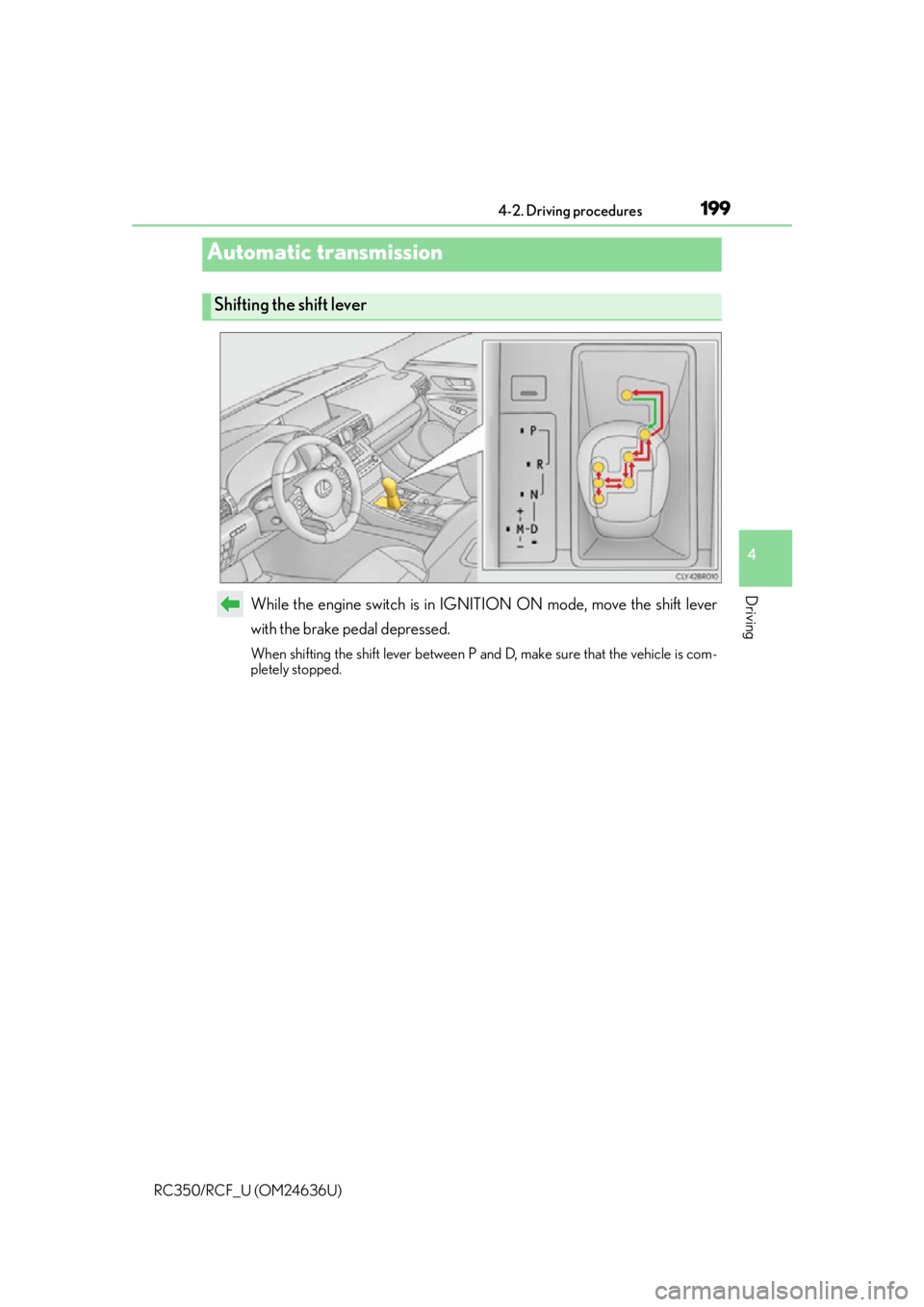
While the engine switch is in IGNITION ON mode, move the shift lever
with the brake pedal depressed.
When shifting the shift lever between P and D, make sure that the vehicle is com-
pletely stopped.
Automatic transmission
Shifting the shift lever
Page 205 of 684
2054-2. Driving procedures
4
Driving
RC350/RCF_U (OM24636U)
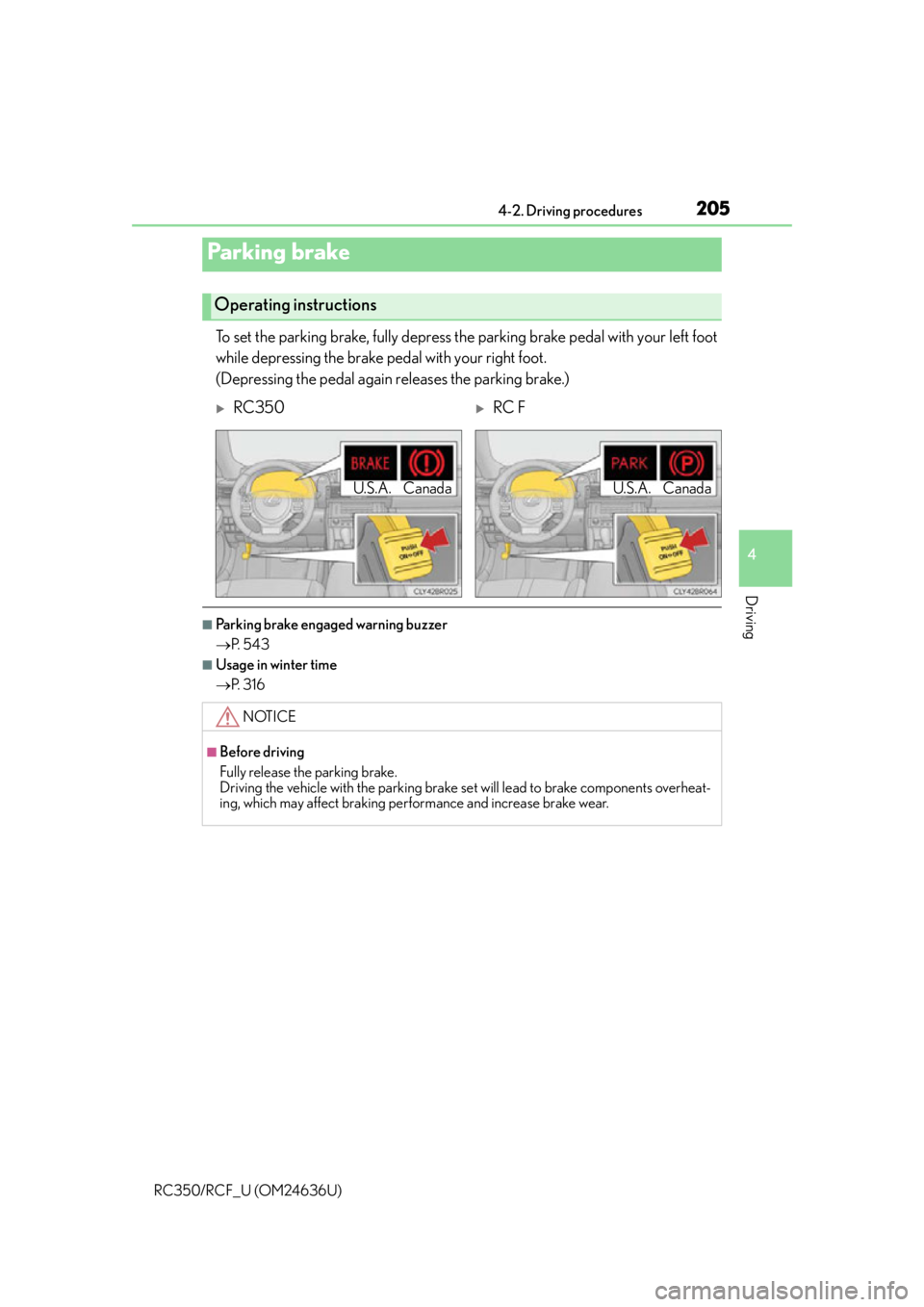
To set the parking brake, fully depress the parking brake pedal with your left foot
while depressing the brake pedal with your right foot.
(Depressing the pedal again releases the parking brake.)
■Parking brake engaged warning buzzer
P. 5 4 3
■Usage in winter time
P. 3 1 6
Parking brake
Operating instructions
RC350RC F
NOTICE
■Before driving
Fully release the parking brake.
Driving the vehicle with the parking brake set will lead to brake components overheat-
ing, which may affect braking perf ormance and increase brake wear.
U.S.A. CanadaU.S.A. Canada
Page 209 of 684

2094-3. Operating the lights and wipers
4
Driving
RC350/RCF_U (OM24636U)
With the headlights on, push the
lever away from you to turn on the
high beams.
Pull the lever toward you to the center
position to turn the high beams off.
Pull the lever toward you and release
it to flash the high beams once.
You can flash the high beams with the
headlights on or off.
■Daytime running light system
●To make your vehicle more visible to other drivers, the parking lights turn on automati-
cally (at an increased intensity) whenever the engine is started and the parking brake is
released. Daytime running lights ar e not designed for use at night.
●Compared to turning on the headlights, the daytime running light system offers greater
durability and consumes less electricity, so it can help improve fuel economy.
●Vehicles with LED front turn signal lights: If a turn signal light is in use, the daytime run-
ning light, on the same side, is turned off. For emergency flashers, both are turned off.
■Headlight control sensor
■Automatic light off system
When the light switch is in , or : The headlights and tail lights turn off 30
seconds after the engine switch is turned to ACCESSORY mode or turned off and a
door is opened and all of the doors and trunk are closed. (The lights turn off immediately
if on the key is pressed twice after both side doors are closed.)
To turn the lights on again, turn the engine switch to IGNITION ON mode, or turn the
light switch off once and then back to or .
If any of the doors or trunk lid is left open, the lights automatically turn off after 20 min-
utes.
Turning on the high beam headlights
1
2
The sensor may not function properly if an
object is placed on the sensor, or anything that
blocks the sensor is affixed to the windshield.
Doing so interferes with the sensor detecting
the level of ambient light and may cause the
automatic headlight system to malfunction.
Page 230 of 684
2304-5. Using the driving support systems
RC350/RCF_U (OM24636U)
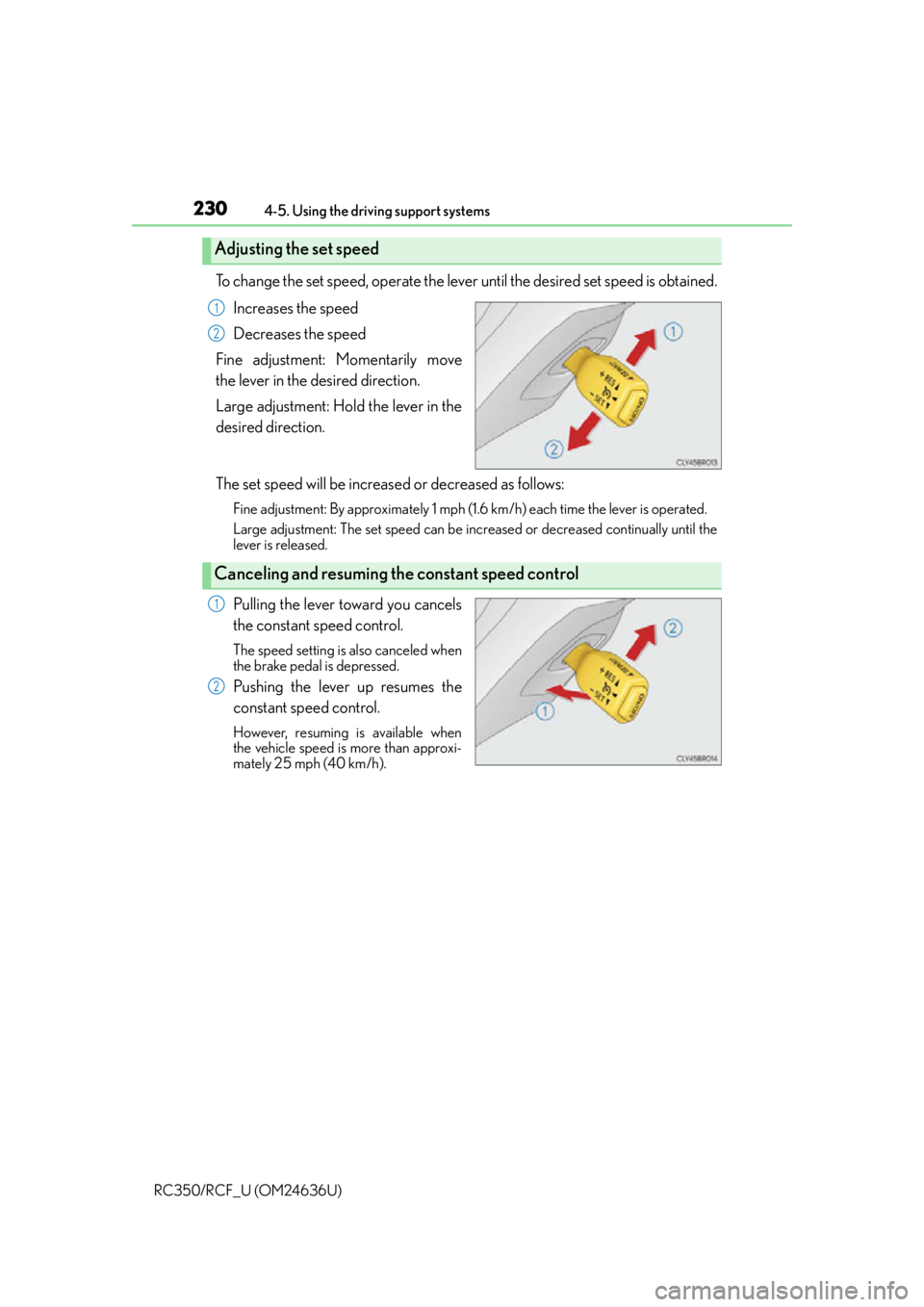
To change the set speed, operate the lever until the desired set speed is obtained. Increases the speed
Decreases the speed
Fine adjustment: Momentarily move
the lever in the desired direction.
Large adjustment: Hold the lever in the
desired direction.
The set speed will be increase d or decreased as follows:
Fine adjustment: By approximately 1 mph (1.6 km/h) each time the lever is operated.
Large adjustment: The set speed can be incr eased or decreased continually until the
lever is released.
Pulling the lever toward you cancels
the constant speed control.
The speed setting is also canceled when
the brake pedal is depressed.
Pushing the lever up resumes the
constant speed control.
However, resuming is available when
the vehicle speed is more than approxi-
mately 25 mph (40 km/h).
Adjusting the set speed
1
2
Canceling and resuming the constant speed control
1
2
Page 234 of 684

2344-5. Using the driving support systems
RC350/RCF_U (OM24636U)
This mode employs a radar sensor to detect the presence of vehicles up to
approximately 400 ft. (120 m) ahead, determines the current vehicle-to-vehicle
following distance, and operates to main tain a suitable following distance from
the vehicle ahead.
Note that vehicle-to-vehicle distance will close in when traveling on long downhill
slopes.
Example of constant speed cruising
When there are no vehicles ahead
The vehicle travels at the speed set by the driver. The desired vehicle-to-vehicle dis-
tance can also be set by operating the vehicle-to-vehicle distance control.
Example of deceleration cruising
When a preceding vehicle driving slower than the set speed appears
When a vehicle is detected running ahead of you, the system automatically deceler-
ates your vehicle. When a greater reduction in vehicle speed is necessary, the system
applies the brakes (the stop lights will come on at this time). A warning tone warns you
when the system cannot decelera te sufficiently to prevent your vehicle from closing in
on the vehicle ahead.
Example of follow-up cruising
When following a preceding vehicle driving slower than the set speed
The system continues follow-up cruising wh ile adjusting for changes in the speed of
the vehicle ahead in order to maintain the vehicle-to-vehicle distance set by the driver.
Example of acceleration
When there are no longer any preceding vehicles driving slower than the set
speed
The system accelerates until the set speed is reached. The system then returns to con-
stant speed cruising.
Driving in vehicle-to-vehicle distance control mode
1
2
3
4
Page 238 of 684

2384-5. Using the driving support systems
RC350/RCF_U (OM24636U)
Pulling the lever toward you cancels
the speed control.
The speed setting is also canceled when
the brake pedal is depressed.
Pushing the lever up resumes the
speed control and returns vehicle
speed to the set speed.
Resuming is available when the vehicle
speed is more than approximately 25
mph (40 km/h).
When your vehicle is too close to a
vehicle ahead, and sufficient automatic
deceleration via the cruise control is
not possible, the display will flash and
the buzzer will sound to alert the driver.
An example of this would be if another
driver cuts in front of you while you are
following a vehicle. Depress the brake
pedal to ensure an appropriate vehicle-
to-vehicle distance.
■Warnings may not occur when
In the following instances, there is a po ssibility that the warnings will not occur:
●When the speed of the preceding vehicle matches or exceeds your vehicle
speed
●When the preceding vehicle is traveling at an extremely slow speed
●Immediately after the cruise control speed was set
●When depressing the accelerator pedal
Canceling and resuming the speed control
1
2
Approach warning (vehicle-to-vehicle distance control mode)
Page 242 of 684

2424-5. Using the driving support systems
RC350/RCF_U (OM24636U)
WA R N I N G
■Before using dynamic radar cruise control
Do not overly rely on vehicle-to-vehicle distance control mode.
Be aware of the set speed. If automatic deceleration/acceleration is not appropriate,
adjust the vehicle speed, as well as the distance between your vehicle and vehicles
ahead by applying the brakes, etc.
■Cautions regarding the driving assist systems
Observe the following precautions.
Failure to do so may cause an accident resulting in death or serious injury.
●Assisting the driver to measure following distance
The dynamic radar cruise control is only in tended to help the driver in determining
the following distance between the driver’s own vehicle and a designated vehicle
traveling ahead. It is not a mechanism that al lows careless or inattentive driving, and it
is not a system that can assist the driver in low-visibility conditions. It is still necessary
for driver to pay close attention to the vehicle’s surroundings.
●Assisting the driver to judge proper following distance
The dynamic radar cruise control determines whether the following distance
between the driver’s own vehicle and a designated vehicle traveling ahead is appro-
priate or not. It is not capable of making an y other type of judgement. Therefore, it is
absolutely necessary for the driver to remain vigilant and to determine whether or not
there is a possibility of danger in any given situation.
●Assisting the driver to operate the vehicle
The dynamic radar cruise control has no capa bility to prevent or avoid a collision with
a vehicle traveling ahead. Therefore, if there is ever any danger, the driver must take
immediate and direct control of the vehicl e and act appropriately in order to ensure
the safety of all involved.
■To avoid inadvertent dynamic radar cruise control activation
Switch the dynamic radar cruise control off using the “ON/OFF” button when not in
use.
Page 244 of 684

2444-5. Using the driving support systems
RC350/RCF_U (OM24636U)
WA R N I N G
■When the sensor may not be correctly detecting the vehicle ahead
In the case of the following and depending on the conditions, operate the brake pedal
when deceleration of the system is insuff icient or operate the accelerator pedal when
acceleration is required.
As the sensor may not be able to correctly detect these types of vehicles, the approach
warning ( P. 238) will not be activated, which may lead to an accident resulting in
death or serious injury.
●Vehicles with small rear ends (traile rs with no load on board, etc.)
●Vehicles that cut in suddenly
●Vehicles traveling at low speeds
●Vehicles that are not moving in the same lane