lock LEXUS RC F 2015 Manual Online
[x] Cancel search | Manufacturer: LEXUS, Model Year: 2015, Model line: RC F, Model: LEXUS RC F 2015Pages: 684, PDF Size: 9.31 MB
Page 488 of 684

4887-3. Do-it-yourself maintenance
RC350/RCF_U (OM24636U)
■Before recharging
When recharging, the battery produces hydrogen gas which is flammable and explosive.
Therefore, observe the following before recharging:
●If recharging with the battery installed on the vehicle, be sure to disconnect the ground
cable.
●Make sure the power switch on the charger is off when connecting and disconnecting
the charger cables to the battery.
■After recharging/reconnecting the battery
The engine may not start. Follow the proc edure below to initialize the system.
Shift the shift lever to P.
Open and close either door.
Restart the engine.
●Unlocking the doors using the smart access system with push-button start may not be
possible immediately after reconnecting the battery. If this happens, use the wireless
remote control or the mechanical key to lock/unlock the doors.
●Start the engine with the engine switch in ACCESSORY mode. The engine may not
start with the engine switch turned off. However, the engine will operate normally from
the second attempt.
●The engine switch mode is recorded by the vehicle. If the battery is disconnected and
reconnected, the vehicle will return the engi ne switch mode to the status it was in
before the battery was disconnected. Make su re to turn off the engine before discon-
necting the battery. Take extra care when connecting the battery if the engine switch
mode prior to the battery be ing disconnected is unknown.
If the system will not start even after mult iple attempts, contact your Lexus dealer.
1
2
3
Page 496 of 684

4967-3. Do-it-yourself maintenance
RC350/RCF_U (OM24636U)
■Situations in which the tire pressure warning system may not operate properly
●In the following cases, the tire pressure warning system may not operate properly.
• If non-genuine Lexus wheels are used.
• A tire has been replaced with a tire that is not an OE (Original Equipment) tire.
• A tire has been replaced with a tire that is not of the specified size.
• Tire chains etc. are equipped.
• Lock nuts are equipped.
• An auxiliary-supported run-flat tire is equipped.
• If a window tint that affects the radio wave signals is installed.
• If there is a lot of snow or ice on the vehicle, particularly around the wheels or wheel housings.
• If the tire inflation pressure is extremely higher than the specified level.
• If tires not equipped with tire pressure warning valves and transmitters are used.
• If the ID code on the tire pressure warning valves and transmitters is not registered in the tire pressure warning computer.
●Performance may be affected in the following situations.
• Near a TV tower, electric power plant, gas station, radio station, large display, air-
port or other facility th at generates strong radio waves or electrical noise
• When carrying a portable radio, cellular phone, cordless phone or other wireless
communication device
If tire position information is not correctl y displayed due to the radio wave conditions,
the display may be corrected by driving and changing the radio wave conditions.
●When the vehicle is parked, the time taken for the warning to start or go off could be
extended.
●When tire inflation pressure declines rapidly for example when a tire has burst, the
warning may not function.
■The initialization operation
●Make sure to carry out initialization af ter adjusting the tire inflation pressure.
Also, make sure the tires are cold before carry ing out initialization or tire inflation pres-
sure adjustment.
●If you have accidentally turned the engine swit ch off during initialization, it is not neces-
sary to press the reset switch again as init ialization will restart automatically when the
engine switch has been turned to IG NITION ON mode for the next time.
●If you accidentally press the reset switch when initialization is not necessary, adjust the
tire inflation pressure to the specified level when the tires are co ld, and conduct initial-
ization again.
■When initialization of the tire pressure warning system has failed
Initialization can be completed in a few minutes. However, in the following cases, the set-
tings have not been recorded and the system will not operate properly. If repeated
attempts to record tire inflation pressure settings are unsuccessful, have the vehicle
inspected by your Lexus dealer.
●When operating the tire pressure warning reset switch, the tire pressure warning light
does not blink 3 times.
●After carrying out the initialization procedure, the tire pressure warning light blinks for 1
minute then stays on after driving for 20 minutes.
Page 514 of 684
5147-3. Do-it-yourself maintenance
RC350/RCF_U (OM24636U)
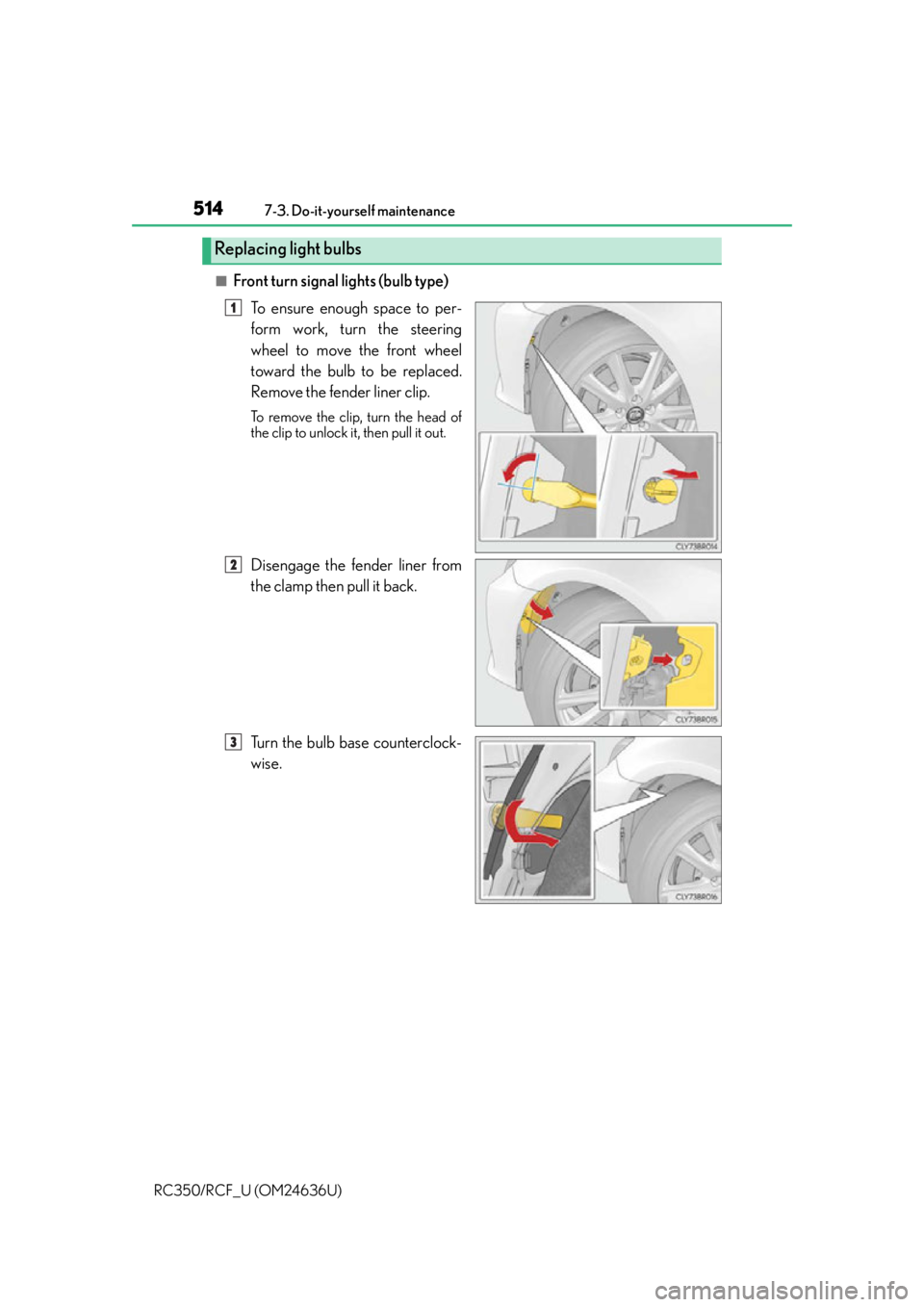
■Front turn signal lights (bulb type) To ensure enough space to per-
form work, turn the steering
wheel to move the front wheel
toward the bulb to be replaced.
Remove the fender liner clip.
To remove the clip, turn the head of
the clip to unlock it, then pull it out.
Disengage the fender liner from
the clamp then pull it back.
Turn the bulb base counterclock-
wise.
Replacing light bulbs
1
2
3
Page 515 of 684
5157-3. Do-it-yourself maintenance
7
Maintenance and care
RC350/RCF_U (OM24636U)
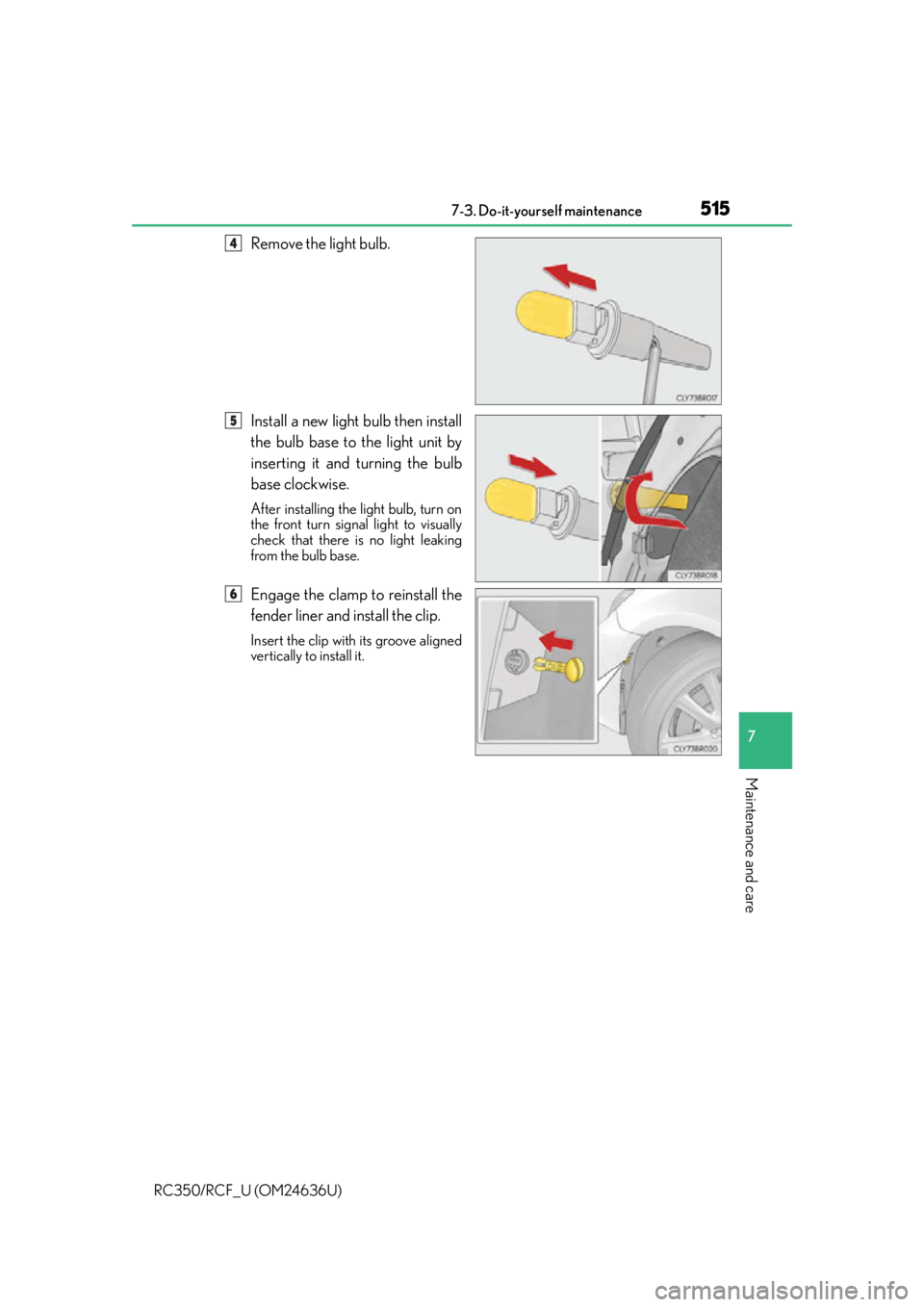
Remove the light bulb.
Install a new light bulb then install
the bulb base to the light unit by
inserting it and turning the bulb
base clockwise.
After installing the light bulb, turn on
the front turn signal light to visually
check that there is no light leaking
from the bulb base.
Engage the clamp to reinstall the
fender liner and install the clip.
Insert the clip with its groove aligned
vertically to install it.
4
5
6
Page 516 of 684
5167-3. Do-it-yourself maintenance
RC350/RCF_U (OM24636U)
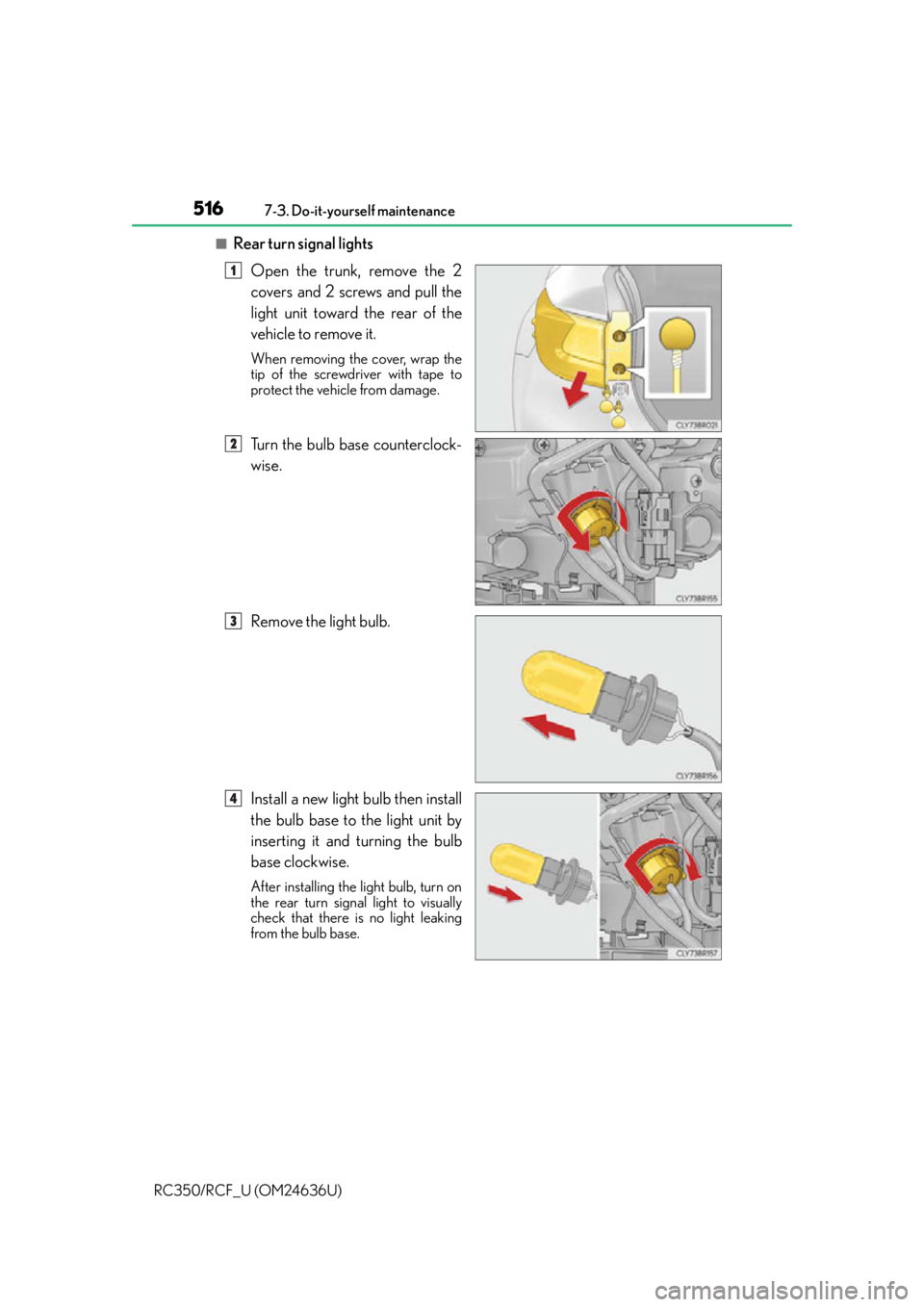
■Rear turn signal lights Open the trunk, remove the 2
covers and 2 screws and pull the
light unit toward the rear of the
vehicle to remove it.
When removing the cover, wrap the
tip of the screwdriver with tape to
protect the vehicle from damage.
Turn the bulb base counterclock-
wise.
Remove the light bulb.
Install a new light bulb then install
the bulb base to the light unit by
inserting it and turning the bulb
base clockwise.
After installing the light bulb, turn on
the rear turn signal light to visually
check that there is no light leaking
from the bulb base.
1
2
3
4
Page 518 of 684
5187-3. Do-it-yourself maintenance
RC350/RCF_U (OM24636U)
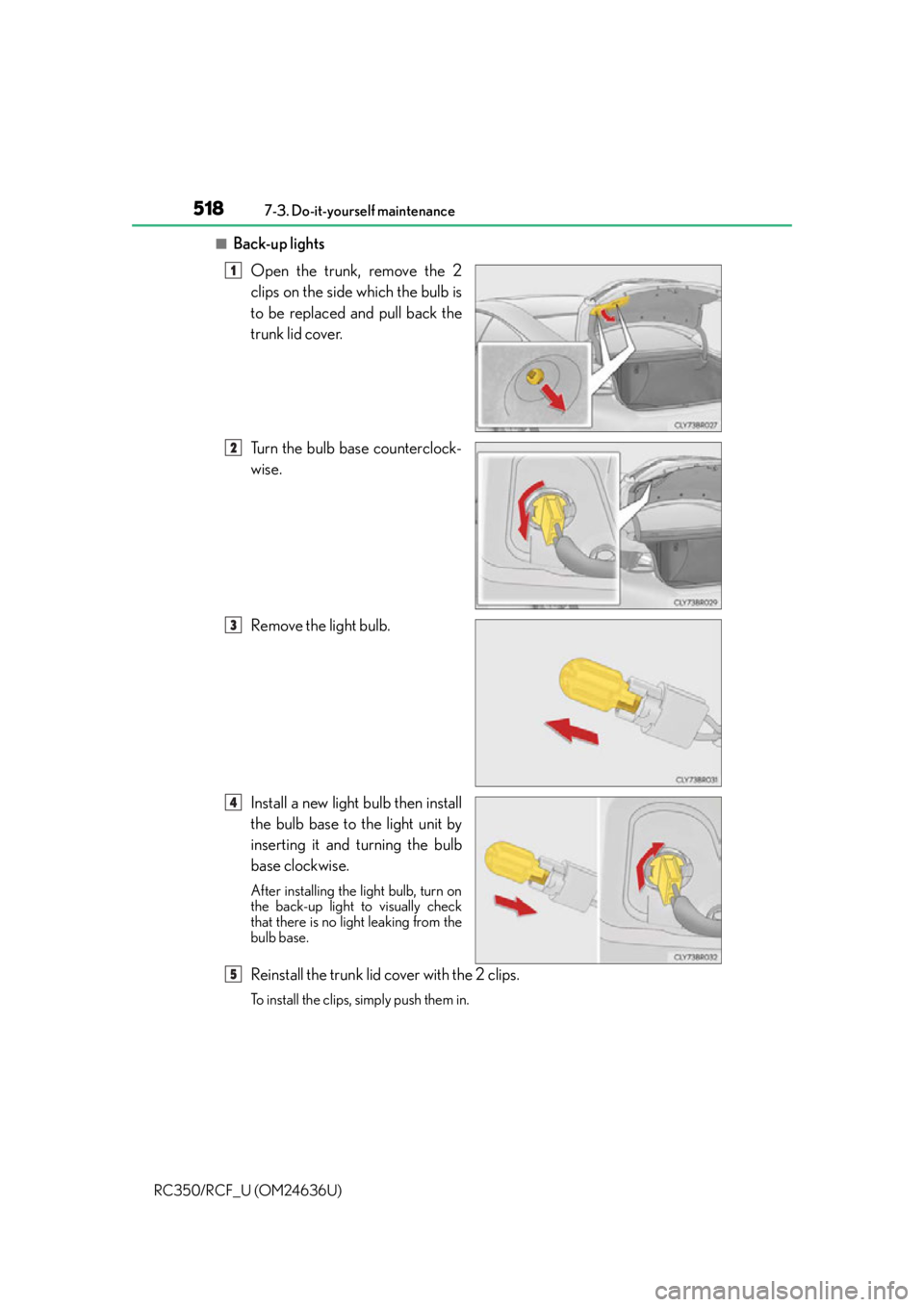
■Back-up lights Open the trunk, remove the 2
clips on the side which the bulb is
to be replaced and pull back the
trunk lid cover.
Turn the bulb base counterclock-
wise.
Remove the light bulb.
Install a new light bulb then install
the bulb base to the light unit by
inserting it and turning the bulb
base clockwise.
After installing the light bulb, turn on
the back-up light to visually check
that there is no li ght leaking from the
bulb base.
Reinstall the trunk lid cover with the 2 clips.
To install the clips, simply push them in.
1
2
3
4
5
Page 520 of 684

5207-3. Do-it-yourself maintenance
RC350/RCF_U (OM24636U)
WA R N I N G
■Replacing light bulbs
●Turn off the lights. Do not attempt to replace the bulb immediately after turning off the
lights.
The bulbs become very hot and may cause burns.
●Do not touch the glass portion of the light bulb with bare hands. When it is unavoid-
able to hold the glass portion, use and ho ld with a clean dry cloth to avoid getting
moisture and oils on the bulb.
Also, if the bulb is scratched or dropped, it may blow out or crack.
●Fully install light bulbs and any parts used to secure them. Failure to do so may result
in heat damage, fire, or water entering the headlight unit. This may damage the head-
lights or cause condensation to build up on the lens.
■To prevent damage or fire
●Make sure bulbs are fully seated and locked.
●Check the wattage of the bulb before installin g to prevent heat damage.
Page 530 of 684
5308-2. Steps to take in an emergency
RC350/RCF_U (OM24636U)
WA R N I N G
■While towing
●When towing using a cables or chains, avoid sudden starts, etc. which place excessive
stress on the towing eyelets, cables or chains. The towing eyelets, cables or chains
may become damaged, broken debris ma y hit people and cause serious damage.
●Do not turn the engine switch off.
There is a possibility that the steering wheel is locked and cannot be operated.
■Installing towing eyelet to the vehicle
Make sure that towing eyelet is installed securely.
If not securely installed, towing ey elet may come loose during towing.
NOTICE
■To prevent damage to the vehicle when towing using a wheel-lift type truck (2WD
models)
●Do not tow the vehicle from the rear when the engine switch is off. The steering lock
mechanism is not strong enough to hold the front wheels straight.
●When raising the vehicle from the rear, en sure adequate ground clearance for towing
at the opposite end of the raised vehicle. Without adequate clearance, the vehicle
could be damaged while being towed from the rear.
■To prevent damage to the vehicle when towing using a wheel-lift type truck (AWD
models)
When raising the vehicle, ensure adequate ground clearance for towing at the oppo-
site end of the raised vehicle. Without adequate clearance, the vehicle could be dam-
aged while being towed.
■To prevent body damage when to wing with a sling-type truck
Do not tow with a sling-type truck, either from the front or rear.
■To prevent damage to the drivetrain, susp ension and related parts when performing
emergency towing
When securing a cable or chai n to the vehicle, do not wrap the cable or chain around
drivetrain or suspension co mponents and related parts.
Page 555 of 684

5558-2. Steps to take in an emergency
8
When trouble arises
RC350/RCF_U (OM24636U)
InteriorbuzzerExteriorbuzzerWa r n i n g m e s s a g eDetails/Actions
Con-
tinuous The driver’s door was opened when
the shift lever was not in P and the
engine switch was not turned off.
Shift the shift lever to P.
Con-
tinuousCon-
tinuous
The driver’s door was opened and
closed while the electronic key was
not in the vehicle, the shift lever was
not in P and the engine switch was
not turned off.
Shift the shift lever to P.
Bring the electronic key back
into the vehicle.
OnceCon-
tinuous
An attempt was made to exit the
vehicle with the electronic key and
lock the doors without first turning
the engine switch off when the shift
lever was in P.
Turn the engine switch off and
lock the doors again.
(Flashes)
(Displayed alternately)
(Flashes)
(Displayed alternately)
(Flashes)
Page 557 of 684
5578-2. Steps to take in an emergency
8
When trouble arises
RC350/RCF_U (OM24636U)
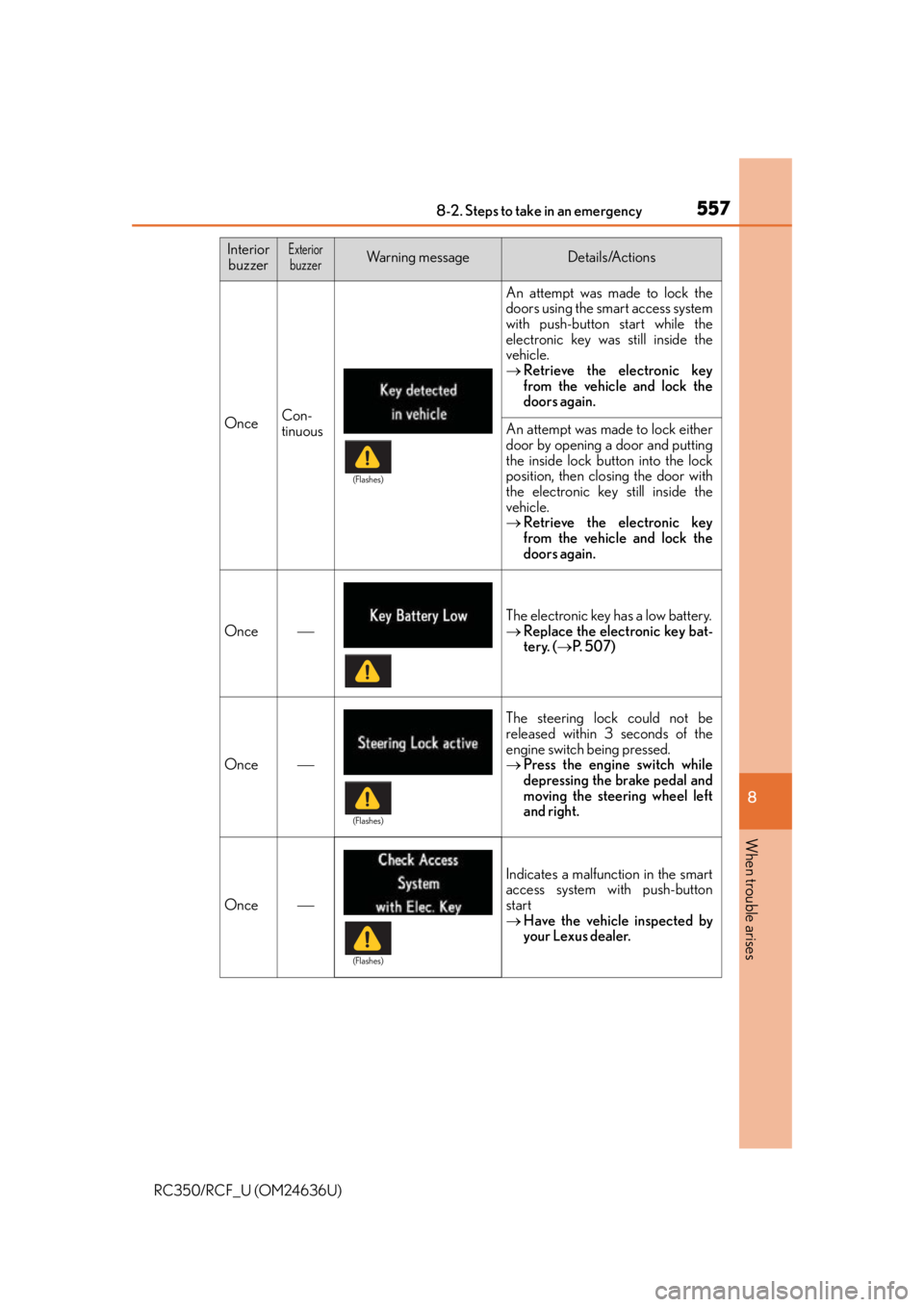
OnceCon-
tinuous
An attempt was made to lock the
doors using the smart access system
with push-button start while the
electronic key was still inside the
vehicle.
Retrieve the electronic key
from the vehicle and lock the
doors again.
An attempt was made to lock either
door by opening a door and putting
the inside lock button into the lock
position, then closing the door with
the electronic key still inside the
vehicle.
Retrieve the electronic key
from the vehicle and lock the
doors again.
Once
The electronic key has a low battery.
Replace the electronic key bat-
tery. ( P. 5 0 7 )
Once
The steering lock could not be
released within 3 seconds of the
engine switch being pressed.
Press the engine switch while
depressing the brake pedal and
moving the steering wheel left
and right.
Once
Indicates a malfunction in the smart
access system with push-button
start
Have the vehicle inspected by
your Lexus dealer.
Interior
buzzerExteriorbuzzerWa r n i n g m e s s a g eDetails/Actions
(Flashes)
(Flashes)
(Flashes)