light LEXUS RC F 2017 Owners Manual
[x] Cancel search | Manufacturer: LEXUS, Model Year: 2017, Model line: RC F, Model: LEXUS RC F 2017Pages: 724, PDF Size: 15.76 MB
Page 316 of 724

3164-5. Using the driving support systems
WARNING
■Handling the radar sensor
Blind Spot Monitor sensors are installed behind the left and right sides of the rear
bumper respectively. Observe the following to ensure the Blind Spot Monitor can
function correctly.
●Do not subject a sensor or its surrounding area on the rear bumper to a strong
impact.
If a sensor is moved even slightly off po sition, the system may malfunction and vehi-
cles may not be detected correctly.
In the following situations , have your vehicle inspected by your Lexus dealer.
• A sensor or its surrounding area is subject to a strong impact.
• If the surrounding area of a sensor is sc ratched or dented, or part of them has
become disconnected.
●Do not disassemble the sensor.
●Do not attach stickers to the sensor or surrounding area on the rear bumper.
●Do not modify the sensor or surrounding area on the rear bumper.
●Do not paint the rear bumper any color other than an official Lexus color.
●Keep the sensors and the surrounding areas
on the rear bumper clean at all times.
If a sensor or its surrounding area on the rear
bumper is dirty or covered with snow, the
Blind Spot Monitor may not operate and a
warning message (→P. 577, 578) will be dis-
played. In this situation, clear off the dirt or
snow and drive the vehicle with the operation
conditions of the BSM function ( →P. 319)
satisfied for approximately 10 minutes. If the
warning message does not disappear, have
the vehicle inspected by your Lexus dealer.
Page 332 of 724
3324-6. Driving tips
Perform the following according to the driving conditions:
●Do not try to forcibly open a window or move a wiper that is frozen. Pour
warm water over the frozen area to me lt the ice. Wipe away the water imme-
diately to prevent it from freezing.
●To ensure proper operation of the c limate control system fan, remove any
snow that has accumulated on the air inlet vents in front of the windshield.
●Check for and remove any excess ice or snow that may have accumulated on
the exterior lights, vehicle’s roof, chassi s, around the tires or on the brakes.
●Remove any snow or mud from the bottom of your shoes before getting in the
vehicle.
Accelerate the vehicle slowly, keep a sa fe distance between you and the vehicle
ahead, and drive at a reduced spee d suitable to road conditions.
●Park the vehicle and move the shift lever to P without setting the parking
brake. The parking brake may freeze up, preventing it from being released. If
the vehicle is parked without setting the parking brake, make sure to block the
wheels.
Failure to do so may be dangerous because it may cause the vehicle to move
unexpectedly, possibly leading to an accident.
●If the vehicle is parked without setting the parking brake, confirm that the shift
lever cannot be moved out of P
*.
*: The shift lever will be locked if it is atte mpted to be shifted from P to any other posi-
tion without depressing the brake pedal. If the shift lever can be shifted from P, there
may be a problem with the shift lock sy stem. Have the vehicle inspected by your
Lexus dealer immediately.
Before driving the vehicle
When driving the vehicle
When parking the vehicle
Page 343 of 724

3435-1. Basic Operations
5
Lexus Display Audio system
■When using the screen
●Under extremely cold conditions, the Lexus Display Audio controller may react slowly.
●If the screen is cold, the display may be dark, or the system may seem to be operating
slightly slower than normal.
●The screen may seem dark and hard to see when viewed through sunglasses. Change
your angle of viewing, adjust the display on the “Display” screen ( →P. 354) or remove
your sunglasses.
■Using cellular phones
Interference may be heard through the audi o system’s speakers if a cellular phone is
being used inside or close to the vehicle while the audio system is operating.
WARNING
■Using the Lexus Display Audio controller
Be careful when touching the Lexus Display Audio controller in extreme temperatures
as it may become very hot or cold due to the temperature inside the vehicle.
■Laser product
●CAUTION
USE OF CONTROL OR ADJUSTMENT OR PERFORMANCE OF PROCE-
DURES OTHER THAN THOSE SPECIFIED HEREIN MAY RESULT IN HAZARD-
OUS RADIATION EXPOSURE.
●CAUTION
THE USE OF OPTICAL INSTRUMENTS WITH THIS PRODUCT WILL
INCREASE EYE HAZARD.
NOTICE
■To prevent Lexus Display Au dio controller malfunction
●Do not allow the Lexus Display Audio controll er to come into contact with food, liq-
uid, stickers or lit cigarettes as doing so may cause it to change color, emit a strange
odor or stop functioning.
●Do not subject the Lexus Display Audio controller to excessive pressure or strong
impact as the controller may bend or break off.
■To prevent battery discharge
Do not leave the audio system on longer than necessary when the engine is off.
■To avoid damaging the audio system
Take care not to spill drinks or other fluids on the audio system.
Page 354 of 724

3545-2. Setup
Go to “Display”: “MENU” button → “Display”
Turn off screen.
Adjust screen quality.
Adjust screen quality of the Lexus
parking assist monitor camera.
Change to day mode.
This setting turns the screen off. To tu rn it on, press any button such as the
“AUDIO” button or “MENU” button.
If a screen off image has been se t, the set image will be displayed.
When the headlights are turned on, the screen dims.
However, the screen can be switched to day mode by selecting “Day Mode”.
The screen will stay in day mode when the headlights are turned on until “Day Mode”
is selected again.
Select “General” or “Camera” on the “D isplay” screen or select “Display” on
audio menu screen. ( →P. 360)
Adjust the display as desired by turning the controller clockwise (+) or coun-
terclockwise (-).
To select “Contrast”, “Brightness”, “Color” or “Tone”, move the controller to the left.
(“Color” and “Tone” are available when “Display” on the audio settings screen for
each audio source is selected.)
■Changing the sample image (when “General” is selected)
Move the controller to the right and select the desired sample image.
Display settings
Settings are available for adjusting the contrast and brightness of the screen.
The display can also be turned off.
Screen for display settings
1
2
3
4
Screen off
Day mode
Adjusting the screen quality
1
2
Page 375 of 724
3755-5. Playing an audio CD and MP3/WMA/AAC discs
5
Lexus Display Audio system
NOTICE
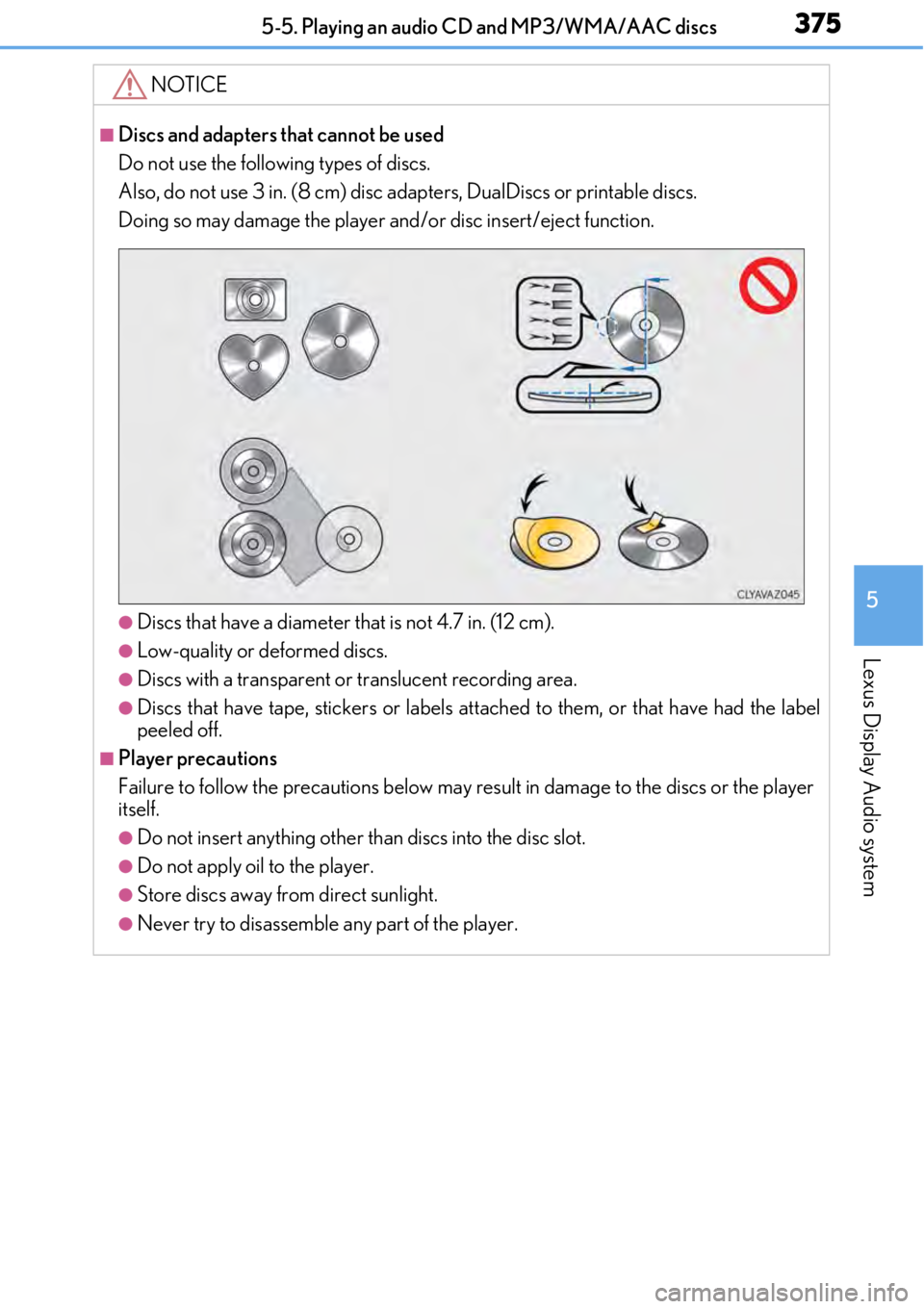
■Discs and adapters that cannot be used
Do not use the following types of discs.
Also, do not use 3 in. (8 cm) disc adapters, DualDiscs or printable discs.
Doing so may damage the player and/or disc insert/eject function.
●Discs that have a diameter that is not 4.7 in. (12 cm).
●Low-quality or deformed discs.
●Discs with a transparent or translucent recording area.
●Discs that have tape, stickers or labels attached to them, or that have had the label
peeled off.
■Player precautions
Failure to follow the precautions below may re sult in damage to the discs or the player
itself.
●Do not insert anything other than discs into the disc slot.
●Do not apply oil to the player.
●Store discs away from direct sunlight.
●Never try to disassemble any part of the player.
Page 418 of 724

4185-11. Bluetooth®
■When using the Bluetooth® audio system
●In the following situations, the system may not function.
• If the portable audio player is turned off
• If the portable audio player is not connected
• If the portable audio player’s battery is low
●There may be a delay if a cellular phone connection is made during Bluetooth® audio
play.
●Depending on the type of portable audio play er that is connected to the system, opera-
tion may differ slight ly and certain functions may not be available.
■When using the hands-free system
●The audio system is mu ted when making a call.
●If both parties speak at the same time, it may be difficult to hear.
●If the received call volume is over ly loud, an echo may be heard.
If the Bluetooth® phone is too close to the system, quality of the sound may deteriorate
and connection status may deteriorate.
●In the following situations, it may be difficult to hear the other party:
• When driving on unpaved roads
• When driving at high speeds
• If a window is open
• If the air conditioning is blow ing directly on the microphone
• If there is interference from the network of the cellular phone
●Depending on the type phone, certain functions may not be available.
■Conditions under which the system will not operate
●If using a cellular phone that does not support Bluetooth®
●If the cellular phone is turned off
●If you are outside of cellular phone service coverage
●If the cellular phone is not connected
●If the cellular phone’s battery is low
●When outgoing calls are controlled, due to heavy traffic on phone lines, etc.
●When the cellular phone itself cannot be used
●When transferring phonebook da ta from the cellular phone
Bluetooth®
Page 433 of 724

433
Interior features6
6-1. Using the air conditioning system
Automatic air conditioning system ..........................................434
Heated steering wheel/ seat heaters/
seat ventilators .........................445
6-2. Using the interior lights Interior lights list......................... 448• Interior lights ..........................449
• Personal lights ...................... 450
6-3. Using the storage features List of storage features.............. 451• Glove box ...............................452
• Console box ...........................452
• Cup holders............................453
Trunk features..............................454 6-4. Using the other interior
features
Other interior features ............455 • Sun visors ................................455
• Vanity mirrors .......................455
• Clock ........................................ 456
• Power outlet........................... 456
• Armrest .................................... 457
•Trunk storage extension .................................458
• Assist grips.............................. 459
• Coat hooks ............................. 459
Garage door opener ...............460
Compass .......................................468
LEXUS Enform Safety Connect ...................................... 472
LEXUS Enform Remote ......... 477
LEXUS Enform Service Connect ...................................... 478
Page 445 of 724
4456-1. Using the air conditioning system
6
Interior features
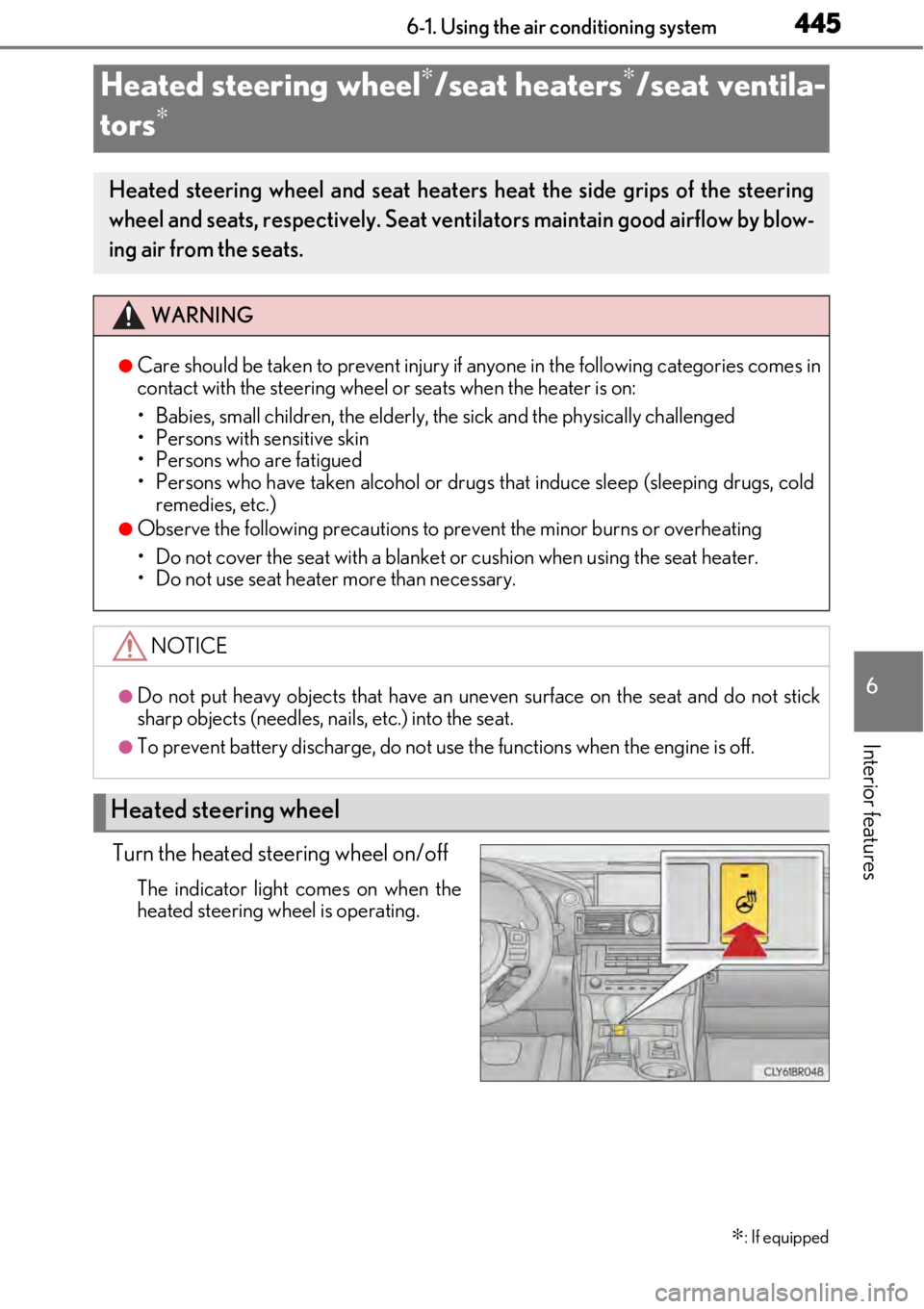
Turn the heated steering wheel on/off
The indicator light comes on when the
heated steering wheel is operating.
Heated steering wheel∗/seat heaters∗/seat ventila-
tors
∗
∗
: If equipped
Heated steering wheel and seat heaters heat the side grips of the steering
wheel and seats, respectively. Seat ventilators maintain good airflow by blow-
ing air from the seats.
WARNING
●Care should be taken to prevent injury if anyone in the following categories comes in
contact with the steering wheel or seats when the heater is on:
• Babies, small children, the elderly, the sick and the physically challenged
• Persons with sensitive skin
• Persons who are fatigued
• Persons who have taken alcohol or drugs that induce sleep (sleeping drugs, cold
remedies, etc.)
●Observe the following precautions to prevent the minor burns or overheating
• Do not cover the seat with a blanket or cushion when using the seat heater.
• Do not use seat heater more than necessary.
NOTICE
●Do not put heavy objects that have an unev en surface on the seat and do not stick
sharp objects (needles, nails, etc.) into the seat.
●To prevent battery discharge, do not use the functions when the engine is off.
Heated steering wheel
Page 446 of 724
4466-1. Using the air conditioning system
●The heated steering wheel can be used when the engine switch is in IGNITION ON
mode.
●The heated steering wheel will automatically turn off after about 30 minutes.
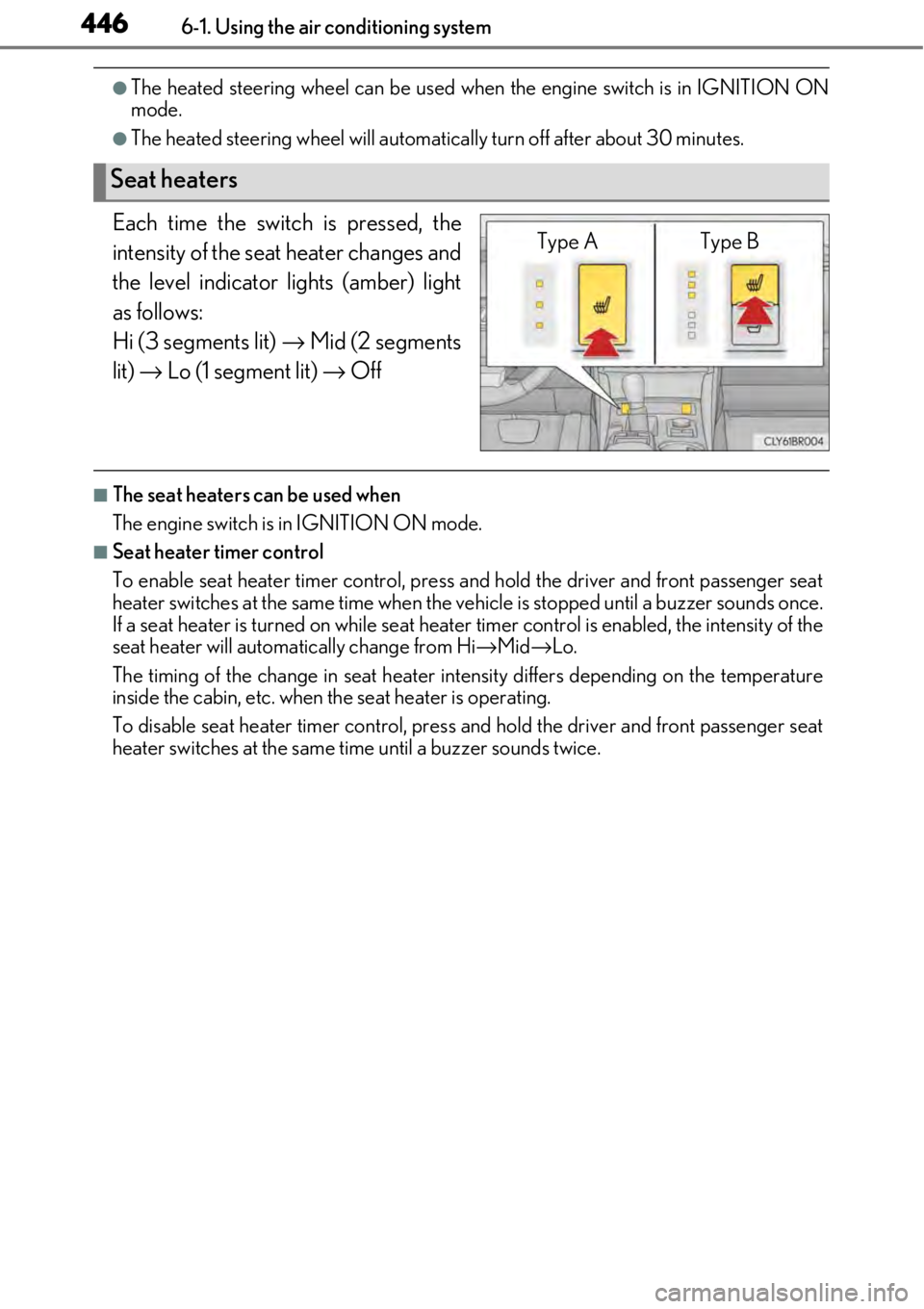
Each time the switch is pressed, the
intensity of the seat heater changes and
the level indicator lights (amber) light
as follows:
Hi (3 segments lit) → Mid (2 segments
lit) → Lo (1 segment lit) → Off
■The seat heaters can be used when
The engine switch is in IGNITION ON mode.
■Seat heater timer control
To enable seat heater timer control, press and hold the driver and front passenger seat
heater switches at the same time when the vehicle is stopped until a buzzer sounds once.
If a seat heater is turned on while seat heater timer control is enabled, the intensity of the
seat heater will automa tically change from Hi→Mid →Lo.
The timing of the change in seat heater in tensity differs depending on the temperature
inside the cabin, etc. when the seat heater is operating.
To disable seat heater timer control, press and hold the driver and front passenger seat
heater switches at the same time until a buzzer sounds twice.
Seat heaters
Type A Type B
Page 447 of 724
4476-1. Using the air conditioning system
6
Interior features
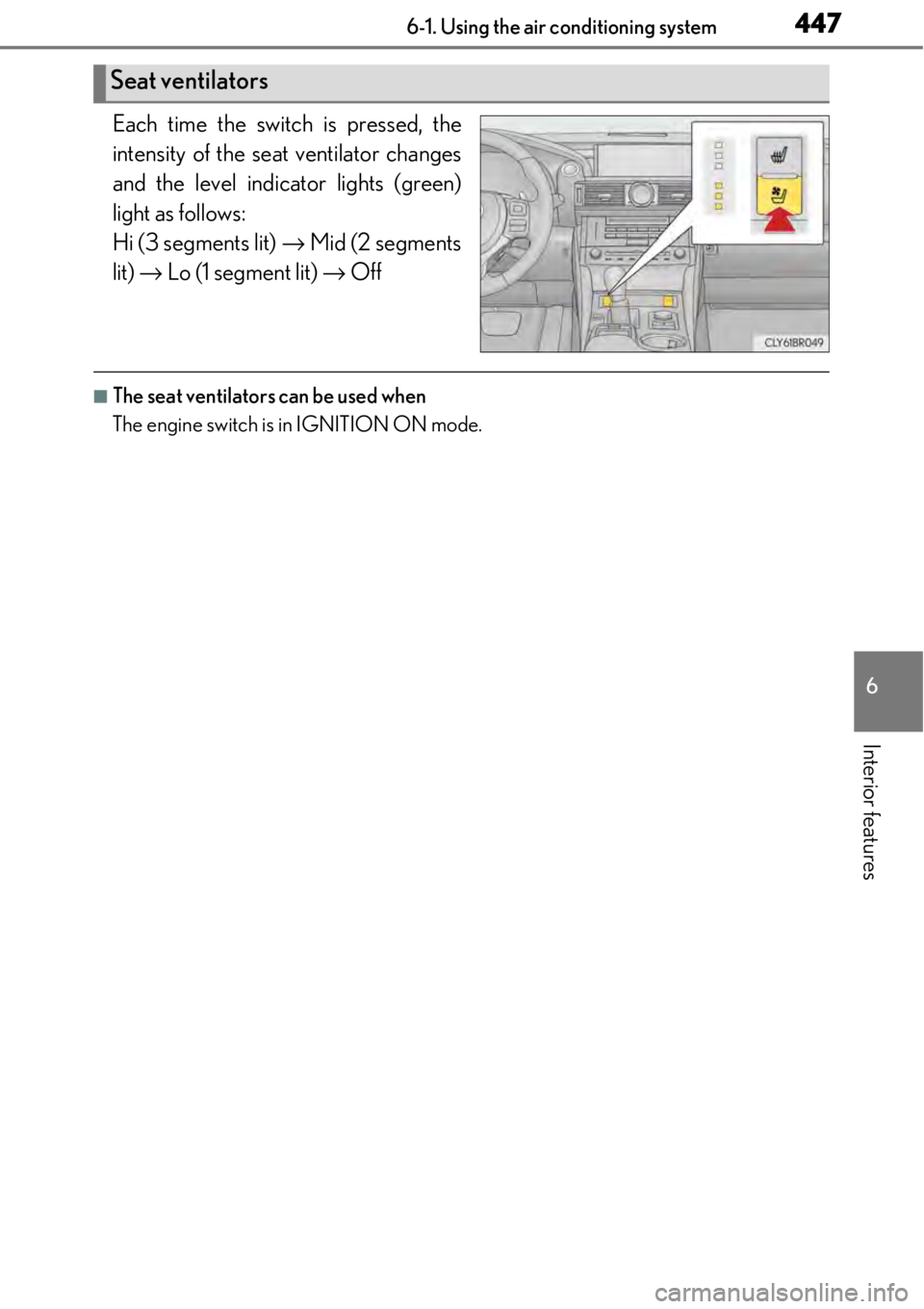
Each time the switch is pressed, the
intensity of the seat ventilator changes
and the level indicator lights (green)
light as follows:
Hi (3 segments lit) → Mid (2 segments
lit) → Lo (1 segment lit) → Off
■The seat ventilators can be used when
The engine switch is in IGNITION ON mode.
Seat ventilators