audio LEXUS RC F 2017 Owner's Manual
[x] Cancel search | Manufacturer: LEXUS, Model Year: 2017, Model line: RC F, Model: LEXUS RC F 2017Pages: 724, PDF Size: 15.76 MB
Page 271 of 724

2714-5. Using the driving support systems
4
Driving
When the sensors detect an obstacle, a graphic is shown on the multi-informa-
tion display and Lexus Display Audio screen depending on the position and dis-
tance to the obstacle.
■Multi-information display
■Lexus Display Audio screen
Intuitive parking assist
When the vehicle is moving forward.
A graphic is automatically displayed
when an obstacle is detected. The
screen can be set so that the graphic
is not displayed. ( →P. 275)
: Select to mute the buzzer
sounds.
Intuitive parking assist
Rear Cross Traffic Alert (if
equipped)
When the vehicle is moving back-
ward.
A simplified image is displayed on
the upper part of the screen when an
obstacle is detected.
Display
RC350/RC300/RC200tRC F
Front corner sensor detection
Front center sensor detection Rear corner sensor detection
Rear center sensor detection
1
2
3
4
1
2
3
Page 272 of 724

2724-5. Using the driving support systems
■Multi-information display and Lexus Display Audio screen
Sensors that detect an obstacle will illuminate continuously or blink.
RC350/RC300/RC200t
*1: Multi-information display
*2: Lexus Display Audio screen
Sensor detection display, obstacle distance
Display
Insert display
(Lexus Display Audio screen only)Approximate distance to obstacle
Corner sensor/
front center sensorRear center sensor
(continuous)(blinking slowly)
Front center sensor
only:
3.3 ft. (100 cm) to 1.6 ft.
(50 cm)
4.9 ft. (150 cm) to 2.0
ft. (60 cm)
(continuous)(blinking)
1.6 ft. (50 cm) to 1.3 ft.
(40 cm)2.0 ft. (60 cm) to 1.5 ft.
(45 cm)
(continuous)(blinking rapidly)
1.3 ft. (40 cm) to 1.0 ft.
(30 cm)1.5 ft. (45 cm) to 1.1 ft.
(35 cm)
(blinking*1 or
continuous
*2)
(continuous)
Less than 1.0 ft. (30 cm)Less than 1.1 ft. (35 cm)
Page 273 of 724

2734-5. Using the driving support systems
4
Driving
RC F
*1: Multi-information display
*2: Lexus Display Audio screen
Display
Insert display
(Lexus Display Audio screen only)Approximate distance to obstacle
Corner sensorRear center sensor
(continuous)(blinking slowly)
⎯4.9 ft. (150 cm) to 2.0
ft. (60 cm)
(continuous)(blinking)
Front corner sensor:
1.6 ft. (50 cm) to 1.3 ft.
(40 cm)
Rear corner sensor:
2.0 ft. (60 cm) to 1.5 ft.
(45 cm)
2.0 ft. (60 cm) to 1.5 ft.
(45 cm)
(continuous)(blinking rapidly)
Front corner sensor:
1.3 ft. (40 cm) to 1.0 ft.
(30 cm)
Rear corner sensor:
1.5 ft. (45 cm) to 1.0 ft.
(30 cm)
1.5 ft. (45 cm) to 1.1 ft.
(35 cm)
(blinking*1 or
continuous
*2)
(continuous)
Less than 1.0 ft. (30 cm)Less than 1.1 ft. (35 cm)
Page 275 of 724

2754-5. Using the driving support systems
4
Driving
You can change the warning beep volume and Lexus Display Audio screen
operating conditions.
Press the “MENU” button on the Lexus Display Audio controller. ( →P. 340)
Select “Setup” on the “Menu” screen.
Select “Vehicle” on the “Setup” screen.
Select “LEXUS Park Assist” on the “Vehicle Settings” screen.
Select the desired button.
The alert volume can be adjusted.
On or off can be selected for intuitive parking assist display.
Front center sensor display an d tone indication can be set.
Rear center sensor display and tone indication can be set.
Setting up intuitive parking assist
1
2
3
4
5
RC350/RC300/RC200tRC F
1
2
3
4
Page 278 of 724

2784-5. Using the driving support systems
WARNING
●The shape of an object may prevent the sensor from detecting it. Pay particular atten-
tion to the following:
• Wires, fences, ropes, etc.
• Cotton, snow and other materi als that absorb sound waves
• Sharply-angled objects
• Low objects
• Tall objects with upper sections projecting outwards in the direction of your vehi-
cle
• People, animals and other moving objects
• People wearing certain types of clothing
●The following situations may occur when using the Lexus parking assist-sensor.
• Depending on the shape of the object and other factors, the detection distance may be shortened, or detection may not be possible.
• Objects may not be detected if they are too close to a sensor.
• There will be a short delay between the detection of an object and display of the detection. Even at slow speeds, there is a possibility that the object will come
within a sensor’s detection area before the display is shown and a warning beep
sounds.
• Thin posts or objects lower than a sensor may not be detected when approached,
even if they have been detected once.
• It might be difficult to hear beeps due to the volume of the audio system or air flow noise of the air co nditioning system.
NOTICE
■When using intuitive parking assist
In the following situations, the system may not function correctly due to a sensor mal-
function etc. Have the vehicle checked by your Lexus dealer.
●The intuitive parking assist operation display flashes, and a beep sounds when no
obstacles are detected.
●If the area around a sensor co llides with something, or is subjected to strong impact.
●If the bumper or grille collides with something.
●If the display shows continuously without beeping, except when the switch has
been turned on.
●If a display error occurs , first check the sensor.
If the error occurs even when there is no ice, snow or mud on the sensor, it is likely that
the sensor is malfunctioning.
■Notes when washing the vehicle
Do not apply intensive bursts of water or steam to the sensor area.
Doing so may result in th e sensor malfunctioning.
Page 281 of 724
2814-5. Using the driving support systems
4
Driving
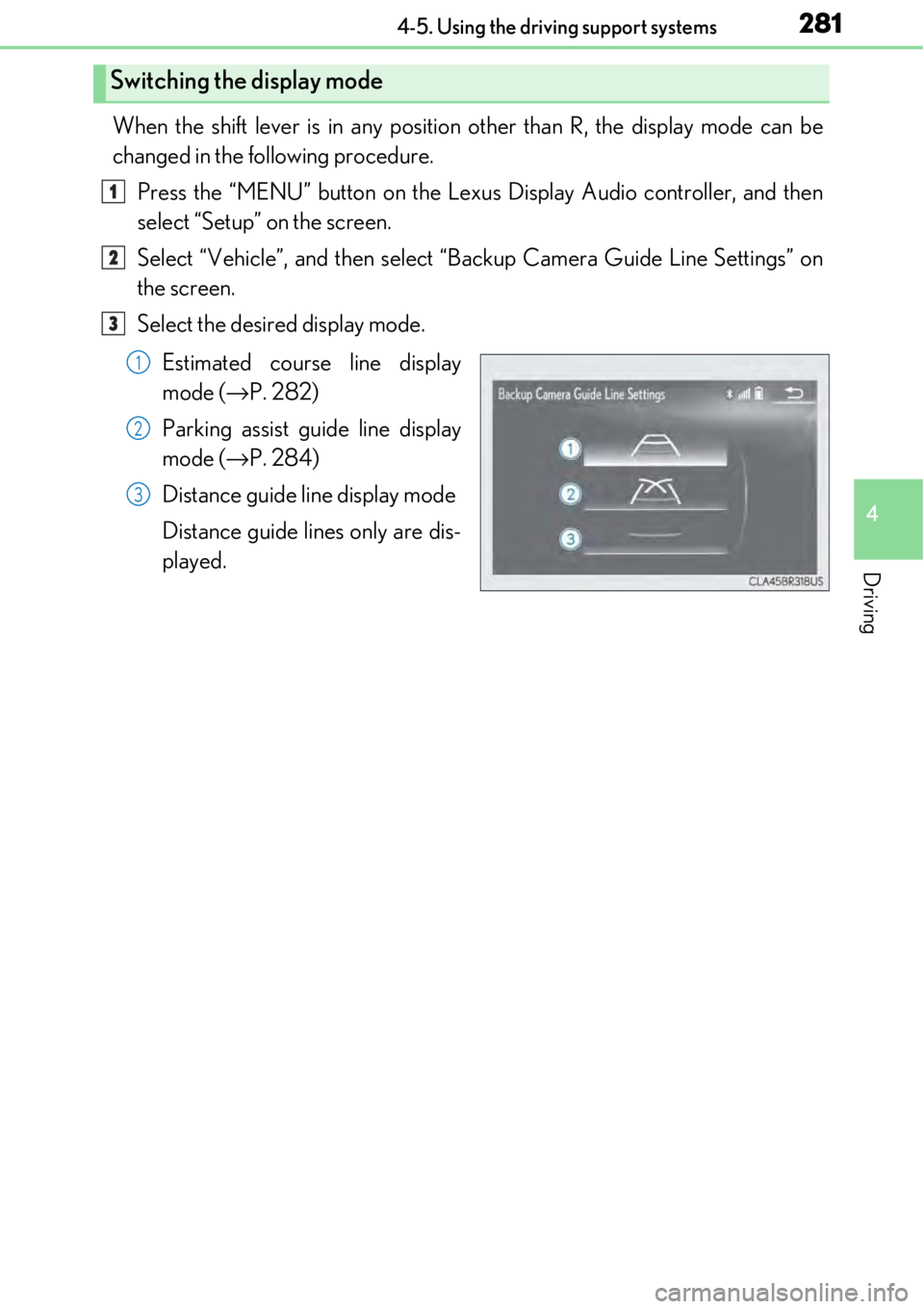
When the shift lever is in any position other than R, the display mode can be
changed in the following procedure.Press the “MENU” button on the Lexu s Display Audio controller, and then
select “Setup” on the screen.
Select “Vehicle”, and then select “Backup Camera Guide Line Settings” on
the screen.
Select the desired display mode.
Estimated course line display
mode ( →P. 282)
Parking assist guide line display
mode ( →P. 284)
Distance guide line display mode
Distance guide lines only are dis-
played.
Switching the display mode
1
2
3
1
2
3
Page 315 of 724

3154-5. Using the driving support systems
4
Driving
■Outside rear view mirror indicator visibility
In strong sunlight, the outside rear view mirror indicator may be difficult to see.
■Hearing the RCTA buzzer
The RCTA buzzer may be difficult to hear over loud noises, such as if the audio system
volume is high.
■When there is a malfunction in the Blind Spot Monitor
If a system malfunction is detected due to any of the following, a warning message will be
displayed: ( →P. 577, 578)
●A sensor is malfunctioning
●A sensor is dirty or covere d with snow or a sticker
●The outside temperature is extremely high or low
●Sensor voltage is abnormal
●A sensor is misaligned
■Certification for the Blind Spot Monitor
For vehicles sold in the U.S.A.
FCC ID : OAYSRR2A
This device complies with part 15 of the FC C Rules. Operation is subject to the following
two conditions:
(1) This device may not cause harmful interference, and
(2) this device must accept any interference received, including interference that may
cause undesired operation.
FCC Warning
Changes or modifications not expressly approved by the party responsible for compli-
ance could void the user's authority to operate the equipment.
For vehicles sold in Canada
Applicable law : Canada 310
This device complies with Industry Canada licence-exempt RSS standard(s). Operation
is subject to the following two conditions: (1) this device may not cause interference, and
(2) this device must accept any interference, including interference that may cause
undesired operation of the device.
Frequency bands : 24.05 - 24.25GHz
Output power : less than 20 milliwatts
Page 336 of 724

336
5-1. Basic OperationsLexus Display Audio system ..........................................338
Steering wheel audio switches....................................... 344
Mobile Assistant......................... 345
USB/AUX ports ........................ 347
5-2. Setup Setup menu .................................. 349
General settings .........................350
Voice settings ..............................353
Display settings ........................... 354
5-3. Using the audio system Selecting the audio source ..........................................355
Optimal use of the audio system .......................................... 356
Audio settings ............................. 357
Audio menu screen operation ....................................360
5-4. Using the radio Radio operation.......................... 363
5-5. Playing an audio CD and MP3/WMA/AAC discs
CD player operation ................ 369
Lexus Display Audio system
5
Page 337 of 724

337
Lexus DisplayAudio system
5
5-6. Using an external device
Listening to an iPod ................... 376
Using USB memory device.......................................... 380
Using the AUX port ................ 384
5-7. Connecting Bluetooth
®
Steps for using Bluetooth®
devices ........................................ 385
Registering a Bluetooth
®
device...........................................387
Selecting a Bluetooth
®
device.......................................... 388
Connecting a Bluetooth
®
audio player .............................. 389
Connecting a Bluetooth
®
phone .......................................... 390
Displaying a Bluetooth
®
device details ............................. 391
Detailed Bluetooth
®
settings.........................................392
5-8. Bluetooth
® Audio
Listening to Bluetooth
®
Audio........................................... 395 5-9. Bluetooth
® Phone
Using a Bluetooth
®
Phone ........................................... 397
Making a call ................................ 399
Receiving a call ........................... 402
Speaking on the phone............403
Using a Bluetooth
® phone
message ......................................405
Using the steering wheel switches....................................... 407
Bluetooth
® phone
settings ....................................... 408
5-10. Phonebook Contact settings .......................... 410
Messaging setting....................... 413
5-11. Bluetooth
®
What to do if... (Troubleshooting).....................414
Bluetooth
®.................................... 418
5-12. Other function “Information” screen................. 423
USB photo .................................... 425
Weather information................ 427
Voice command system ......... 428
Page 338 of 724

3385-1. Basic Operations
Eject a disc.
Select preset radio stations, or access a desired track or file.
Except radio and A/V mode: Pause or resume playing a track or file.
Radio and A/V mode: Turn mute on/off.
“TUNE•SCROLL” knob
Select a radio station band, track or file.
Disc slot
Display the media top screen.
Display the radio top screen.
“PWR•VOL” knob
Press to turn the audio system on/o ff, and turn to adjust the volume.
Lexus Display Audio system∗
∗
: If equipped
Use the following buttons to star t listening to the audio system.
Lexus Display Audio operation buttons
1
2
3
4
5
6
7
8