light LEXUS RC F 2017 Service Manual
[x] Cancel search | Manufacturer: LEXUS, Model Year: 2017, Model line: RC F, Model: LEXUS RC F 2017Pages: 724, PDF Size: 15.76 MB
Page 114 of 724

1142. Instrument cluster
■Language
Select to change the language on the display.
■Units
Select to change the unit of measure for fuel consumption.
■Maintenance system (if equipped)
Select to reset the maintenance data after the required maintenance is per-
formed. (
→ P. 489)
■Eco Driving Indicator Light
Select to activate/deactivate th e Eco Driving Indicator Light.
■ switch settings (except F SPORT models)
Displays a procedure to register a desired screen to .
You can register 1 screen as a shortcut, which can be displayed by pressing . (
→P. 111)
■Drive information 1/Drive information 2
Select to select up to 2 items that will be displayed on the “Drive Info 1” screen
and “Drive Info 2” screen respectively. (
→ P. 112)
■Pop-up display
Select to set the following pop-up disp lays, which may appear in some situa-
tions, on/off. • Route guidance display of the navigation system-linked system (if equipped)
• Incoming call display of the hands-free phone system
• Dynamic radar cruise control operation display (if equipped)
• Instrument panel bright ness adjustment display
• Main meter switch operation display (F SPORT models)
■Accent color (except F SPORT models)
Select to change the accent colors on the screen, such as the cursor color.
■Needle (F SPORT models)
Select to change the needle color for the tachometer.
Settings display
Page 126 of 724

1262. Instrument cluster
■Language
Select to change the language on the display.
■Units
Select to change the unit of measure for fuel consumption.
■Maintenance system (U.S.A. only)
Select to reset the maintenance data after the required maintenance is per-
formed. (
→ P. 489)
■Eco Driving Indicator Light
Select to activate/deactivate th e Eco Driving Indicator Light.
■ switch settings
Displays a procedure to register a desired screen to .
You can register 1 screen as a shortcut, which can be displayed by pressing . (→ P. 118)
■Drive information 1/Drive information 2
Select to select up to 2 items that will be displayed on the “Drive Info 1” screen
and “Drive Info 2” screen respectively.
( → P. 119)
■Pop-up display
Select to set the following pop-up disp lays, which may appear in some situa-
tions, on/off. • Route guidance display of the navigation system-linked system (if equipped)
• Incoming call display of the hands-free phone system
• Dynamic radar cruise control operation display (if equipped)
• Instrument panel bright ness adjustment display
• TVD control mode change display (if equipped)
• Drive mode change display
■Rev indicator
Select to set the rev indicator on/off.
When set to on, proceed to select the engine speed at which the rev indicator
will be displayed.
■Rev peak
Select to set the rev peak on/off.
Settings display
Page 137 of 724
1373-1. Key information
3
Operation of each component
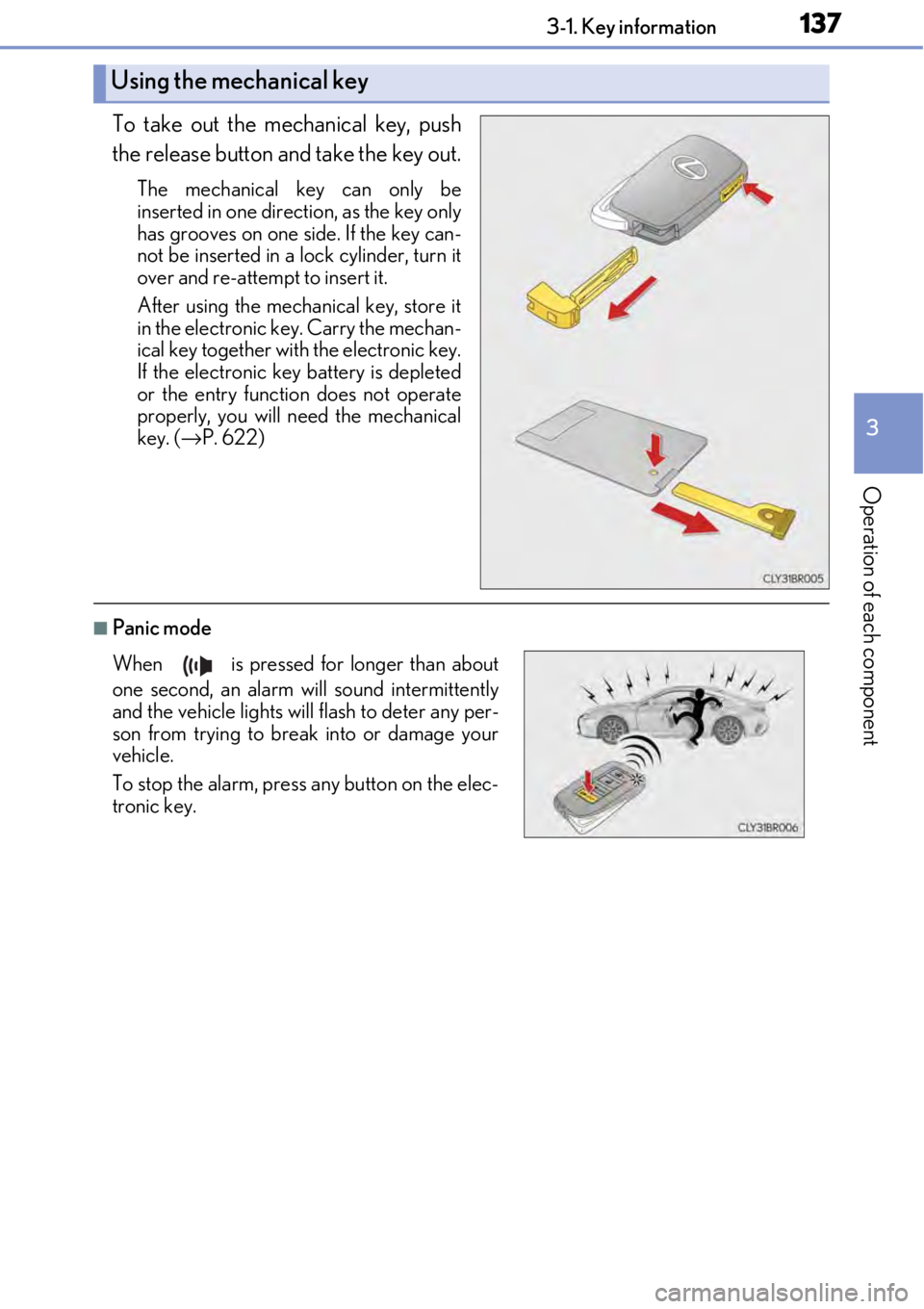
To take out the mechanical key, push
the release button and take the key out.
The mechanical key can only be
inserted in one direction, as the key only
has grooves on one side. If the key can-
not be inserted in a lock cylinder, turn it
over and re-attempt to insert it.
After using the mechanical key, store it
in the electronic key. Carry the mechan-
ical key together with the electronic key.
If the electronic key battery is depleted
or the entry function does not operate
properly, you will need the mechanical
key. ( →P. 622)
■Panic mode
Using the mechanical key
When is pressed for longer than about
one second, an alarm will sound intermittently
and the vehicle lights will flash to deter any per-
son from trying to break into or damage your
vehicle.
To stop the alarm, press any button on the elec-
tronic key.
Page 140 of 724

1403-1. Key information
NOTICE
■To prevent key damage
●Do not drop the keys, subject them to strong shocks or bend them.
●Do not expose the keys to high temp eratures for long periods of time.
●Do not get the keys wet or wash them in an ultrasonic washer etc.
●Do not attach metallic or magnetic materials to the keys or place the keys close to
such materials.
●Do not disassemble the keys.
●Do not attach a sticker or anything else to the surface of the electronic key.
●Do not place the keys near objects that pr oduce magnetic fields, such as TVs, audio
systems and induction cookers.
■Carrying the electronic key on your person
Carry the electronic key 3.9 in. (10 cm) or mo re away from electric appliances that are
turned on. Radio waves emitted from electric appliances within 3.9 in. (10 cm) of the
electronic key may interfere with the key, causing the key to not function properly.
■In case of a smart access system with push-button start malfunction or other key-
related problems
Take your vehicle with all the electronic keys provided with your vehicle, including the
card key, to your Lexus dealer.
■When an electronic key is lost
If the electronic key remains lost, the risk of vehicle th eft increases significantly. Visit
your Lexus dealer immediately with all rema ining electronic keys and the card key that
were provided with your vehicle.
■Handling the card key (if equipped)
●Do not apply excess force when inserting th e mechanical key into the card key. Doing
so may damage the card key.
●If the battery or card key terminals get wet, the battery may corrode.
If the key is dropped into water, or if drin king water etc. is spilled on the key, immedi-
ately remove the battery cover and wipe th e battery and terminals. (To remove the
battery cover, lightly grasp and pull it.) If the battery is corroded, have your Lexus
dealer replace the battery.
●Do not crush the battery cover or use a screwdriver to remove the battery cover.
Forcibly removing the battery cover may bend or damage the key.
●If the battery cover is frequently removed, the battery cover may become loose.
●When installing the battery, make sure to check the direction of the battery.
Installing the battery in the wrong directio n may cause the battery to deplete rapidly.
●The surface of the card key may be damaged, or its coating may peel off in the follow-
ing situations:
• The card key is carried together with hard objects, such as coins and keys.
• The card key is scraped with a sharp object, such as the tip of a mechanical pencil.
• The surface of the card key is wiped with thinner or benzene.
Page 142 of 724

1423-2. Opening, closing and locking the doors and trunk
■Operation signals
A buzzer sounds and the emergency flashers flash to indicate that the doors have been
locked/unlocked. (Locked: once; Unlocked: twice)
A buzzer sounds to indicate that th e windows and moon roof are operating.
■Security feature
If a door is not opened within approximately 60 seconds after the vehicle is unlocked, the
security feature automatically locks the vehicle again.
■Welcome light illumination control
The side marker, parking, tail and license plate lights automati cally turn on at night when
the doors are unlocked using the entry function or wireless remote control if the light
switch is in the “AUTO” position.
■When the door cannot be locked by the lock sensor on the surface of the door handle
■Door lock buzzer
If an attempt to lock the doors is made when a door is not fully closed, a buzzer sounds
continuously for 5 seconds. Fully close the d oor to stop the buzzer, and lock the vehicle
once more.
■Setting the alarm
Locking the doors will set the alarm system. ( →P. 83)
■If the smart access system with push-button start or the wireless remote control does
not operate properly
Use the mechanical key and/or inside lock buttons to lock and unlock the doors.
( → P. 622)
Replace the key battery with a new one if it is depleted. ( →P. 538)
Use your palm to touch the lock sensor.
Page 145 of 724
1453-2. Opening, closing and locking the doors and trunk
3
Operation of each component
■Side window open/close function linked to door operation
When a door is opened, its window opens slightly. When a door is closed, its window
closes completely.
■Switching the door unlock function
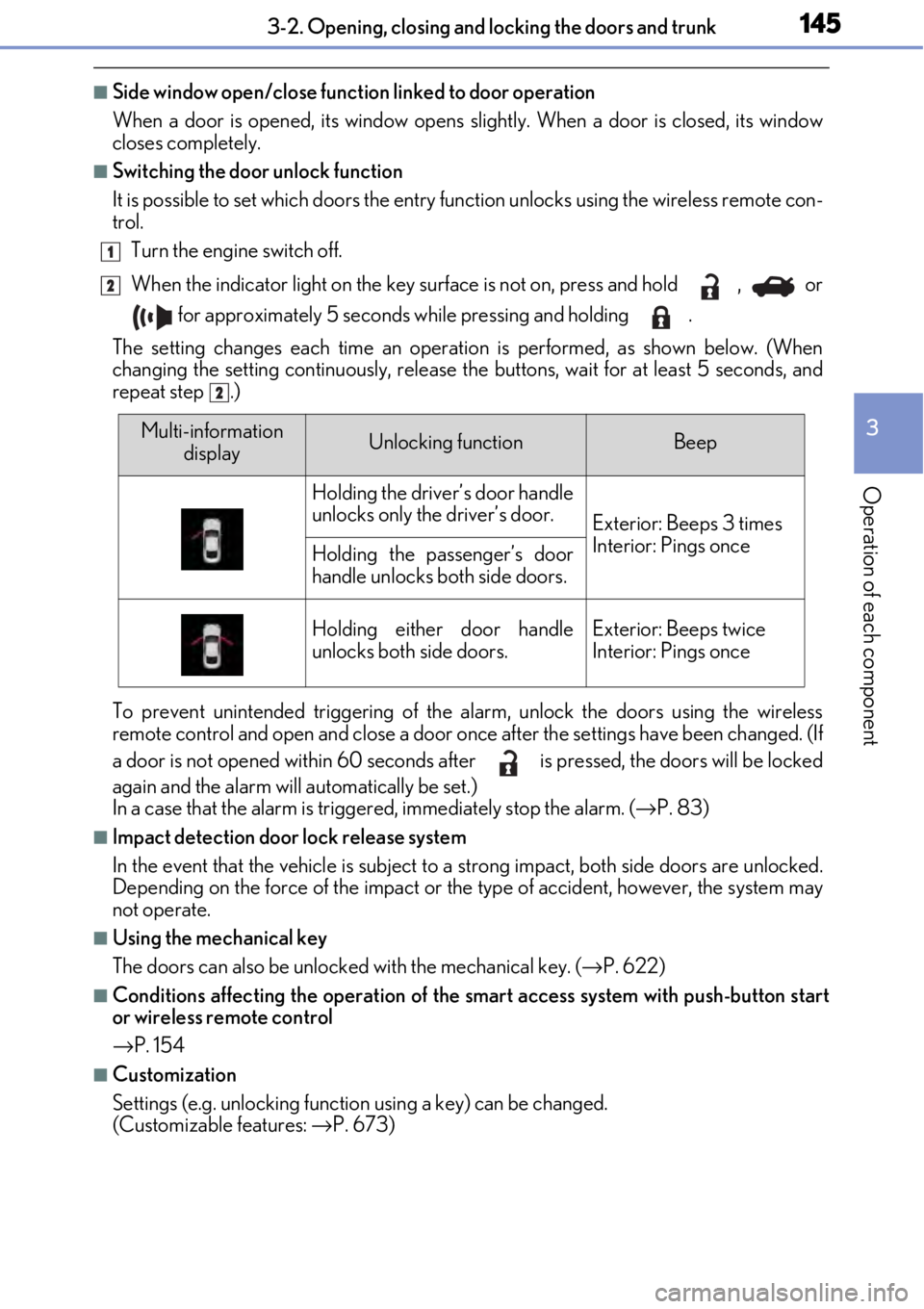
It is possible to set which doors the entry function unlock s using the wireless remote con-
trol.
Turn the engine switch off.
When the indicator light on the key surface is not on, press and hold , or
for approximately 5 seconds while pressing and holding .
The setting changes each time an operation is performed, as shown below. (When
changing the setting continuously, release the buttons, wait for at least 5 seconds, and
repeat step .)
To prevent unintended triggering of the alarm, unlock the doors using the wireless
remote control and open and close a door once after the settings have been changed. (If
a door is not opened within 60 seconds af ter is pressed, the doors will be locked
again and the alarm will automatically be set.)
In a case that the alarm is triggered, immediately stop the alarm. ( →P. 83)
■Impact detection door lock release system
In the event that the vehicle is subject to a strong impact, both side doors are unlocked.
Depending on the force of the impact or the type of accident, however, the system may
not operate.
■Using the mechanical key
The doors can also be unlocked with the mechanical key. ( →P. 622)
■Conditions affecting the oper ation of the smart access system with push-button start
or wireless remote control
→ P. 154
■Customization
Settings (e.g. unlocking function using a key) can be changed.
(Customizable features: →P. 673)
1
2
2
Multi-information
displayUnlocking functionBeep
Holding the driver’s door handle
unlocks only the driver’s door.
Exterior: Beeps 3 times
Interior: Pings once
Holding the passenger’s door
handle unlocks both side doors.
Holding either door handle
unlocks both side doors.Exterior: Beeps twice
Interior: Pings once
Page 149 of 724

1493-2. Opening, closing and locking the doors and trunk
3
Operation of each component
■Trunk light
●The trunk light turns on when the trunk is opened.
●If the trunk light is left on when the engine switch is turned off, the light will go off auto-
matically after 20 minutes.
■Function to prevent the trunk being lo cked with the electronic key inside
●When both side doors are locked, closing the trunk lid with the electronic key left inside
the trunk will sound an alarm.
In this case, the trunk lid can be opened by pressing the trunk release button on the
trunk lid.
●If the spare electronic key is put in the trunk with both side doors locked, the key con-
finement prevention function is activated so the trunk can be opened. In order to pre-
vent theft, take all el ectronic keys with you when leaving the vehicle.
●If the electronic key is put in the trunk with both side doors locked, the key may not be
detected depending on the location of the key and the surrounding radio wave condi-
tions. In this case, the key confinement prevention function cannot be activated, causing
the doors to lock when the trunk is closed. Make sure to check where the key is before
closing the trunk.
●The key confinement prevention function cannot be activated if either door is unlocked.
In this case, open the trunk using the trunk opener.
■Internal trunk release lever
■Using the mechanical key
The trunk can be also opened using the mechanical key. ( →P. 623)
■If the smart access system with push-button start or the wireless remote control does
not operate properly
Use the mechanical key to unlock the trunk. (→ P. 623)
Replace the key battery with a new one if it is depleted. ( →P. 538)
■When leaving a key to the vehicle with a parking attendant
→P. 138
■Customization
The trunk unlocking operation can be changed. (Customizable features: → P. 673)
The trunk lid can be open
ed by pulling the glow-
in-the-dark lever located on the inside of the
trunk lid upward.
The lever will continue to glow for some time
after the trunk lid is closed.
Page 151 of 724

1513-2. Opening, closing and locking the doors and trunk
3
Operation of each component
WARNING
■Using the trunk
Observe the following precautions.
Failure to do so may cause parts of the body to be caught, resulting in serious injury.
●Remove any heavy loads, such as snow and ice, from the trunk lid before opening it.
Failure to do so may cause the trunk lid to suddenly shut again after it is opened.
●When opening or closing the trunk lid, thoroughly check to make sure the surround-
ing area is safe.
●If anyone is in the vicinity, make sure they are safe and let them know that the trunk is
about to open or close.
●Use caution when opening or closing the tr unk lid in windy weather as it may move
abruptly in strong wind.
●On an incline it is more difficult to open or close the trunk lid than on a level surface,
so beware of the trunk lid un expectedly opening or closin g by itself. Make sure that
the trunk lid is fully open and secure before using the trunk.
●Do not attach any accessories other than genuine Lexus parts to the trunk lid. Such
additional weight on the trunk lid may cause the lid to suddenly shut again after it is
opened.
●When opening the trunk lid, take care so that
it does not hit anyone in the face or any other
part of the body.
●When closing the trunk li d, take extra care to
prevent your fingers etc. from being caught.
●When closing the trunk lid, make sure to
press it lightly on its outer surface. If the trunk
handle is used to fully close the trunk lid, it
may result in hands or arms being caught.
Page 165 of 724
1653-3. Adjusting the seats
3
Operation of each component
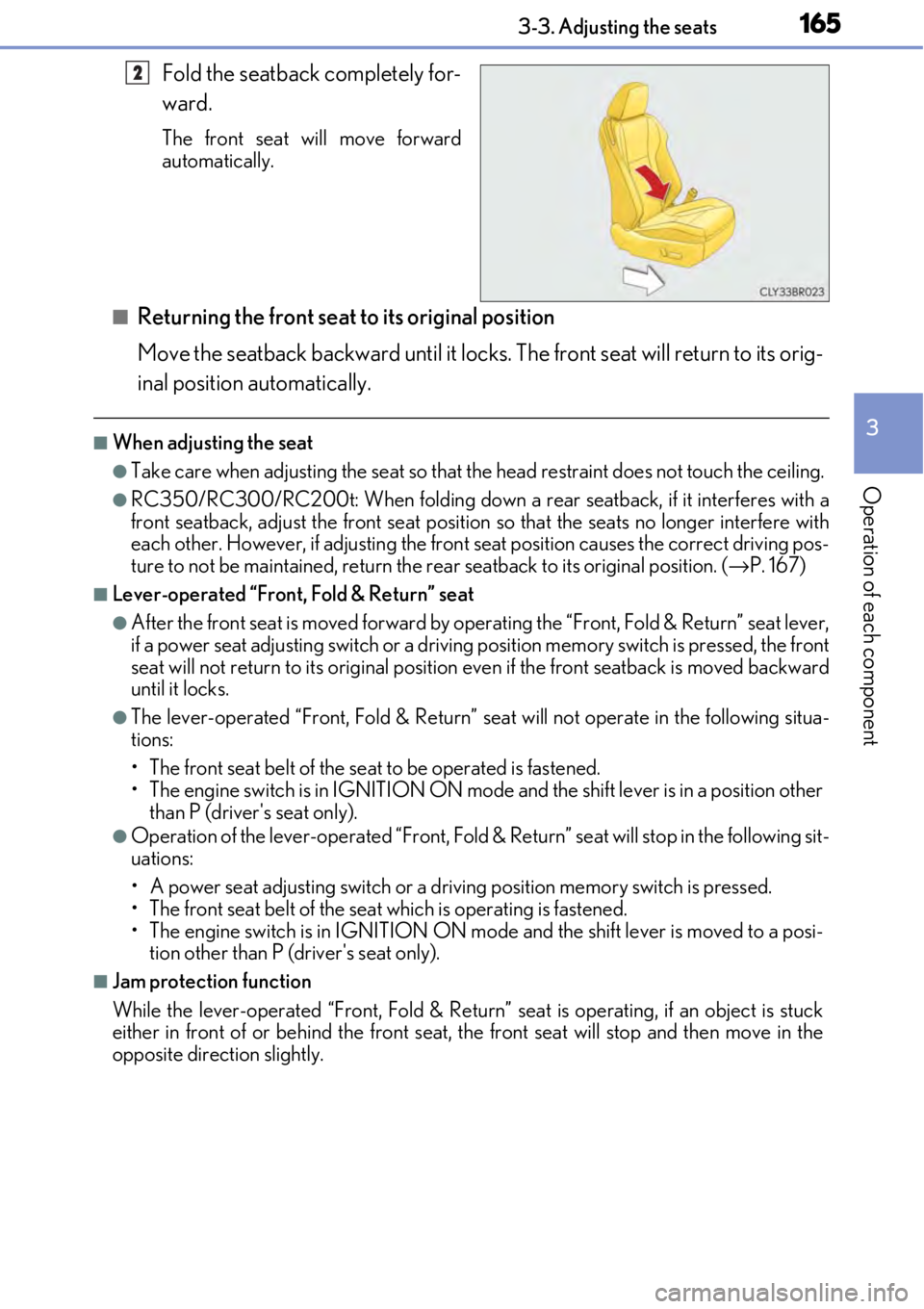
Fold the seatback completely for-
ward.
The front seat will move forward
automatically.
■Returning the front seat to its original position
Move the seatback backward until it locks. The front seat will return to its orig-
inal position automatically.
■When adjusting the seat
●Take care when adjusting the seat so that the head restraint does not touch the ceiling.
●RC350/RC300/RC200t: When folding down a rear seatback, if it interferes with a
front seatback, adjust the front seat position so that the seats no longer interfere with
each other. However, if adjusting the front seat position causes the correct driving pos-
ture to not be maintained, return the rear seatback to its original position. ( →P. 167)
■Lever-operated “Front, Fold & Return” seat
●After the front seat is moved forward by oper ating the “Front, Fold & Return” seat lever,
if a power seat adjustin g switch or a driving position memo ry switch is pressed, the front
seat will not return to its original position even if the front seatback is moved backward
until it locks.
●The lever-operated “Front, Fold & Return” seat will not operate in the following situa-
tions:
• The front seat belt of the seat to be operated is fastened.
• The engine switch is in IGNITION ON mode and the shift lever is in a position other
than P (driver's seat only).
●Operation of the lever-operated “Front, Fold & Return” seat will stop in the following sit-
uations:
• A power seat adjusting switch or a driv ing position memory switch is pressed.
• The front seat belt of the seat which is operating is fastened.
• The engine switch is in IGNITION ON mo de and the shift lever is moved to a posi-
tion other than P (driver's seat only).
■Jam protection function
While the lever-operated “Front, Fold & Return” seat is operating, if an object is stuck
either in front of or behind the front seat, the front seat will stop and then move in the
opposite direction slightly.
2
Page 168 of 724
1683-3. Adjusting the seats
WARNING
Observe the following precautions. Failure to do so may result in death or serious injury.
■When folding the rear seatbacks down
●Do not fold the seatbacks down while driving.
●Stop the vehicle on level ground, set the pa rking brake and shift the shift lever to P.
●Do not allow anyone to sit on a folded seatback or in the trunk while driving.
●Do not allow children to enter the trunk.
■After returning the rear seatback to the upright position
●Check that the seat belts are not twisted or caught in the seatback.
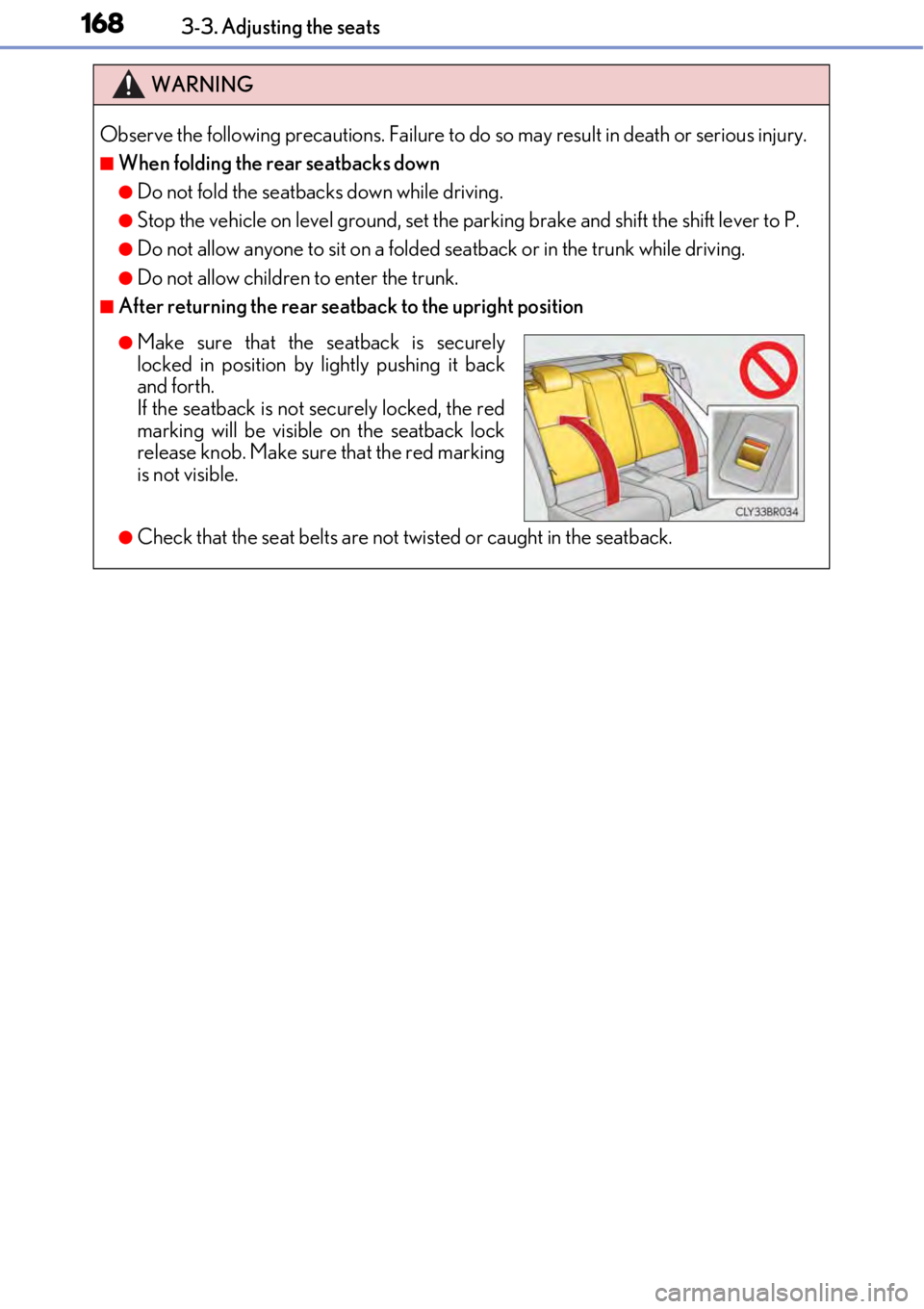
●Make sure that the seatback is securely
locked in position by lightly pushing it back
and forth.
If the seatback is not securely locked, the red
marking will be visible on the seatback lock
release knob. Make sure that the red marking
is not visible.