engine LEXUS RC200T 2016 Owners Manual
[x] Cancel search | Manufacturer: LEXUS, Model Year: 2016, Model line: RC200T, Model: LEXUS RC200T 2016Pages: 700, PDF Size: 14.12 MB
Page 283 of 700
2834-5. Using the driving support systems
4
Driving
RC350_RC300_RC200t_RC F_U (OM24671U)
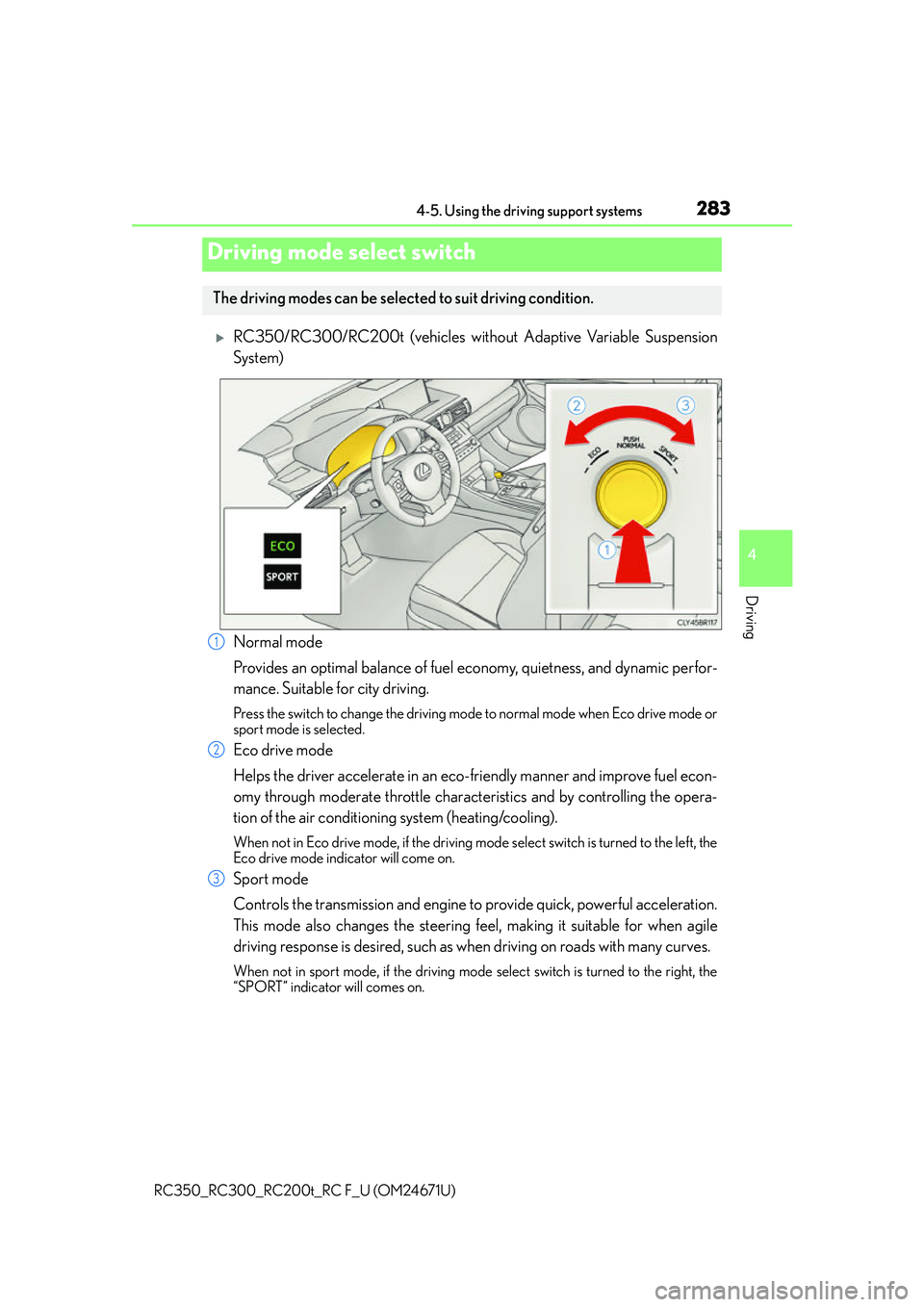
RC350/RC300/RC200t (vehicles without Adaptive Variable Suspension
System)
Normal mode
Provides an optimal balance of fuel economy, quietness, and dynamic perfor-
mance. Suitable for city driving.
Press the switch to change the driving mode to normal mode when Eco drive mode or
sport mode is selected.
Eco drive mode
Helps the driver accelerate in an eco-friendly manner and improve fuel econ-
omy through moderate throttle characteristics and by controlling the opera-
tion of the air conditioning system (heating/cooling).
When not in Eco drive mode, if the driving mode select switch is turned to the left, the
Eco drive mode indicator will come on.
Sport mode
Controls the transmission and engine to provide quick, powerful acceleration.
This mode also changes the steering f eel, making it suitable for when agile
driving response is desired, such as wh en driving on roads with many curves.
When not in sport mode, if the driving mode select switch is turned to the right, the
“SPORT” indicator will comes on.
Driving mode select switch
The driving modes can be selected to suit driving condition.
1
2
3
Page 284 of 700
2844-5. Using the driving support systems
RC350_RC300_RC200t_RC F_U (OM24671U)
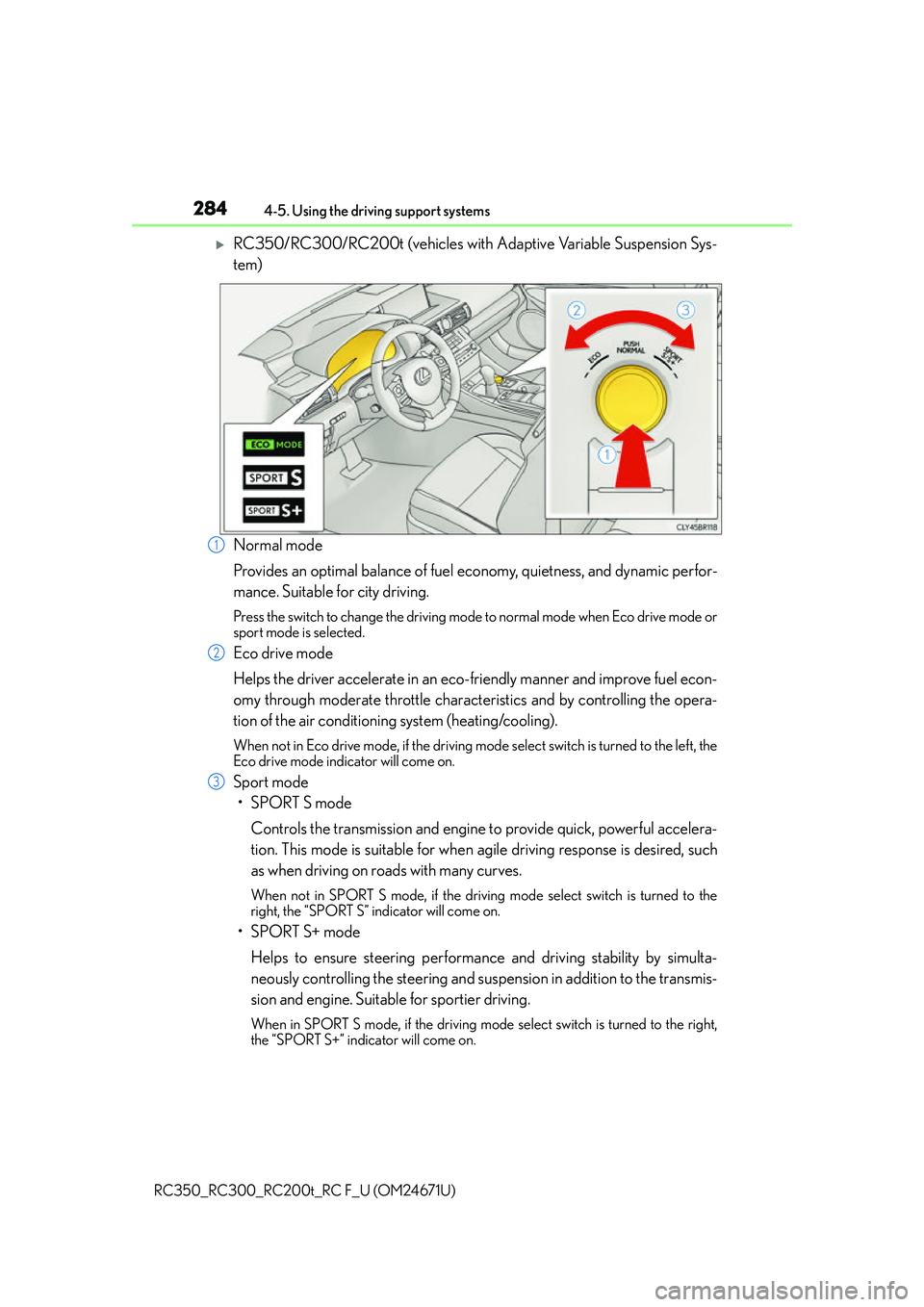
RC350/RC300/RC200t (vehicles with Adaptive Variable Suspension Sys-
tem)
Normal mode
Provides an optimal balance of fuel economy, quietness, and dynamic perfor-
mance. Suitable for city driving.
Press the switch to change the driving mode to normal mode when Eco drive mode or
sport mode is selected.
Eco drive mode
Helps the driver accelerate in an eco- friendly manner and improve fuel econ-
omy through moderate throttle characteristics and by controlling the opera-
tion of the air conditioning system (heating/cooling).
When not in Eco drive mode, if the driving mode select switch is turned to the left, the
Eco drive mode indicator will come on.
Sport mode
•SPORT S mode
Controls the transmission and engine to provide quick, powerful accelera-
tion. This mode is suitable for when agile driving response is desired, such
as when driving on roads with many curves.
When not in SPORT S mode, if the driving mode select switch is turned to the
right, the “SPORT S” indicator will come on.
•SPORT S+ mode
Helps to ensure steering performanc e and driving stability by simulta-
neously controlling the steering and suspen sion in addition to the transmis-
sion and engine. Suitable for sportier driving.
When in SPORT S mode, if the driving mode select switch is turned to the right,
the “SPORT S+” indicator will come on.
1
2
3
Page 285 of 700
2854-5. Using the driving support systems
4
Driving
RC350_RC300_RC200t_RC F_U (OM24671U)
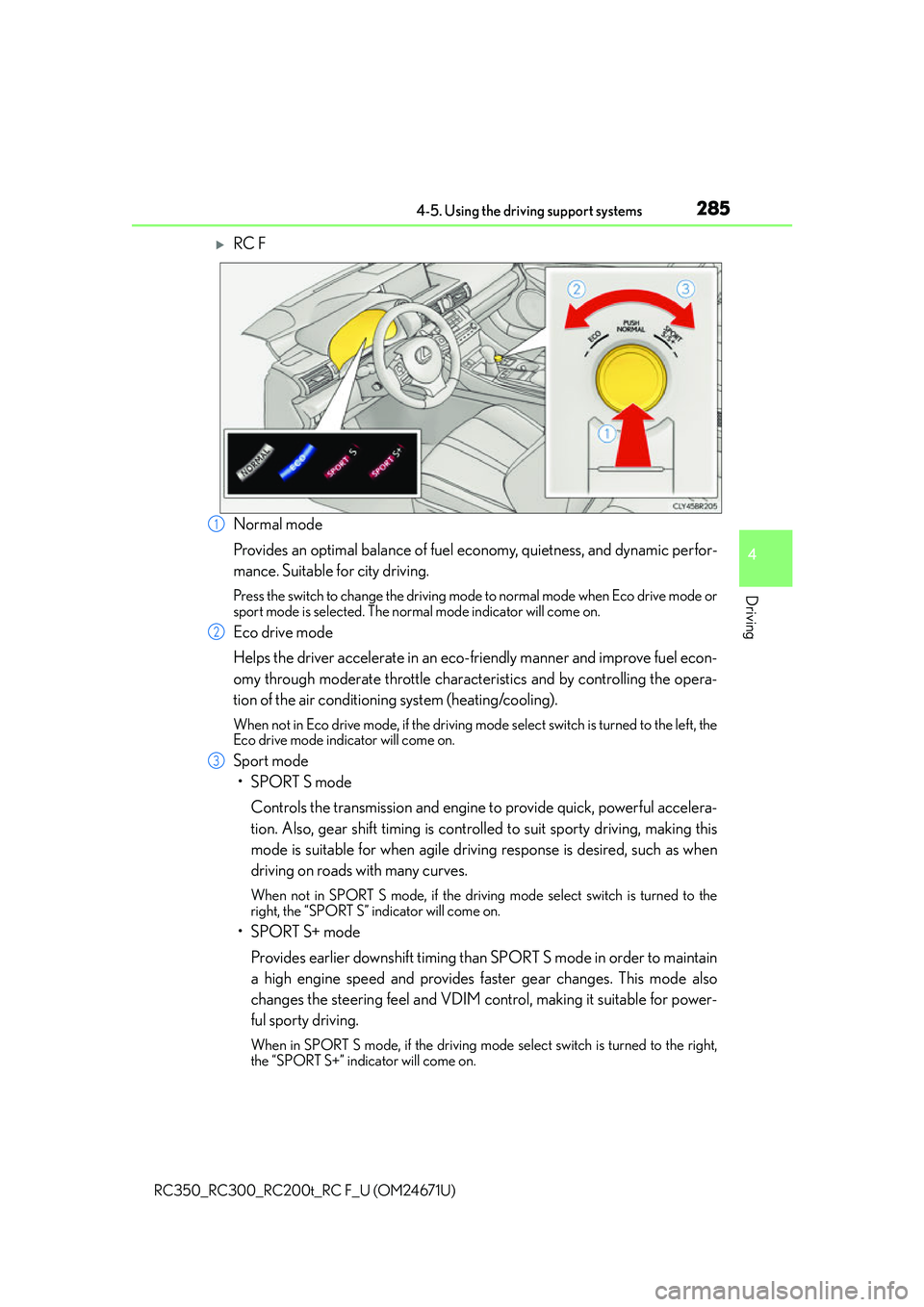
RC F
Normal mode
Provides an optimal balance of fuel economy, quietness, and dynamic perfor-
mance. Suitable for city driving.
Press the switch to change the driving mode to normal mode when Eco drive mode or
sport mode is selected. The normal mode indicator will come on.
Eco drive mode
Helps the driver accelerate in an eco-friendly manner and improve fuel econ-
omy through moderate throttle characteristics and by controlling the opera-
tion of the air conditioning system (heating/cooling).
When not in Eco drive mode, if the driving mode select switch is turned to the left, the
Eco drive mode indicator will come on.
Sport mode
•SPORT S mode
Controls the transmission and engine to provide quick, powerful accelera-
tion. Also, gear shift timing is controll ed to suit sporty driving, making this
mode is suitable for when agile drivin g response is desired, such as when
driving on roads with many curves.
When not in SPORT S mode, if the driving mode select switch is turned to the
right, the “SPORT S” indicator will come on.
•SPORT S+ mode
Provides earlier downshift timing than SPORT S mode in order to maintain
a high engine speed and provides fa ster gear changes. This mode also
changes the steering feel and VDIM cont rol, making it suitable for power-
ful sporty driving.
When in SPORT S mode, if the driving mode select switch is turned to the right,
the “SPORT S+” indicator will come on.
1
2
3
Page 286 of 700

2864-5. Using the driving support systems
RC350_RC300_RC200t_RC F_U (OM24671U)
■Operation of the air conditioning system in Eco drive mode
Eco drive mode controls the heating/cooling operations and fan speed of the air condi-
tioning system to enhance fuel efficiency ( P. 420). To improve air conditioning perfor-
mance, adjust the fan speed or turn off Eco drive mode.
■Sport mode automatic deactivation
Sport mode is automatically deactivated if the engine switch is turned off after driving in
sport mode.
Page 288 of 700
2884-5. Using the driving support systems
RC350_RC300_RC200t_RC F_U (OM24671U)
◆EPS (Electric Power Steering)
Employs an electric motor to reduce the amount of effort needed to turn the
steering wheel
◆Adaptive Variable Suspension System (if equipped)
By independently controlling the dampin g force of the shock absorbers for
each of the 4 wheels according to the road and driving conditions, this system
combines riding comfort with superior steering stability, and helps good vehi-
cle posture. ( P. 2 8 4 )
◆LDH (Lexus Dynamic Handling system) (if equipped)
Provides integrated control of the VGRS, DRS and EPS. Contributes to turn-
ing characteristics at low speeds, re sponsiveness at medium speeds and
safety at high speeds by controlling the steering angle of the front and rear
wheels in accordance with the steering wheel operation and vehicle speed.
◆VDIM (Vehicle Dynamics Integrated Management)
Provides integrated control of the ABS, brake assist, TRAC, VSC, hill-start
assist control, EPS, VGRS (if equi pped) and DRS (if equipped) systems
Helps to maintain vehicle stability when swerving on slippery road surfaces by
controlling the brakes, engine output, steering assist, and if equipped with
VGRS, steering ratio
◆PCS (Pre-Collision System) (if equipped)
P. 2 9 5
◆BSM (Blind Spot Monitor) (if equipped)
P. 3 0 2
◆TVD (Torque Vectoring Differential) (if equipped)
P. 3 1 8
Page 289 of 700
2894-5. Using the driving support systems
4
Driving
RC350_RC300_RC200t_RC F_U (OM24671U)
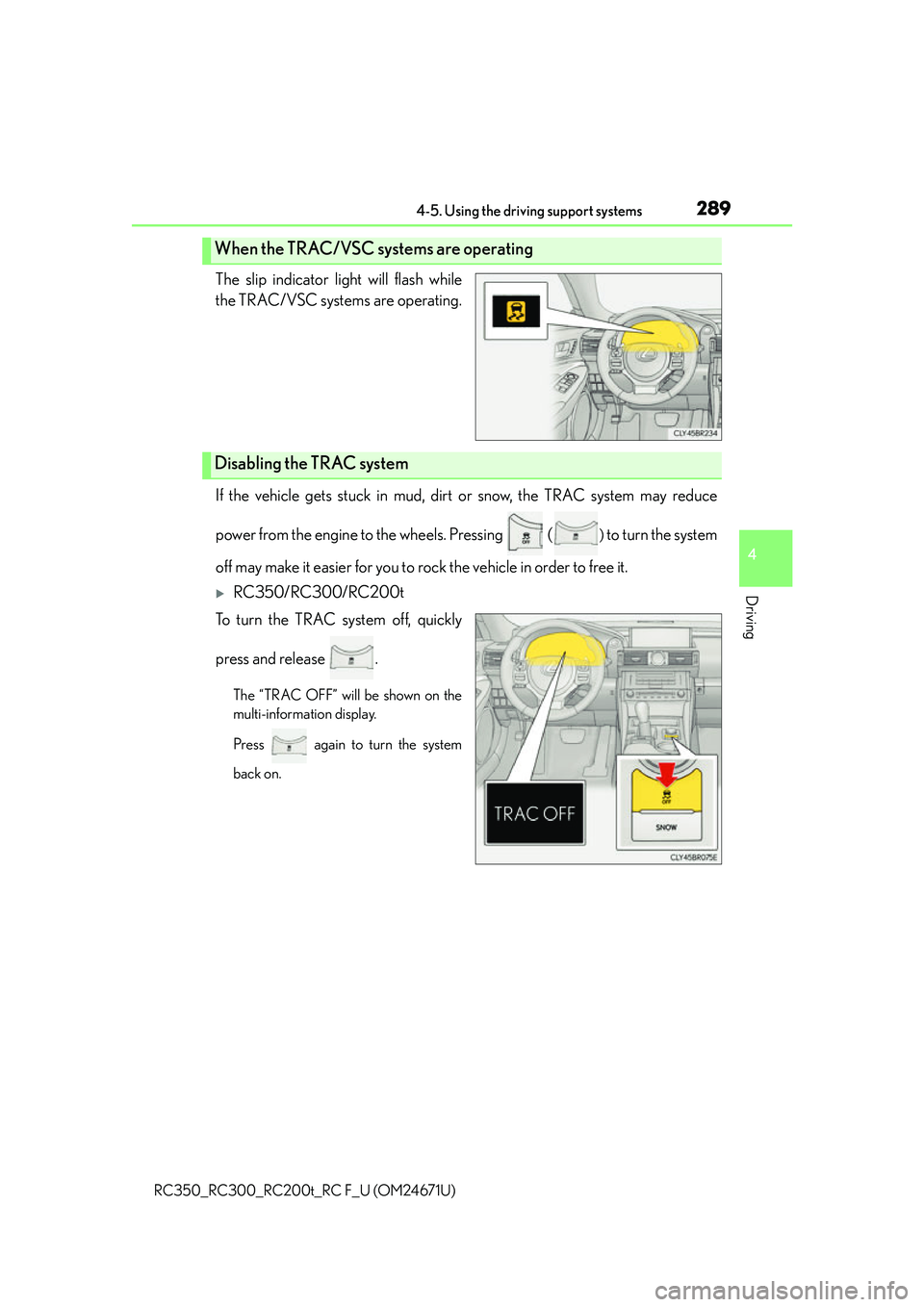
The slip indicator light will flash while
the TRAC/VSC systems are operating.
If the vehicle gets stuck in mud, dirt or snow, the TRAC system may reduce
power from the engine to the wheels. Pressing (
) to turn the system
off may make it easier for you to rock the vehicle in order to free it.
RC350/RC300/RC200t
To turn the TRAC system off, quickly
press and release .
The “TRAC OFF” will be shown on the
multi-information display.
Press again to turn the system
back on.
When the TRAC/VSC systems are operating
Disabling the TRAC system
Page 291 of 700
2914-5. Using the driving support systems
4
Driving
RC350_RC300_RC200t_RC F_U (OM24671U)
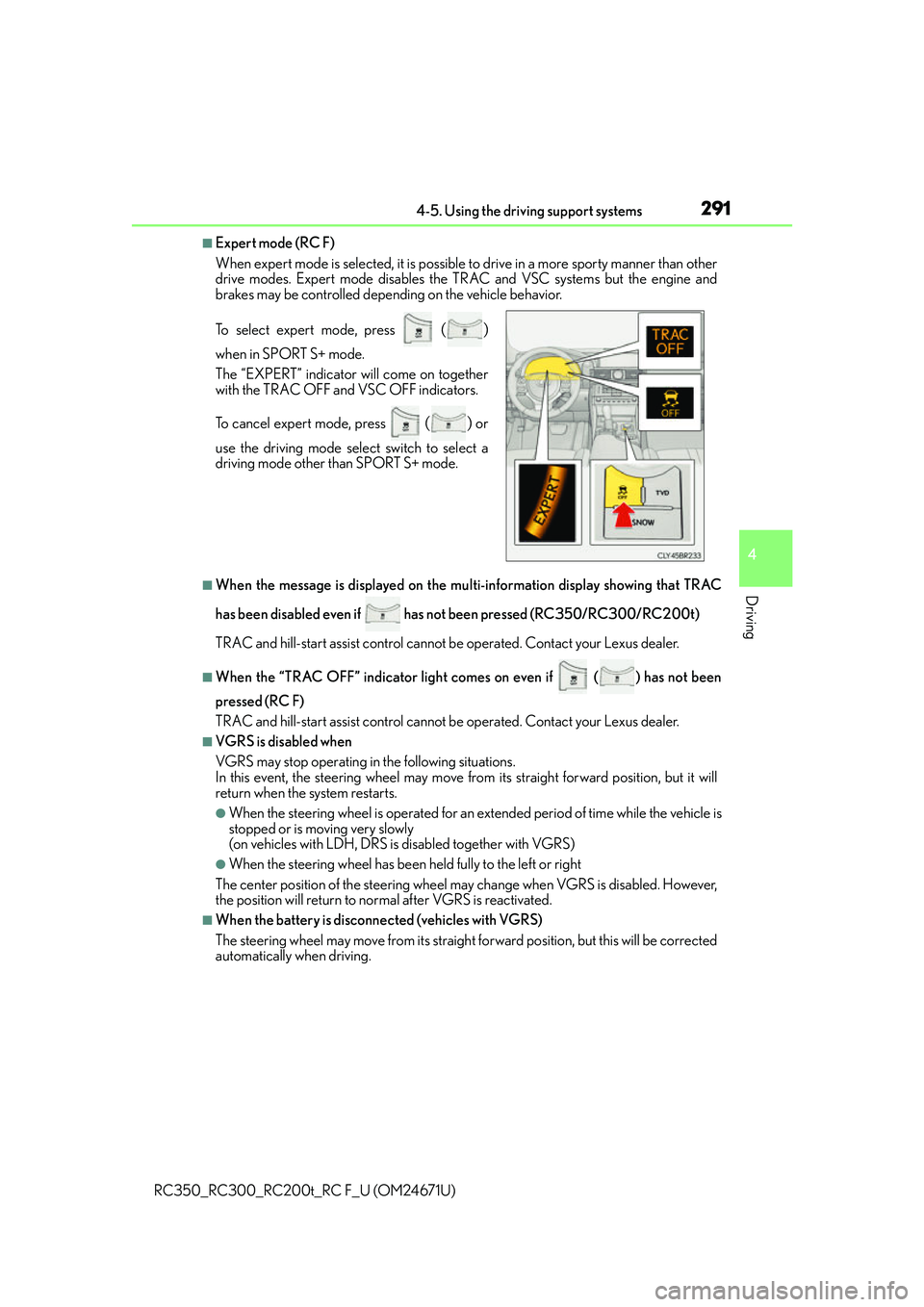
■Expert mode (RC F)
When expert mode is selected, it is possible to drive in a more sporty manner than other
drive modes. Expert mode disables the TRAC and VSC systems but the engine and
brakes may be controlled depending on the vehicle behavior.
■When the message is displayed on the mu lti-information display showing that TRAC
has been disabled even if has not been pressed (RC350/RC300/RC200t)
TRAC and hill-start assist control cannot be operated. Contact your Lexus dealer.
■When the “TRAC OFF” indicato r light comes on even if () has not been
pressed (RC F)
TRAC and hill-start assist control cannot be operated. Contact your Lexus dealer.
■VGRS is disabled when
VGRS may stop operating in the following situations.
In this event, the steering wheel may move fr om its straight forward position, but it will
return when the system restarts.
●When the steering wheel is operated for an extended period of time while the vehicle is
stopped or is moving very slowly
(on vehicles with LDH, DRS is disabled together with VGRS)
●When the steering wheel has been held fully to the left or right
The center position of the steering wheel may change when VGRS is disabled. However,
the position will return to normal after VGRS is reactivated.
■When the battery is disconnected (vehicles with VGRS)
The steering wheel may move fr om its straight forward position, but this will be corrected
automatically when driving. To select expert mode, press
()
when in SPORT S+ mode.
The “EXPERT” indicator will come on together
with the TRAC OFF and VSC OFF indicators.
To cancel expert mode, press
() or
use the driving mode sele ct switch to select a
driving mode other than SPORT S+ mode.
Page 292 of 700
2924-5. Using the driving support systems
RC350_RC300_RC200t_RC F_U (OM24671U)
■Sounds and vibrations caused by the ABS, brake assist, VSC, TRAC, hill-start assist
control and VGRS systems
●A sound may be heard from the engine compartment when the brake pedal is
depressed repeatedly, when the engine is started or just after the vehicle begins to
move. This sound does not indicate that a malfunction has occurred in any of these sys-
tems.
●Any of the following condit ions may occur when the above systems are operating.
None of these indicates that a malfunction has occurred.
• Vibrations may be felt through the vehicle body and steering.
• A motor sound may be heard after the vehicle comes to a stop.
• The brake pedal may pulsate slig htly after the ABS is activated.
• The brake pedal may move down s lightly after the ABS is activated.
■EPS, VGRS and DRS operation sound
When the steering wheel is operated, a motor sound may be heard. This does not indi-
cate a malfunction.
■Reactivation of the TRAC/VSC systems
Even after the TRAC/VSC systems have been turned off, turning the engine off and then
on again will automatically reactivate the TRAC/VSC systems.
■Reactivation of the TRAC system linked to vehicle speed
When only the TRAC system is turned off, the TRAC system will turn on when vehicle
speed increases. However, when both TRAC /VSC systems are turned off, the systems
will not turn on even when vehicle speed increases.
■Reduced effectiveness of the EPS system
The effectiveness of the EPS system is reduced to prevent the system from overheating
when there is frequent steering input over an extended period of time. The steering
wheel may feel heavy as a result. Should this occur, refrain from excessive steering input
or stop the vehicle and turn the engine of f. The EPS system should return to normal
within 10 minutes.
■Operating conditions of hill-start assist control
When the following four conditions are met, the hill-start assist control will operate:
●The shift lever is in a position other than P or N (when starting off forward/backward on
an upward incline).
●The vehicle is stopped.
●The accelerator pedal is not depressed.
●The parking brake is not engaged.
■Automatic system cancelation of hill-start assist control
The hill-start assist control will turn off in any of the following situations:
●The shift lever is moved to P or N.
●The accelerator pedal is depressed.
●The parking brake is engaged.
●Approximately 2 seconds elapse after the brake pedal is released.
Page 314 of 700
3144-5. Using the driving support systems
RC350_RC300_RC200t_RC F_U (OM24671U) • Immediately after the BSM main switch is turned on
• Immediately after the engine is started with the BSM main switch on
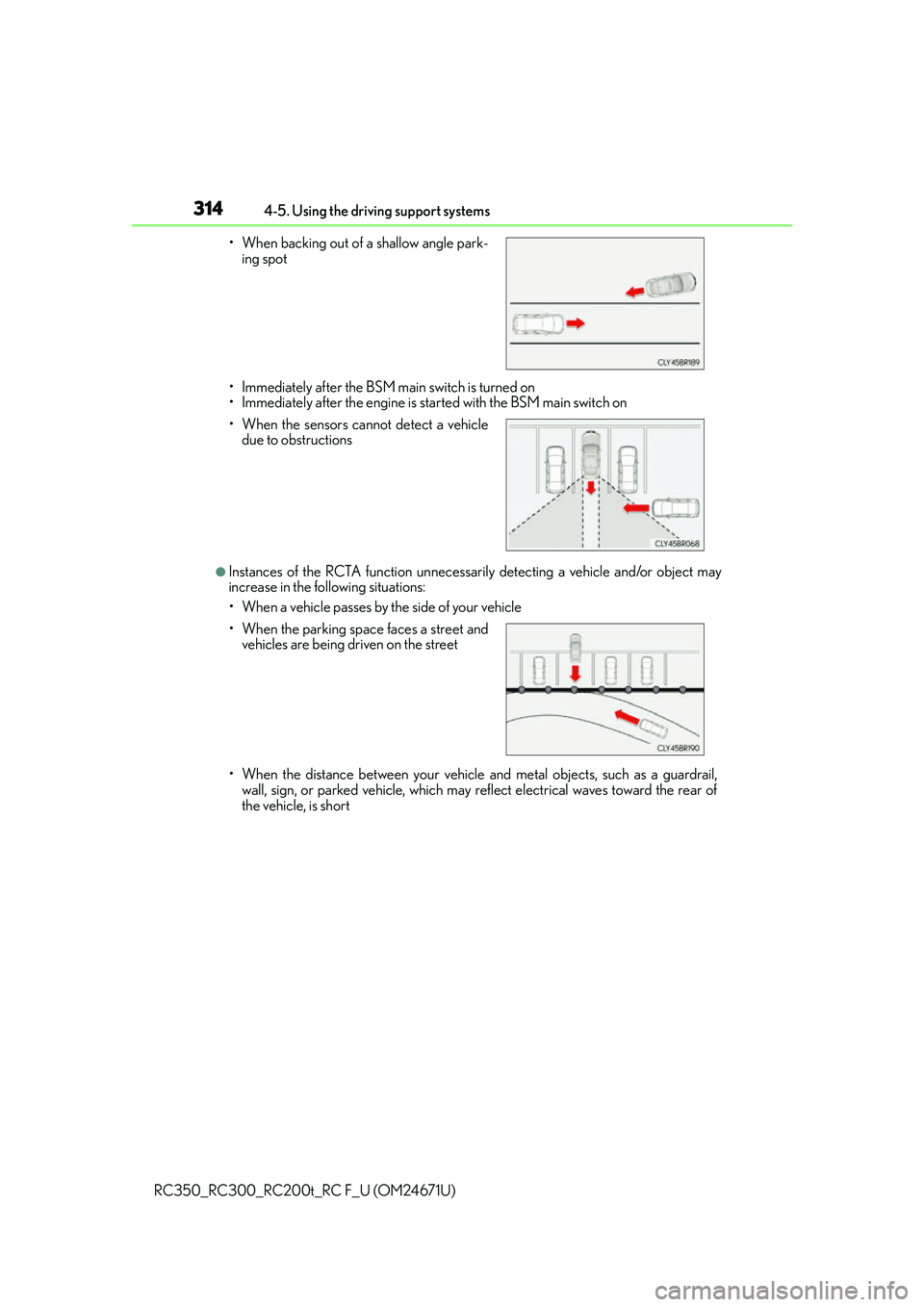
●Instances of the RCTA function unnecessarily detecting a vehicle and/or object may
increase in the following situations:
• When a vehicle passes by the side of your vehicle
• When the distance between your vehicle and metal objects, such as a guardrail,
wall, sign, or parked vehicle, which may reflect electrical waves toward the rear of
the vehicle, is short
• When backing out of a shallow angle park-
ing spot
• When the sensors cannot detect a vehicle due to obstructions
• When the parking spac e faces a street and
vehicles are being driven on the street
Page 316 of 700
3164-5. Using the driving support systems
RC350_RC300_RC200t_RC F_U (OM24671U)
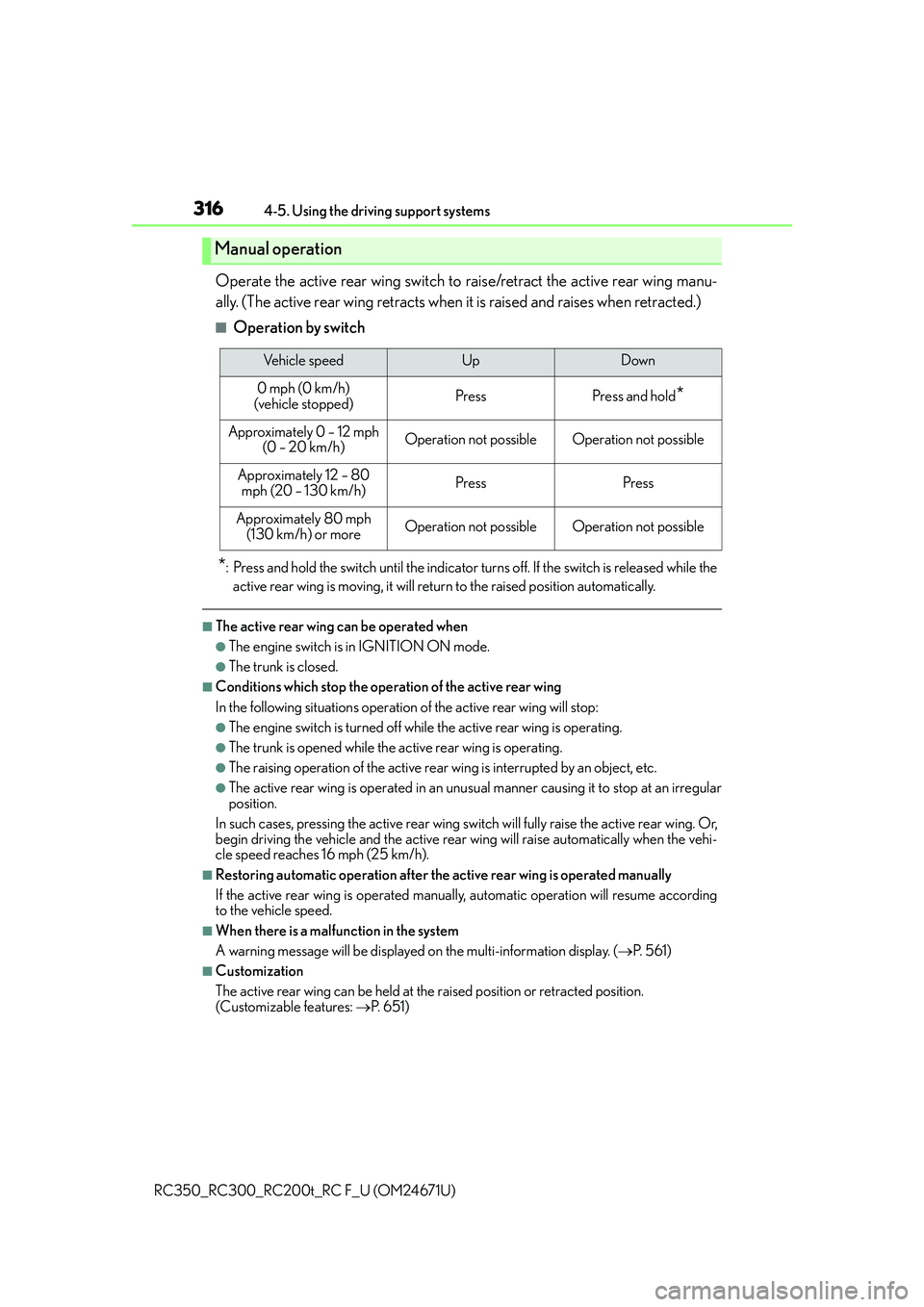
Operate the active rear wing switch to raise/retract the active rear wing manu-
ally. (The active rear wing retracts when it is raised and raises when retracted.)
■Operation by switch
*: Press and hold the switch until the indicator turns off. If the switch is released while the
active rear wing is moving, it will return to the raised position automatically.
■The active rear wing can be operated when
●The engine switch is in IGNITION ON mode.
●The trunk is closed.
■Conditions which stop the operation of the active rear wing
In the following situations operatio n of the active rear wing will stop:
●The engine switch is turned off while the active rear wing is operating.
●The trunk is opened while the active rear wing is operating.
●The raising operation of the active rear wing is interrupted by an object, etc.
●The active rear wing is operated in an unus ual manner causing it to stop at an irregular
position.
In such cases, pressing the active rear wing switch will fully raise the active rear wing. Or,
begin driving the vehicle and the active rear wing will raise automatically when the vehi-
cle speed reaches 16 mph (25 km/h).
■Restoring automatic operation after the active rear wing is operated manually
If the active rear wing is operated manually, automatic operation will resume according
to the vehicle speed.
■When there is a malfunction in the system
A warning message will be displayed on the multi-information display. (P. 5 6 1 )
■Customization
The active rear wing can be held at the raised position or retracted position.
(Customizable features: P. 6 5 1 )
Manual operation
Vehicle speedUpDown
0 mph (0 km/h)
(vehicle stopped)PressPress and hold*
Approximately 0 – 12 mph (0 – 20 km/h)Operation not possibleOperation not possible
Approximately 12 – 80 mph (20 – 130 km/h)PressPress
Approximately 80 mph
(130 km/h) or moreOperation not possibleOperation not possible