air condition LEXUS RC200T 2017 User Guide
[x] Cancel search | Manufacturer: LEXUS, Model Year: 2017, Model line: RC200T, Model: LEXUS RC200T 2017Pages: 724, PDF Size: 42.04 MB
Page 244 of 724
2444-1. Before driving
RC200t_RC F_EE(OM24728E)
NOTICE
■When driving the vehicle
●Do not depress the accelerator and brake pedals at the same time while driving, as this may restrain the engine output.
●Do not use the accelerator pedal or depress the accelerator and brake pedals at thesame time to hold the vehicle on a hill.
■When parking the vehicle
Always set the parking brake, and shift the sh ift lever to P. Failure to do so may cause the vehicle to move or the vehicle may accelerate suddenly if the accelerator pedal isaccidentally depressed.
■Avoiding damage to vehicle parts
●Do not turn the steering wheel fully in either direction and hold it there for anextended period of time.
Doing so may damage the power steering motor.
●When driving over bumps in the road, driv e as slowly as possible to avoid damaging the wheels, underside of the vehicle, etc.
●RC200t: Make sure to idle the engine immediately after high-load driving. Stop theengine only after the turbocharger has cooled down.Failure to do so may cause damage to the turbocharger.
■If you get a flat tire while driving
A flat or damaged tire may cause the following situations. Hold the steering wheel firmly and gradually depress the brake pedal to slow down the vehicle.
●It may be difficult to control your vehicle.
●The vehicle will make abnormal sounds or vibrations.
●The vehicle will lean abnormally.
Information on what to do in case of a flat tire ( P. 619, 633)
■When encountering flooded roads
Do not drive on a road that has flooded after heavy rain etc. Doing so may cause the
following serious damage to the vehicle:
●Engine stalling
●Short in electrical components
●Engine damage caused by water immersion
In the event that you drive on a flooded road and the vehicle is flooded, be sure to have any authorized Lexus dealer or repairer, or another duly qualified and equipped pro-
fessional check the following:
●Brake function
●Changes in quantity and quality of oil and fluid used for the engine, transmission, dif-
ferentials, etc.
●Lubricant condition for the propeller shaft, bearings and suspension joints (where possible), and the function of all joints, bearings, etc.
Page 250 of 724
2504-2. Driving procedures
RC200t_RC F_EE(OM24728E)
■Auto power off function
If the vehicle is left in ACCESSORY mode for more than 20 minutes or IGNITION ON mode (the engine is not running) for more than an hour with the shift lever in P, the engineswitch will automatically turn off. However, this function cannot entirely prevent battery
discharge. Do not leave the vehicle with the engine switch in ACCESSORY or IGNI- TION ON mode for long periods of time when the engine is not running.
■Electronic key battery depletion
P. 161
■Conditions affecting operation
P. 177
■Notes for the entry function
P. 178
■If the engine does not start
●Check that the shift lever is securely set in P. The engine may not start if the shift lever is displaced out of P.
●The engine immobilizer system may not have been deactivated. ( P. 92)
Contact any authorized Lexus dealer or repairer, or another duly qualified and equipped professional.
■Steering lock
After turning the engine switch off and opening and closing the doors, the steering wheel will be locked due to the steering lock functi on. Operating the engine switch again auto- matically cancels the steering lock.
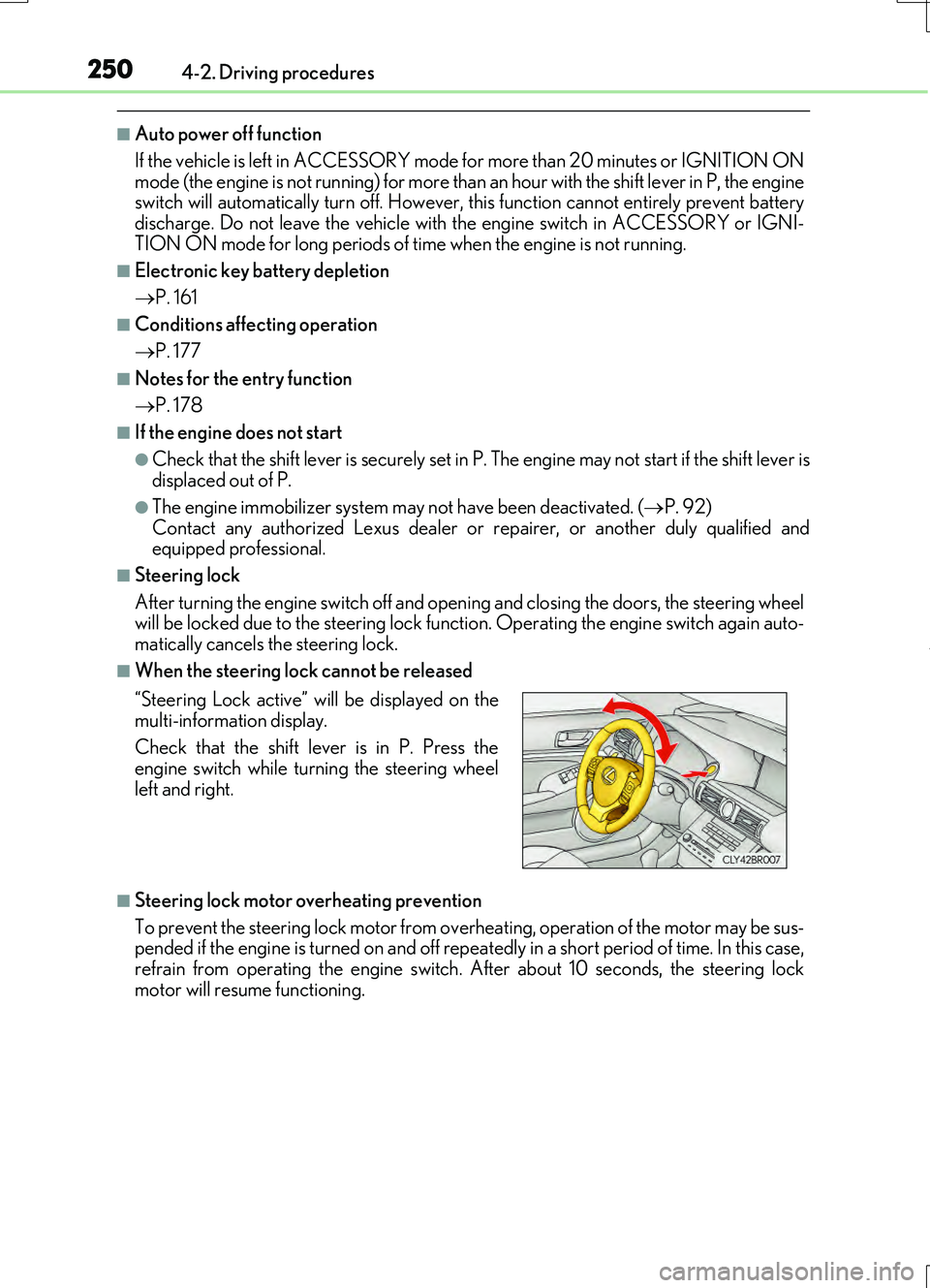
■When the steering lock cannot be released
■Steering lock motor overheating prevention
To prevent the steering lock motor from over heating, operation of the motor may be sus- pended if the engine is turned on and off repeat edly in a short period of time. In this case,
refrain from operating the engine switch. After about 10 seconds, the steering lock motor will resume functioning.
“Steering Lock active” will be displayed on the
multi-information display.
Check that the shift lever is in P. Press the engine switch while turning the steering wheel
left and right.
Page 257 of 724
2574-2. Driving procedures
4
Driving
RC200t_RC F_EE(OM24728E)
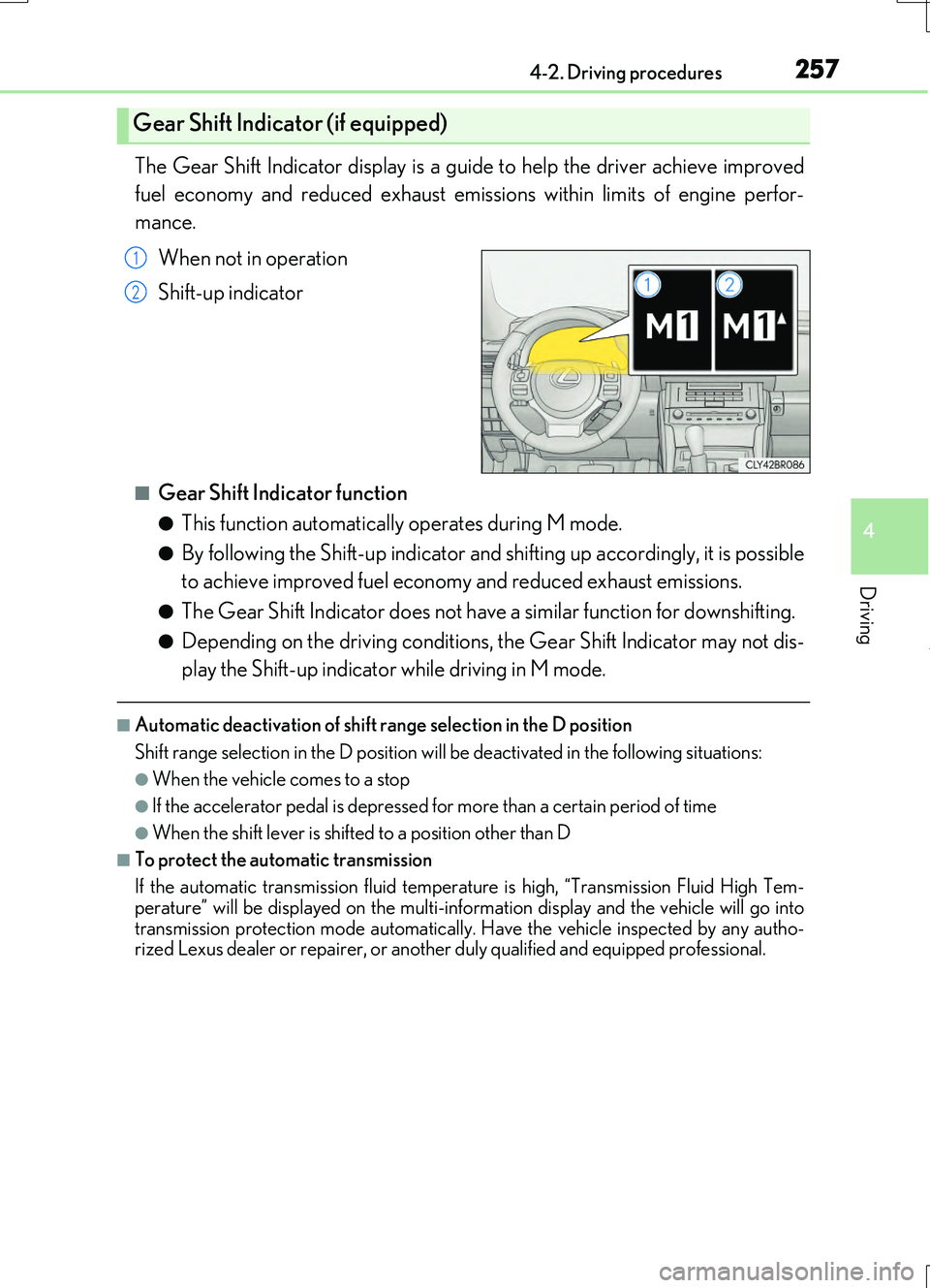
The Gear Shift Indicator display is a guide to help the driver achieve improved
fuel economy and reduced exhaust emissions within limits of engine perfor-
mance.
When not in operation
Shift-up indicator
■Gear Shift Indicator function
●This function automatically operates during M mode.
●By following the Shift-up indicator and shifting up accordingly, it is possible
to achieve improved fuel economy and reduced exhaust emissions.
●The Gear Shift Indicator does not have a similar function for downshifting.
●Depending on the driving conditions, the Gear Shift Indicator may not dis-
play the Shift-up indicator while driving in M mode.
■Automatic deactivation of shift range selection in the D position
Shift range selection in the D position will be deactivated in the following situations:
●When the vehicle comes to a stop
●If the accelerator pedal is depressed for more than a certain period of time
●When the shift lever is shifted to a position other than D
■To protect the automatic transmission
If the automatic transmission fluid temperat ure is high, “Transmission Fluid High Tem-
perature” will be displayed on the multi-information display and the vehicle will go into transmission protection mode automatically. Have the vehicle inspected by any autho-rized Lexus dealer or repairer, or another duly qualified and equipped professional.
Gear Shift Indicator (if equipped)
1
2
Page 288 of 724
2884-5. Using the driving support systems
RC200t_RC F_EE(OM24728E)
■Operating conditions
●The Stop & Start system is operational when all of the following conditions are met:
• The brake pedal is being depressed firmly.
• The shift lever is in D or P.
• Normal mode or Eco drive mode is selected as the driving mode.
• is off.
• The driver’s seat belt is fastened.
• The engine is adequately warmed up.
• The driver’s door is closed.
• The accelerator pedal is not being depressed.
• The outside temperature is -5°C (23°F) or higher.
• The hood is closed.
●In the following situations the engine may not be stopped by the Stop & Start system.
This is not a malfunction of the Stop & Start system.
• The air conditioning system is being used when the ambient temperature is high or
low.
• The battery is not sufficiently charged, such as if the vehicle has been parked for a long time and the battery charge has decreased, the electric load is large, the bat-
tery temperature is excessively low or the battery has deteriorated, or is undergoing
a periodic recharge.
• The brake booster vacuum is low.
• The vehicle is stoppe d on a steep incline.
• The steering wheel is being operated.
• Due to traffic or other circumstances the vehicle is stopped repeatedly.
• The vehicle is being driven in a high altitude area.
• Engine coolant temperature or transmissi on fluid temperature is extremely low or
high.
• The battery fluid temperature is extremely low or high.
• For a while after the battery terminals have been disconnected and reconnected.
• For a while after the battery replacement.
●In the following situations, the engine will re start automatically if the engine is stopped
by the Stop & Start system. (To enable stoppi ng of the engine by the Stop & Start sys-
tem, drive the vehicle.)
• The air conditioning system is turned on.
• Pollen removal mode is turned on.
• is turned on.
• is turned on.
• The steering wheel is operated.
• The shift lever is shifted to M, N or R from D.
• The shift lever is shifted from P.
• Sport mode or snow mode is selected as the driving mode.
• The driver’s seat belt is unfastened.
• The driver’s door is opened.
• The accelerator pedal is depressed.
• The Stop & Start cancel switch is pressed.
• The vehicle starts to roll on an incline.
Page 289 of 724
2894-5. Using the driving support systems
4
Driving
RC200t_RC F_EE(OM24728E)
●In the following situations, the engine may restart automatically if the engine is stopped by the Stop & Start system. (To enable stoppi ng of the engine by the Stop & Start sys- tem, drive the vehicle.)
• The brake pedal is pumped or strongly depressed. • The air conditioning system is being used.• The battery is not sufficiently charged.
■If the steering wheel is turned shortly after the engine has started
If the steering wheel is turned shortly after the engine has been started by the Stop & Start system, the steering wheel may feel heavy.
■Hood
●If the hood is opened while the engine is stopped by the Stop & Start system with theshift lever in D, the engine w ill stall and will not be able to be restarted by the automatic
engine start function. In this case, restart the engine using the normal engine starting procedure. ( P. 247)
●If the hood is opened while the engine is stopped by the Stop & Start system with the
shift lever in P, the engine will be restarted automatically.
●Even if the hood is closed after the engine is started with the hood open, the Stop & Start system will not operate. Close the hood, turn the engine switch off, wait 30 sec-
onds or more, and then start the engine.
■When to use the Stop & Start system
●Use the Stop & Start system when stopping the vehicle temporarily at red lights, inter-
sections, etc. When stopping the vehicle fo r a longer period of time, stop the engine completely.
●When the system does not operate, is canceled, or is malfunctioning, warning mes-
sages and a warning buzzer are used to inform the driver. ( P. 291)
●If the engine switch is pressed when the engine is stopped by the Stop & Start system,
the engine will stall and will not be able to be restarted by the automatic engine start function. In this case, restart the engine using the normal engine starting procedure. ( P. 247)
●When the engine is restarted by the Stop & Start system, the power outlet may be tem- porarily unusable, but this is not a malfunction.
●Installation and remova l of electrical components and wireless devices may affect the
Stop & Start system. Contact any authoriz ed Lexus retailers or Lexus authorized repairers, or any reliable repairers for details.
Page 290 of 724
2904-5. Using the driving support systems
RC200t_RC F_EE(OM24728E)
■If the windshield is fogged up while the engine is stopped by the Stop & Start system
Turn on. (The engine will start due to the automatic engine start function.):
P. 484
If the windshield fogs up frequently, press the Stop & Start cancel switch to disable the
system.
■Air conditioning system operation while the engine is stopped by the Stop & Start sys-
tem
●If the air conditioning system is being us ed in automatic mode, the fan speed may be
reduced or the fan may be stopped while the engine is stopped by the Stop & Start sys-
tem in order to reduce changes in the cabin temperature.
●To ensure air conditioning system performanc e when the vehicle is stopped, disable the
Stop & Start system by pressing the Stop & Start cancel switch.
■Changing the idling stop time with the air conditioning system on
The length of time the Stop & Start system will operate when the air conditioning system
is on can be changed by performing the followi ng operation. (The length of time the Stop
& Start system will operate when the air condit ioning system is off cannot be changed.)
●Setting by pressing and holding the Stop & Start cancel switch
Each time the Stop & Start cancel switch is pressed and held for 3 seconds or more, the
system changes between standard and extended. The system status can be confirmed
on the multi-information display screen. ( P. 131)
●Settings from the multi-information display
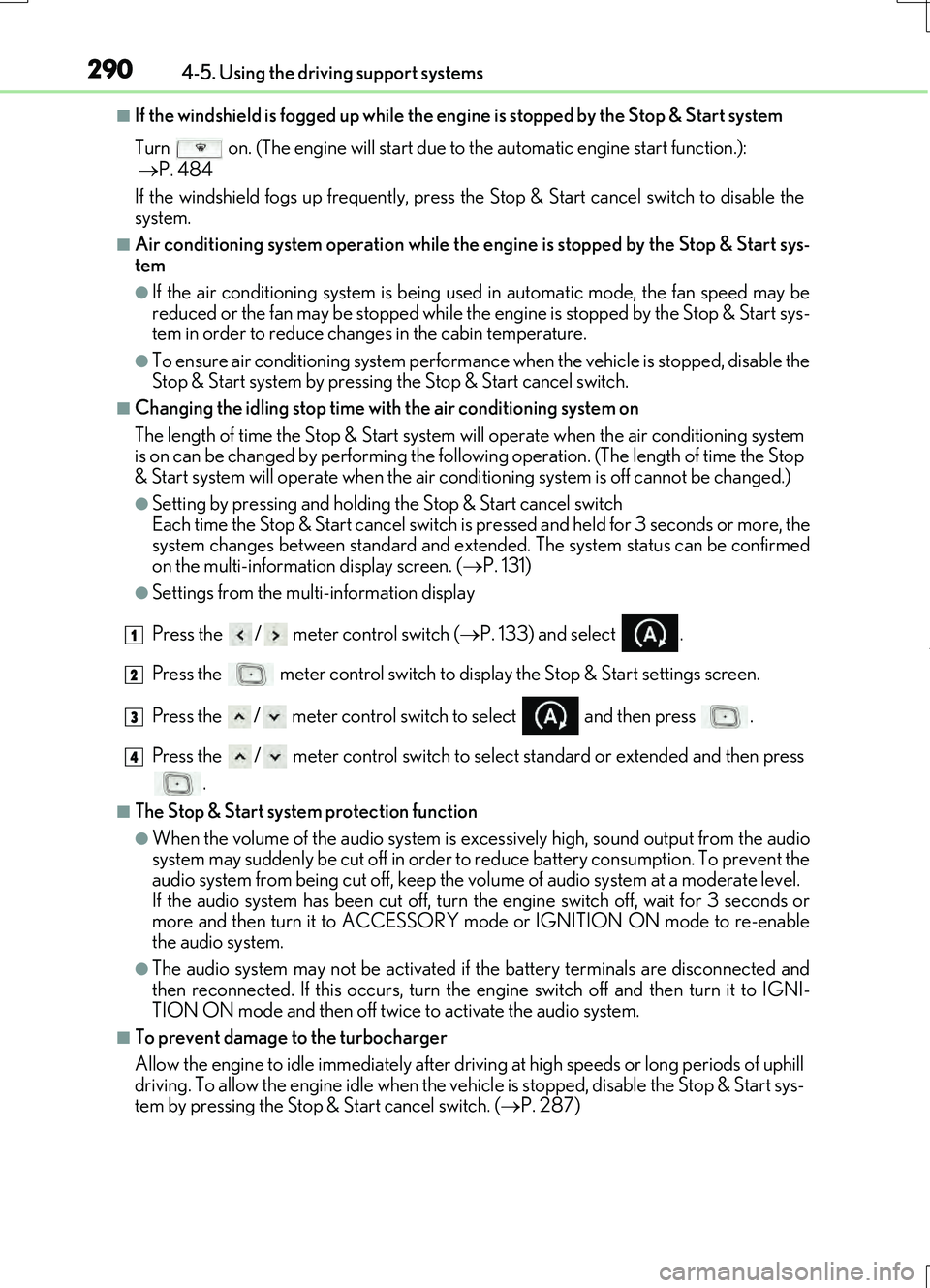
Press the / meter control switch ( P. 133) and select .
Press the meter control switch to display the Stop & Start settings screen.
Press the / meter control switch to select and then press .
Press the / meter control switch to select standard or extended and then press .
■The Stop & Start system protection function
●When the volume of the audio system is ex cessively high, sound output from the audio
system may suddenly be cut of f in order to reduce battery consumption. To prevent the
audio system from being cut off, keep the vo lume of audio system at a moderate level.
If the audio system has been cut off, turn the engine switch off, wait for 3 seconds or
more and then turn it to ACCESSORY mode or IGNITION ON mode to re-enable
the audio system.
●The audio system may not be activated if the battery terminals are disconnected and
then reconnected. If this occurs, turn the engine switch off and then turn it to IGNI-
TION ON mode and then off twice to activate the audio system.
■To prevent damage to the turbocharger
Allow the engine to idle immediately after driv ing at high speeds or long periods of uphill
driving. To allow the engine idle when the vehicle is stopped, disable the Stop & Start sys-
tem by pressing the Stop & Start cancel switch. ( P. 287)
1
2
3
4
Page 291 of 724
2914-5. Using the driving support systems
4
Driving
RC200t_RC F_EE(OM24728E)
■Replacing the battery
P. 657
■Displaying the Stop & Start system status
P. 137
■Multi-information display messages
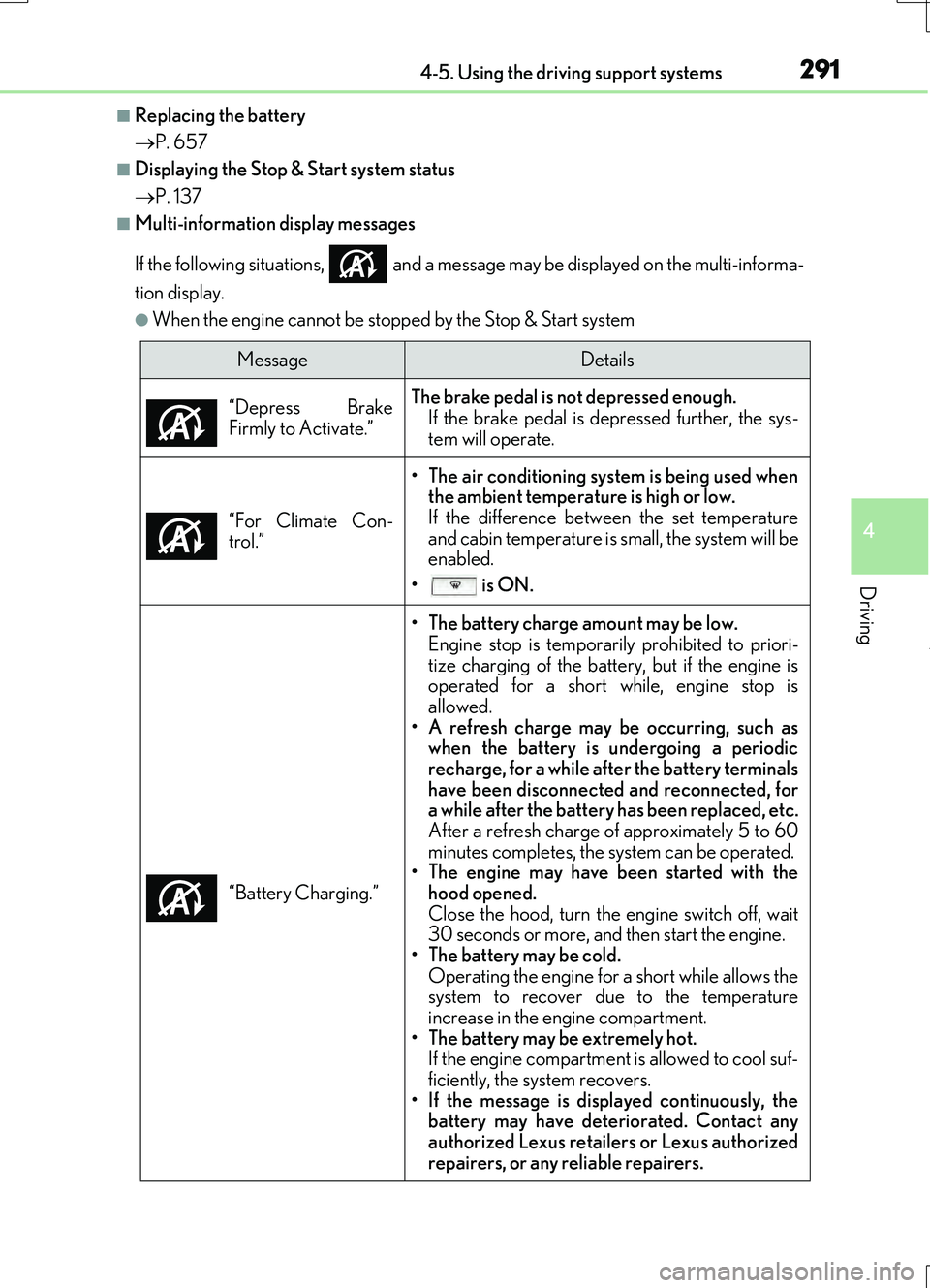
If the following situations, and a message may be displayed on the multi-informa-
tion display.
●When the engine cannot be stopped by the Stop & Start system
MessageDetails
“Depress Brake
Firmly to Activate.”
The brake pedal is not depressed enough.
If the brake pedal is depressed further, the sys-
tem will operate.
“For Climate Con-
trol.”
• The air conditioning system is being used when the ambient temperature is high or low.
If the difference between the set temperature
and cabin temperature is small, the system will be
enabled.
• is ON.
“Battery Charging.”
• The battery charge amount may be low. Engine stop is temporarily prohibited to priori-
tize charging of the battery, but if the engine is
operated for a short while, engine stop is
allowed.
• A refresh charge may be occurring, such as when the battery is undergoing a periodic
recharge, for a while after the battery terminals
have been disconnected and reconnected, for
a while after the battery has been replaced, etc.
After a refresh charge of approximately 5 to 60
minutes completes, the system can be operated.
• The engine may have been started with the
hood opened.
Close the hood, turn the engine switch off, wait
30 seconds or more, and then start the engine.
• The battery may be cold. Operating the engine for a short while allows the
system to recover due to the temperature
increase in the engine compartment.
• The battery may be extremely hot. If the engine compartment is allowed to cool suf-
ficiently, the system recovers.
• If the message is displayed continuously, the battery may have deteriorated. Contact any
authorized Lexus retailers or Lexus authorized
repairers, or any reliable repairers.
Page 292 of 724
2924-5. Using the driving support systems
RC200t_RC F_EE(OM24728E)
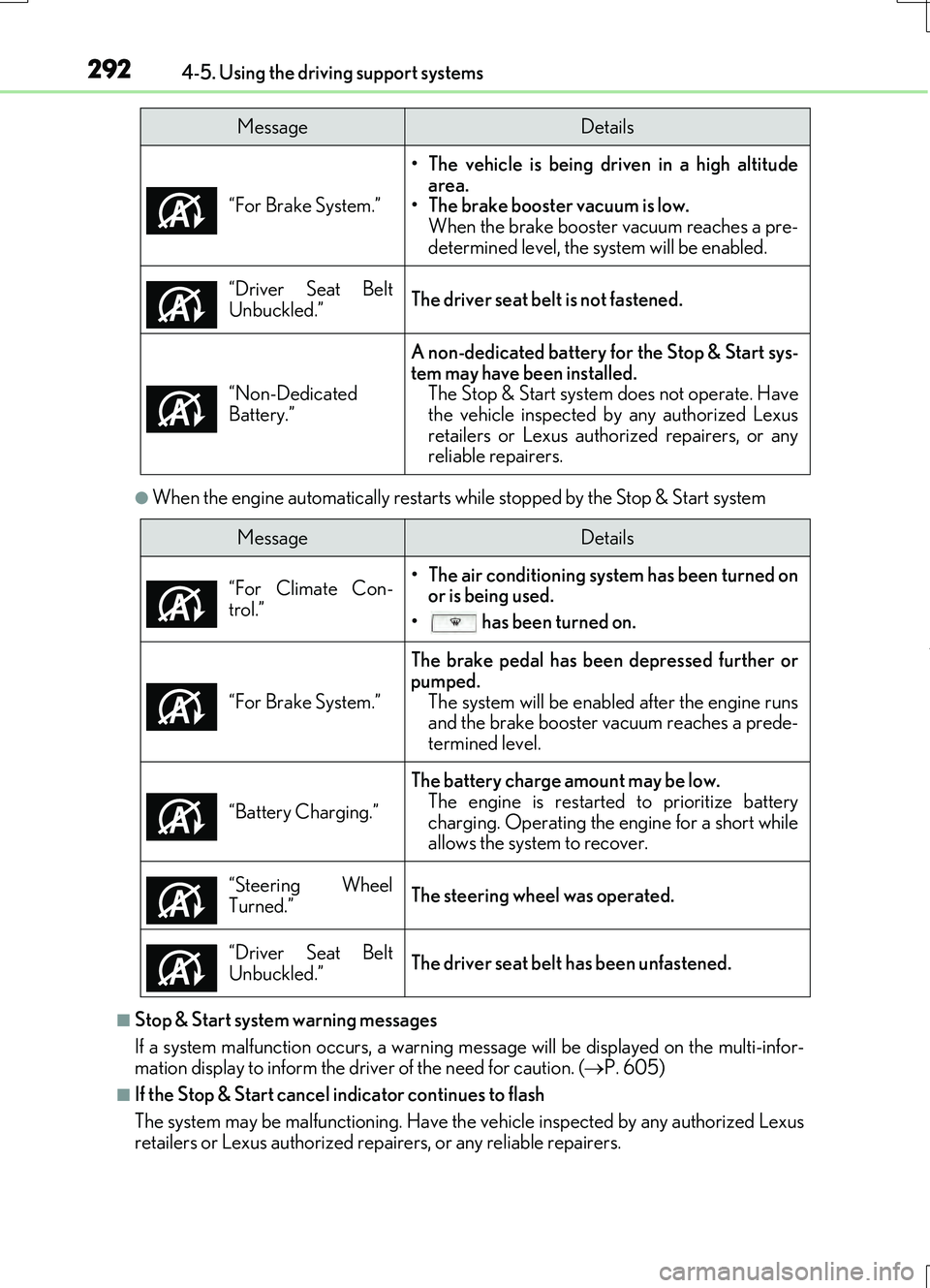
●When the engine automatically restarts while stopped by the Stop & Start system
■Stop & Start system warning messages
If a system malfunction occu rs, a warning message will be displayed on the multi-infor-
mation display to inform the driver of the need for caution. ( P. 605)
■If the Stop & Start cancel indicator continues to flash
The system may be malfunctioning. Have the vehicle inspected by any authorized Lexus
retailers or Lexus authorized repairers, or any reliable repairers. “For Brake System.”
• The vehicle is being driven in a high altitude
area.
• The brake booster vacuum is low.
When the brake booster vacuum reaches a pre-
determined level, the system will be enabled.
“Driver Seat Belt
Unbuckled.”
The driver seat belt is not fastened.
“Non-Dedicated
Battery.”
A non-dedicated battery for the Stop & Start sys-
tem may have been installed. The Stop & Start system does not operate. Have
the vehicle inspected by any authorized Lexus
retailers or Lexus authorized repairers, or any
reliable repairers.
MessageDetails
MessageDetails
“For Climate Con-
trol.”
• The air conditioning system has been turned on or is being used.
• has been turned on.
“For Brake System.”
The brake pedal has been depressed further or
pumped. The system will be enable d after the engine runs
and the brake booster vacuum reaches a prede-
termined level.
“Battery Charging.”
The battery charge amount may be low. The engine is restarted to prioritize battery
charging. Operating the engine for a short while
allows the system to recover.
“Steering Wheel
Turned.”
The steering wheel was operated.
“Driver Seat Belt
Unbuckled.”
The driver seat belt has been unfastened.
Page 317 of 724
3174-5. Using the driving support systems
4
Driving
RC200t_RC F_EE(OM24728E)
■Temporary cancelation of the LDA system functions
If any of the following occurs, the LDA system functions will be temporarily canceled. The functions will resume after the necessary operating conditions have returned.
●The turn signal lever is operated.
●The vehicle speed deviates from the operating range of the LDA system functions.
●When the lane lines cannot be recognized while driving.
●When the lane departure warning sounds.
The lane departure warning function will not operate again for a several seconds after it has been activated, even if the vehicle leaves the lane again.
■The lane departure warning
Depending on the audio system sound level or air conditioning fan noise while the audio system or air conditioning system is in use, it may be difficult to hear the warning sound.
■After the vehicle has been parked in the sun
The LDA system may not be available and a warning message ( P. 603) will be dis- played for a while after driving has started. When the temperature in the cabin decreasesand the temperature around the camera sensor ( P. 314) becomes suitable for its oper-
ation, the functions will begin to operate.
■If there are lane markers on only one side of the vehicle
The lane departure warning will not operate fo r the side on which lane markers could not
be recognized.
■Conditions in which the function may not operate correctly
In the following situations, the camera sensor may be unable to recognize lane markers
causing the lane departure warning function to operate incorrectly. However, this does not indicate a malfunction.
●When driving through an area with no lane markers, such as a tollbooth, a crossing or
before a ticket checkpoint
●When driving on a sharp curve
●When lane markers are extremely narrow or extremely wide
●When the vehicle leans to one side an unusual amount due to a heavy load or improper tire inflation pressure
●When the following distance between your vehicle and the vehicle ahead is extremely
short
●When the lane markers are yellow (These ma y be more difficult for the system to rec- ognize compared to white markers.)
●When the lane markers are broken, Botts’ dots (raised pavement markers) or stones
●When the lane markers are on a curb etc.
●When lane markers are obscured or partially obscured by sand, dirt, etc.
●When there are shadows on the road running parallel with lane markers, or if a shadow covers the lane markers
●When driving on a partic ularly bright road surface, such as concrete
●When driving on a road surface that is bright due to reflected light
●When driving in a location where the light level changes rapidly, such as the entrance to
or exit from a tunnel
Page 327 of 724
3274-5. Using the driving support systems
4
Driving
RC200t_RC F_EE(OM24728E)
■Lexus parking assist-sensor display
When an obstacle is detected while the Lexus pa rking assist monitor system is in use, the warning indicator will appe ar in the top right of the screen even if the display setting has
been set to off.
■If a message is displayed on the multi-information display
P. 600
WARNING
■When using the Lexus parking assist-sensor
Observe the following precautions. Failing to do so may result in the vehicle be ing unable to be driven safely and possibly cause an accident.
●Do not use the sensor at speeds in excess of 10 km/h (6 mph).
●The sensors’ detection areas and reaction times are limited. When moving forward or reversing, check the areas surrounding the vehicle (especially the sides of the vehi-
cle) for safety, and drive slowly, using the brake to control the vehicle’s speed.
●Do not install accessories within the sensors’ detection areas.
■Limitations of the sensors
●RC200t: The detection areas of the sensors are limited to the areas around the vehi- cle’s front and rear bumpers.
●RC F: The detection areas of the sensors are limited to the areas around the vehicle’s
front corners and the rear bumpers.
●Certain vehicle conditions and surrounding environments, such as the following, may affect the ability of the sensors to correctly detect objects. Pay particular attention in
the following situations. Failure to do so may result in the vehicle being driven unsafely, possibly leading to an accident.
• When there is dirt, snow or ice on a sens or (Cleaning the sensor will resolve this
problem.) • When the sensor is frozen (Thawing the area will resolve this problem.)In especially cold weather, if a sensor is frozen the screen may show an abnormal
display, or objects may not be detected • When a sensor is covered in any way• When the vehicle is leaning considerably to one side
• When driving on an extremely bumpy road, incline, gravel, or grass • When the vicinity of the vehicle is noisy due to vehicle horns, motorcycle engines,air brakes of large vehicles, or other loud noises producing ultrasonic waves
• When there is another vehicle equipped with parking assist sensor in the vicinity • When the sensor is coated with a sheet of spray or heavy rain• When the vehicle is equipped with a fender pole or wireless antenna
• When a towing eyelet is installed • When a bumper or sensor receives a strong impact• When the vehicle is approaching a tall or curved curb
• When driving in harsh sunlight or intense cold weather