parking brake LEXUS RC200T 2017 User Guide
[x] Cancel search | Manufacturer: LEXUS, Model Year: 2017, Model line: RC200T, Model: LEXUS RC200T 2017Pages: 724, PDF Size: 42.04 MB
Page 243 of 724
2434-1. Before driving
4
Driving
RC200t_RC F_EE(OM24728E)
WARNING
Observe the following precautions. Failure to do so may result in death or serious injury.
■When braking
●When the brakes are wet, drive more cautiously.Braking distance increases when the brakes are wet, and this may cause one side ofthe vehicle to brake differently than the other side. Also, the parking brake may not
securely hold the vehicle.
●If the power brake assist function does not operate, do not follow other vehicles closely and avoid hills or shar p turns that require braking.
In this case, braking is still possible, bu t the brake pedal should be depressed more firmly than usual. Also, the braking distance will increase. Have your brakes fixedimmediately.
●Do not pump the brake pedal if the engine stalls. Each push on the brake pedal uses up the reserve for the power-assisted brakes.
●The brake system consists of 2 individual hy draulic systems; if one of the systems fails,
the other will still operate. In this case, the brake pedal should be depressed more firmly than usual and the braking distance will increase. Have your brakes fixed imme- diately.
■If the vehicle becomes stuck
Do not spin the wheels excessively when any of the tires is up in the air, or the vehicle is stuck in sand, mud, etc. This may damage th e driveline components or propel the vehi-
cle forward or backward, causing an accident.
Page 244 of 724
2444-1. Before driving
RC200t_RC F_EE(OM24728E)
NOTICE
■When driving the vehicle
●Do not depress the accelerator and brake pedals at the same time while driving, as this may restrain the engine output.
●Do not use the accelerator pedal or depress the accelerator and brake pedals at thesame time to hold the vehicle on a hill.
■When parking the vehicle
Always set the parking brake, and shift the sh ift lever to P. Failure to do so may cause the vehicle to move or the vehicle may accelerate suddenly if the accelerator pedal isaccidentally depressed.
■Avoiding damage to vehicle parts
●Do not turn the steering wheel fully in either direction and hold it there for anextended period of time.
Doing so may damage the power steering motor.
●When driving over bumps in the road, driv e as slowly as possible to avoid damaging the wheels, underside of the vehicle, etc.
●RC200t: Make sure to idle the engine immediately after high-load driving. Stop theengine only after the turbocharger has cooled down.Failure to do so may cause damage to the turbocharger.
■If you get a flat tire while driving
A flat or damaged tire may cause the following situations. Hold the steering wheel firmly and gradually depress the brake pedal to slow down the vehicle.
●It may be difficult to control your vehicle.
●The vehicle will make abnormal sounds or vibrations.
●The vehicle will lean abnormally.
Information on what to do in case of a flat tire ( P. 619, 633)
■When encountering flooded roads
Do not drive on a road that has flooded after heavy rain etc. Doing so may cause the
following serious damage to the vehicle:
●Engine stalling
●Short in electrical components
●Engine damage caused by water immersion
In the event that you drive on a flooded road and the vehicle is flooded, be sure to have any authorized Lexus dealer or repairer, or another duly qualified and equipped pro-
fessional check the following:
●Brake function
●Changes in quantity and quality of oil and fluid used for the engine, transmission, dif-
ferentials, etc.
●Lubricant condition for the propeller shaft, bearings and suspension joints (where possible), and the function of all joints, bearings, etc.
Page 247 of 724
247
4
Driving
RC200t_RC F_EE(OM24728E)
4-2. Driving procedures
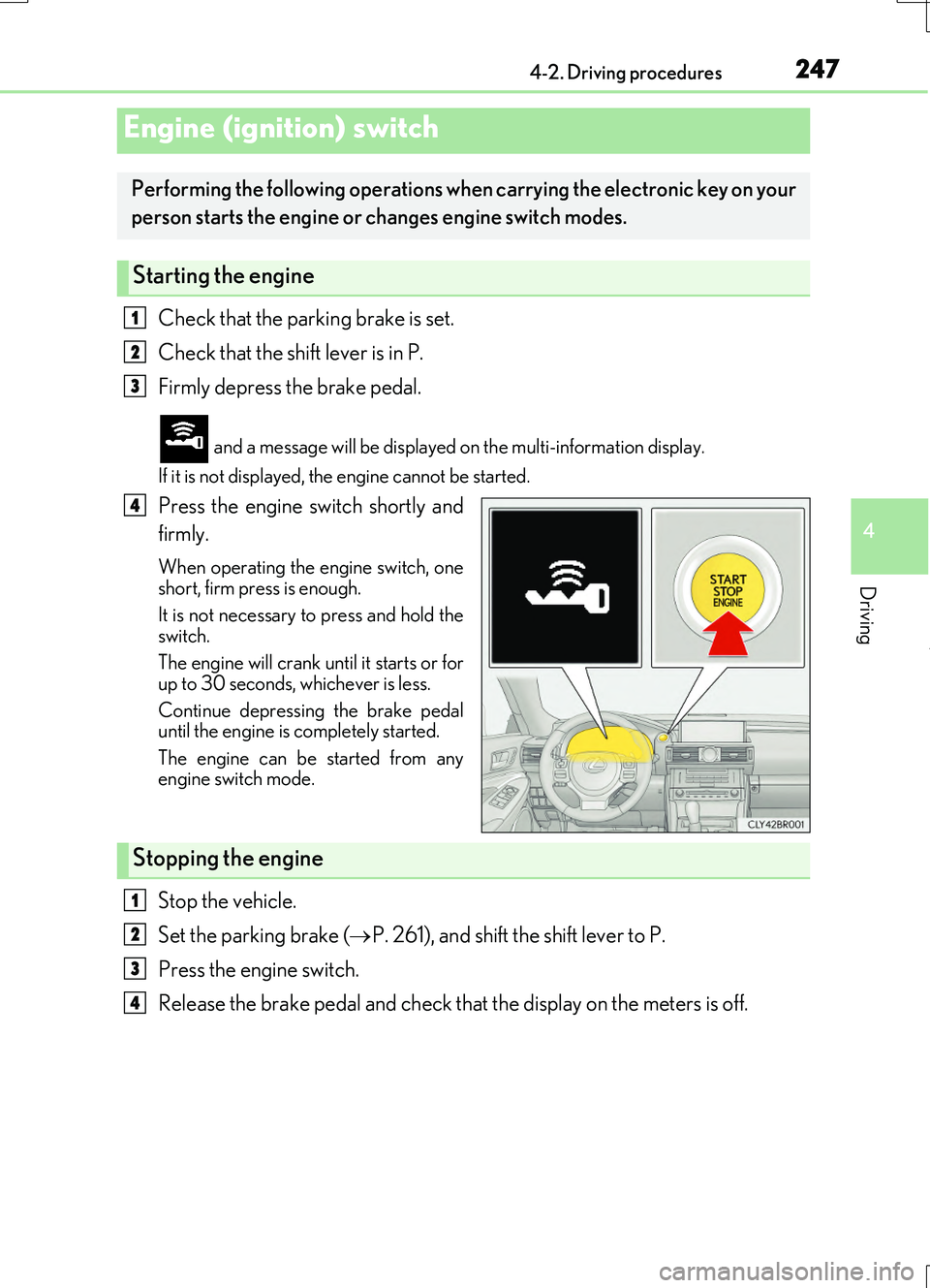
Check that the parking brake is set.
Check that the shift lever is in P.
Firmly depress the brake pedal.
and a message will be displayed on the multi-information display.
If it is not displayed, the engine cannot be started.
Press the engine switch shortly and
firmly.
When operating the engine switch, one short, firm press is enough.
It is not necessary to press and hold the switch.
The engine will crank un til it starts or for
up to 30 seconds, whichever is less.
Continue depressing the brake pedal until the engine is completely started.
The engine can be started from any engine switch mode.
Stop the vehicle.
Set the parking brake ( P. 261), and shift the shift lever to P.
Press the engine switch.
Release the brake pedal and check that the display on the meters is off.
Engine (ignition) switch
Performing the following operations when carrying the electronic key on your
person starts the engine or changes engine switch modes.
Starting the engine
1
2
3
4
Stopping the engine
1
2
3
4
Page 249 of 724
2494-2. Driving procedures
4
Driving
RC200t_RC F_EE(OM24728E)
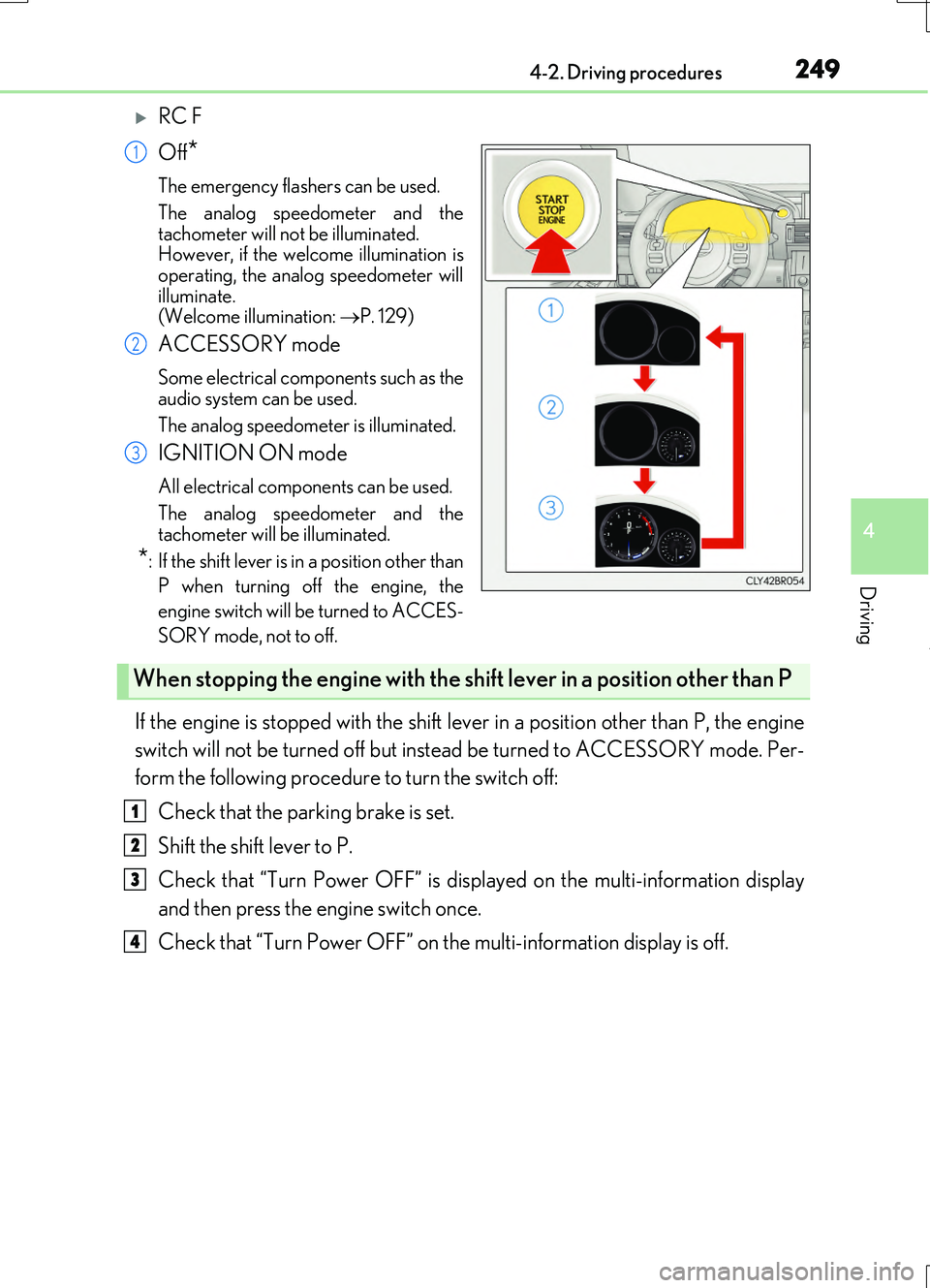
RC F
Off*
The emergency flashers can be used.
The analog speedometer and the
tachometer will not be illuminated. However, if the welcome illumination isoperating, the analog speedometer will
illuminate. (Welcome illumination: P. 129)
ACCESSORY mode
Some electrical components such as the audio system can be used.
The analog speedometer is illuminated.
IGNITION ON mode
All electrical components can be used.
The analog speedometer and the tachometer will be illuminated.
*: If the shift lever is in a position other than
P when turning off the engine, the
engine switch will be turned to ACCES-
SORY mode, not to off.
If the engine is stopped with the shift lever in a position other than P, the engine
switch will not be turned off but inst ead be turned to ACCESSORY mode. Per-
form the following procedure to turn the switch off:
Check that the parking brake is set.
Shift the shift lever to P.
Check that “Turn Power OFF” is displayed on the multi-information display
and then press the engine switch once.
Check that “Turn Power OFF” on the multi-information display is off.
1
2
3
When stopping the engine with the shift lever in a position other than P
1
2
3
4
Page 258 of 724
2584-2. Driving procedures
RC200t_RC F_EE(OM24728E)
■Downshifting restriction warning buzzer
To help ensure safety and driving performa nce, downshifting operation may sometimes be restricted. In some circumstances, down shifting may not be possible even when the
shift lever or paddle shift switch is operated. (A buzzer will sound twice.)
■Snow mode automatic deactivation
Snow mode is automatically deactivated if the engine switch is turned off after driving in
snow mode.
■When driving with cruise control or dynamic radar cruise control activated
Even when performing the following actions with the intent of enabling engine braking,
engine braking will not activate because crui se control or dynamic radar cruise control will not be canceled.
●While driving in the D position, downshifting to 7, 6, 5 or 4. ( P. 294, 298)
●When switching the driving mode to sport mode while driving in D position. (P. 345)
■Shift lock system
The shift lock system is a system to prevent accidental operation of the shift lever in start-
ing.
The shift lever can be shifte d from P only when the engine switch is in IGNITION ON mode and the brake pedal is being depressed.
■If the shift lever cannot be shifted from P
First, check whether the brake pedal is being depressed.
If the shift lever cannot be shifted with your foot on the brake pedal, there may be a prob-
lem with the shift lock system. Have the vehicle inspected by any authorized Lexus dealer or repairer, or another duly qualifie d and equipped professional immediately.
The following steps may be used as an emerge ncy measure to ensure that the shift lever
can be shifted.
Releasing the shift lock:
Set the parking brake.
Turn the engine switch to off.
Depress the brake pedal.
1
2
3
Page 259 of 724
2594-2. Driving procedures
4
Driving
RC200t_RC F_EE(OM24728E)
■AI-SHIFT
●The AI-SHIFT automatically selects the suitable gear according to driver performance and driving conditions.
The AI-SHIFT automatically operates when th e shift lever is in D. (Shifting the shift
lever to the M position cancels the function.)
●G AI-SHIFT automatically selects a suitab le gear for sporty driving according to driver’s input and driving cond itions. G AI-SHIFT operates automatically when the shift
lever is in D and sport mode is selected for the driving mode. (Selecting normal mode with the driving mode select switch or shifti ng the shift lever to the M position cancels this function.)
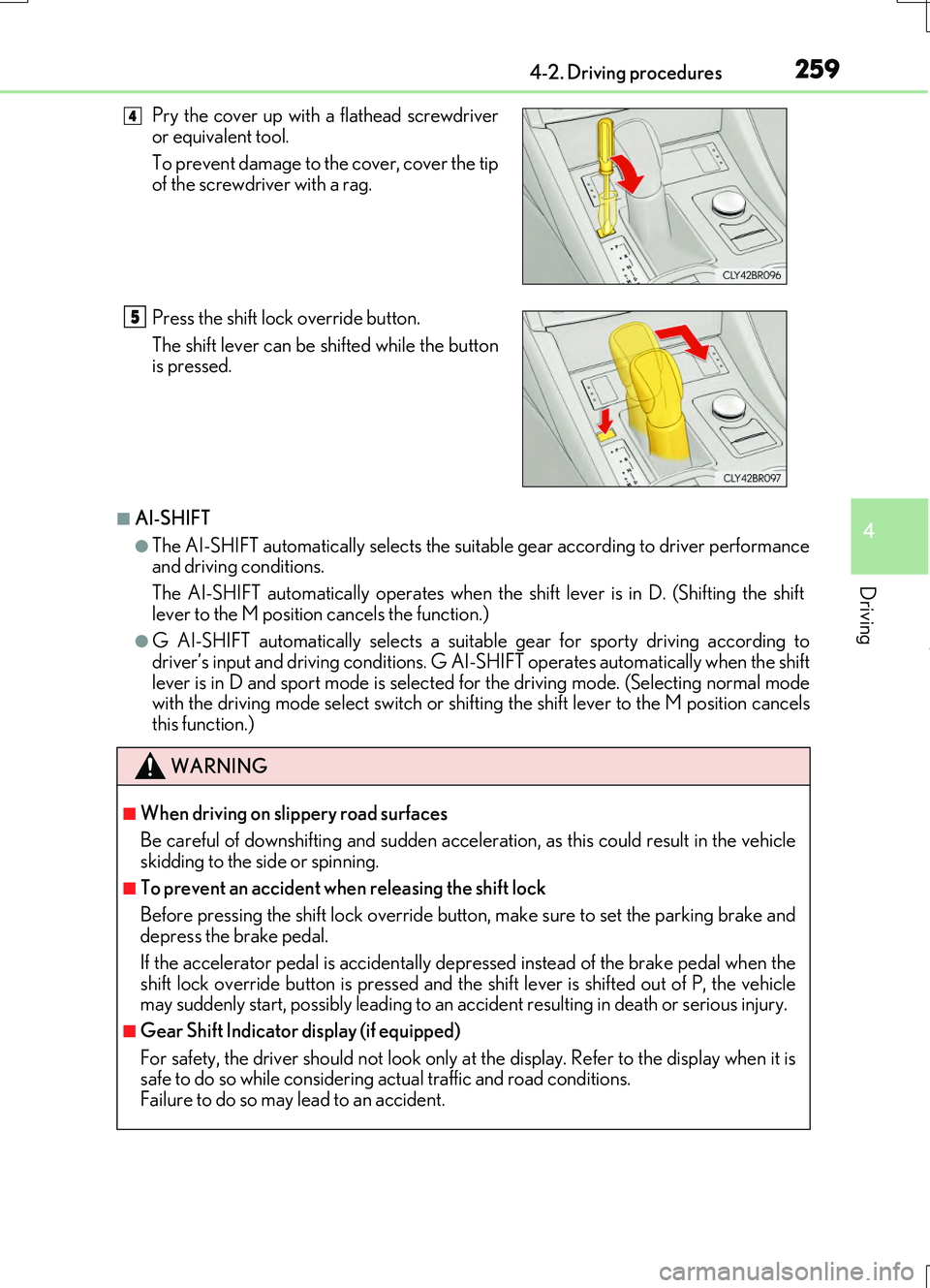
Pry the cover up with a flathead screwdriver or equivalent tool.
To prevent damage to the cover, cover the tip
of the screwdriver with a rag.
Press the shift lock override button.
The shift lever can be shifted while the button is pressed.
WARNING
■When driving on slippery road surfaces
Be careful of downshifting and sudden acceler ation, as this could result in the vehicle skidding to the side or spinning.
■To prevent an accident wh en releasing the shift lock
Before pressing the shift lock override butt on, make sure to set the parking brake and depress the brake pedal.
If the accelerator pedal is accidentally depressed instead of the brake pedal when the
shift lock override button is pressed and the shift lever is shifted out of P, the vehicle may suddenly start, possibly leading to an accident resulting in death or serious injury.
■Gear Shift Indicator display (if equipped)
For safety, the driver should not look only at the display. Refer to the display when it is safe to do so while considering actual traffic and road conditions. Failure to do so may lead to an accident.
4
5
Page 261 of 724
2614-2. Driving procedures
4
Driving
RC200t_RC F_EE(OM24728E)
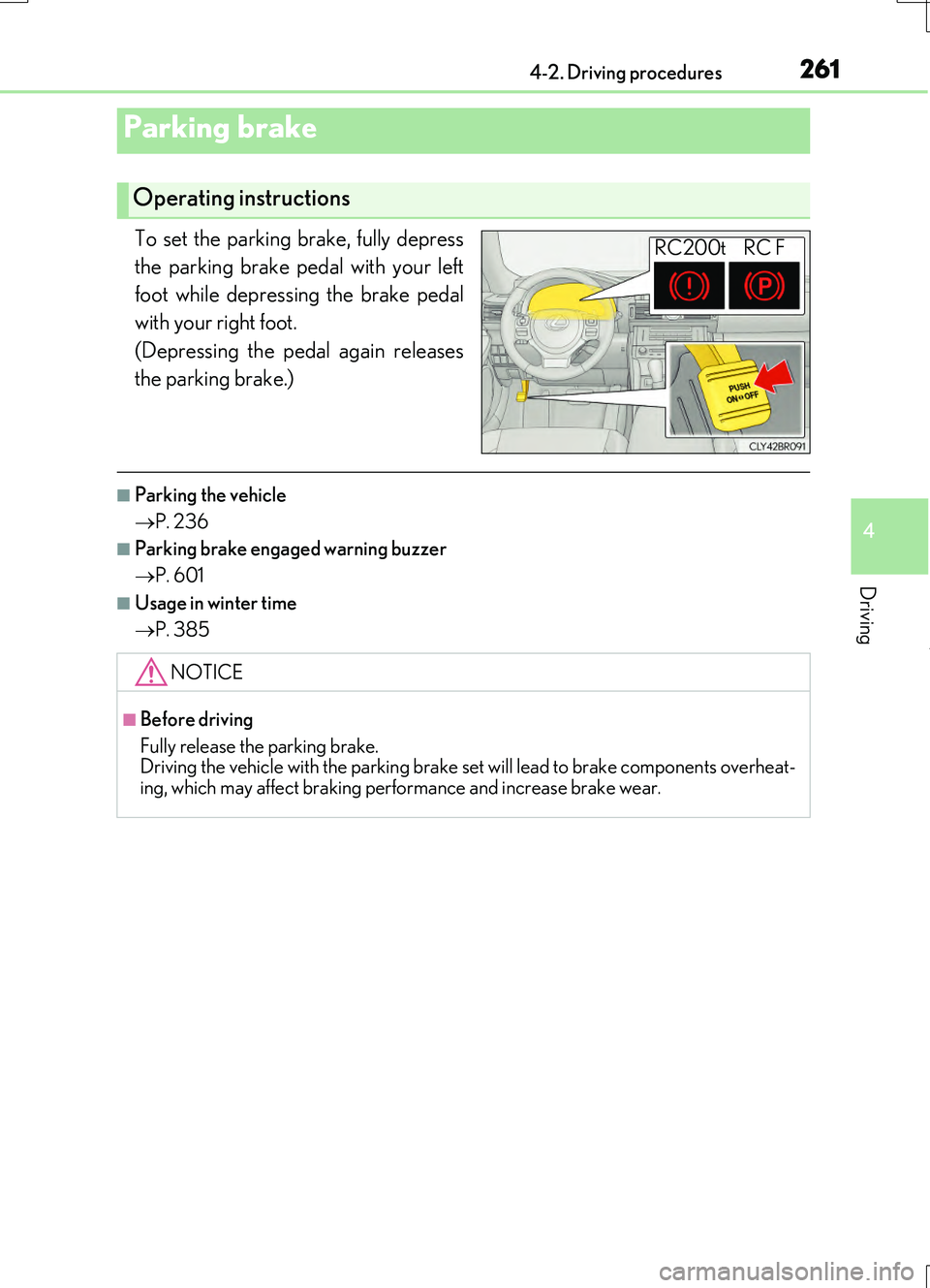
To set the parking brake, fully depress
the parking brake pedal with your left
foot while depressing the brake pedal
with your right foot.
(Depressing the pedal again releases
the parking brake.)
■Parking the vehicle
P. 236
■Parking brake engaged warning buzzer
P. 601
■Usage in winter time
P. 385
Parking brake
Operating instructions
RC200t RC F
NOTICE
■Before driving
Fully release the parking brake. Driving the vehicle with the parking brake se t will lead to brake components overheat-
ing, which may affect braking performance and increase brake wear.
Page 265 of 724
2654-3. Operating the lights and wipers
4
Driving
RC200t_RC F_EE(OM24728E)
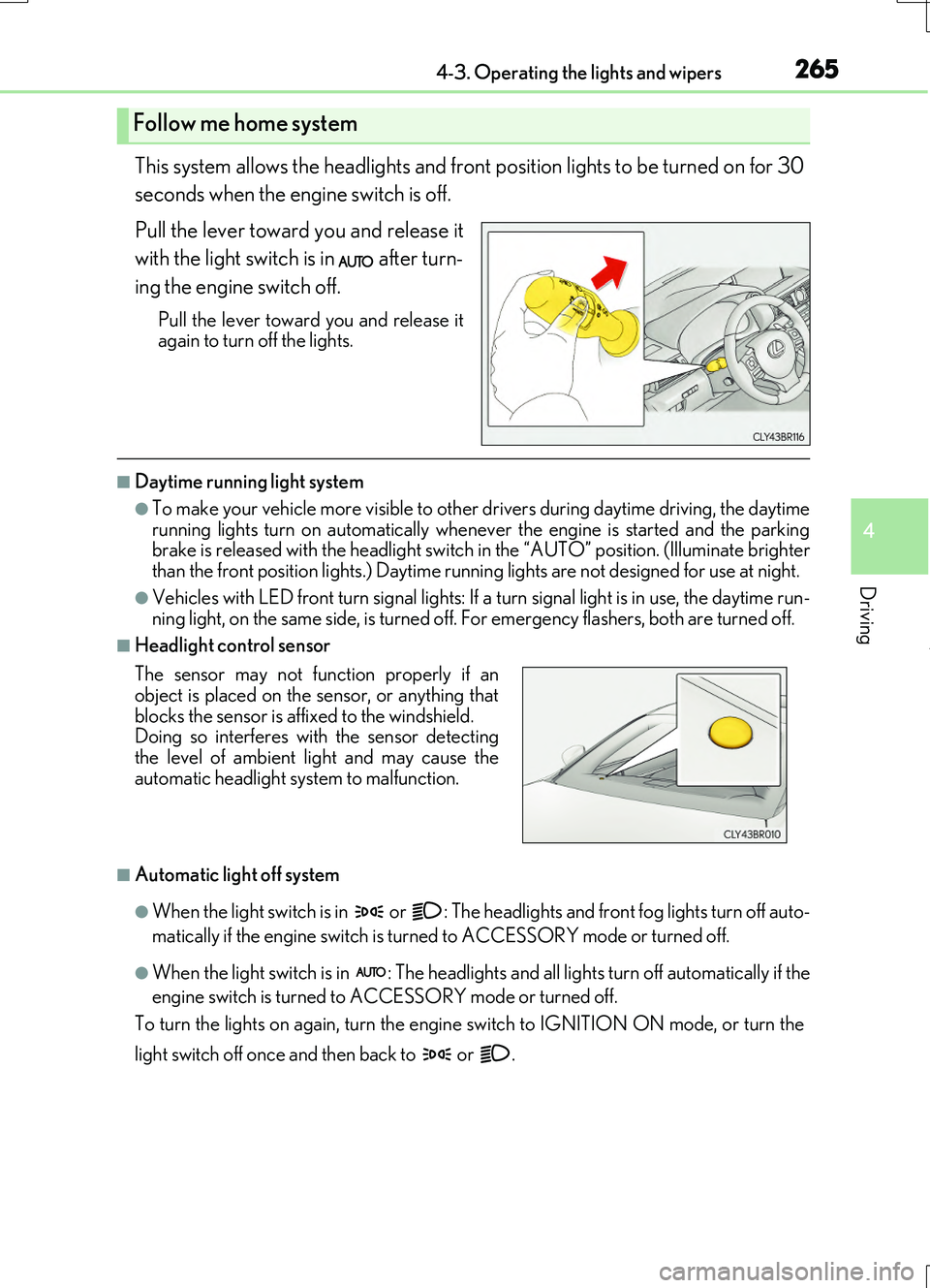
This system allows the headlights and front position lights to be turned on for 30
seconds when the engine switch is off.
Pull the lever toward you and release it
with the light switch is in after turn-
ing the engine switch off.
Pull the lever toward you and release it again to turn off the lights.
■Daytime running light system
●To make your vehicle more visible to other drivers during daytime driving, the daytime
running lights turn on automatically whenever the engine is started and the parking brake is released with the headlight switch in the “AUTO” position. (Illuminate brighter than the front position lights.) Daytime running lights are not designed for use at night.
●Vehicles with LED front turn signal lights: If a turn signal light is in use, the daytime run- ning light, on the same side, is turned off. For emergency flashers, both are turned off.
■Headlight control sensor
■Automatic light off system
●When the light switch is in or : The headlights and front fog lights turn off auto-
matically if the engine switch is turned to ACCESSORY mode or turned off.
●When the light switch is in : The headlights and all lights turn off automatically if the
engine switch is turned to ACCESSORY mode or turned off.
To turn the lights on again, turn the engine switch to IGNITION ON mode, or turn the
light switch off once and then back to or .
Follow me home system
The sensor may not function properly if an object is placed on the sensor, or anything that
blocks the sensor is affixed to the windshield. Doing so interferes with the sensor detectingthe level of ambient light and may cause the
automatic headlight system to malfunction.
Page 293 of 724
2934-5. Using the driving support systems
4
Driving
RC200t_RC F_EE(OM24728E)
WARNING
■When the Stop & Start system is operating
●Depress the brake pedal and apply the parking brake when necessary while the engine is stopped by the Stop & Start system (while the Stop & Start indicator is on).
●Do not allow anyone to leave the vehicle wh ile the engine is stopped by the Stop & Start system (while the Stop & Start indicator is on). An accident may occur due to the automatic engine start function.
●Ensure that the engine is not stopped by the Stop & Start system while the vehicle is ina poorly ventilated area. The engine may restart due to the automatic engine startfunction, causing exhaust gases to collect and enter the vehicle, possibly resulting in
death or a serious health hazard.
NOTICE
■To ensure the system operates correctly
If any of the following situations occur, the Stop & Start system may not operate cor- rectly. Have your vehicle checked by any authorized Lexus retailers or Lexus autho-rized repairers, or any reliable repairers.
●While the driver’s seat belt is fastened, the driver’s and front passenger’s seat belt reminder light flashes.
●Even though the driver’s seat belt is not fastened, the driver’s and front passenger’s
seat belt reminder light does not illuminate.
●Even though the driver’s door is closed, the open door warning light is illuminated or the interior light is illuminated when the inte rior light switch is in the door position.
●Even though the driver’s door is open, the open door warning light does not illumi- nated or the interior light does not illuminate when the interior light switch is in the door position.
Page 327 of 724
3274-5. Using the driving support systems
4
Driving
RC200t_RC F_EE(OM24728E)
■Lexus parking assist-sensor display
When an obstacle is detected while the Lexus pa rking assist monitor system is in use, the warning indicator will appe ar in the top right of the screen even if the display setting has
been set to off.
■If a message is displayed on the multi-information display
P. 600
WARNING
■When using the Lexus parking assist-sensor
Observe the following precautions. Failing to do so may result in the vehicle be ing unable to be driven safely and possibly cause an accident.
●Do not use the sensor at speeds in excess of 10 km/h (6 mph).
●The sensors’ detection areas and reaction times are limited. When moving forward or reversing, check the areas surrounding the vehicle (especially the sides of the vehi-
cle) for safety, and drive slowly, using the brake to control the vehicle’s speed.
●Do not install accessories within the sensors’ detection areas.
■Limitations of the sensors
●RC200t: The detection areas of the sensors are limited to the areas around the vehi- cle’s front and rear bumpers.
●RC F: The detection areas of the sensors are limited to the areas around the vehicle’s
front corners and the rear bumpers.
●Certain vehicle conditions and surrounding environments, such as the following, may affect the ability of the sensors to correctly detect objects. Pay particular attention in
the following situations. Failure to do so may result in the vehicle being driven unsafely, possibly leading to an accident.
• When there is dirt, snow or ice on a sens or (Cleaning the sensor will resolve this
problem.) • When the sensor is frozen (Thawing the area will resolve this problem.)In especially cold weather, if a sensor is frozen the screen may show an abnormal
display, or objects may not be detected • When a sensor is covered in any way• When the vehicle is leaning considerably to one side
• When driving on an extremely bumpy road, incline, gravel, or grass • When the vicinity of the vehicle is noisy due to vehicle horns, motorcycle engines,air brakes of large vehicles, or other loud noises producing ultrasonic waves
• When there is another vehicle equipped with parking assist sensor in the vicinity • When the sensor is coated with a sheet of spray or heavy rain• When the vehicle is equipped with a fender pole or wireless antenna
• When a towing eyelet is installed • When a bumper or sensor receives a strong impact• When the vehicle is approaching a tall or curved curb
• When driving in harsh sunlight or intense cold weather