sport mode LEXUS RC200T 2017 User Guide
[x] Cancel search | Manufacturer: LEXUS, Model Year: 2017, Model line: RC200T, Model: LEXUS RC200T 2017Pages: 724, PDF Size: 42.04 MB
Page 131 of 724
1312. Instrument cluster
2
Instrument cluster
RC200t_RC F_EE(OM24728E)
◆Display content
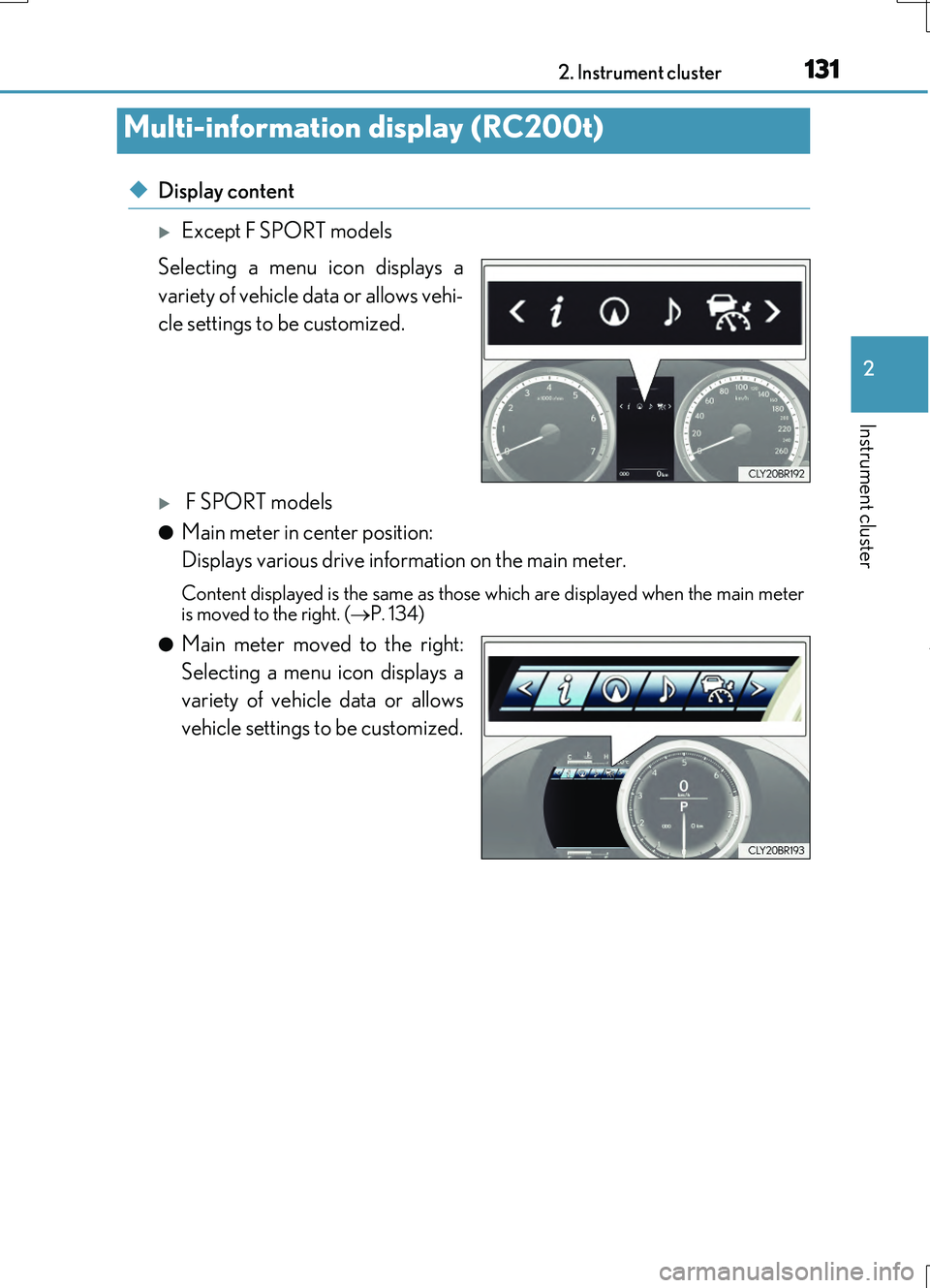
Except F SPORT models
Selecting a menu icon displays a
variety of vehicle data or allows vehi-
cle settings to be customized.
F SPORT models
●Main meter in center position:
Displays various drive information on the main meter.
Content displayed is the same as those which are displayed when the main meter is moved to the right. ( P. 134)
●Main meter moved to the right:
Selecting a menu icon displays a
variety of vehicle data or allows
vehicle settings to be customized.
Multi-information display (RC200t)
Page 133 of 724
1332. Instrument cluster
2
Instrument cluster
RC200t_RC F_EE(OM24728E)
◆Operating the meter control switches
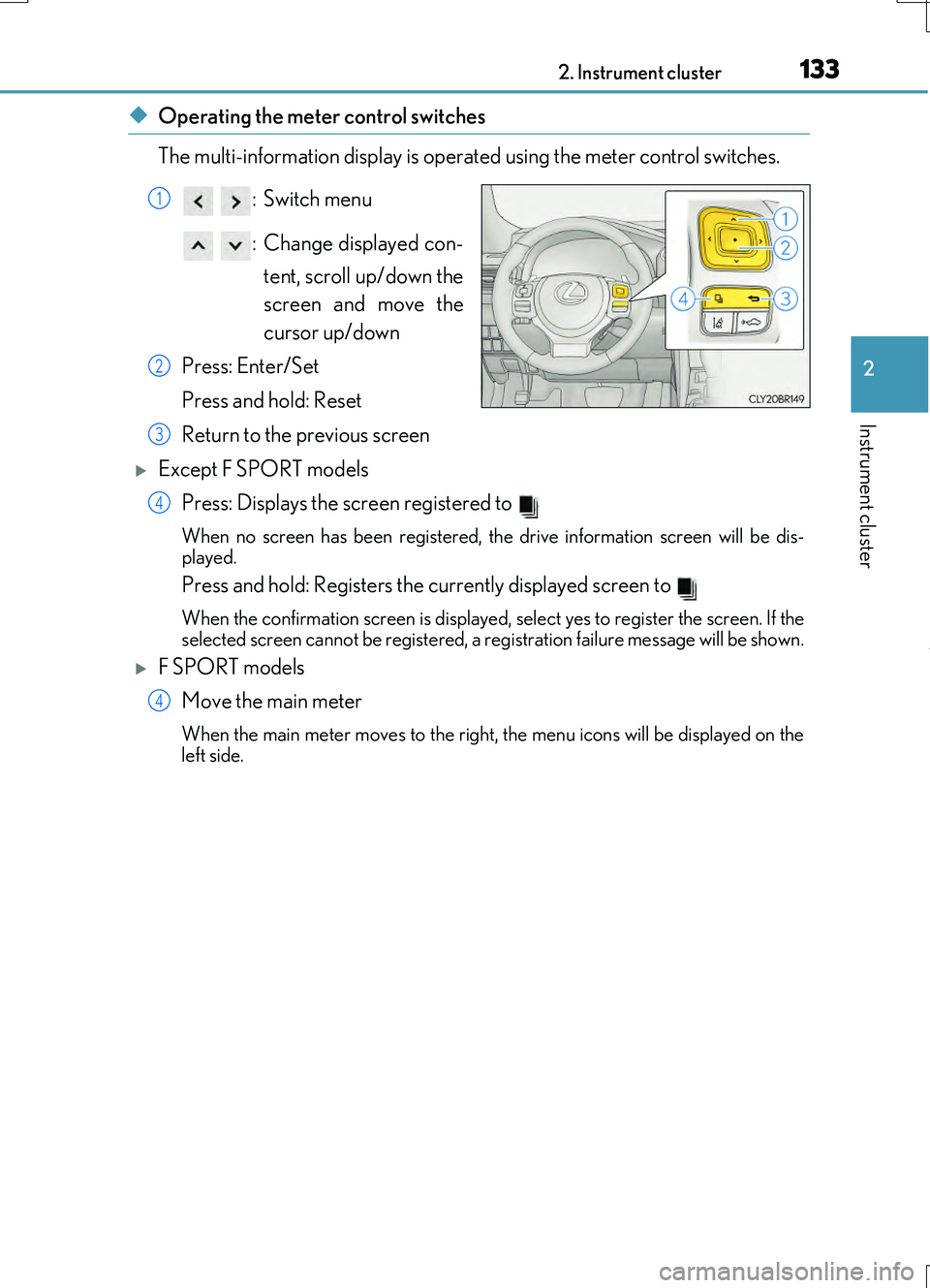
The multi-information display is operated using the meter control switches.
:Switch menu
: Change displayed con- tent, scroll up/down the
screen and move the
cursor up/down
Press: Enter/Set
Press and hold: Reset
Return to the previous screen
Except F SPORT models Press: Displays the screen registered to
When no screen has been registered, the drive information screen will be dis-
played.
Press and hold: Registers the currently displayed screen to
When the confirmation screen is displayed, select yes to register the screen. If the
selected screen cannot be registered, a re gistration failure message will be shown.
F SPORT models
Move the main meter
When the main meter moves to the right, the menu icons will be displayed on the
left side.
1
2
3
4
4
Page 134 of 724
1342. Instrument cluster
RC200t_RC F_EE(OM24728E)
■Drive information 1/Drive information 2
Select to select up to 2 of the following items to display on each screen
respectively.
F SPORT models (main meter in center po sition): Each item is displayed sepa-
rately.
*1: Use the displayed figure (average fuel consumption, average vehicle speed, elapsed
time) for reference only.
*2: This distance is computed based on your average fuel consumption. As a result, the
actual distance that can be driven may differ from that displayed.
*3: When only a small amount of fuel is added to the tank, the display may not be
updated.
When refueling, turn the engine switch off. If the vehicle is refueled without turning
the engine switch off, the display may not be updated.
Drive information
ItemContent
Current fuel consumptionDisplays instantaneous current fuel consumption
Average fuel econ-omy (after reset)Displays average fuel consumption since display reset*1
Average fuel econ-
omy (after start)Displays average fuel cons umption since engine start*1
Average fuel econ- omy (after refuel)Displays average fuel consumption since refuel*1
Average vehiclespeed (after reset)Displays average vehicle speed since display reset*1
Average vehicle
speed (after start)Displays average vehicle speed since engine start*1
Elapsed time (after reset)Displays elapsed time since display reset*1
Elapsed time (afterstart)Displays elapsed time since engine start*1
Distance (driving
range)Displays driving range with remaining fuel*2, 3
Distance (after start)Displays drive distance since vehicle start
Page 135 of 724
1352. Instrument cluster
2
Instrument cluster
RC200t_RC F_EE(OM24728E)
●Resetting
The following displays can be reset: average fuel consumption after reset,
average vehicle speed after reset, and elapsed time after reset.
• To reset, display the desired item and press and hold .
• If both displayed items are resettable, a reset selection screen will
appear.
■Eco Driving Indicator
P. 116
■Boost Meter/Oil Temperature Gauge/Oil Pressure Gauge (F SPORT
models)
Boost Meter:
Displays the boost pressure. The display changes colors when the set pres-
sure is exceeded.
Oil Temperature Gauge:
Displays the temperature of the engine oil. The display flashes when the
engine oil exceeds 140°C (284°F).
Oil Pressure Gauge:
Displays the oil pressure for the engine interior. A buzzer sounds and warning
message is displayed when the oil pressure gets low. ( P. 604)
Depending on the road conditions, temperature, vehicle speed, etc., the actual
vehicle condition on the display screen may differ. Use the display screen as a reference.
■Tire pressure (if equipped)
P. 537
■Gear positions
Displays the current gear position when the shift lever is in D or M.
Page 136 of 724
1362. Instrument cluster
RC200t_RC F_EE(OM24728E)
■Language
Select to change the language on the display.
■Units
Select to change the unit of measure for fuel consumption.
■Maintenance system (RC200t)
Select to reset the maintenance data after the required maintenance is per-
formed. (
P. 526)
■Eco Driving Indicator Light
Select to activate/deactivate the Eco Driving Indicator Light.
■ switch settings (except F SPORT models)
Displays a procedure to register a desired screen to .
You can register 1 screen as a shortcut, which can be displayed by pressing . ( P. 133)
■Drive information 1/Drive information 2
Select to select up to 2 items that will be displayed on the “Drive Info 1” screen
and “Drive Info 2” screen respectively.
( P. 134)
■Pop-up display
Select to set the following pop-up displays, which may appear in some situa-
tions, on/off.
• Route guidance display of the navigation system-linked system (if equipped)
• Incoming call display of the hands-free phone system
• Dynamic radar cruise control operation display (if equipped)
• Instrument panel brightness adjustment display
• Main meter switch operation display (F SPORT models)
• Stop & Start system duration
• Stop & Start system status
■Accent color (except F SPORT models)
Select to change the accent colors on the screen, such as the cursor color.
■Needle (F SPORT models)
Select to change the needle color for the tachometer.
Settings display
Page 137 of 724
1372. Instrument cluster
2
Instrument cluster
RC200t_RC F_EE(OM24728E)
■Rev indicator (F SPORT models)
Select to set the rev indicator on/off.
When set to on, proceed to set the engine speed at which the rev indicator will
be displayed.
Selectable engine speed range: 2000 r/min to 6100 r/min
■Rev peak (F SPORT models)
Select to set the rev peak on/off.
■Speed indicator (F SPORT models)
Select to set the speed indicator on/off.
When set to on, proceed to set the vehicle speed at which the speed indicator
will be displayed.
Selectable speed range:
Type A*1: 30 mph to 100 mph (50 km/h to 160 km/h)*3
Type B*2: 50 km/h to 200 km/h (30 mph to 125 mph)*3
*1:For U.K.
*2:Except for U.K.
*3: Always observe the legal speed limit when driving on public roads.
■Initialization
Select to reset the meter display settings. ( P. 686)
■Smart Stop settings
P. 290
■Idling Stop Time
Displays the current idling stop time (Engine stop time due to the Stop & Start
system)
■Idling Stop Time (after reset/after start)
Displays the total idling stop time (eng ine stop time via the Stop & Start sys-
tem) after resetting and engine startup.
■Idling Stop Time fuel savings (after reset/after start)
Displays the fuel savings (reference) during idling stop time after resetting and
engine startup.
Stop & Start system (Smart Stop) information
Page 149 of 724
1492. Instrument cluster
2
Instrument cluster
RC200t_RC F_EE(OM24728E)
■Speed indicator
Select to set the speed indicator on/off.
When set to on, proceed to set the vehicle speed at which the speed indicator
will be displayed.
Selectable speed range:
Except for United Kingdom: 50 km/h to 200 km/h (30 mph to 125 mph)*
For United Kingdom: 50 km/h to 160 km/h (30 mph to 100 mph)*
*: Always observe the legal speed limit when driving on public roads.
■Rear wing
Select to enable/disable the active rear wing.
■SPORT gauges
The SPORT S or SPORT S+ mode meter display can be selected and set as
the customized display for either SPORT S or SPORT S+ mode.
■Initialization
Select to reset the meter display settings. ( P. 686)
■Start-up display
When the engine is started, the name of the vehicle is displayed on the multi-information display.
While the start-up display is being displayed, the meter display cannot be changed even if the drive mode is changed. When the start-up display is finished, the meter display forthe currently selected mode will be displayed.
■Torque distribution display (if equipped)
Torque distribution may not be displayed corre ctly in some cases, such as when the vehi- cle passes over road expansion joints.
■G-force display
●The G-force values may not be zero even when the vehicle is parked, such as when it isparked on an incline.
●The steering amount, accelerator pedal input, and brake fluid pressure displays are dis-abled until the engine has warmed up (the variable red zone of the tachometer hasretracted to 7300 r/min).
After the engine has warmed up, these displays will be enabled.
●Depending on the vehicle usage conditions, the brake fluid pressure display may not reach its maximum reading even though the brake pedal is fully depressed.
●If a battery terminal is disconnected and reconnected, the steering amount display may be disabled temporarily. After driving the ve hicle for a while, the display will be enabled.
Page 237 of 724
2374-1. Before driving
4
Driving
RC200t_RC F_EE(OM24728E)
■When starting off on an uphill
The hill-start assist co ntrol will activate. (P. 349)
■Driving in the rain
●Drive carefully when it is raining, because visibility will be reduced, the windows may
become fogged-up, and the road will be slippery.
●Drive carefully when it starts to rain, because the road surface will be especially slip- pery.
●Refrain from high speeds when driving on an expressway in the rain, because there maybe a layer of water between the tires and the road surface, preventing the steering andbrakes from operating properly.
■Engine speed while driving
In the following conditions, the engine speed may become high while driving. This is due to automatic up-shifting control or down-shi fting implementation to meet driving condi-
tions. It does not indicate sudden acceleration.
●The vehicle is judged to be driving uphill or downhill
●When the accelerator pedal is released
●When the brake pedal is depressed while sport mode is selected
■Restraining the engine output (brake override system)
●When the accelerator and brake pedals are depressed at the same time, the engine
output may be restrained.
●A warning message is displayed on the mult i-information display while the system is operating. ( P. 608)
■Breaking in your new Lexus
To extend the life of the vehicle, observing the following precautions is recommended:
●For the first 300 km (186 miles):
Avoid sudden stops.
●For the first 1000 km (621 miles):
• Do not drive at extremely high speeds.
• Avoid sudden acceleration. • Do not drive continuously in low gears.• Do not drive at a constant speed for extended periods.
■Drum-in-disc type parking brake system
Your vehicle has a drum-in-disc type parkin g brake system. This type of brake system needs bedding-down of the brake shoes periodically or whenever the parking brake
shoes and/or drum are replaced. Have any authorized Lexus dealer or repairer, or another duly qualified and equipped professional, perform the bedding down operation.
■Operating your vehicle in a foreign country
Comply with the relevant vehicle registration laws and confirm the availability of the cor- rect fuel. ( P. 671)
■Brake pads and discs (RC F)
The brake pads and discs are designed for use under high load conditions. Therefore, brake noise may be generated depending on the vehicle speed, braking force and vehi-
cle environment (temperature, humidity, etc.).
Page 254 of 724
2544-2. Driving procedures
RC200t_RC F_EE(OM24728E)
*1: To improve fuel efficiency and reduce noise, shift the shift lever to D for normal driv-
ing.
*2: Any gear range can be fixed when driving in M mode.
■Sport mode/Eco drive mode
P. 345
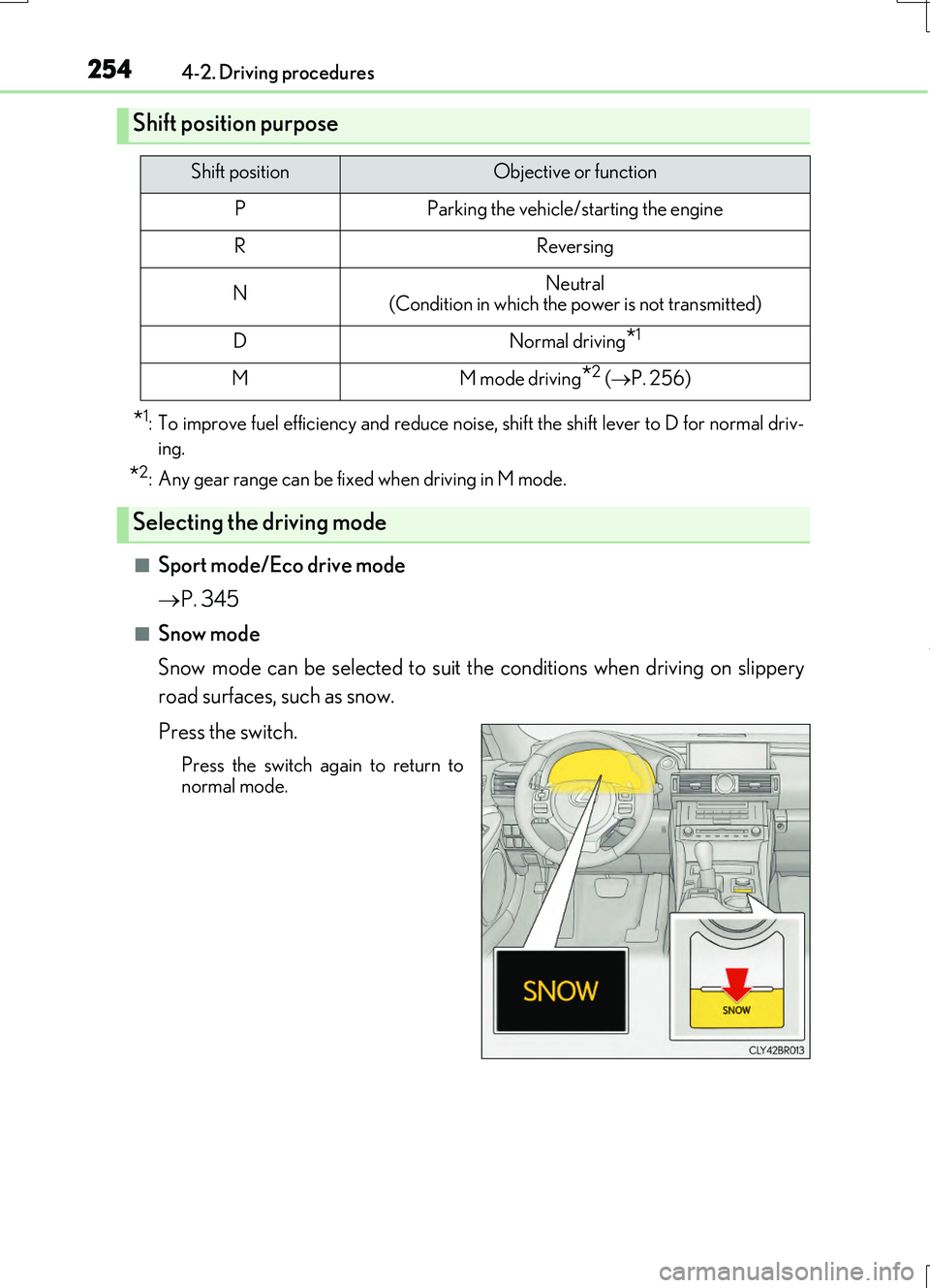
■Snow mode
Snow mode can be selected to suit the conditions when driving on slippery
road surfaces, such as snow.
Press the switch.
Press the switch again to return to
normal mode.
Shift position purpose
Shift positionObjective or function
PParking the vehicle/starting the engine
RReversing
NNeutral (Condition in which the power is not transmitted)
DNormal driving*1
MM mode driving*2 ( P. 256)
Selecting the driving mode
Page 258 of 724
2584-2. Driving procedures
RC200t_RC F_EE(OM24728E)
■Downshifting restriction warning buzzer
To help ensure safety and driving performa nce, downshifting operation may sometimes be restricted. In some circumstances, down shifting may not be possible even when the
shift lever or paddle shift switch is operated. (A buzzer will sound twice.)
■Snow mode automatic deactivation
Snow mode is automatically deactivated if the engine switch is turned off after driving in
snow mode.
■When driving with cruise control or dynamic radar cruise control activated
Even when performing the following actions with the intent of enabling engine braking,
engine braking will not activate because crui se control or dynamic radar cruise control will not be canceled.
●While driving in the D position, downshifting to 7, 6, 5 or 4. ( P. 294, 298)
●When switching the driving mode to sport mode while driving in D position. (P. 345)
■Shift lock system
The shift lock system is a system to prevent accidental operation of the shift lever in start-
ing.
The shift lever can be shifte d from P only when the engine switch is in IGNITION ON mode and the brake pedal is being depressed.
■If the shift lever cannot be shifted from P
First, check whether the brake pedal is being depressed.
If the shift lever cannot be shifted with your foot on the brake pedal, there may be a prob-
lem with the shift lock system. Have the vehicle inspected by any authorized Lexus dealer or repairer, or another duly qualifie d and equipped professional immediately.
The following steps may be used as an emerge ncy measure to ensure that the shift lever
can be shifted.
Releasing the shift lock:
Set the parking brake.
Turn the engine switch to off.
Depress the brake pedal.
1
2
3