reset LEXUS RC200T 2017 Owner's Guide
[x] Cancel search | Manufacturer: LEXUS, Model Year: 2017, Model line: RC200T, Model: LEXUS RC200T 2017Pages: 724, PDF Size: 42.04 MB
Page 416 of 724
4165-4. Using the radio
RC200t_RC F_EE(OM24728E)
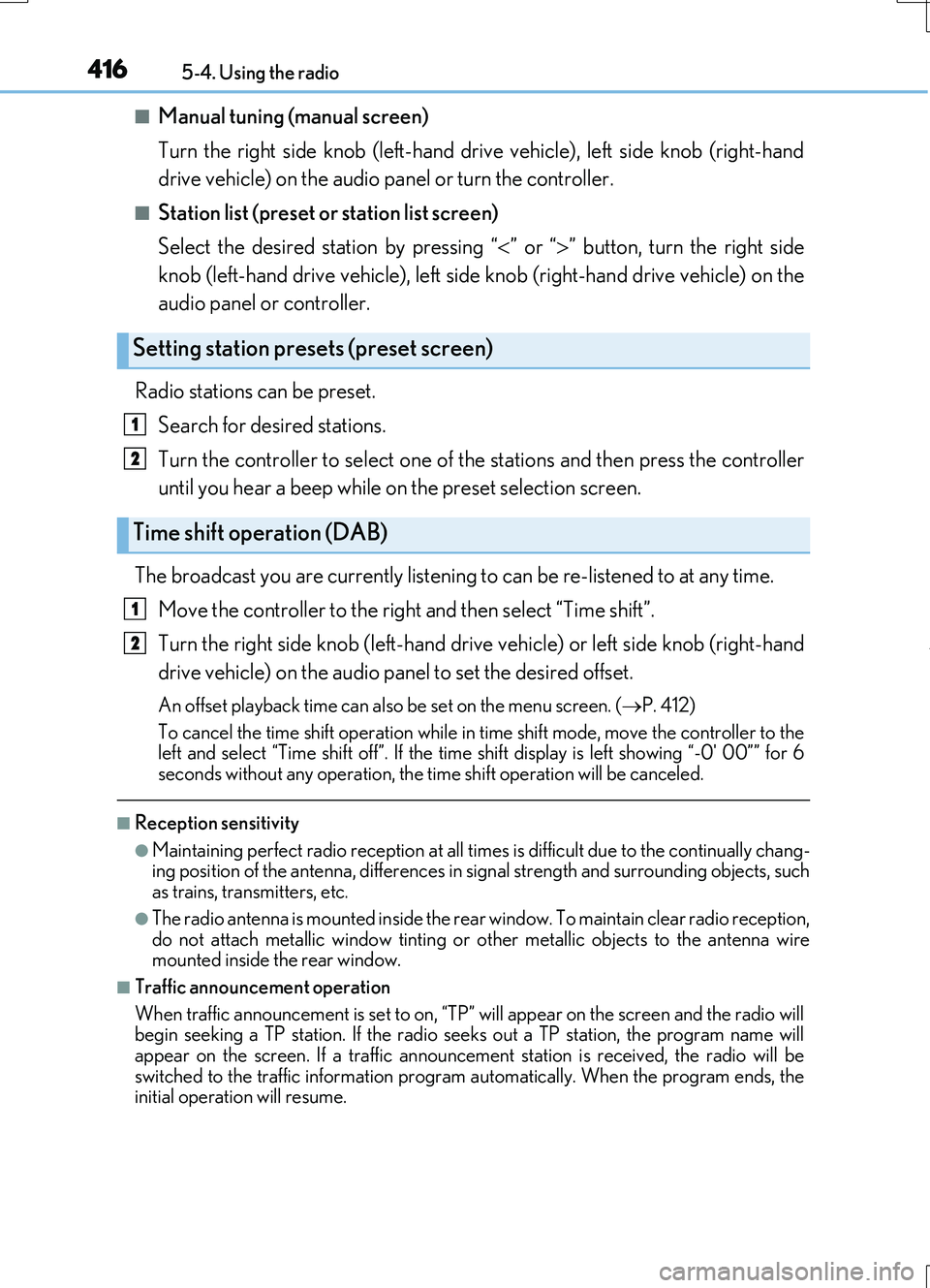
■Manual tuning (manual screen)
Turn the right side knob (left-hand drive vehicle), left side knob (right-hand
drive vehicle) on the audio panel or turn the controller.
■Station list (preset or station list screen)
Select the desired station by pressing “ ” or “” button, turn the right side
knob (left-hand drive vehicle), left side knob (right-hand drive vehicle) on the
audio panel or controller.
Radio stations can be preset.
Search for desired stations.
Turn the controller to select one of the stations and then press the controller
until you hear a beep while on the preset selection screen.
The broadcast you are currently listening to can be re-listened to at any time.
Move the controller to the right and then select “Time shift”.
Turn the right side knob (left-hand drive vehicle) or left side knob (right-hand
drive vehicle) on the audio panel to set the desired offset.
An offset playback time can also be set on the menu screen. ( P. 412)
To cancel the time shift operation while in time shift mode, move the controller to the left and select “Time shift off”. If the time shift display is left showing “-0' 00”” for 6
seconds without any operation, the time shift operation will be canceled.
■Reception sensitivity
●Maintaining perfect radio recept ion at all times is difficult due to the continually chang- ing position of the antenna, differences in signal strength and surrounding objects, suchas trains, transmitters, etc.
●The radio antenna is mounted inside the rear window. To maintain clear radio reception, do not attach metallic window tinting or other metallic objects to the antenna wire mounted inside the rear window.
■Traffic announcement operation
When traffic announcement is set to on, “TP” will appear on the screen and the radio will begin seeking a TP station. If the radio seeks out a TP station, the program name will
appear on the screen. If a traffic announcement station is received, the radio will be switched to the traffic information program automatically. When the program ends, theinitial operation will resume.
Setting station presets (preset screen)
Time shift operation (DAB)
1
2
1
2
Page 425 of 724
4255-6. Using an external device
5
Lexus Display Audio system
RC200t_RC F_EE(OM24728E)
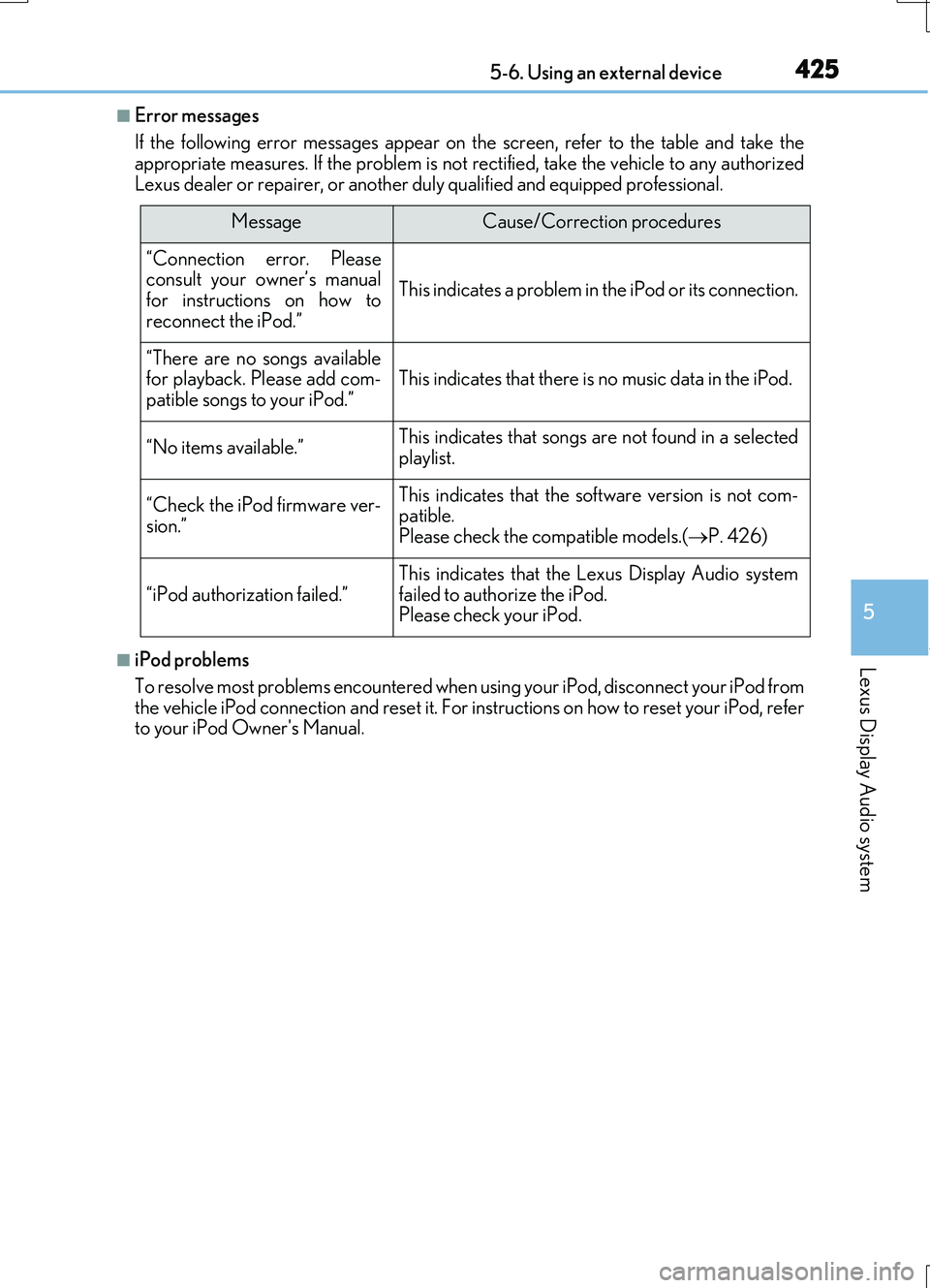
■Error messages
If the following error messages appear on the screen, refer to the table and take the appropriate measures. If the problem is not rectified, take the vehicle to any authorized
Lexus dealer or repairer, or another duly qualified and equipped professional.
■iPod problems
To resolve most problems encountered when us ing your iPod, disconnect your iPod from the vehicle iPod connection and reset it. For instructions on how to reset your iPod, referto your iPod Owner's Manual.
MessageCause/Correction procedures
“Connection error. Pleaseconsult your owner’s manualfor instructions on how to
reconnect the iPod.”
This indicates a problem in the iPod or its connection.
“There are no songs available for playback. Please add com-patible songs to your iPod.”This indicates that there is no music data in the iPod.
“No items available.”This indicates that songs are not found in a selected
playlist.
“Check the iPod firmware ver-
sion.”
This indicates that the software version is not com- patible.Please check the compatible models.( P. 426)
“iPod authorization failed.”
This indicates that the Lexus Display Audio system
failed to authorize the iPod. Please check your iPod.
Page 526 of 724
5267-3. Do-it-yourself maintenance
RC200t_RC F_EE(OM24728E)
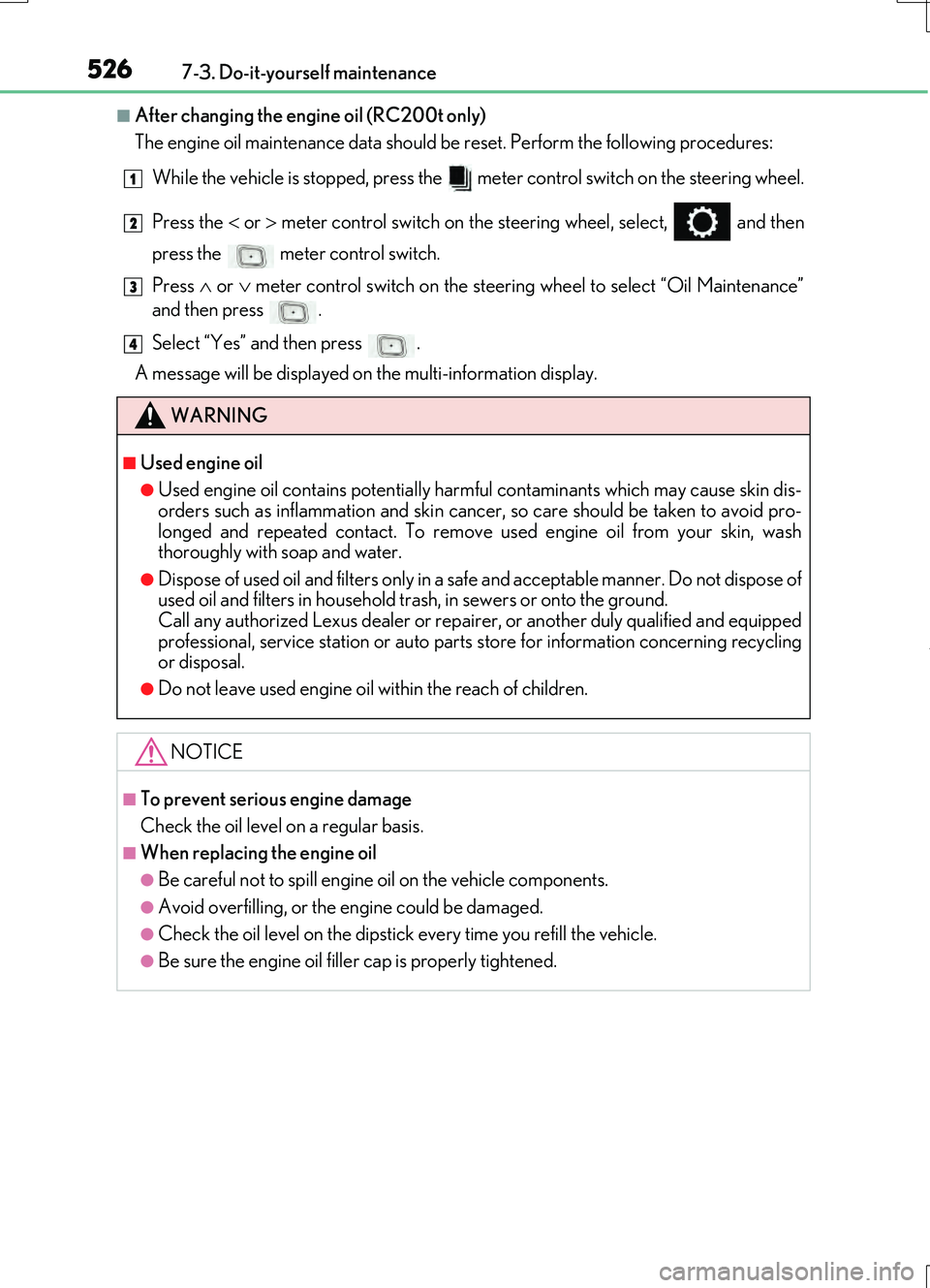
■After changing the engine oil (RC200t only)
The engine oil maintenance data should be reset. Perform the following procedures:
While the vehicle is stopped, press the meter control switch on the steering wheel.
Press the or meter control switch on the st eering wheel, select, and then
press the meter control switch.
Press or meter control switch on the steering wheel to select “Oil Maintenance”
and then press .
Select “Yes” and then press .
A message will be displayed on the multi-information display.
WARNING
■Used engine oil
●Used engine oil contains potentially harmful contaminants which may cause skin dis-
orders such as inflammation and skin cancer, so care should be taken to avoid pro-
longed and repeated contact. To remove used engine oil from your skin, wash
thoroughly with soap and water.
●Dispose of used oil and filters only in a safe and acceptable manner. Do not dispose of
used oil and filters in household trash, in sewers or onto the ground.
Call any authorized Lexus dealer or repair er, or another duly qualified and equipped
professional, service station or auto parts store for information concerning recycling
or disposal.
●Do not leave used engine oil within the reach of children.
NOTICE
■To prevent serious engine damage
Check the oil level on a regular basis.
■When replacing the engine oil
●Be careful not to spill engine oil on the vehicle components.
●Avoid overfilling, or the engine could be damaged.
●Check the oil level on the dipstick every time you refill the vehicle.
●Be sure the engine oil filler cap is properly tightened.
1
2
3
4
Page 538 of 724
5387-3. Do-it-yourself maintenance
RC200t_RC F_EE(OM24728E)
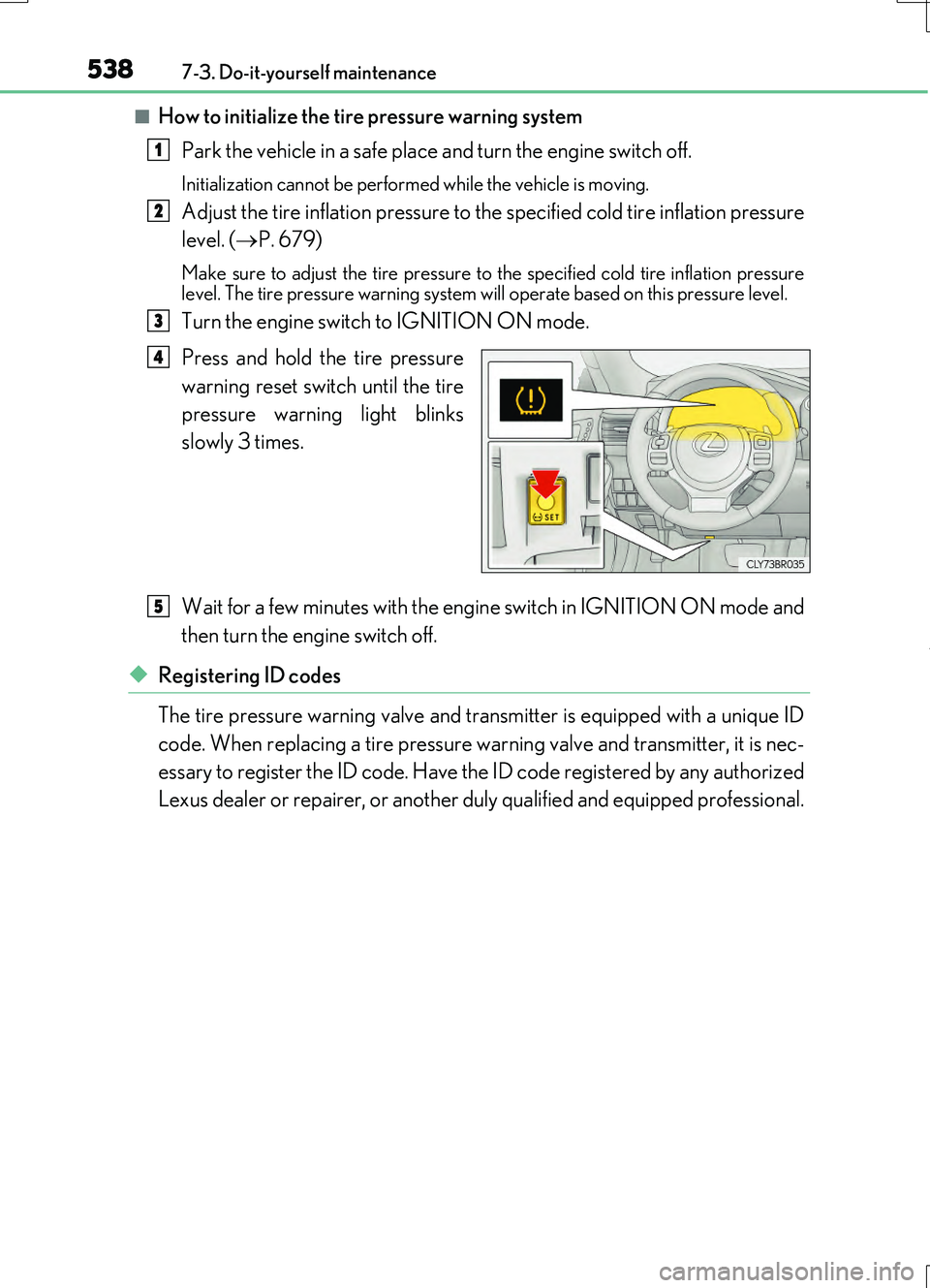
■How to initialize the tire pressure warning system
Park the vehicle in a safe place and turn the engine switch off.
Initialization cannot be perfor med while the vehicle is moving.
Adjust the tire inflation pressure to the specified cold tire inflation pressure
level. ( P. 679)
Make sure to adjust the tire pressure to the specified cold tire inflation pressure level. The tire pressure warning system will operate based on this pressure level.
Turn the engine switch to IGNITION ON mode.
Press and hold the tire pressure
warning reset switch until the tire
pressure warning light blinks
slowly 3 times.
Wait for a few minutes with the engine switch in IGNITION ON mode and
then turn the engine switch off.
◆Registering ID codes
The tire pressure warning valve and transmitter is equipped with a unique ID
code. When replacing a tire pressure wa rning valve and transmitter, it is nec-
essary to register the ID code. Have the ID code registered by any authorized
Lexus dealer or repairer, or another duly qualified and equipped professional.
1
2
3
4
5
Page 540 of 724
5407-3. Do-it-yourself maintenance
RC200t_RC F_EE(OM24728E)
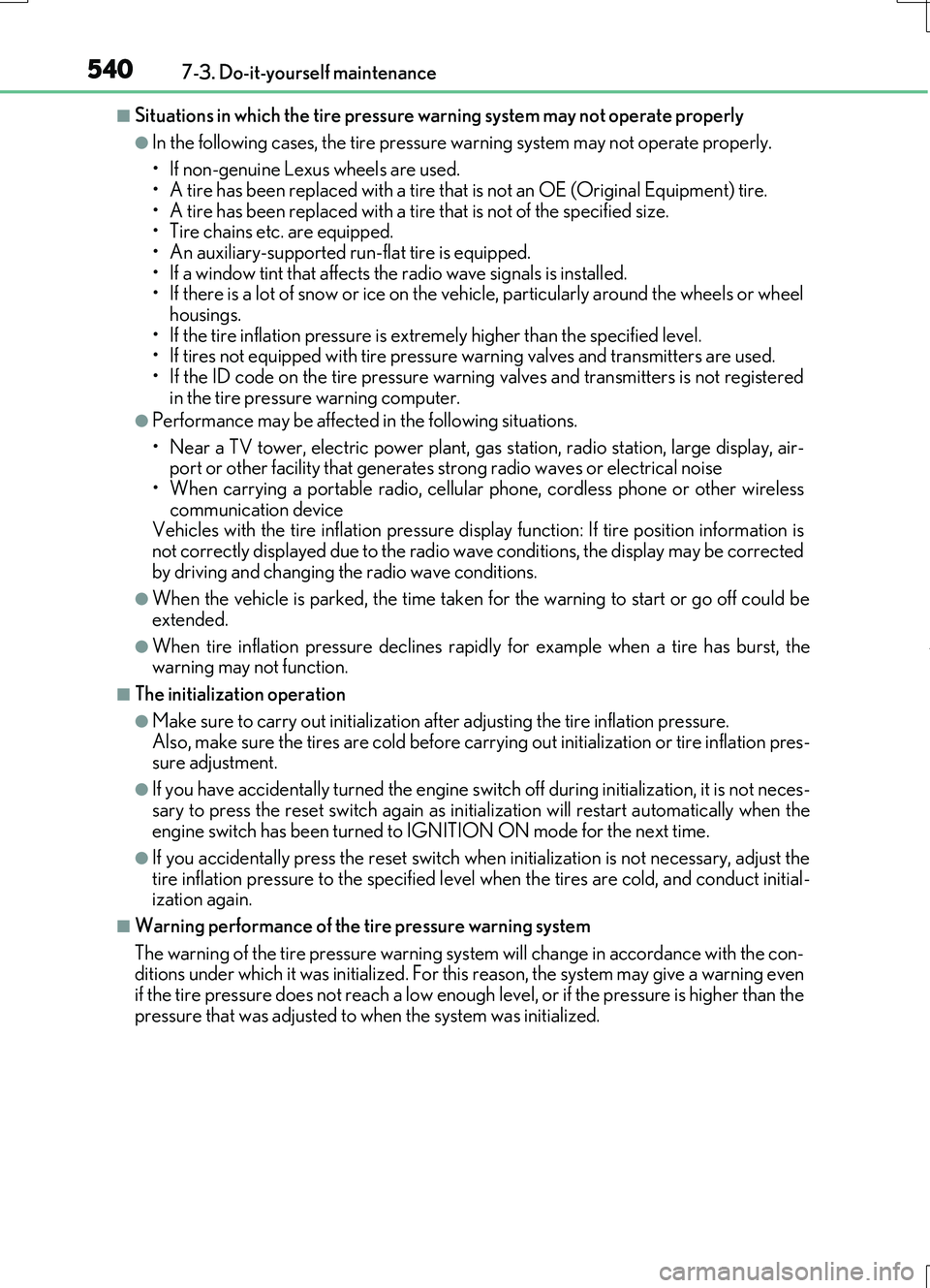
■Situations in which the tire pressure warning system may not operate properly
●In the following cases, the tire pressure warning system may not operate properly.
• If non-genuine Lexus wheels are used.
• A tire has been replaced with a tire that is not an OE (Original Equipment) tire. • A tire has been replaced with a tire that is not of the specified size.• Tire chains etc. are equipped.
• An auxiliary-supported run-flat tire is equipped. • If a window tint that affects the radio wave signals is installed.• If there is a lot of snow or ice on the vehi cle, particularly around the wheels or wheel
housings. • If the tire inflation pressure is extr emely higher than the specified level. • If tires not equipped with tire pressure warning valves and transmitters are used.
• If the ID code on the tire pressure warning valves and transmitters is not registered in the tire pressure warning computer.
●Performance may be affected in the following situations.
• Near a TV tower, electric power plant, gas station, radio station, large display, air- port or other facility that generates st rong radio waves or electrical noise
• When carrying a portable radio, cellular phone, cordless phone or other wireless communication deviceVehicles with the tire inflation pressure display function: If tire position information is
not correctly displayed due to the radio wave conditions, the display may be corrected by driving and changing the radio wave conditions.
●When the vehicle is parked, the time taken for the warning to start or go off could be
extended.
●When tire inflation pressure declines rapi dly for example when a tire has burst, the warning may not function.
■The initialization operation
●Make sure to carry out initialization af ter adjusting the tire inflation pressure.
Also, make sure the tires are cold before carry ing out initialization or tire inflation pres- sure adjustment.
●If you have accidentally turned the engine swit ch off during initialization, it is not neces-
sary to press the reset switch again as init ialization will restart automatically when the engine switch has been turned to IGNITION ON mode for the next time.
●If you accidentally press the reset switch when initialization is not necessary, adjust the
tire inflation pressure to the specified leve l when the tires are cold, and conduct initial- ization again.
■Warning performance of the tire pressure warning system
The warning of the tire pressure warning syst em will change in accordance with the con- ditions under which it was initialized. For this reason, the system may give a warning even if the tire pressure does not reach a low enough level, or if the pressure is higher than the
pressure that was adjusted to when the system was initialized.
Page 610 of 724
6108-2. Steps to take in an emergency
RC200t_RC F_EE(OM24728E)
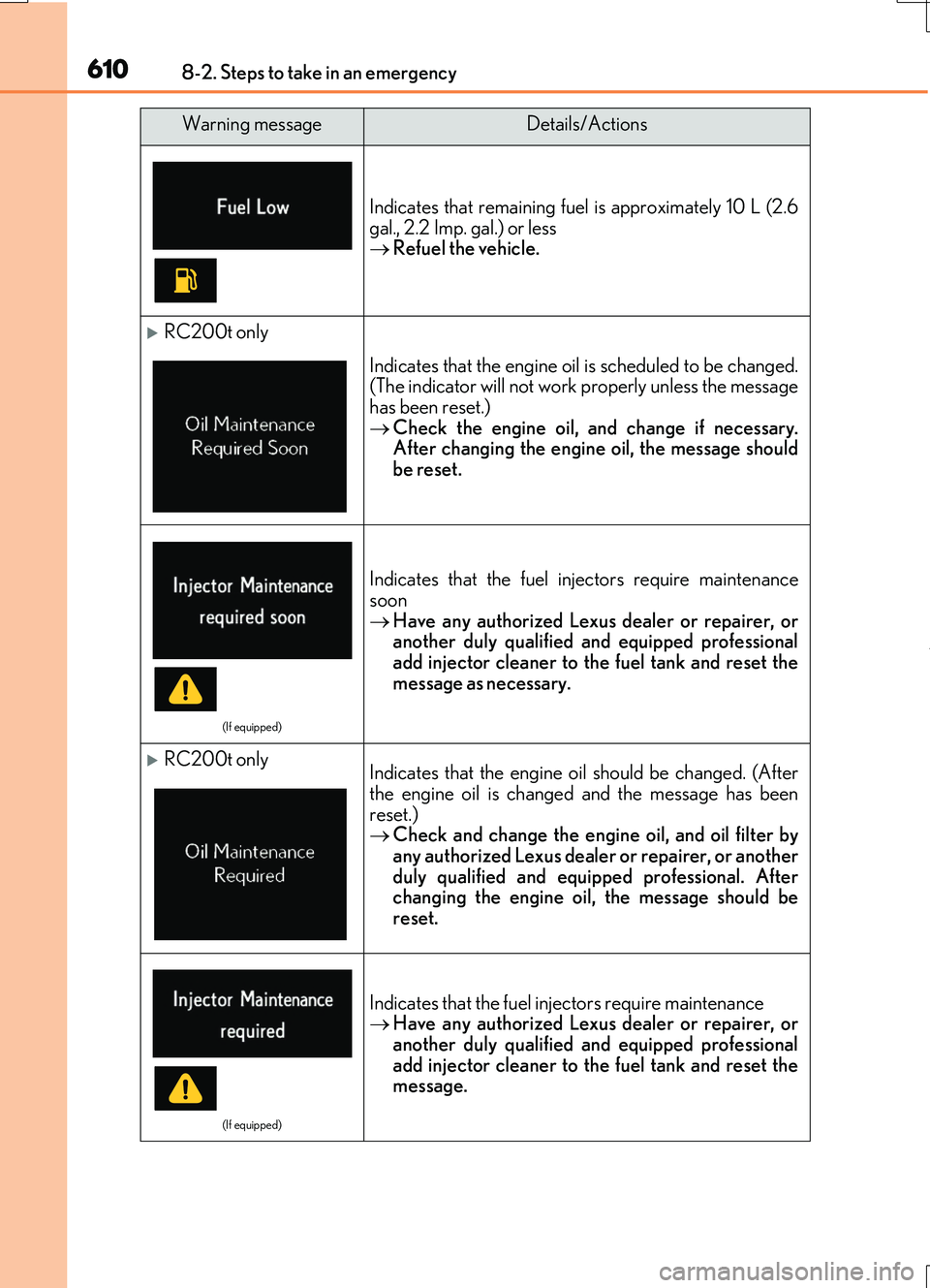
Indicates that remaining fuel is approximately 10 L (2.6 gal., 2.2 Imp. gal.) or less Refuel the vehicle.
RC200t only
Indicates that the engine oil is scheduled to be changed. (The indicator will not work properly unless the message
has been reset.) Check the engine oil, and change if necessary. After changing the engine oil, the message should
be reset.
(If equipped)
Indicates that the fuel in jectors require maintenance
soon Have any authorized Lexus dealer or repairer, or another duly qualified and equipped professional
add injector cleaner to the fuel tank and reset the message as necessary.
RC200t onlyIndicates that the engine oil should be changed. (After
the engine oil is changed and the message has been reset.) Check and change the engine oil, and oil filter by
any authorized Lexus dealer or repairer, or another duly qualified and equipped professional. Afterchanging the engine oil, the message should be
reset.
(If equipped)
Indicates that the fuel injectors require maintenance Have any authorized Lexus dealer or repairer, or another duly qualified and equipped professional
add injector cleaner to the fuel tank and reset the message.
Warning messageDetails/Actions
Page 612 of 724
6128-2. Steps to take in an emergency
RC200t_RC F_EE(OM24728E)
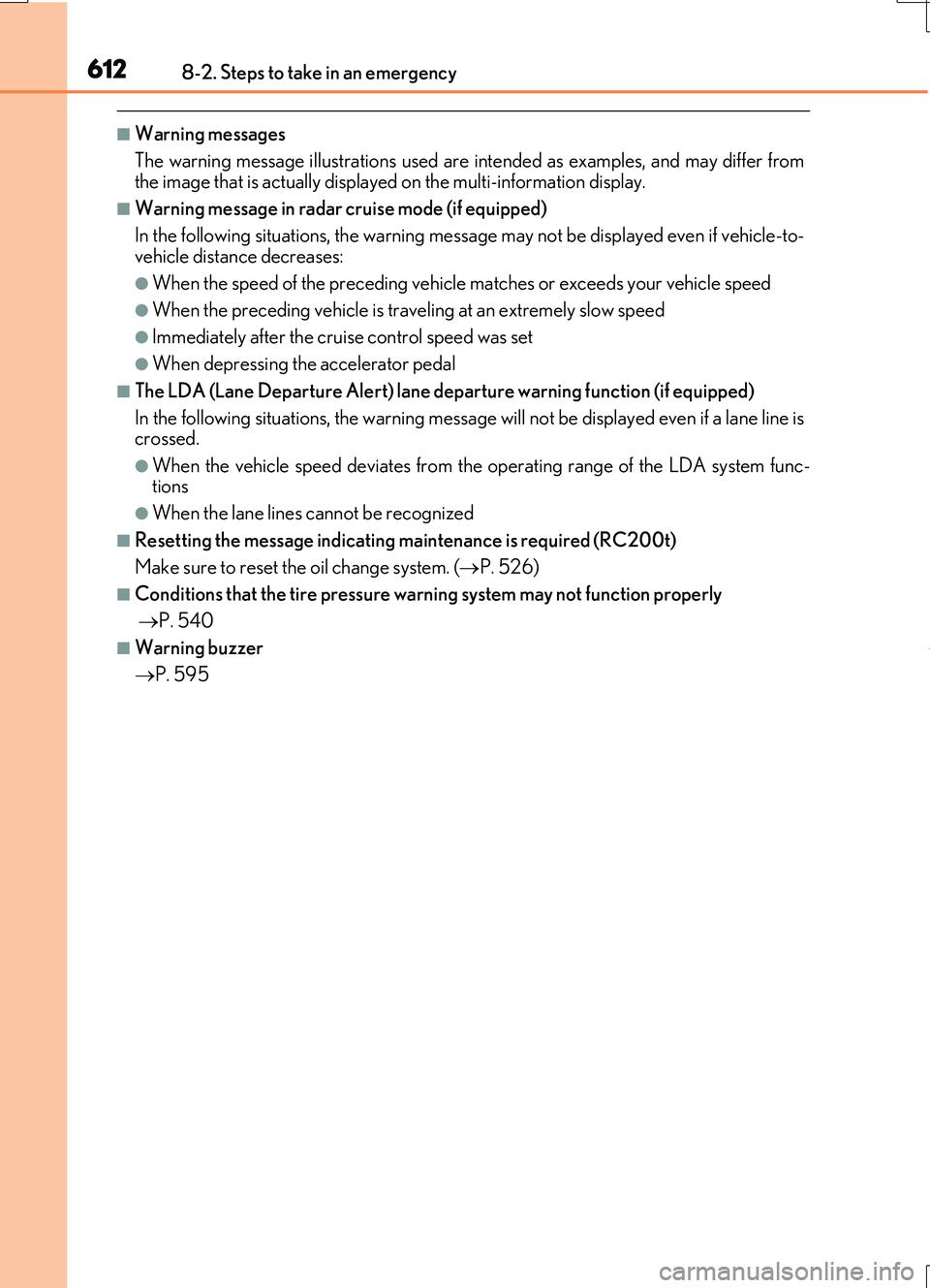
■Warning messages
The warning message illustrations used are in tended as examples, and may differ from the image that is actually displaye d on the multi-information display.
■Warning message in radar cruise mode (if equipped)
In the following situations, the warning message may not be displayed even if vehicle-to- vehicle distance decreases:
●When the speed of the preceding vehicle matches or exceeds your vehicle speed
●When the preceding vehicle is traveling at an extremely slow speed
●Immediately after the cruise control speed was set
●When depressing the accelerator pedal
■The LDA (Lane Departure Alert) lane departure warning function (if equipped)
In the following situations, the warning message will not be displayed even if a lane line is crossed.
●When the vehicle speed deviates from the operating range of the LDA system func-tions
●When the lane lines cannot be recognized
■Resetting the message indicating maintenance is required (RC200t)
Make sure to reset the oil change system. ( P. 526)
■Conditions that the tire pressure warning system may not function properly
P. 540
■Warning buzzer
P. 595
Page 686 of 724
6869-2. Customization
RC200t_RC F_EE(OM24728E)
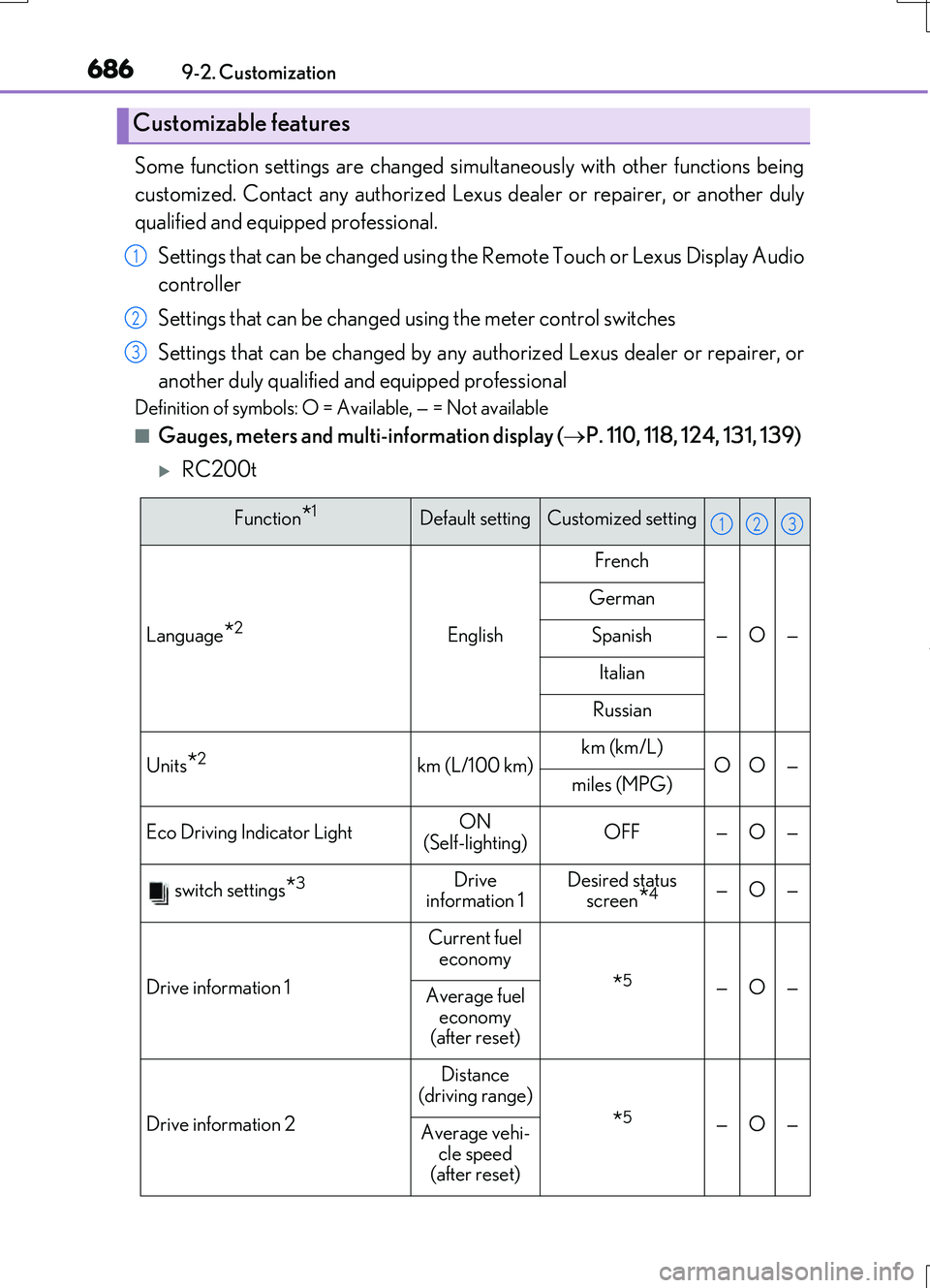
Some function settings are changed simultaneously with other functions being
customized. Contact any authorized Lexu s dealer or repairer, or another duly
qualified and equipped professional.
Settings that can be changed using the Remote Touch or Lexus Display Audio
controller
Settings that can be changed using the meter control switches
Settings that can be changed by any authorized Lexus dealer or repairer, or
another duly qualified and equipped professional
Definition of symbols: O = Available, — = Not available
■Gauges, meters and multi-information display ( P. 110, 118, 124, 131, 139)
RC200t
Customizable features
1
2
3
Function*1Default settingCustomized setting
Language*2English
French
—O—
German
Spanish
Italian
Russian
Units*2km (L/100 km)km (km/L)OO—miles (MPG)
Eco Driving Indicator LightON
(Self-lighting)OFF—O—
switch settings*3Drive
information 1Desired status screen*4—O—
Drive information 1
Current fuel
economy
*5—O—Average fuel economy
(after reset)
Drive information 2
Distance
(driving range)
*5—O—Average vehi- cle speed
(after reset)
123
Page 687 of 724
687
9
9-2. Customization
Vehicle specifications
RC200t_RC F_EE(OM24728E)
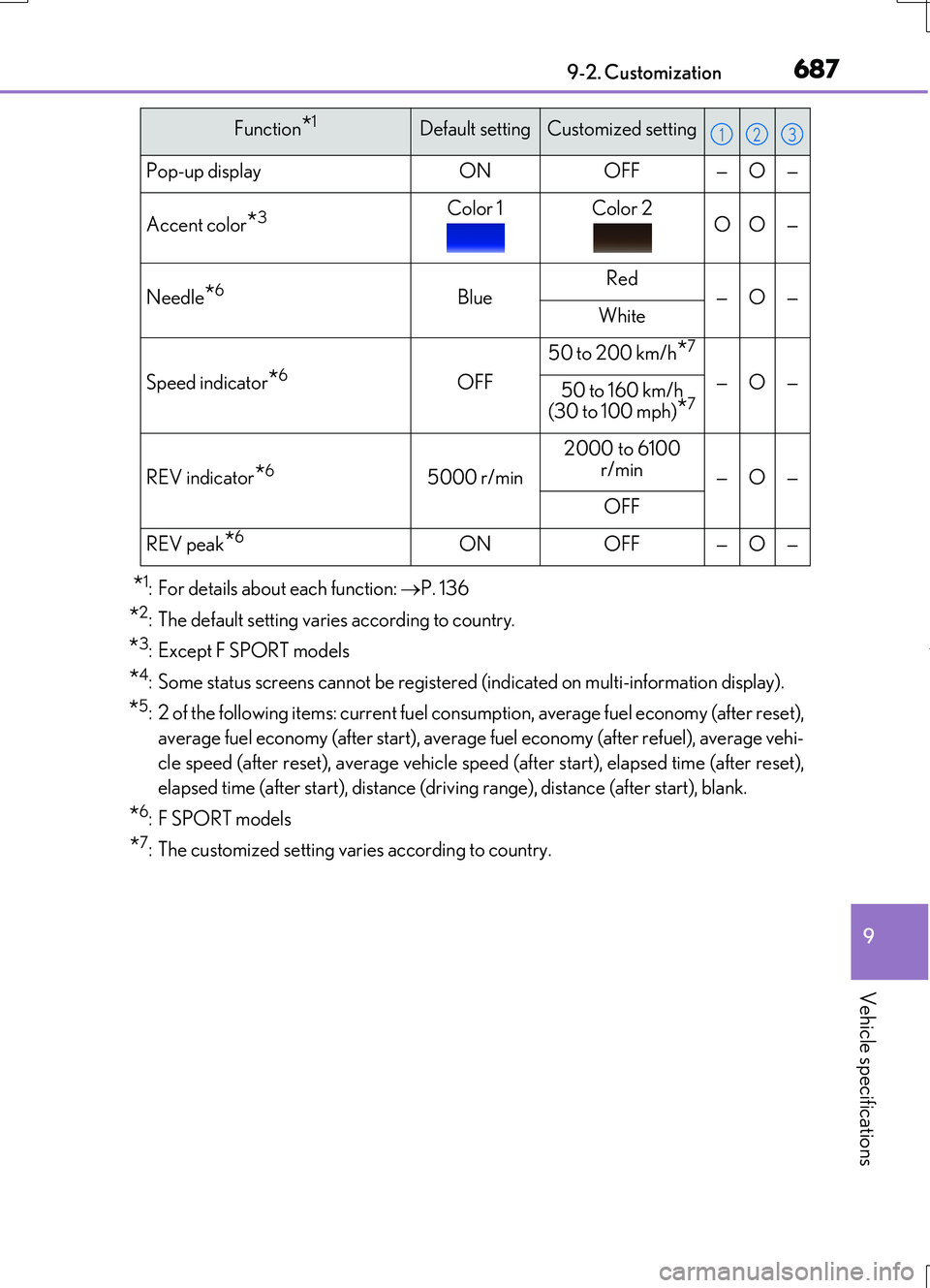
*1: For details about each function: P. 136
*2: The default setting varies according to country.
*3: Except F SPORT models
*4: Some status screens cannot be registered (indicated on multi-information display).
*5: 2 of the following items: current fuel consumption, average fuel economy (after reset),
average fuel economy (after start), average fuel economy (after refuel), average vehi-
cle speed (after reset), average vehicle speed (after start), elapsed time (after reset),
elapsed time (after start), distance (driving range), distance (after start), blank.
*6: F SPORT models
*7: The customized setting varies according to country.
Pop-up displayONOFF—O—
Accent color*3Color 1Color 2OO—
Needle*6BlueRed—O—White
Speed indicator*6OFF
50 to 200 km/h*7
—O—50 to 160 km/h (30 to 100 mph)*7
REV indicator*65000 r/min
2000 to 6100
r/min—O—
OFF
REV peak*6ONOFF—O—
Function*1Default settingCustomized setting123
Page 688 of 724
6889-2. Customization
RC200t_RC F_EE(OM24728E)
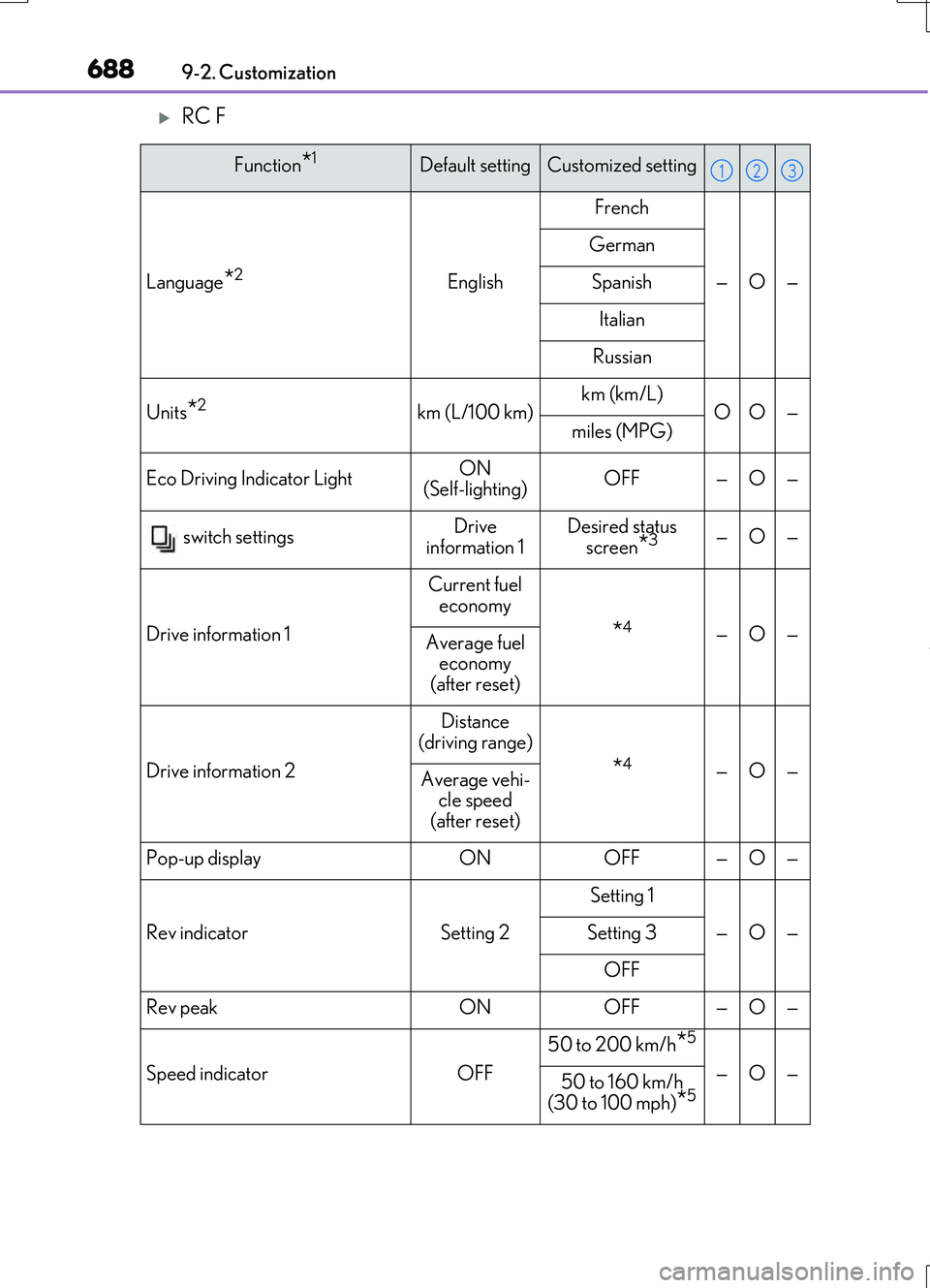
RC F
Function*1Default settingCustomized setting
Language*2English
French
—O—
German
Spanish
Italian
Russian
Units*2km (L/100 km)km (km/L)OO—miles (MPG)
Eco Driving Indicator LightON
(Self-lighting)OFF—O—
switch settingsDrive
information 1Desired status screen*3—O—
Drive information 1
Current fuel
economy
*4—O—Average fuel economy
(after reset)
Drive information 2
Distance
(driving range)
*4—O—Average vehi- cle speed
(after reset)
Pop-up displayONOFF—O—
Rev indicatorSetting 2
Setting 1
—O—Setting 3
OFF
Rev peakONOFF—O—
Speed indicatorOFF
50 to 200 km/h*5
—O—50 to 160 km/h
(30 to 100 mph)
*5
123