ECU LEXUS RC200T 2017 Repair Manual
[x] Cancel search | Manufacturer: LEXUS, Model Year: 2017, Model line: RC200T, Model: LEXUS RC200T 2017Pages: 724, PDF Size: 42.04 MB
Page 271 of 724
2714-3. Operating the lights and wipers
4
Driving
RC200t_RC F_EE(OM24728E)
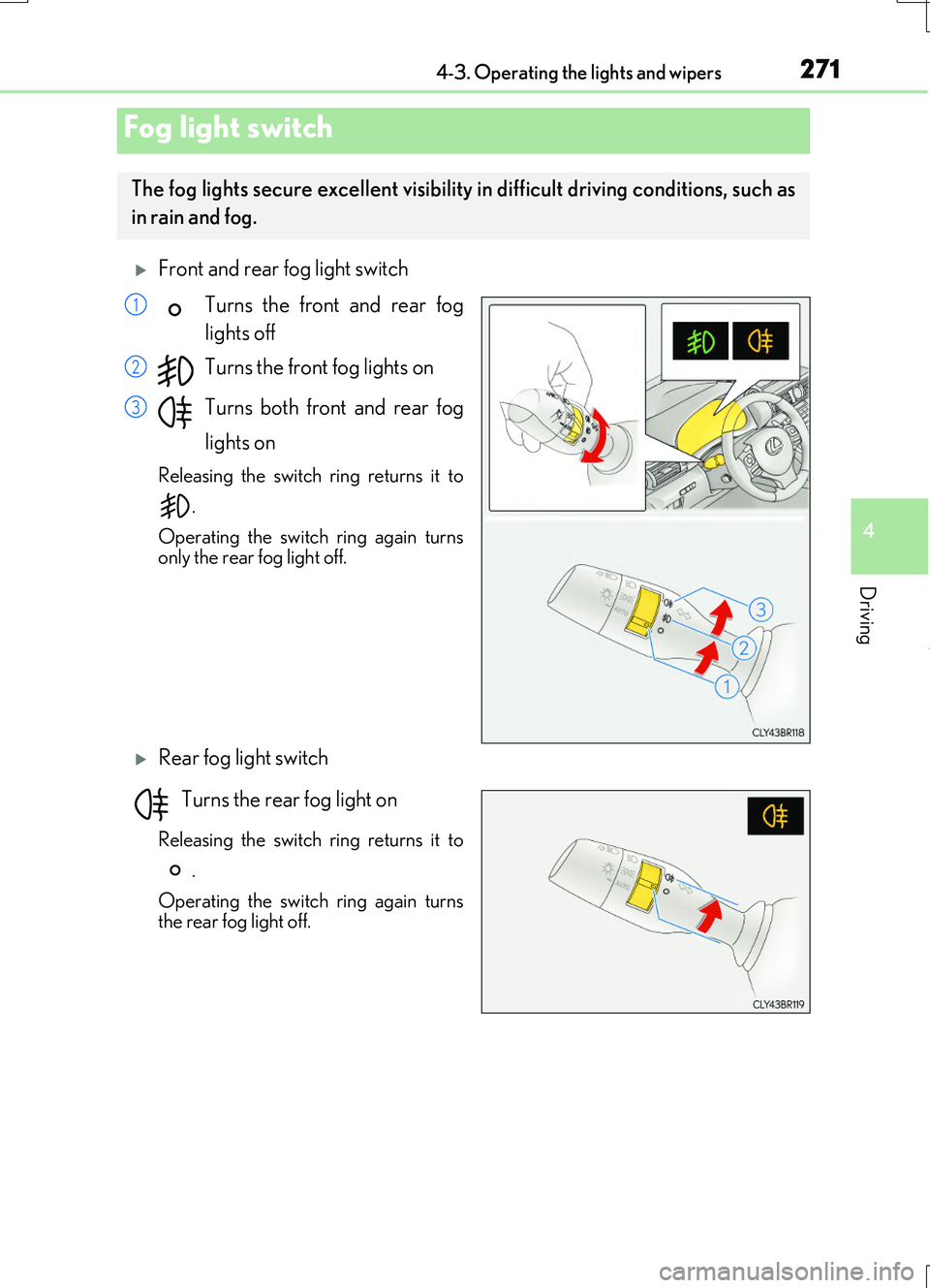
Front and rear fog light switch
Turns the front and rear fog
lights off
Turns the front fog lights on
Turns both front and rear fog
lights on
Releasing the switch ring returns it to
.
Operating the switch ring again turns only the rear fog light off.
Rear fog light switch
Turns the rear fog light on
Releasing the switch ring returns it to
.
Operating the switch ring again turns the rear fog light off.
Fog light switch
The fog lights secure excellent visibility in difficult driving conditions, such as
in rain and fog.
1
2
3
Page 282 of 724
2824-4. Refueling
RC200t_RC F_EE(OM24728E)
WARNING
■When refueling the vehicle
Observe the following precautions while refueling the vehicle. Failure to do so may result in death or serious injury.
●After exiting the vehicle and before opening the fuel door, touch an unpainted metalsurface to discharge any static electricity. It is important to discharge static electricity before refueling because sparks resulting fr om static electricity can cause fuel vapors
to ignite while refueling.
●Always hold the grips on the fuel tank cap and turn it slowly to remove it. A whooshing sound may be heard when the fuel tank cap is loosened. Wait until the
sound cannot be heard before fully removing the cap. In hot weather, pressurized fuel may spray out the filler neck and cause injury.
●Do not allow anyone that has not discharged static electricity from their body to come
close to an open fuel tank.
●Do not inhale vaporized fuel. Fuel contains substances that are harmful if inhaled.
●Do not smoke while refueling the vehicle.Doing so may cause the fuel to ignite and cause a fire.
●Do not return to the vehicle or touch any person or object that is statically charged.
This may cause static electricity to build up, resulting in a possible ignition hazard.
■When refueling
Observe the following precautions to prevent fuel overflowing from the fuel tank:
●Securely insert the fuel nozzle into the fuel filler neck.
●Stop filling the tank after the fuel nozzle automatically clicks off.
●Do not top off the fuel tank.
NOTICE
■Refueling
Do not spill fuel during refueling. Doing so may damage the vehicle, such as causing the emission control system tooperate abnormally or damaging fuel system components or the vehicle’s painted sur-
face.
Page 373 of 724
3734-5. Using the driving support systems
4
Driving
RC200t_RC F_EE(OM24728E)
■Conditions under which the BSM function may not function correctly
●The BSM function may not detect vehicles correctly in the following situations:
• When the sensor is misaligned due to a strong impact to the sensor or its surround-
ing area • When mud, snow, ice, a sticker, etc. is covering the sensor or surrounding area onthe rear bumper
• When driving on a road surface that is wet with standing water during bad weather, such as heavy rain, snow, or fog• When multiple vehicles are approaching wi th only a small gap between each vehicle
• When the distance between your vehicle and a following vehicle is short • When there is a significant difference in speed between your vehicle and the vehiclethat enters the detection area
• When the difference in speed between your vehicle and another vehicle is changing • When a vehicle enters a detection area traveling at about the same speed as yourvehicle
• As your vehicle starts from a stop, a vehicle remains in the detection area • When driving up and down consecutive steep inclines, such as hills, dips in the road, etc.
• When driving on roads with sharp bends, consecutive curves, or uneven surfaces • When vehicle lanes are wide, or when driving on the edge of a lane, and the vehiclein an adjacent lane is far away from your vehicle
• When a bicycle carrier or other accessory is installed to the rear of the vehicle • When there is a significant difference in height between your vehicle and the vehiclethat enters the detection area
• Immediately after the BSM main switch is turned on
●Instances of the BSM function unnecessarily detecting a vehicle and/or object may
increase in the following situations:
• When the sensor is misaligned due to a strong impact to the sensor or its surround-
ing area • When the distance between your vehicle and a guardrail, wall, etc. that enters thedetection area is short
• When driving up and down consecutive steep inclines, such as hills, dips in the road, etc.• When vehicle lanes are narrow, or when driving on the edge of a lane, and a vehicle
traveling in a lane other than the adjacent lanes enters the detection area • When driving on roads with sharp bends, consecutive curves, or uneven surfaces• When the tires are slipping or spinning
• When the distance between your vehicle and a following vehicle is short • When a bicycle carrier or other accessory is installed to the rear of the vehicle
Page 435 of 724
4355-7. Connecting Bluetooth®
5
Lexus Display Audio system
RC200t_RC F_EE(OM24728E)
Turn the Bluetooth® connection setting of your device set to on.
Go to “Bluetooth
* setup”: “Setup” “Bluetooth*”
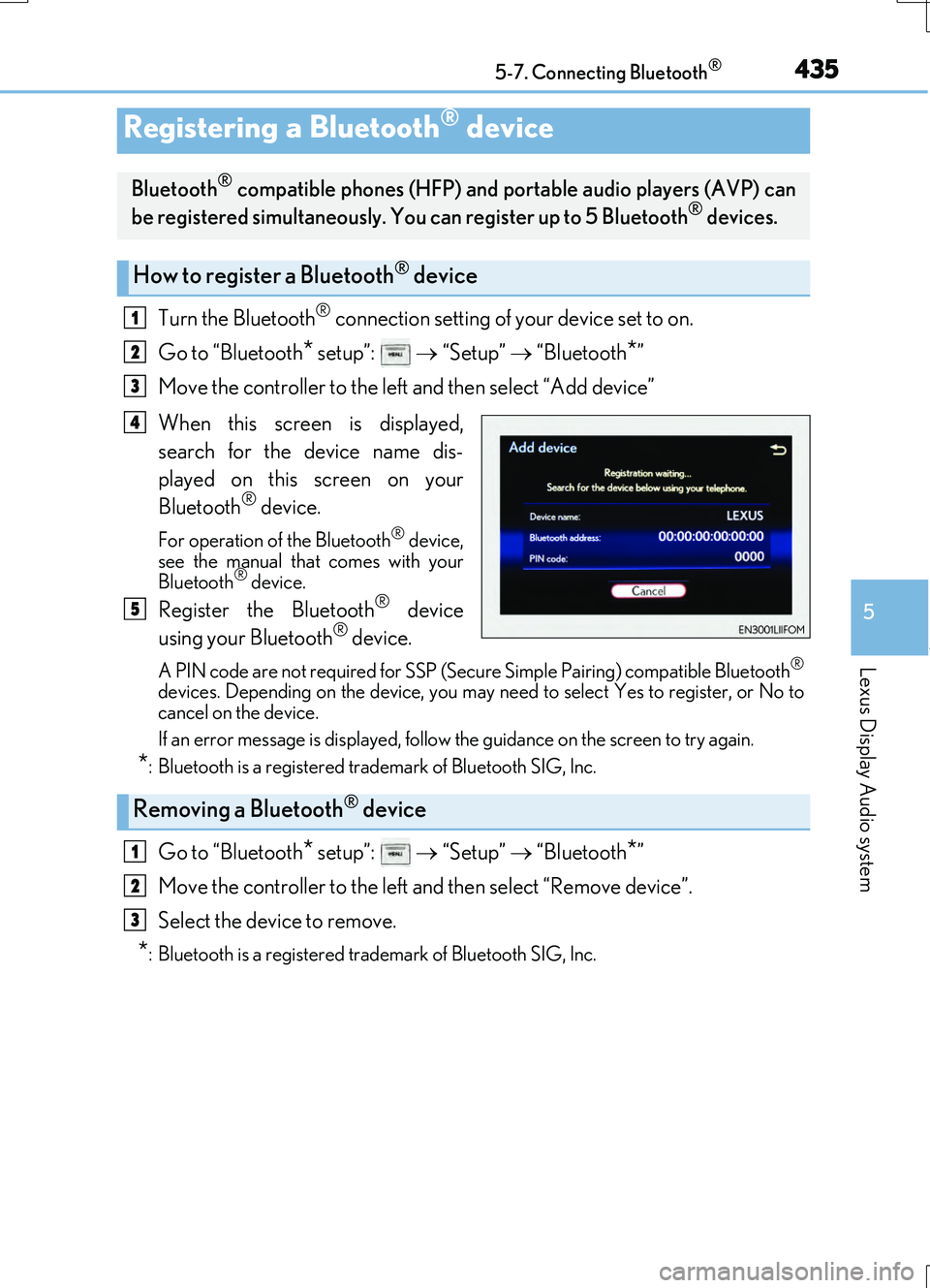
Move the controller to the left and then select “Add device”
When this screen is displayed,
search for the device name dis-
played on this screen on your
Bluetooth
® device.
For operation of the Bluetooth® device,
see the manual that comes with your
Bluetooth
® device.
Register the Bluetooth® device
using your Bluetooth® device.
A PIN code are not required for SSP (Secur e Simple Pairing) compatible Bluetooth®
devices. Depending on the device, you may ne ed to select Yes to register, or No to
cancel on the device.
If an error message is displayed, follow the guidance on the screen to try again.
*: Bluetooth is a registered trademark of Bluetooth SIG, Inc.
Go to “Bluetooth* setup”: “Setup” “Bluetooth*”
Move the controller to the left and then select “Remove device”.
Select the device to remove.
*: Bluetooth is a registered trademark of Bluetooth SIG, Inc.
Registering a Bluetooth® device
Bluetooth® compatible phones (HFP) and po rtable audio players (AVP) can
be registered simultaneously. You can register up to 5 Bluetooth® devices.
How to register a Bluetooth® device
1
2
3
4
5
Removing a Bluetooth® device
1
2
3
Page 463 of 724
4635-11. Bluetooth®
5
Lexus Display Audio system
RC200t_RC F_EE(OM24728E)
In other situations
Even though all conceivable measures have been taken, the symptom status does not
change.
The cellular phone is not close enough to this system. Bring the cellular phone closer to this system.
The cellular phone is the most likely cause of the symptom. Turn the cellular phone off, remove and reinstall the battery pack, and then
restart the cellular phone. Enable the cellular phone’s Bluetooth® connection. Stop the cellular phone’s security software and close all applications.
Before using an application installed on the cellular phone, carefully check its source and how its operation might affect this system.
Page 498 of 724
4986-3. Using the storage features
RC200t_RC F_EE(OM24728E)
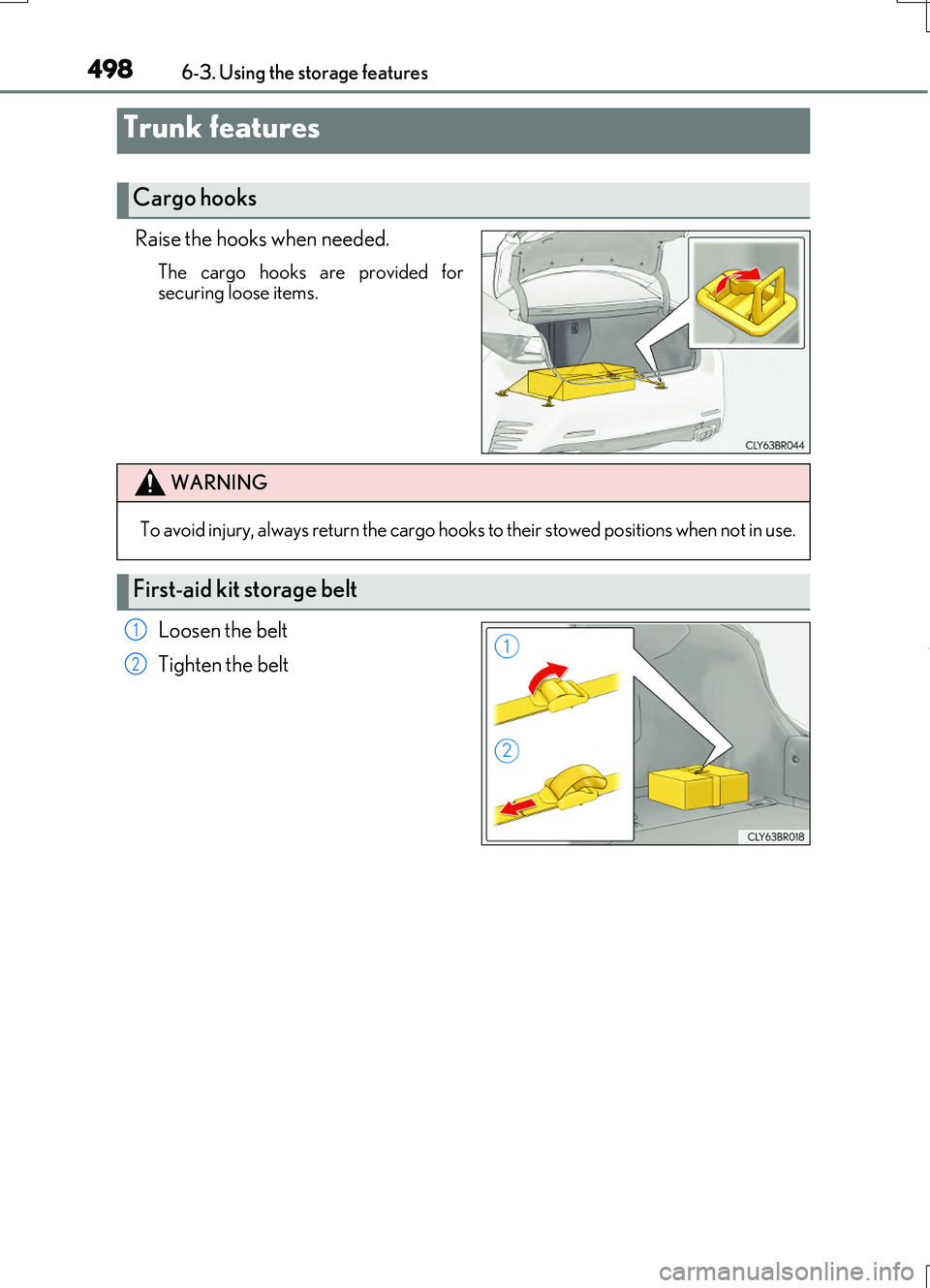
Raise the hooks when needed.
The cargo hooks are provided for securing loose items.
Loosen the belt
Tighten the belt
Trunk features
Cargo hooks
WARNING
To avoid injury, always return the cargo hooks to their stowed positions when not in use.
First-aid kit storage belt
1
2
Page 499 of 724
4996-3. Using the storage features
6
Interior features
RC200t_RC F_EE(OM24728E)
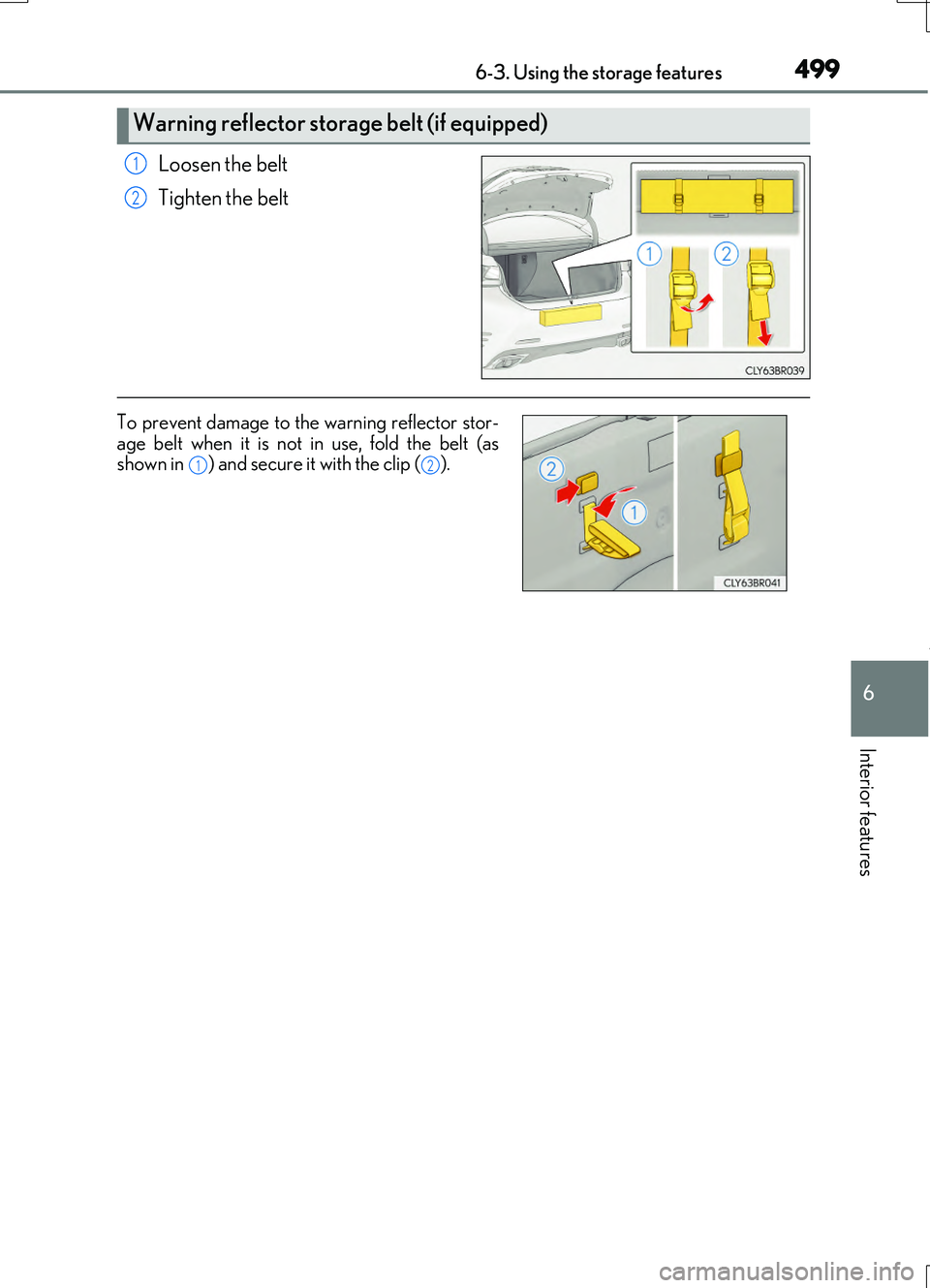
Loosen the belt
Tighten the belt
Warning reflector storage belt (if equipped)
1
2
To prevent damage to the warning reflector stor- age belt when it is not in use, fold the belt (asshown in ) and secure it with the clip ( ).12
Page 531 of 724
5317-3. Do-it-yourself maintenance
7
Maintenance and care
RC200t_RC F_EE(OM24728E)
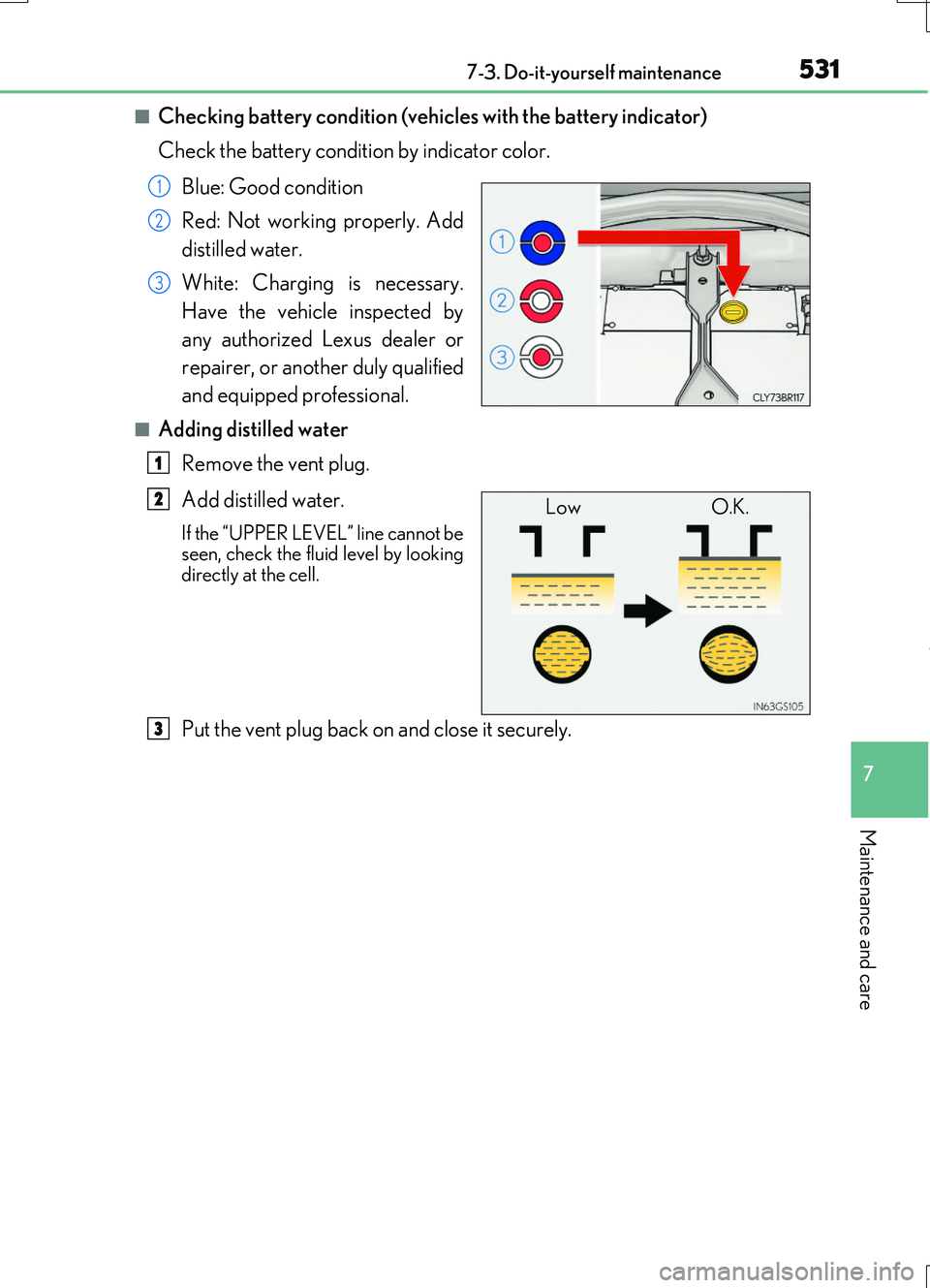
■Checking battery condition (vehicles with the battery indicator)
Check the battery condition by indicator color.
Blue: Good condition
Red: Not working properly. Add
distilled water.
White: Charging is necessary.
Have the vehicle inspected by
any authorized Lexus dealer or
repairer, or another duly qualified
and equipped professional.
■Adding distilled water
Remove the vent plug.
Add distilled water.
If the “UPPER LEVEL” line cannot be seen, check the fluid level by looking
directly at the cell.
Put the vent plug back on and close it securely.
1
2
3
1
Low O.K.2
3
Page 578 of 724
5787-3. Do-it-yourself maintenance
RC200t_RC F_EE(OM24728E)
WARNING
■Replacing light bulbs
●Turn off the lights. Do not attempt to replace the bulb immediately after turning off the lights.
The bulbs become very hot and may cause burns.
●Do not touch the glass portion of the light bulb with bare hands. When it is unavoid- able to hold the glass portion, use and hold with a clean dry cloth to avoid getting
moisture and oils on the bulb. Also, if the bulb is scratched or dropped, it may blow out or crack.
●Fully install light bulbs and any parts used to secure them. Failure to do so may result
in heat damage, fire, or wate r entering the headlight unit. This may damage the head- lights or cause condensation to build up on the lens.
■To prevent damage or fire
●Make sure bulbs are fully seated and locked.
●Check the wattage of the bulb before installing to prevent heat damage.
Page 581 of 724
5818-1. Essential information
8
When trouble arises
RC200t_RC F_EE(OM24728E)
Steadily step on the brake pedal with both feet and firmly depress it.
Do not pump the brake pedal repeatedly as this will increase the effort required to slow the vehicle.
Shift the shift lever to N.
If the shift lever is shifted to N
After slowing down, stop the vehicle in a safe place by the road.
Stop the engine.
If the shift lever cannot be shifted to N
Keep depressing the brake pedal with both feet to reduce vehicle speed as
much as possible.
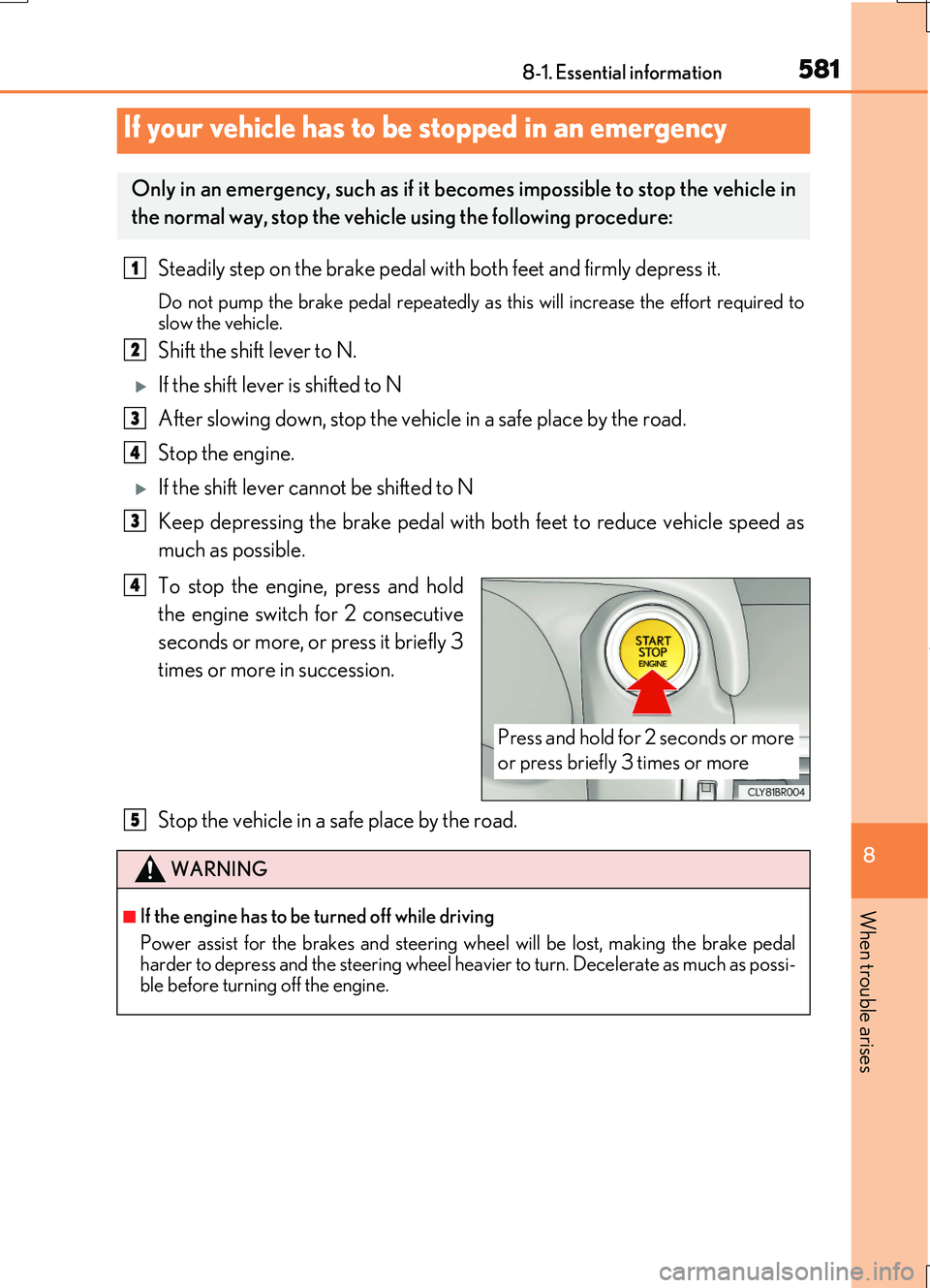
To stop the engine, press and hold
the engine switch for 2 consecutive
seconds or more, or press it briefly 3
times or more in succession.
Stop the vehicle in a safe place by the road.
If your vehicle has to be stopped in an emergency
Only in an emergency, such as if it becomes impossible to stop the vehicle in
the normal way, stop the vehicle using the following procedure:
1
2
3
4
3
Press and hold for 2 seconds or more
or press briefly 3 times or more
4
WARNING
■If the engine has to be turned off while driving
Power assist for the brakes and steering wheel will be lost, making the brake pedal harder to depress and the steering wheel heavier to turn. Decelerate as much as possi-
ble before turning off the engine.
5