door lock LEXUS RC200T 2017 Manual PDF
[x] Cancel search | Manufacturer: LEXUS, Model Year: 2017, Model line: RC200T, Model: LEXUS RC200T 2017Pages: 724, PDF Size: 42.04 MB
Page 494 of 724
4946-2. Using the interior lights
RC200t_RC F_EE(OM24728E)
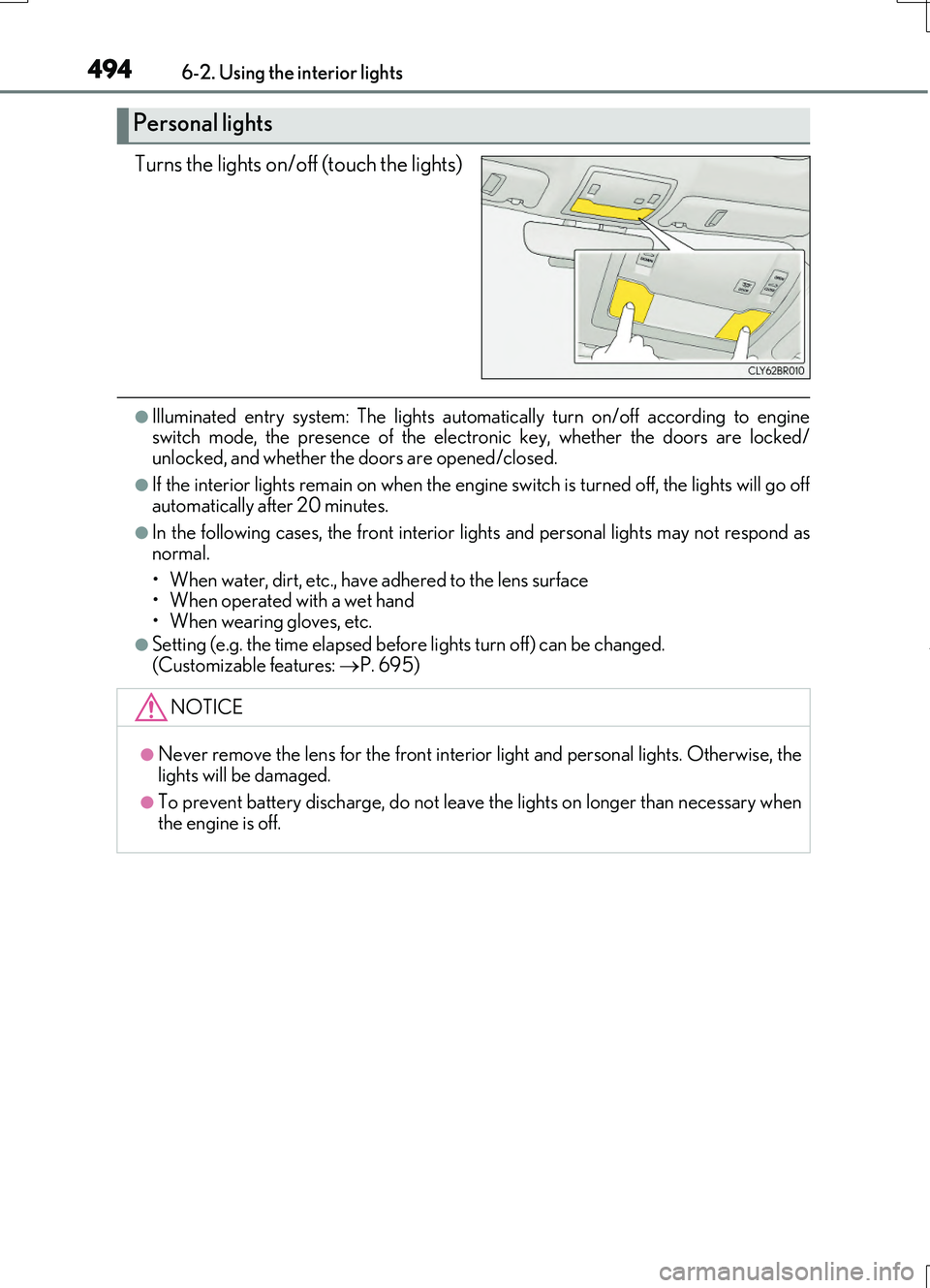
Turns the lights on/off (touch the lights)
●Illuminated entry system: The lights automatically turn on/off according to engine switch mode, the presence of the electronic key, whether the doors are locked/unlocked, and whether the doors are opened/closed.
●If the interior lights remain on when the engine switch is turned off, the lights will go off automatically after 20 minutes.
●In the following cases, the front interior lights and personal lights may not respond as
normal.
• When water, dirt, etc., have adhered to the lens surface • When operated with a wet hand
• When wearing gloves, etc.
●Setting (e.g. the time elapsed before lights turn off) can be changed.
(Customizable features: P. 695)
Personal lights
NOTICE
●Never remove the lens for the front interior light and personal lights. Otherwise, the
lights will be damaged.
●To prevent battery discharge, do not leave the lights on longer than necessary when the engine is off.
Page 507 of 724
5077-1. Maintenance and care
7
Maintenance and care
RC200t_RC F_EE(OM24728E)
■Automatic car washes (vehicles with CFRP parts)
Do not use automatic car washes as they may scratch the CFRP parts and damage the paint.
■High pressure car washes
●Do not allow the nozzles of the car wash to come within close proximity of the windows.
●Before using the car wash, check that the fuel filler door on your vehicle is closed prop-
erly.
■When using a car wash
If the door handle becomes wet while the electronic key is within the effective range, the
door may lock and unlock repeatedly. In that case, follow the following correction proce- dures to wash the vehicle:
●Place the key in a position 2 m (6 ft.) or more separate from the vehicle while the vehi-
cle is being washed. (Take care to ensure that the key is not stolen.)
●Set the electronic key to battery-saving mode to disable the smart entry & start system. ( P. 177)
■Aluminum wheels
●Remove any dirt immediately by using a neutral detergent. Do not use hard brushes or abrasive cleaners. Do not use strong or harsh chemical cleaners.
Use the same mild detergent and wax as used on the paint.
●Do not use detergent on the wheels when they are hot, for example after driving a long distance in hot weather.
●Wash detergent from the wheels immediately after use.
■When cleaning the painted brake calipers (if equipped)
●If a detergent is to be used to clean the painted brake calipers, use a neutral detergent.
Do not use hard brushes or abrasive cl eaners as they may damage the paint.
●Do not use detergent on the brake calipers when they are hot.
●Wash detergent from the brake calipers immediately after use.
■Bumpers
Do not scrub with abrasive cleaners.
■Side windows water-repellent coating
●The following precautions can extend the effectiveness of the water-repellent coating.
• Remove any dirt, etc. from the side windows regularly.
• Do not allow dirt and dust to accumulate on the windows for a long period. Clean the windows with a soft, damp cloth as soon as possible.• Do not use wax or glass cleaners that co ntain abrasives when cleaning the windows.
• Do not use any metallic objects to remove condensation build up.
●When the water-repellent performance has become insufficient, the coating can be
repaired. Contact any authorized Lexus dealer or repairer, or another duly qualified and equipped professional.
Page 532 of 724
5327-3. Do-it-yourself maintenance
RC200t_RC F_EE(OM24728E)
■Before recharging
When recharging, the battery produces hydr ogen gas which is flammable and explosive. Therefore, observe the following before recharging:
●If recharging with the battery installed on the vehicle, be sure to disconnect the ground
cable.
●Make sure the power switch on the charger is off when connecting and disconnecting the charger cables to the battery.
■After recharging/reconnecting the battery
The engine may not start. Follow the procedure below to initialize the system.
Shift the shift lever to P.
Open and close either door.
Restart the engine.
●Unlocking the doors using the smart entry & start system may not be possible immedi-
ately after reconnecting the battery. If this happens, use the wireless remote control or the mechanical key to lock/unlock the doors.
●Start the engine with the engine switch in ACCESSORY mode. The engine may not
start with the engine switch turned off. However, the engine will operate normally from the second attempt.
●The engine switch mode is recorded by the vehicle. If the battery is disconnected and
reconnected, the vehicle will return the engi ne switch mode to the status it was in before the battery was disconnected. Make sure to turn off the engine before discon-necting the battery. Take extra care when connecting the battery if the engine switch
mode prior to the battery being disconnected is unknown.
If the engine will not start even after multip le attempts at all the methods contact any authorized Lexus dealer or repairer, or anot her duly qualified and equipped professional.
1
2
3
Page 613 of 724
6138-2. Steps to take in an emergency
8
When trouble arises
RC200t_RC F_EE(OM24728E)
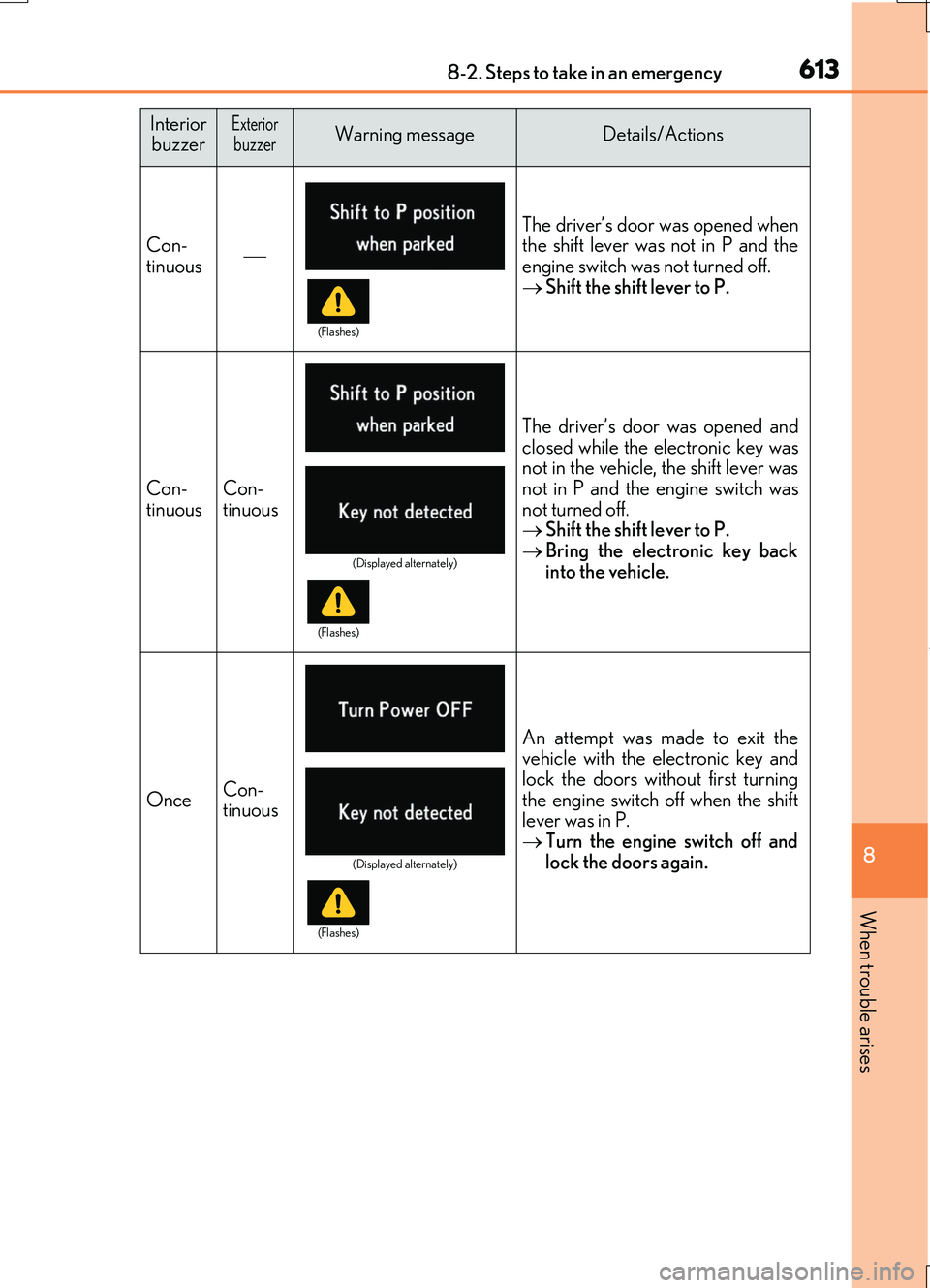
Interior buzzerExteriorbuzzerWarning messageDetails/Actions
Con-
tinuous The driver’s door was opened when
the shift lever was not in P and the
engine switch was not turned off.
Shift the shift lever to P.
Con-
tinuousCon-
tinuous
The driver’s door was opened and
closed while the electronic key was
not in the vehicle, the shift lever was
not in P and the engine switch was
not turned off.
Shift the shift lever to P.
Bring the electronic key back
into the vehicle.
OnceCon-
tinuous
An attempt was made to exit the
vehicle with the electronic key and
lock the doors without first turning
the engine switch off when the shift
lever was in P.
Turn the engine switch off and
lock the doors again.
(Flashes)
(Displayed alternately)
(Flashes)
(Displayed alternately)
(Flashes)
Page 615 of 724
6158-2. Steps to take in an emergency
8
When trouble arises
RC200t_RC F_EE(OM24728E)
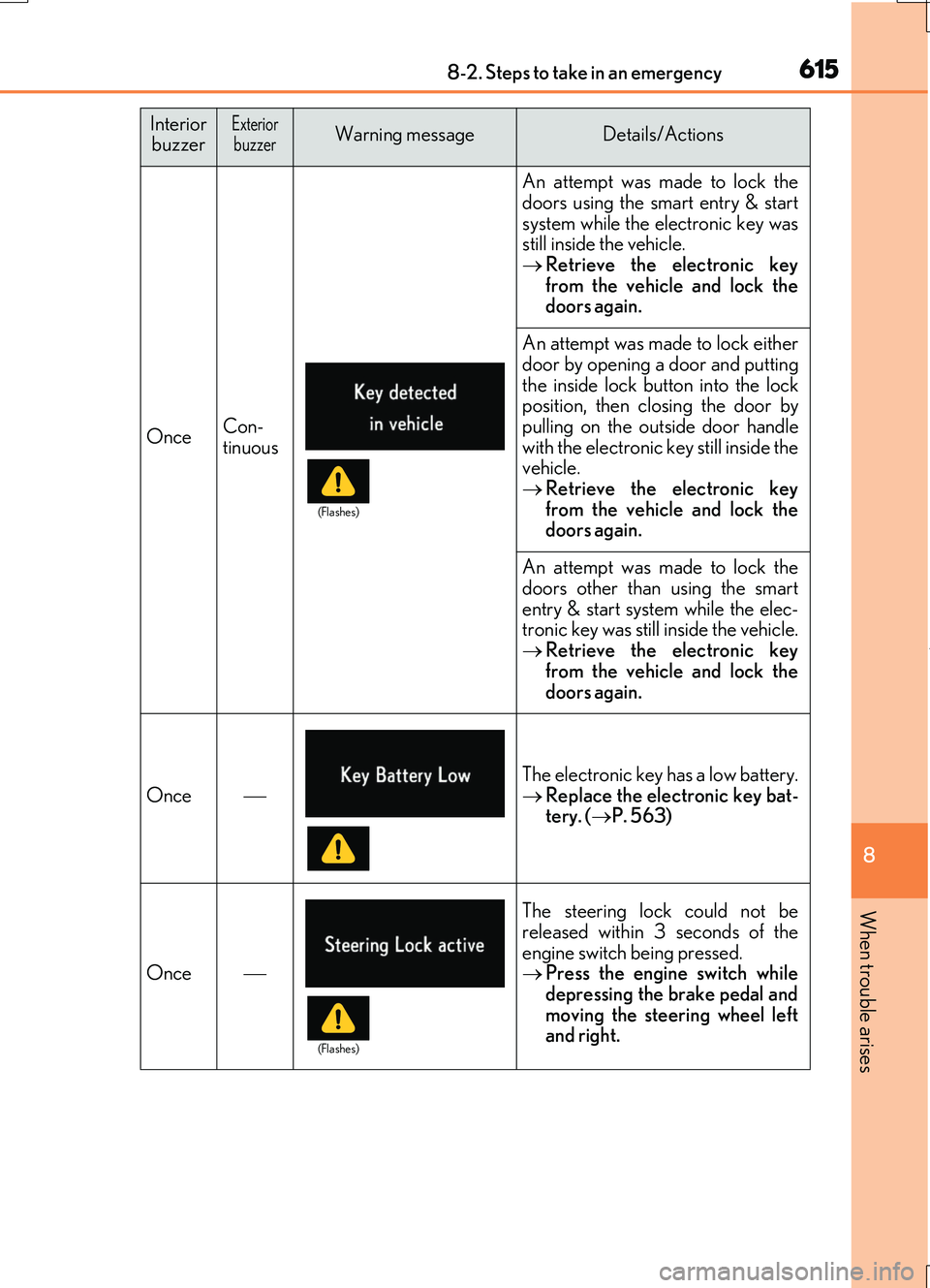
OnceCon- tinuous
An attempt was made to lock the
doors using the smart entry & start system while the electronic key wasstill inside the vehicle.
Retrieve the electronic key from the vehicle and lock thedoors again.
An attempt was made to lock either
door by opening a door and putting the inside lock button into the lockposition, then closing the door by
pulling on the outside door handle with the electronic key still inside thevehicle.
Retrieve the electronic key from the vehicle and lock thedoors again.
An attempt was made to lock the
doors other than using the smart entry & start system while the elec-tronic key was still inside the vehicle.
Retrieve the electronic key from the vehicle and lock the
doors again.
Once
The electronic key has a low battery.
Replace the electronic key bat- tery. ( P. 563)
Once
The steering lock could not be released within 3 seconds of the
engine switch being pressed. Press the engine switch while depressing the brake pedal and
moving the steering wheel left and right.
InteriorbuzzerExteriorbuzzerWarning messageDetails/Actions
(Flashes)
(Flashes)
Page 616 of 724
6168-2. Steps to take in an emergency
RC200t_RC F_EE(OM24728E)
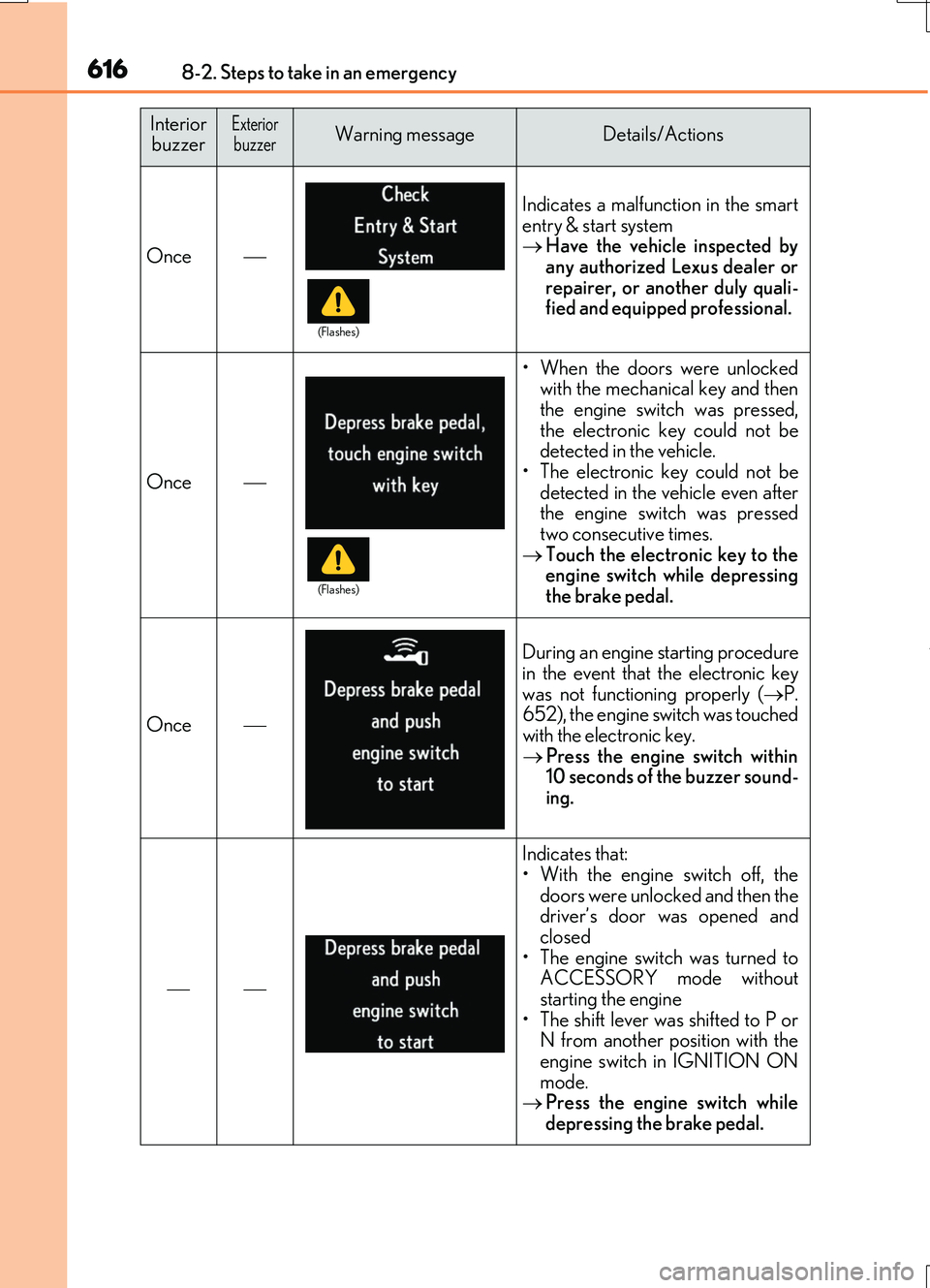
Once
Indicates a malfunction in the smart
entry & start system Have the vehicle inspected by any authorized Lexus dealer or
repairer, or another duly quali- fied and equipped professional.
Once
• When the doors were unlockedwith the mechanical key and thenthe engine swit ch was pressed,
the electronic key could not be detected in the vehicle.• The electronic key could not be
detected in the vehicle even after the engine switch was pressedtwo consecutive times.
Touch the electronic key to the engine switch while depressingthe brake pedal.
Once
During an engine starting procedurein the event that the electronic key
was not functioning properly ( P. 652), the engine switch was touchedwith the electronic key.
Press the engine switch within 10 seconds of the buzzer sound-ing.
Indicates that: • With the engine switch off, the
doors were unlocked and then the driver’s door was opened andclosed
• The engine switch was turned to ACCESSORY mode withoutstarting the engine
• The shift lever was shifted to P or N from another position with theengine switch in IGNITION ON
mode. Press the engine switch while depressing the brake pedal.
InteriorbuzzerExteriorbuzzerWarning messageDetails/Actions
(Flashes)
(Flashes)
Page 650 of 724
6508-2. Steps to take in an emergency
RC200t_RC F_EE(OM24728E)
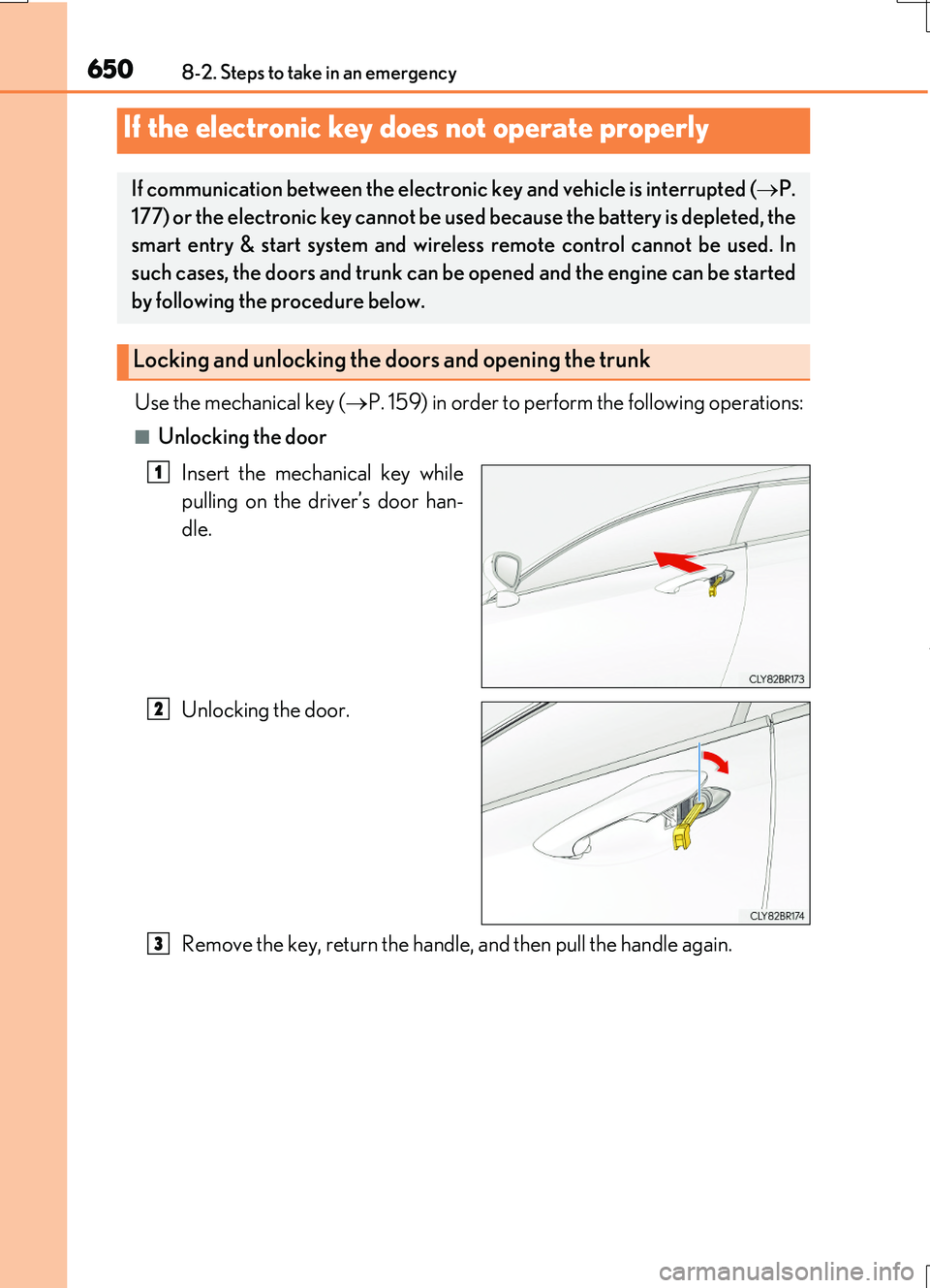
Use the mechanical key (P. 159) in order to perform the following operations:
■Unlocking the door
Insert the mechanical key while
pulling on the driver’s door han-
dle.
Unlocking the door.
Remove the key, return the handle, and then pull the handle again.
If the electronic key does not operate properly
If communication between the electronic key and vehicle is interrupted ( P.
177) or the electronic key cannot be us ed because the battery is depleted, the
smart entry & start system and wireless remote control cannot be used. In
such cases, the doors and trunk can be opened and the engine can be started
by following the procedure below.
Locking and unlocking the doors and opening the trunk
1
2
3
Page 651 of 724
6518-2. Steps to take in an emergency
8
When trouble arises
RC200t_RC F_EE(OM24728E)
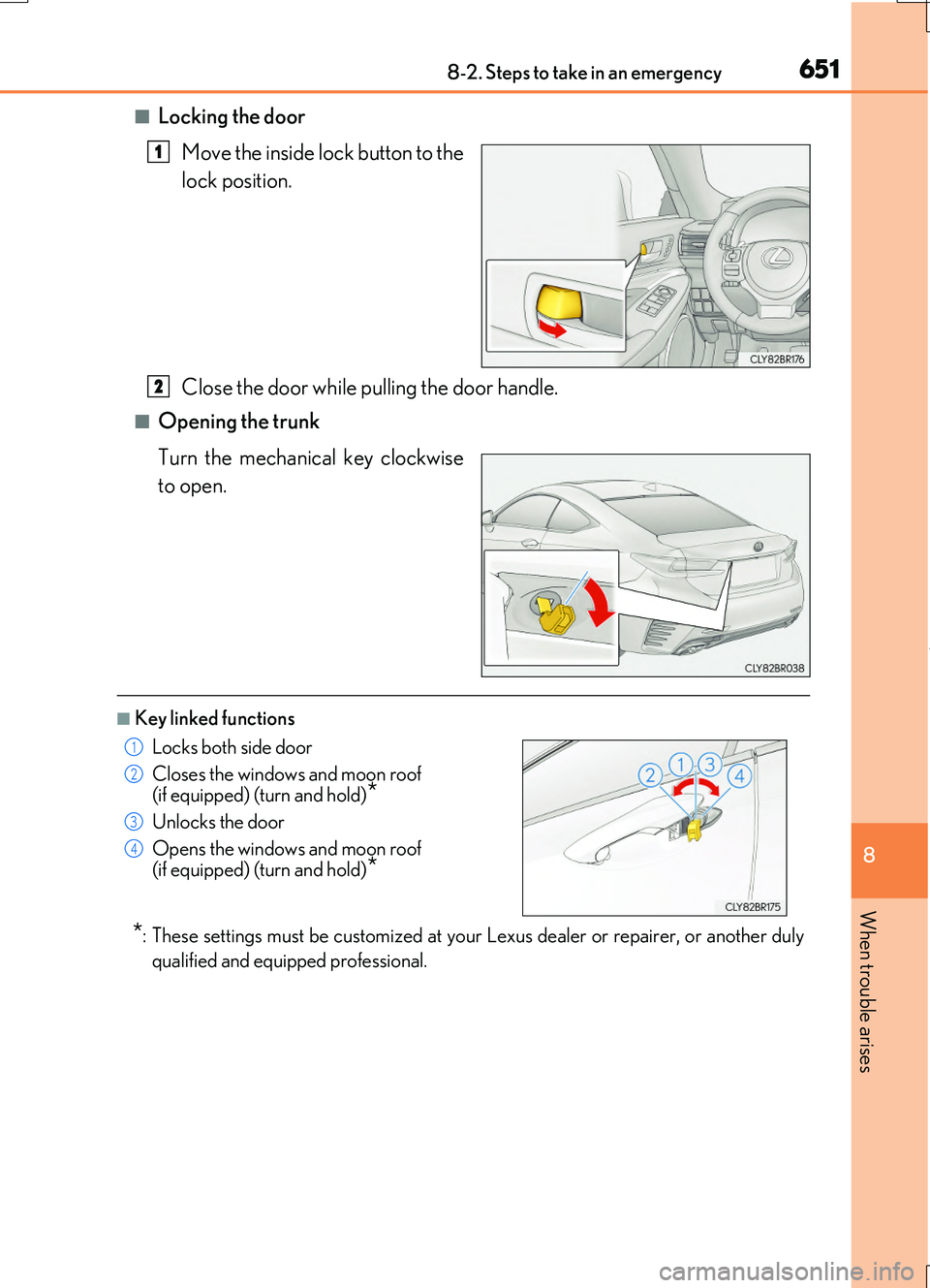
■Locking the door
Move the inside lock button to the
lock position.
Close the door while pulling the door handle.
■Opening the trunk
Turn the mechanical key clockwise
to open.
■Key linked functions
*: These settings must be customized at your Lexus dealer or repairer, or another duly
qualified and equipped professional.
1
2
Locks both side door
Closes the windows and moon roof (if equipped) (turn and hold)*
Unlocks the door
Opens the windows and moon roof (if equipped) (turn and hold)*
1
2
3
4
Page 653 of 724
6538-2. Steps to take in an emergency
8
When trouble arises
RC200t_RC F_EE(OM24728E)
■Stopping the engine
Shift the shift lever to P and press the engine switch as you normally do when stopping the engine.
■Replacing the key battery
As the above procedure is a temporary measur e, it is recommended that the electronic key battery be replaced immediately when the battery is depleted. ( P. 563)
■Alarm (if equipped)
Using the mechanical key to lock the doors will not set the alarm system. If a door is unlocked using the mechanical key when the alarm system is set, the alarm may be triggered.
■Changing engine switch modes
Release the brake pedal and press the engine switch in step above. The engine does not start an d modes will be changed each time the switch is pressed.
( P. 248)
■When the electronic key does not work properly
●Make sure that the smart entry & start system has not been deactivated in the
customization setting. If it is off, turn the function on. (Customizable features P. 685)
●Check if battery-saving mode is set. If it is set, cancel the function. (P. 177)
WARNING
■When using the mechanical key and operating the power windows or moon roof
Operate the power window or moon roof after checking to make sure that there is no possibility of any passenger having any of their body parts caught in the window or moon roof.
Also, do not allow children to operate the me chanical key. It is possible for children and other passengers to get caught in the power window or moon roof.
3
Page 654 of 724
6548-2. Steps to take in an emergency
RC200t_RC F_EE(OM24728E)
If you have a set of jumper (or booster) cables and a second vehicle with a 12-volt
battery, you can jump start your vehicle by following the steps below.
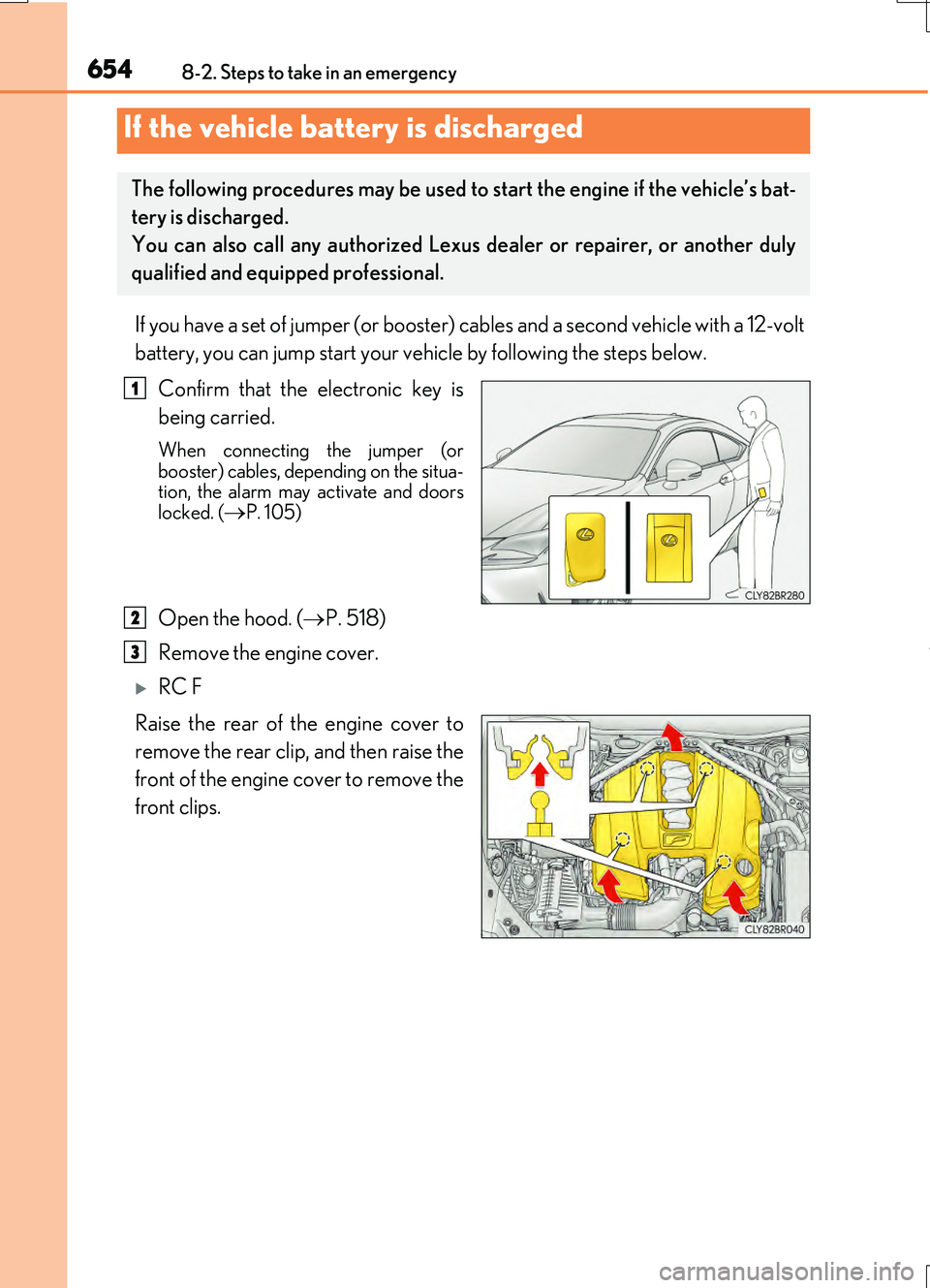
Confirm that the electronic key is
being carried.
When connecting the jumper (or booster) cables, depending on the situa-tion, the alarm may activate and doors
locked. (P. 105)
Open the hood. ( P. 518)
Remove the engine cover.
RC F
Raise the rear of the engine cover to
remove the rear clip, and then raise the
front of the engine cover to remove the
front clips.
If the vehicle battery is discharged
The following procedures may be used to start the engine if the vehicle’s bat-
tery is discharged.
You can also call any authorized Lexus dealer or repairer, or another duly
qualified and equipped professional.
1
2
3