key battery LEXUS RC200T 2017 Owners Manual
[x] Cancel search | Manufacturer: LEXUS, Model Year: 2017, Model line: RC200T, Model: LEXUS RC200T 2017Pages: 724, PDF Size: 42.04 MB
Page 6 of 724
TABLE OF CONTENTS6
RC200t_RC F_EE(OM24728E)
7-1. Maintenance and care
Cleaning and protecting
the vehicle exterior................ 506
Cleaning and protecting
the vehicle interior .....................511
7-2. Maintenance
Maintenance
requirements.............................. 514
7-3. Do-it-yourself maintenance
Do-it-yourself service
precautions ................................. 516
Hood ................................................ 518
Positioning a floor jack.............. 519
Engine compartment................522
Tires ................................................ 535
Tire inflation pressure...............557
Wheels........................................... 559
Air conditioning filter................. 561
Electronic key battery ..............563
Checking and replacing
fuses ..............................................566
Light bulbs .....................................570
8-1. Essential information
Emergency flashers ................. 580
If your vehicle has to
be stopped in an
emergency.................................. 581
8-2. Steps to take in an
emergency
If your vehicle needs to
be towed .................................... 582
If you think something is
wrong .......................................... 589
Fuel pump shut off
system ......................................... 590
If a warning light turns
on or a warning buzzer
sounds........................................... 591
If a warning message is
displayed..................................... 597
If you have a flat tire
(vehicles with a spare
tire) ................................................. 619
If you have a flat tire
(vehicles with an
emergency tire puncture
repair kit) ....................................633
If the engine will not start ........648
If the electronic key does
not operate properly ............ 650
If the vehicle battery is
discharged .................................654
7Maintenance and care8When trouble arises
Page 105 of 724
1051-2. Theft deterrent system
1
For safety and security
RC200t_RC F_EE(OM24728E)
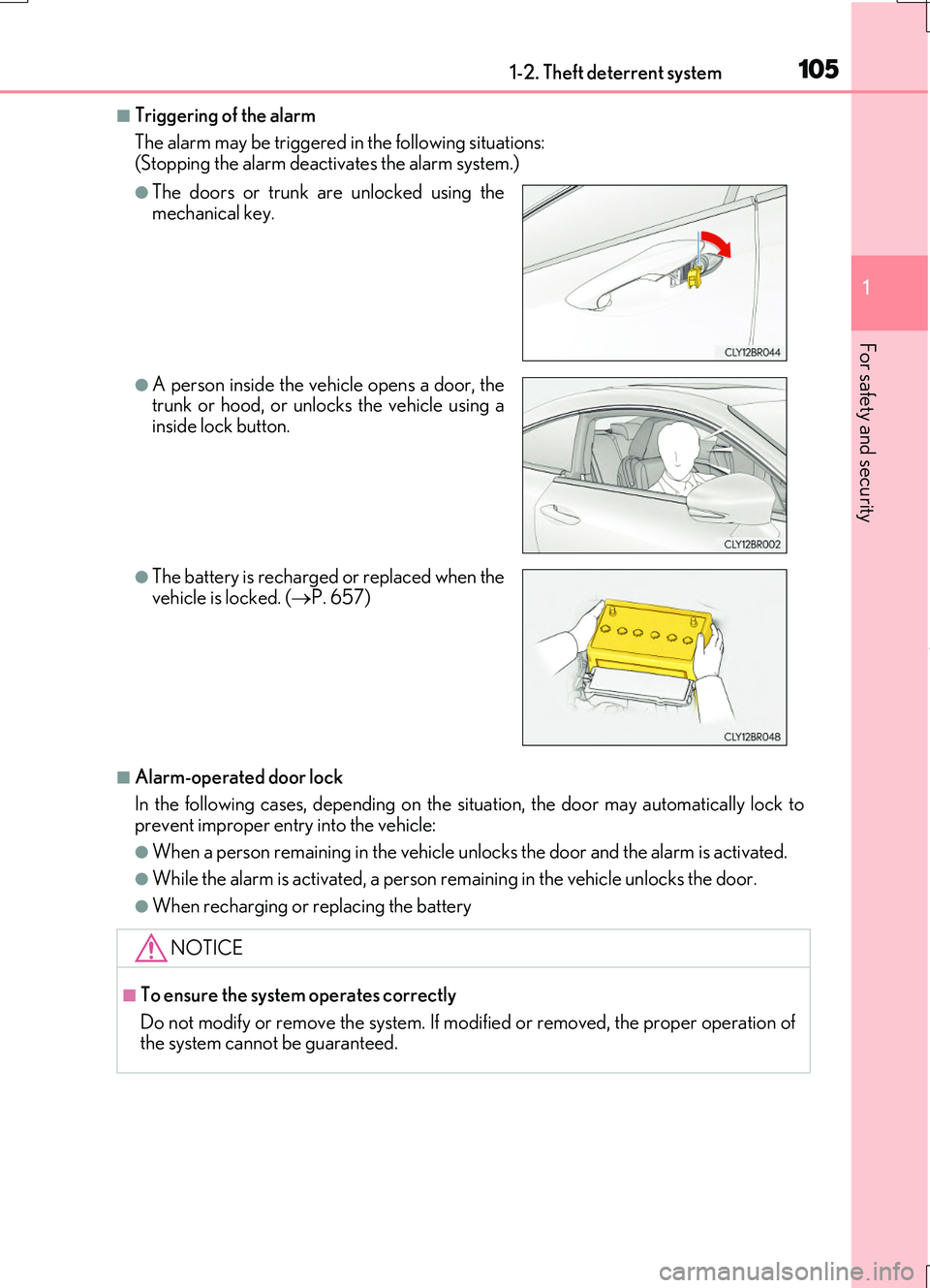
■Triggering of the alarm
The alarm may be triggered in the following situations: (Stopping the alarm deactivates the alarm system.)
■Alarm-operated door lock
In the following cases, depending on the situation, the door may automatically lock to
prevent improper entry into the vehicle:
●When a person remain ing in the vehicle unlocks the door and the alarm is activated.
●While the alarm is activated, a person remaining in the vehicle unlocks the door.
●When recharging or replacing the battery
●The doors or trunk are unlocked using the mechanical key.
●A person inside the vehicle opens a door, thetrunk or hood, or unlocks the vehicle using a
inside lock button.
●The battery is recharged or replaced when the vehicle is locked. ( P. 657)
NOTICE
■To ensure the system operates correctly
Do not modify or remove the system. If modi fied or removed, the proper operation of the system cannot be guaranteed.
Page 159 of 724
1593-1. Key information
3
Operation of each component
RC200t_RC F_EE(OM24728E)
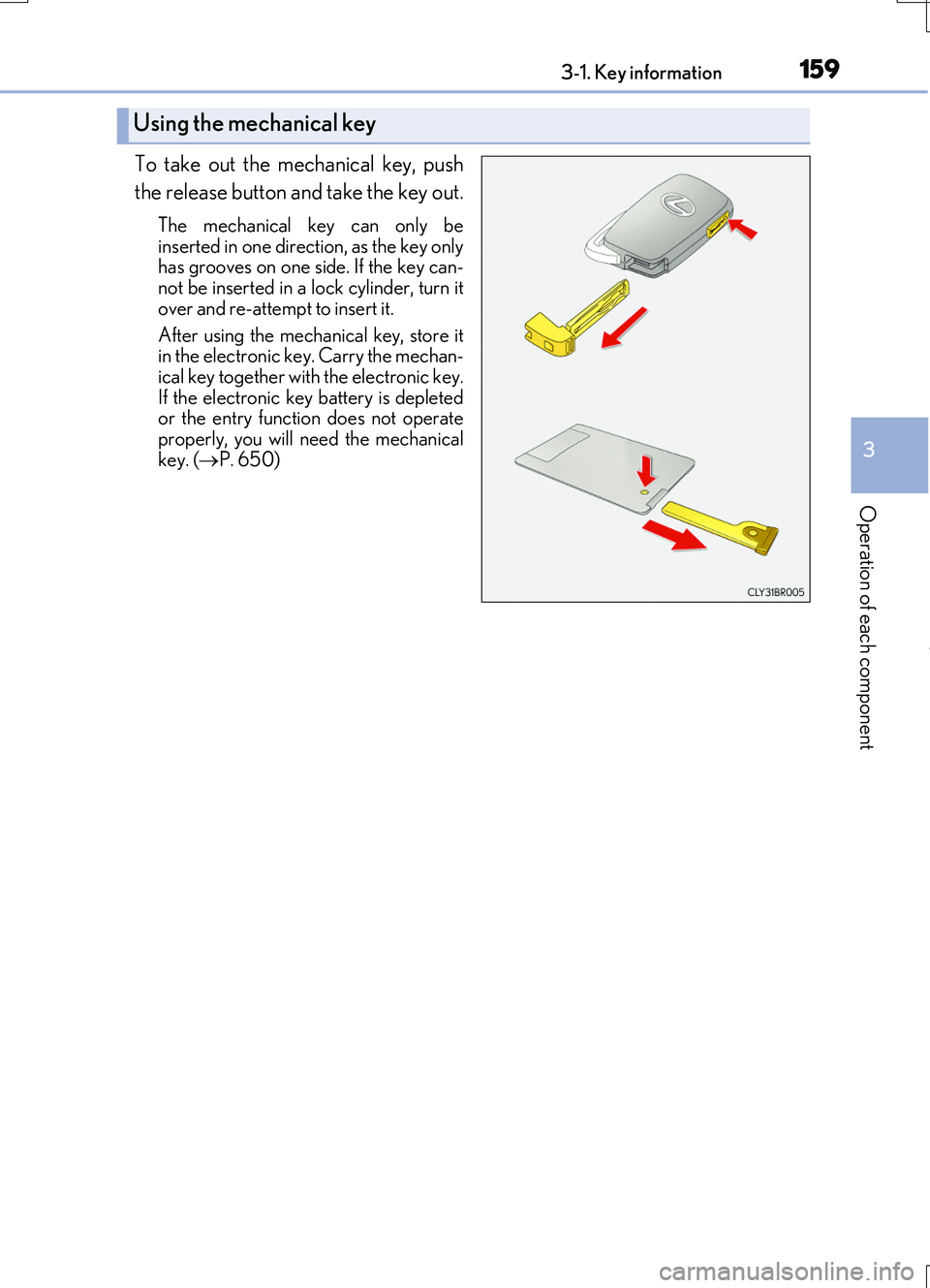
To take out the mechanical key, push
the release button and take the key out.
The mechanical key can only be
inserted in one direction, as the key only has grooves on one si de. If the key can- not be inserted in a lock cylinder, turn it
over and re-attempt to insert it.
After using the mechanical key, store it in the electronic key. Carry the mechan-
ical key together with the electronic key. If the electronic key battery is depletedor the entry function does not operate
properly, you will ne ed the mechanical key. ( P. 650)
Using the mechanical key
Page 160 of 724
1603-1. Key information
RC200t_RC F_EE(OM24728E)
■Card key (if equipped)
●The card key is not waterproof.
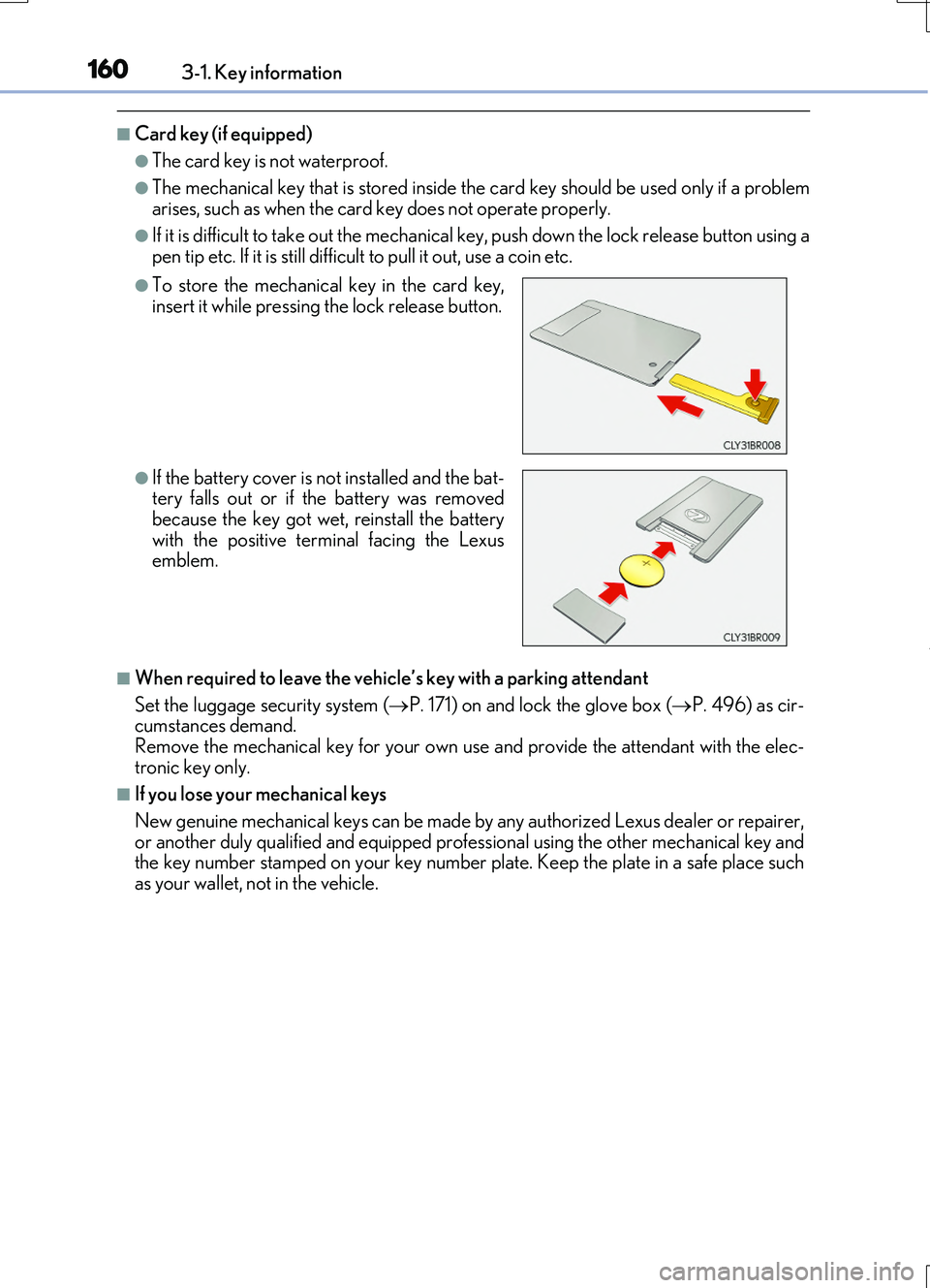
●The mechanical key that is stored inside the card key should be used only if a problem arises, such as when the card key does not operate properly.
●If it is difficult to take out the mechanical key, push down the lock release button using apen tip etc. If it is still difficu lt to pull it out, use a coin etc.
■When required to leave the vehicle’s key with a parking attendant
Set the luggage security system ( P. 171) on and lock the glove box (P. 496) as cir- cumstances demand.
Remove the mechanical key for your own use and provide the attendant with the elec- tronic key only.
■If you lose your mechanical keys
New genuine mechanical keys can be made by any authorized Lexus dealer or repairer, or another duly qualified and equipped professional using the other mechanical key andthe key number stamped on your key number plate. Keep the plate in a safe place such
as your wallet, not in the vehicle.
●To store the mechanical key in the card key, insert it while pressing the lock release button.
●If the battery cover is not installed and the bat-tery falls out or if the battery was removedbecause the key got wet, reinstall the battery
with the positive terminal facing the Lexus emblem.
Page 161 of 724
1613-1. Key information
3
Operation of each component
RC200t_RC F_EE(OM24728E)
■When riding in an aircraft
When bringing an electronic key onto an aircraft, make sure you do not press any but- tons on the electronic key while inside the ai rcraft cabin. If you are carrying an electronic
key in your bag etc., ensure that the buttons are not likely to be pressed accidentally. Pressing a button may cause the electronic key to emit radio waves that could interferewith the operation of the aircraft.
■Electronic key battery depletion
●The standard battery life is 1 to 2 years. (The card key battery life is about a year and a half.)
●If the battery becomes low, an alarm will sound in the cabin when the engine is stopped.( P. 615)
●As the electronic key always receives radio waves, the battery will become depleted
even if the electronic key is not used. The following symptoms indicate that the elec- tronic key battery may be depleted. Replace the battery when necessary. ( P. 563)
• The smart entry & start system or the wireless remote control does not operate.
• The detection area becomes smaller. • The LED indicator on the key surface does not turn on.
●To avoid serious deterioration, do not leave the electronic key within 1 m (3 ft.) of thefollowing electrical appliances that produce a magnetic field:
•TVs
• Personal computers • Cellular phones, cordless phones and battery chargers• Recharging cellular phones or cordless phones
• Table lamps • Induction cookers
■Replacing the battery
P. 563
■Confirmation of the registered key number
The number of keys already registered to the vehicle can be confirmed. Ask any autho- rized Lexus dealer or repairer, or another du ly qualified and equipped professional for details.
■If a wrong key is used
The key cylinder rotates freely, isolated from the internal mechanism.
Page 163 of 724
1633-1. Key information
3
Operation of each component
RC200t_RC F_EE(OM24728E)
NOTICE
■When an electronic key is lost
If the electronic key remains lost, the risk of vehicle theft increases significantly. Visit any authorized Lexus dealer or repairer, or another duly qualified and equipped pro-
fessional immediately with all remaining el ectronic keys and the card key that were provided with your vehicle.
■Handling the card key (if equipped)
●Do not apply excess force when inserting the mechanical key into the card key. Doingso may damage the card key.
●If the battery or card key terminals get wet, the battery may corrode.
If the key is dropped into wate r, or if drinking water etc. is spilled on the key, immedi- ately remove the battery cover and wipe the battery and terminals. (To remove thebattery cover, lightly grasp and pull it.) If the battery is corroded, have any authorized
Lexus dealer or repairer, or another duly qualified and equipped professional replace the battery.
●Do not crush the battery cover or use a screwdriver to remove the battery cover.
Forcibly removing the battery co ver may bend or damage the key.
●If the battery cover is frequently removed, the battery cover may become loose.
●When installing the battery, make sure to check the direction of the battery.
Installing the battery in the wrong direction may cause the battery to deplete rapidly.
●The surface of the card key may be damaged, or its coating may peel off in the follow- ing situations:
• The card key is carried together with hard objects, such as coins and keys. • The card key is scraped with a sharp object, such as the tip of a mechanical pencil.• The surface of the card key is wiped with thinner or benzene.
Page 165 of 724

1653-2. Opening, closing and locking the doors and trunk
3
Operation of each component
RC200t_RC F_EE(OM24728E)
■Operation signals
The emergency flashers flash to indicate th at the doors have been locked/unlocked. (Locked: once; Unlocked: twice)
A buzzer sounds to indicate that th e windows and moon roof are operating.
■Security feature
If a door is not opened within approximately 30 seconds after the vehicle is unlocked, the security feature automatically locks the vehicle again.
■Welcome light illumination control
The front position, tail and license plate lights automatically turn on at night when the doors are unlocked using the entry function or wireless remote control if the light switch
is in the “AUTO” position.
■When the door cannot be locked by the lock sensor on the surface of the door handle
■Door lock buzzer
If an attempt to lock the doors is made when a door is not fully closed, a buzzer sounds
continuously for 5 seconds. Fully close the door to stop the buzzer, and lock the vehicle once more.
■Setting the alarm (if equipped)
Locking the doors will set the alarm system. ( P. 103)
■If the smart entry & start system or the wireless remote control does not operate prop- erly
Use the mechanical key and/or inside lock buttons to lock and unlock the doors. ( P. 650) Replace the key battery with a new one if it is depleted. ( P. 563)
Use your palm to touch the lock sensor.
Page 172 of 724

1723-2. Opening, closing and locking the doors and trunk
RC200t_RC F_EE(OM24728E)
■Trunk light
●The trunk light turns on when the trunk is opened.
●If the trunk light is left on when the engine switch is turned off, the light will go off auto- matically after 20 minutes.
■Function to prevent the trunk being locked with the electronic key inside
●When both side doors are locked, closing the trunk lid with the electronic key left insidethe trunk will sound an alarm.
In this case, the trunk lid can be opened by pressing the trunk release button on the trunk lid.
●If the spare electronic key is put in the trunk with both side doors locked, the key con-
finement prevention function is activated so the trunk can be opened. In order to pre- vent theft, take all electronic keys with you when leaving the vehicle.
●If the electronic key is put in the trunk with both side doors locked, the key may not be
detected depending on the location of the key and the surrounding radio wave condi- tions. In this case, the key confinement prevention function cannot be activated, causingthe doors to lock when the trunk is closed. Make sure to check where the key is before
closing the trunk.
●The key confinement prevention function cannot be activated if either door is unlocked. In this case, open the trunk using the trunk opener.
■Using the mechanical key
The trunk can be also opened using the mechanical key. ( P. 651)
■If the smart entry & start system or the wireless remote control does not operate prop-
erly
Use the mechanical key to unlock the trunk. ( P. 651) Replace the key battery with a new one if it is depleted. ( P. 563)
■When leaving a key to the vehicle with a parking attendant
P. 160
■Customization
The trunk unlocking operation can be changed. (Customizable features: P. 685)
Page 176 of 724

1763-2. Opening, closing and locking the doors and trunk
RC200t_RC F_EE(OM24728E)
■Alarms and warning indicators
An alarm sounds and warning messages are di splayed on the multi-information display to protect against unexpected accidents or theft of the vehicle resulting from erroneous
operation. When a warning message is displayed, take appropriate measures based on the displayed message. ( P. 597)
When only an alarm sounds, circumstances and correction procedures are as follows.
■Battery-saving function
The battery-saving function will be activated in order to prevent the electronic key bat- tery and the vehicle battery from being discharged while the vehicle is not in operationfor a long time.
●In the following situations, the smart entry & start system may take some time to unlockthe doors.
• The electronic key has been left within approximately 2 m (6 ft.) of the outside of the
vehicle for 10 minutes or longer. • The smart entry & start system has no t been used for 5 days or longer.
●If the smart entry & start system has not been used for 14 days or longer, the doors can- not be unlocked at the passenger door. In this case, hold the driver’s door handle, or use the wireless remote control or mechanical key, to unlock the doors.
AlarmSituationCorrection procedure
Exterior alarm soundsonce for 5 seconds
The trunk was closed while
the electronic key was still inside the trunk and bothside doors were locked.
Retrieve the electronic keyfrom the trunk and close
the trunk lid.
An attempt was made to
lock the vehicle while a door was open.
Close both side doors andlock the doors again.
Interior alarm sounds con-
tinuously
The engine switch was turned to ACCESSORY
mode while the driver’s door was open (or thedriver’s door was opened
while the engine switch was in ACCESSORYmode).
Turn the engine switch offand close the driver’s door.
The engine switch was
turned off while the driver’s door was open.Close the driver’s door.
Page 177 of 724
1773-2. Opening, closing and locking the doors and trunk
3
Operation of each component
RC200t_RC F_EE(OM24728E)
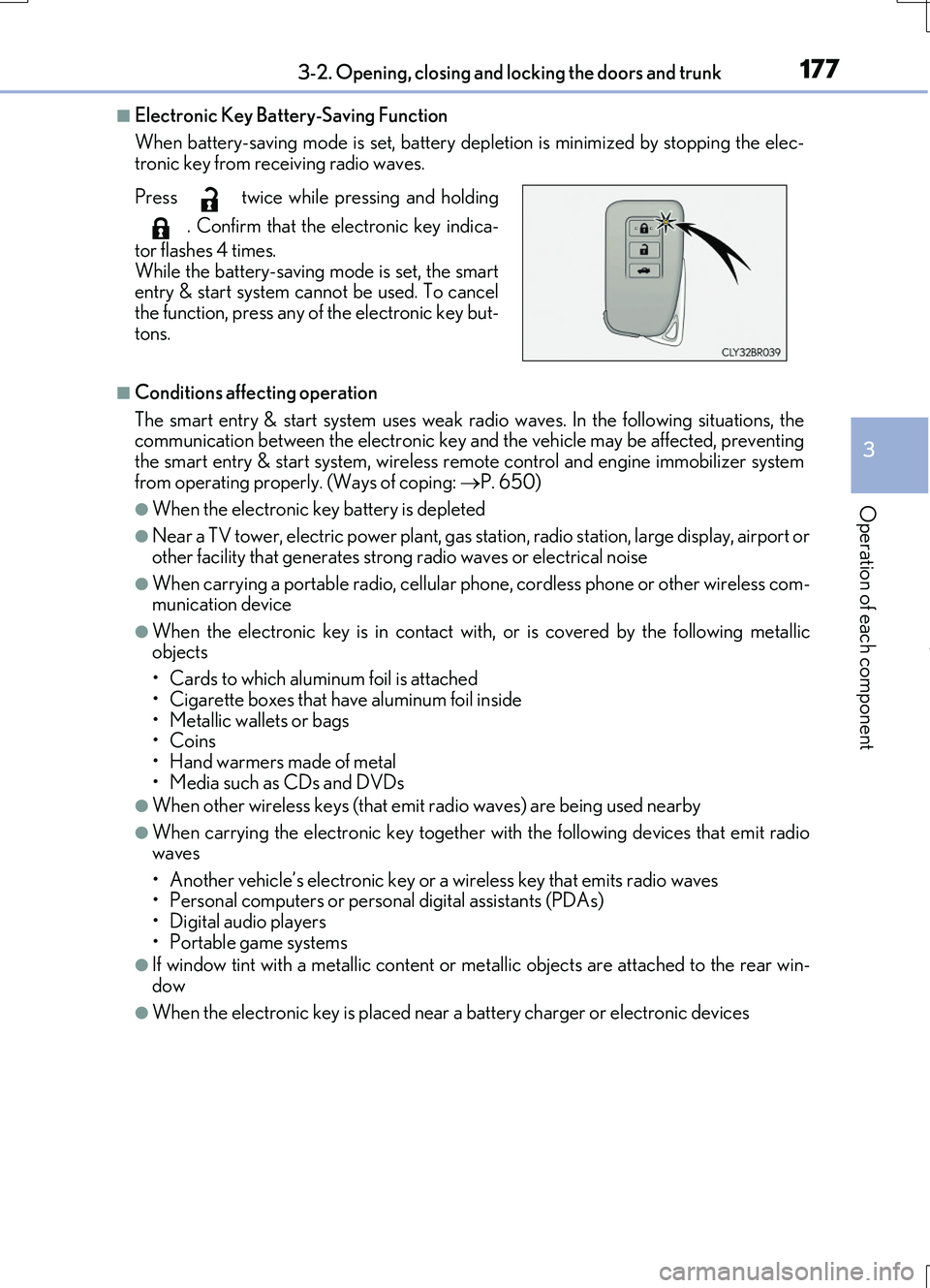
■Electronic Key Battery-Saving Function
When battery-saving mode is set, battery depl etion is minimized by stopping the elec- tronic key from receiving radio waves.
■Conditions affecting operation
The smart entry & start system uses weak ra dio waves. In the following situations, the communication between the electronic key an d the vehicle may be affected, preventing the smart entry & start system, wireless remote control and engine immobilizer system
from operating properly. (Ways of coping: P. 650)
●When the electronic key battery is depleted
●Near a TV tower, electric power plant, gas station, radio station, large display, airport or
other facility that gene rates strong radio waves or electrical noise
●When carrying a portable radio, cellular phone, cordless phone or other wireless com- munication device
●When the electronic key is in contact wi th, or is covered by the following metallic objects
• Cards to which aluminum foil is attached
• Cigarette boxes that have aluminum foil inside • Metallic wallets or bags•Coins
• Hand warmers made of metal • Media such as CDs and DVDs
●When other wireless keys (that emit radio waves) are being used nearby
●When carrying the electronic key together with the following devices that emit radiowaves
• Another vehicle’s electronic key or a wireless key that emits radio waves • Personal computers or personal digital assistants (PDAs)• Digital audio players
• Portable game systems
●If window tint with a metallic content or me tallic objects are attached to the rear win-
dow
●When the electronic key is placed near a battery charger or electronic devices
Press twice while pressing and holding
. Confirm that the electronic key indica-
tor flashes 4 times.
While the battery-saving mode is set, the smart entry & start system cannot be used. To cancelthe function, press any of the electronic key but-
tons.