audio LEXUS RC300 2016 Owners Manual
[x] Cancel search | Manufacturer: LEXUS, Model Year: 2016, Model line: RC300, Model: LEXUS RC300 2016Pages: 700, PDF Size: 14.12 MB
Page 411 of 700
4115-12. Other function
5
Lexus Display Audio system
RC350_RC300_RC200t_RC F_U (OM24671U)
Go to “USB Photo”: “Info” “USB1 Photo” or “USB2 Photo”
P. 3 3 4
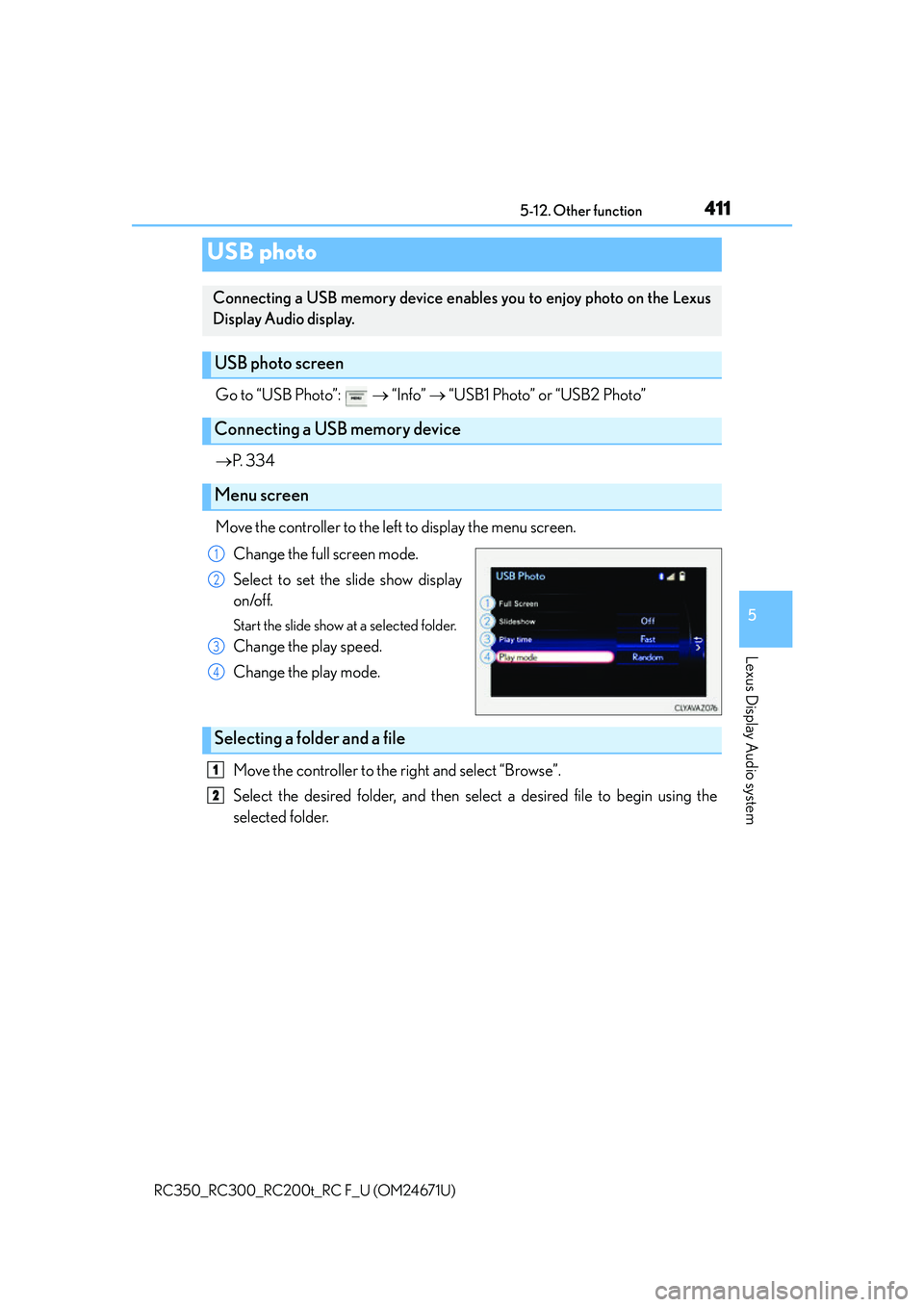
Move the controller to the left to display the menu screen. Change the full screen mode.
Select to set the slide show display
on/off.
Start the slide show at a selected folder.
Change the play speed.
Change the play mode.
Move the controller to the right and select “Browse”.
Select the desired folder, and then select a desired file to begin using the
selected folder.
USB photo
Connecting a USB memory device enables you to enjoy photo on the Lexus
Display Audio display.
USB photo screen
Connecting a USB memory device
Menu screen
1
2
3
4
Selecting a folder and a file
1
2
Page 413 of 700
4135-12. Other function
5
Lexus Display Audio system
RC350_RC300_RC200t_RC F_U (OM24671U)
Go to “Weather”: “Info” “Weather”
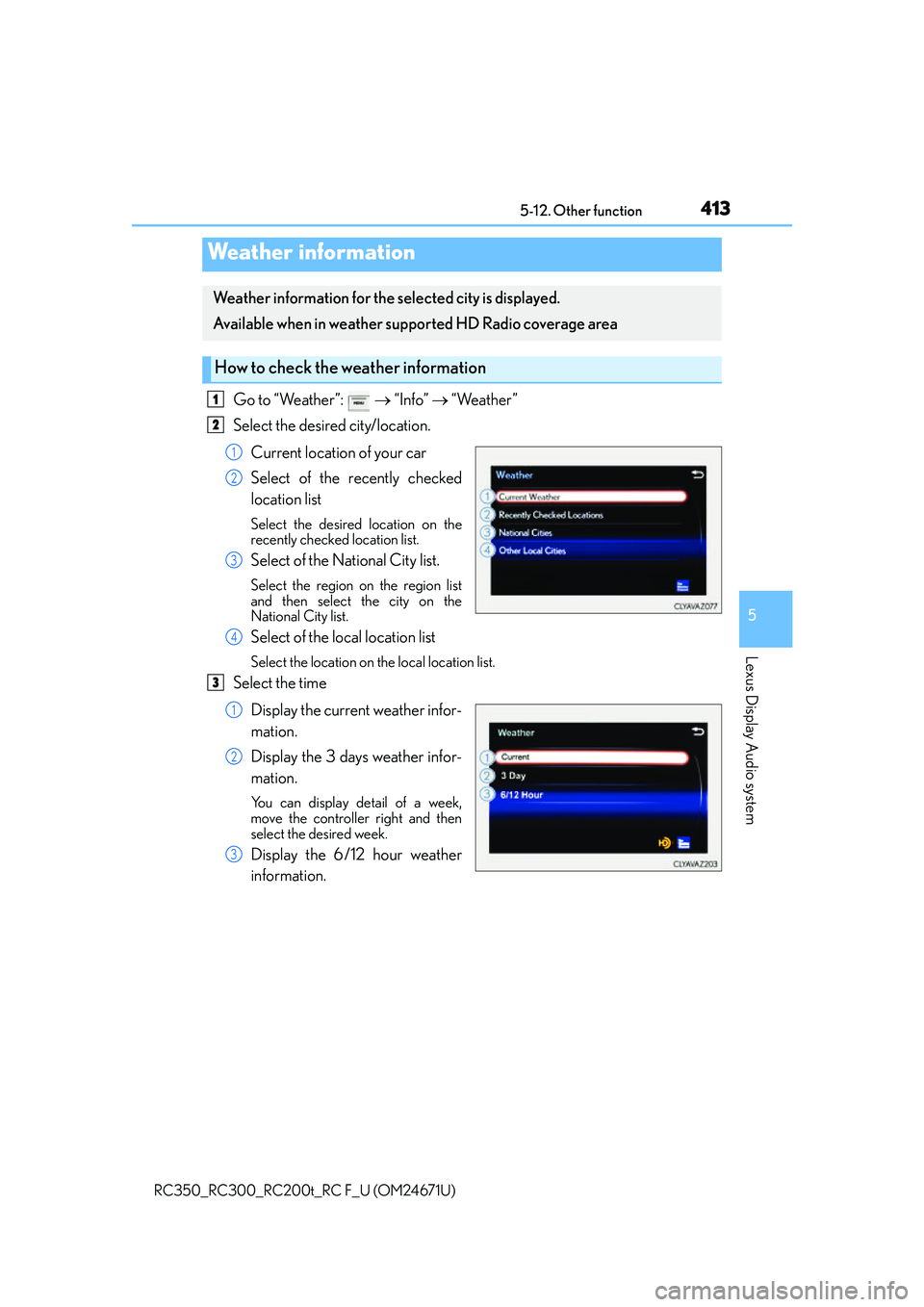
Select the desired city/location.
Current location of your car
Select of the recently checked
location list
Select the desired location on the
recently checked location list.
Select of the National City list.
Select the region on the region list
and then select the city on the
National City list.
Select of the local location list
Select the location on the local location list.
Select the timeDisplay the current weather infor-
mation.
Display the 3 days weather infor-
mation.
You can display detail of a week,
move the controller right and then
select the desired week.
Display the 6/12 hour weather
information.
Weather information
Weather information for the selected city is displayed.
Available when in weather supported HD Radio coverage area
How to check the weather information
1
2
1
2
3
4
3
1
2
3
Page 414 of 700
4145-12. Other function
RC350_RC300_RC200t_RC F_U (OM24671U)
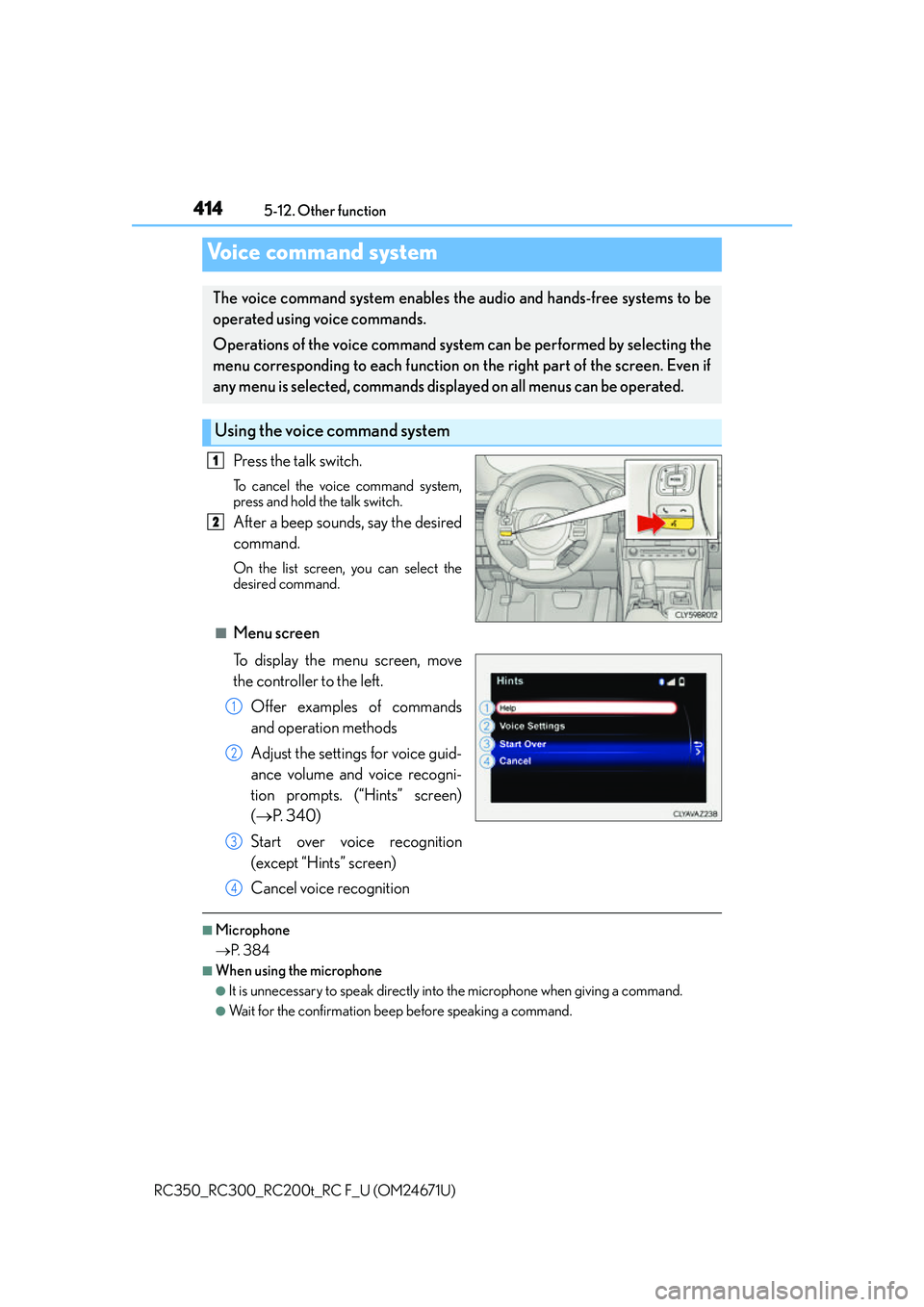
Press the talk switch.
To cancel the voice command system,
press and hold the talk switch.
After a beep sounds, say the desired
command.
On the list screen, you can select the
desired command.
■Menu screen
To display the menu screen, move
the controller to the left.
Offer examples of commands
and operation methods
Adjust the settings for voice guid-
ance volume and voice recogni-
tion prompts. (“Hints” screen)
( P. 3 4 0 )
Start over voice recognition
(except “Hints” screen)
Cancel voice recognition
■Microphone
P. 3 8 4
■When using the microphone
●It is unnecessary to speak directly into the microphone when giving a command.
●Wait for the confirmation beep before speaking a command.
Voice command system
The voice command system enables the audio and hands-free systems to be
operated using voice commands.
Operations of the voice command system can be performed by selecting the
menu corresponding to each function on the right part of the screen. Even if
any menu is selected, commands displayed on all menus can be operated.
Using the voice command system
1
2
1
2
3
4
Page 415 of 700
4155-12. Other function
5
Lexus Display Audio system
RC350_RC300_RC200t_RC F_U (OM24671U)
●Voice commands may not be recognized if:
• Spoken too quickly.
• Spoken at a low or high volume.
• The roof or windows are open.
• Passengers are talking while voice commands are spoken.
• The air conditioning speed is set high.
• The air conditioning vents are turned towards the microphone.
●In the following conditions, the system may not recognize the command properly and
using voice commands may not be possible:
• The command is incorrect or unclear. No te that certain words, accents or speech
patterns may be difficult for the system to recognize.
• There is excessive background noise, such as wind noise.
■When searching for a track
●A USB memory or iPod must be connected to enable track searching and playback.
( P. 3 3 4 )
●When a USB memory or iPod is connected, recognition data is created so tracks can
be searched using voice commands.
●Recognition data is updated un der the following conditions:
• When the USB memory or iPod data has changed.
• When the voice recognition language is changed. (P. 3 3 7 )
●While the recognition data is being created or being updated, a track search cannot be
performed using a voice command.
■The Gracenote® media database
P. 3 6 1
Due to natural language speech recognitio n technology, this system enables rec-
ognition of a command when spoken naturally. However, the system cannot rec-
ognize every variation of each command.
In some situations, it is possible to omit the command for the procedure and
directly state the desired operation.
This function is available in English, Spanish and French.
Casual speech recognization
Page 417 of 700
4175-12. Other function
5
Lexus Display Audio system
RC350_RC300_RC200t_RC F_U (OM24671U)
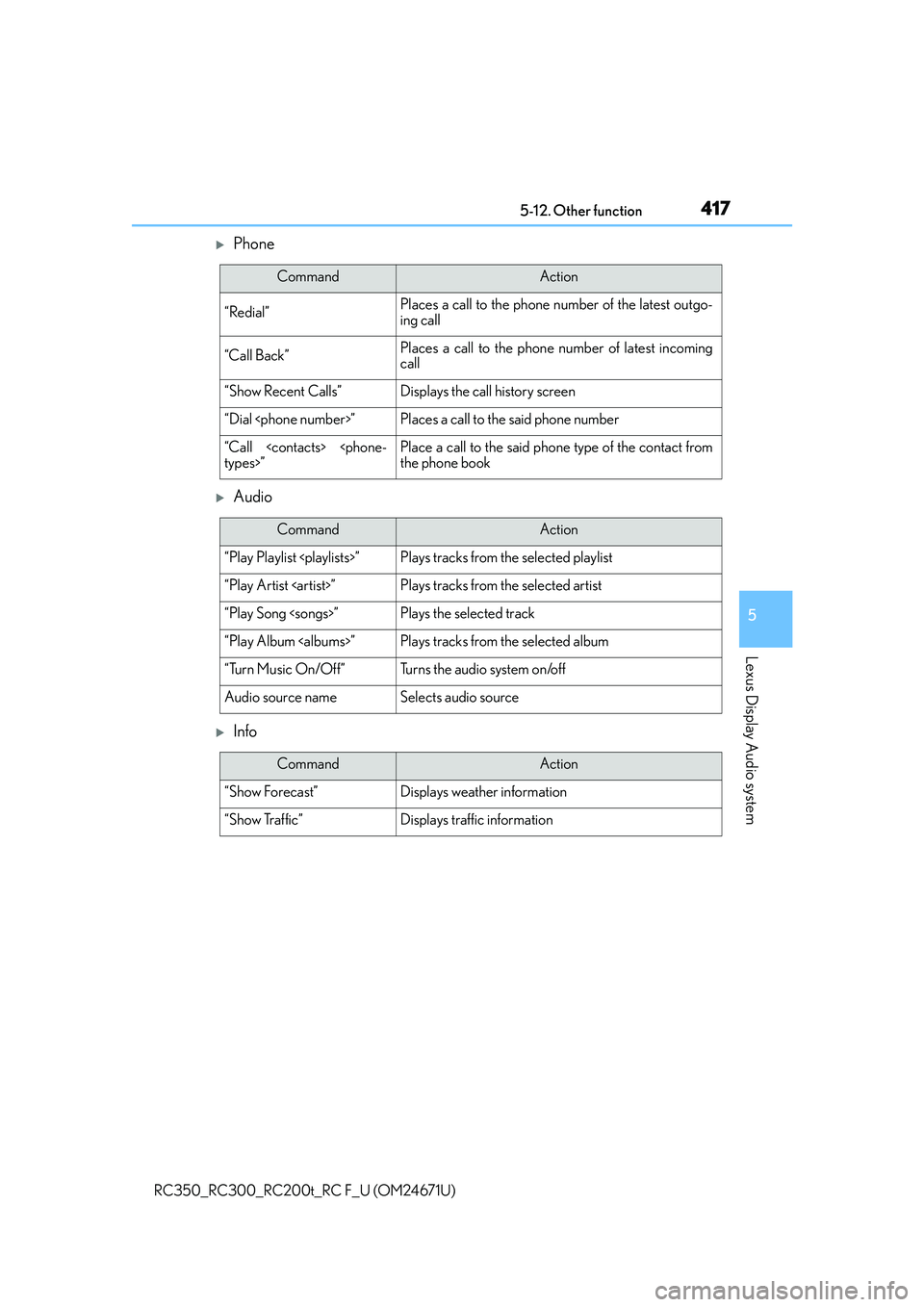
Phone
Audio
Info
CommandAction
“Redial”Places a call to the phone number of the latest outgo-
ing call
“Call Back”Places a call to the phone number of latest incoming
call
“Show Recent Calls”Displays the call history screen
“Dial
“Call
the phone book
CommandAction
“Play Playlist
“Play Artist
“Play Song
“Play Album
“Turn Music On/Off”Turns the audio system on/off
Audio source nameSelects audio source
CommandAction
“Show Forecast”Displays weather information
“Show Traffic”Displays traffic information
Page 420 of 700
420
RC350_RC300_RC200t_RC F_U (OM24671U)6-1. Using the air conditioning system
Automatic air conditioning system
Air outlets and fan speed are automatica
lly adjusted according to the temper-
ature setting.
Vehicles with a Lexus Display Audio sy stem: Press the “MENU” button on the
Lexus Display Audio controller, then select “Climate” to display the air condi-
tioning operation screen.
For details on the Lexus Display Audio controller, refer to “Lexus Display
Audio controller” on P. 328.
Vehicles with a navigati on system: Press the “MENU” button on the Remote
Touch, then select “Climate” to display the air conditioning control screen.
For details on the Remote Touch, refer to the “NAVIGATION SYSTEM
OWNER’S MANUAL”.
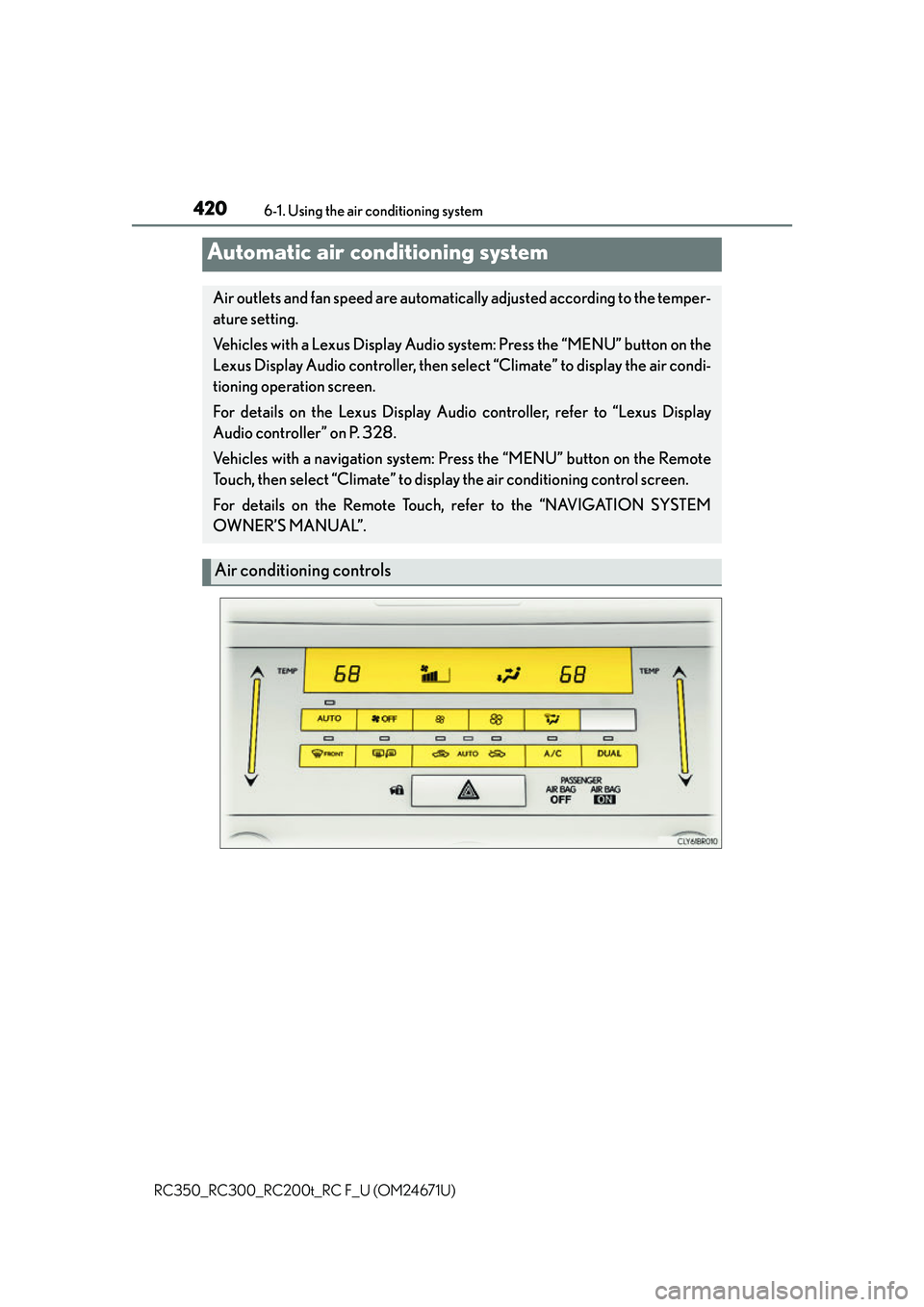
Air conditioning controls
Page 422 of 700
4226-1. Using the air conditioning system
RC350_RC300_RC200t_RC F_U (OM24671U)
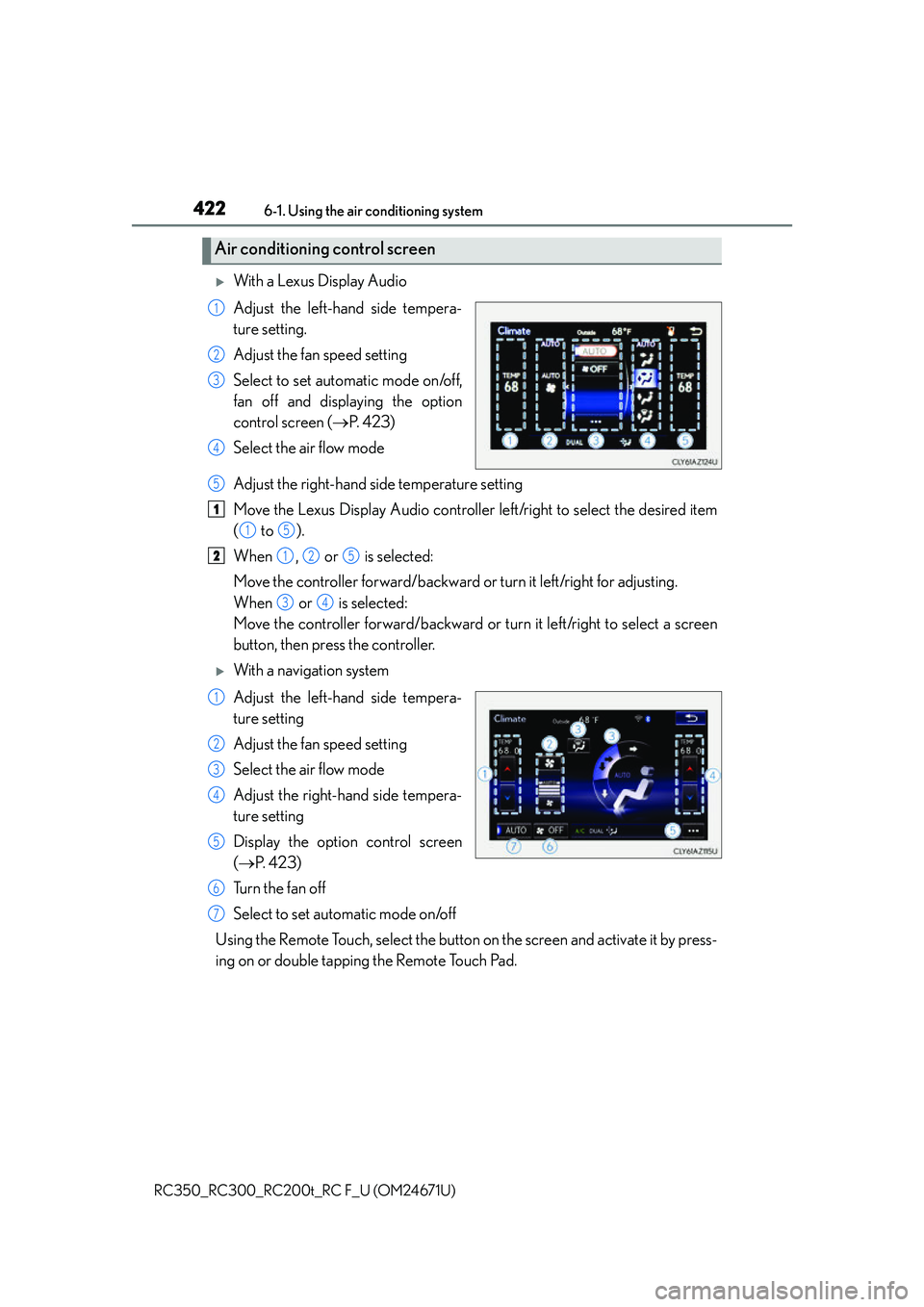
With a Lexus Display Audio
Adjust the left-hand side tempera-
ture setting.
Adjust the fan speed setting
Select to set automatic mode on/off,
fan off and displaying the option
control screen ( P. 4 2 3 )
Select the air flow mode
Adjust the right-hand side temperature setting
Move the Lexus Display Audio controller left/right to select the desired item
( to ).
When , or is selected:
Move the controller forward/backward or turn it left/right for adjusting.
When or is selected:
Move the controller forward/backward or turn it left/right to select a screen
button, then press the controller.
With a navigation system
Adjust the left-hand side tempera-
ture setting
Adjust the fan speed setting
Select the air flow mode
Adjust the right-hand side tempera-
ture setting
Display the option control screen
( P. 4 2 3 )
Tu r n t h e f a n o f f
Select to set automatic mode on/off
Using the Remote Touch, select the button on the screen and activate it by press-
ing on or double tapping the Remote Touch Pad.
Air conditioning control screen
1
2
3
4
5
1
15
2125
34
1
2
3
4
5
6
7
Page 471 of 700
4717-1. Maintenance and care
7
Maintenance and care
RC350_RC300_RC200t_RC F_U (OM24671U)
NOTICE
■Cleaning detergents
●Do not use the following types of detergent, as they may discolor the vehicle interior
or cause streaks or damage to painted surfaces:
• Non-seat portions: Organic substances such as benzene or gasoline, alkaline oracidic solutions, dye, and bleach
• Seats: Alkaline or acidic solutions, su ch as thinner, benzene, and alcohol
●Do not use polish wax or polish cleaner. The instrument panel’s or other interior part’s
painted surface may be damaged.
■Preventing damage to leather surfaces
Observe the following precautions to avoid damage to and deterioration of leather
surfaces:
●Remove any dust or dirt from leather surfaces immediately.
●Do not expose the vehicle to direct sunlight for extended periods of time. Park the
vehicle in the shade, especially during summer.
●Do not place items made of vinyl, plastic, or containing wax on the upholstery, as they
may stick to the leather su rface if the vehicle interior heats up significantly.
■Water on the floor
Do not wash the vehicle floor with water.
Vehicle systems such as the audio system may be damaged if water comes into contact
with electrical components such as the au dio system above or under the floor of the
vehicle. Water may also cause the body to rust.
■When cleaning the inside of the windshield (vehicles with LDA [Lane Departure
Alert])
Be careful not to touch the camera sensor ( P. 2 5 3 ) .
If the camera is accidentally scratched or hit, LDA may not operate properly or may
cause a malfunction.
■Cleaning the inside of the rear window
●Do not use glass cleaner to clean the rear window, as this may cause damage to the
rear window defogger heater wires or antenna. Use a cloth dampened with luke-
warm water to gently wipe the window cl ean. Wipe the window in strokes running
parallel to the heater wires or antenna.
●Be careful not to scratch or damage the heater wires or antenna.
Page 546 of 700
5468-2. Steps to take in an emergency
RC350_RC300_RC200t_RC F_U (OM24671U)
■SRS warning light
This warning light system monitors the airbag sensor assembly, front impact sensors, side
impact sensors (door), side impact sensors (f ront), side impact sensors (rear), driver’s
seat position sensor, driver’s seat belt buck le switch, front passenger occupant classifica-
tion system, “AIR BAG ON” indicator light, “A IR BAG OFF” indicator light, front passen-
ger’s seat belt buckle switch, seat belt pretensioners, airbags, interconnecting wiring and
power sources. ( P. 41)
■Front passenger detection sensor, seat belt reminder and warning buzzer
If luggage is placed on the front passenger seat, the front passenger detection sensor
may cause the warning light to flash and the wa rning buzzer to sound even if a passenger
is not sitting in the seat.
■If the malfunction indicator lamp comes on while driving
First check the following:
●Is the fuel tank empty?
If it is, fill the fuel tank immediately.
●Is the fuel tank cap loose?
If it is, tighten it securely.
The light will go off after several driving trips.
If the light does not go off even after severa l trips, contact your Lexus dealer as soon as
possible.
■Electric power steering system warning light (warning buzzer)
When the battery charge becomes insufficie nt or the voltage temporarily drops, the
electric power steering system warning light may come on and the warning buzzer may
sound.
■When the tire pressure warning light comes on
Check the tire inflation pressure and adjust to the appropriate level. Pushing the tire
pressure warning reset switch will not tu rn off the tire pressure warning light.
■The tire pressure warning light may come on due to natural causes
The tire pressure warning light may come on due to natural causes such as natural air
leaks and tire inflation pressure changes caused by temperature. In this case, adjusting
the tire inflation pressure will turn off the warning light (after a few minutes).
■When a tire is replaced with the spare tire (if equipped)
The spare tire is not equipped with a tire pr essure warning valve and transmitter. If a tire
goes flat, the tire pressure warning light will no t turn off even though the flat tire has been
replaced with the spare tire.
■Conditions that the tire pressure warning system may not function properly
P. 5 0 6
■If the tire pressure warning light frequently comes on after blinking for 1 minute
If the tire pressure warning light frequently comes on after blinking for 1 minute when the
engine switch is turned to IGNITION ON mo de, have it checked by your Lexus dealer.
■Warning buzzer
In some cases, the buzzer may not be heard due to being in a noisy location or audio
sound.
Page 606 of 700
6068-2. Steps to take in an emergency
RC350_RC300_RC200t_RC F_U (OM24671U)
Start the engine of the second vehicle. Increase the engine speed slightly and
maintain at that level for approximately 5 minutes to recharge the battery of
your vehicle.
Open and close any of the door of your vehicle with the engine switch off.
Maintain the engine speed of the second vehicle and start the engine of your
vehicle by turning the engine switch to IGNITION ON mode.
Once the vehicle’s engine has started, remove the jumper cables in the exact
reverse order from which they were connected.
Once the engine starts, have the vehicle inspected at your Lexus dealer as soon
as possible.
■Starting the engine when the battery is discharged
The engine cannot be started by push-starting.
■To prevent battery discharge
●Turn off the headlights and the audio system while the engine is off.
●Turn off any unnecessary electrical components when the vehicle is running at a low
speed for an extended period, such as in heavy traffic.
■Charging the battery
The electricity stored in the battery will discharge gradually even when the vehicle is not
in use, due to natural discharg e and the draining effects of certain electrical appliances. If
the vehicle is left for a long time, the battery may discharge, and the engine may be
unable to start. (The battery recharges automatically during driving.)
■When recharging or replacing the battery
●In some cases, it may not be possible to unlock the doors using the smart access system
with push-button start when the battery is discharged. Use the wireless remote control
or the mechanical key to lock or unlock the doors.
●The engine may not start on the first attempt after the battery has recharged but will
start normally after the second attempt. This is not a malfunction.
●The engine switch mode is memorized by the vehicle. When the battery is recon-
nected, the system will return to the mode it was in before the battery was discharged.
Before disconnecting the battery, turn the engine switch off.
If you are unsure what mode the engine switch was in before the battery discharged, be
especially careful when reconnecting the battery.
5
6
7
8