instrument panel LEXUS RC300 2016 User Guide
[x] Cancel search | Manufacturer: LEXUS, Model Year: 2016, Model line: RC300, Model: LEXUS RC300 2016Pages: 700, PDF Size: 14.12 MB
Page 110 of 700
1102. Instrument cluster
RC350_RC300_RC200t_RC F_U (OM24671U)
■Language
Select to change the language on the display.
■Units
Select to change the unit of measure for fuel consumption.
■Maintenance system (if equipped)
Select to reset the maintenance data after the required maintenance is per-
formed. (
P. 4 7 3)
■Eco Driving Indicator Light
Select to activate/deactivate th e Eco Driving Indicator Light.
■ switch settings (except F SPORT models)
Displays a procedure to register a desired screen to .
You can register 1 screen as a shortcut, which can be displayed by pressing . (
P. 1 0 7 )
■Drive information 1 /Drive information 2
Select to select up to 2 items that will be displayed on the “Drive Info 1” screen
and “Drive Info 2” screen respectively. (
P. 1 0 8 )
■Pop-up display
Select to set the following pop-up disp lays, which may appear in some situa-
tions, on/off. • Route guidance display of the navigation system-linked system (if equipped)
• Incoming call display of the hands-free phone system
• Windshield wiper switch operation display (if equipped)
• Headlight switch operation display (if equipped)
• Dynamic radar cruise control operation display (if equipped)
• Instrument panel brightness adjustment display
• Main meter switch operation display (F SPORT models)
■Accent color (except F SPORT models)
Select to change the accent colors on the screen, such as the cursor color.
■Needle (F SPORT models)
Select to change the needle color for the tachometer.
Settings display
Page 122 of 700
1222. Instrument cluster
RC350_RC300_RC200t_RC F_U (OM24671U)
■Language
Select to change the language on the display.
■Units
Select to change the unit of measure for fuel consumption.
■Maintenance system (U.S.A. only)
Select to reset the maintenance data after the required maintenance is per-
formed. (
P. 4 7 3)
■Eco Driving Indicator Light
Select to activate/deactivate th e Eco Driving Indicator Light.
■ switch settings
Displays a procedure to register a desired screen to .
You can register 1 screen as a shortcut, which can be displayed by pressing . ( P. 114)
■Drive information 1 /Drive information 2
Select to select up to 2 items that will be displayed on the “Drive Info 1” screen
and “Drive Info 2” screen respectively.
( P. 115)
■Pop-up display
Select to set the following pop-up disp lays, which may appear in some situa-
tions, on/off. • Route guidance display of the navigation system-linked system (if equipped)
• Incoming call display of the hands-free phone system
• Windshield wiper switch operation display (if equipped)
• Headlight switch operation display (if equipped)
• Dynamic radar cruise control operation display (if equipped)
• Instrument panel brightness adjustment display
• TVD control mode change display (if equipped)
• Drive mode change display
■Rev indicator
Select to set the rev indicator on/off.
When set to on, proceed to select the engine speed at which the rev indicator
will be displayed.
■Rev peak
Select to set the rev peak on/off.
Settings display
Page 151 of 700
1513-2. Opening, closing and locking the doors and trunk
3
Operation of each component
RC350_RC300_RC200t_RC F_U (OM24671U)
■Note for the entry function
●Even when the electronic key is within the effective range (detection areas), the system
may not operate properly in the following cases:
• The electronic key is too close to the window or outside door handle, near the
ground, or in a high place when the doors are locked or unlocked.
• The electronic key is near the ground or in a high place, or too close to the rear
bumper center when the trunk is opened.
• The electronic key is on the instrument pa nel, rear package tray or floor, or in the
door pockets or glove box when the engine is started or engine switch modes are
changed.
●Do not leave the electronic key on top of th e instrument panel or near the door pockets
when exiting the vehicle. Depending on the radio wave reception conditions, it may be
detected by the antenna outside the cabin and the doors will become lockable from the
outside, possibly trapping the el ectronic key inside the vehicle.
●As long as the electronic key is within the effective range, the doors may be locked or
unlocked by anyone. However, only the door s detecting the electronic key can be used
to unlock the vehicle.
●Even if the electronic key is not inside the vehicle, it may be possible to start the engine
if the electronic key is near the window.
●The doors may unlock or lock if a large amou nt of water splashes on the door handle,
such as in the rain or in a car wash, when th e electronic key is within the effective range.
(The doors will automatically be locked after approximately 60 seconds if the doors
are not opened and closed.)
●If the wireless remote control is used to lo ck the doors when the electronic key is near
the vehicle, there is a possibility that the door may not be unlocked by the entry func-
tion. (Use the wireless remote control to unlock the doors.)
●Touching the door lock or unlock sensor while wearing gloves may prevent lock or
unlock operation.
●When the lock operation is performed using the lock sensor, recognition signals will be
shown up to two consecutive times. After this, no recognition signals will be given.
●If the door handle becomes wet while the el ectronic key is within the effective range,
the door may lock and unlock repeatedly. In this case, follow the following correction
procedures to wash the vehicle:
• Place the electronic key in a location 6 ft. (2 m) or more away from the vehicle. (Take
care to ensure that the key is not stolen.)
• Set the electronic key to battery-saving mode to disable the smart access system with push-button start. ( P. 1 5 0 )
●If the electronic key is insi de the vehicle and a door handle becomes wet during a car
wash, a message may be shown on the mult i-information display and a buzzer will
sound outside the vehicle. To turn off the alarm, lock both side doors.
●The lock sensor may not work properly if it comes into contact with ice, snow, mud, etc.
Clean the lock sensor and attempt to operate it again.
●A sudden handle operation or a handle operation immediately after entering the effec-
tive range may prevent the doors from bein g unlocked. Touch the door unlock sensor
and check that the doors are unlocked before pulling the door handle again.
●Unlocking the vehicle may take more time if another electronic key is within the effec-
tive range.
Page 190 of 700
1904-1. Before driving
RC350_RC300_RC200t_RC F_U (OM24671U)
WA R N I N G
Observe the following precautions.
Failure to do so may result in death or serious injury.
■When the vehicle is parked
●Do not leave glasses, cigarette lighters, sp ray cans, or soft drink cans in the vehicle
when it is in the sun.
Doing so may result in the following:
• Gas may leak from a cigarette lighter or spray can, and may lead to a fire.
• The temperature inside the vehicle may cause the plastic lenses and plastic mate- rial of glasses to deform or crack.
• Soft drink cans may fracture, causing the contents to spray over the interior of the vehicle, and may also cause a short circuit in the vehicle’s electrical components.
●Do not leave cigarette lighters in the vehicle. If a cigarette lighter is in a place such as
the glove box or on the floor, it may be lit accidentally when luggage is loaded or the
seat is adjusted, causing a fire.
●Do not attach adhesive discs to the windsh ield or windows. Do not place containers
such as air fresheners on the instrument panel or dashboard. Adhesive discs or con-
tainers may act as lenses, causing a fire in the vehicle.
●Do not leave a door or window open if the curved glass is coated with a metallized
film such as a silver-colored one. Reflected sunlight may cause the glass to act as a
lens, causing a fire.
●Always apply the parking brake, shift the shift lever to P, stop the engine and lock the
vehicle.
Do not leave the vehicle unattend ed while the engine is running.
●Do not touch the exhaust pipes while the engine is running or immediately after turn-
ing the engine off.
Doing so may cause burns.
■When taking a nap in the vehicle
Always turn the engine off. Otherwise, if you accidentally move the shift lever or
depress the accelerator pedal, this could cause an accident or fire due to engine over-
heating. Additionally, if the vehicle is parked in a poorly ventilated area, exhaust gases
may collect and enter the vehicle, leadin g to death or a serious health hazard.
Page 195 of 700
1954-1. Before driving
4
Driving
RC350_RC300_RC200t_RC F_U (OM24671U)
WA R N I N G
■Things that must not be carried in the trunk
The following things may cause a fire if loaded in the trunk:
●Receptacles containing gasoline
●Aerosol cans
■Storage precautions
Observe the following precautions.
Failure to do so may prevent the pedals from being depressed properly, may block the
driver’s vision, or may result in items hittin g the driver or passengers, possibly causing
an accident.
●Stow cargo and luggage in the trunk whenever possible.
●RC350/RC300/RC200t: To prevent cargo and luggage from sliding forward dur-
ing braking, do not stack anything in the enlarged trunk. Keep cargo and luggage low,
as close to the floor as possible.
●RC350/RC300/RC200t: When you fold down the rear seats, long items should
not be placed directly behind the front seats.
●RC350/RC300/RC200t: Never allow anyone to ride in the enlarged trunk. It is not
designed for passengers. They should ride in their seats with their seat belts properly
fastened.
●Do not place cargo or luggage in or on the following locations.
• At the feet of the driver
• On the front passenger or re ar seats (when stacking items)
• On the package tray
• On the instrument panel
•On the dashboard
• In front of the navigation system scre en (if equipped) or Lexus Display Audio
screen (if equipped)
●Secure all items in th e occupant compartment.
■Capacity and distribution
●Do not exceed the maximum axle weight ra ting or the total vehicle weight rating.
●Even if the total load of occupant’s weight and the cargo load is less than the total load
capacity, do not apply the load unevenly. Improper loading may cause deterioration
of steering or braking control which may cause death or serious injury.
Page 212 of 700
2124-2. Driving procedures
RC350_RC300_RC200t_RC F_U (OM24671U)
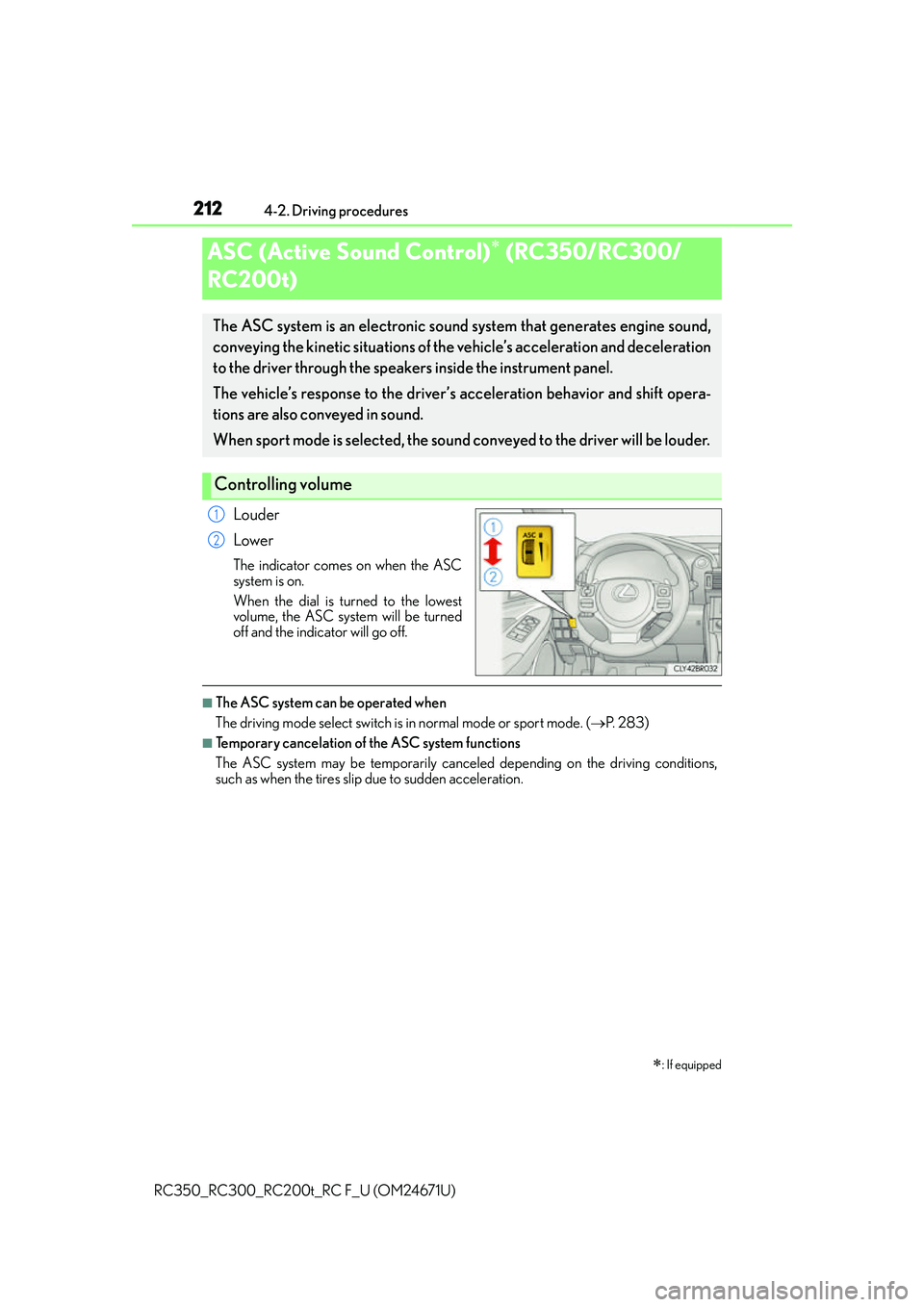
Louder
Lower
The indicator comes on when the ASC
system is on.
When the dial is turned to the lowest
volume, the ASC system will be turned
off and the indicator will go off.
■The ASC system can be operated when
The driving mode select switch is in normal mode or sport mode. (P. 2 8 3 )
■Temporary cancelation of the ASC system functions
The ASC system may be temporarily cancele d depending on the driving conditions,
such as when the tires slip due to sudden acceleration.
ASC (Active Sound Control) (RC350/RC300/
RC200t)
: If equipped
The ASC system is an electronic sound system that generates engine sound,
conveying the kinetic situations of the vehicle’s acceleration and deceleration
to the driver through the speake rs inside the instrument panel.
The vehicle’s response to the driver’s acceleration behavior and shift opera-
tions are also conveyed in sound.
When sport mode is selected, the sound co nveyed to the driver will be louder.
Controlling volume
1
2
Page 214 of 700
214
RC350_RC300_RC200t_RC F_U (OM24671U)4-3. Operating the lights and wipers
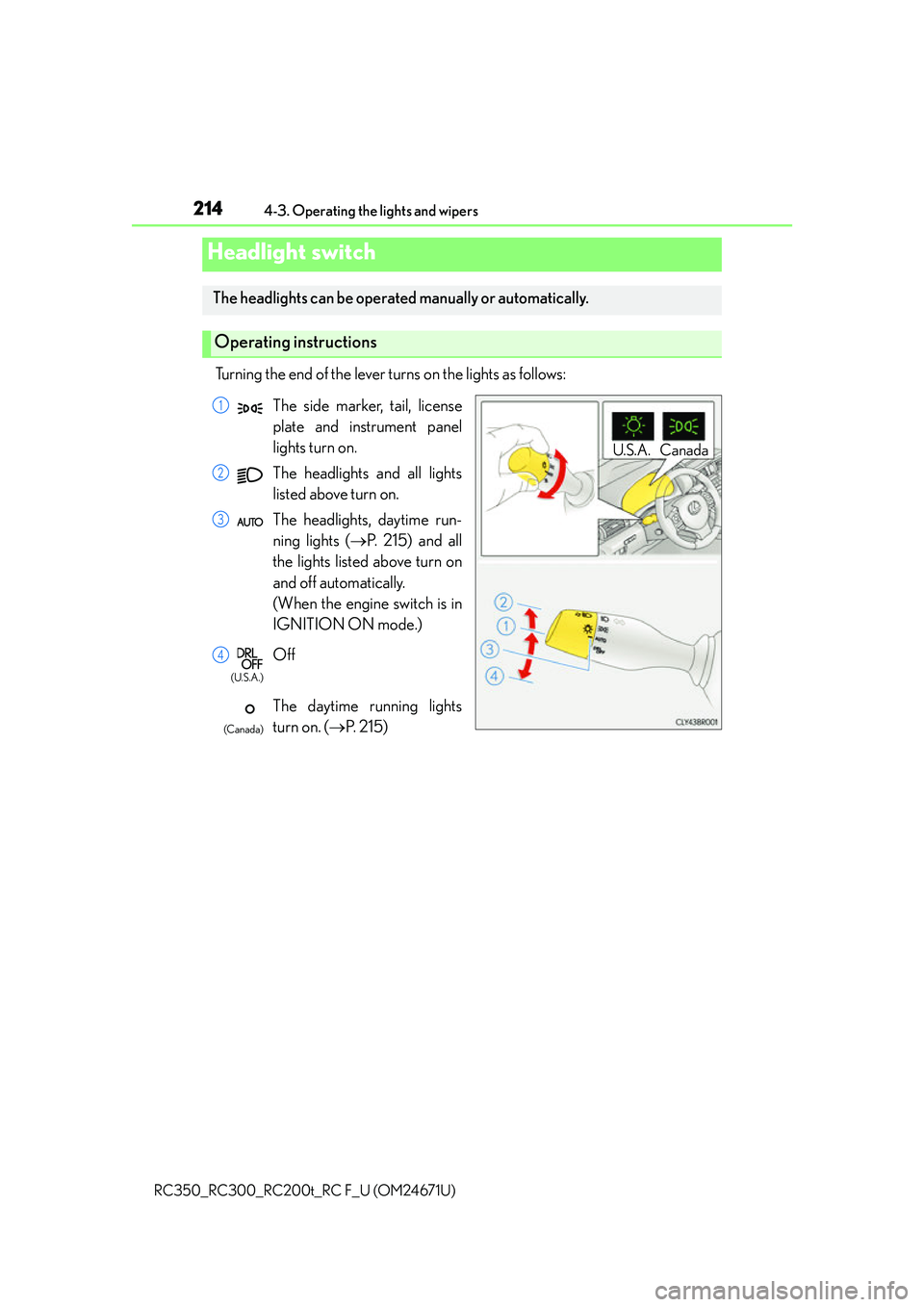
Turning the end of the lever turns on the lights as follows:
Headlight switch
The headlights can be operated manually or automatically.
Operating instructions
U.S.A. Canada
The side marker, tail, license
plate and instrument panel
lights turn on.
The headlights and all lights
listed above turn on.
The headlights, daytime run-
ning lights (
P. 215) and all
the lights listed above turn on
and off automatically.
(When the engine switch is in
IGNITION ON mode.)
Off
The daytime running lights
turn on. ( P. 2 1 5 )1
2
3
4
(U.S.A.)
(Canada)
Page 405 of 700
4055-11. Bluetooth®
5
Lexus Display Audio system
RC350_RC300_RC200t_RC F_U (OM24671U)
■Bluetooth® antenna
The antenna is built into the instrument panel.
If the portable audio player is behind the seat or in the glove box or console box, or is
touching or covered by metal objects, the connection status may deteriorate.
If the cellular phone is behind the seat or in the console box, or touching or covered by
metal objects, the connection status may deteriorate.
■Battery charge/signal status
●This display may not correspond exactly wi th the portable audio player or cellular
phone itself.
●This system does not have a charging function.
●The portable audio player or cellular phone battery will be deplet ed quickly when the
device is connected to Bluetooth®.
■When using the Bluetooth® audio and hands-free system at the same time
The following problems may occur.
●The Bluetooth® audio connection may be interrupted.
●Noise may be heard during Bluetooth® audio playback.
■About the contact in this system
The following data is stored for every regi stered cellular phone. When another phone is
connecting, you cannot read the registered data.
●Contact data
●Call history
●Favorite
●Message
When removing a Bluetooth® phone from the system, the above-mentioned data is also
deleted.
■About Bluetooth®
The Bluetooth® word mark and logos are regis-
tered trademarks owned by the Bluetooth SIG,
Inc. and any use of such marks by PIONEER
Corporation is under license. Other trademarks
and trade names are those of their respective
owners.
Page 428 of 700
4286-1. Using the air conditioning system
RC350_RC300_RC200t_RC F_U (OM24671U)
WA R N I N G
■To prevent the windshield from fogging up
●Do not use during cool air operation in extremely humid weather. The differ-
ence between the temperature of the outside air and that of the windshield can cause
the outer surface of the windshield to fog up, blocking your vision.
■To prevent burns
●Do not touch the rear view mirror surfaces when the outside rear view mirror defog-
gers are on.
●Do not touch the glass at lower part of the wi ndshield or to the side of the front pillars
when the windshield wiper de-icer is on.
NOTICE
■To prevent battery discharge
Do not leave the air conditioning system on longer than necessary when the engine is
stopped.
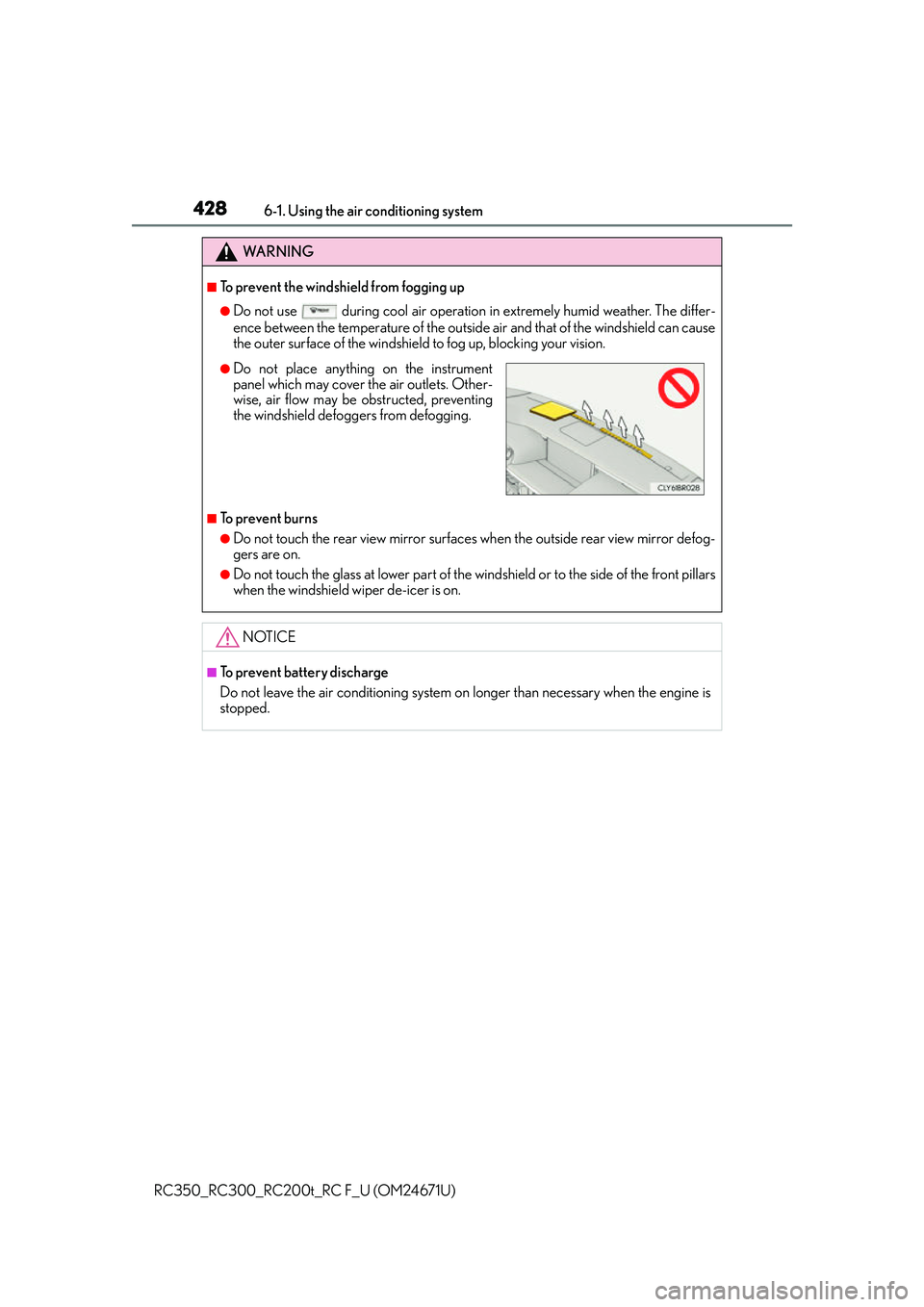
●Do not place anything on the instrument
panel which may cover th e air outlets. Other-
wise, air flow may be obstructed, preventing
the windshield defoggers from defogging.
Page 470 of 700
4707-1. Maintenance and care
RC350_RC300_RC200t_RC F_U (OM24671U)
■Caring for leather areas
Lexus recommends cleaning the interior of th e vehicle at least twice a year to maintain
the quality of the vehicle’s interior.
■Shampooing the carpets
There are several commercial foaming-type cleaners available. Use a sponge or brush to
apply the foam. Rub in overlapping circles. Do not use water. Wipe dirty surfaces and let
them dry. Excellent results are obtained by keeping the carpet as dry as possible.
■Seat belts
Clean with mild soap and lukewarm water using a cloth or sponge. Also check the belts
periodically for excessive wear, fraying or cuts.
■When cleaning the carpeted portions of the glove box, console box, etc.
If a strong adhesive tape is used, there is a possibility that the surface of the carpet could
be damaged.
WA R N I N G
■Wa t e r i n t h e v e h i c l e
●Do not splash or spill liquid in the vehicle.
Doing so may cause electrical components etc. to malfunction or catch fire.
●Do not get any of the SRS components or wiring in the vehicle interior wet.
( P. 4 1 )
An electrical malfunction may cause the airbags to deploy or not function properly,
resulting in death or serious injury.
■Cleaning the interior (especially instrument panel)
Do not use polish wax or polish cleaner. The instrument panel may reflect off the wind-
shield, obstructing the driver’s view and leading to an accident, resulting in death or
serious injury.