fuel LEXUS RC300 2016 Owner's Manual
[x] Cancel search | Manufacturer: LEXUS, Model Year: 2016, Model line: RC300, Model: LEXUS RC300 2016Pages: 700, PDF Size: 14.12 MB
Page 130 of 700
1302. Instrument cluster
RC350_RC300_RC200t_RC F_U (OM24671U)
■Updating the past record data
Navigation system
Update the average fuel consumption by selecting “Update” to measure the current fuel
consumption again.
Lexus Display Audio system
Update the average fuel consumption by moving the controller to the left and select
“Update” to measure the current fuel consumption again.
■Resetting the data
Navigation system
The fuel consumption data can be deleted by selecting “Clear”.
Lexus Display Audio system
The fuel consumption data can be deleted by moving the controller to the left and select
“Clear ”.
■Cruising range
Displays the estimated maximum distance that can be driven with the quantity of fuel
remaining.
This distance is computed based on your average fuel consumption.
As a result, the actual distance that can be driven may differ from that displayed.
Page 183 of 700
183
Driving4
RC350_RC300_RC200t_RC F_U (OM24671U)
4-1. Before drivingDriving the vehicle ...................... 184
Cargo and luggage .................... 193
Vehicle load limits ....................... 196
Trailer towing ..................................197
Dinghy towing...............................198
4-2. Driving procedures Engine (ignition) switch ............ 199
Automatic transmission .......... 205
Turn signal lever ........................... 210
Parking brake ..................................211
ASC (Active Sound Control)
(RC350/RC300/
RC200t)...................................... 212
ASC (Active Sound Control) (RC F)............................................ 213
4-3. Operating the lights and wipers
Headlight switch .......................... 214
Automatic High Beam .............. 217
Fog light switch............................ 222
Windshield wipers and washer..........................................223
4-4. Refueling Opening the fuel tank cap....... 231 4-5. Using the driving support
systems
Cruise control ............................. 235
Dynamic radar cruise control ......................................... 239
LDA (Lane Departure Alert) ........ 253
Intuitive parking assist .............. 259
Lexus parking assist monitor ........................................ 268
Driving mode select switch ........................................... 283
Driving assist systems............... 287
PCS (Pre-Collision System).......... 295
BSM (Blind Spot Moni tor)..............302
• BSM function .........................306
• RCTA function ....................... 310
Active rear wing .......................... 315
TVD (Torque Vectoring Differential)................................. 318
4-6. Driving tips Winter driving tips .....................320
Page 185 of 700
1854-1. Before driving
4
Driving
RC350_RC300_RC200t_RC F_U (OM24671U)
■When starting off on an uphill
The hill-start assist control will activate. (P. 2 8 7 )
■Driving in the rain
●Drive carefully when it is raining, because visibility will be reduced, the windows may
become fogged-up, and th e road will be slippery.
●Drive carefully when it starts to rain, becau se the road surface will be especially slip-
pery.
●Refrain from high speeds when driving on an expressway in the rain, because there may
be a layer of water between the tires and the road surface, preventing the steering and
brakes from operating properly.
■Engine speed while driving
In the following conditions, the engine speed may become high while driving. This is due
to automatic up-shifting control or down-shi fting implementation to meet driving condi-
tions. It does not indica te sudden acceleration.
●The vehicle is judged to be driving uphill or downhill
●When the accelerator pedal is released
●When the brake pedal is depressed while sport mode is selected
■Restraining the engine output (brake override system)
●When the accelerator and brake pedals are depressed at the same time, the engine
output may be restrained.
●A warning message is displayed on the multi-information display while the system is
operating. (P. 5 6 0 )
■Breaking in your new Lexus
To extend the life of the ve hicle, observing the followin g precautions is recommended:
●For the first 186 miles (300 km):
Avoid sudden stops.
●For the first 621 miles (1000 km):
• Do not drive at extremely high speeds.
• Avoid sudden acceleration.
• Do not drive continuously in low gears.
• Do not drive at a constant speed for extended periods.
■Drum-in-disc type parking brake system
Your vehicle has a drum-in-disc type parking brake system. This type of brake system
needs bedding-down of the brake shoes periodically or whenever the parking brake
shoes and/or drum are replaced. Have your Lexus dealer perform the bedding down
operation.
■Operating your vehicle in a foreign country
Comply with the relevant vehi cle registration laws and confirm the availability of the cor-
rect fuel. ( P. 636)
■Brake pads and discs (RC F)
The brake pads and discs are designed for use under high load conditions. Therefore,
brake noise may be generated depending on the vehicle speed, braking force and vehi-
cle environment (temperature, humidity, etc.).
Page 206 of 700
2064-2. Driving procedures
RC350_RC300_RC200t_RC F_U (OM24671U)
*1: To improve fuel efficiency and reduce noise, shift the shift lever to D for normal driv-
ing.
*2: Any gear range can be fixed when driving in M mode.
■Sport mode/Eco drive mode
P. 2 8 3
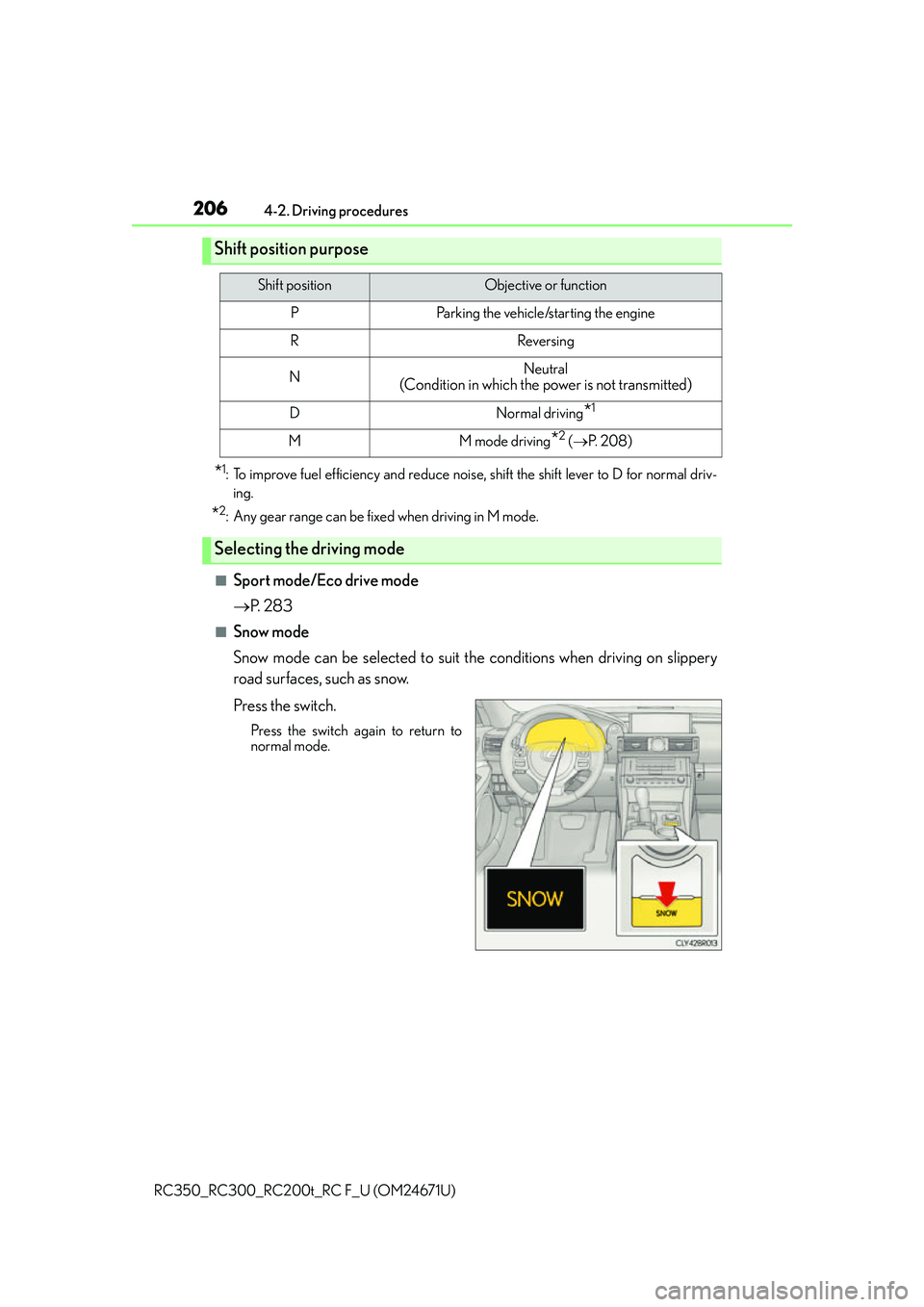
■Snow mode
Snow mode can be selected to suit th e conditions when driving on slippery
road surfaces, such as snow.
Press the switch.
Press the switch again to return to
normal mode.
Shift position purpose
Shift positionObjective or function
PParking the vehicle/starting the engine
RReversing
NNeutral
(Condition in which the power is not transmitted)
DNormal driving*1
MM mode driving*2 ( P. 2 0 8 )
Selecting the driving mode
Page 215 of 700
2154-3. Operating the lights and wipers
4
Driving
RC350_RC300_RC200t_RC F_U (OM24671U)
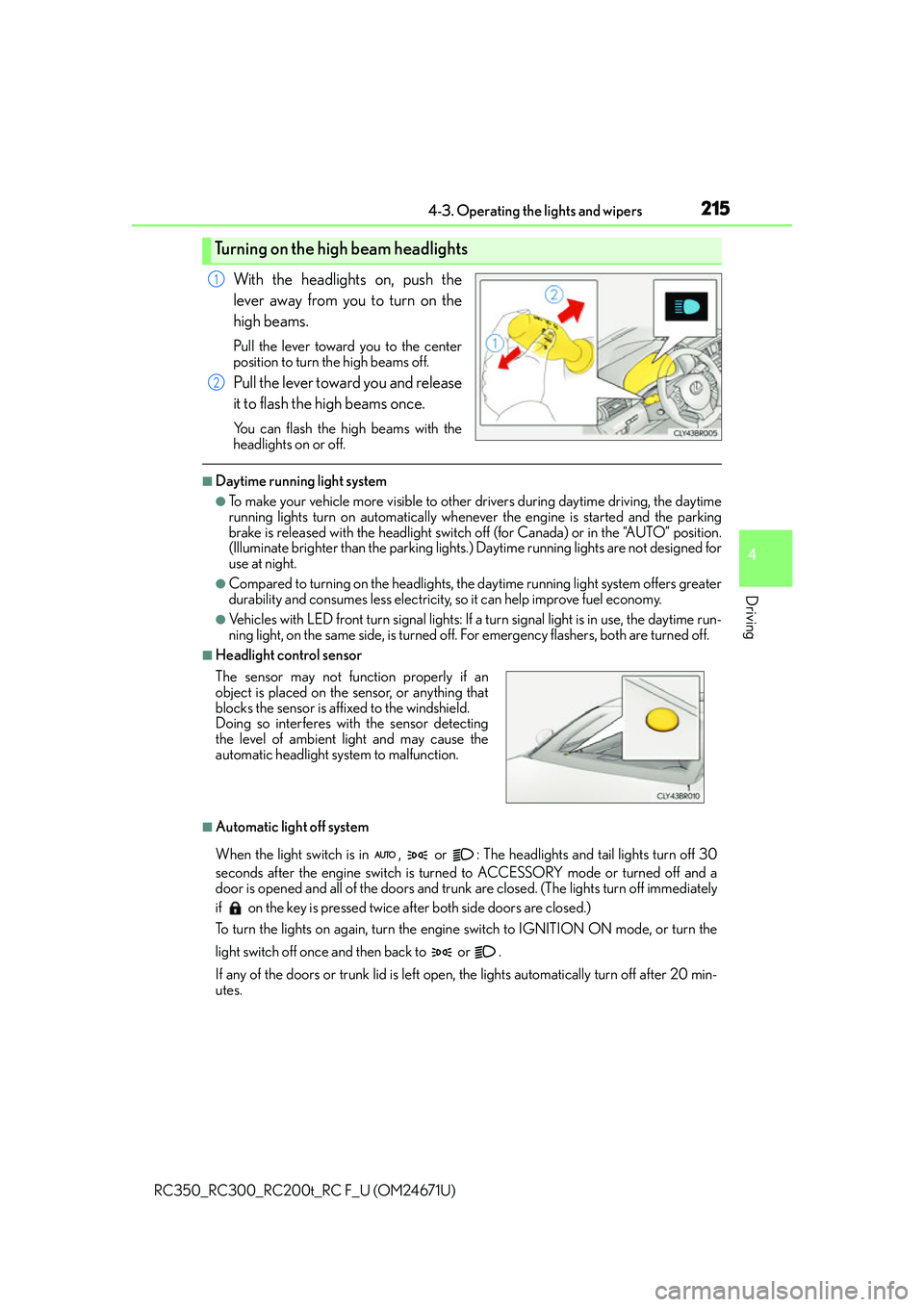
With the headlights on, push the
lever away from you to turn on the
high beams.
Pull the lever toward you to the center
position to turn the high beams off.
Pull the lever toward you and release
it to flash the high beams once.
You can flash the high beams with the
headlights on or off.
■Daytime running light system
●To make your vehicle more visible to other drivers during daytime driving, the daytime
running lights turn on automatically whenever the engine is started and the parking
brake is released with the headlight switch off (for Canada) or in the “AUTO” position.
(Illuminate brighter th an the parking lights.) Daytime running lights are not designed for
use at night.
●Compared to turning on the headlights, the daytime running light system offers greater
durability and consumes less electricity, so it can help improve fuel economy.
●Vehicles with LED front turn signal lights: If a turn signal light is in use, the daytime run-
ning light, on the same side, is turned off. For emergency flashers, both are turned off.
■Headlight control sensor
■Automatic light off system
When the light switch is in , or : The headlights and tail lights turn off 30
seconds after the engine switch is turned to ACCESSORY mode or turned off and a
door is opened and all of the doors and trunk are closed. (The lights turn off immediately
if on the key is pressed twice after both side doors are closed.)
To turn the lights on again, turn the engine switch to IGNITION ON mode, or turn the
light switch off once and then back to or .
If any of the doors or trunk lid is left open, the lights automatically turn off after 20 min-
utes.
Turning on the high beam headlights
1
2
The sensor may not function properly if an
object is placed on the sensor, or anything that
blocks the sensor is affixed to the windshield.
Doing so interferes with the sensor detecting
the level of ambient light and may cause the
automatic headlight system to malfunction.
Page 231 of 700
231
4
Driving
RC350_RC300_RC200t_RC F_U (OM24671U)4-4. Refueling
●Close both side doors and windows, and turn the engine switch off.
●Confirm the type of fuel.
■Fuel types
P. 6 3 6
■Fuel tank opening for unleaded gasoline
To help prevent incorrect fueling, your vehicle has a fuel tank opening that only accom-
modates the special nozzle on unleaded fuel pumps.
Opening the fuel tank cap
Perform the following steps to open the fuel tank cap:
Before refueling the vehicle
WA R N I N G
■When refueling the vehicle
Observe the following precautions while refu eling the vehicle. Failure to do so may
result in death or serious injury.
●After exiting the vehicle and before openin g the fuel door, touch an unpainted metal
surface to discharge any static electricity. It is important to discharge static electricity
before refueling because sparks resulting fr om static electricity can cause fuel vapors
to ignite while refueling.
●Always hold the grips on th e fuel tank cap and turn it slowly to remove it.
A whooshing sound may be heard when the fuel tank cap is loosened. Wait until the
sound cannot be heard before fully removing the cap. In hot weather, pressurized fuel
may spray out the filler neck and cause injury.
●Do not allow anyone that has not discharged static electricity from their body to come
close to an open fuel tank.
●Do not inhale vaporized fuel.
Fuel contains substances th at are harmful if inhaled.
●Do not smoke while refueling the vehicle.
Doing so may cause the fuel to ignite and cause a fire.
●Do not return to the vehicle or touch any person or object that is statically charged.
This may cause static electricity to build up, resulting in a possible ignition hazard.
■When refueling
Observe the following precautions to prevent fuel overflowing from the fuel tank:
●Securely insert the fuel nozzle into the fuel filler neck.
●Stop filling the tank after the fuel nozzle automatically clicks off.
●Do not top off the fuel tank.
Page 232 of 700
2324-4. Refueling
RC350_RC300_RC200t_RC F_U (OM24671U)
NOTICE
■Refueling
Do not spill fuel during refueling.
Doing so may damage the vehicle, such as causing the emission control system to
operate abnormally or damaging fuel system components or the vehicle’s painted sur-
face.
Page 233 of 700
2334-4. Refueling
4
Driving
RC350_RC300_RC200t_RC F_U (OM24671U)
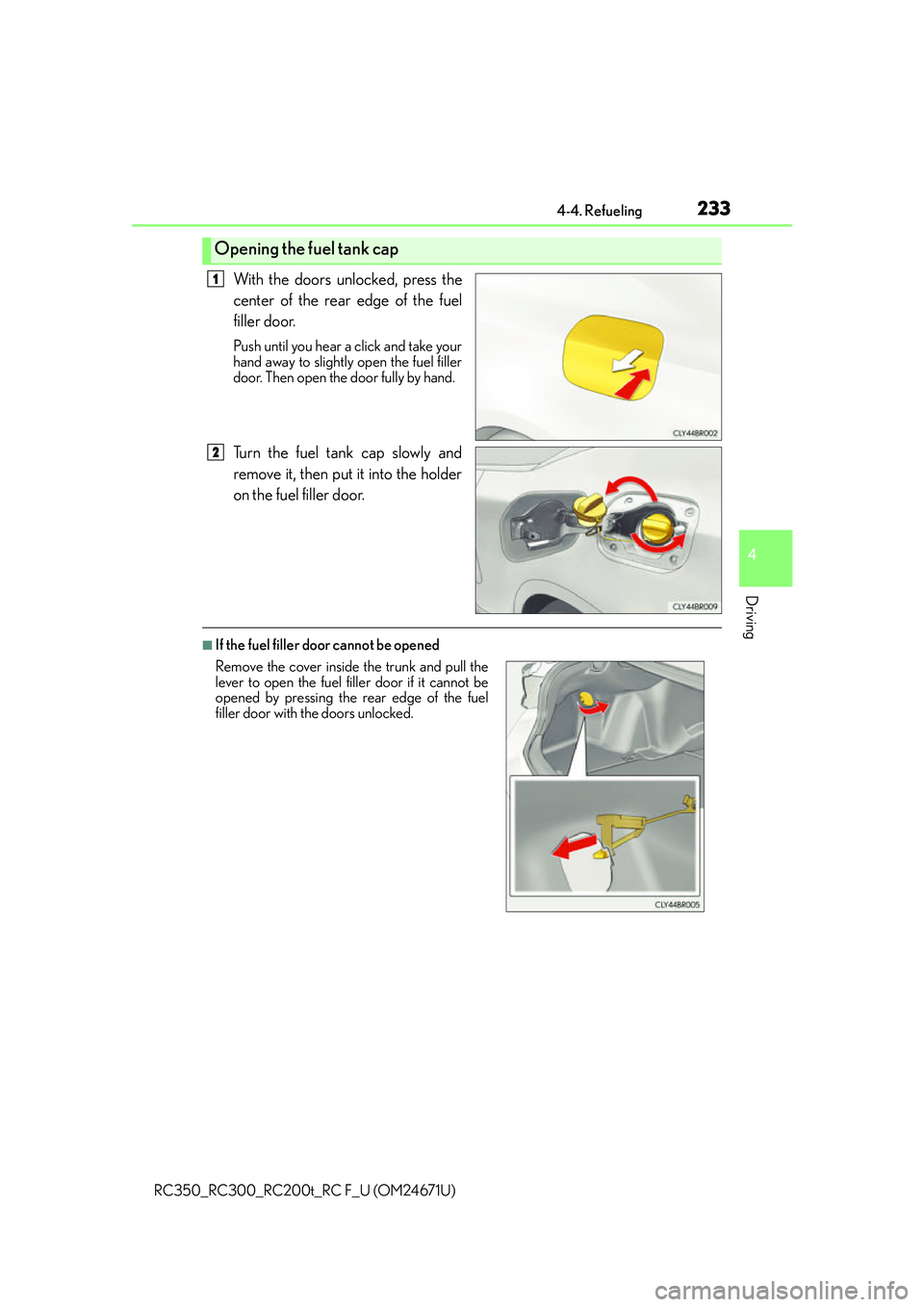
With the doors unlocked, press the
center of the rear edge of the fuel
filler door.
Push until you hear a click and take your
hand away to slightly open the fuel filler
door. Then open the door fully by hand.
Turn the fuel tank cap slowly and
remove it, then put it into the holder
on the fuel filler door.
■If the fuel filler door cannot be opened
Opening the fuel tank cap
1
2
Remove the cover inside the trunk and pull the
lever to open the fuel filler door if it cannot be
opened by pressing the rear edge of the fuel
filler door with the doors unlocked.
Page 234 of 700
2344-4. Refueling
RC350_RC300_RC200t_RC F_U (OM24671U)
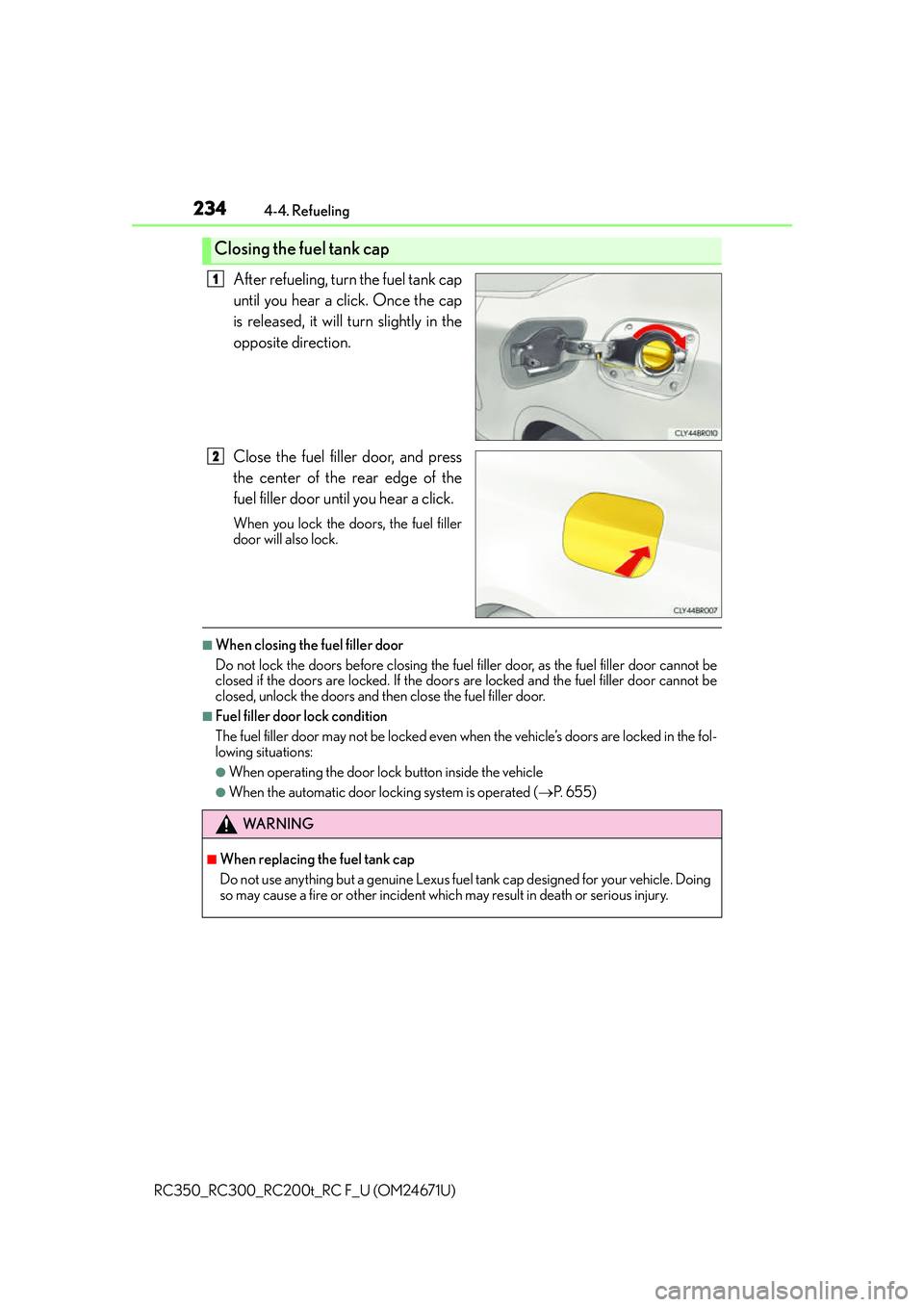
After refueling, turn the fuel tank cap
until you hear a click. Once the cap
is released, it will turn slightly in the
opposite direction.
Close the fuel filler door, and press
the center of the rear edge of the
fuel filler door until you hear a click.
When you lock the doors, the fuel filler
door will also lock.
■When closing the fuel filler door
Do not lock the doors before closing the fuel filler door, as the fuel filler door cannot be
closed if the doors are locked. If the doors are locked and the fuel filler door cannot be
closed, unlock the doors and th en close the fuel filler door.
■Fuel filler door lock condition
The fuel filler door may not be locked even wh en the vehicle’s doors are locked in the fol-
lowing situations:
●When operating the door lock button inside the vehicle
●When the automatic door locking system is operated ( P. 6 5 5 )
Closing the fuel tank cap
1
2
WA R N I N G
■When replacing the fuel tank cap
Do not use anything but a genuine Lexus fuel tank cap designed for your vehicle. Doing
so may cause a fire or other incident whic h may result in death or serious injury.
Page 283 of 700
2834-5. Using the driving support systems
4
Driving
RC350_RC300_RC200t_RC F_U (OM24671U)
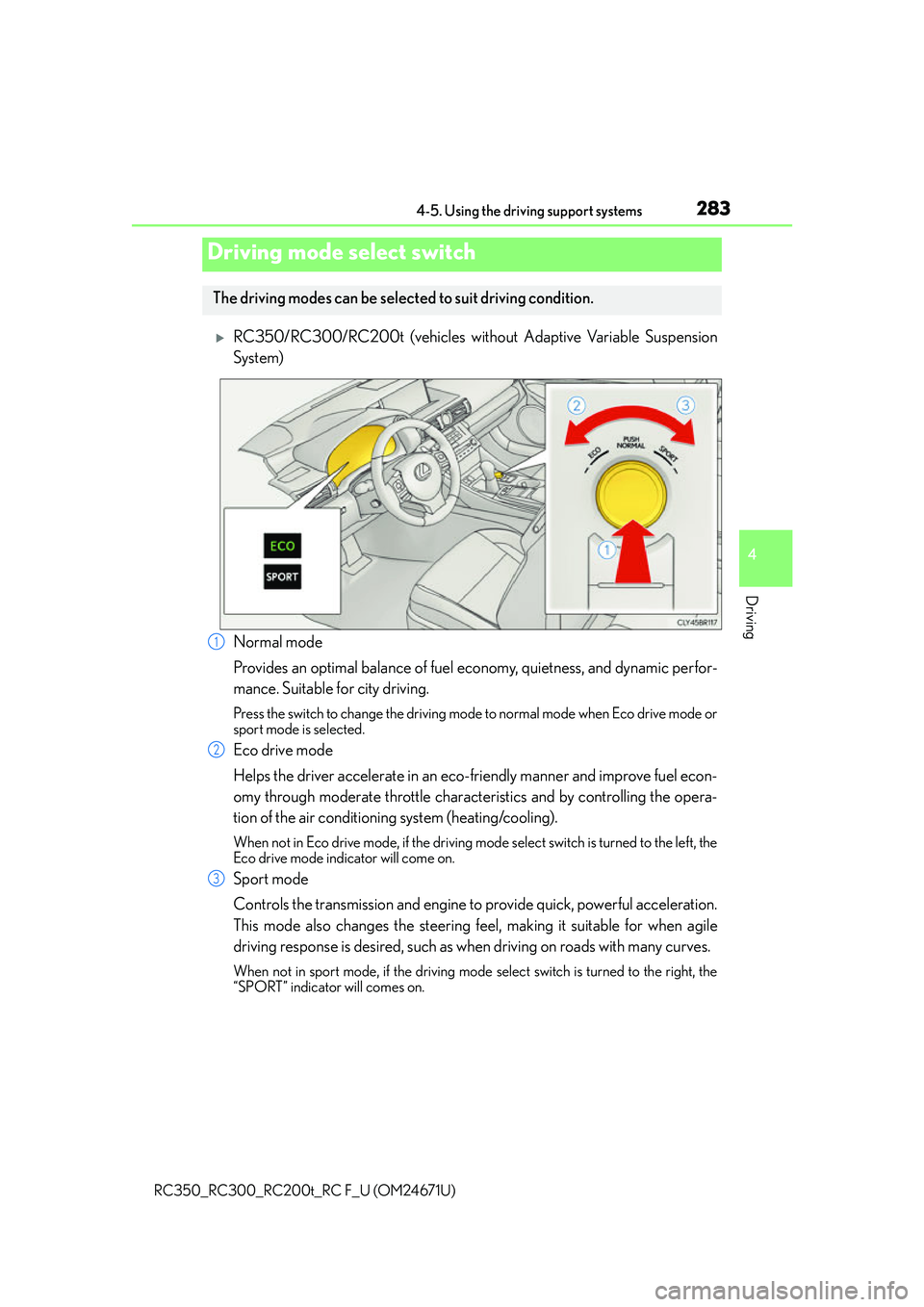
RC350/RC300/RC200t (vehicles without Adaptive Variable Suspension
System)
Normal mode
Provides an optimal balance of fuel economy, quietness, and dynamic perfor-
mance. Suitable for city driving.
Press the switch to change the driving mode to normal mode when Eco drive mode or
sport mode is selected.
Eco drive mode
Helps the driver accelerate in an eco-friendly manner and improve fuel econ-
omy through moderate throttle characteristics and by controlling the opera-
tion of the air conditioning system (heating/cooling).
When not in Eco drive mode, if the driving mode select switch is turned to the left, the
Eco drive mode indicator will come on.
Sport mode
Controls the transmission and engine to provide quick, powerful acceleration.
This mode also changes the steering f eel, making it suitable for when agile
driving response is desired, such as wh en driving on roads with many curves.
When not in sport mode, if the driving mode select switch is turned to the right, the
“SPORT” indicator will comes on.
Driving mode select switch
The driving modes can be selected to suit driving condition.
1
2
3