roof LEXUS RC300 2016 Owner's Manual
[x] Cancel search | Manufacturer: LEXUS, Model Year: 2016, Model line: RC300, Model: LEXUS RC300 2016Pages: 700, PDF Size: 14.12 MB
Page 179 of 700
1793-5. Opening, closing the windows and moon roof
3
Operation of each component
RC350_RC300_RC200t_RC F_U (OM24671U)
■The moon roof can be operated when
The engine switch is in IGNITION ON mode.
■Operating the moon roof after turning the engine off
The moon roof can be operated for approximately 45 seconds after the engine switch is
turned to ACCESSORY mode or turned off. It cannot, however, be operated once either
door is opened.
■Jam protection function
If an object is detected between the moon roof and the frame while the moon roof is clos-
ing or tilting down, travel is stoppe d and the moon roof opens slightly.
■Sunshade
The sunshade can be opened and closed manually. However, the sunshade will open
automatically when the moon roof is opened.
■Door lock linked moon roof operation
●The moon roof can be opened and closed using the mechanical key.* ( P. 6 0 1 )
●The moon roof can be opened using the wireless remote control.* ( P. 1 3 7 )
*: These settings must be cust omized at your Lexus dealer.
■If the moon roof does not close normally
Perform the following procedure:
Stop the vehicle.
Press and hold the “CLOSE” switch.
*
The moon roof will close, reopen and pause for approximately 10 seconds. Then it will
close again and stop at the completely closed position.
Check to make sure that the moon roof is completely closed and then release the
switch.
*: If the switch is released at the incorrect time, the procedure will have to be performed
again from the beginning.
If the moon roof does not fully close even after performing the above procedure cor-
rectly, have the vehicle inspected by your Lexus dealer.
1
2
3
Page 180 of 700
1803-5. Opening, closing the windows and moon roof
RC350_RC300_RC200t_RC F_U (OM24671U)
■If the moon roof does not move normally
If the moon roof does not open or close no rmally or the automatic opening function does
not operate, perform the foll owing initialization procedure.
Turn the engine switch to IGNITION ON mode.
Operate the moon roof.
Depending on the kind of malfunction perform either of the following:
If the moon roof does not open wh en the “OPEN” switch is pressed
Press and hold the “DOWN” switch or “CLO SE” switch until the moon roof is com-
pletely closed.
The moon roof will open and close a fe w times before it closes completely.
Confirm that the moon roof has comple tely stopped and release the switch.
If the moon roof does not open completely automatically even though it tilts up and
opens while the “OPEN” switch is being pressed and held
Press and hold the “OPEN” switch until the moon roof opens completely.
Press and hold the “CLOSE” switch unt il the moon roof closes completely.
Press and hold the “UP” switch until the moon roof tilts up and stops.
Press and hold the “DOWN” switch until th e moon roof tilts down and stops at the
completely closed position.
If you release the switch while the moon roof is moving, perform the procedure again
from the beginning.
If, after performing the above procedures corr ectly, the moon roof still does not open or
close normally or the automatic opening function does not operate, have the vehicle
inspected by your Lexus dealer.
■Moon roof open warning buzzer
The buzzer sounds and a message is shown on the multi-information display in the instru-
ment cluster when the engine switch is turned off and the driver’s door is opened with the
moon roof open.
■Customization
Settings (e.g. linked door lock operation) can be changed.
(Customizable features: P. 6 5 1 )
1
2
3
4
3
4
5
6
Page 181 of 700
1813-5. Opening, closing the windows and moon roof
3
Operation of each component
RC350_RC300_RC200t_RC F_U (OM24671U)
WA R N I N G
Observe the following precautions.
Failure to do so may cause death or serious injury.
■Opening the moon roof
●Do not allow any passengers to put their hands or heads outside the vehicle while it is
moving.
●Do not sit on top of the moon roof.
■Closing the moon roof
●The driver is responsible for moon roof opening and closing operations.
In order to prevent accidental operation, espe cially by a child, do not let a child oper-
ate the moon roof. It is possible for children and other passengers to have body parts
caught in the moon roof.
●Check to make sure that all passengers do not have any part of their body in a posi-
tion where it could be caught when the moon roof is being operated.
●When using the wireless remote control or mechanical key and operating the moon
roof, operate the moon roof after checking to make sure that there is no possibility of
any passenger having any of their body parts caught in the moon roof. Also, do not let
a child operate moon roof by the wireless remote control or mechanical key. It is pos-
sible for children and other passengers to get caught in the moon roof.
●When exiting the vehicle, turn the engine sw itch off, carry the key and exit the vehicle
along with the child. There may be accidental operation, due to mischief, etc., that
may possibly lead to an accident.
■Jam protection function
●Never use any part of your body to intentio nally activate the jam protection function.
●The jam protection function may not work if something gets caught just before the
moon roof is fully closed. Also, the jam protection function is not designed to operate
while the moon roof switch is being pressed. Take care so that your fingers, etc. do not
get caught.
NOTICE
■To prevent damage to the moon roof
●Before opening, make sure that there are no foreign objects such as stones or ice
around the opening.
●Do not hit the face or edge of the moon roof with hard objects.
■Operating the moon roof
There is the possibility that water or rain will get into the vehicle if you operate the
moon roof after a rainfall, snowfall or car wash. Wipe the moon roof dry with a cloth
before operating it.
Page 182 of 700

1823-5. Opening, closing the windows and moon roof
RC350_RC300_RC200t_RC F_U (OM24671U)
Page 282 of 700
2824-5. Using the driving support systems
RC350_RC300_RC200t_RC F_U (OM24671U)
NOTICE
■How to use the camera
●The parking assist monitor may not oper ate properly in the following cases.
• If the back of the vehicle is hit, the position and mounting angle of the camera may change.
• As the camera has a water proof construction, do not detach, disassemble or modify it. This may cause incorrect operation.
• When cleaning the camera lens, flush the camera with a large quantity of water
and wipe it with a soft and wet cloth. St rongly rubbing the camera lens may cause
the camera lens to be scratched and unable to transmit a clear image.
• Do not allow organic solvent, car wax, window cleaner or glass coat to adhere to the camera. If this happens, wipe it off as soon as possible.
• If the temperature changes rapidly, such as when hot water is poured on the vehi- cle in cold weather, the system may not operate normally.
• When washing the vehicle, do not apply intensive bursts of water to the camera or
camera area. Doing so may result in the camera malfunctioning.
●Do not expose the camera to strong impact as this could cause a malfunction.
If this happens, have the vehicle inspected by your Lexus dealer as soon as possible.
Page 321 of 700
3214-6. Driving tips
4
Driving
RC350_RC300_RC200t_RC F_U (OM24671U)
Perform the following according to the driving conditions:
●Do not try to forcibly open a window or move a wiper that is frozen. Pour
warm water over the frozen area to melt the ice. Wipe away the water imme-
diately to prevent it from freezing.
●To ensure proper operation of the climate control system fan, remove any
snow that has accumulated on the air inlet vents in front of the windshield.
●Check for and remove any excess ice or snow that may have accumulated on
the exterior lights, vehicle’s roof, chassis, around the tires or on the brakes.
●Remove any snow or mud from the bottom of your shoes before getting in the
vehicle.
Accelerate the vehicle slowly, keep a safe distance between you and the vehicle
ahead, and drive at a reduced speed suitable to road conditions.
Park the vehicle and move the shift lever to P without setting the parking brake.
The parking brake may freeze up, preventing it from being released. If necessary,
block the wheels to prevent in advertent sliding or creeping.
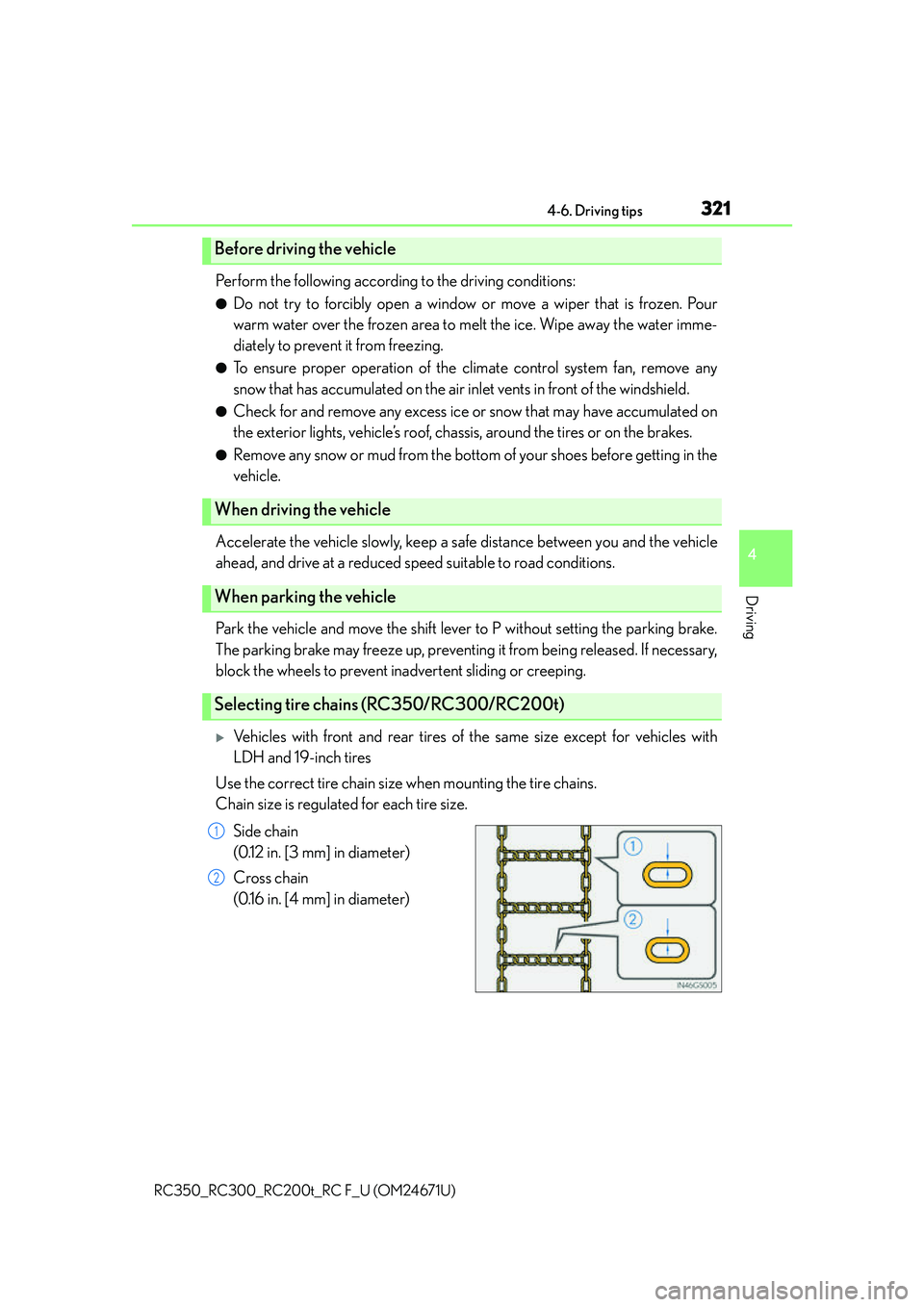
Vehicles with front and rear tires of the same size except for vehicles with
LDH and 19-inch tires
Use the correct tire chain size when mounting the tire chains.
Chain size is regulated for each tire size.
Side chain
(0.12 in. [3 mm] in diameter)
Cross chain
(0.16 in. [4 mm] in diameter)
Before driving the vehicle
When driving the vehicle
When parking the vehicle
Selecting tire chains (RC350/RC300/RC200t)
1
2
Page 333 of 700
3335-1. Basic Operations
5
Lexus Display Audio system
RC350_RC300_RC200t_RC F_U (OM24671U)
■Adjusting the volume
The volume of the Mobile Assistant can be adjusted using the
“PWR·VOL” knob or
steering wheel volume switches. The Mobile Assistant and phone call volumes are syn-
chronized.
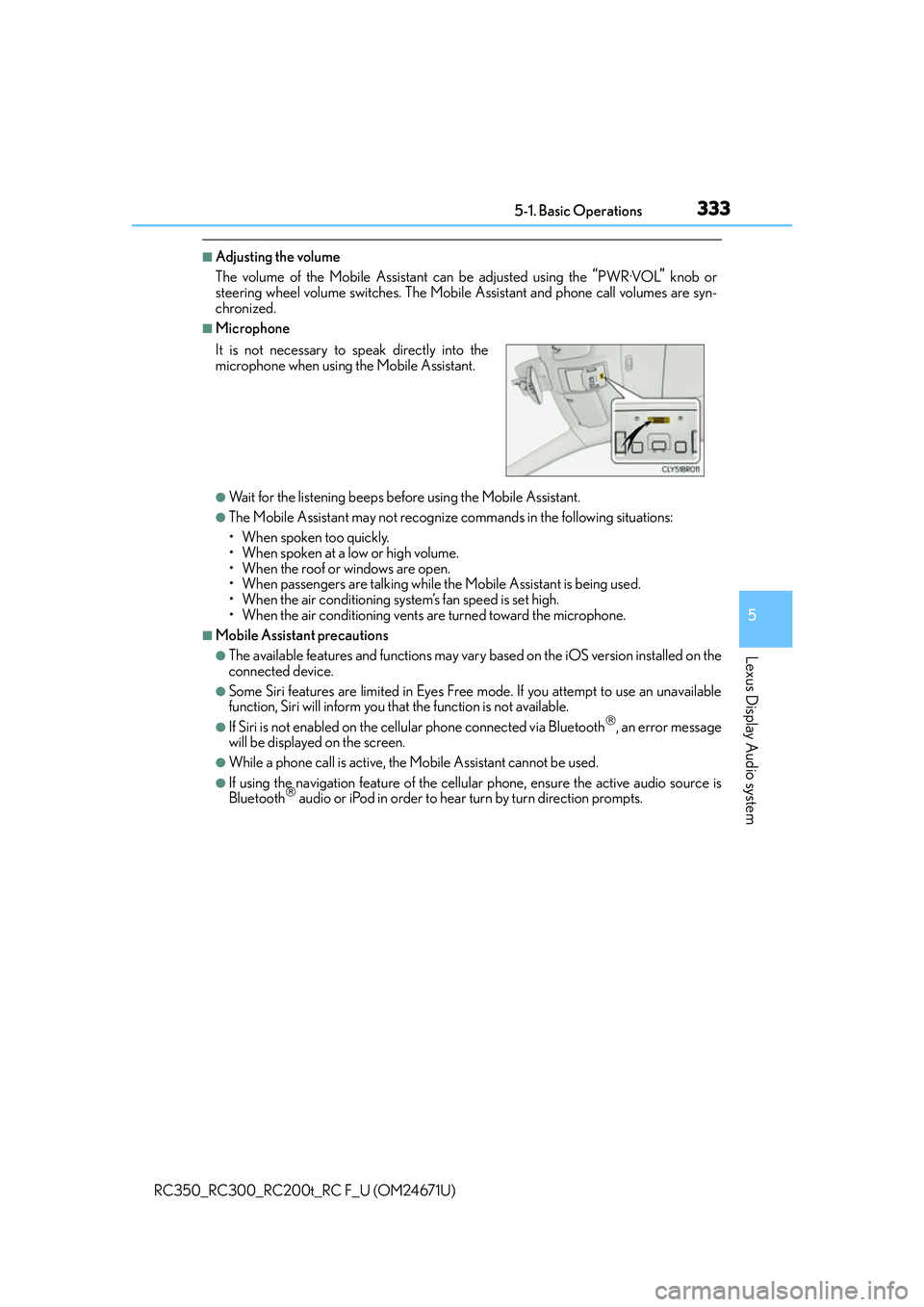
■Microphone
●Wait for the listening beeps befo re using the Mobile Assistant.
●The Mobile Assistant may not recognize commands in the following situations:
• When spoken too quickly.
• When spoken at a low or high volume.
• When the roof or windows are open.
• When passengers are talking while th e Mobile Assistant is being used.
• When the air conditioning syst em’s fan speed is set high.
• When the air conditioning vents ar e turned toward the microphone.
■Mobile Assistant precautions
●The available features and functions may vary based on the iOS version installed on the
connected device.
●Some Siri features are limited in Eyes Free mode. If you attempt to use an unavailable
function, Siri will inform you that the function is not available.
●If Siri is not enabled on the cellular phone connected via Bluetooth, an error message
will be displayed on the screen.
●While a phone call is active, the Mobile Assistant cannot be used.
●If using the navigation feature of the cellular phone, ensure the active audio source is
Bluetooth audio or iPod in order to hear turn by turn direction prompts.
It is not necessary to speak directly into the
microphone when using
the Mobile Assistant.
Page 415 of 700
4155-12. Other function
5
Lexus Display Audio system
RC350_RC300_RC200t_RC F_U (OM24671U)
●Voice commands may not be recognized if:
• Spoken too quickly.
• Spoken at a low or high volume.
• The roof or windows are open.
• Passengers are talking while voice commands are spoken.
• The air conditioning speed is set high.
• The air conditioning vents are turned towards the microphone.
●In the following conditions, the system may not recognize the command properly and
using voice commands may not be possible:
• The command is incorrect or unclear. No te that certain words, accents or speech
patterns may be difficult for the system to recognize.
• There is excessive background noise, such as wind noise.
■When searching for a track
●A USB memory or iPod must be connected to enable track searching and playback.
( P. 3 3 4 )
●When a USB memory or iPod is connected, recognition data is created so tracks can
be searched using voice commands.
●Recognition data is updated un der the following conditions:
• When the USB memory or iPod data has changed.
• When the voice recognition language is changed. (P. 3 3 7 )
●While the recognition data is being created or being updated, a track search cannot be
performed using a voice command.
■The Gracenote® media database
P. 3 6 1
Due to natural language speech recognitio n technology, this system enables rec-
ognition of a command when spoken naturally. However, the system cannot rec-
ognize every variation of each command.
In some situations, it is possible to omit the command for the procedure and
directly state the desired operation.
This function is available in English, Spanish and French.
Casual speech recognization
Page 453 of 700
4536-4. Using the other interior features
6
Interior features
RC350_RC300_RC200t_RC F_U (OM24671U)
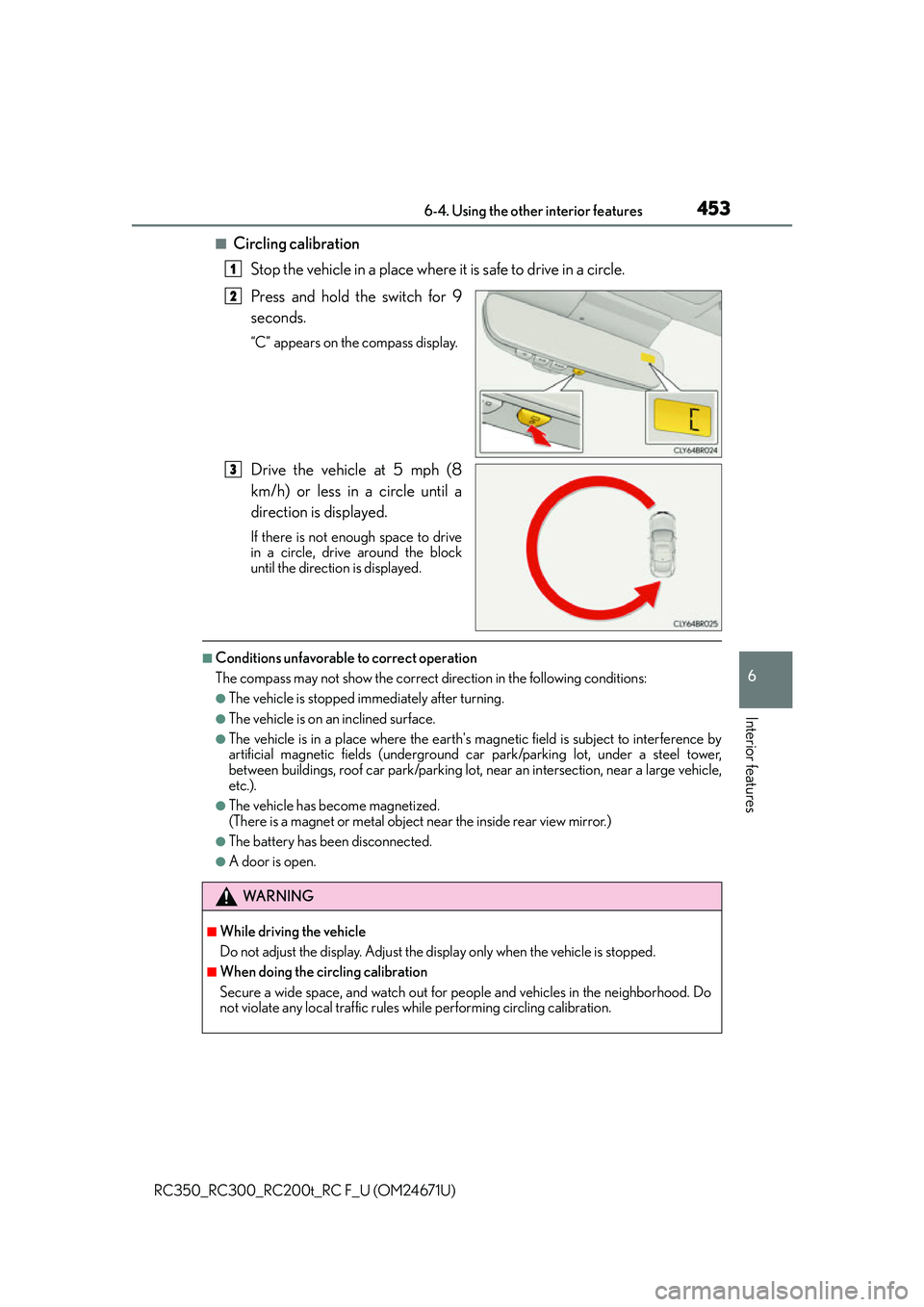
■Circling calibrationStop the vehicle in a place where it is safe to drive in a circle.
Press and hold the switch for 9
seconds.
“C” appears on the compass display.
Drive the vehicle at 5 mph (8
km/h) or less in a circle until a
direction is displayed.
If there is not enough space to drive
in a circle, drive around the block
until the direction is displayed.
■Conditions unfavorable to correct operation
The compass may not show the correct direction in the following conditions:
●The vehicle is stopped immediately after turning.
●The vehicle is on an inclined surface.
●The vehicle is in a place where the earth's ma gnetic field is subject to interference by
artificial magnetic fields (underground car park/parking lot, under a steel tower,
between buildings, roof car park/parking lot, near an intersection, near a large vehicle,
etc.).
●The vehicle has become magnetized.
(There is a magnet or metal object near the inside rear view mirror.)
●The battery has been disconnected.
●A door is open.
1
2
3
WA R N I N G
■While driving the vehicle
Do not adjust the display. Adjust the di splay only when the vehicle is stopped.
■When doing the circling calibration
Secure a wide space, and watch out for people and vehicles in the neighborhood. Do
not violate any local traffic rules while performing circling calibration.
Page 454 of 700
4546-4. Using the other interior features
RC350_RC300_RC200t_RC F_U (OM24671U)
NOTICE
■To avoid compass malfunctions
Do not place magnets or any metal object s near the inside rear view mirror.
Doing this may cause the compass sensor to malfunction.
■To ensure normal operation of the compass
●Do not perform circling calibration of th e compass in a place where the earth's mag-
netic field is subject to interference by artificial magnetic fields.
●During calibration, do not operate electric systems (moon roof, power windows, etc.)
as they may interfere with the calibration.