door lock LEXUS RC300 2016 Service Manual
[x] Cancel search | Manufacturer: LEXUS, Model Year: 2016, Model line: RC300, Model: LEXUS RC300 2016Pages: 700, PDF Size: 14.12 MB
Page 426 of 700
4266-1. Using the air conditioning system
RC350_RC300_RC200t_RC F_U (OM24671U)
■Registering air conditioning settings to elec tronic keys (vehicles with driving position
memory)
●Unlocking the vehicle using an electronic ke y and turning the engine switch to IGNI-
TION ON mode will recall that key's registered air conditioning settings.
●When the engine switch is tu rned off, the current air conditioning settings will automat-
ically be registered to the electronic ke y that was used to unlock the vehicle.
●The system may not operate correctly if more th an one electronic key is in the vicinity or
if the smart access system with push-button start is used to unlock a passenger door.
●The doors that can recall the air conditioning setting* when unlocked using the smart
access system with push-button start can be changed. For details, contact your Lexus
dealer.
*: The doors that can recall the driving posi tion memory are changed at the same time.
■Using automatic mode
Fan speed is adjusted automatically accordin g to the temperature setting and the ambi-
ent conditions.
Therefore, the fan may stop for a while until warm or cool air is ready to flow immediately
after is pressed or “AUTO” is selected.
■Using the voice command system (veh icles with a navigation system)
Air conditioning system can be operated usin g voice commands. For details, refer to the
“NAVIGATION SYSTEM OWNER’S MANUAL”.
■Fogging up of the windows
The windows will easily fog up when the humidity in the vehicle is high. Turning
(“A/C”) on will dehumidify the air from the outlets and defog the windshield effectively.
●If you turn (“A/C”) off, the windows may fog up more easily.
●The windows may fog up if the recirculated air mode is used.
■Outside/recirculated air mode
●When driving on dusty roads such as tunnels or in heavy traffic, set the outside/recircu-
lated air mode button to the recirculated ai r mode. This is effective in preventing out-
side air from entering the vehicle interior. During cooling operation, setting the
recirculated air mode will also cool the vehicle interior effectively.
●Outside/recirculated air mode may automa tically switch depending on the tempera-
ture setting or the inside temperature.
■When the outside temperature exceeds 75 F (24 C) and the air conditioning system
is on
●In order to reduce the air conditioning po wer consumption, the air conditioning system
may switch to recirculated air mode automa tically. This may also reduce fuel consump-
tion.
●Recirculated air mode is selected as a defaul t mode when the engine switch is turned to
IGNITION ON mode.
●It is possible to switch to outside air mode at any time by pressing .
Page 434 of 700
4346-2. Using the interior lights
RC350_RC300_RC200t_RC F_U (OM24671U)
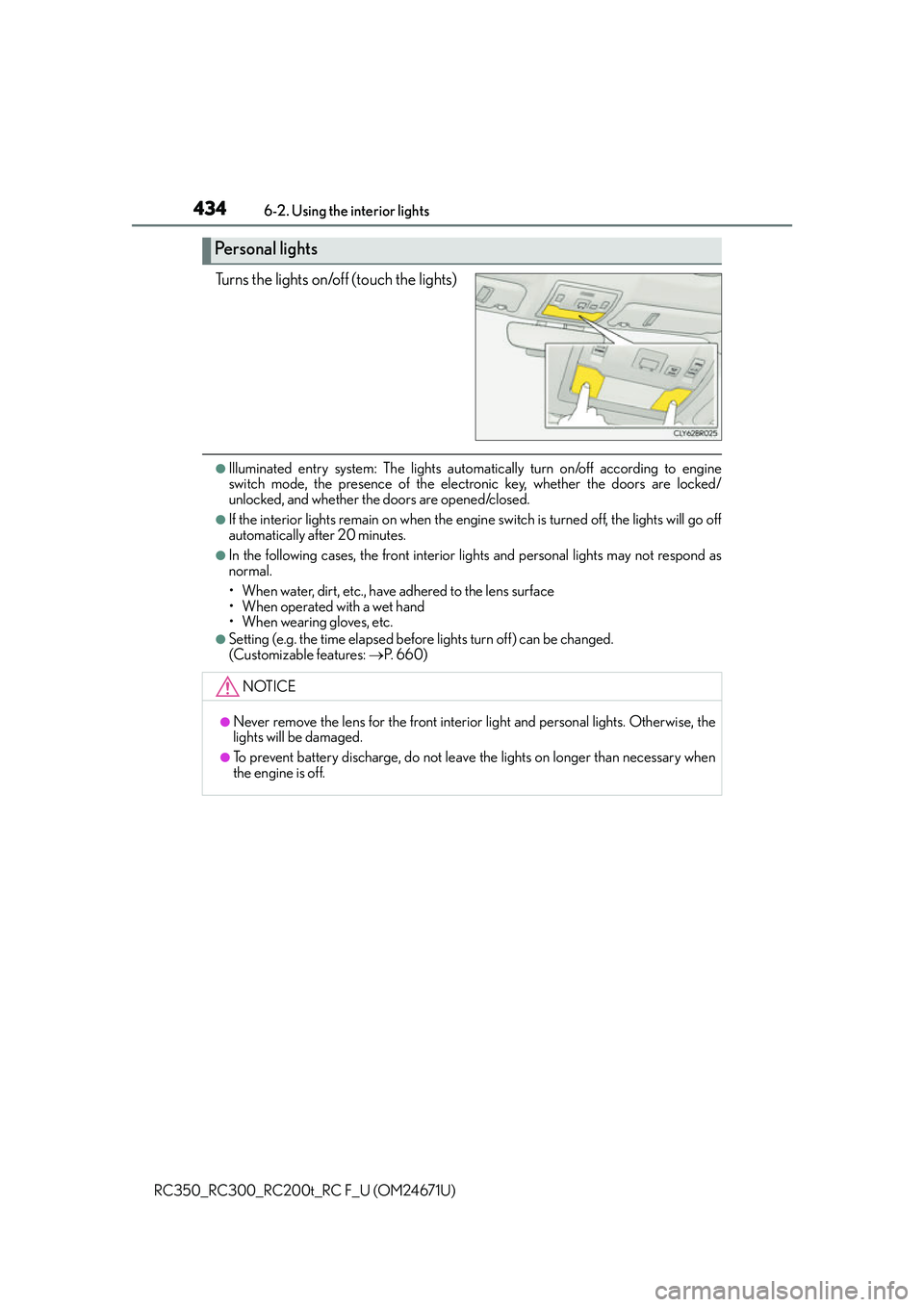
Turns the lights on/off (touch the lights)
●Illuminated entry system: The lights automa tically turn on/off according to engine
switch mode, the presence of the electronic key, whether the doors are locked/
unlocked, and whether the doors are opened/closed.
●If the interior lights remain on when the engine switch is turned off, the lights will go off
automatically after 20 minutes.
●In the following cases, the front interior li ghts and personal lights may not respond as
normal.
• When water, dirt, etc., have adhered to the lens surface
• When operated with a wet hand
• When wearing gloves, etc.
●Setting (e.g. the time elapsed before lights turn off) can be changed.
(Customizable features: P. 660)
Personal lights
NOTICE
●Never remove the lens for the front interior light and personal lights. Otherwise, the
lights will be damaged.
●To prevent battery discharge, do not leav e the lights on longer than necessary when
the engine is off.
Page 444 of 700
4446-4. Using the other interior features
RC350_RC300_RC200t_RC F_U (OM24671U)
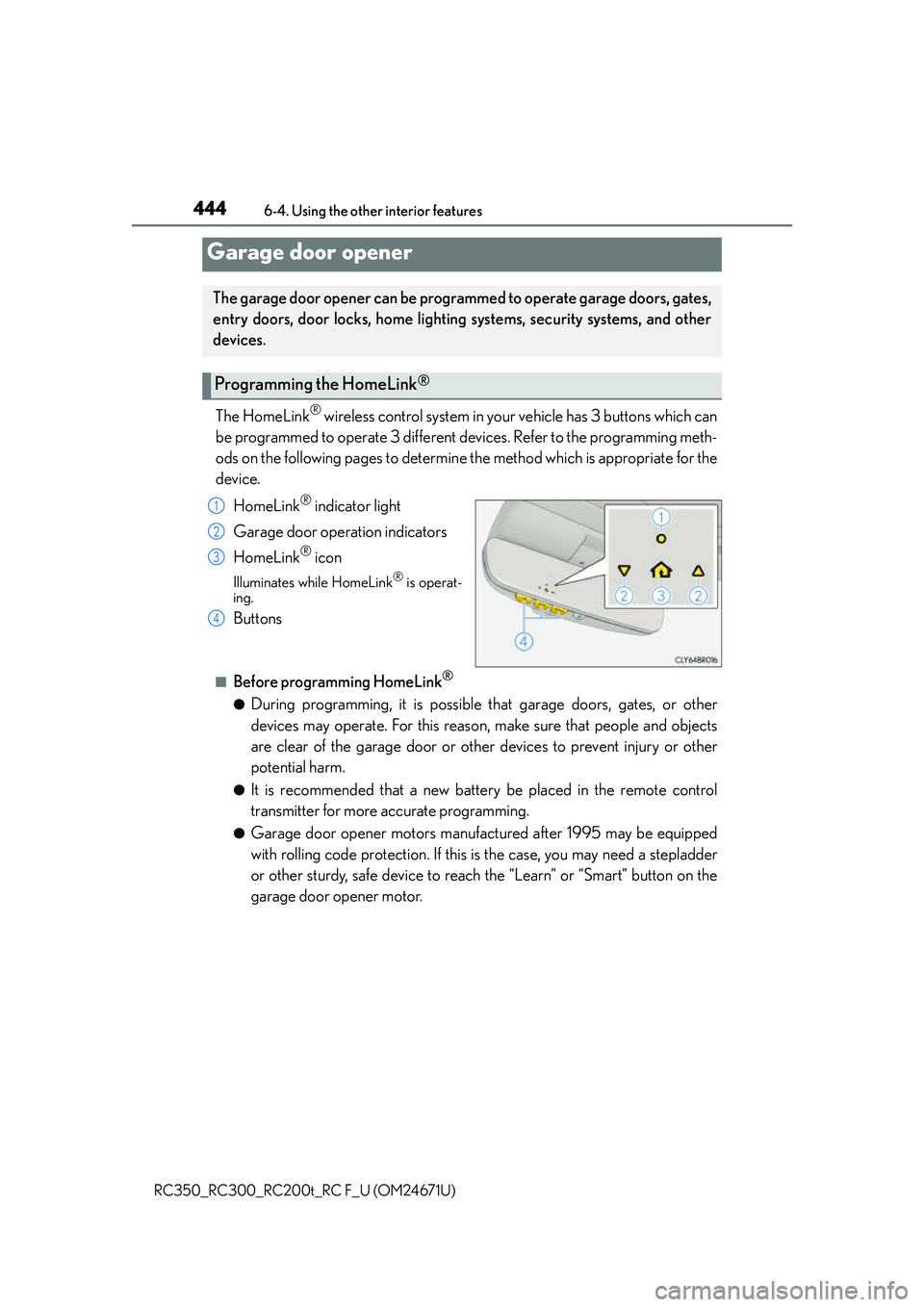
The HomeLink® wireless control system in your vehicle has 3 buttons which can
be programmed to operate 3 different devices. Refer to the programming meth-
ods on the following pages to determine the method which is appropriate for the
device.
HomeLink
® indicator light
Garage door operation indicators
HomeLink
® icon
Illuminates while HomeLink® is operat-
ing.
Buttons
■Before programming HomeLink®
●During programming, it is possible that garage doors, gates, or other
devices may operate. For this reason, make sure that people and objects
are clear of the garage door or other devices to prevent injury or other
potential harm.
●It is recommended that a new battery be placed in the remote control
transmitter for more accurate programming.
●Garage door opener motors manufactured after 1995 may be equipped
with rolling code protection. If this is the case, you may need a stepladder
or other sturdy, safe device to reach the “Learn” or “Smart” button on the
garage door opener motor.
Garage door opener
The garage door opener can be programmed to operate garage doors, gates,
entry doors, door locks, home lighting systems, security systems, and other
devices.
Programming the HomeLink®
1
2
3
4
Page 453 of 700
4536-4. Using the other interior features
6
Interior features
RC350_RC300_RC200t_RC F_U (OM24671U)
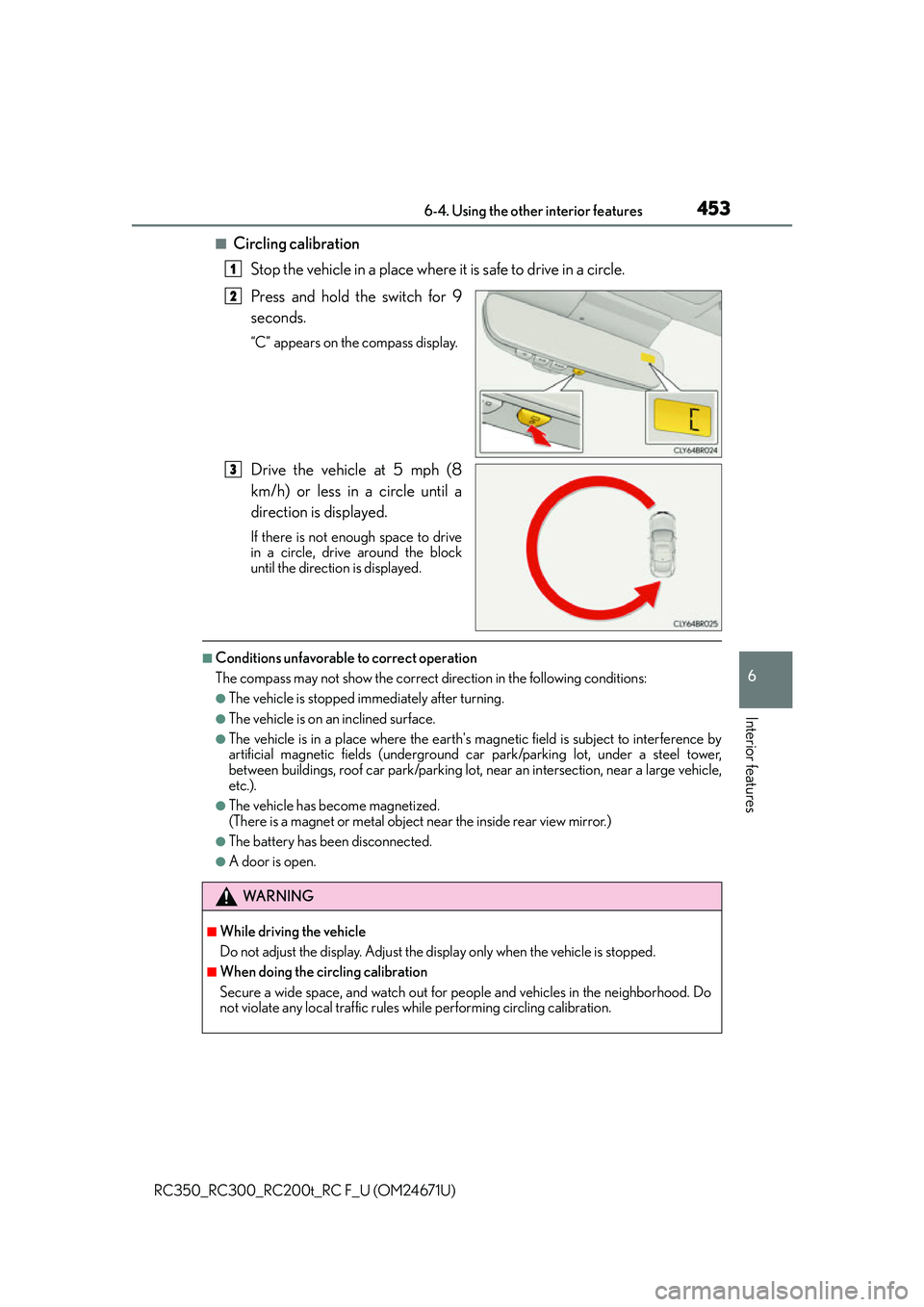
■Circling calibrationStop the vehicle in a place where it is safe to drive in a circle.
Press and hold the switch for 9
seconds.
“C” appears on the compass display.
Drive the vehicle at 5 mph (8
km/h) or less in a circle until a
direction is displayed.
If there is not enough space to drive
in a circle, drive around the block
until the direction is displayed.
■Conditions unfavorable to correct operation
The compass may not show the correct direction in the following conditions:
●The vehicle is stopped immediately after turning.
●The vehicle is on an inclined surface.
●The vehicle is in a place where the earth's ma gnetic field is subject to interference by
artificial magnetic fields (underground car park/parking lot, under a steel tower,
between buildings, roof car park/parking lot, near an intersection, near a large vehicle,
etc.).
●The vehicle has become magnetized.
(There is a magnet or metal object near the inside rear view mirror.)
●The battery has been disconnected.
●A door is open.
1
2
3
WA R N I N G
■While driving the vehicle
Do not adjust the display. Adjust the di splay only when the vehicle is stopped.
■When doing the circling calibration
Secure a wide space, and watch out for people and vehicles in the neighborhood. Do
not violate any local traffic rules while performing circling calibration.
Page 465 of 700
4657-1. Maintenance and care
7
Maintenance and care
RC350_RC300_RC200t_RC F_U (OM24671U)
■Automatic car washes (vehicles with CFRP parts)
Do not use automatic car washes as they may scratch the CFRP parts and damage the
paint.
■High pressure car washes
●Do not allow the nozzles of the car wash to come within close proximity of the windows.
●Before using the car wash, check that the fuel filler door on your vehicle is closed prop-
erly.
■When using a car wash
If the door handle becomes wet while the electronic key is within the effective range, the
door may lock and unlock repeatedly. In that case, follow the following correction proce-
dures to wash the vehicle:
●Place the key in a position 6 ft. (2 m) or more separate from the vehicle while the vehi-
cle is being washed. (Take care to ensure that the key is not stolen.)
●Set the electronic key to battery-saving mode to disable the smart access system with
push-button start. ( P. 1 5 0 )
■Aluminum wheels
●Remove any dirt immediately by using a neutral detergent. Do not use hard brushes or
abrasive cleaners. Do not use strong or harsh chemical cleaners.
Use the same mild detergent and wax as used on the paint.
●Do not use detergent on the wheels when they are hot, for example after driving a long
distance in hot weather.
●Wash detergent from the wheels immediately after use.
■When cleaning the painted brake calipers (if equipped)
●If a detergent is to be used to clean the painted brake calipers, use a neutral detergent.
Do not use hard brushes or abrasive cl eaners as they may damage the paint.
●Do not use detergent on the brake calipers when they are hot.
●Wash detergent from the brake calipers immediately after use.
■Bumpers
Do not scrub with abrasive cleaners.
■Side windows water-repellent coating (if equipped)
●The following precautions can extend the effectiveness of the water-repellent coating.
• Remove any dirt, etc. from the side windows regularly.
• Do not allow dirt and dust to accumulate on the windows for a long period.
Clean the windows with a soft, da mp cloth as soon as possible.
• Do not use wax or glass cleaners that co ntain abrasives when cleaning the windows.
• Do not use any metallic objects to remove condensation build up.
●When the water-repellent performance has become insufficient, the coating can be
repaired. Contact your Lexus dealer.
Page 477 of 700
4777-2. Maintenance
7
Maintenance and care
RC350_RC300_RC200t_RC F_U (OM24671U)
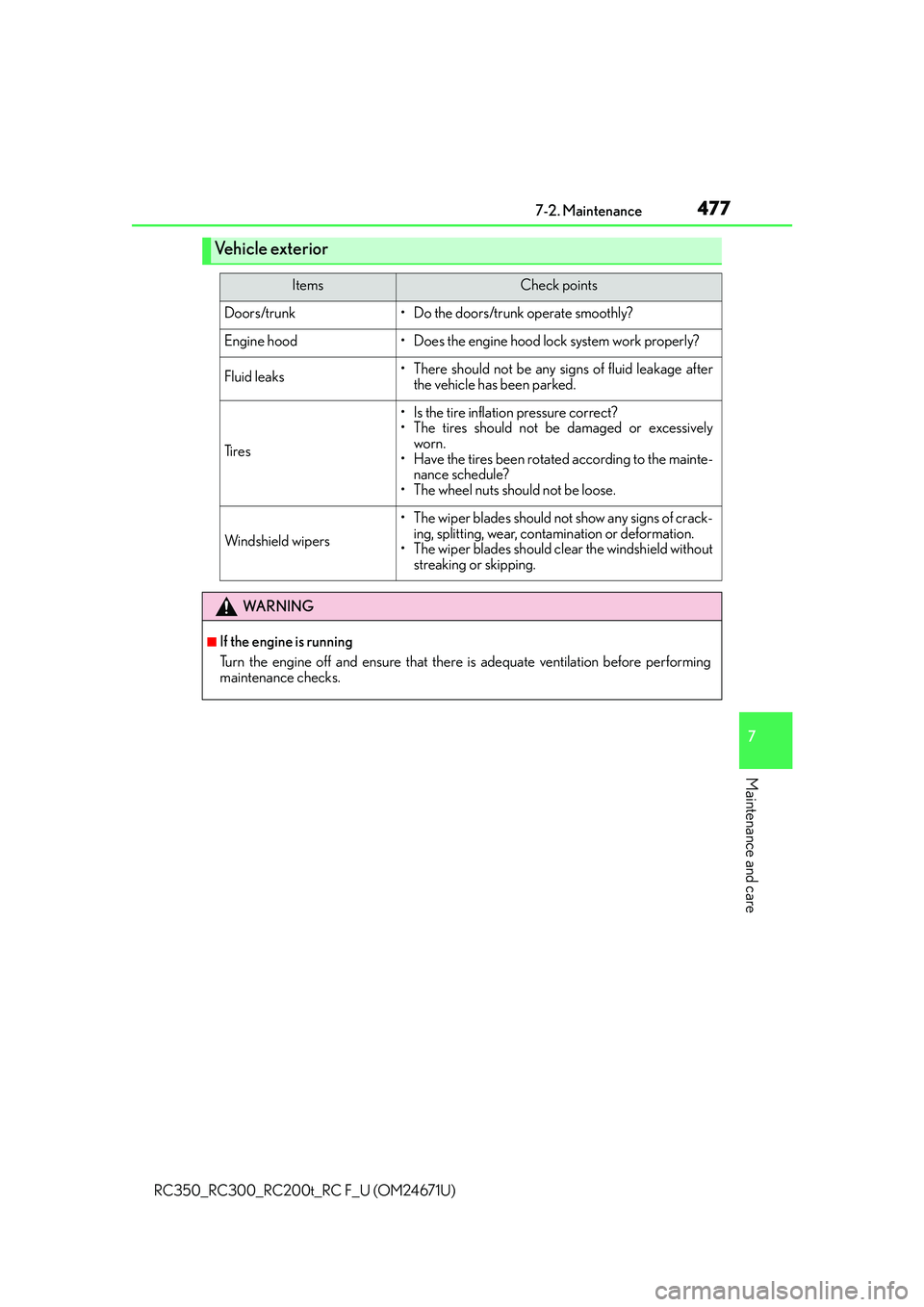
Vehicle exterior
ItemsCheck points
Doors/trunk• Do the doors/trunk operate smoothly?
Engine hood• Does the engine hood lock system work properly?
Fluid leaks• There should not be any signs of fluid leakage after
the vehicle has been parked.
Ti r e s
• Is the tire inflation pressure correct?
• The tires should not be damaged or excessively worn.
• Have the tires been rotated according to the mainte- nance schedule?
• The wheel nuts should not be loose.
Windshield wipers
• The wiper blades should no t show any signs of crack-
ing, splitting, wear, contamination or deformation.
• The wiper blades should clear the windshield without
streaking or skipping.
WA R N I N G
■If the engine is running
Turn the engine off and ensure that there is adequate ventilation before performing
maintenance checks.
Page 498 of 700
4987-3. Do-it-yourself maintenance
RC350_RC300_RC200t_RC F_U (OM24671U)
■Before recharging
When recharging, the battery produces hydrogen gas which is flammable and explosive.
Therefore, observe the following before recharging:
●If recharging with the battery installed on the vehicle, be sure to disconnect the ground
cable.
●Make sure the power switch on the charger is off when connecting and disconnecting
the charger cables to the battery.
■After recharging/reconnecting the battery
The engine may not start. Follow the proc edure below to initialize the system.
Shift the shift lever to P.
Open and close either door.
Restart the engine.
●Unlocking the doors using the smart access system with push-button start may not be
possible immediately after reconnecting the battery. If this happens, use the wireless
remote control or the mechanical key to lock/unlock the doors.
●Start the engine with the engine switch in ACCESSORY mode. The engine may not
start with the engine switch turned off. However, the engine will operate normally from
the second attempt.
●The engine switch mode is recorded by the vehicle. If the battery is disconnected and
reconnected, the vehicle will return the engi ne switch mode to the status it was in
before the battery was disconnected. Make su re to turn off the engine before discon-
necting the battery. Take extra care when connecting the battery if the engine switch
mode prior to the battery be ing disconnected is unknown.
If the system will not start even after mult iple attempts, contact your Lexus dealer.
1
2
3
Page 565 of 700
5658-2. Steps to take in an emergency
8
When trouble arises
RC350_RC300_RC200t_RC F_U (OM24671U)
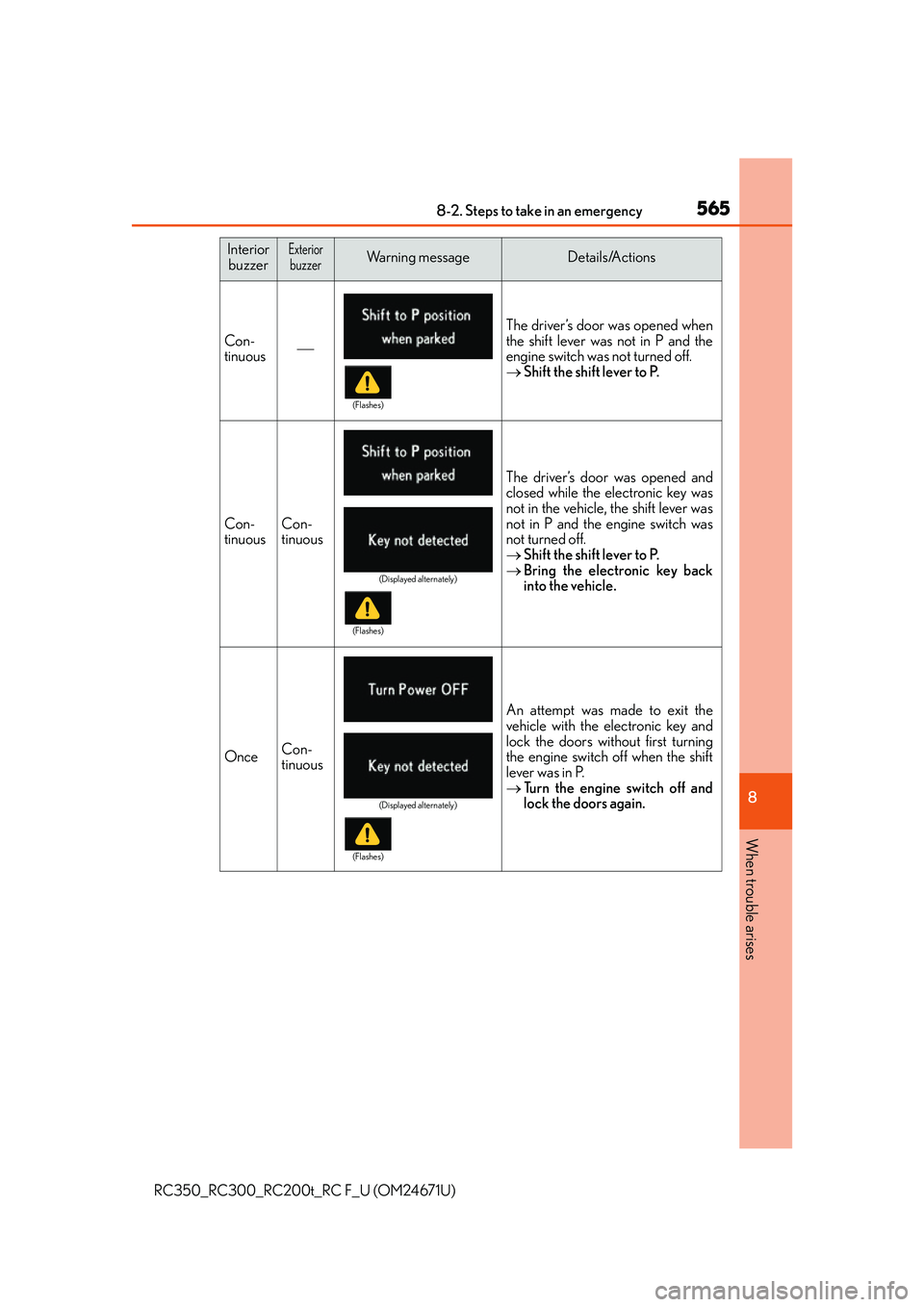
InteriorbuzzerExteriorbuzzerWa r n i n g m e s s a g eDetails/Actions
Con-
tinuous The driver’s door was opened when
the shift lever was not in P and the
engine switch was not turned off.
Shift the shift lever to P.
Con-
tinuousCon-
tinuous
The driver’s door was opened and
closed while the electronic key was
not in the vehicle, the shift lever was
not in P and the engine switch was
not turned off.
Shift the shift lever to P.
Bring the electronic key back
into the vehicle.
OnceCon-
tinuous
An attempt was made to exit the
vehicle with the electronic key and
lock the doors without first turning
the engine switch off when the shift
lever was in P.
Tu r n t h e e n g i n e s w i t c h o f f a n d
lock the doors again.
(Flashes)
(Displayed alternately)
(Flashes)
(Displayed alternately)
(Flashes)
Page 567 of 700
5678-2. Steps to take in an emergency
8
When trouble arises
RC350_RC300_RC200t_RC F_U (OM24671U)
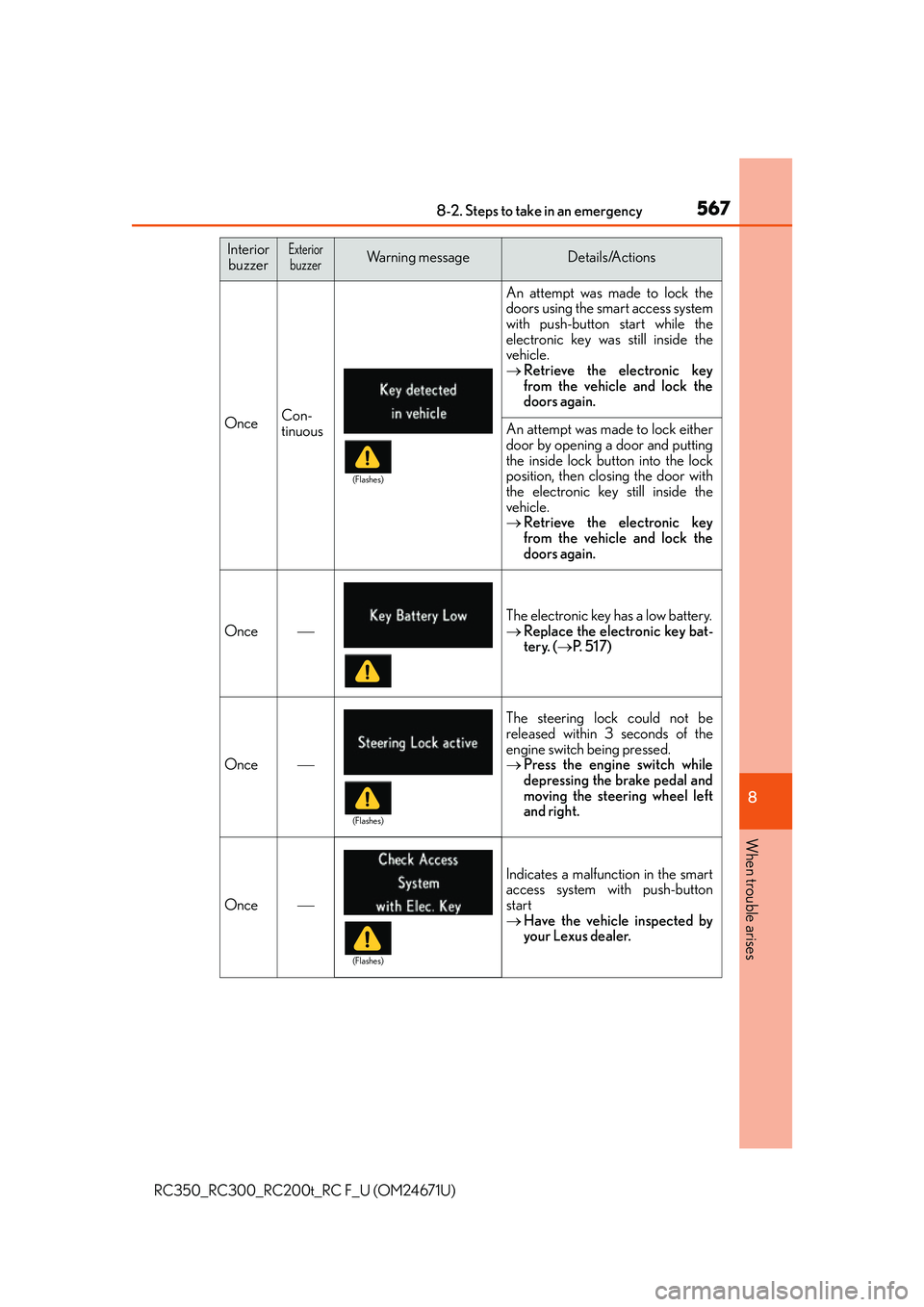
OnceCon-
tinuous
An attempt was made to lock the
doors using the smart access system
with push-button start while the
electronic key was still inside the
vehicle.
Retrieve the electronic key
from the vehicle and lock the
doors again.
An attempt was made to lock either
door by opening a door and putting
the inside lock button into the lock
position, then closing the door with
the electronic key still inside the
vehicle.
Retrieve the electronic key
from the vehicle and lock the
doors again.
Once
The electronic key has a low battery.
Replace the electronic key bat-
tery. ( P. 5 1 7 )
Once
The steering lock could not be
released within 3 seconds of the
engine switch being pressed.
Press the engine switch while
depressing the brake pedal and
moving the steering wheel left
and right.
Once
Indicates a malfunction in the smart
access system with push-button
start
Have the vehicle inspected by
your Lexus dealer.
Interior
buzzerExteriorbuzzerWa r n i n g m e s s a g eDetails/Actions
(Flashes)
(Flashes)
(Flashes)
Page 568 of 700
5688-2. Steps to take in an emergency
RC350_RC300_RC200t_RC F_U (OM24671U)
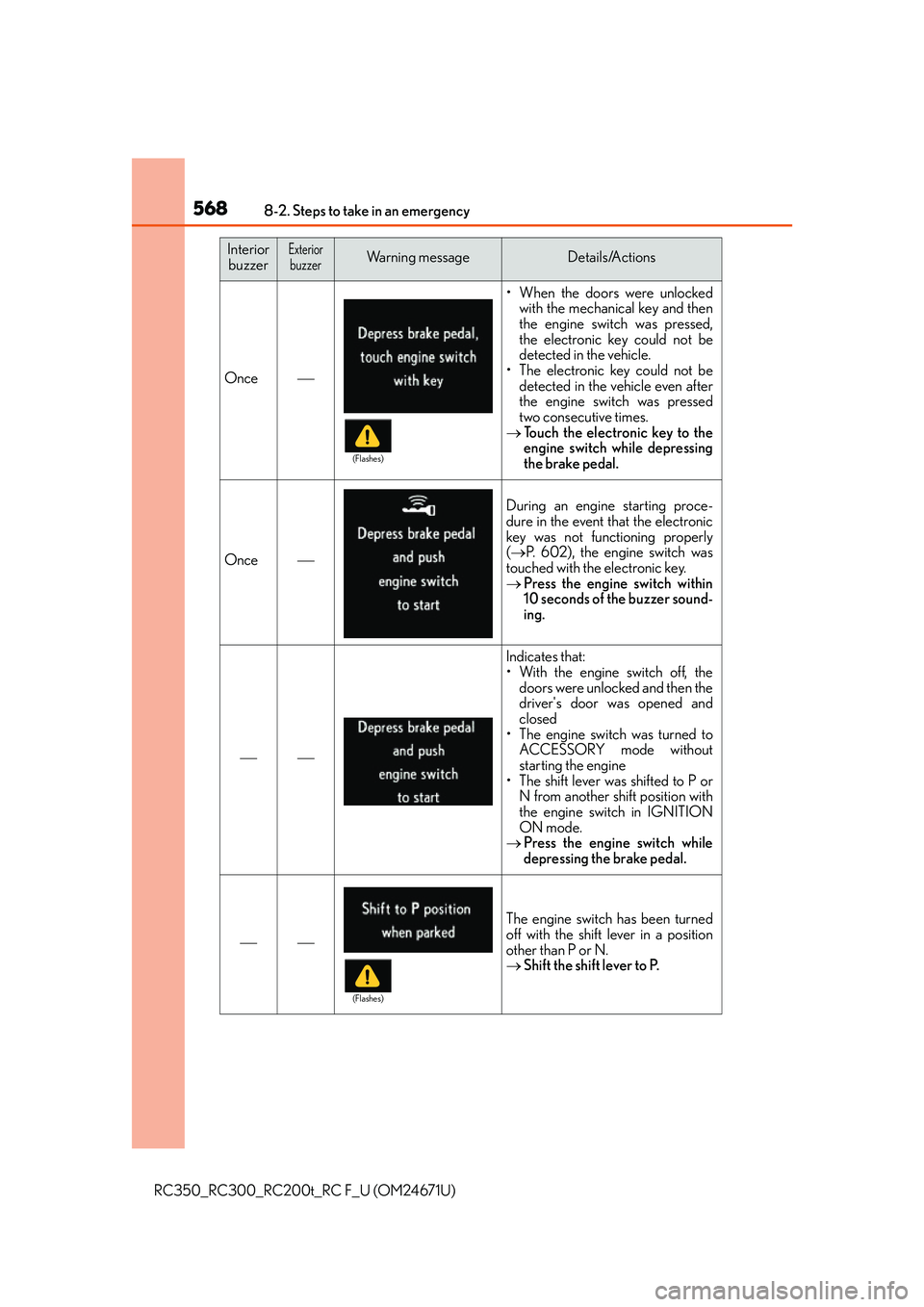
Once
• When the doors were unlockedwith the mechanical key and then
the engine switch was pressed,
the electronic key could not be
detected in the vehicle.
• The electronic key could not be detected in the vehicle even after
the engine switch was pressed
two consecutive times.
Touch the electronic key to the
engine switch while depressing
the brake pedal.
Once
During an engine starting proce-
dure in the event that the electronic
key was not functioning properly
( P. 602), the engine switch was
touched with the electronic key.
Press the engine switch within
10 seconds of the buzzer sound-
ing.
Indicates that:
• With the engine switch off, the
doors were unlocked and then the
driver's door was opened and
closed
• The engine switch was turned to ACCESSORY mode without
starting the engine
• The shift lever was shifted to P or N from another shift position with
the engine switch in IGNITION
ON mode.
Press the engine switch while
depressing the brake pedal.
The engine switch has been turned
off with the shift lever in a position
other than P or N.
Shift the shift lever to P.
Interior
buzzerExteriorbuzzerWa r n i n g m e s s a g eDetails/Actions
(Flashes)
(Flashes)