steering wheel LEXUS RC300 2016 Workshop Manual
[x] Cancel search | Manufacturer: LEXUS, Model Year: 2016, Model line: RC300, Model: LEXUS RC300 2016Pages: 700, PDF Size: 14.12 MB
Page 386 of 700
3865-9. Bluetooth® Phone
RC350_RC300_RC200t_RC F_U (OM24671U)
You can transfer the phone numbers in a Bluetooth® phone to the system.
Operation methods differ between PBAP (Phone Book Access Profile) compat-
ible and PBAP inco mpatible Bluetooth
® phones. If the cellular phone does not
support either PBAP or OPP (Object Push Profile) service, you cannot transfer
contacts.
Press the switch on the steering wheel.
If the phonebook is empty, a message will be displayed.
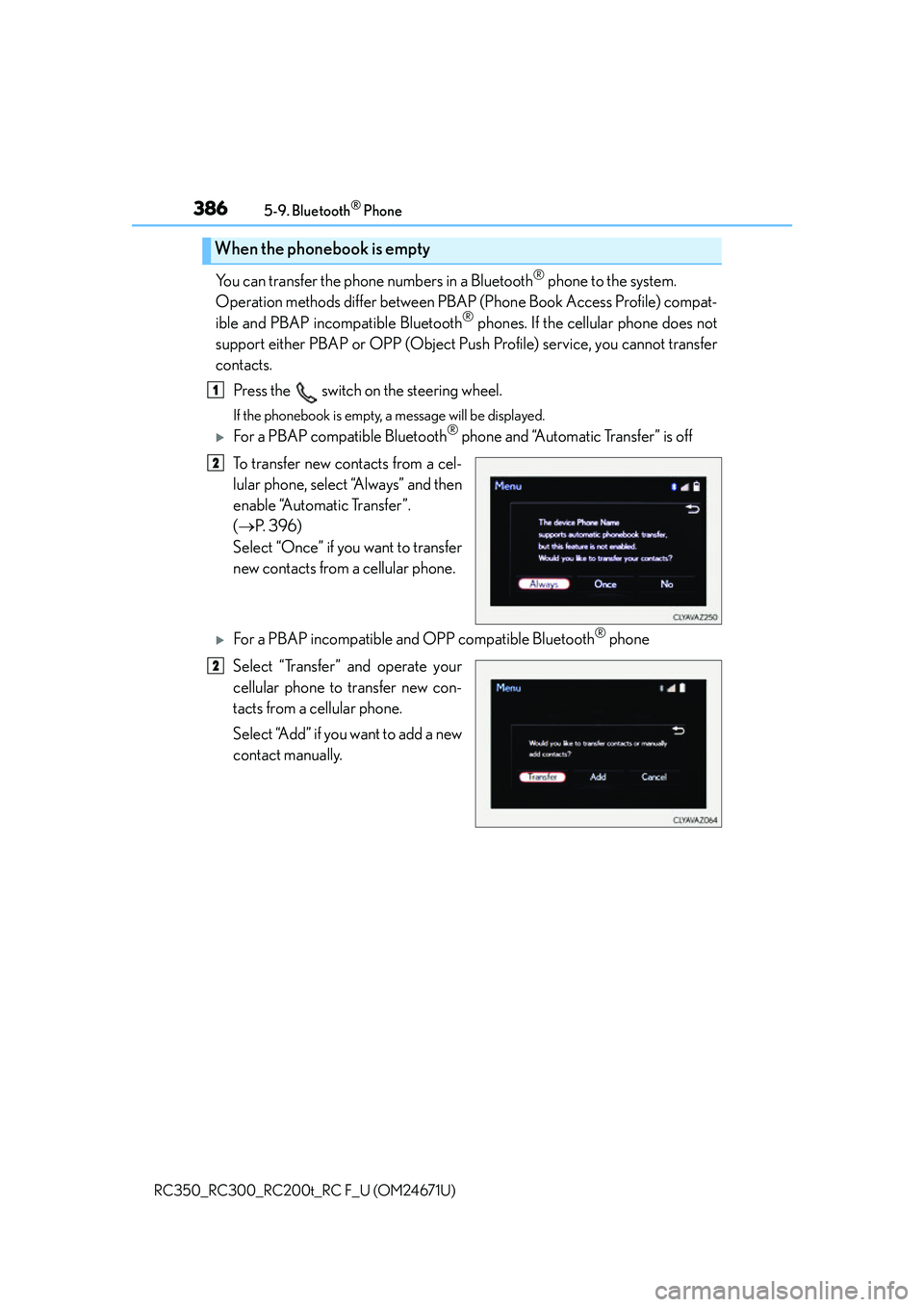
For a PBAP compatible Bluetooth® phone and “Automatic Transfer” is off
To transfer new contacts from a cel-
lular phone, select “Always” and then
enable “Automatic Transfer”.
( P. 3 9 6 )
Select “Once” if you want to transfer
new contacts from a cellular phone.
For a PBAP incompatible and OPP compatible Bluetooth® phone
Select “Transfer” and operate your
cellular phone to transfer new con-
tacts from a cellular phone.
Select “Add” if you want to add a new
contact manually.
When the phonebook is empty
1
2
2
Page 387 of 700
3875-9. Bluetooth® Phone
5
Lexus Display Audio system
RC350_RC300_RC200t_RC F_U (OM24671U)
You can make a call using numbers registered in the favorites.Go to “Favorites”: “Phone” “Favorites”
Choose the desired contact to call from the list.
Choose the number and then press the switch on the steering wheel or
press the controller.
You can make a call using the call history. Go to “Call History”: “Phone” “Call History”
Select the desired entry from the list.
Press the switch on the steering wheel or select .
■Call history list
●If you make a call to or receive a call from a number registered in the phonebook, the
name is displayed in the call history.
●If you make multiple calls to the same number , only the last call made is displayed in the
call history.
■International calls
Depending on the mobile phone in use, you ma y not be able to make international calls.
■Calling by using the latest call history entry
Press the
switch on the steering wheel to display the phone top screen.
Press the
switch on the steering wheel to display the “Call History” screen.
Press the
switch on the steering wheel to se lect the latest call history entry.
Dialing from favorites
Dialing from history
1
2
3
1
2
3
1
2
3
Page 388 of 700
3885-9. Bluetooth® Phone
RC350_RC300_RC200t_RC F_U (OM24671U)
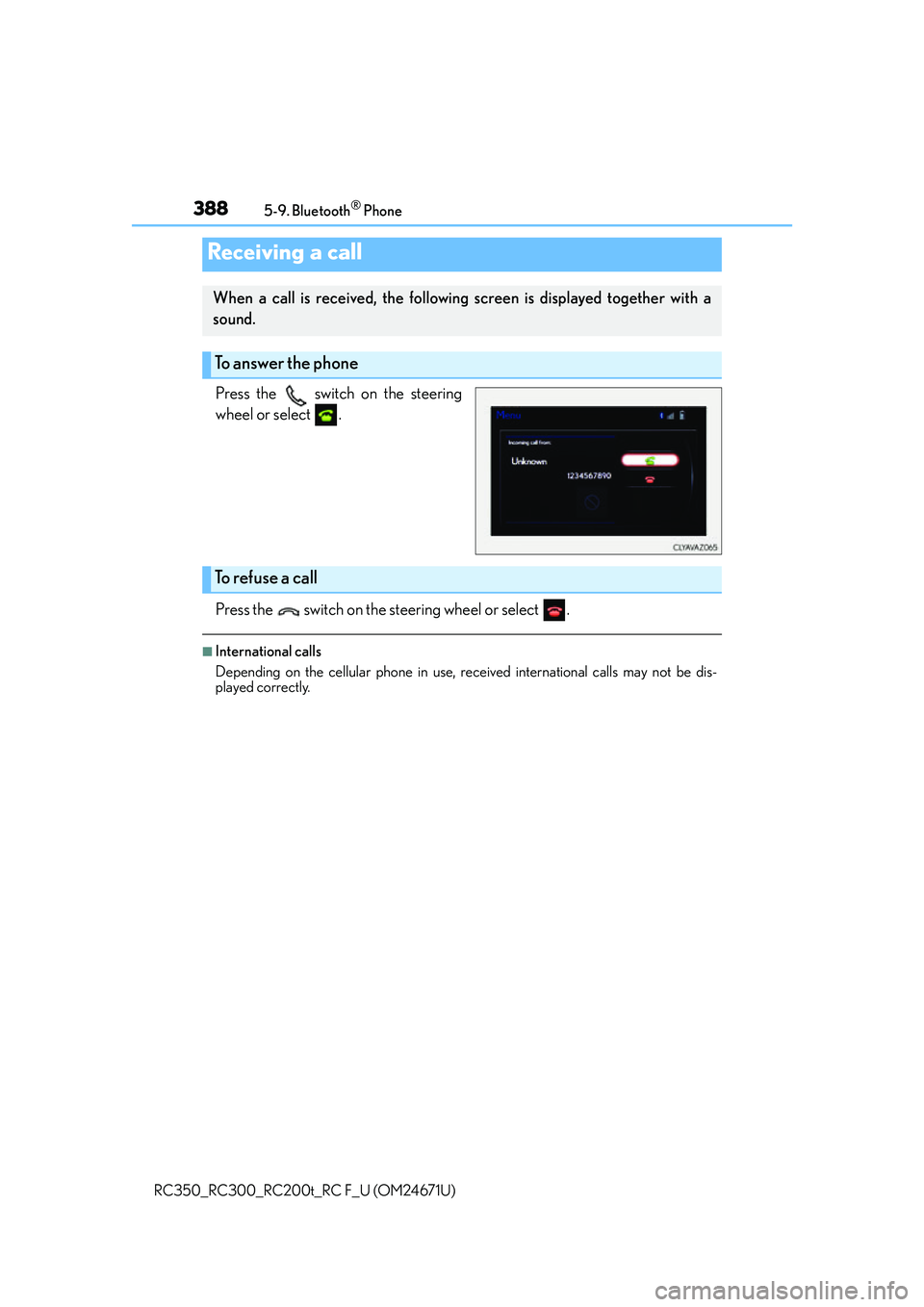
Press the switch on the steering
wheel or select .
Press the switch on the steering wheel or select .
■International calls
Depending on the cellular phone in use, re ceived international calls may not be dis-
played correctly.
Receiving a call
When a call is received, the following screen is displayed together with a
sound.
To answer the phone
To refuse a call
Page 390 of 700
3905-9. Bluetooth® Phone
RC350_RC300_RC200t_RC F_U (OM24671U)
Phone number containing a “w” symbol
When the “w” symbol is dialed in an outg oing call, you need to go to the “Release
Tones” screen to dial the following digits . Move the controller to the left and then
select “Release Tones”.
Select “Handset Mode” to change from a hands-free call to a cellular phone call
or vice versa.
Press the switch on the steering wheel or select .
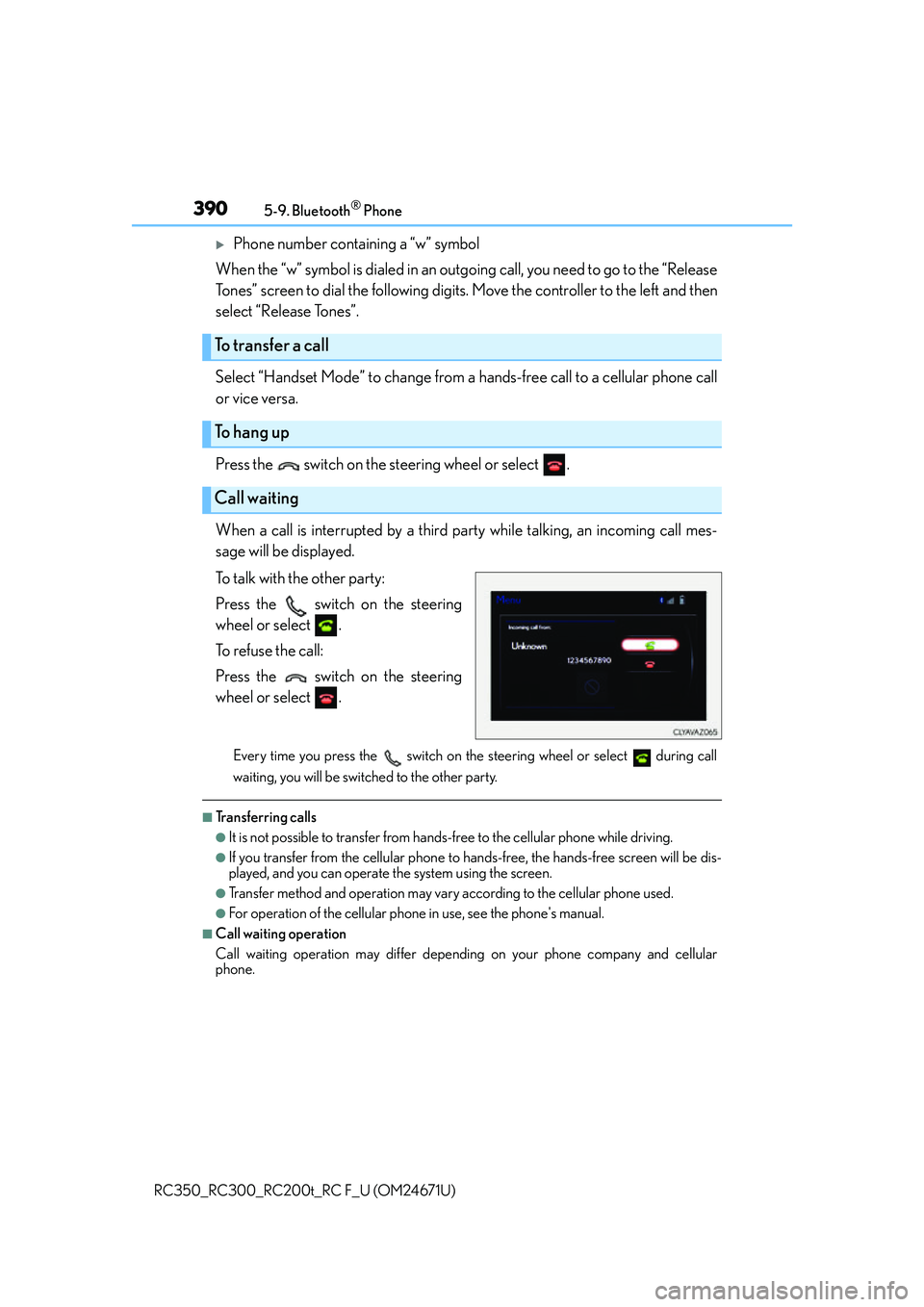
When a call is interrupted by a third party while talking, an incoming call mes-
sage will be displayed.
To talk with the other party:
Press the switch on the steering
wheel or select .
To refuse the call:
Press the switch on the steering
wheel or select .
Every time you press the switch on the steering wheel or select during call
waiting, you will be switched to the other party.
■Transferring calls
●It is not possible to transfer from hand s-free to the cellular phone while driving.
●If you transfer from the cellular phone to ha nds-free, the hands-free screen will be dis-
played, and you can operate the system using the screen.
●Transfer method and operation may vary according to the cellular phone used.
●For operation of the cellular phone in use, see the phone's manual.
■Call waiting operation
Call waiting operation may differ depend ing on your phone company and cellular
phone.
To transfer a call
To hang up
Call waiting
Page 393 of 700
3935-9. Bluetooth® Phone
5
Lexus Display Audio system
RC350_RC300_RC200t_RC F_U (OM24671U)
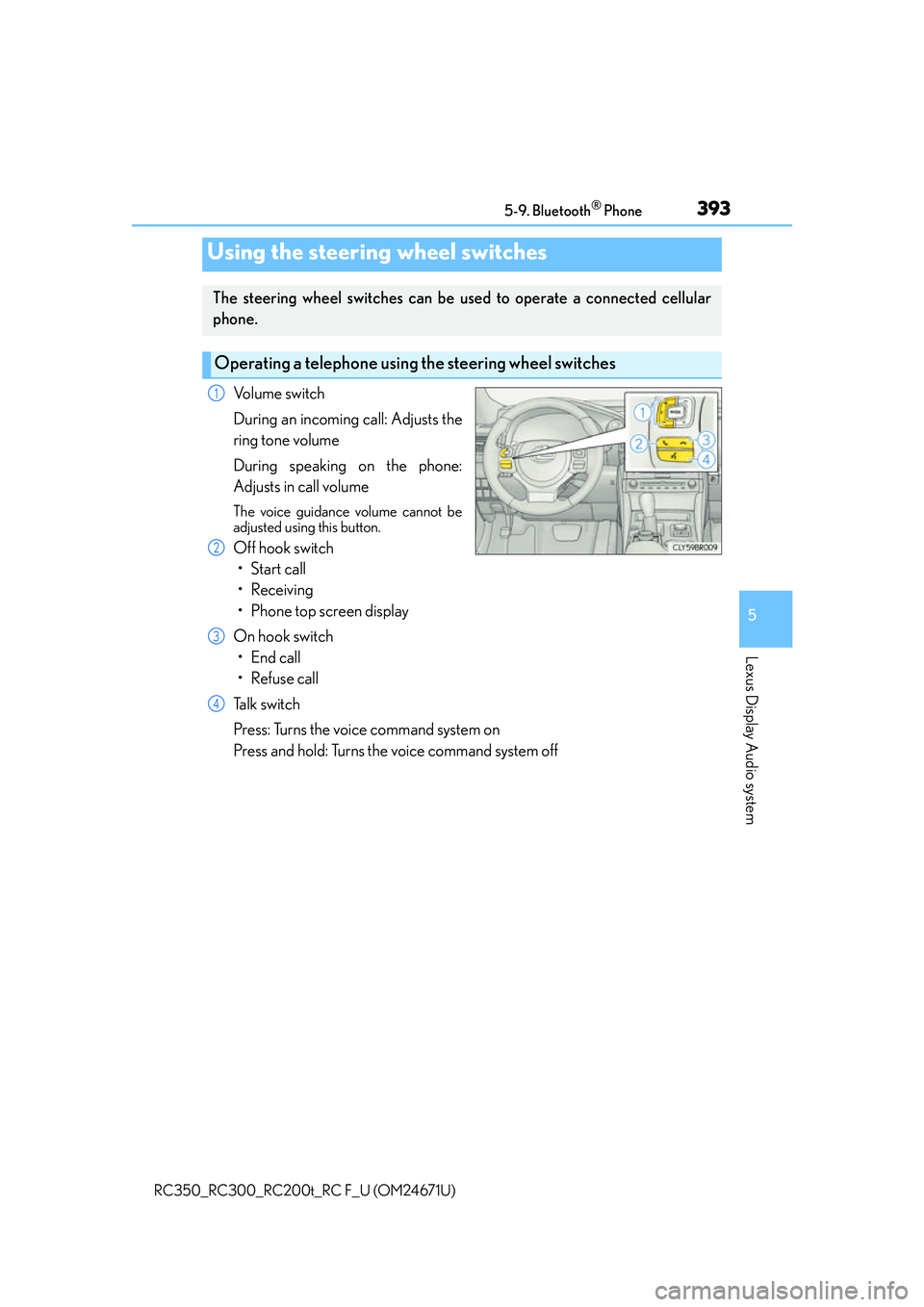
Volume switch
During an incoming call: Adjusts the
ring tone volume
During speaking on the phone:
Adjusts in call volume
The voice guidance volume cannot be
adjusted using this button.
Off hook switch• Start call
• Receiving
• Phone top screen display
On hook switch • End call
• Refuse call
Talk switch
Press: Turns the voice command system on
Press and hold: Turns the voice command system off
Using the steering wheel switches
The steering wheel switches can be used to operate a connected cellular
phone.
Operating a telephone usin g the steering wheel switches
1
2
3
4
Page 419 of 700
419
Interior features6
RC350_RC300_RC200t_RC F_U (OM24671U)
6-1. Using the air conditioning system
Automatic air conditioning system ..........................................420
Heated steering wheel/ seat heaters/
seat ventilators.......................... 429
6-2. Using the interior lights Interior lights list..........................432• Interior lights ..........................433
• Personal lights........................434
6-3. Using the storage features List of storage features.............435• Glove box................................436
• Console box ...........................436
• Cup holders............................ 437
Trunk features ............................. 438 6-4. Using the other interior
features
Other interior features ............ 439 • Sun visors ................................ 439
• Vanity mirrors ........................ 439
• Clock ........................................440
• Power outlet ...........................440
• Armrest ......................................441
•Trunk storage extension ................................. 442
• Assist grips.............................. 443
• Coat hooks ............................. 443
Garage door opener................ 444
Compass .........................................451
LEXUS Enform Safety Connect ...................................... 455
LEXUS Enform Remote .........460
LEXUS Enform Service Connect ........................................461
Page 429 of 700
4296-1. Using the air conditioning system
6
Interior features
RC350_RC300_RC200t_RC F_U (OM24671U)
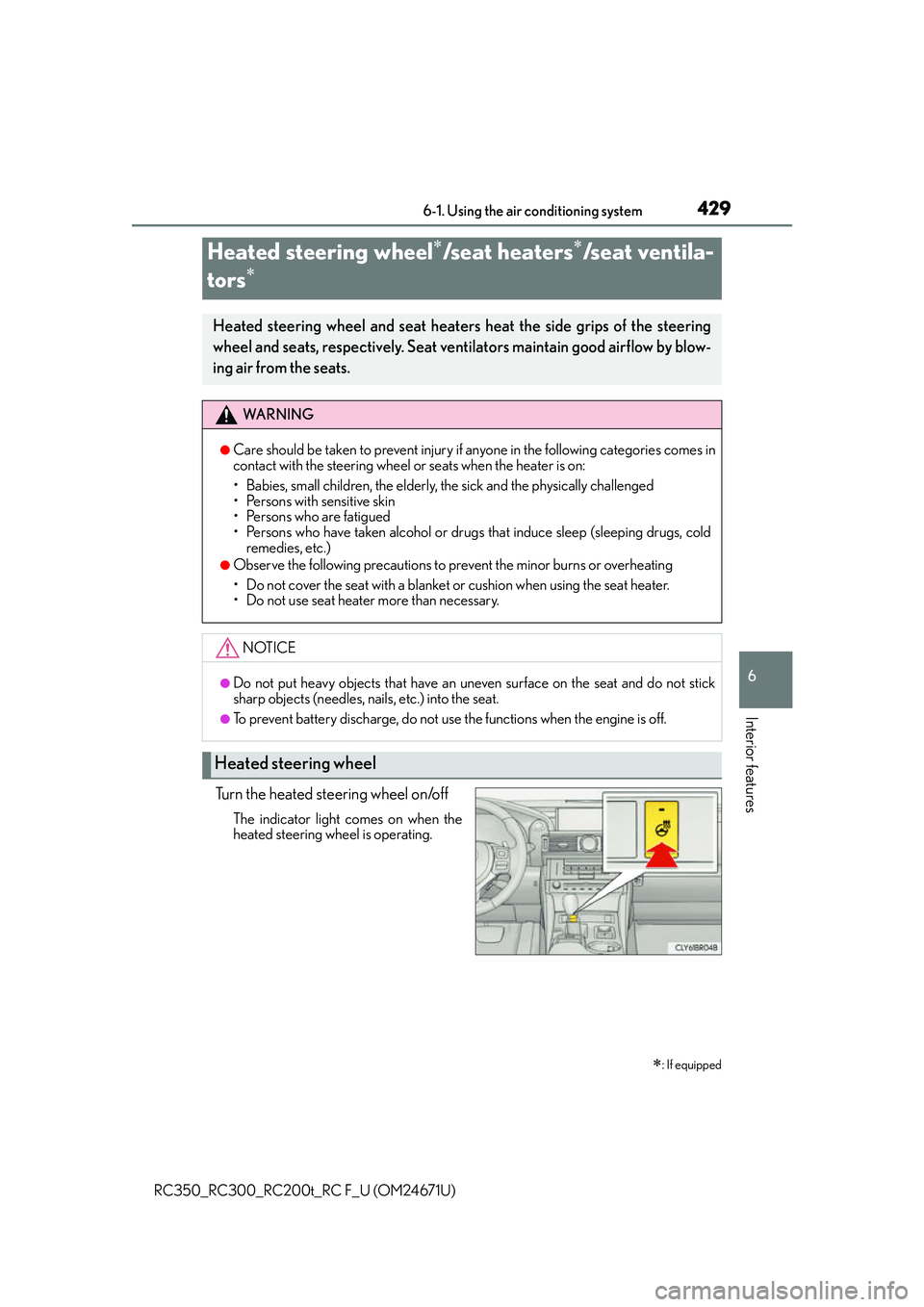
Turn the heated steering wheel on/off
The indicator light comes on when the
heated steering wheel is operating.
Heated steering wheel/seat heaters/seat ventila-
tors
: If equipped
Heated steering wheel and seat heaters heat the side grips of the steering
wheel and seats, respectively. Seat ventilators maintain good airflow by blow-
ing air from the seats.
WA R N I N G
●Care should be taken to prevent injury if anyone in the following categories comes in
contact with the steering wheel or seats when the heater is on:
• Babies, small children, the elderly, the sick and the physically challenged
• Persons with sensitive skin
• Persons who are fatigued
• Persons who have taken alcohol or drugs that induce sleep (sleeping drugs, cold
remedies, etc.)
●Observe the following precautions to prevent the minor burns or overheating
• Do not cover the seat with a blanket or cushion when using the seat heater.
• Do not use seat heater more than necessary.
NOTICE
●Do not put heavy objects that have an uneven surface on the seat and do not stick
sharp objects (needles, nails, etc.) into the seat.
●To prevent battery discharge, do not use the functions when the engine is off.
Heated steering wheel
Page 430 of 700
4306-1. Using the air conditioning system
RC350_RC300_RC200t_RC F_U (OM24671U)
●The heated steering wheel can be used when the engine switch is in IGNITION ON
mode.
●The heated steering wheel will automati cally turn off after about 30 minutes.
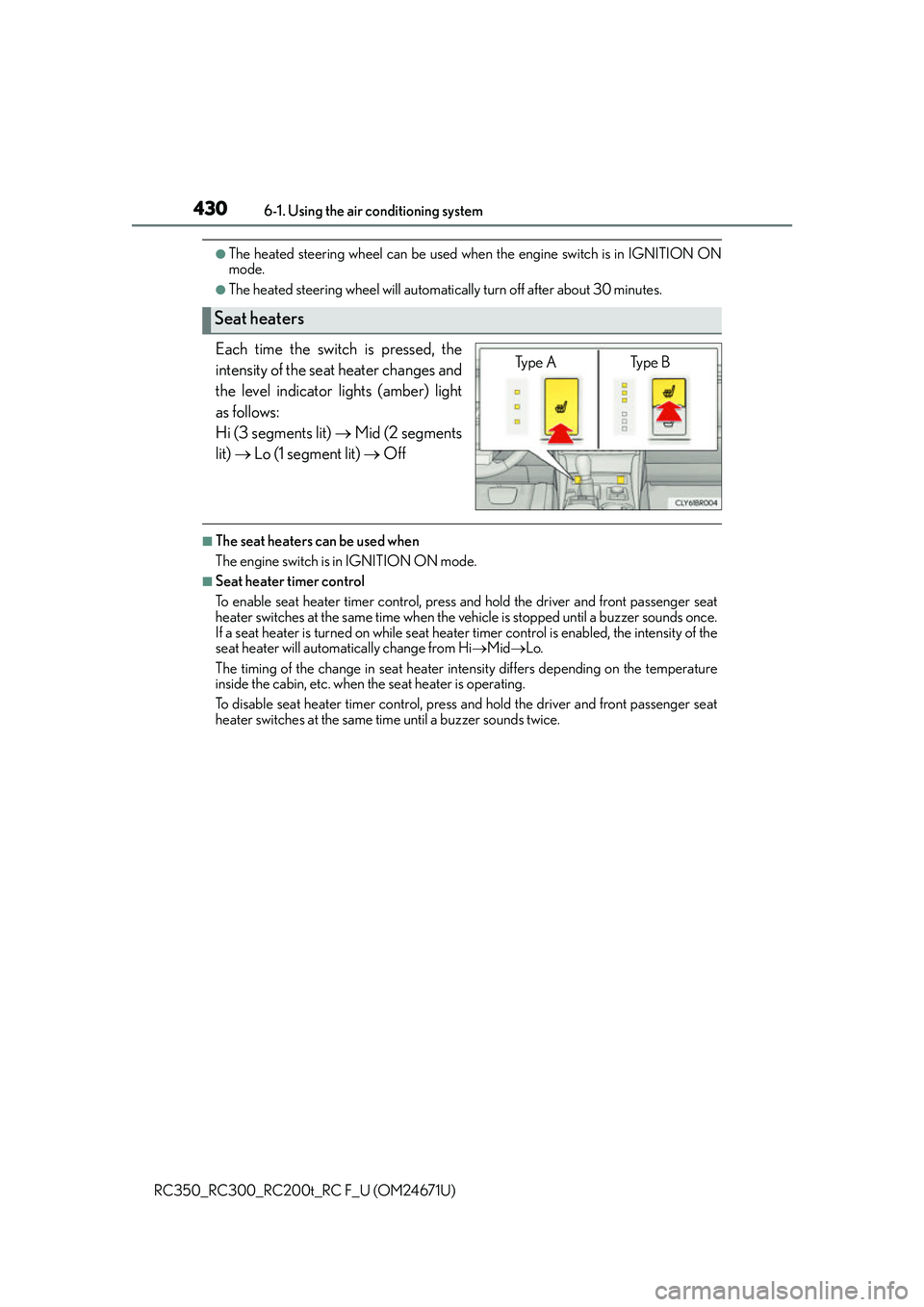
Each time the switch is pressed, the
intensity of the seat heater changes and
the level indicator lights (amber) light
as follows:
Hi (3 segments lit) Mid (2 segments
lit) Lo (1 segment lit) Off
■The seat heaters can be used when
The engine switch is in IGNITION ON mode.
■Seat heater timer control
To enable seat heater timer control, press and hold the driver and front passenger seat
heater switches at the same time when the vehicle is stopped until a buzzer sounds once.
If a seat heater is turned on while seat heater timer control is enabled, the intensity of the
seat heater will automatically change from Hi MidLo.
The timing of the change in seat heater intensity differs depending on the temperature
inside the cabin, etc. when the seat heater is operating.
To disable seat heater timer control, press and hold the driver and front passenger seat
heater switches at the same time until a buzzer sounds twice.
Seat heaters
Type A Type B
Page 476 of 700
4767-2. Maintenance
RC350_RC300_RC200t_RC F_U (OM24671U)
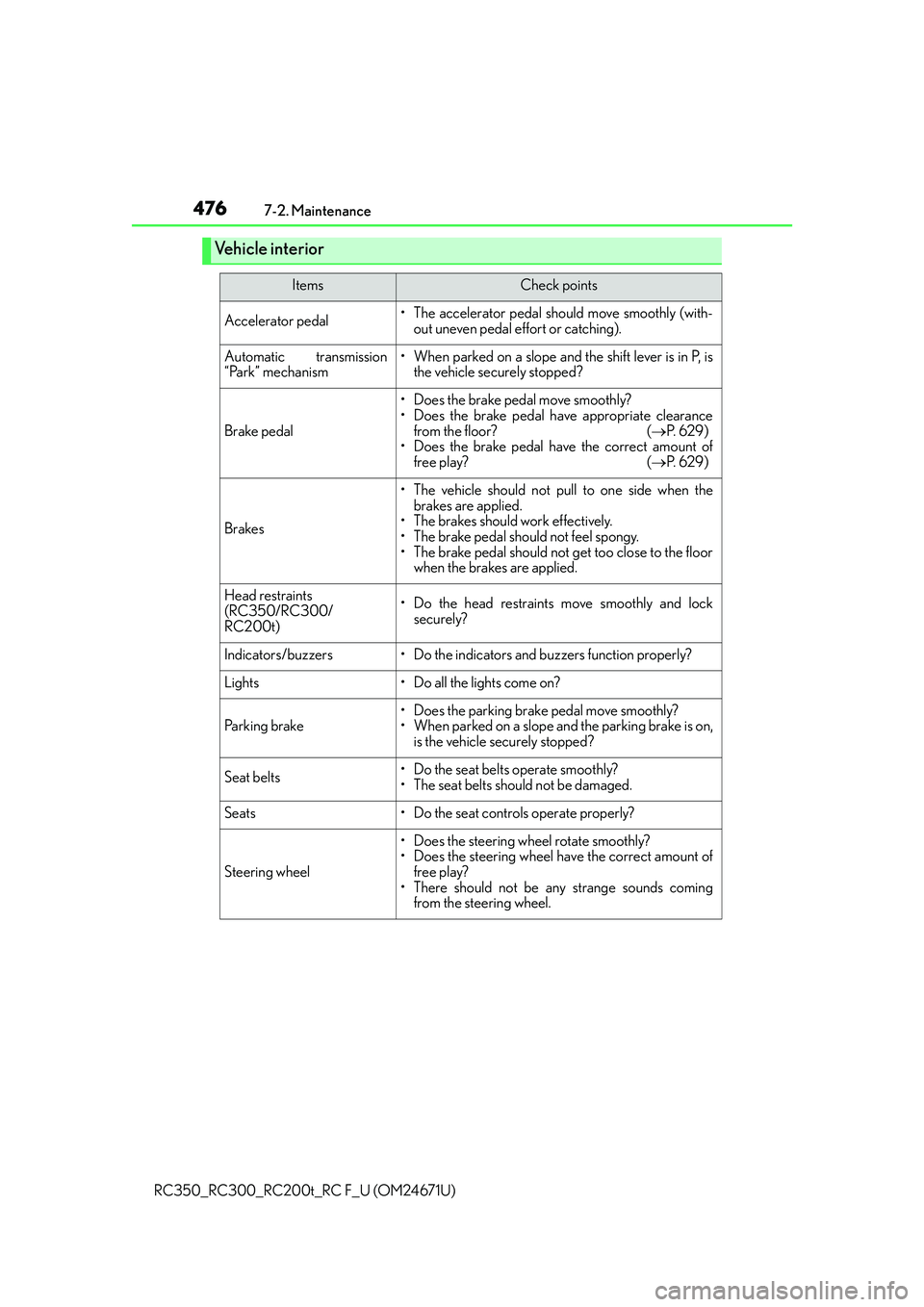
Vehicle interior
ItemsCheck points
Accelerator pedal• The accelerator pedal should move smoothly (with- out uneven pedal effort or catching).
Automatic transmission
“Park” mechanism• When parked on a slope and the shift lever is in P, isthe vehicle securely stopped?
Brake pedal
• Does the brake pedal move smoothly?
• Does the brake pedal have appropriate clearance
from the floor? ( P. 6 2 9 )
• Does the brake pedal have the correct amount of
free play? ( P. 6 2 9 )
Brakes
• The vehicle should not pull to one side when the
brakes are applied.
• The brakes should work effectively.
• The brake pedal should not feel spongy.
• The brake pedal should not get too close to the floor when the brakes are applied.
Head restraints
(RC350/RC300/
RC200t)• Do the head restraints move smoothly and locksecurely?
Indicators/buzzers• Do the indicators and buzzers function properly?
Lights• Do all the lights come on?
Parking brake• Does the parking brake pedal move smoothly?
• When parked on a slope and the parking brake is on,
is the vehicle securely stopped?
Seat belts•Do the seat belt s operate smoothly?
• The seat belts should not be damaged.
Seats• Do the seat controls operate properly?
Steering wheel
• Does the steering wheel rotate smoothly?
• Does the steering wheel have the correct amount of free play?
• There should not be an y strange sounds coming
from the steering wheel.
Page 491 of 700
4917-3. Do-it-yourself maintenance
7
Maintenance and care
RC350_RC300_RC200t_RC F_U (OM24671U)
■Engine oil consumption
A certain amount of engine oil will be consumed while driving. In the following situations,
oil consumption may increase, and engine o il may need to be refilled in between oil
maintenance intervals.
●When the engine is new, for example directly after purchasing the vehicle or after
replacing the engine
●If low quality oil or oil of an inappropriate viscosity is used
●When driving at high engine speeds or with a heavy load, or when driving while accel-
erating or decelerating frequently
●When leaving the engi ne idling for a long time, or when driving frequently through
heavy traffic
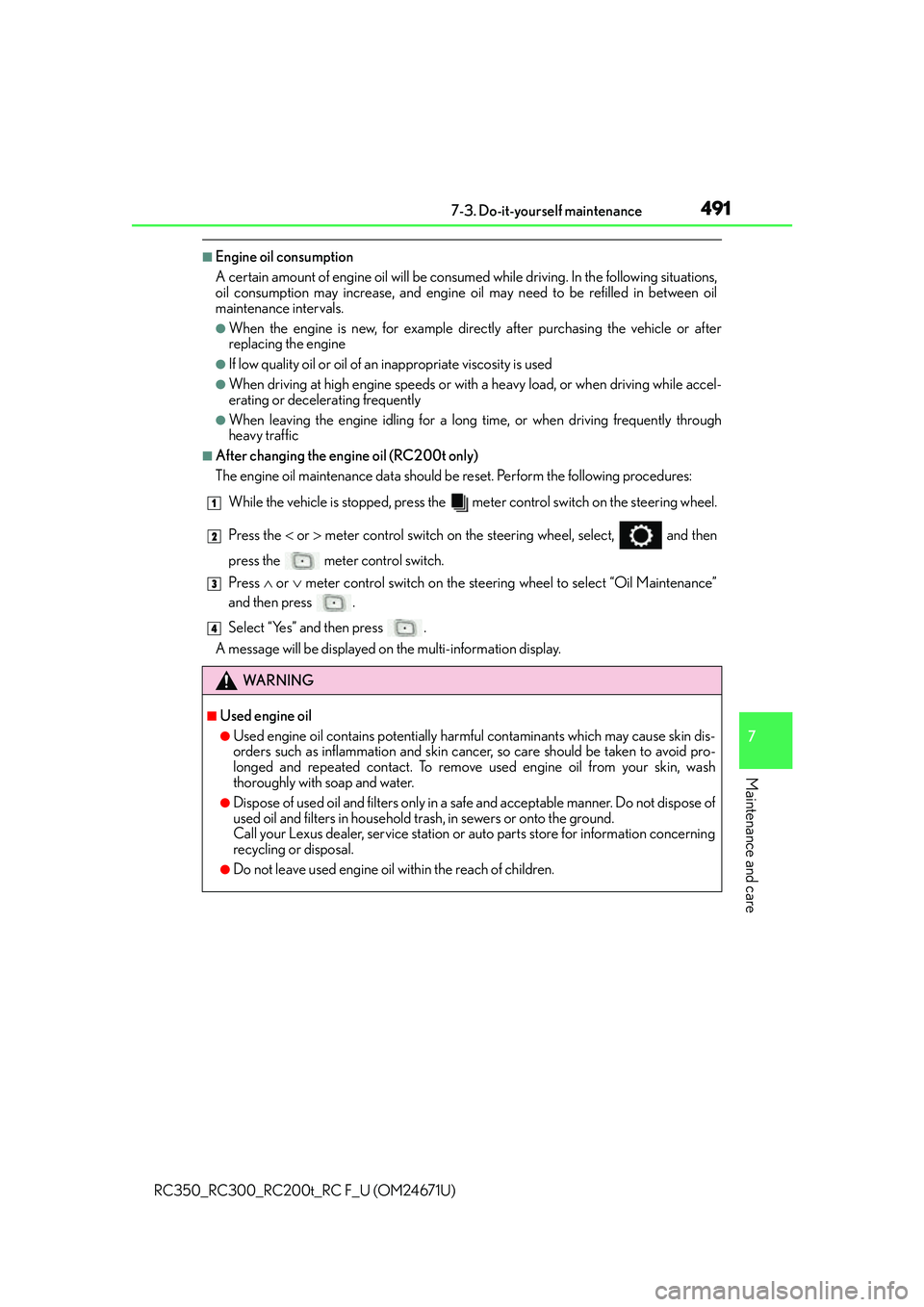
■After changing the engine oil (RC200t only)
The engine oil maintenance da ta should be reset. Perform the following procedures:
While the vehicle is stopped, press the me ter control switch on the steering wheel.
Press the or meter control switch on the steering wheel, se lect, and then
press the meter control switch.
Press or meter control switch on the steering wheel to select “Oil Maintenance”
and then press .
Select “Yes” and then press .
A message will be displayed on the multi-information display.
WA R N I N G
■Used engine oil
●Used engine oil contains potentially harm ful contaminants which may cause skin dis-
orders such as inflammation and skin canc er, so care should be taken to avoid pro-
longed and repeated contact. To remove used engine oil from your skin, wash
thoroughly with soap and water.
●Dispose of used oil and filters only in a sa fe and acceptable manner. Do not dispose of
used oil and filters in household tras h, in sewers or onto the ground.
Call your Lexus dealer, service station or auto parts store for information concerning
recycling or disposal.
●Do not leave used engine oil within the reach of children.
1
2
3
4