lock LEXUS RC300 2017 Owners Manual
[x] Cancel search | Manufacturer: LEXUS, Model Year: 2017, Model line: RC300, Model: LEXUS RC300 2017Pages: 724, PDF Size: 15.76 MB
Page 611 of 724
6118-2. Steps to take in an emergency
8
When trouble arises
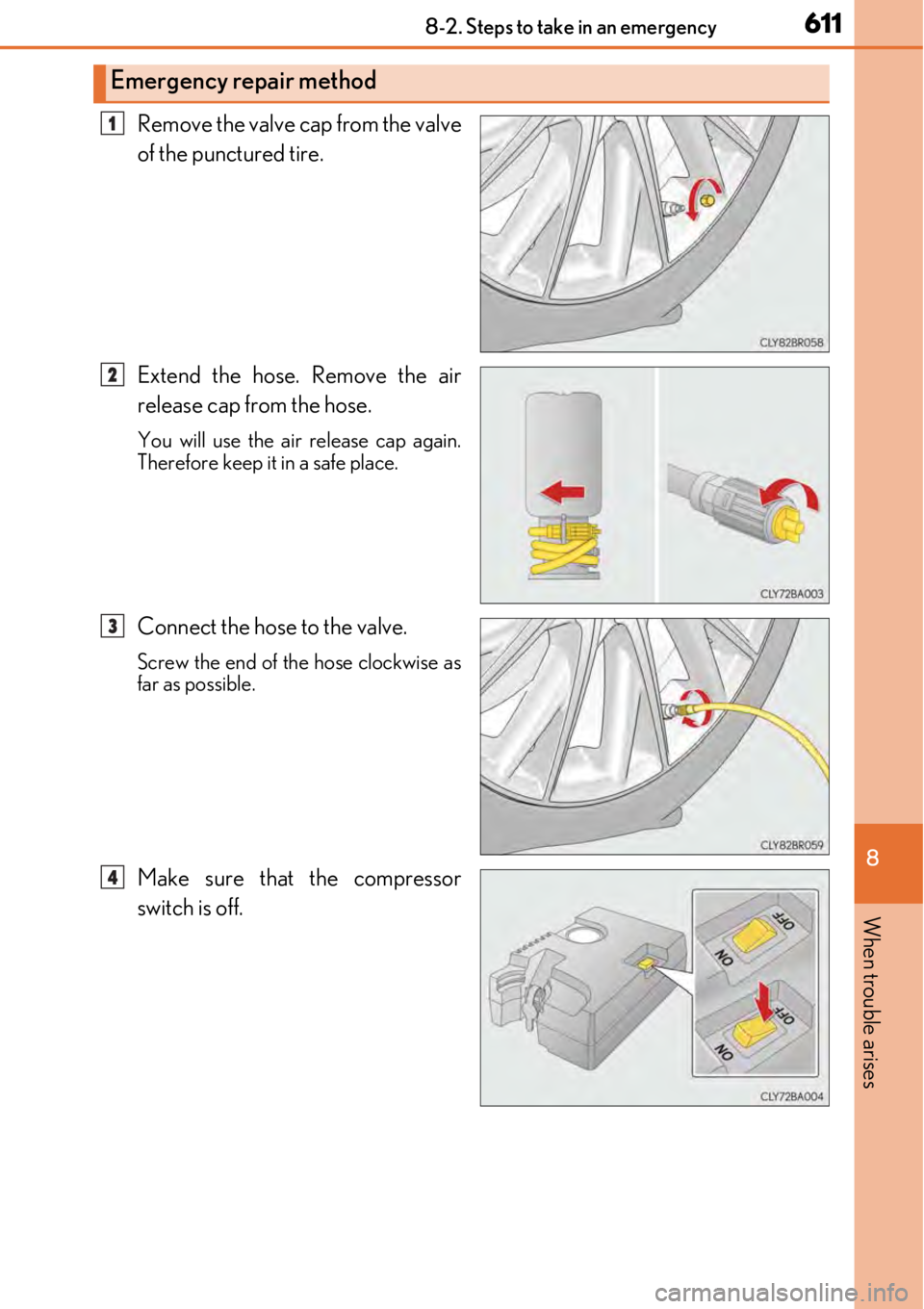
Remove the valve cap from the valve
of the punctured tire.
Extend the hose. Remove the air
release cap from the hose.
You will use the air release cap again.
Therefore keep it in a safe place.
Connect the hose to the valve.
Screw the end of the hose clockwise as
far as possible.
Make sure that the compressor
switch is off.
Emergency repair method
1
2
3
4
Page 621 of 724
6218-2. Steps to take in an emergency
8
When trouble arises
One of the following may be the cause of the problem:
●One or both of the battery terminals may be disconnected.
●The battery may be discharged. (→P. 626)
●There may be a malfunction in the steering lock system.
Contact your Lexus dealer if the problem cannot be repaired, or if repair procedures
are unknown.
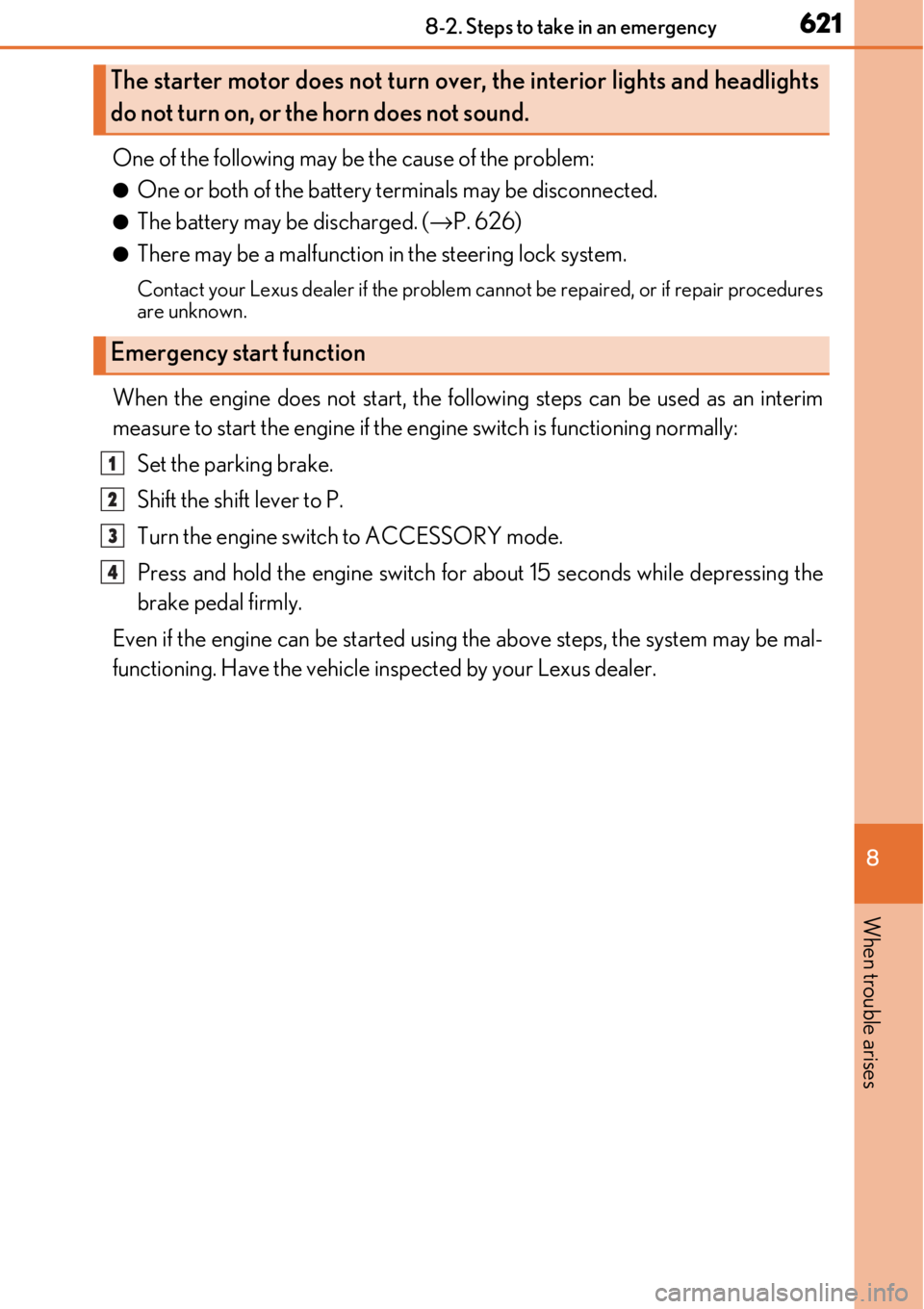
When the engine does not start, the follo wing steps can be used as an interim
measure to start the engine if the engine switch is functioning normally:
Set the parking brake.
Shift the shift lever to P.
Turn the engine switch to ACCESSORY mode.
Press and hold the engine switch for about 15 seconds while depressing the
brake pedal firmly.
Even if the engine can be started using the above steps, the system may be mal-
functioning. Have the vehicle in spected by your Lexus dealer.
The starter motor does not turn over, the interior lights and headlights
do not turn on, or the horn does not sound.
Emergency start function
1
2
3
4
Page 622 of 724
6228-2. Steps to take in an emergency
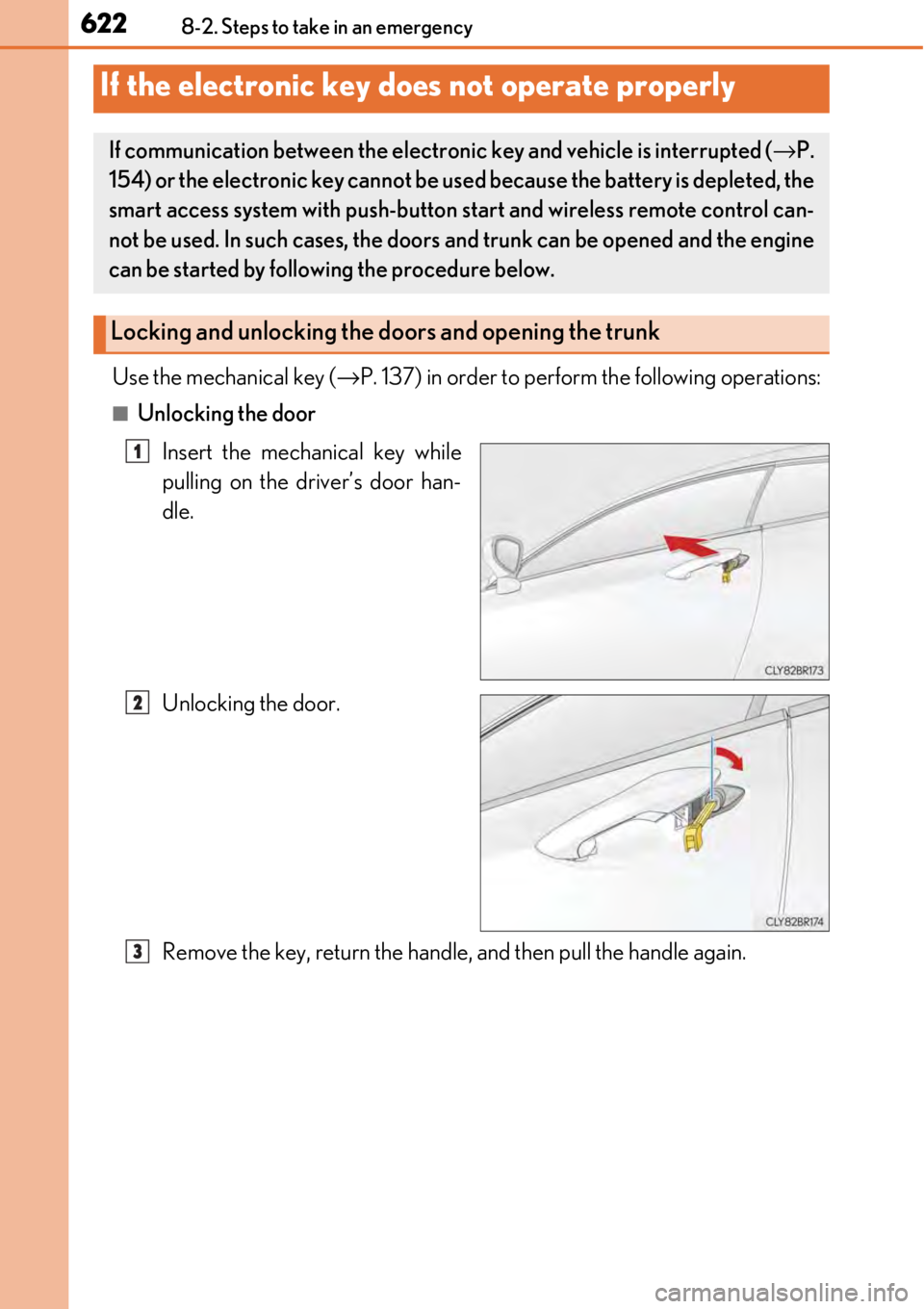
Use the mechanical key (→P. 137) in order to perfor m the following operations:
■Unlocking the door
Insert the mechanical key while
pulling on the driver’s door han-
dle.
Unlocking the door.
Remove the key, return the handle, and then pull the handle again.
If the electronic key does not operate properly
If communication between the electron ic key and vehicle is interrupted (→P.
154) or the electronic key cannot be us ed because the battery is depleted, the
smart access system with push-button st art and wireless remote control can-
not be used. In such cases, the doors and trunk can be opened and the engine
can be started by follow ing the procedure below.
Locking and unlocking the doors and opening the trunk
1
2
3
Page 623 of 724
6238-2. Steps to take in an emergency
8
When trouble arises
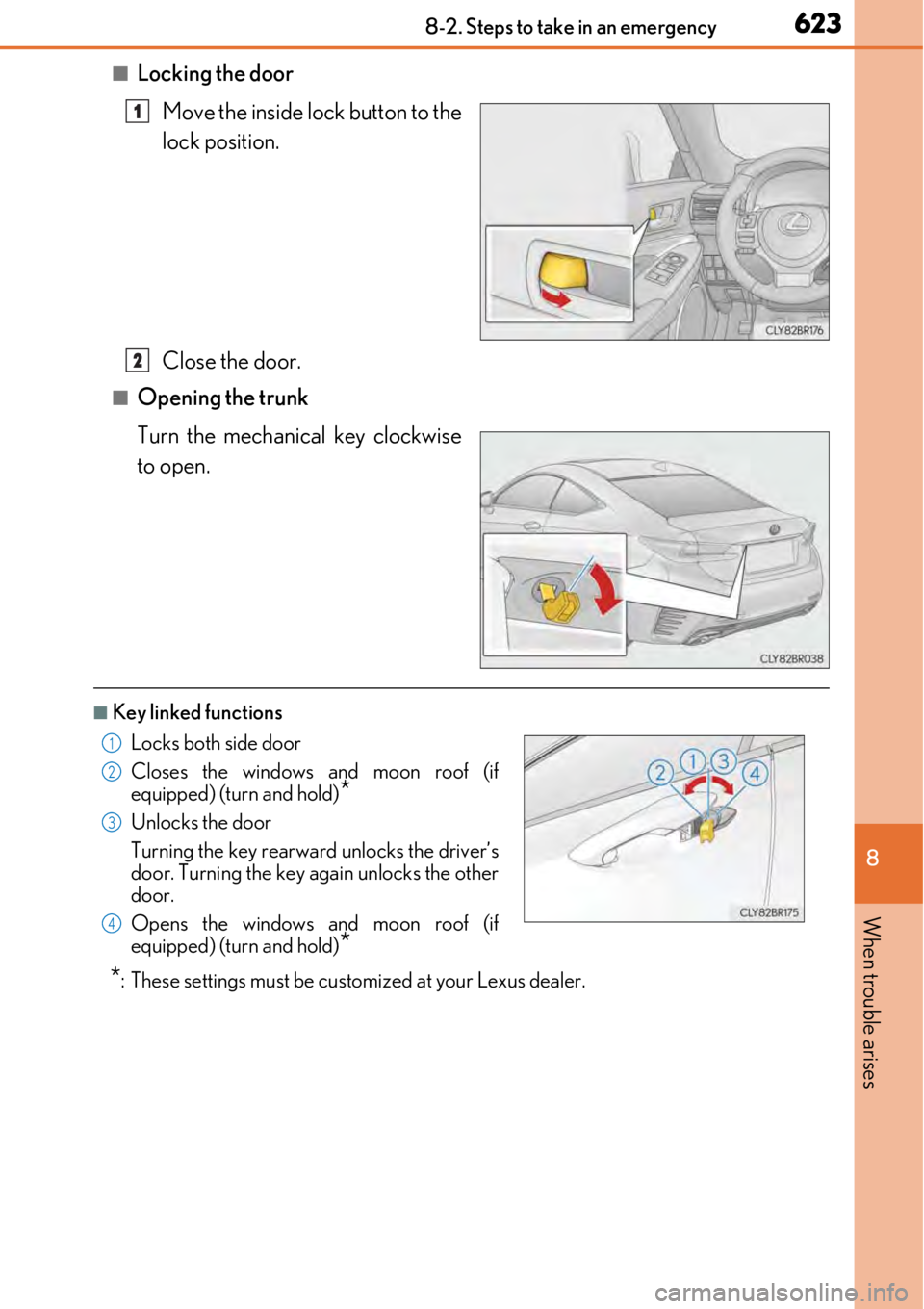
■Locking the doorMove the inside lock button to the
lock position.
Close the door.
■Opening the trunk
Turn the mechanical key clockwise
to open.
■Key linked functions
*: These settings must be cust omized at your Lexus dealer.
1
2
Locks both side door
Closes the windows and moon roof (if
equipped) (turn and hold)
*
Unlocks the door
Turning the key rearward unlocks the driver’s
door. Turning the key again unlocks the other
door.
Opens the windows and moon roof (if
equipped) (turn and hold)
*
1
22
33
44
Page 626 of 724
6268-2. Steps to take in an emergency
If you have a set of jumper (or booster) cables and a second vehicle with a 12-volt
battery, you can jump start your vehicle by following the steps below.
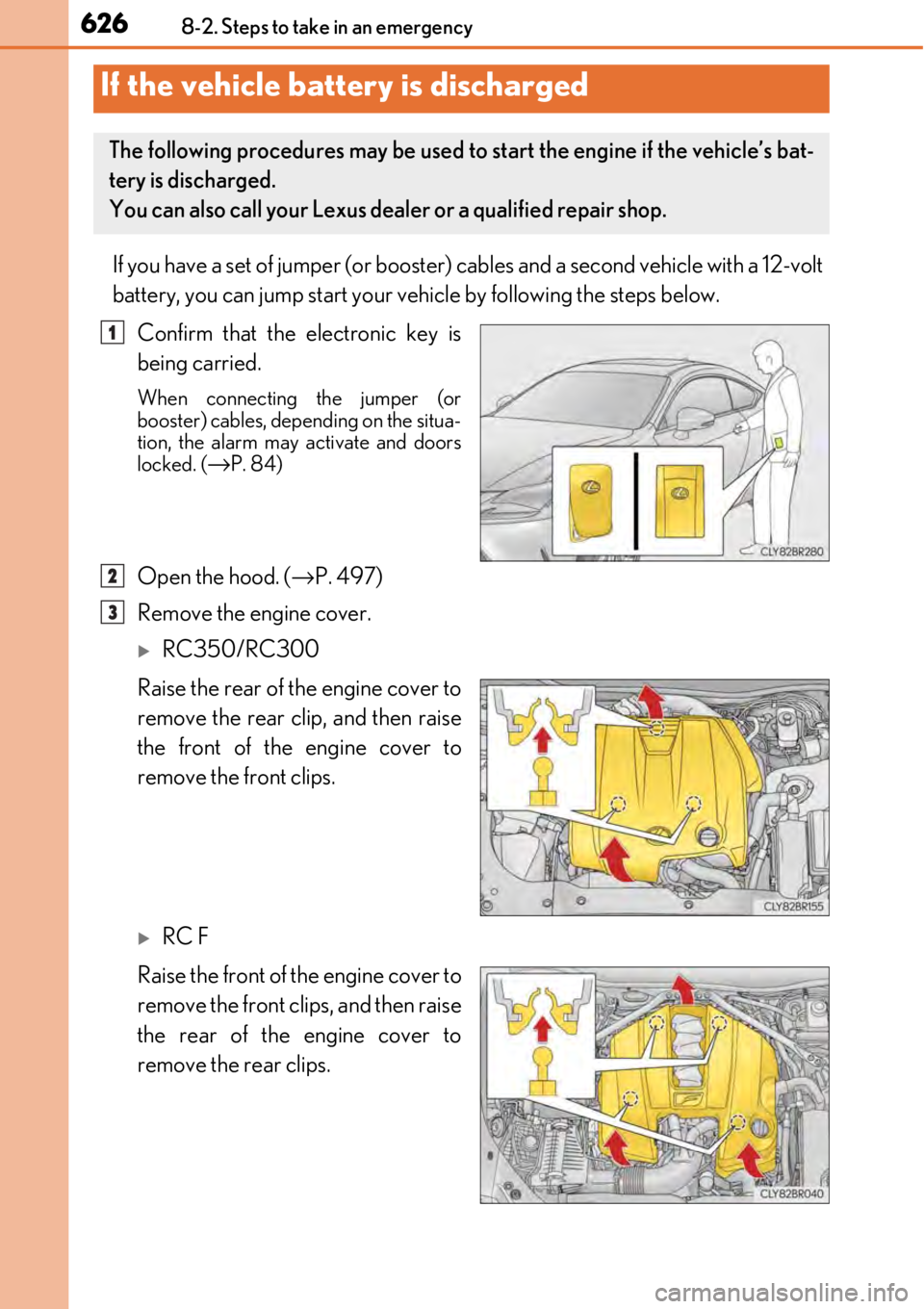
Confirm that the electronic key is
being carried.
When connecting the jumper (or
booster) cables, depending on the situa-
tion, the alarm may activate and doors
locked. (
→P. 84)
Open the hood. ( →P. 497)
Remove the engine cover.
RC350/RC300
Raise the rear of the engine cover to
remove the rear clip, and then raise
the front of the engine cover to
remove the front clips.
RC F
Raise the front of the engine cover to
remove the front clips, and then raise
the rear of the engine cover to
remove the rear clips.
If the vehicle battery is discharged
The following procedures may be used to start the engine if the vehicle’s bat-
tery is discharged.
You can also call your Lexus deal er or a qualified repair shop.
1
2
3
Page 628 of 724

6288-2. Steps to take in an emergency
Start the engine of the second vehicle. Increase the engine speed slightly and
maintain at that level for approximatel y 5 minutes to recharge the battery of
your vehicle.
Open and close any of the door of your vehicle with the engine switch off.
Maintain the engine speed of the second vehicle and start the engine of your
vehicle by turning the engine switch to IGNITION ON mode.
Once the vehicle’s engine has started, remove the jumper cables in the exact
reverse order from which they were connected.
Once the engine starts, have the vehicle inspected at your Lexus dealer as soon
as possible.
■Starting the engine when the battery is discharged
The engine cannot be started by push-starting.
■To prevent battery discharge
●Turn off the headlights and the audio system while the engine is off.
●Turn off any unnecessary electrical components when the vehicle is running at a low
speed for an extended period , such as in heavy traffic.
■Charging the battery
The electricity stored in the battery will disc harge gradually even when the vehicle is not
in use, due to natural discharge and the draini ng effects of certain electrical appliances. If
the vehicle is left for a long time, the battery may discharge, and the engine may be
unable to start. (The battery recharges automatically during driving.)
■When recharging or replacing the battery
●In some cases, it may not be possible to un lock the doors using the smart access system
with push-button start when the battery is discharged. Use the wireless remote control
or the mechanical key to lock or unlock the doors.
●The engine may not start on the first attempt after the battery has recharged but will
start normally after the second attempt. This is not a malfunction.
●The engine switch mode is memorized by the vehicle. When the battery is recon-
nected, the system will return to the mode it was in before the battery was discharged.
Before disconnecting the battery, turn the engine switch off.
If you are unsure what mode the engine switch was in before the battery discharged, be
especially careful when reconnecting the battery.
5
6
7
8
Page 649 of 724
6499-1. Specifications
9
Vehicle specifications
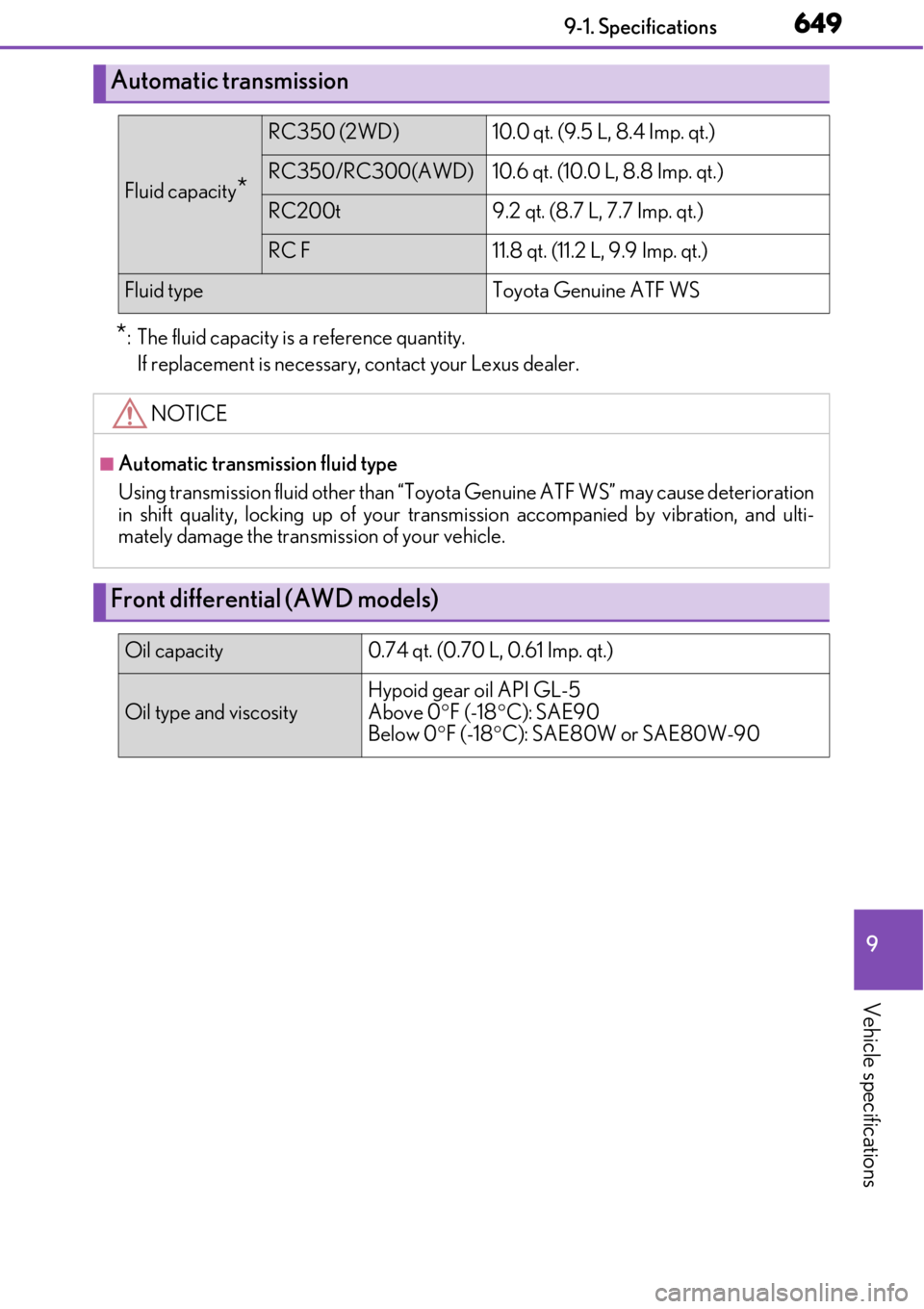
*: The fluid capacity is a reference quantity.If replacement is necessary , contact your Lexus dealer.
Automatic transmission
Fluid capacity*
RC350 (2WD)10.0 qt. (9.5 L, 8.4 Imp. qt.)
RC350/RC300 (AWD)10.6 qt. (10.0 L, 8.8 Imp. qt.)
RC200t9.2 qt. (8.7 L, 7.7 Imp. qt.)
RC F11.8 qt. (11.2 L, 9.9 Imp. qt.)
Fluid typeToyota Genuine ATF WS
NOTICE
■Automatic transmission fluid type
Using transmission fluid other than “Toyota Genuine ATF WS” may cause deterioration
in shift quality, locking up of your transm ission accompanied by vibration, and ulti-
mately damage the transmission of your vehicle.
Front differential (AWD models)
Oil capacity 0.74 qt. (0.70 L, 0.61 Imp. qt.)
Oil type and viscosity
Hypoid gear oil API GL-5
Above 0°F (-18 °C): SAE90
Below 0 °F (-18 °C): SAE80W or SAE80W-90
Page 677 of 724
6779-2. Customization
9
Vehicle specifications
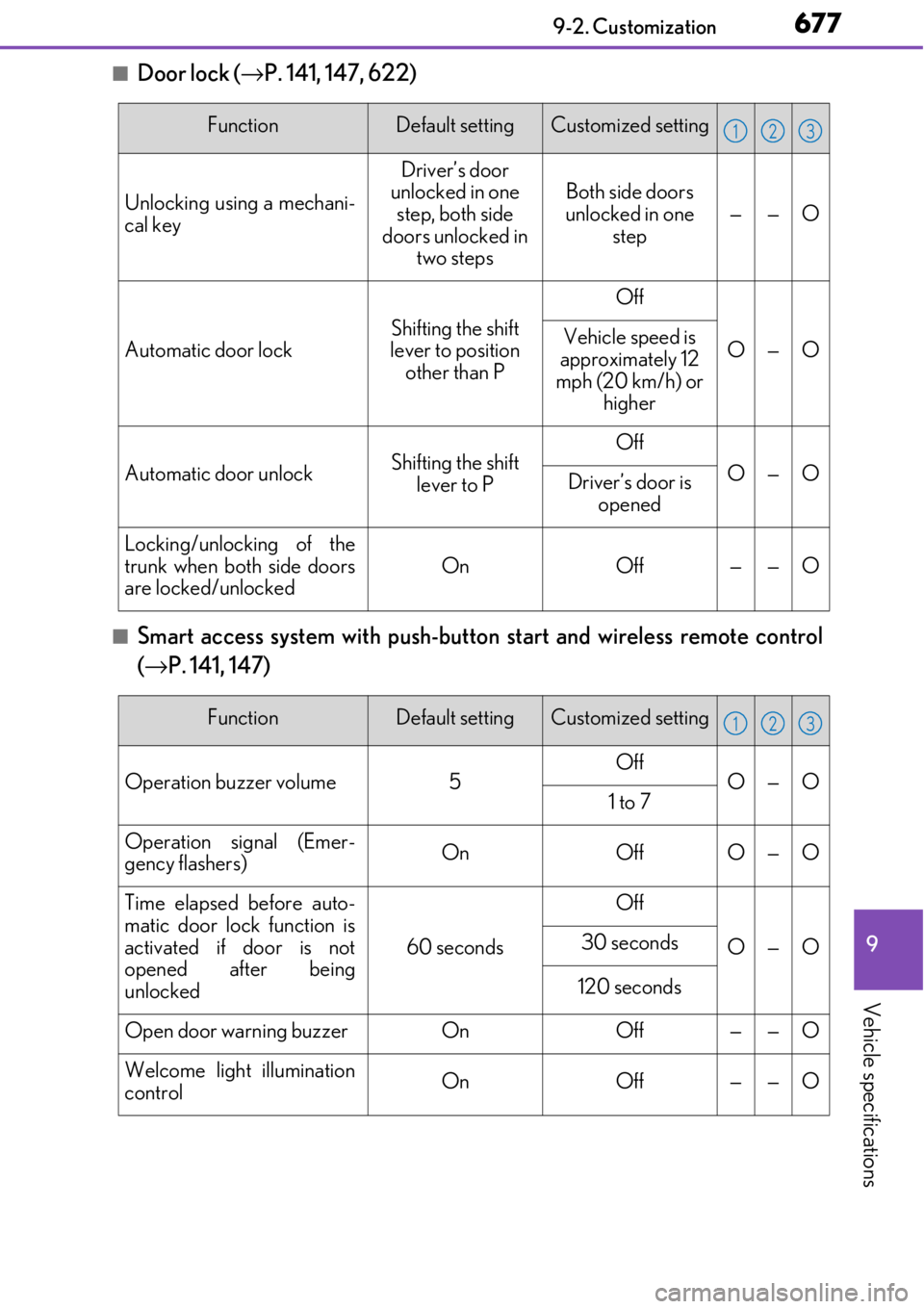
■Door lock (→P. 141, 147, 622)
■Smart access system with push-button start and wireless remote control
( → P. 141, 147)
FunctionDefault settingCustomized setting
Unlocking using a mechani-
cal key
Driver’s door
unlocked in one
step, both side
doors unlocked in two stepsBoth side doors
unlocked in one step
——O
Automatic door lockShifting the shift
lever to position
other than P
Off
O—OVehicle speed is
approximately 12
mph (20 km/h) or higher
Automatic door unlockShifting the shift
lever to POff
O—ODriver’s door is opened
Locking/unlocking of the
trunk when both side doors
are locked/unlocked
OnOff——O
123
FunctionDefault settingCustomized setting
Operation buzzer volume5OffO—O1 to 7
Operation signal (Emer-
gency flashers)OnOffO—O
Time elapsed before auto-
matic door lock function is
activated if door is not
opened after being
unlocked
60 seconds
Off
O—O30 seconds
120 seconds
Open door warning buzzerOnOff——O
Welcome light illumination
controlOnOff——O
123
Page 678 of 724
6789-2. Customization
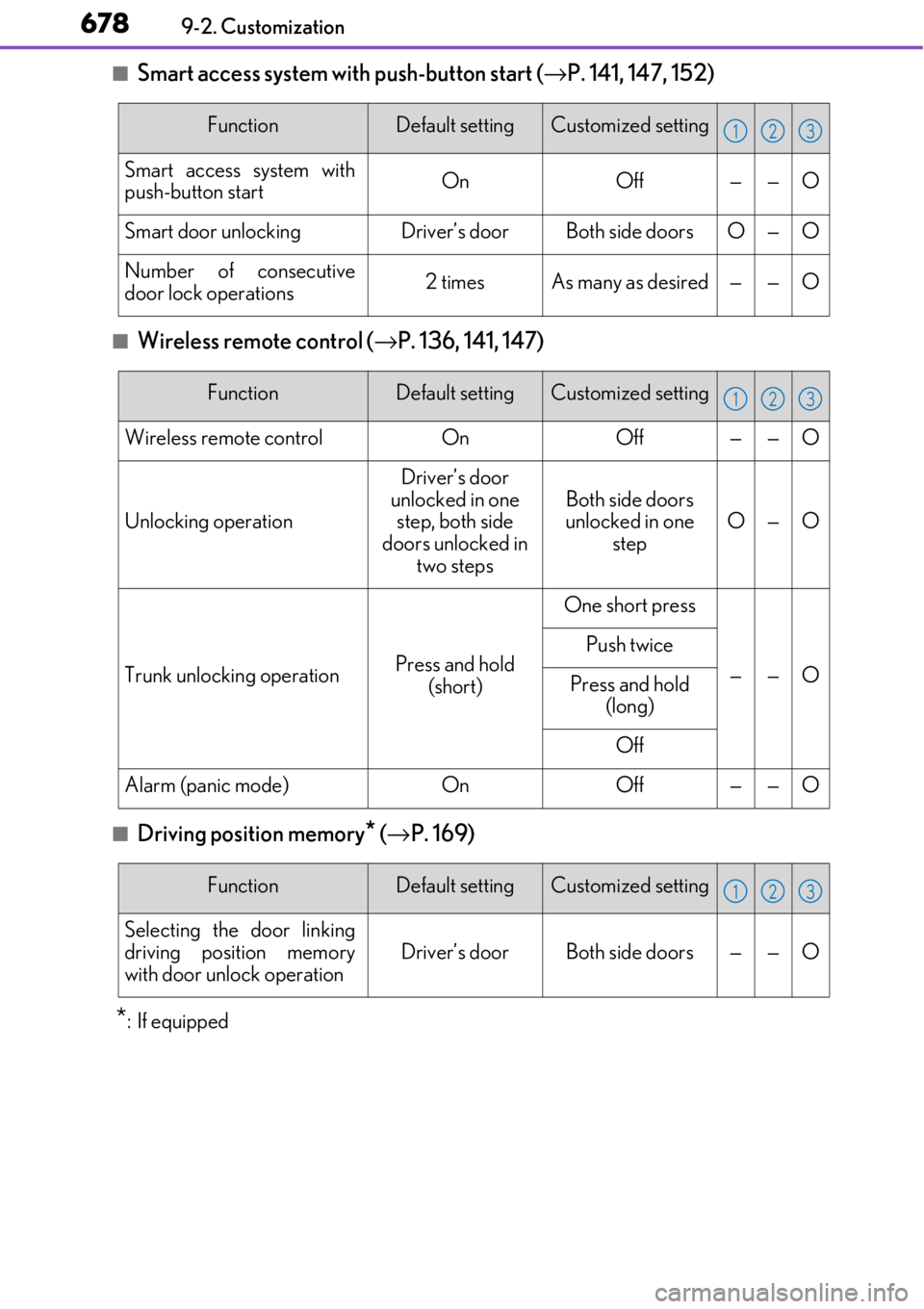
■Smart access system with push-button start (→P. 141, 147, 152)
■Wireless remote control ( →P. 136, 141, 147)
■Driving position memory* (→ P. 169)
*:If equipped
FunctionDefault settingCustomized setting
Smart access system with
push-button startOnOff——O
Smart door unlockingDriver’s doorBoth side doorsO—O
Number of consecutive
door lock operations2 timesAs many as desired——O
123
FunctionDefault settingCustomized setting
Wireless remote controlOnOff——O
Unlocking operation
Driver’s door
unlocked in one step, both side
doors unlocked in two steps
Both side doors
unlocked in one
stepO—O
Trunk unlocking operationPress and hold (short)
One short press
——O
Push twice
Press and hold (long)
Off
Alarm (panic mode)OnOff——O
123
FunctionDefault settingCustomized setting
Selecting the door linking
driving position memory
with door unlock operation
Driver’s doorBoth side doors——O
123
Page 682 of 724
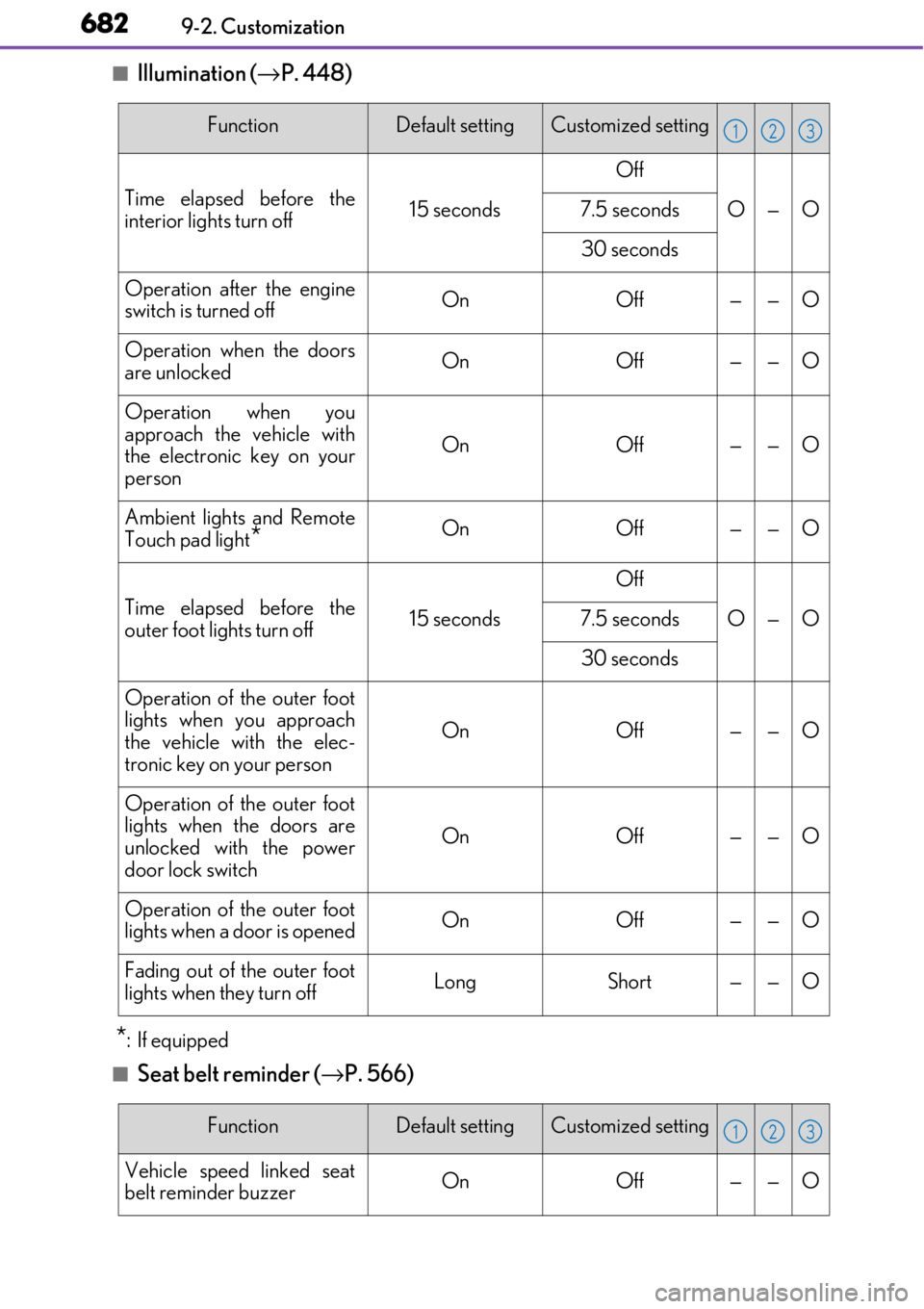
6829-2. Customization
■Illumination (→P. 448)
*:If equipped
■Seat belt reminder ( →P. 566)
FunctionDefault settingCustomized setting
Time elapsed before the
interior lights turn off15 seconds
Off
O—O7.5 seconds
30 seconds
Operation after the engine
switch is turned offOnOff——O
Operation when the doors
are unlockedOnOff——O
Operation when you
approach the vehicle with
the electronic key on your
person
OnOff——O
Ambient lights and Remote
Touch pad light
*OnOff——O
Time elapsed before the
outer foot lights turn off15 seconds
Off
O—O7.5 seconds
30 seconds
Operation of the outer foot
lights when you approach
the vehicle with the elec-
tronic key on your person
OnOff——O
Operation of the outer foot
lights when the doors are
unlocked with the power
door lock switch
OnOff——O
Operation of the outer foot
lights when a door is openedOnOff——O
Fading out of the outer foot
lights when they turn offLongShort——O
123
FunctionDefault settingCustomized setting
Vehicle speed linked seat
belt reminder buzzerOnOff——O
123