alarm LEXUS RC300 2017 User Guide
[x] Cancel search | Manufacturer: LEXUS, Model Year: 2017, Model line: RC300, Model: LEXUS RC300 2017Pages: 724, PDF Size: 15.76 MB
Page 153 of 724
1533-2. Opening, closing and locking the doors and trunk
3
Operation of each component
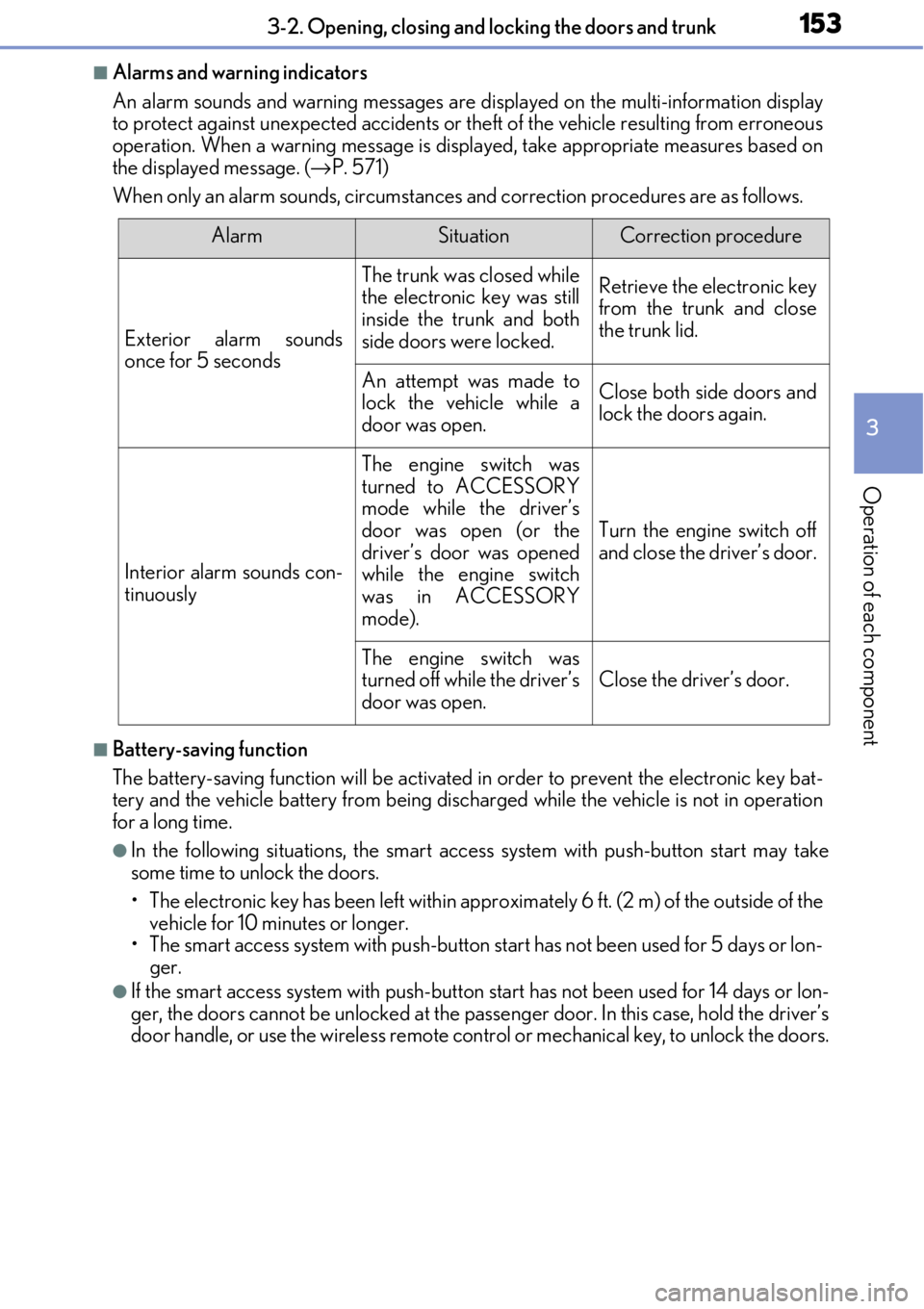
■Alarms and warning indicators
An alarm sounds and warning messages are displayed on the multi-information display
to protect against unexpected accidents or th eft of the vehicle resulting from erroneous
operation. When a warning me ssage is displayed, take appropriate measures based on
the displayed message. ( →P. 571)
When only an alarm sounds, circumstances and correction procedures are as follows.
■Battery-saving function
The battery-saving function w ill be activated in order to prevent the electronic key bat-
tery and the vehicle battery from being discharged while the vehicle is not in operation
for a long time.
●In the following situations, the smart acce ss system with push-button start may take
some time to unlock the doors.
• The electronic key has been left within appr oximately 6 ft. (2 m) of the outside of the
vehicle for 10 minutes or longer.
• The smart access system with push-button start has not been used for 5 days or lon-
ger.
●If the smart access system with push-button start has not been used for 14 days or lon-
ger, the doors cannot be unlocked at the passe nger door. In this case, hold the driver’s
door handle, or use the wireless remote cont rol or mechanical key, to unlock the doors.
AlarmSituationCorrection procedure
Exterior alarm sounds
once for 5 seconds
The trunk was closed while
the electronic key was still
inside the trunk and both
side doors were locked.Retrieve the electronic key
from the trunk and close
the trunk lid.
An attempt was made to
lock the vehicle while a
door was open.Close both side doors and
lock the doors again.
Interior alarm sounds con-
tinuously
The engine switch was
turned to ACCESSORY
mode while the driver’s
door was open (or the
driver’s door was opened
while the engine switch
was in ACCESSORY
mode).
Turn the engine switch off
and close the driver’s door.
The engine switch was
turned off while the driver’s
door was open.
Close the driver’s door.
Page 155 of 724

1553-2. Opening, closing and locking the doors and trunk
3
Operation of each component
■Note for the entry function
●Even when the electronic key is within the effective range (detection areas), the system
may not operate properly in the following cases:
• The electronic key is too close to the window or outside door handle, near the ground, or in a high place when the doors are locked or unlocked.
• The electronic key is near the ground or in a high place, or too close to the rear
bumper center when the trunk is opened.
• The electronic key is on th e instrument panel, rear pack age tray or floor, or in the
door pockets or glove box when the engine is started or engine switch modes are
changed.
●Do not leave the electronic key on top of th e instrument panel or near the door pockets
when exiting the vehicle. Depending on the radio wave reception conditions, it may be
detected by the antenna outside the cabin an d the doors will become lockable from the
outside, possibly trapping the electronic key inside the vehicle.
●As long as the electronic key is within th e effective range, the doors may be locked or
unlocked by anyone. However, only the door s detecting the electronic key can be used
to unlock the vehicle.
●Even if the electronic key is not inside the vehicle, it may be possible to start the engine
if the electronic key is near the window.
●The doors may unlock or lock if a large amou nt of water splashes on the door handle,
such as in the rain or in a car wash, when th e electronic key is within the effective range.
(The doors will automatically be locked af ter approximately 60 seconds if the doors
are not opened and closed.)
●If the wireless remote control is used to lo ck the doors when the electronic key is near
the vehicle, there is a possibility that the d oor may not be unlocked by the entry func-
tion. (Use the wireless remote control to unlock the doors.)
●Touching the door lock or unlock sensor while wearing gloves may prevent lock or
unlock operation.
●When the lock operation is performed using the lock sensor, recognition signals will be
shown up to two consecutive times. After this, no recognition signals will be given.
●If the door handle becomes wet while the el ectronic key is within the effective range,
the door may lock and unlock repeatedly. In this case, follow the following correction
procedures to wash the vehicle:
• Place the electronic key in a location 6 ft. (2 m) or more away from the vehicle. (Take care to ensure that the key is not stolen.)
• Set the electronic key to battery-saving mode to disable the smart access system with push-button start. ( →P. 154)
●If the electronic key is inside the vehicle and a door handle becomes wet during a car
wash, a message may be shown on the mult i-information display and a buzzer will
sound outside the vehicle. To turn of f the alarm, lock both side doors.
●The lock sensor may not work properly if it comes into contact with ice, snow, mud, etc.
Clean the lock sensor and attempt to operate it again.
●A sudden handle operation or a handle operation immediately after entering the effec-
tive range may prevent the doors from bein g unlocked. Touch the door unlock sensor
and check that the doors are unlocked before pulling the door handle again.
●Unlocking the vehicle may take more time if another electronic key is within the effec-
tive range.
Page 156 of 724

1563-2. Opening, closing and locking the doors and trunk
■When the vehicle is not driven for extended periods
●To prevent theft of the vehicle, do not leave the electronic key within 6 ft. (2 m) of the
vehicle.
●The smart access system wi th push-button start can be deactivated in advance.
( → P. 673)
■To operate the system properly
●Make sure to carry the electr onic key when operating the system. Do not get the elec-
tronic key too close to the vehicle when operating the system from the outside of the
vehicle.
Depending on the position and holding condit ion of the electronic key, the key may not
be detected correctly and the system may no t operate properly. (The alarm may go off
accidentally, or the door lock prev ention function may not operate.)
●Do not leave the electronic key inside the trunk.
The key confinement prevention function ma y not operate, depending on the location
of the key (close to a spare tire [if equipped], the inside edge of the trunk), conditions
(inside a metal bag, close to metallic obje cts) and the radio waves in the surrounding
area. ( →P. 149)
■If the smart access system with push-button start does not operate properly
●Locking and unlocking the d oors and opening the trunk: →P. 622
●Starting the engine: →P. 624
■Customization
Settings (e. g. smart access system with push-button start) can be changed.
(Customizable features: →P. 673)
■If the smart access system with push-button start has been deactivated in a customized
setting
●Locking and unlocking the d oors and opening the trunk:
Use the wireless remote cont rol or mechanical key. (→P. 141, 147, 622)
●Starting the engine and changing engine switch modes: →P. 624
●Stopping the engine: →P. 207
Page 312 of 724

3124-5. Using the driving support systems
WARNING
■Cautions regarding the assist contents of the system
By means of alarms and brake control, the pre-collision system is intended to assist the
driver in avoiding collisions through the process of LOOK-JUDGE-ACT. There are
limits to the degree of assistance the system can provide, so please keep in mind the
following important points.
●Assisting the driver in watching the road
The pre-collision system is only able to detect obstacles directly in front of the vehicle,
and only within a limited range. It is not a mechanism that allows careless or inatten-
tive driving, and it is not a system that can assist the driver in low- visibility conditions. It
is still necessary for the driver to pay cl ose attention to the vehicle’s surroundings.
●Assisting the driver in making correct judgment
When attempting to estimate the possibility of a collis ion, the only data available to
the pre-collision system is that from obstacles it has detected directly in front of the
vehicle. Therefore, it is absolutely necessa ry for the driver to remain vigilant and to
determine whether or not there is a possib ility of collision in any given situation.
●Assisting the driver in taking action
The pre-collision brake assist function of th e pre-collision system is designed to help
reduce the severity of a collision, and will only operate when the system determines
that a collision is unavoidable. This system is not capable of automatically avoiding a
collision or bringing the vehicle to a stop safely without appropriate operations per-
formed by the driver. For this reason, when encountering a dangerous situation the
driver must take direct and immediate action in order to ensure the safety of all
involved.
Page 626 of 724
6268-2. Steps to take in an emergency
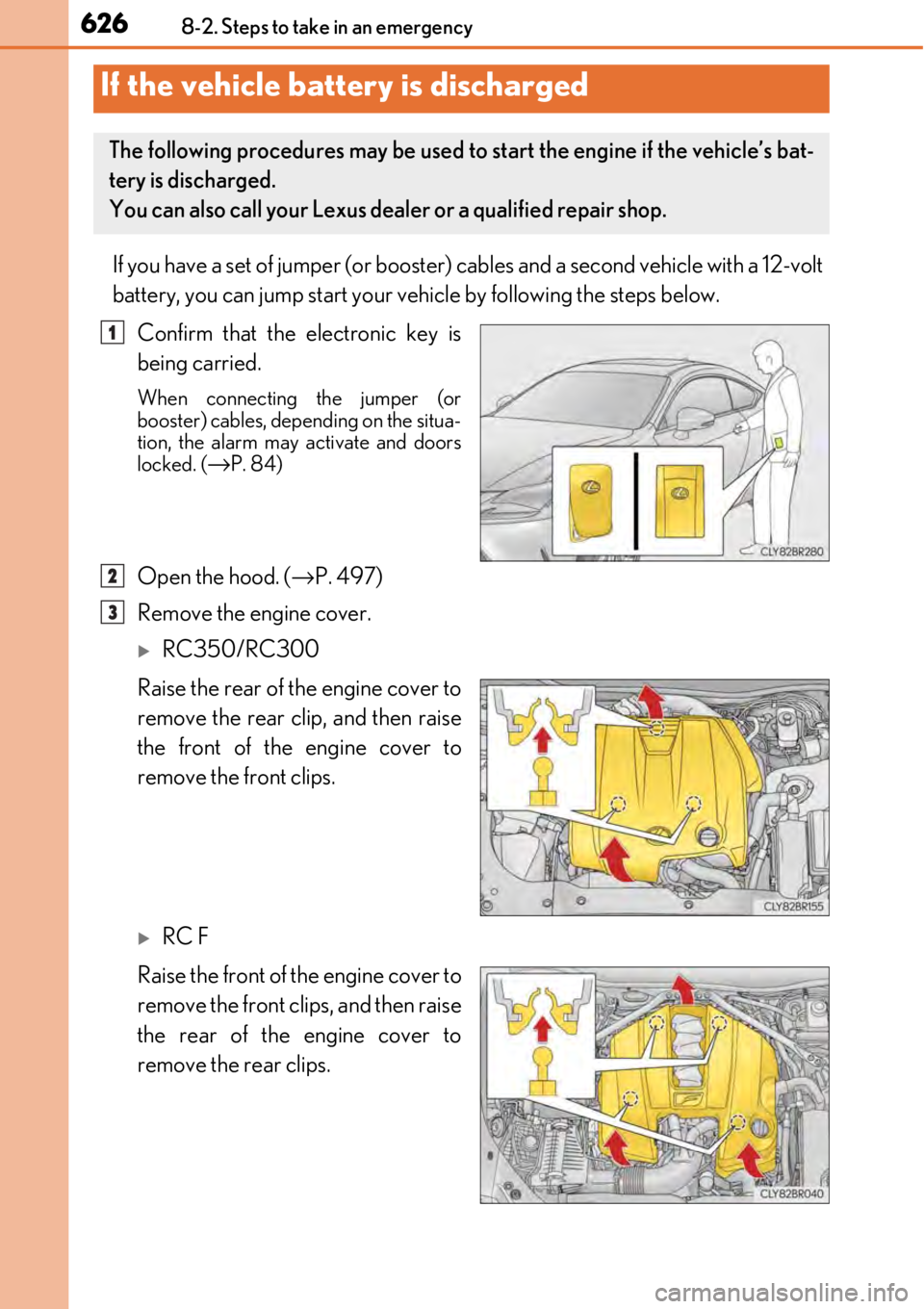
If you have a set of jumper (or booster) cables and a second vehicle with a 12-volt
battery, you can jump start your vehicle by following the steps below.
Confirm that the electronic key is
being carried.
When connecting the jumper (or
booster) cables, depending on the situa-
tion, the alarm may activate and doors
locked. (
→P. 84)
Open the hood. ( →P. 497)
Remove the engine cover.
RC350/RC300
Raise the rear of the engine cover to
remove the rear clip, and then raise
the front of the engine cover to
remove the front clips.
RC F
Raise the front of the engine cover to
remove the front clips, and then raise
the rear of the engine cover to
remove the rear clips.
If the vehicle battery is discharged
The following procedures may be used to start the engine if the vehicle’s bat-
tery is discharged.
You can also call your Lexus deal er or a qualified repair shop.
1
2
3
Page 678 of 724
6789-2. Customization
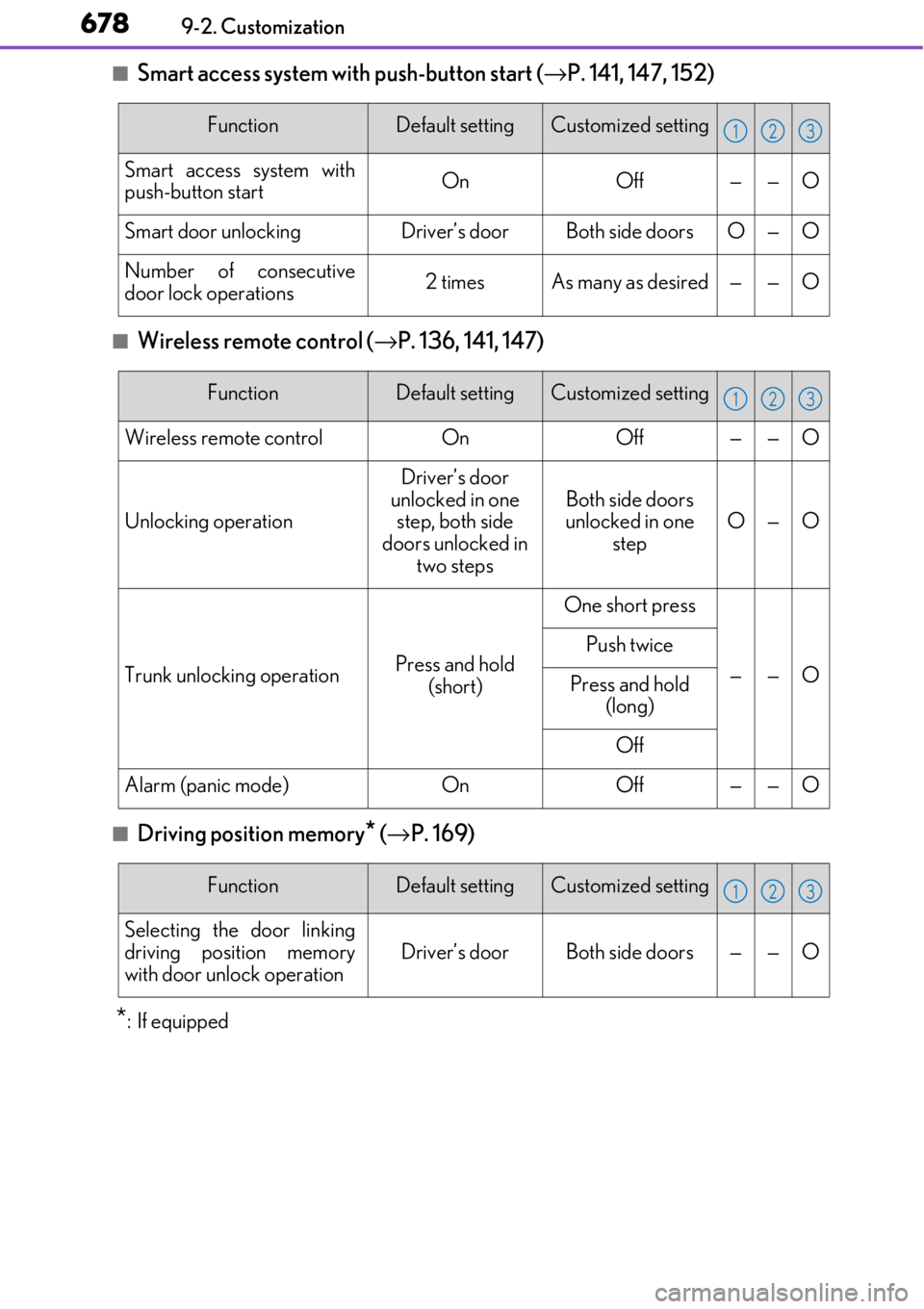
■Smart access system with push-button start (→P. 141, 147, 152)
■Wireless remote control ( →P. 136, 141, 147)
■Driving position memory* (→ P. 169)
*:If equipped
FunctionDefault settingCustomized setting
Smart access system with
push-button startOnOff——O
Smart door unlockingDriver’s doorBoth side doorsO—O
Number of consecutive
door lock operations2 timesAs many as desired——O
123
FunctionDefault settingCustomized setting
Wireless remote controlOnOff——O
Unlocking operation
Driver’s door
unlocked in one step, both side
doors unlocked in two steps
Both side doors
unlocked in one
stepO—O
Trunk unlocking operationPress and hold (short)
One short press
——O
Push twice
Press and hold (long)
Off
Alarm (panic mode)OnOff——O
123
FunctionDefault settingCustomized setting
Selecting the door linking
driving position memory
with door unlock operation
Driver’s doorBoth side doors——O
123
Page 700 of 724

700What to do if... (Troubleshooting)
●The seat belt reminder light is flashing
Are the driver and the front passenger wearing the seat belts? (→P. 566)
●The parking brake indicator is on
Is the parking brake released? ( →P. 221)
Depending on the situation, other types of warning buzzer may also sound.
(→ P. 565, 571)
●Did anyone inside the vehicle open a door during setting the alarm?
The sensor detects it and the alarm sounds. (→ P. 83)
Do one of the following to de activate or stop the alarms:
• Unlock the doors or open the trunk.
• Turn the engine switch to ACCESSORY or IGNITION ON mode, or start the
engine.
●Is the electronic key left inside the vehicle or the moon roof opened?
Check the message on the multi-information display. (→ P. 571)
●When a warning light turns on or a warning message is displayed, refer to
P. 565, 571.A warning buzzer sounds during driving
An alarm is activated and the horn sounds
A warning buzzer sounds when leaving the vehicle
A warning light turns on or a warning message is displayed
Page 703 of 724

703Alphabetical index
Alarm ............................................................ 83
Anchor brackets ...................................... 60
Antennas (smart access system with push-button start) ......................152
Anti-lock Brake System (ABS)....... 298 Warning light ...................................... 565
Approach warning............................... 254
Armrest .................................................... 457
ASC (Active Sound Control)....... 222, 223
Assist grip ................................................ 459
Audio input.............................................. 347
Audio system.......................................... 338 Audio input............................................ 347
AUX port/USB port........................ 347
Bluetooth
® audio.............................. 395
CD player ............................................. 369
iPod ...........................................................376
MP3/WMA/AAC disc ................ 369
Optimal use ......................................... 356
Portable music player ..................... 384
Radio ........................................................363
Steering wheel audio switch ........344
USB memory ...................................... 380 Automatic headlight leveling
system .....................................................226 Warning light .......................................566
Automatic High Beam ........................ 227
Automatic light control system .......224
Automatic transmission....................... 213 If the shift lever cannot be shifted from P ..............218
M mode .................................................... 216
Paddle shift switches............... 215, 216
AUX port .................................................347
Average fuel economy ................. 112, 119
Average vehicle speed................. 112, 119
Page 719 of 724
719Alphabetical index
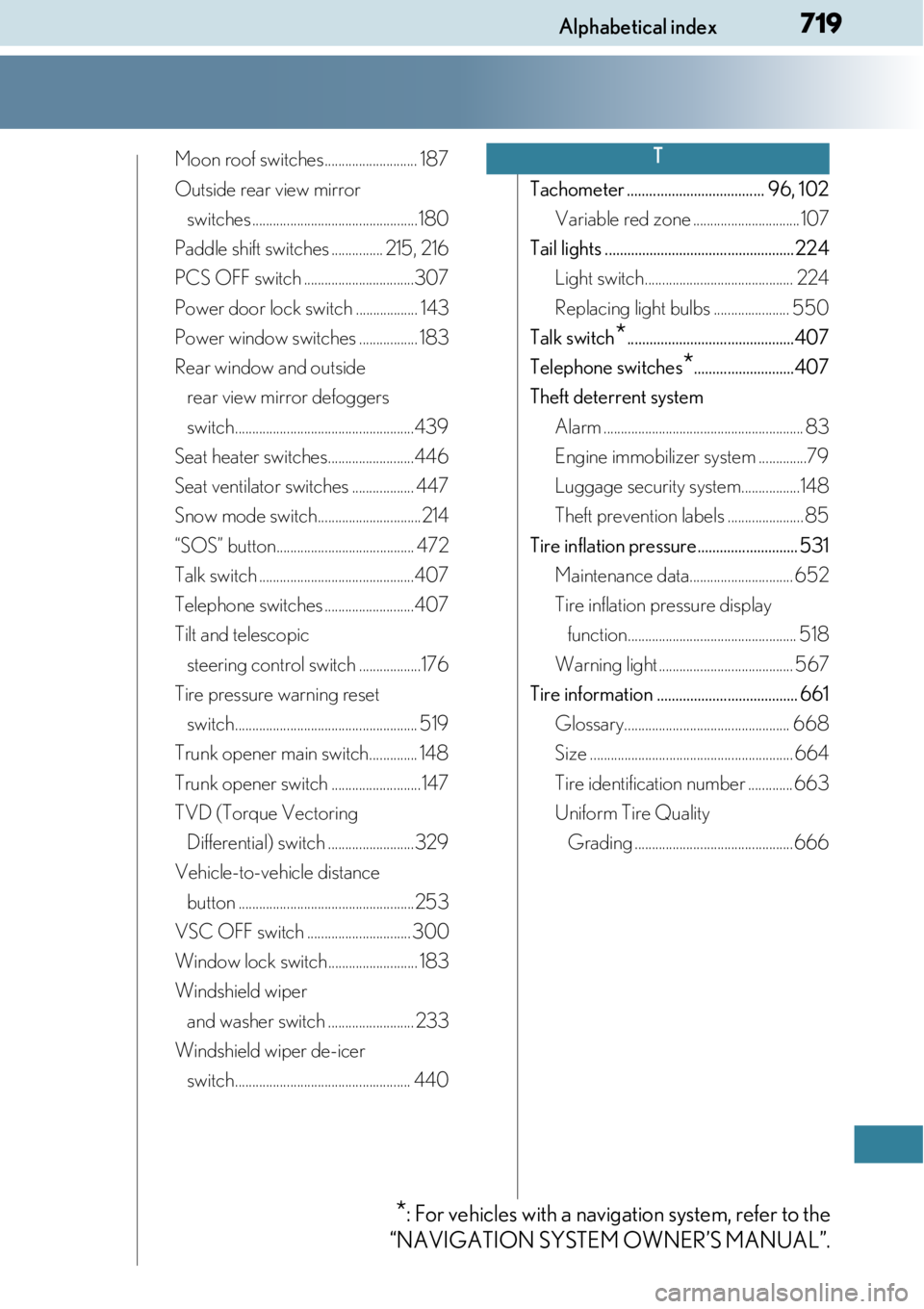
Moon roof switches........................... 187
Outside rear view mirror switches ................................................180
Paddle shift switches ............... 215, 216
PCS OFF switch ................................307
Power door lock switch .................. 143
Power window switches ................. 183
Rear window and outside rear view mirror defoggers
switch....................................................439
Seat heater switches.........................446
Seat ventilator switches .................. 447
Snow mode switch..............................214
“SOS” button........................................ 472
Talk switch .............................................407
Telephone switches ..........................407
Tilt and telescopic steering control switch ..................176
Tire pressure warning reset switch..................................................... 519
Trunk opener main switch.............. 148
Trunk opener switch ..........................147
TVD (Torque Vectoring Differential) switch .........................329
Vehicle-to-vehicle distance button ...................................................253
VSC OFF switch .............................. 300
Window lock switch.......................... 183
Windshield wiper and washer switch ......................... 233
Windshield wiper de-icer switch................................................... 440 Tachometer ..................................... 96, 102
Variable red zone ...............................107
Tail lights ...................................................224 Light switch........................................... 224
Replacing light bulbs ...................... 550
Talk switch
*.............................................407
Telephone switches
*...........................407
Theft deterrent system Alarm .......................................................... 83
Engine immobilizer system ..............79
Luggage security system.................148
Theft prevention labels ...................... 85
Tire inflation pressure........................... 531 Maintenance data.............................. 652
Tire inflation pressure display function................................................. 518
Warning light ....................................... 567
Tire information ...................................... 661 Glossary................................................ 668
Size ........................................................... 664
Tire identification number ............. 663
Uniform Tire Quality Grading ..............................................666
T
*: For vehicles with a naviga tion system, refer to the
“NAVIGATION SYSTEM OWNER’S MANUAL”.