turn signal LEXUS RC300 2018 User Guide
[x] Cancel search | Manufacturer: LEXUS, Model Year: 2018, Model line: RC300, Model: LEXUS RC300 2018Pages: 636, PDF Size: 6.88 MB
Page 230 of 636

230 4-3. Operating the lights and wipers
RC350_RC300 AWD_RC3 00_RC F_U(OM24748U)■
Conditions to turn the high beams on/off automatically●
When all of the following conditions are met, the high beams will be turned on automat-
ically (after approximately 1 second):
• The vehicle speed is approximately 21 mph (34 km/h) or more.
• The area ahead of the vehicle is dark.
• There are no vehicles ahead with headlights or tail lights turned on.
• There are few streetlights on the road ahead. ●
If any of the following condit ions is met, the high beams will turn off automatically:
• The vehicle speed is below ap proximately 17 mph (27 km/h).
• The area ahead of the vehicle is not dark.
• Vehicles ahead have th eir headlights or tail lights turned on.
• There are many streetlights on the road ahead. ■
Camera sensor detection information ●
The high beams may not be automatically turned off in the following situations:
• When a vehicle suddenly appears from around a curve
• When the vehicle is cut in front of by another vehicle
• When vehicles ahead cannot be detected du e to repeated curves , road dividers or
roadside trees
• When vehicles ahead appear in a faraway lane on a wide road
• When the lights of vehicles ahead are not on ●
The high beams may be turned off if a vehicl e ahead that is using fog lights without its
headlights turned on is detected. ●
House lights, street lights, traffic signals, and illuminated billboards or signs and other
reflective objects may cause the high beams to change to the low beams, or the low
beams to remain on. ●
The following factors may affect the amount of time taken for the high beams to turn on
or off:
• The brightness of the headlights, fog lights, and tail lights of vehicles ahead
• The movement and direction of vehicles ahead
• When a vehicle ahead only has operational lights on one side
• When a vehicle ahead is a two-wheeled vehicle
• The condition of the road (gradient, cu rve, condition of the road surface, etc.)
• The number of passengers and amount of luggage in the vehicle ●
The high beams may turn on or off unexpectedly.
Page 266 of 636

266 4-5. Using the driving support systems
RC350_RC300 AWD_RC3 00_RC F_U(OM24748U)■
Operation conditions of each function ●
Lane departure alert function
This function operates when all of the following conditions are met.
• LDA is turned on.
• Vehicle speed is approximatel y 32 mph (50 km/h) or more.
• System recognizes white (yellow) lines.
• Width of traffic lane is approx imately 9.8 ft. (3 m) or more.
• Turn signal lever is not operated.
• Vehicle is driven on a stra ight road or around a gentle curve with a radius of more
than approximately 492 ft. (150 m).
• No system malfunctions are detected. ( P. 453)●
Steering control function
This function operates when all of the follo wing conditions are met in addition to the
operation conditions for the lane departure alert function.
• Setting for Steering Assist in of th e multi-information display is set to On.
( P. 111)
• Vehicle is not accelerated or dece lerated by a fixed amount or more.
• Steering wheel is not operated with a steering force level suitable for changing
lanes.
• ABS, VSC, TRAC and PCS are not operating.
• TRAC or VSC is not turned off.
• Hands off steering wheel alert is not displayed. ( P. 266)●
Vehicle sway warning function
This function operates when all of the following conditions are met.
• Setting for Sway Warning in of the multi-information display is set to On.
( P. 111)
• Vehicle speed is approximatel y 32 mph (50 km/h) or more.
• Width of traffic lane is approx imately 9.8 ft. (3 m) or more.
• No system malfunctions are detected. ( P. 453)■
Temporary cancellation of functions
When operation conditions are no longer met, a function may be temporarily canceled.
However, when the operation co nditions are met again, operat ion of the function is auto-
matically restored. ( P. 266)■
Steering control function
Depending on the vehicle speed, lane depart ure situation, road conditions, etc., the
driver may not feel the function is operat ing or the function may not operate at all.■
Lane departure alert function
The warning buzzer may be difficult to hear due to external noise, audio playback, etc.
Also, it may be difficult to f eel steering wheel vibrations due to the road conditions, etc.■
Hands off steering wheel alert
When the system determines that the driver has removed the hands from the steering
wheel while the steering control function is operating, a warning message is displayed on
the multi-information display.
If the driver continues to keep the hands of f of the steering wheel, a warning message is
displayed and the function is temporarily canc eled. This alert also operates in the same
way when the driver continuously operates the steering wheel only a small amount.
However, depending on the road conditions, etc., the function may not cancel.
Page 291 of 636
2914-5. Using the driving support systems
4
Driving
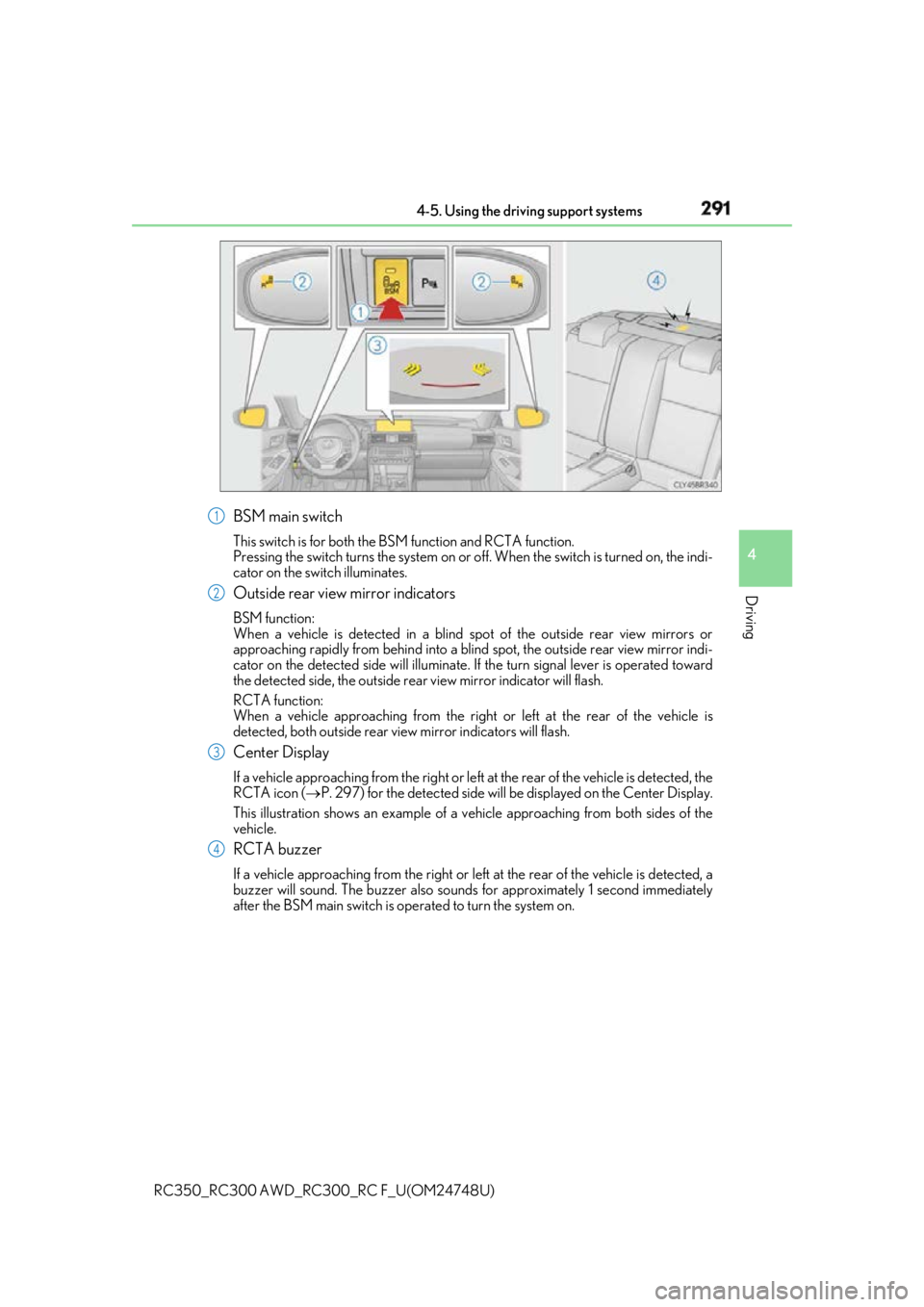
RC350_RC300 AWD_RC3 00_RC F_U(OM24748U)BSM main switch This switch is for both the BS M function and RCTA function.
Pressing the switch turns the system on or of f. When the switch is turned on, the indi-
cator on the switch illuminates.
Outside rear view mirror indicators BSM function:
When a vehicle is detected in a blind spot of the outside rear view mirrors or
approaching rapidly from behind into a blin d spot, the outside rear view mirror indi-
cator on the detected side will illuminate. If the turn signal lever is operated toward
the detected side, the outside rear view mirror indicator will flash.
RCTA function:
When a vehicle approaching from the right or left at the rear of the vehicle is
detected, both outsid e rear view mirror indicators will flash.
Center Display If a vehicle approaching from the right or left at the rear of the vehicle is detected, the
RCTA icon ( P. 297) for the detected side will be displayed on the Center Display.
This illustration shows an example of a ve hicle approaching from both sides of the
vehicle.
RCTA buzzer If a vehicle approaching from the right or left at the rear of the vehicle is detected, a
buzzer will sound. The buzzer also sounds for approximately 1 second immediately
after the BSM main switch is operated to turn the system on. 1
2
3
4
Page 364 of 636
364 5-4. Using the other interior features
RC350_RC300 AWD_RC3 00_RC F_U(OM24748U)Press the appropriate HomeLink ®
button. The HomeLink ®
indicator light
should turn on.
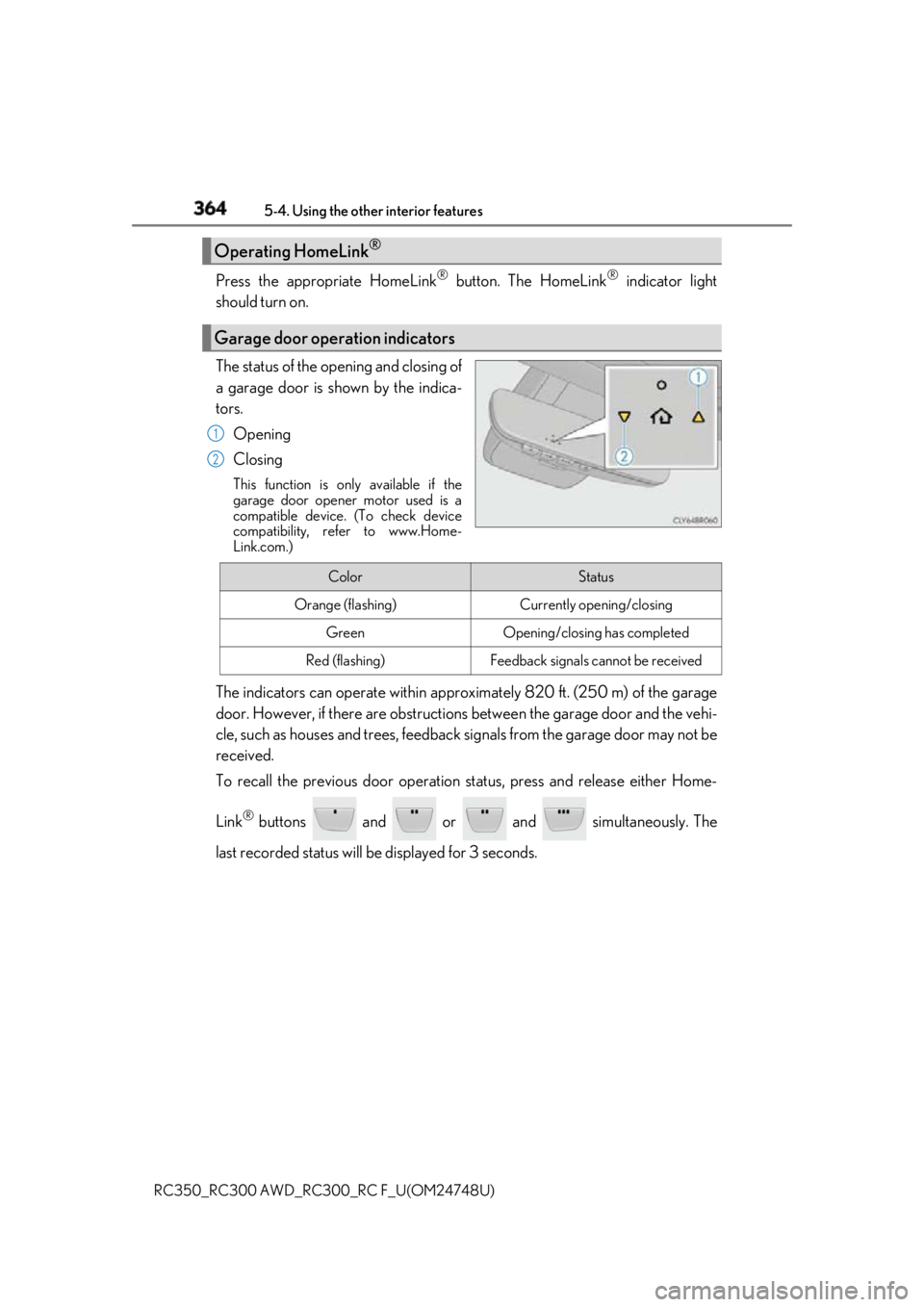
The status of the opening and closing of
a garage door is shown by the indica-
tors.
Opening
Closing This function is only available if the
garage door opener motor used is a
compatible device. (To check device
compatibility, refer to www.Home-
Link.com.)
The indicators can operate wi thin approximately 820 ft. (250 m) of the garage
door. However, if there are obstructions between the garage door and the vehi-
cle, such as houses and trees, feedback signals from the garage door may not be
received.
To recall the previous door operation status, press and release either Home-
Link ®
buttons and or and simultaneously. The
last recorded status will be displayed for 3 seconds.Operating HomeLink ®
Garage door operation indicators 1
2
Color Status
Orange (flashing) Currently opening/closing
Green Opening/closing has completed
Red (flashing) Feedback signals cannot be received
Page 417 of 636

4176-3. Do-it-yourself maintenance
RC350_RC300 AWD_RC3 00_RC F_U(OM24748U) 6
Maintenance and care ■
Situations in which the tire pressure warning system may not operate properly ●
In the following cases, the tire pressure warning system may not operate properly.
• If non-genuine Lexus wheels are used.
• A tire has been replaced with a tire that is not an OE (Original Equipment) tire.
• A tire has been replaced with a tire that is not of the specified size.
• Tire chains etc. are equipped.
• An auxiliary-supported run-flat tire is equipped.
• If a window tint that affects th e radio wave signals is installed.
• If there is a lot of snow or ice on the vehi cle, particularly around the wheels or wheel
housings.
• If the tire inflation pressure is extr emely higher than the specified level.
• If tires not equipped with tire pressure warning valves and tr ansmitters are used.
• If the ID code on the tire pressure warning valves and transmitters is not registered
in the tire pressure warning computer. ●
Performance may be affected in the following situations.
• Near a TV tower, electric power plant, gas station, radio station, large display, air-
port or other facility that generates st rong radio waves or electrical noise
• When carrying a portable radio, cellular phone, cordless phon e or other wireless
communication device
If tire position information is not correctly displayed due to the radio wave conditions,
the display may be corrected by driving and changing the radio wave conditions. ●
When the vehicle is parked, the time taken for the warning to start or go off could be
extended. ●
When tire inflation pressure declines rapidly for example when a tire has burst, the
warning may not function. ■
The initialization operation ●
Make sure to carry out initialization afte r adjusting the tire inflation pressure.
Also, make sure the tires are cold before carryi ng out initialization or tire inflation pres-
sure adjustment. ●
If you have accidentally turned the engine swit ch off during initialization, it is not neces-
sary to press the reset switch again as initialization will re start automatically when the
engine switch has been turned to IG NITION ON mode for the next time.●
If you accidentally press the re set switch when initialization is not necessary, adjust the
tire inflation pressure to the specified leve l when the tires are co ld, and conduct initial-
ization again. ■
When initialization of the tire pressure warning system has failed
Initialization can be completed in a few minutes. However, in the following cases, the set-
tings have not been recorded and the system will not operate properly. If repeated
attempts to record tire inflation pressure settings are unsuccessful, have the vehicle
inspected by your Lexus dealer. ●
When operating the tire pres sure warning reset switch, th e tire pressure warning light
does not blink 3 times. ●
After carrying out the initializat ion procedure, the tire pressu re warning light blinks for 1
minute then stays on after driving for 20 minutes.
Page 433 of 636
4336-3. Do-it-yourself maintenance
RC350_RC300 AWD_RC3 00_RC F_U(OM24748U) 6
Maintenance and care ■
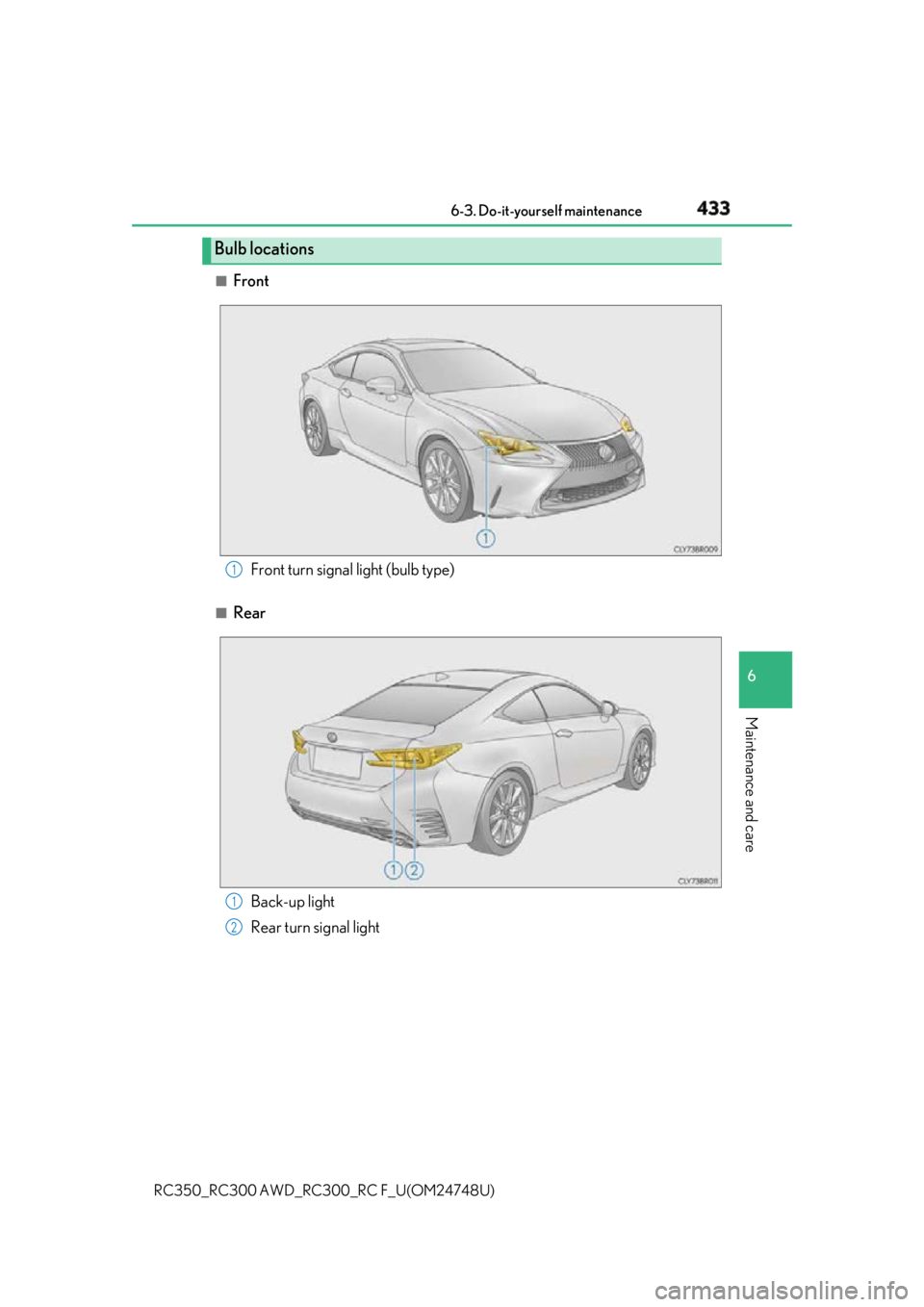
Front
■
RearBulb locations
Front turn signal light (bulb type) 1
Back-up light
Rear turn signal light 1
2
Page 434 of 636
434 6-3. Do-it-yourself maintenance
RC350_RC300 AWD_RC3 00_RC F_U(OM24748U)■
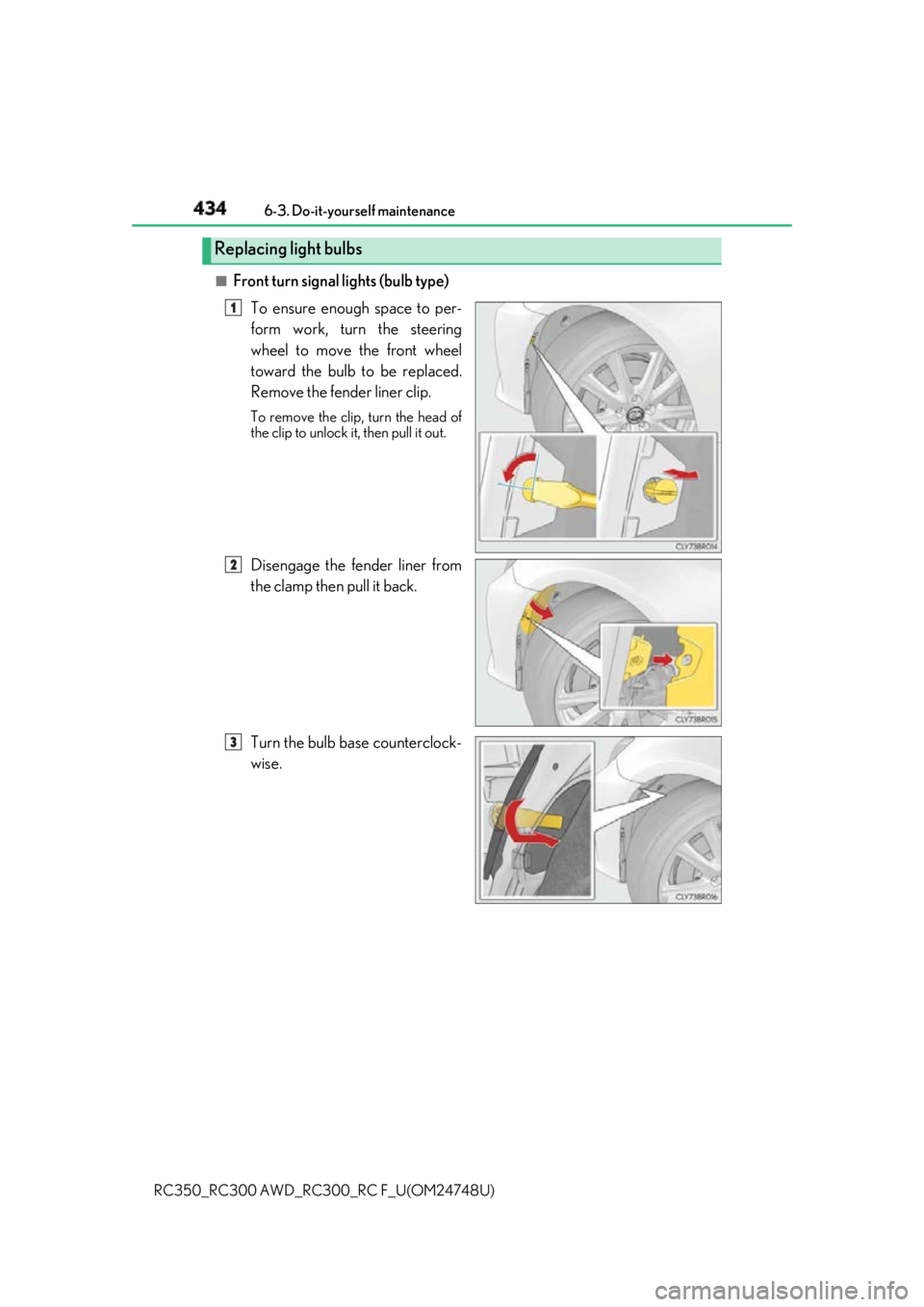
Front turn signal lights (bulb type)
To ensure enough space to per-
form work, turn the steering
wheel to move the front wheel
toward the bulb to be replaced.
Remove the fender liner clip. To remove the clip , turn the head of
the clip to unlock it, then pull it out.
Disengage the fender liner from
the clamp then pull it back.
Turn the bulb base counterclock-
wise.Replacing light bulbs 1
2
3
Page 435 of 636
4356-3. Do-it-yourself maintenance
RC350_RC300 AWD_RC3 00_RC F_U(OM24748U) 6
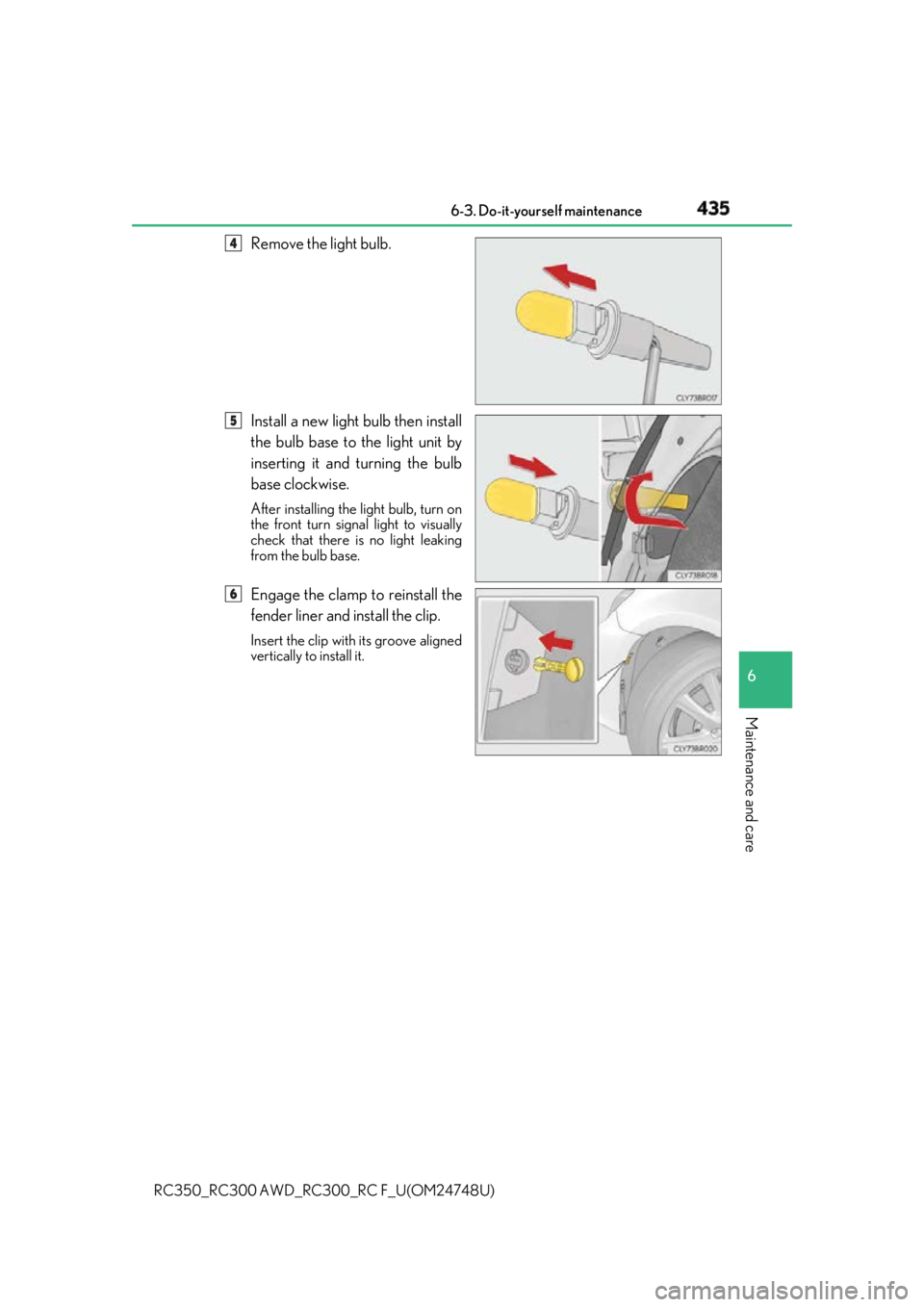
Maintenance and care Remove the light bulb.
Install a new light bulb then install
the bulb base to the light unit by
inserting it and turning the bulb
base clockwise. After installing the light bulb, turn on
the front turn signal light to visually
check that there is no light leaking
from the bulb base.
Engage the clamp to reinstall the
fender liner and install the clip. Insert the clip with its groove aligned
vertically to install it. 4
5
6
Page 436 of 636
436 6-3. Do-it-yourself maintenance
RC350_RC300 AWD_RC3 00_RC F_U(OM24748U)■
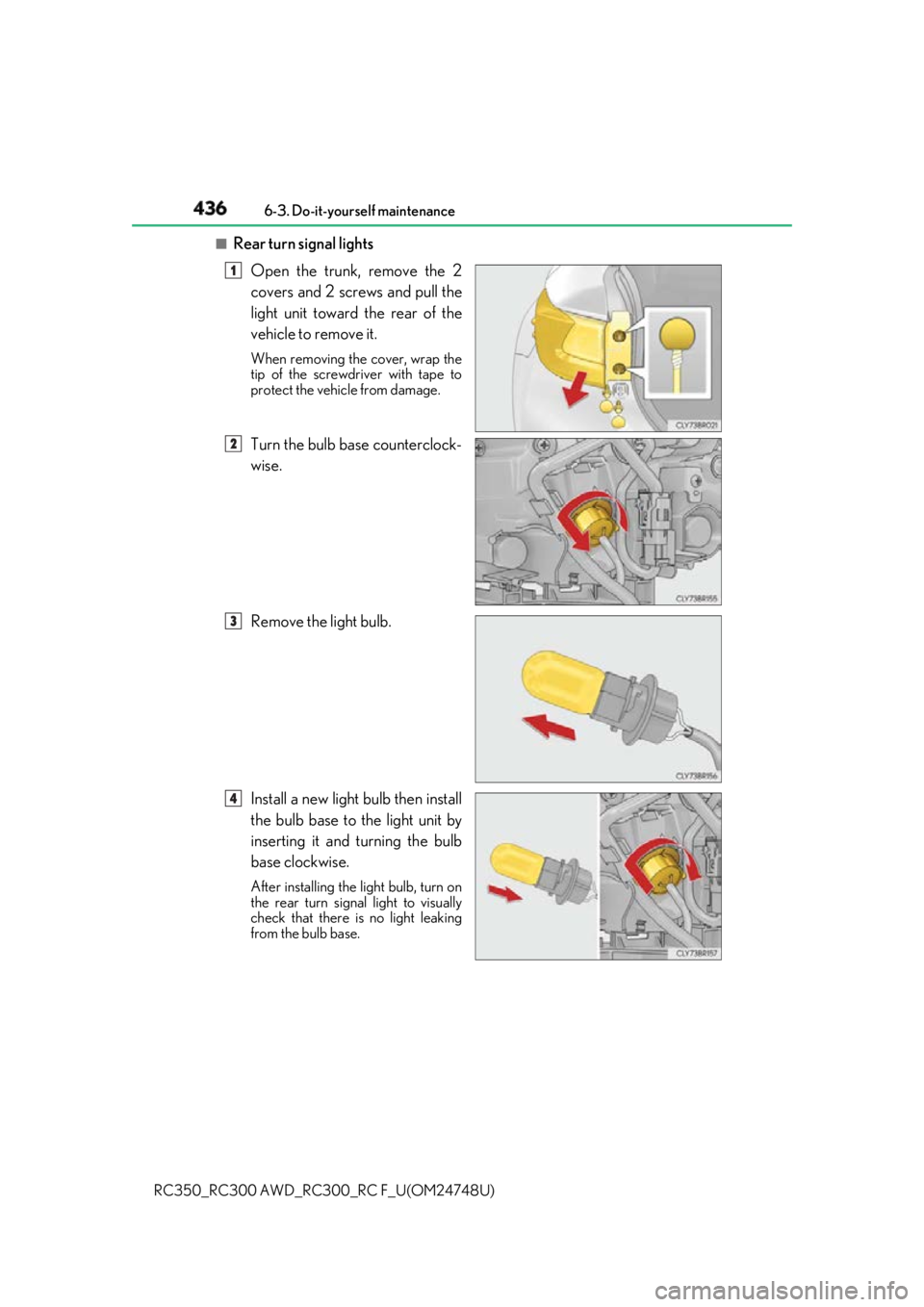
Rear turn signal lights
Open the trunk, remove the 2
covers and 2 screws and pull the
light unit toward the rear of the
vehicle to remove it. When removing the cover, wrap the
tip of the screwdriver with tape to
protect the vehicle from damage.
Turn the bulb base counterclock-
wise.
Remove the light bulb.
Install a new light bulb then install
the bulb base to the light unit by
inserting it and turning the bulb
base clockwise. After installing the light bulb, turn on
the rear turn signal light to visually
check that there is no light leaking
from the bulb base. 1
2
3
4
Page 439 of 636

4396-3. Do-it-yourself maintenance
RC350_RC300 AWD_RC3 00_RC F_U(OM24748U) 6
Maintenance and care ■
Replacing the following bulbs
If any of the lights listed below has burnt out, have it replaced by your Lexus
dealer. ●
Headlights ●
Parking lights and daytime running lights ●
Front turn signal lights (LED type) ●
Front fog lights (if equipped) ●
Side marker lights ●
Side turn signal lights ●
Stop/tail lights ●
Stop lights ●
High mounted stoplight ●
License plate lights ■
LED lights
The lights other than the front turn signal ligh ts (bulb type), rear turn signal lights and
back-up lights each consist of a number of LEDs. If any of the LEDs burn out, take your
vehicle to your Lexus dealer to have the light replaced. ■
Condensation build-up on the inside of the lens
Temporary condensation build-up on the inside of the headlight lens does not indicate a
malfunction. Contact your Lexus dealer for mo re information in the following situations:●
Large drops of water have built up on the inside of the lens. ●
Water has built up inside the headlight. ■
When replacing light bulbs
P. 431