flat LEXUS RC300 2019 User Guide
[x] Cancel search | Manufacturer: LEXUS, Model Year: 2019, Model line: RC300, Model: LEXUS RC300 2019Pages: 390, PDF Size: 7.88 MB
Page 43 of 390
431-1. For safe use
RC350AWD_RC350_RC300AWD_RC30
0_OM_(U)_1810
1
For safety and security
tion
Raise the seat to the highest position
If the head restraint interferes with
the installation of the child restraint
system, and the head restraint can
be removed, remove the head
restraint
WARNING
■When installing a child restraint sys-
tem
Observe the following when installing
child restraint system to the front passen-
ger seat if it is unavoidable. The front pas-
senger SRS airbag inflates with
considerable speed and force that if not
observed may lead to death or serious
injury to the child.
●Never install a rear-facing child
restraint system on the front passenger
seat even if the “AIR BAG OFF” indi-
cator light is illuminated. In the event of
an accident, the force of the rapid infla-
tion of the front passenger airbag can
cause death or serious injury to the
child if the rear-facing child restraint
system is installed on the front passen-
ger seat.
●A forward-facing child restraint system
may be installed on the front passen-
ger seat only when it is unavoidable. A
child restraint system that requires a
top tether strap should not be used in
the front passenger seat since there is
no top tether strap anchor for the front
passenger seat.
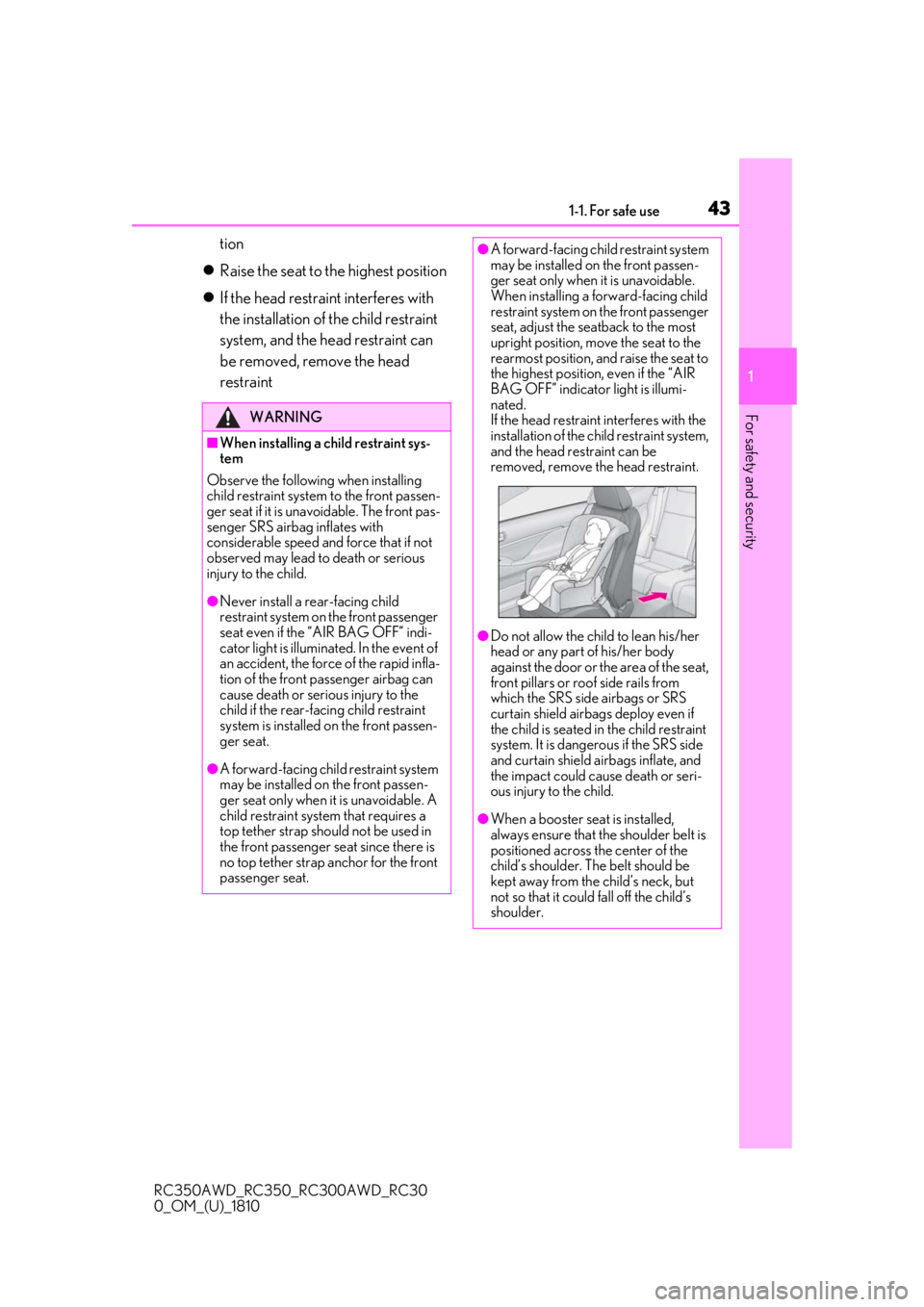
●A forward-facing child restraint system
may be installed on the front passen-
ger seat only when it is unavoidable.
When installing a forward-facing child
restraint system on the front passenger
seat, adjust the seatback to the most
upright position, move the seat to the
rearmost position, and raise the seat to
the highest position, even if the “AIR
BAG OFF” indicator light is illumi-
nated.
If the head restraint interferes with the
installation of the ch ild restraint system,
and the head restraint can be
removed, remove the head restraint.
●Do not allow the child to lean his/her
head or any part of his/her body
against the door or th e area of the seat,
front pillars or roof side rails from
which the SRS side airbags or SRS
curtain shield airbags deploy even if
the child is seated in the child restraint
system. It is dangerous if the SRS side
and curtain shield airbags inflate, and
the impact could cause death or seri-
ous injury to the child.
●When a booster seat is installed,
always ensure that th e shoulder belt is
positioned across the center of the
child’s shoulder. The belt should be
kept away from the child’s neck, but
not so that it could fall off the child’s
shoulder.
Page 44 of 390
441-1. For safe use
RC350AWD_RC350_RC300AWD_RC30
0_OM_(U)_1810
A child restraint system for a small
child or baby must itself be properly
restrained on the seat with the lap por-tion of the lap/shoulder belt.
■Installing child restraint system
using a seat belt (child restraint
lock function belt)
Install the child restraint system in
accordance to the operation manual
enclosed with the child restraint sys-
tem.
■Rear-facing Infant seat/convert-
ible seat
1
When using the front seat: Adjust
the seatback
If there is gap between the child seat and
the seatback, adjust the seatback until
good contact is achieved.
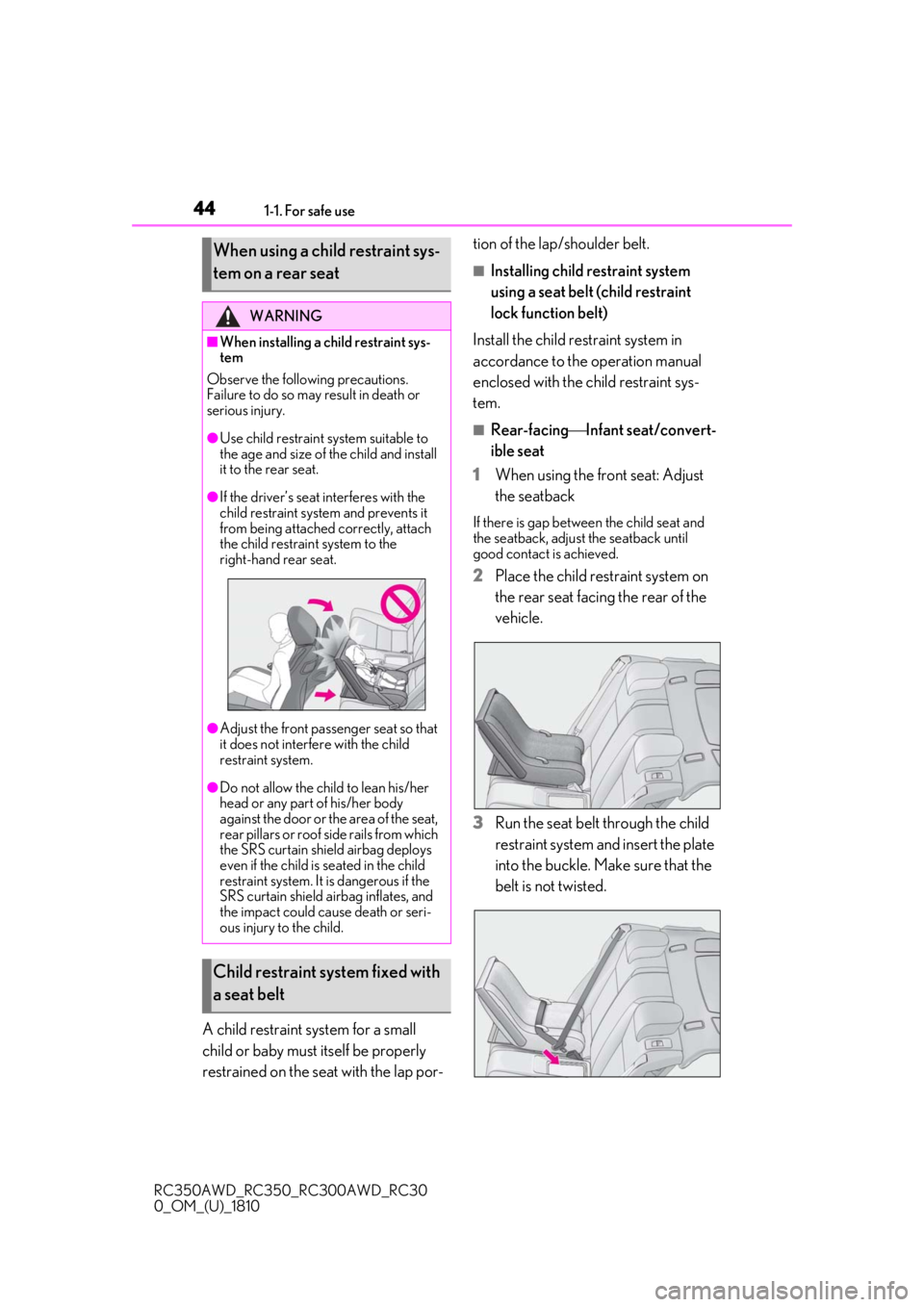
2Place the child restraint system on
the rear seat facing the rear of the
vehicle.
3
Run the seat belt through the child
restraint system and insert the plate
into the buckle. Make sure that the
belt is not twisted.
When using a child restraint sys-
tem on a rear seat
WARNING
■When installing a child restraint sys-
tem
Observe the following precautions.
Failure to do so may result in death or
serious injury.
●Use child restraint system suitable to
the age and size of the child and install
it to the rear seat.
●If the driver’s seat interferes with the
child restraint system and prevents it
from being attached correctly, attach
the child restraint system to the
right-hand rear seat.
●Adjust the front passenger seat so that
it does not interfere with the child
restraint system.
●Do not allow the child to lean his/her
head or any part of his/her body
against the door or the area of the seat,
rear pillars or roof side rails from which
the SRS curtain shie ld airbag deploys
even if the child is seated in the child
restraint system. It is dangerous if the
SRS curtain shield airbag inflates, and
the impact could cause death or seri-
ous injury to the child.
Child restraint system fixed with
a seat belt
Page 55 of 390
551-2. LEXUS Enform
RC350AWD_RC350_RC300AWD_RC30
0_OM_(U)_1810
1
For safety and security
Connect service not active
■Automatic Collision Notification
In case of either airbag deployment or
severe rear-end collision, the system is
designed to automatically call the
response center. The responding agent
receives the vehicle’s location and
attempts to speak with the vehicle
occupants to assess the level of emer-
gency. If the occupants are unable to
communicate, the ag ent automatically
treats the call as an emergency, con-
tacts the nearest emergency services
provider to describe the situation, and
requests that assistance be sent to the
location.
■Stolen Vehicle Location
If your vehicle is stolen, Safety Connect
can work with local authorities to assist
them in locating and recovering the
vehicle. After filing a police report, call
the Safety Connect response center at
1-800-25-LEXUS
(1-800-255-3987) in the United
States, 1-877-539-8777 in Puerto
Rico or 1-800-265- 3987 in Canada,
and follow the prompts for Safety Con-
nect to initiate this service.
In addition to assisting law enforce-
ment with recovery of a stolen vehicle,
Safety-Connect-equipped vehicle
location data may, under certain cir-
cumstances, be shared with third par-
ties to locate your vehicle. Further
information is available at Lexus.com.
■Emergency Assistance Button
(“SOS”)
In the event of an emergency on the
road, push the “SOS” button to reach
the Safety Connect response center.
The answering agent will determine
your vehicle’s location, assess the
emergency, and dispatch the neces-
sary assistance required.
If you accidentally press the “SOS” button,
tell the response-center agent that you are
not experiencing an emergency.
■Enhanced Roadside Assistance
Enhanced Roadside Assistance adds
GPS data to the already included war-
ranty-based Lexus roadside service.
Subscribers can press the “SOS” but-
ton to reach a Safety Connect
response-center agent, who can help
with a wide range of needs, such as:
towing, flat tire, fuel delivery, etc. For a
description of the Roadside Assistance
services and their limitations, please
see the Safety Connect Terms and
Conditions, which are available at
Lexus.com.
Important! Read this information about
exposure to radio frequency signals
before using Safety Connect;
The Safety Connect system installed in
your vehicle is a low-power radio trans-
mitter and receiver. It receives and also
sends out radio frequency (RF) signals.
In August 1996, the Federal Commu-
Safety Connect services
Safety information for Safety
Connect
Page 75 of 390
752-1. Instrument cluster
RC350AWD_RC350_RC300AWD_RC30
0_OM_(U)_1810
2
Vehicle status information and indicators
guideline. Depending on factors such
as the road surface condition, tem-
perature and vehicle speed, the display
may not show the actual condition of
the vehicle.
Resetting the record of maximum
G-forces
Press and hold to reset the record.
Peak hold function
If lateral G-forces of 0.5 G or greater are
generated, the G-forc e value display will
turn amber and be held for 2 seconds.
*: For F SPORT models, this item is not available when the ma in meter is in the
center position.
■Tire pressure
P.258
■Vehicle sway warning*
Detects the sway of the vehicle within a
lane, which is often associated with a
decrease in the driver’s attention level,
and displays the decrease in attention
using a bar display.
The shorter the bar length, the more
the driver may need to rest.
This display is a part of the LDA (Lane
Departure Alert with steering control) sys-
tem.The display is enabled when the oper-
ating conditions of the vehicle sway
warning are met. ( P.162)
*: For F SPORT models, this item is not
available when the ma in meter is in the
center position.
■Gear positions
Displays the current gear position
when the shift lever is in D or M.
■Units (if equipped) *
The units of measure used can be
changed while driving.
Unlike the units sett ing performed on ,
the units setting performed on can be
changed while driving.
*: For F SPORT models, this item is not available when the main meter is in the
right-side position.
■Blank (No items)
Displays no drive information contents.
■Tire pressure
●It may take a few minutes to display the
tire inflation pressu re after the engine
switch is turned to IGNITION ON mode.
It may also take a few minutes to display
the tire inflation pressure after inflation
pressure has b een adjusted.
●“---” may be displayed if the tire informa-
tion cannot be determined due to unfa-
vorable radio wave conditions.
●Tire inflation pressure changes with tem-
perature. The displaye d values may also
be different from the values measured
using a tire pressure gauge.
Select to display the following naviga-
tion system-linked information.
Route guidance
Compass display (heading-up dis-
play)
Select to enable se lection of an audio
source or track on the display using the
meter control switches.
Navigation system-linked dis-
play (if equipped)
Audio system-linked display
Page 121 of 390
1214-1. Before driving
RC350AWD_RC350_RC300AWD_RC30
0_OM_(U)_1810
4
Driving
Cargo capacity depends on the total
weight of the occupants.
(Cargo capacity) = (Total load capac-
ity) — (Total weight of occupants)
Steps for Determining Correct Load
Limit —
(1) Locate the statement “The com-
bined weight of occupants and cargo
should never exceed XXX kg or XXX
lbs.” on your vehicle’s placard.
(2) Determine the combined weight of
the driver and passengers that will be
riding in your vehicle.
(3) Subtract the combined weight of
the driver and passengers from XXX
kg or XXX lbs.
(4) The resulting figure equals the
available amount of cargo and luggage
load capacity.
For example, if the “XXX” amount
equals 1400 lbs. and there will be five
150 lb passengers in your vehicle, the
amount of available cargo and luggage
load capacity is 650 lbs. (1400 - 750
(5 150) = 650 lbs.)
(5) Determine the combined weight of
luggage and cargo being loaded on
the vehicle. That weight may not safely
exceed the available cargo and lug-
NOTICE
●RC300: Make sure to idle the engine
immediately after high-load driving.
Stop the engine only after the turbo-
charger has cooled down.
Failure to do so may cause damage to
the turbocharger.
■If you get a flat tire while driving
A flat or damaged ti re may cause the fol-
lowing situations. Hold the steering
wheel firmly and gradually depress the
brake pedal to slow down the vehicle.
●It may be difficult to control your vehi-
cle.
●The vehicle will make abnormal
sounds or vibrations.
●The vehicle will lean abnormally.
Information on what to do in case of a flat
tire ( P.294)
■When encountering flooded roads
Do not drive on a road that has flooded
after heavy rain etc. Doing so may cause
the following serious damage to the vehi-
cle:
●Engine stalling
●Short in electrical components
●Engine damage caused by water
immersion
In the event that you drive on a flooded
road and the vehicle is flooded, be sure
to have your Lexus dealer check the fol-
lowing:
●Brake function
●Changes in quantity and quality of oil
and fluid used for the engine, transmis-
sion, transfer (AWD models), differen-
tial, etc.
●Lubricant condition for the propeller
shaft, bearings and suspension joints
(where possible), and the function of
all joints, bearings, etc.
Cargo and luggage
Take notice of the following infor-
mation about storage precautions,
cargo capacity and load:
Capacity and distribution
Page 130 of 390
1304-2. Driving procedures
RC350AWD_RC350_RC300AWD_RC30
0_OM_(U)_1810emergency measure to ensure that the shift
lever can be shifted.
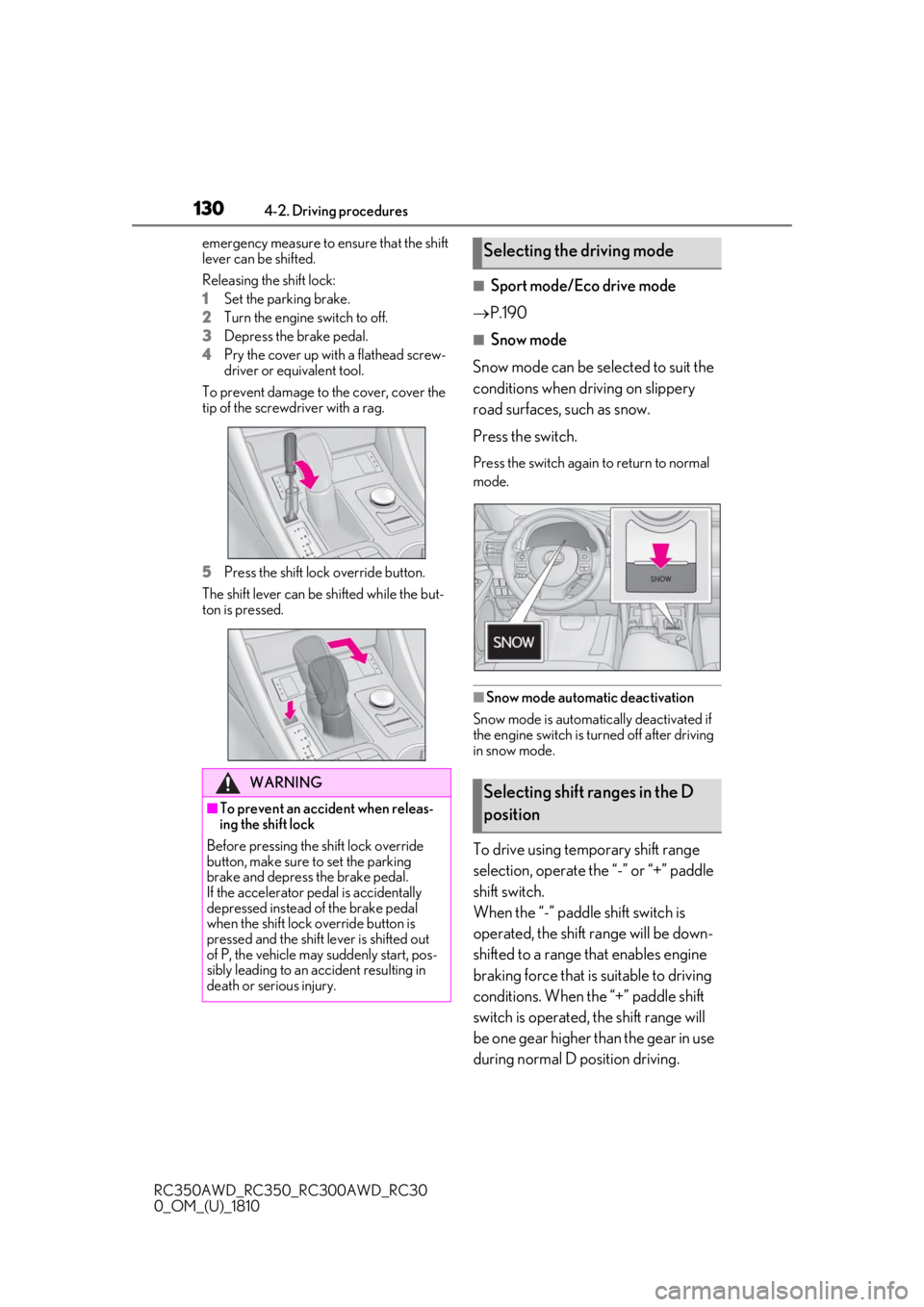
Releasing the shift lock:
1
Set the parking brake.
2
Turn the engine switch to off.
3
Depress the brake pedal.
4
Pry the cover up with a flathead screw-
driver or equivalent tool.
To prevent damage to the cover, cover the
tip of the screwd river with a rag.
5
Press the shift lock override button.
The shift lever can be shifted while the but-
ton is pressed.
■Sport mode/Eco drive mode
P.190
■Snow mode
Snow mode can be se lected to suit the
conditions when driving on slippery
road surfaces, such as snow.
Press the switch.
Press the switch again to return to normal
mode.
■Snow mode automatic deactivation
Snow mode is automatically deactivated if
the engine switch is turned off after driving
in snow mode.
To drive using temporary shift range
selection, operate the “-” or “+” paddle
shift switch.
When the “-” paddle shift switch is
operated, the shift range will be down-
shifted to a range that enables engine
braking force that is suitable to driving
conditions. When the “+” paddle shift
switch is operated, the shift range will
be one gear higher than the gear in use
during normal D position driving.
WARNING
■To prevent an accident when releas-
ing the shift lock
Before pressing the shift lock override
button, make sure to set the parking
brake and depress the brake pedal.
If the accelerator pe dal is accidentally
depressed instead of the brake pedal
when the shift lock override button is
pressed and the shift lever is shifted out
of P, the vehicle may suddenly start, pos-
sibly leading to an accident resulting in
death or serious injury.
Selecting the driving mode
Selecting shift ranges in the D
position
Page 140 of 390
1404-3. Operating the lights and wipers
RC350AWD_RC350_RC300AWD_RC30
0_OM_(U)_1810mittently changing brightness and dark-
ness
• When frequently and repeatedly driving
ascending/descending roads, or roads
with rough, bumpy or uneven surfaces
(such as stone-paved ro ads, gravel roads,
etc.)
• When frequently and repeatedly taking curves or driving on a winding road
• When there is a highly reflective object ahead of the vehicle, such as a sign or
mirror
• When the back of a preceding vehicle is highly reflective, such as a container on a
truck
• When the vehicle's headlights are dam- aged or dirty, or are not aimed properly
• When the vehicle is listing or titling due to
a flat tire, a trailer being towed, etc.
• When the headlights are changed between the high beams and low beams
repeatedly in an abnormal manner
• When the driver believes that the high beams may be flashing or dazzling
pedestrians or other drivers
■Temporarily lowering sensor sensitivity
The sensitivity of the sensor can be tempo-
rarily lowered.
1 Turn the engine switch off while the fol-
lowing conditions are met.
●The headlight switch is in or .
●The headlight sw itch lever is in high beam
position.
●Automatic High Beam switch is on.
2 Turn the engine switch to IGNITION
ON mode.
3 Within 30 seconds after 2, repeat pull-
ing the headlight switch lever to the
original position then pushing it to the
high beam position quickly 10 times,
then leave the lever in high beam posi-
tion.
4 If the sensitivity is changed, the Auto-
matic High Beam indicator is turn on
and off 3 times.
Automatic High Beam (headlights) may
turn on even when the vehicle is stopped.
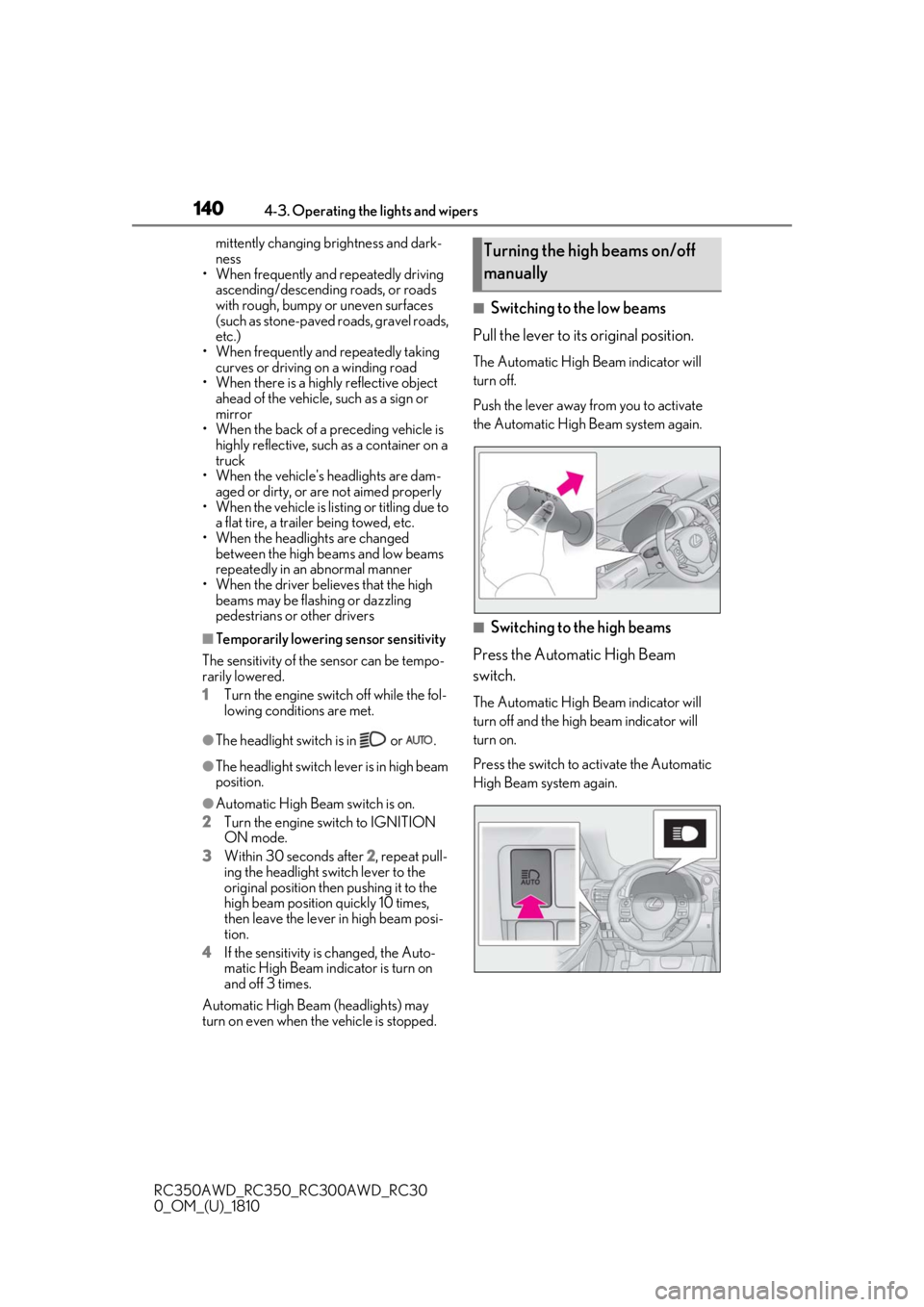
■Switching to the low beams
Pull the lever to its original position.
The Automatic High Beam indicator will
turn off.
Push the lever away from you to activate
the Automatic High Beam system again.
■Switching to the high beams
Press the Automatic High Beam
switch.
The Automatic High Beam indicator will
turn off and the high beam indicator will
turn on.
Press the switch to activate the Automatic
High Beam system again.
Turning the high beams on/off
manually
Page 156 of 390
1564-5. Using the driving support systems
RC350AWD_RC350_RC300AWD_RC30
0_OM_(U)_1810
■Enabling/disabling the pre-colli-
sion system
The pre-collision system can be
enabled/disabled on ( P.71) of
the multi-information display.
The system is automatically enabled each
time the engine switch is turned to IGNI-
TION ON mode.
If the system is disabled, the PCS warn-
ing light will turn on and a message will
be displayed on the multi-information
display.
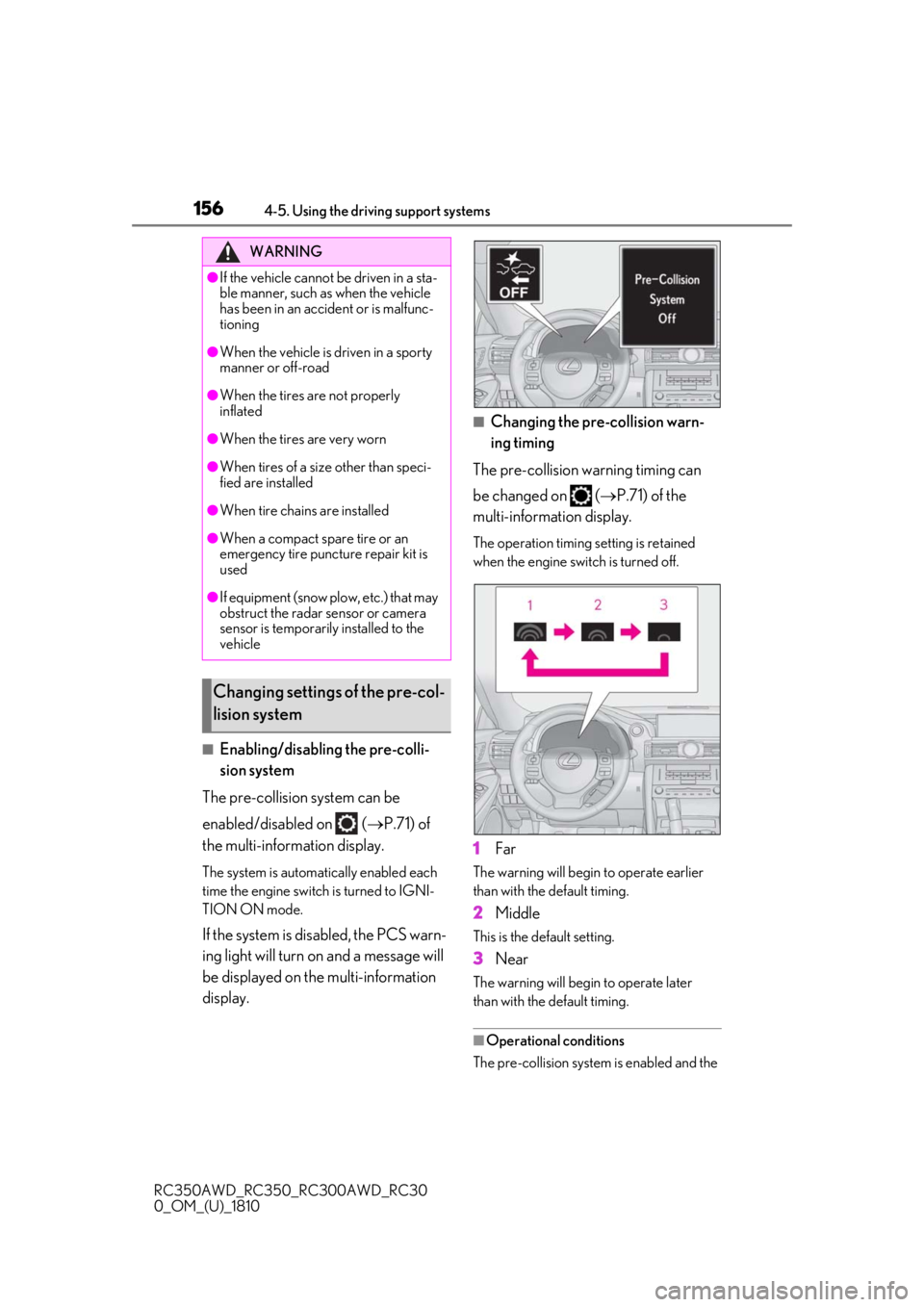
■Changing the pre-collision warn-
ing timing
The pre-collision warning timing can
be changed on ( P.71) of the
multi-information display.
The operation timing setting is retained
when the engine switch is turned off.
1Far
The warning will begin to operate earlier
than with the default timing.
2Middle
This is the default setting.
3Near
The warning will begi n to operate later
than with the default timing.
■Operational conditions
The pre-collision system is enabled and the
WARNING
●If the vehicle cannot be driven in a sta-
ble manner, such as when the vehicle
has been in an accident or is malfunc-
tioning
●When the vehicle is driven in a sporty
manner or off-road
●When the tires are not properly
inflated
●When the tires are very worn
●When tires of a size other than speci-
fied are installed
●When tire chains are installed
●When a compact spare tire or an
emergency tire puncture repair kit is
used
●If equipment (snow plow, etc.) that may
obstruct the radar sensor or camera
sensor is temporarily installed to the
vehicle
Changing settings of the pre-col-
lision system
Page 160 of 390

1604-5. Using the driving support systems
RC350AWD_RC350_RC300AWD_RC30
0_OM_(U)_1810• The vehicle is wobbling.
• The vehicle is being driven at extremely
high speeds.
• When driving on a hill
• If the radar sensor or camera sensor is misaligned
●In some situations such as the following,
sufficient braking force may not be
obtained, preventing the system from
performing properly:
• If the braking functions cannot operate to
their full extent, such as when the brake
parts are extremely cold, extremely hot,
or wet
• If the vehicle is not properly maintained (brakes or tires are excessively worn,
improper tire inflation pressure, etc.)
• When the vehicle is being driven on a gravel road or other slippery surface
●Some pedestrians such as the following
may not be detected by the radar sensor
and camera sensor, preventing the sys-
tem from operating properly:
• Pedestrians shorter than approximately 3.2 ft. (1 m) or tall er than approximately
6.5 ft. (2 m)
• Pedestrians wearing oversized clothing (a rain coat, long skir t, etc.), making their
silhouette obscure
• Pedestrians who are carrying large bag- gage, holding an umbrella, etc., hiding
part of their body
• Pedestrians who are bending forward or squatting
• Pedestrians who are pushing a stroller, wheelchair, bicycle or other vehicle
• Groups of pedestrians which are close
together
• Pedestrians who are wearing white and look extremely bright
• Pedestrians in the dark, such as at night or while in a tunnel
• Pedestrians whose clothing appears to
be nearly the same co lor or brightness as
their surroundings
• Pedestrians near walls , fences, guardrails,
or large objects
• Pedestrians who are on a metal object (manhole cover, steel plate, etc.) on the
road
• Pedestrians who are walking fast
• Pedestrians who are changing speed abruptly • Pedestrians running out from behind a
vehicle or a large object
• Pedestrians who are extremely close to
the side of the vehicle (outside rear view
mirror, etc.)
■If the PCS warning light flashes or illumi-
nates and a warning message is dis-
played on the multi-information display
The pre-collision system may be temporar-
ily unavailable or there may be a malfunc-
tion in the system.
●In the following situations, the warning
light will turn off, the message will disap-
pear and the system will become opera-
tional when normal operating conditions
return:
• When the radar sensor or camera sensor
or the area around either sensor is hot,
such as in the sun
• When the radar sensor or camera sensor
or the area around either sensor is cold,
such as in an extremely cold environment
• When a front sensor is dirty or covered
with snow, etc.
• When the part of the windshield in front of the camera sensor is fogged up or cov-
ered with condensation or ice
(Defogging the windshield: P.209)
• If the camera sensor is obstructed, such
as when the hood is open or a sticker is
attached to the windshield near the cam-
era sensor
●If the PCS warning light continues to flash
or remains illuminated or the warning
message does not disappear even
though the vehicle has returned to nor-
mal, the system may be malfunctioning.
Have the vehicle inspected by your Lexus
dealer immediately.
■If VSC is disabled
●If VSC is disabled ( P.192), the pre-col-
lision brake assist and pre-collision brak-
ing functions are also disabled.
●The PCS warning light will turn on and
“VSC Turned Off Pre-Collision Brake
System Unavailable” will be displayed on
the multi-information display.
Page 162 of 390
1624-5. Using the driving support systems
RC350AWD_RC350_RC300AWD_RC30
0_OM_(U)_1810
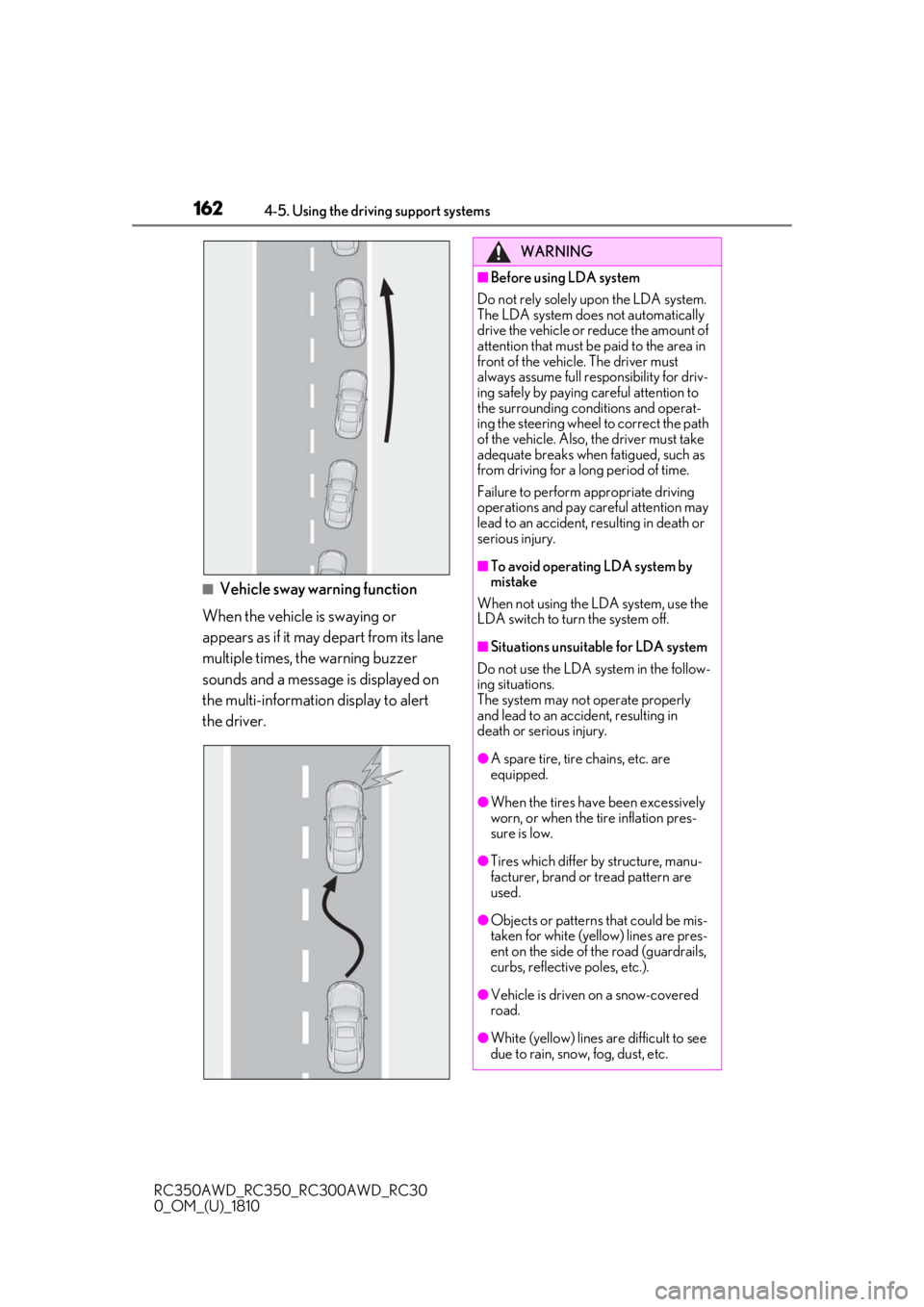
■Vehicle sway warning function
When the vehicle is swaying or
appears as if it may depart from its lane
multiple times, the warning buzzer
sounds and a message is displayed on
the multi-information display to alert
the driver.
WARNING
■Before using LDA system
Do not rely solely upon the LDA system.
The LDA system does not automatically
drive the vehicle or reduce the amount of
attention that must be paid to the area in
front of the vehicle. The driver must
always assume full responsibility for driv-
ing safely by paying careful attention to
the surrounding conditions and operat-
ing the steering wheel to correct the path
of the vehicle. Also, the driver must take
adequate breaks when fatigued, such as
from driving for a long period of time.
Failure to perform appropriate driving
operations and pay careful attention may
lead to an accident, resulting in death or
serious injury.
■To avoid operating LDA system by
mistake
When not using the LDA system, use the
LDA switch to turn the system off.
■Situations unsuitable for LDA system
Do not use the LDA system in the follow-
ing situations.
The system may not operate properly
and lead to an accident, resulting in
death or serious injury.
●A spare tire, tire chains, etc. are
equipped.
●When the tires have been excessively
worn, or when the tire inflation pres-
sure is low.
●Tires which differ by structure, manu-
facturer, brand or tread pattern are
used.
●Objects or patterns that could be mis-
taken for white (yellow) lines are pres-
ent on the side of the road (guardrails,
curbs, reflective poles, etc.).
●Vehicle is driven on a snow-covered
road.
●White (yellow) lines are difficult to see
due to rain, snow, fog, dust, etc.