lights LEXUS RC300 2019 User Guide
[x] Cancel search | Manufacturer: LEXUS, Model Year: 2019, Model line: RC300, Model: LEXUS RC300 2019Pages: 390, PDF Size: 7.88 MB
Page 61 of 390
61
RC350AWD_RC350_RC300AWD_RC30
0_OM_(U)_1810
2
2
Vehicle status information and indicators
Vehicle status informationand indicators
.2-1. Instrument cluster
Warning lights and indicators........................................................... 62
Gauges and meters .................... 66
Multi-information display............ 71
Fuel consumption information ........................................................... 78
Page 62 of 390
622-1. Instrument cluster
RC350AWD_RC350_RC300AWD_RC30
0_OM_(U)_1810
2-1.Instrument cluster
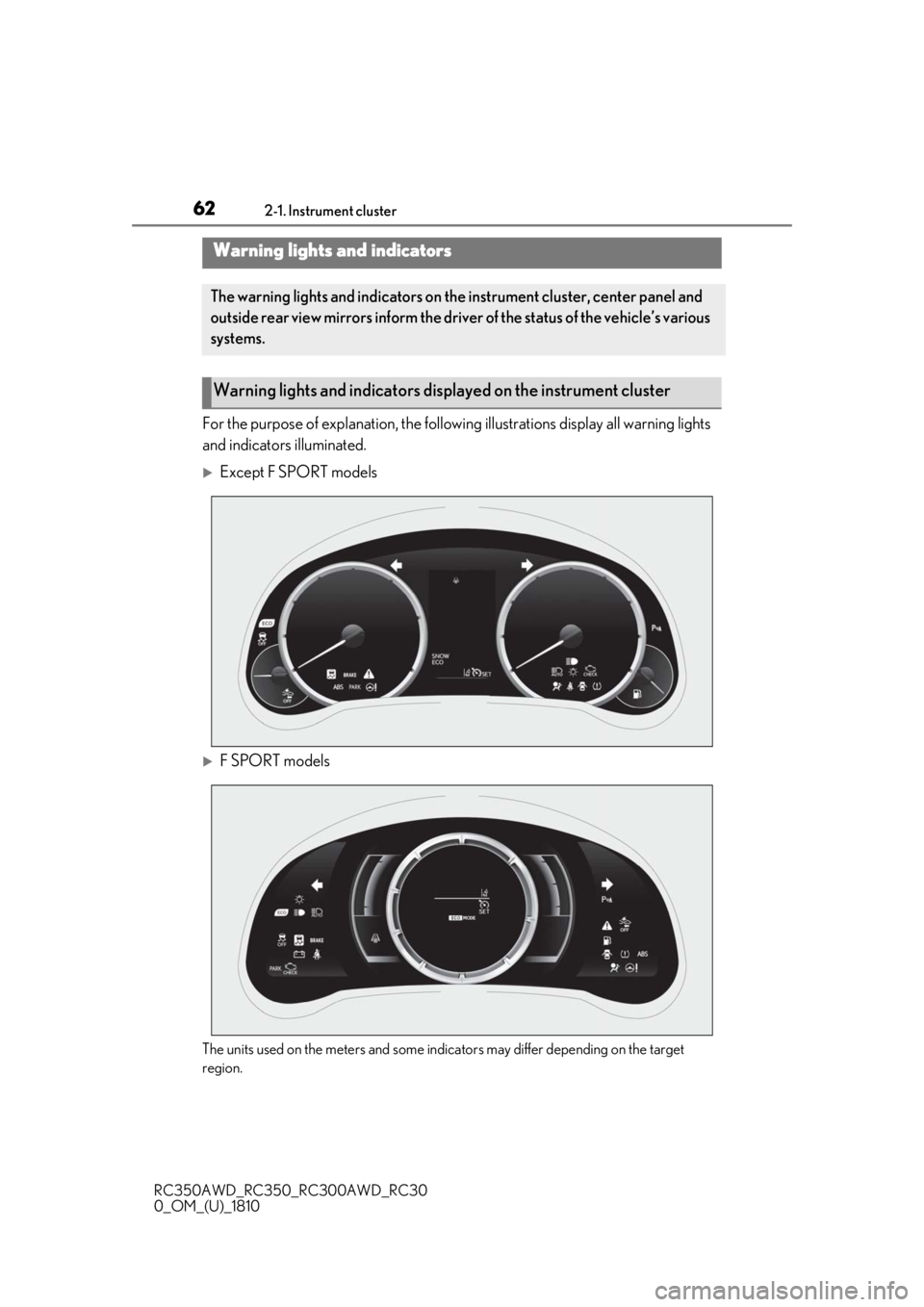
For the purpose of explanation, the following illustrations display all warning lights
and indicators illuminated.
Except F SPORT models
F SPORT models
The units used on the meters and some indicators may differ depending on the target
region.
Warning lights and indicators
The warning lights and indicators on th e instrument cluster, center panel and
outside rear view mirrors inform the driver of the status of the vehicle’s various
systems.
Warning lights and indicators displayed on the instrument cluster
Page 63 of 390
632-1. Instrument cluster
RC350AWD_RC350_RC300AWD_RC30
0_OM_(U)_1810
2
Vehicle status information and indicators
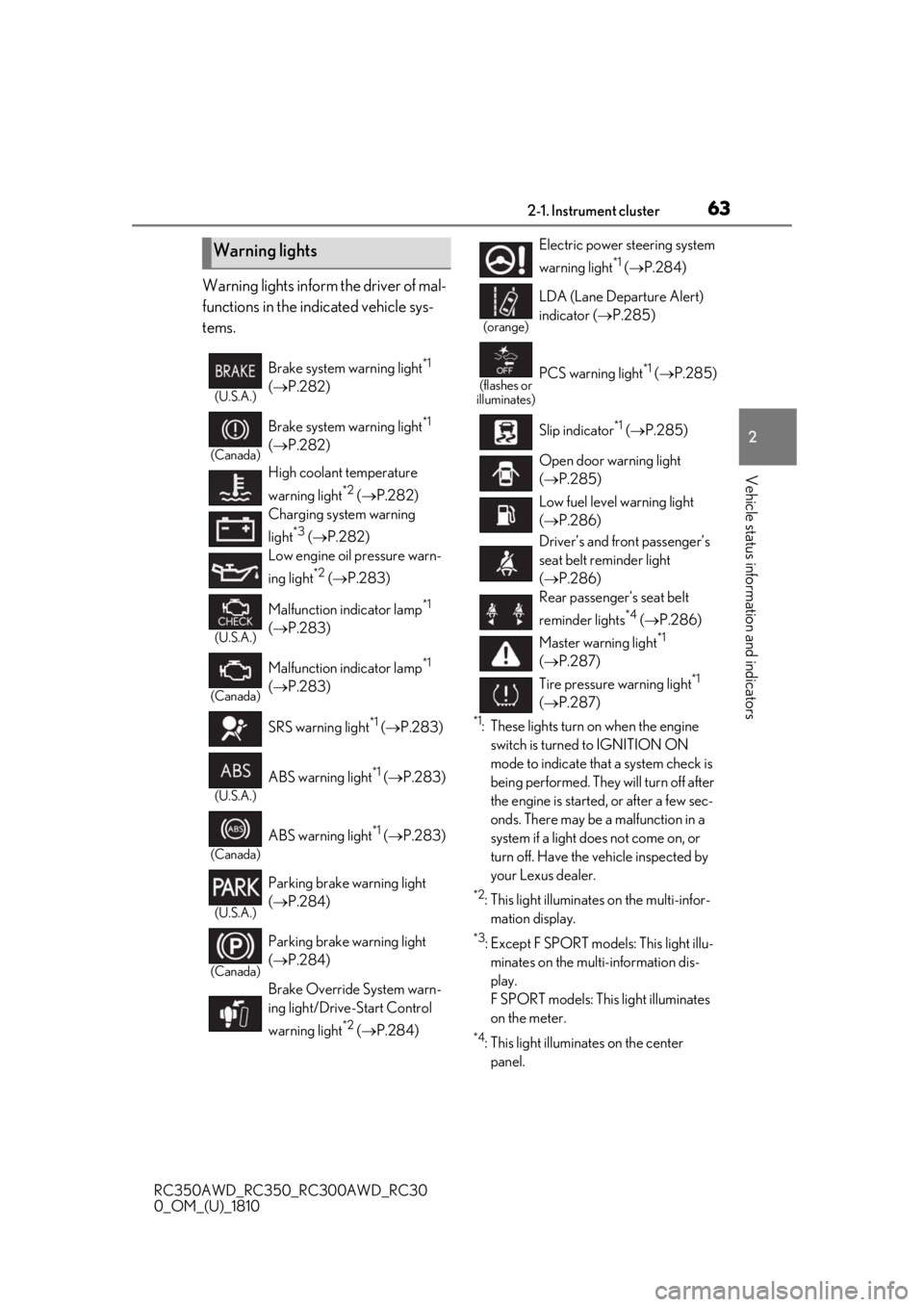
Warning lights inform the driver of mal-
functions in the indicated vehicle sys-
tems.
*1: These lights turn on when the engine switch is turned to IGNITION ON
mode to indicate that a system check is
being performed. They will turn off after
the engine is started, or after a few sec-
onds. There may be a malfunction in a
system if a light does not come on, or
turn off. Have the vehicle inspected by
your Lexus dealer.
*2: This light illuminates on the multi-infor-mation display.
*3: Except F SPORT models: This light illu-minates on the multi-information dis-
play.
F SPORT models: This light illuminates
on the meter.
*4: This light illuminates on the center panel.
Warning lights
(U.S.A.)
Brake system warning light*1
( P.282)
(Canada)
Brake system warning light*1
( P.282)
High coolant temperature
warning light
*2 ( P.282)
Charging system warning
light
*3 ( P.282)
Low engine oil pressure warn-
ing light
*2 ( P.283)
(U.S.A.)
Malfunction indicator lamp*1
( P.283)
(Canada)
Malfunction indicator lamp*1
( P.283)
SRS warning light
*1 ( P.283)
(U.S.A.)
ABS warning light*1 ( P.283)
(Canada)
ABS warning light*1 ( P.283)
(U.S.A.)
Parking brake warning light
( P.284)
(Canada)
Parking brake warning light
( P.284)
Brake Override System warn-
ing light/Drive-Start Control
warning light
*2 ( P.284)
Electric power steering system
warning light
*1 ( P.284)
(orange)
LDA (Lane Departure Alert)
indicator ( P.285)
(flashes or
illuminates)PCS warning light*1 ( P.285)
Slip indicator
*1 ( P.285)
Open door warning light
( P.285)
Low fuel level warning light
( P.286)
Driver’s and front passenger’s
seat belt reminder light
( P.286)
Rear passenger’s seat belt
reminder lights
*4 ( P.286)
Master warning light
*1
( P.287)
Tire pressure warning light
*1
( P.287)
Page 65 of 390
652-1. Instrument cluster
RC350AWD_RC350_RC300AWD_RC30
0_OM_(U)_1810
2
Vehicle status information and indicators
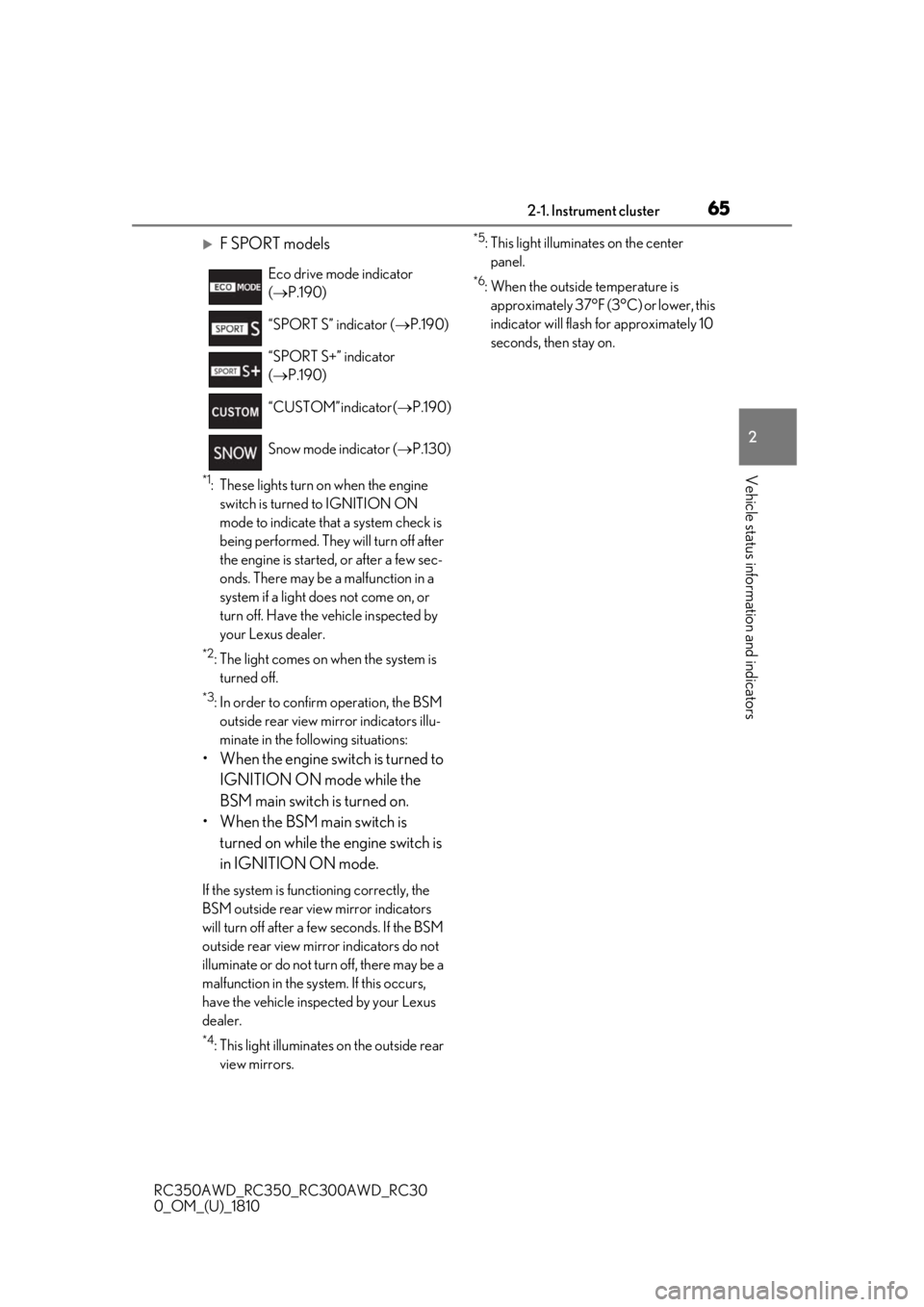
F SPORT models
*1: These lights turn on when the engine switch is turned to IGNITION ON
mode to indicate that a system check is
being performed. They will turn off after
the engine is started, or after a few sec-
onds. There may be a malfunction in a
system if a light does not come on, or
turn off. Have the vehicle inspected by
your Lexus dealer.
*2: The light comes on when the system is turned off.
*3: In order to confirm operation, the BSM
outside rear view mirror indicators illu-
minate in the following situations:
• When the engine switch is turned to
IGNITION ON mode while the
BSM main switch is turned on.
• When the BSM main switch is turned on while the engine switch is
in IGNITION ON mode.
If the system is functioning correctly, the
BSM outside rear view mirror indicators
will turn off after a few seconds. If the BSM
outside rear view mirror indicators do not
illuminate or do not turn off, there may be a
malfunction in the system. If this occurs,
have the vehicle inspected by your Lexus
dealer.
*4: This light illuminates on the outside rear view mirrors.
*5: This light illuminates on the center panel.
*6: When the outside temperature is approximately 37°F (3°C) or lower, this
indicator will flash for approximately 10
seconds, then stay on.
Eco drive mode indicator
(
P.190)
“SPORT S” indicator ( P.190)
“SPORT S+” indicator
( P.190)
“CUSTOM” indicator ( P.190)
Snow mode indicator ( P.130)
Page 71 of 390
712-1. Instrument cluster
RC350AWD_RC350_RC300AWD_RC30
0_OM_(U)_1810
2
Vehicle status information and indicators
■Pop-up display
In some situations the following will be
temporarily displayed:
Distance until next engine oil
change
Distance until the next engine oil change
will displayed when a warning message
indicating that oil ma intenance should be
performed soon or is required is displayed.
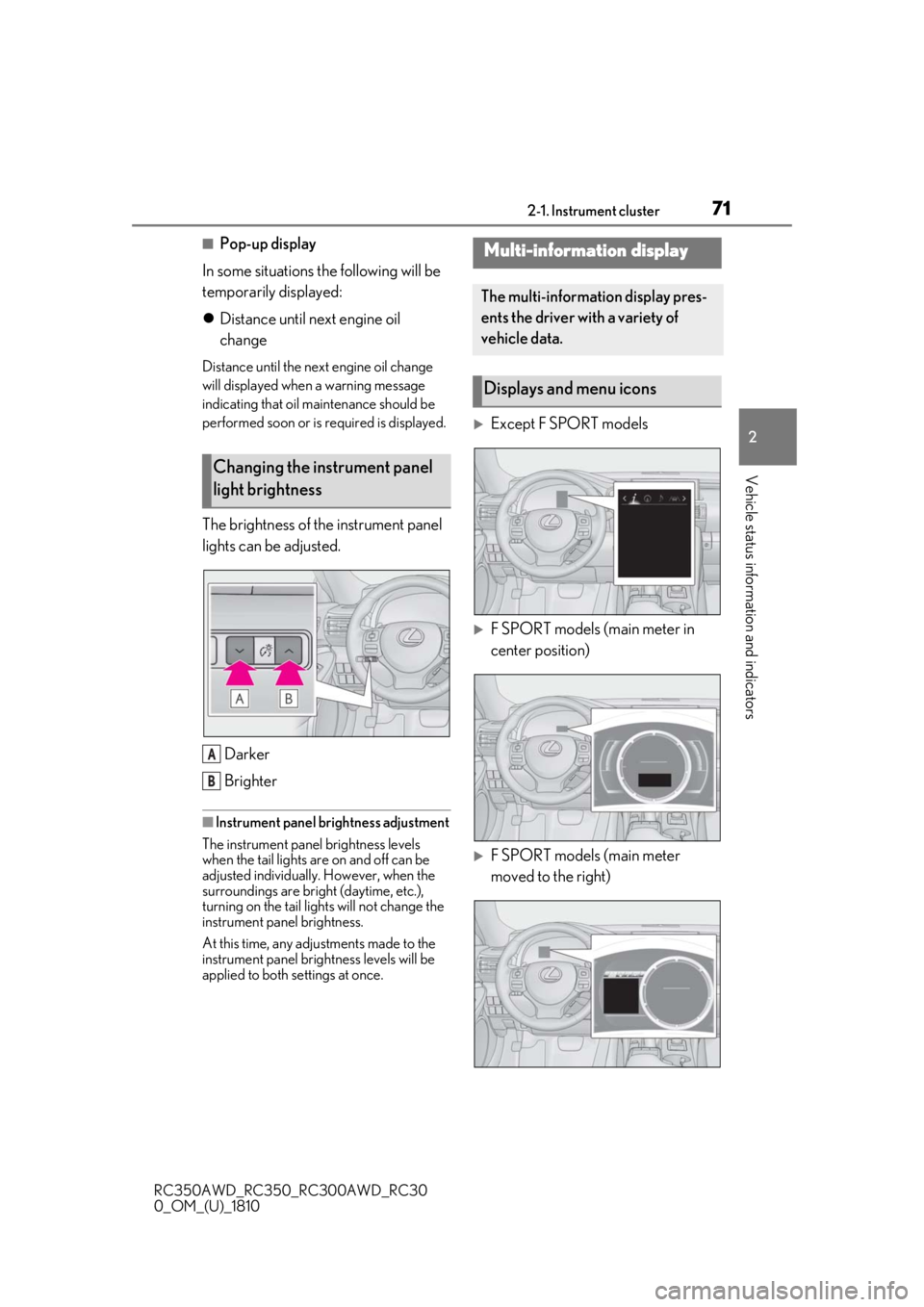
The brightness of the instrument panel
lights can be adjusted.
Darker
Brighter
■Instrument panel brightness adjustment
The instrument panel brightness levels
when the tail lights are on and off can be
adjusted individually. However, when the
surroundings are bright (daytime, etc.),
turning on the tail lights will not change the
instrument panel brightness.
At this time, any adjustments made to the
instrument panel brig htness levels will be
applied to both settings at once.
Except F SPORT models
F SPORT models (main meter in
center position)
F SPORT models (main meter
moved to the right)
Changing the instrument panel
light brightness
A
B
Multi-information display
The multi-information display pres-
ents the driver with a variety of
vehicle data.
Displays and menu icons
Page 84 of 390
843-1. Key information
RC350AWD_RC350_RC300AWD_RC30
0_OM_(U)_1810
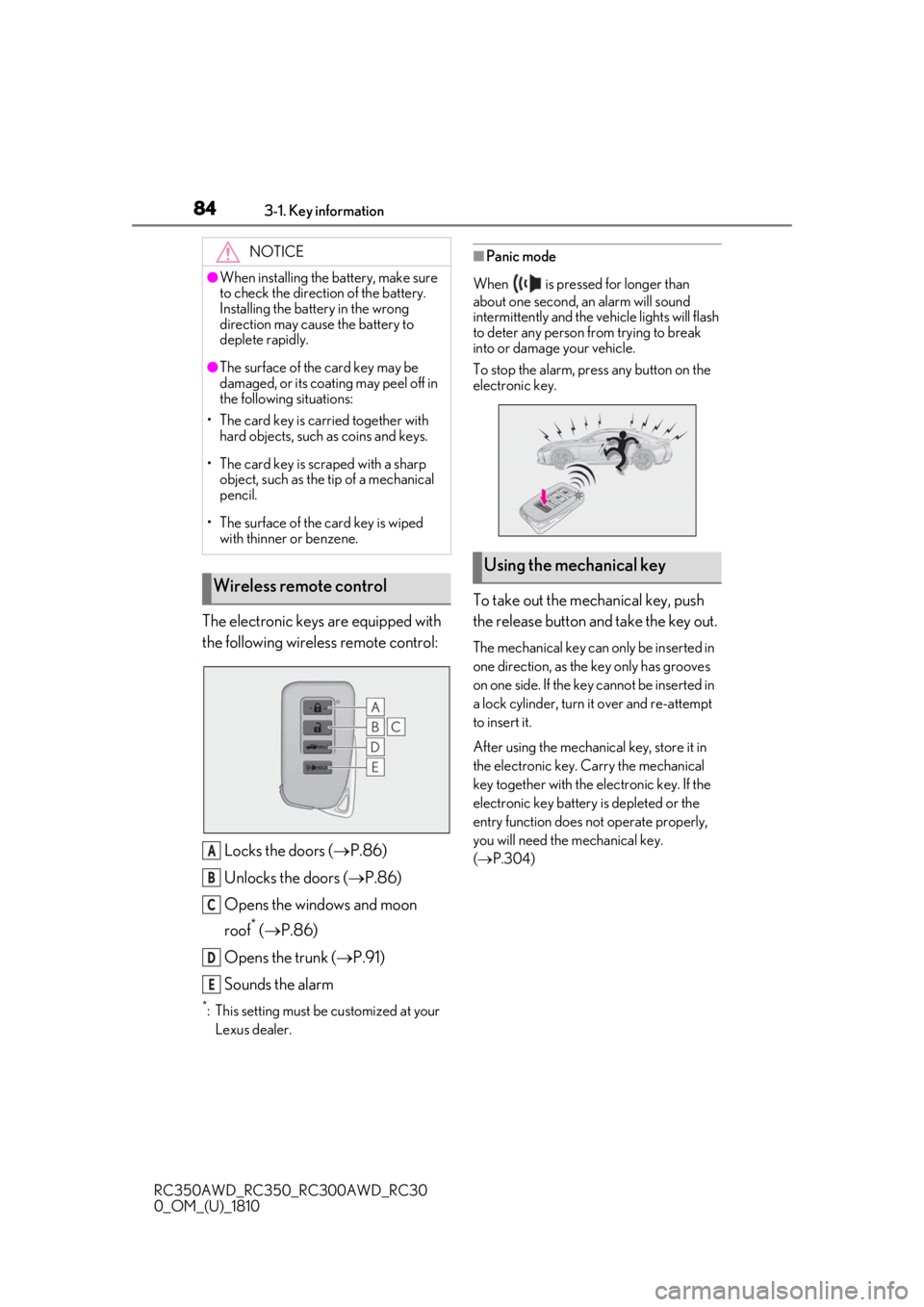
The electronic keys are equipped with
the following wireless remote control:Locks the doors ( P.86)
Unlocks the doors ( P.86)
Opens the windows and moon
roof
* ( P.86)
Opens the trunk ( P.91)
Sounds the alarm
*: This setting must be customized at your
Lexus dealer.
■Panic mode
When is pressed for longer than
about one second, an alarm will sound
intermittently and the vehicle lights will flash
to deter any person from trying to break
into or damage your vehicle.
To stop the alarm, press any button on the
electronic key.
To take out the mechanical key, push
the release button and take the key out.
The mechanical key can only be inserted in
one direction, as the key only has grooves
on one side. If the key cannot be inserted in
a lock cylinder, turn it over and re-attempt
to insert it.
After using the mechanical key, store it in
the electronic key. Carry the mechanical
key together with the electronic key. If the
electronic key battery is depleted or the
entry function does not operate properly,
you will need the mechanical key.
( P.304)
NOTICE
●When installing the ba
ttery, make sure
to check the direction of the battery.
Installing the battery in the wrong
direction may cause the battery to
deplete rapidly.
●The surface of the card key may be
damaged, or its coating may peel off in
the following situations:
• The card key is carried together with hard objects, such as coins and keys.
• The card key is scraped with a sharp object, such as the tip of a mechanical
pencil.
• The surface of the card key is wiped with thinner or benzene.
Wireless remote control
A
B
C
D
E
Using the mechanical key
Page 87 of 390
873-2. Opening, closing and locking the doors and trunk
RC350AWD_RC350_RC300AWD_RC30
0_OM_(U)_1810
3
Before driving
To prevent unintended triggering of the
alarm, unlock the doors using the wireless
remote control and open and close a door
once after the settings have been changed.
(If a door is not opened within 60 seconds
after is pressed, the doors will be
locked again and the alarm will automati-
cally be set.)
In a case that the alarm is triggered, imme-
diately stop the alarm. ( P.58)
■Impact detection door lock release sys-
tem
In the event that the vehicle is subject to a
strong impact, both side doors are
unlocked. Depending on the force of the
impact or the type of accident, however, the
system may not operate.
■Operation signals
A buzzer sounds and the emergency flash-
ers flash to indicate that the doors have
been locked/unlocked. (Locked: once;
Unlocked: twice)
A buzzer sounds to indicate that the win-
dows and moon roof are operating.
■Welcome light illumination control
The side marker, parking, tail and license
plate lights automatically turn on at night when the doors are unlocked using the
entry function or wireless remote control if
the light switch is in the position.
■Security feature
If a door is not opened within approximately
60 seconds after the vehicle is unlocked,
the security feature automatically locks the
vehicle again.
■When the door cannot be locked by the
lock sensor on the surface of the door
handle
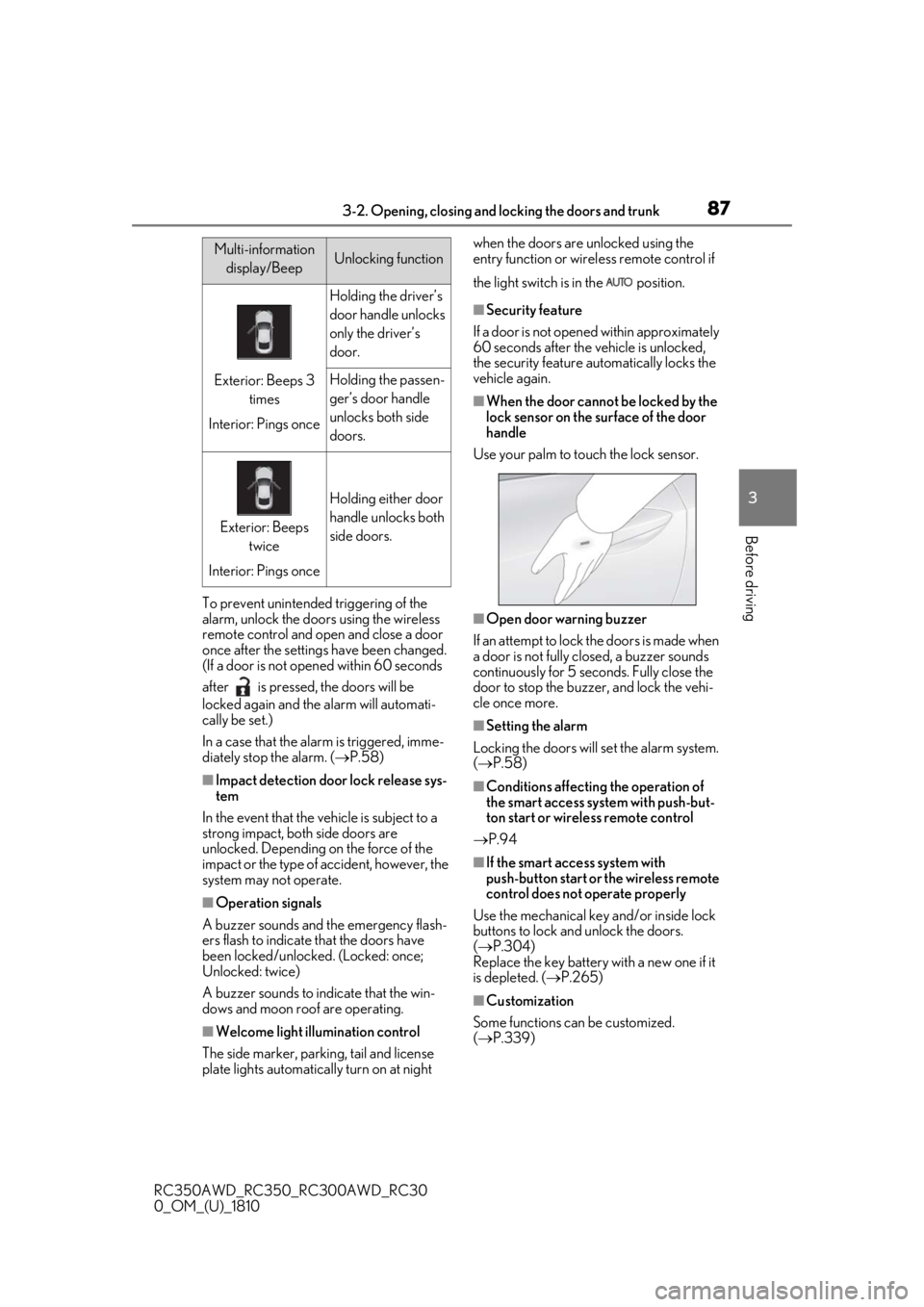
Use your palm to touch the lock sensor.
■Open door warning buzzer
If an attempt to lock the doors is made when
a door is not fully closed, a buzzer sounds
continuously for 5 seconds. Fully close the
door to stop the buzzer, and lock the vehi-
cle once more.
■Setting the alarm
Locking the doors will set the alarm system.
( P.58)
■Conditions affecting the operation of
the smart access system with push-but-
ton start or wireless remote control
P.94
■If the smart access system with
push-button start or the wireless remote
control does not operate properly
Use the mechanical key and/or inside lock
buttons to lock and unlock the doors.
( P.304)
Replace the key battery with a new one if it
is depleted. ( P.265)
■Customization
Some functions can be customized.
( P.339)
Multi-information
display/BeepUnlocking function
Exterior: Beeps 3 times
Interior: Pings once
Holding the driver’s
door handle unlocks
only the driver’s
door.
Holding the passen-
ger’s door handle
unlocks both side
doors.
Exterior: Beeps twice
Interior: Pings once
Holding either door
handle unlocks both
side doors.
Page 107 of 390
1073-4. Adjusting the steering wheel and mirrors
RC350AWD_RC350_RC300AWD_RC30
0_OM_(U)_1810
3
Before driving
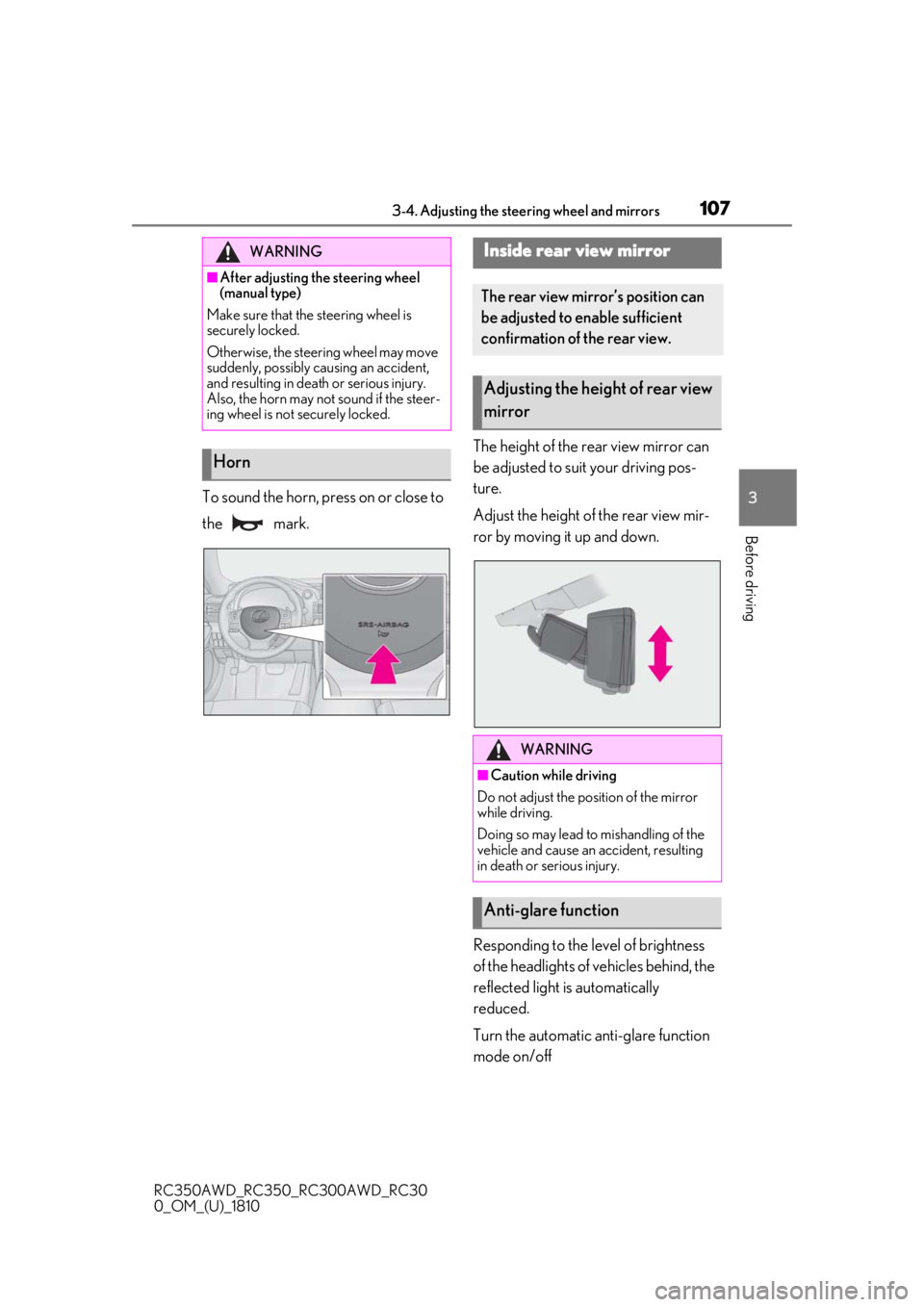
To sound the horn, press on or close to
the mark. The height of the rear view mirror can
be adjusted to suit your driving pos-
ture.
Adjust the height of the rear view mir-
ror by moving it up and down.
Responding to the level of brightness
of the headlights of vehicles behind, the
reflected light is automatically
reduced.
Turn the automatic anti-glare function
mode on/off
WARNING
■After adjusting the steering wheel
(manual type)
Make sure that the steering wheel is
securely locked.
Otherwise, the steering wheel may move
suddenly, possibly causing an accident,
and resulting in death or serious injury.
Also, the horn may not sound if the steer-
ing wheel is not securely locked.
Horn
Inside rear view mirror
The rear view mirror’s position can
be adjusted to enable sufficient
confirmation of the rear view.
Adjusting the heig ht of rear view
mirror
WARNING
■Caution while driving
Do not adjust the position of the mirror
while driving.
Doing so may lead to mishandling of the
vehicle and cause an accident, resulting
in death or serious injury.
Anti-glare function
Page 115 of 390
115
RC350AWD_RC350_RC300AWD_RC30
0_OM_(U)_1810
4
4
Driving
Driving
.4-1. Before drivingDriving the vehicle ...................... 116
Cargo and luggage .................... 121
Vehicle load limits ...................... 123
Trailer towing ............................... 124
Dinghy towing ............................. 124
4-2. Driving procedures Engine (ignition) switch ........... 125
Automatic transmission........... 128
Turn signal lever.......................... 133
Parking brake .............................. 134
ASC (Active Sound Control) ......................................................... 134
4-3. Operating the lights and wipers Headlight switch ......................... 136
Automatic High Beam ............. 138
Windshield wipers and washer .......................................................... 141
4-4. Refueling Opening the fuel tank cap...... 148
4-5. Using the driving support sys- tems
Lexus Safety System + .............. 151
PCS (Pre-Collision System) ......................................................... 154
LDA (Lane Departure Alert with steering control) ....................... 161
Dynamic radar cruise control ......................................................... 168
Intuitive parking assist .............. 176BSM (Blind Spot Monitor) .....
182
Driving mode select switch ... 190
Driving assist systems............... 192
4-6. Driving tips Winter driving tips ..................... 196
Page 133 of 390
1334-2. Driving procedures
RC350AWD_RC350_RC300AWD_RC30
0_OM_(U)_1810
4
Driving
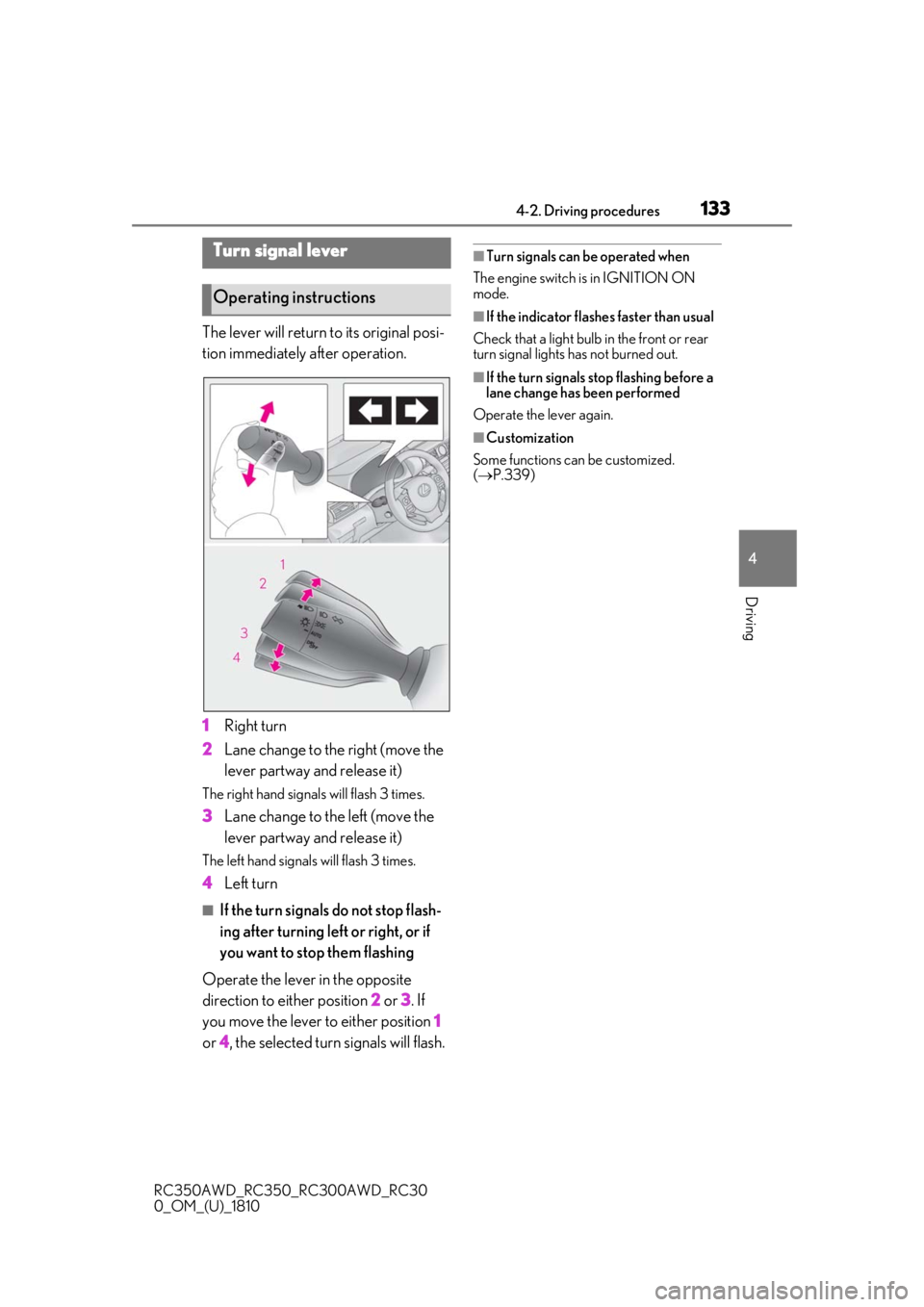
The lever will return to its original posi-
tion immediately after operation.
1 Right turn
2 Lane change to the right (move the
lever partway and release it)
The right hand signals will flash 3 times.
3Lane change to the left (move the
lever partway and release it)
The left hand signals will flash 3 times.
4Left turn
■If the turn signals do not stop flash-
ing after turning left or right, or if
you want to stop them flashing
Operate the lever in the opposite
direction to either position 2 or 3 . If
you move the lever to either position 1
or 4, the selected turn signals will flash.
■Turn signals can be operated when
The engine switch is in IGNITION ON
mode.
■If the indicator flashes faster than usual
Check that a light bulb in the front or rear
turn signal lights has not burned out.
■If the turn signals stop flashing before a
lane change has been performed
Operate the lever again.
■Customization
Some functions can be customized.
( P.339)
Turn signal lever
Operating instructions