door lock LEXUS RC300 2019 Owners Manual
[x] Cancel search | Manufacturer: LEXUS, Model Year: 2019, Model line: RC300, Model: LEXUS RC300 2019Pages: 390, PDF Size: 7.88 MB
Page 2 of 390
2
RC350AWD_RC350_RC300AWD_RC30
0_OM_(U)_1810TABLE OF CONTENTS
For your information ......................................
5
Reading this manual ....................................... 9
How to search ............................................... 10
Pictorial index .................................................. 11
1-1. For safe use Before driving .................................... 22
For safe driving.................................. 23
Seat belts ............................................. 24
SRS airbags ....................................... 28
Front passenger occupant classifi- cation system ................................. 36
Safety information for children .............................................................. 40
Child restraint systems ................. 40
Exhaust gas precautions ................ 51
1-2. LEXUS Enform Lexus Enform Safety Connect .. 53
1-3. Theft deterrent system Engine immobilizer system ......... 57
Alarm.................................................... 58
Theft prevention labels (U.S.A.) .............................................................. 59
2-1. Instrument cluster Warning lights and indicators ..... 62
Gauges and meters ....................... 66
Multi-information display............... 71
Fuel consumption information ... 783-1. Key information
Keys ....................................................... 82
3-2. Opening, closing and locking the doors and trunk
Doors ................................................... 86
Trunk .................................................... 89
Smart access system with push-but- ton start ............................................. 93
3-3. Adjusting the seats Front seats........................................... 97
Rear seats............................................ 99
Power easy access system/driving position memory/memory recall
function........................................... 100
Head restraints .............................. 103
3-4. Adjusting the steering wheel and mirrors
Steering wheel ............................... 106
Inside rear view mirror ............... 107
Outside rear view mirrors......... 108
3-5. Opening, closing the windows and moon roof
Power windows .............................. 110
Moon roof .......................................... 112
4-1. Before driving Driving the vehicle.......................... 116
Cargo and luggage........................ 121
Vehicle load limits.......................... 123
Trailer towing................................... 124
Dinghy towing ................................. 124
1For safety and security
2Vehicle status information and
indicators
3Before driving
4Driving
Page 11 of 390
11Pictorial index
RC350AWD_RC350_RC300AWD_RC30
0_OM_(U)_1810
Pictorial index
■ Exterior
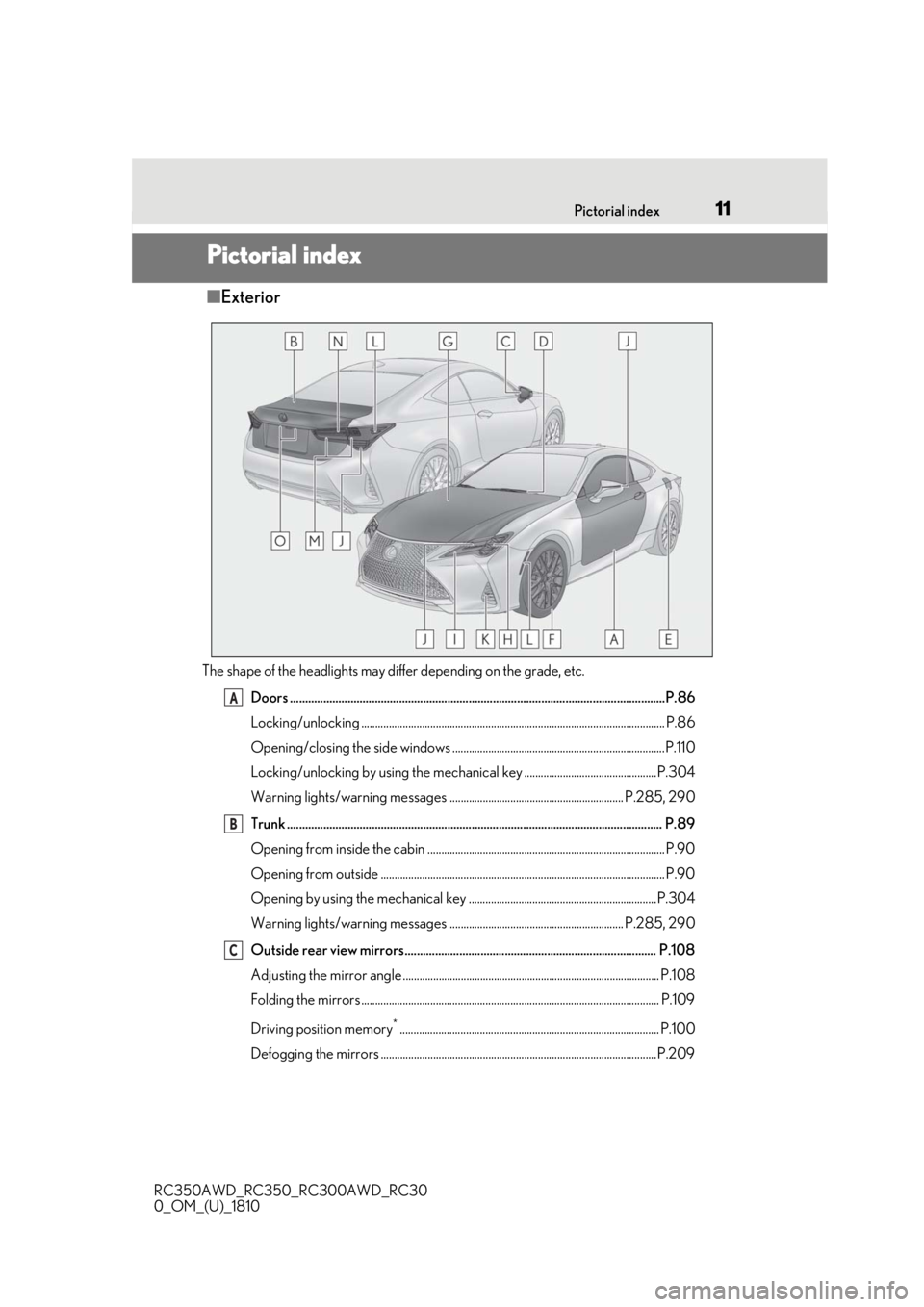
The shape of the headlights may differ depending on the grade, etc.
Doors .......................................................................................................................... ..P.86
Locking/unlocking .............................................................................................................. P.86
Opening/closing the side windows .............................................................................P.110
Locking/unlocking by using th e mechanical key ................................................P.304
Warning lights/warning messages ............................................................... P.285, 290
Trunk .......................................................................................................................... .. P.89
Opening from inside the cabin ...................................................................................... P.90
Opening from outside ....................................................................................................... P.90
Opening by using the mechanical key ....................................................................P.304
Warning lights/warning messages ............................................................... P.285, 290
Outside rear view mirrors................................................................................... P.108
Adjusting the mirror angle ............................................................................................. P.108
Folding the mirrors ............................................................................................................ P.109
Driving position memory
*.............................................................................................. P.100
Defogging the mirrors ....................................................................................................P.209
A
B
C
Page 16 of 390
16Pictorial index
RC350AWD_RC350_RC300AWD_RC30
0_OM_(U)_1810
Outside rear view mirror switches ................................................................... P.108
Door lock switches .................................................................................................. P.88
Power window switches ......................................................................................... P.110
Window lock switch ................................................................................................. P.111
Tire pressure warning reset switch...................................................................P.260
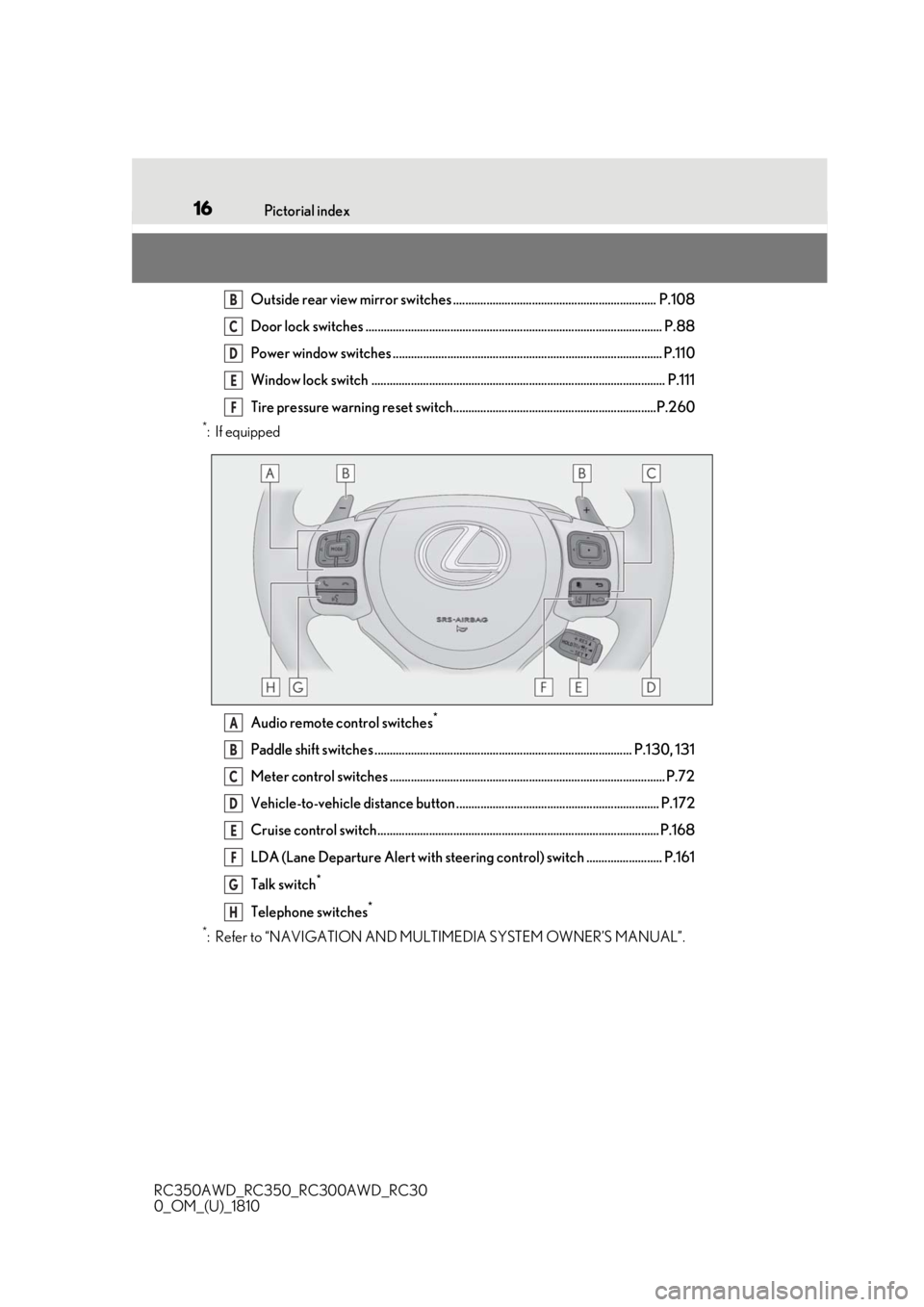
*:If equipped Audio remote control switches
*
Paddle shift switches ..................................................................................... P.130, 131
Meter control switches ........................................................................................... P.72
Vehicle-to-vehicle distance button ................................................................... P.172
Cruise control switch............................................................................................. P.168
LDA (Lane Departure Alert with steering control) switch ......................... P.161
Talk switch
*
Telephone switches*
*
: Refer to “NAVIGATION AND MULTIMEDIA SYSTEM OWNER’S MANUAL”.
B
C
D
E
F
A
B
C
D
E
F
G
H
Page 30 of 390

301-1. For safe use
RC350AWD_RC350_RC300AWD_RC30
0_OM_(U)_1810
severity and occupant information. As the airbags deploy, a chemical reaction in
the inflators quickly fills the airbags with non-toxic gas to help restrain the motion of
the occupants.
■If the SRS airbags deploy (inflate)
●Slight abrasions, burns, bruising etc., may
be sustained from SRS airbags, due to the
extremely high speed deployment (infla-
tion) by hot gases.
●A loud noise and white powder will be
emitted.
●Parts of the airbag module (steering
wheel hub, airbag cover and inflator) as
well as the front seat s, parts of the front
and rear pillars, and roof side rails, may
be hot for several minutes. The airbag
itself may also be hot.
●The windshield may crack.
●All of the doors will be unlocked.
( P.87)
●Fuel supply to the engine will be stopped.
( P.281)
●For Lexus Enform Safety Connect sub-
scribers, if any of the following situations
occur, the system is designed to send an
emergency call to the response center,
notifying them of the vehicle’s location
(without needing to push the “SOS” but-
ton) and an agent will attempt to speak
with the occupants to ascertain the level
of emergency and assi stance required. If
the occupants are unable to communi-
cate, the agent automatically treats the
call as an emergency and helps to dis-
patch the necessary emergency services.
( P.53)
• An SRS airbag is deployed.
• A seat belt pretensioner is activated.
• The vehicle is involved in a sever rear-end collision.
■SRS airbag deployment conditions (SRS
front airbags)
●The SRS front airbags will deploy in the
event of an impact that exceeds the set
threshold level (the level of force corre-
sponding to an approximately 12 - 18
mph [20 - 30 km/h] frontal collision with
a fixed wall that does not move or
deform). However, this threshol
d velocity will be
considerably higher in the following situa-
tions:
• If the vehicle strikes an object, such as a parked vehicle or sign pole, which can
move or deform on impact
• If the vehicle is involved in an underride
collision, such as a collision in which the
front of the vehicle “underrides”, or goes
under, the bed of a truck
●Depending on the type of collision, it is
possible that only the seat belt preten-
sioners will activate.
●The SRS front airbags for the front pas-
senger will not activate if there is no pas-
senger sitting in the front passenger seat.
However, the SRS front airbags for the
front passenger may deploy if luggage is
put in the seat, even if the seat is unoccu-
pied.
■SRS airbag deployment conditions (SRS
side and curtain shield airbags)
●The SRS side and curtain shield airbags
will deploy in the event of an impact that
exceeds the set threshold level (the level
of force corresponding to the impact
force produced by an approximately
3300 lb. [1500 kg] vehicle colliding with
the vehicle cabin from a direction per-
pendicular to the vehicle orientation at an
approximate speed of 12 - 18 mph [20 -
30 km/h]).
●Both SRS curtain shield airbags will
deploy in the event of vehicle rollover.
●All SRS side and curtain shield airbags
will deploy in the event of a severe frontal
collision.
■Conditions under which the SRS air-
bags may deploy (inflate), other than a
collision
The SRS front airbags and SRS side and
curtain shield airbags may also deploy if a
serious impact occurs to the underside of
your vehicle. Some examples are shown in
the illustration.
●Hitting a curb, edge of pavement or hard
Page 44 of 390
441-1. For safe use
RC350AWD_RC350_RC300AWD_RC30
0_OM_(U)_1810
A child restraint system for a small
child or baby must itself be properly
restrained on the seat with the lap por-tion of the lap/shoulder belt.
■Installing child restraint system
using a seat belt (child restraint
lock function belt)
Install the child restraint system in
accordance to the operation manual
enclosed with the child restraint sys-
tem.
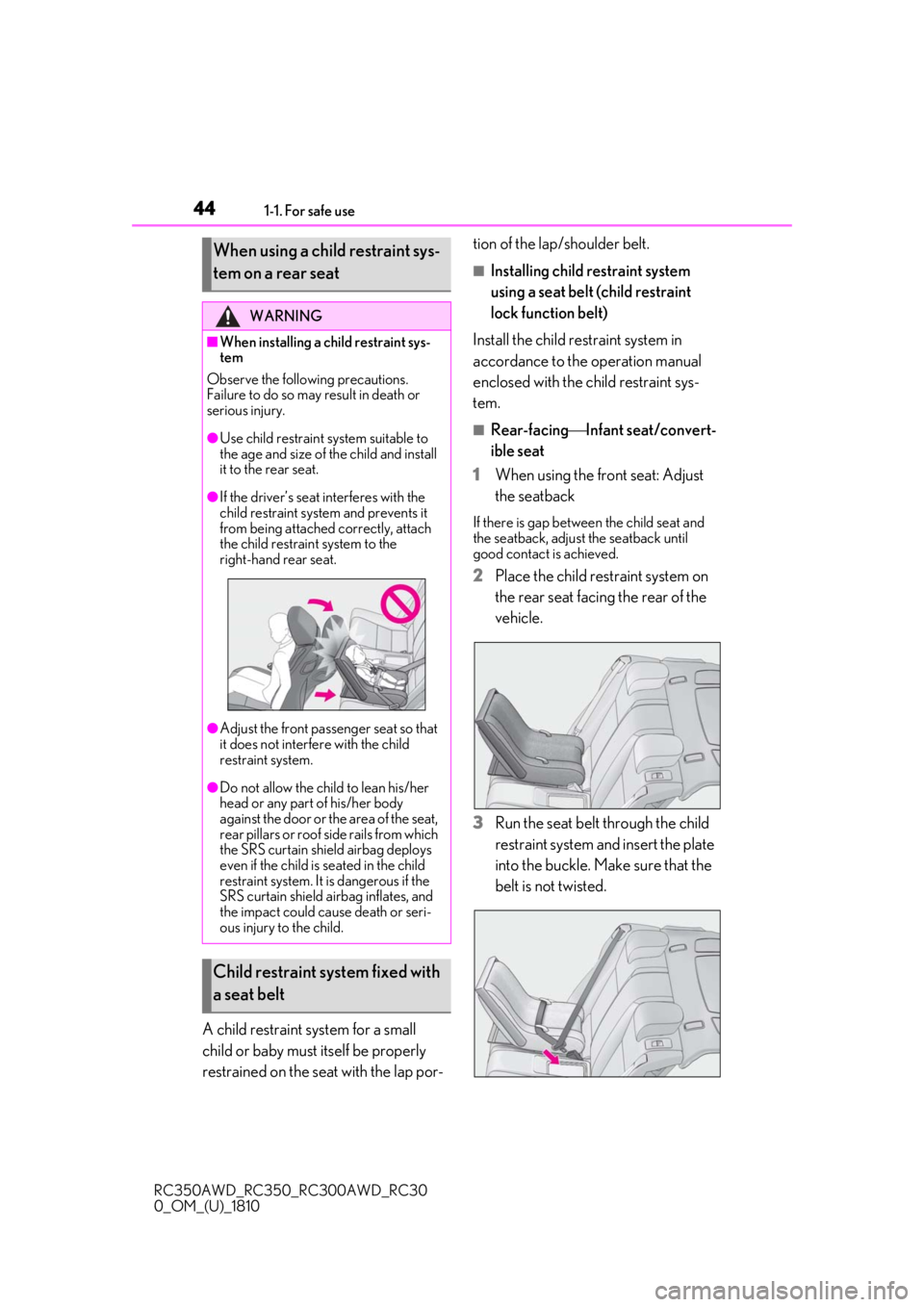
■Rear-facing Infant seat/convert-
ible seat
1
When using the front seat: Adjust
the seatback
If there is gap between the child seat and
the seatback, adjust the seatback until
good contact is achieved.
2Place the child restraint system on
the rear seat facing the rear of the
vehicle.
3
Run the seat belt through the child
restraint system and insert the plate
into the buckle. Make sure that the
belt is not twisted.
When using a child restraint sys-
tem on a rear seat
WARNING
■When installing a child restraint sys-
tem
Observe the following precautions.
Failure to do so may result in death or
serious injury.
●Use child restraint system suitable to
the age and size of the child and install
it to the rear seat.
●If the driver’s seat interferes with the
child restraint system and prevents it
from being attached correctly, attach
the child restraint system to the
right-hand rear seat.
●Adjust the front passenger seat so that
it does not interfere with the child
restraint system.
●Do not allow the child to lean his/her
head or any part of his/her body
against the door or the area of the seat,
rear pillars or roof side rails from which
the SRS curtain shie ld airbag deploys
even if the child is seated in the child
restraint system. It is dangerous if the
SRS curtain shield airbag inflates, and
the impact could cause death or seri-
ous injury to the child.
Child restraint system fixed with
a seat belt
Page 58 of 390
581-3. Theft deterrent system
RC350AWD_RC350_RC300AWD_RC30
0_OM_(U)_1810
■Items to check before locking the
vehicle
To prevent unexpected triggering of
the alarm and vehicle theft, make sure
of the following:
Nobody is in the vehicle.
The windows and moon roof (if
equipped) are closed before the
alarm is set.
No valuables or other personal
items are left in the vehicle.
■Setting
Close the doors, trunk and hood, and
lock both side doors. The system will
be set automatically after 30 seconds.
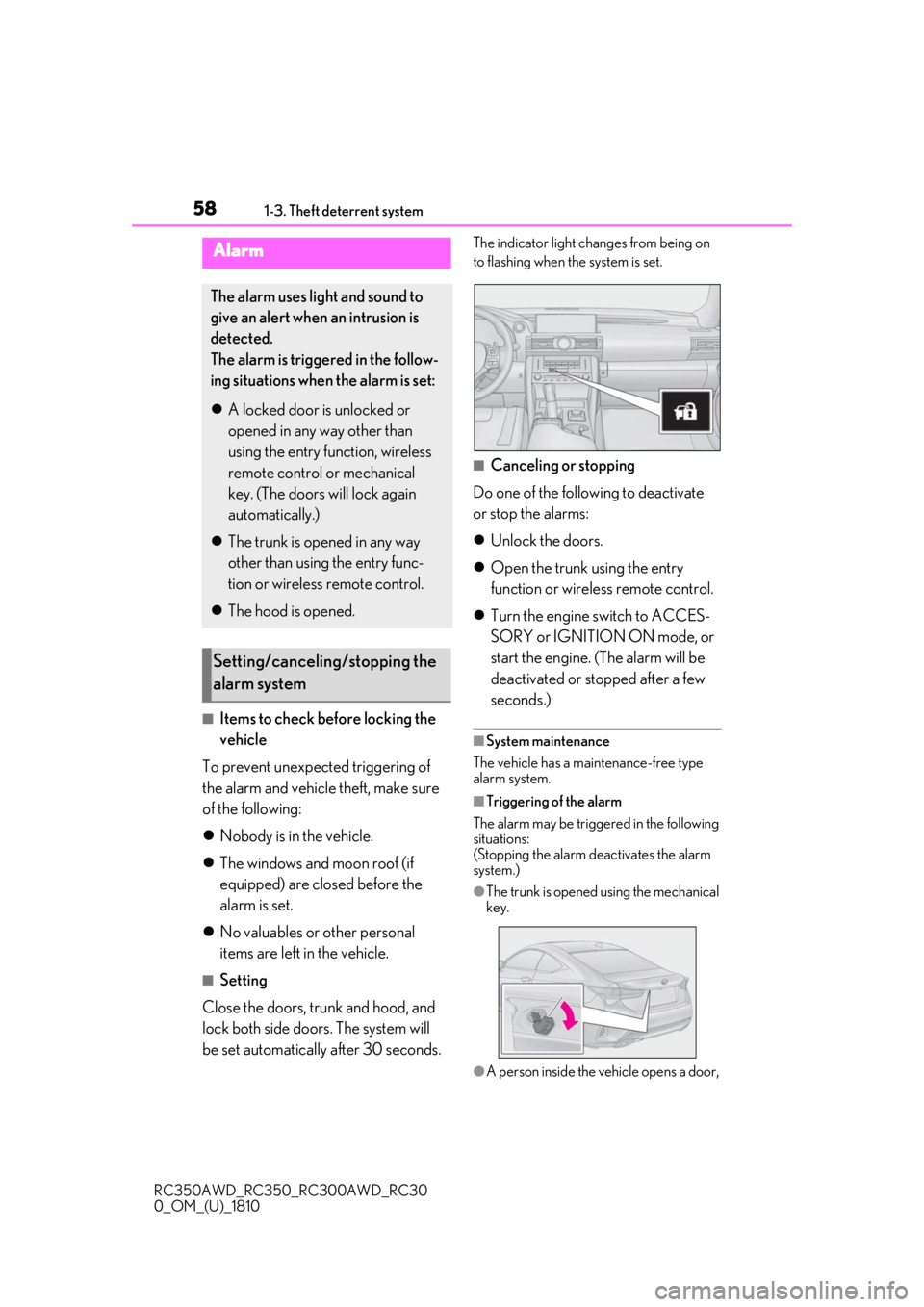
The indicator light changes from being on
to flashing when the system is set.
■Canceling or stopping
Do one of the following to deactivate
or stop the alarms:
Unlock the doors.
Open the trunk using the entry
function or wireless remote control.
Turn the engine switch to ACCES-
SORY or IGNITION ON mode, or
start the engine. (The alarm will be
deactivated or stopped after a few
seconds.)
■System maintenance
The vehicle has a maintenance-free type
alarm system.
■Triggering of the alarm
The alarm may be triggered in the following
situations:
(Stopping the alarm deactivates the alarm
system.)
●The trunk is opened using the mechanical
key.
●A person inside the vehicle opens a door,
Alarm
The alarm uses light and sound to
give an alert when an intrusion is
detected.
The alarm is triggered in the follow-
ing situations when the alarm is set:
A locked door is unlocked or
opened in any way other than
using the entry function, wireless
remote control or mechanical
key. (The doors will lock again
automatically.)
The trunk is opened in any way
other than using the entry func-
tion or wireless remote control.
The hood is opened.
Setting/canceling/stopping the
alarm system
Page 59 of 390
591-3. Theft deterrent system
RC350AWD_RC350_RC300AWD_RC30
0_OM_(U)_1810
1
For safety and security
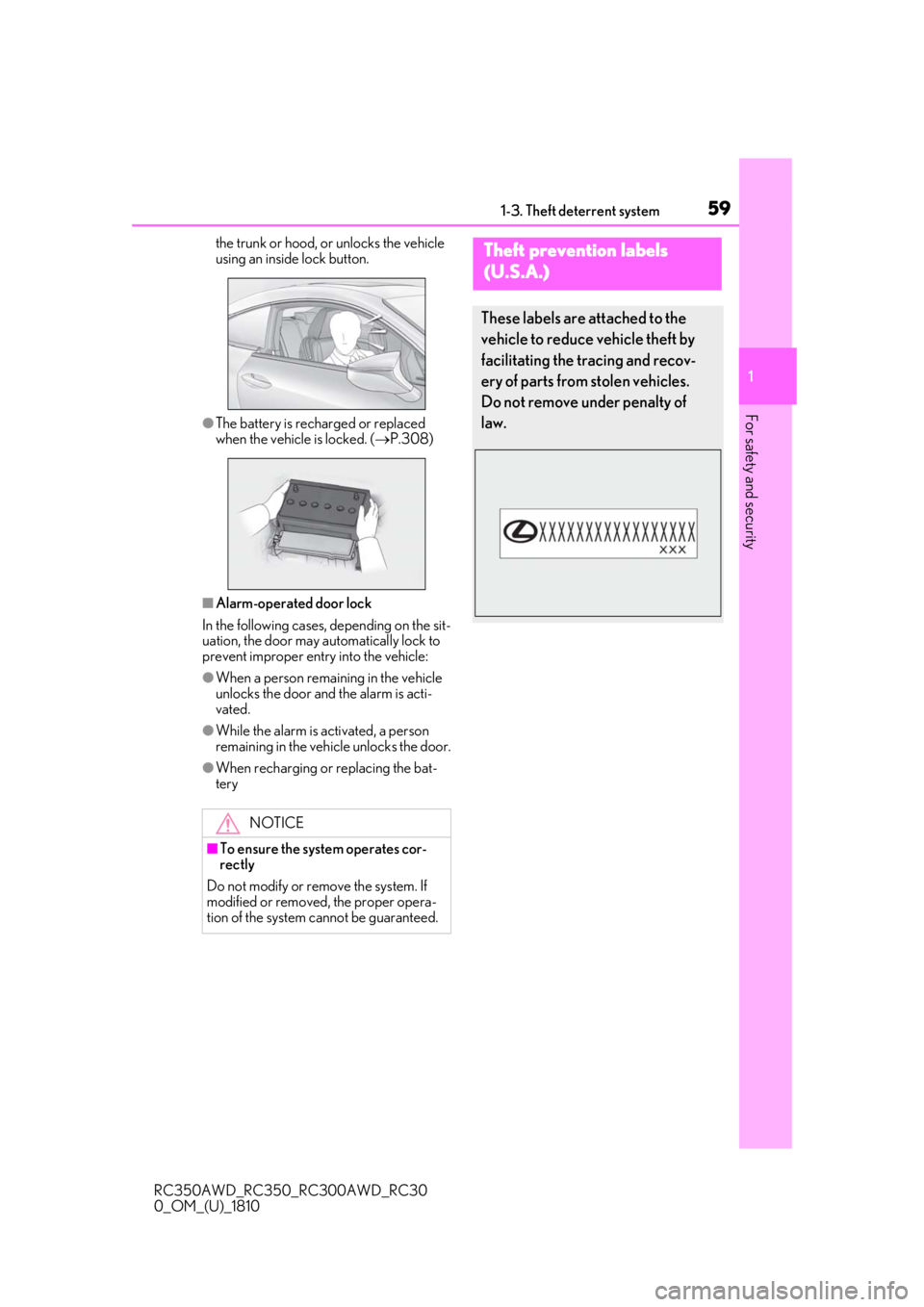
the trunk or hood, or unlocks the vehicle
using an inside lock button.
●The battery is rech arged or replaced
when the vehicle is locked. ( P.308)
■Alarm-operated door lock
In the following cases, depending on the sit-
uation, the door may automatically lock to
prevent improper entry into the vehicle:
●When a person remaining in the vehicle
unlocks the door and the alarm is acti-
vated.
●While the alarm is activated, a person
remaining in the vehicle unlocks the door.
●When recharging or replacing the bat-
tery
NOTICE
■To ensure the system operates cor-
rectly
Do not modify or remove the system. If
modified or removed, the proper opera-
tion of the system cannot be guaranteed.
Theft prevention labels
(
U.S.A.)
These labels are attached to the
vehicle to reduce vehicle theft by
facilitating the tracing and recov-
ery of parts from stolen vehicles.
Do not remove under penalty of
law.
Page 81 of 390
81
RC350AWD_RC350_RC300AWD_RC30
0_OM_(U)_1810
3
3
Before driving
Before driving
.3-1. Key informationKeys ................................................... 82
3-2. Opening, closing and locking the doors and trunk
Doors................................................. 86
Trunk.................................................. 89
Smart access system with push-button start ....................... 93
3-3. Adjusting the seats Front seats ....................................... 97
Rear seats ........................................ 99
Power easy access system/driving position memory/memory recall
function ........................................ 100
Head restraints............................ 103
3-4. Adjusting the steering wheel and mirrors
Steering wheel............................. 106
Inside rear view mirror............. 107
Outside rear view mirrors ...... 108
3-5. Opening, closing the windows and moon roof
Power windows............................ 110
Moon roof ...................................... 112
Page 84 of 390
843-1. Key information
RC350AWD_RC350_RC300AWD_RC30
0_OM_(U)_1810
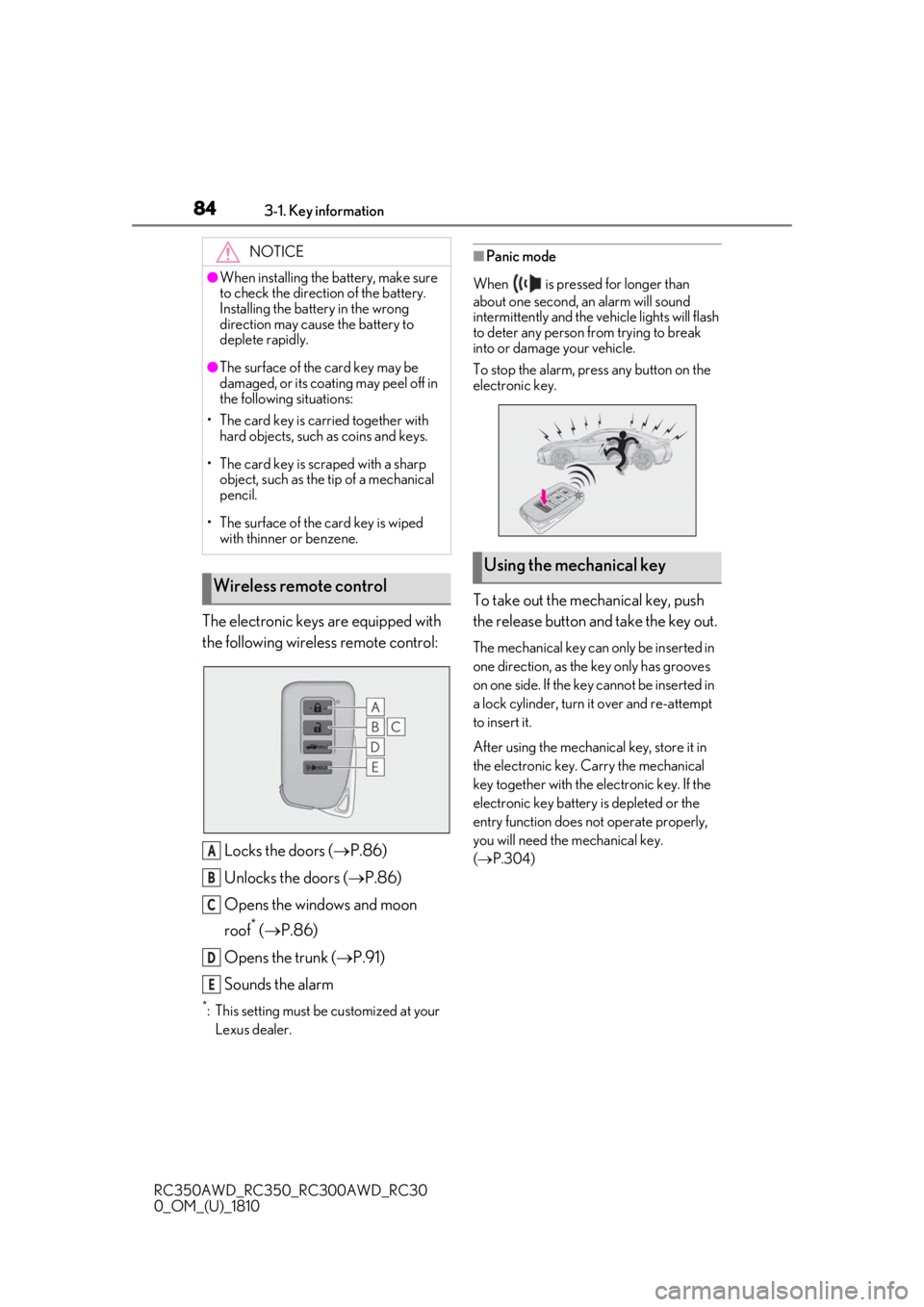
The electronic keys are equipped with
the following wireless remote control:Locks the doors ( P.86)
Unlocks the doors ( P.86)
Opens the windows and moon
roof
* ( P.86)
Opens the trunk ( P.91)
Sounds the alarm
*: This setting must be customized at your
Lexus dealer.
■Panic mode
When is pressed for longer than
about one second, an alarm will sound
intermittently and the vehicle lights will flash
to deter any person from trying to break
into or damage your vehicle.
To stop the alarm, press any button on the
electronic key.
To take out the mechanical key, push
the release button and take the key out.
The mechanical key can only be inserted in
one direction, as the key only has grooves
on one side. If the key cannot be inserted in
a lock cylinder, turn it over and re-attempt
to insert it.
After using the mechanical key, store it in
the electronic key. Carry the mechanical
key together with the electronic key. If the
electronic key battery is depleted or the
entry function does not operate properly,
you will need the mechanical key.
( P.304)
NOTICE
●When installing the ba
ttery, make sure
to check the direction of the battery.
Installing the battery in the wrong
direction may cause the battery to
deplete rapidly.
●The surface of the card key may be
damaged, or its coating may peel off in
the following situations:
• The card key is carried together with hard objects, such as coins and keys.
• The card key is scraped with a sharp object, such as the tip of a mechanical
pencil.
• The surface of the card key is wiped with thinner or benzene.
Wireless remote control
A
B
C
D
E
Using the mechanical key
Page 86 of 390
863-2. Opening, closing and locking the doors and trunk
RC350AWD_RC350_RC300AWD_RC30
0_OM_(U)_1810
3-2.Opening, closing and locking the doors and trunk
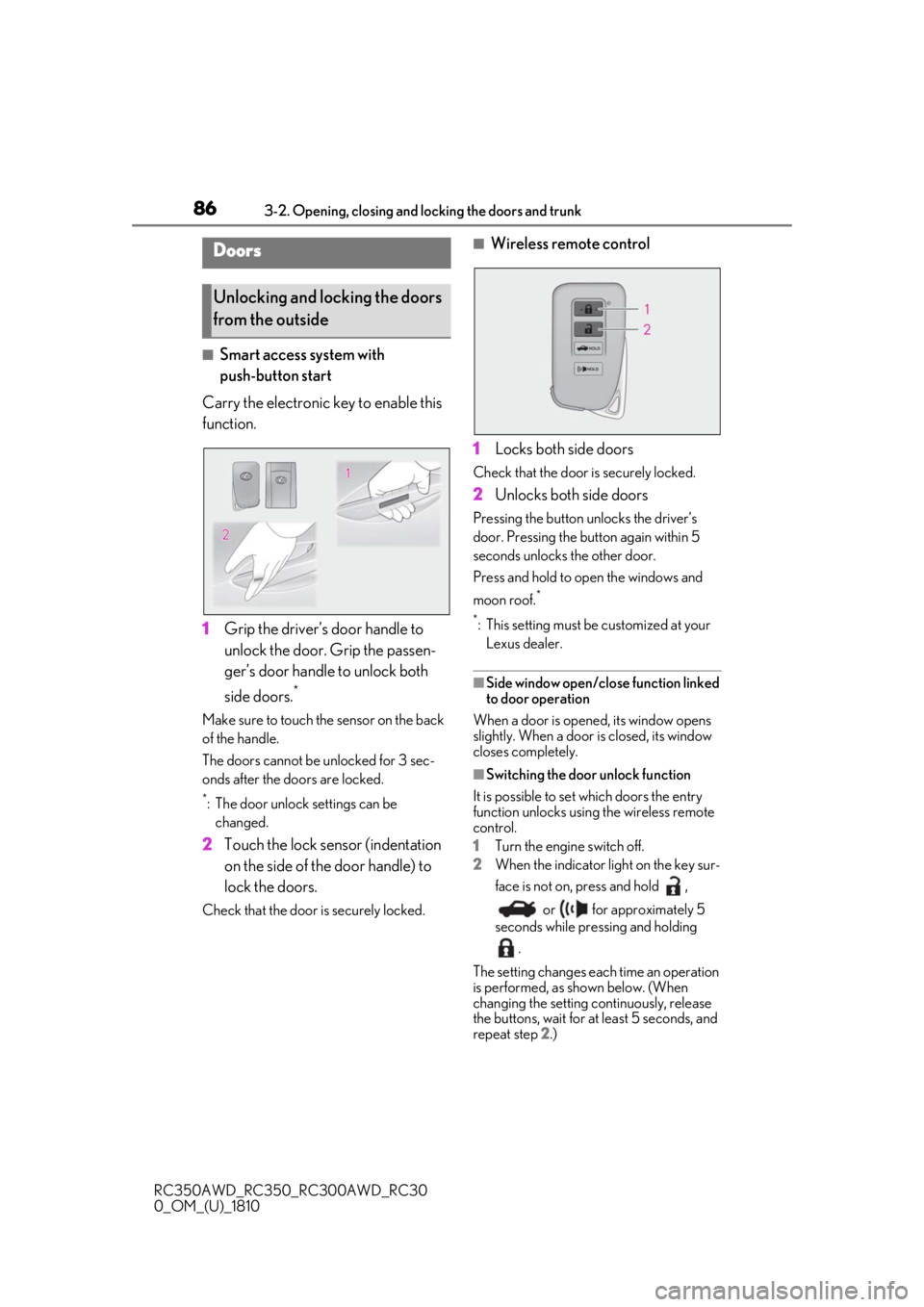
■Smart access system with
push-button start
Carry the electronic key to enable this
function.
1 Grip the driver’s door handle to
unlock the door. Grip the passen-
ger’s door handle to unlock both
side doors.
*
Make sure to touch the sensor on the back
of the handle.
The doors cannot be unlocked for 3 sec-
onds after the doors are locked.
*: The door unlock settings can be
changed.
2 Touch the lock sensor (indentation
on the side of the door handle) to
lock the doors.
Check that the door is securely locked.
■Wireless remote control
1 Locks both side doors
Check that the door is securely locked.
2Unlocks both side doors
Pressing the button unlocks the driver’s
door. Pressing the button again within 5
seconds unlocks the other door.
Press and hold to open the windows and
moon roof.
*
*
: This setting must be customized at your Lexus dealer.
■Side window open/close function linked
to door operation
When a door is opened, its window opens
slightly. When a door is closed, its window
closes completely.
■Switching the door unlock function
It is possible to set which doors the entry
function unlocks using the wireless remote
control.
1 Turn the engine switch off.
2 When the indicator light on the key sur-
face is not on, press and hold ,
or for approximately 5
seconds while pre ssing and holding
.
The setting changes each time an operation
is performed, as shown below. (When
changing the setting continuously, release
the buttons, wait for at least 5 seconds, and
repeat step 2 .)
Doors
Unlocking and locking the doors
from the outside