navigation system LEXUS RC300 2019 Owners Manual
[x] Cancel search | Manufacturer: LEXUS, Model Year: 2019, Model line: RC300, Model: LEXUS RC300 2019Pages: 390, PDF Size: 7.88 MB
Page 14 of 390
14Pictorial index
RC350AWD_RC350_RC300AWD_RC30
0_OM_(U)_1810
Parking brake........................................................................................................... P.134
Applying/releasing ........................................................................................................... P. 134
Precautions for winter season ..... ..................................................................................P.197
Warning buzzer/message............................................................................................P.290
Headlight switch ..................................................................................................... P.136
Turn signal lever ......................................................................................................P.133
Headlights/parking lights/tail lights/daytime running lights ........................... P.136
Windshield wiper and washer switch ................................................................. P.141
Usage........................................................................................................................................ P.141
Adding washer fluid ......................................................................................................... P.2 54
Warning messages ..........................................................................................................P.290
Headlight cleaners
*1........................................................................................................... P.141
Emergency flasher switch ................................................................................... P.274
Trunk opener switch................................................................................................ P.90
Hood lock release lever .......................................................................................P.245
Tilt and telescopic steering control switch
*1................................................... P.106
Adjustment ..................................................................................................................... ...... P.106
Driving position memory
*1............................................................................................. P.100
Tilt and telescopic steeri ng lock release lever
*1............................................ P.106
Adjustment ..................................................................................................................... ...... P.106
Air conditioning system ...................................................................................... P.205
Usage.......................................................................................................................... ...........P.205
Rear window defogger...................................................................................................P.209
Audio system
*2
Trunk opener main switch ......................................................................................P.92
*1: If equipped
*2: Refer to “NAVIGATION AND MULTIMEDIA SYSTEM OWNER’S MANUAL”.
E
F
G
H
I
J
K
L
M
N
O
Page 16 of 390
16Pictorial index
RC350AWD_RC350_RC300AWD_RC30
0_OM_(U)_1810
Outside rear view mirror switches ................................................................... P.108
Door lock switches .................................................................................................. P.88
Power window switches ......................................................................................... P.110
Window lock switch ................................................................................................. P.111
Tire pressure warning reset switch...................................................................P.260
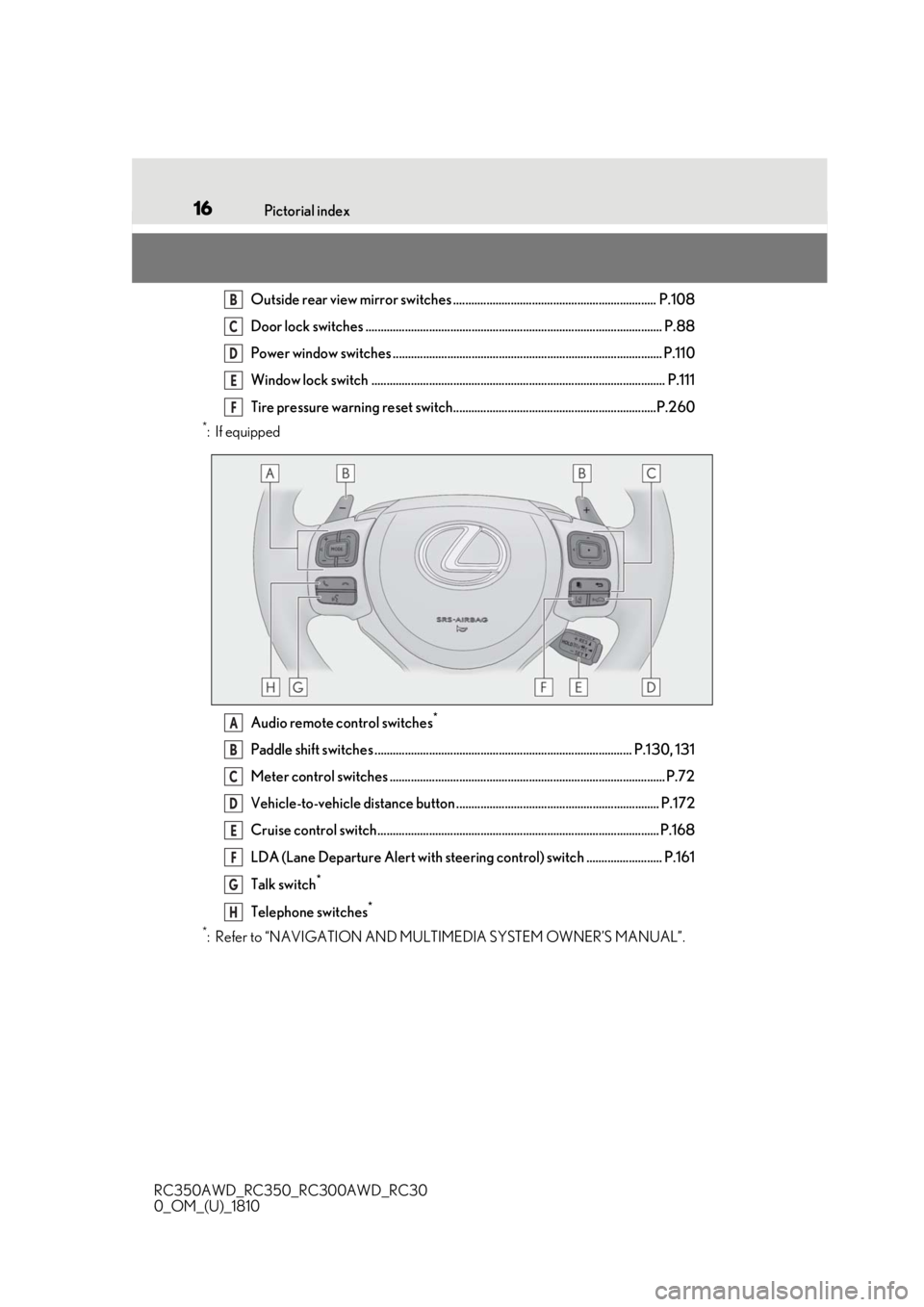
*:If equipped Audio remote control switches
*
Paddle shift switches ..................................................................................... P.130, 131
Meter control switches ........................................................................................... P.72
Vehicle-to-vehicle distance button ................................................................... P.172
Cruise control switch............................................................................................. P.168
LDA (Lane Departure Alert with steering control) switch ......................... P.161
Talk switch
*
Telephone switches*
*
: Refer to “NAVIGATION AND MULTIMEDIA SYSTEM OWNER’S MANUAL”.
B
C
D
E
F
A
B
C
D
E
F
G
H
Page 17 of 390
17Pictorial index
RC350AWD_RC350_RC300AWD_RC30
0_OM_(U)_1810
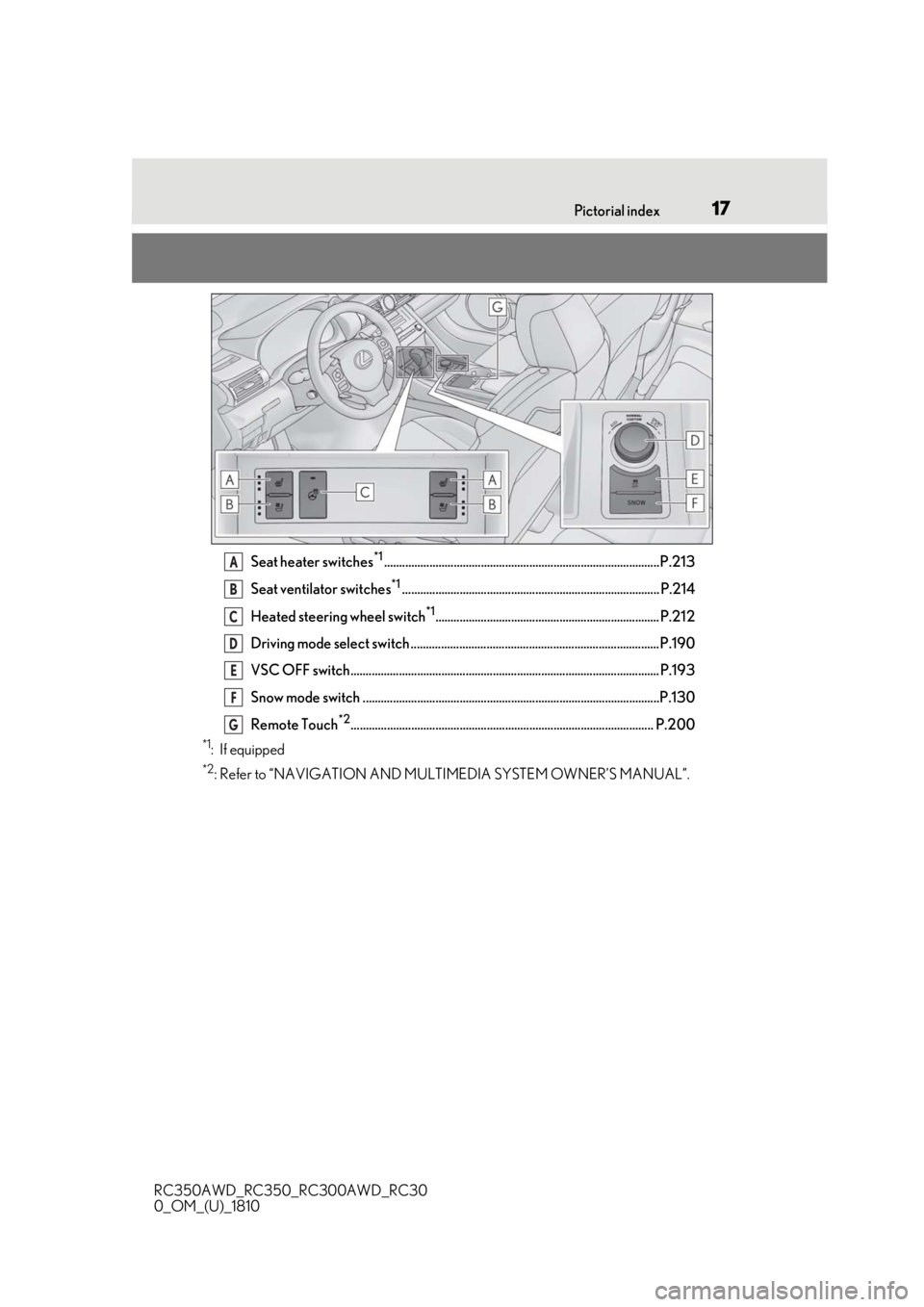
Seat heater switches*1...........................................................................................P.213
Seat ventilator switches
*1..................................................................................... P.214
Heated steering wheel switch
*1.......................................................................... P.212
Driving mode select switch ..................................................................................P.190
VSC OFF switch...................................................................................................... P.193
Snow mode switch ..................................................................................................P.130
Remote Touch
*2.................................................................................................... P.200
*1: If equipped
*2: Refer to “NAVIGATION AND MULTIMEDIA SYSTEM OWNER’S MANUAL”.
A
B
C
D
E
F
G
Page 72 of 390
722-1. Instrument cluster
RC350AWD_RC350_RC300AWD_RC30
0_OM_(U)_1810
■Menu icons
■Liquid crystal display
P.70
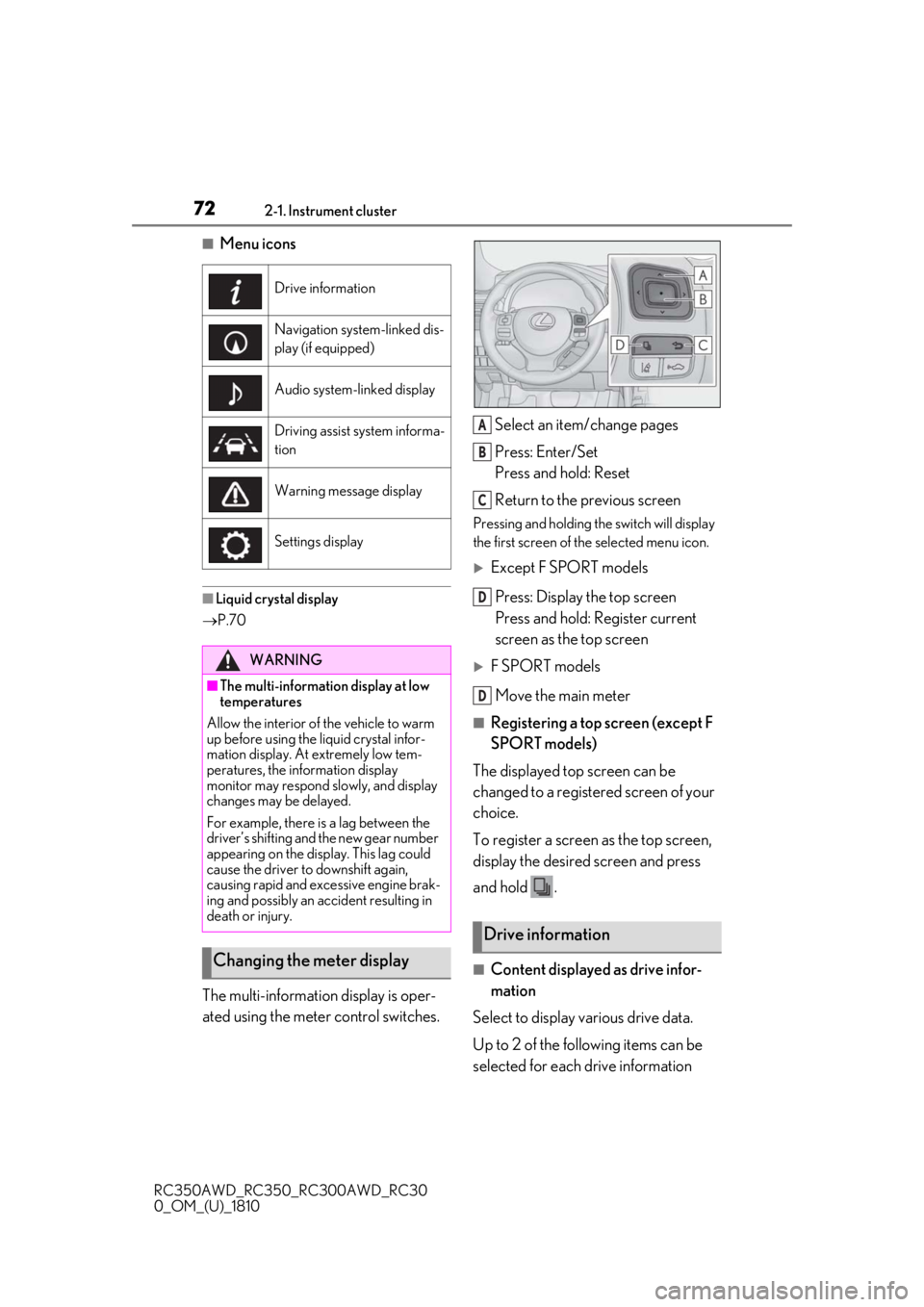
The multi-information display is oper-
ated using the meter control switches. Select an item/change pages
Press: Enter/Set
Press and hold: Reset
Return to the previous screen
Pressing and holding the switch will display
the first screen of the selected menu icon.
Except F SPORT models
Press: Display the top screen
Press and hold: Register current
screen as the top screen
F SPORT modelsMove the main meter
■Registering a top screen (except F
SPORT models)
The displayed top screen can be
changed to a registered screen of your
choice.
To register a screen as the top screen,
display the desired screen and press
and hold .
■Content displayed as drive infor-
mation
Select to display various drive data.
Up to 2 of the following items can be
selected for each drive information
Drive information
Navigation system-linked dis-
play (if equipped)
Audio system-linked display
Driving assist system informa-
tion
Warning message display
Settings display
WARNING
■The multi-information display at low
temperatures
Allow the interior of the vehicle to warm
up before using the liquid crystal infor-
mation display. At extremely low tem-
peratures, the information display
monitor may respond slowly, and display
changes may be delayed.
For example, there is a lag between the
driver’s shifting and the new gear number
appearing on the display. This lag could
cause the driver to downshift again,
causing rapid and excessive engine brak-
ing and possibly an accident resulting in
death or injury.
Changing the meter display
Drive information
A
B
C
D
D
Page 75 of 390
752-1. Instrument cluster
RC350AWD_RC350_RC300AWD_RC30
0_OM_(U)_1810
2
Vehicle status information and indicators
guideline. Depending on factors such
as the road surface condition, tem-
perature and vehicle speed, the display
may not show the actual condition of
the vehicle.
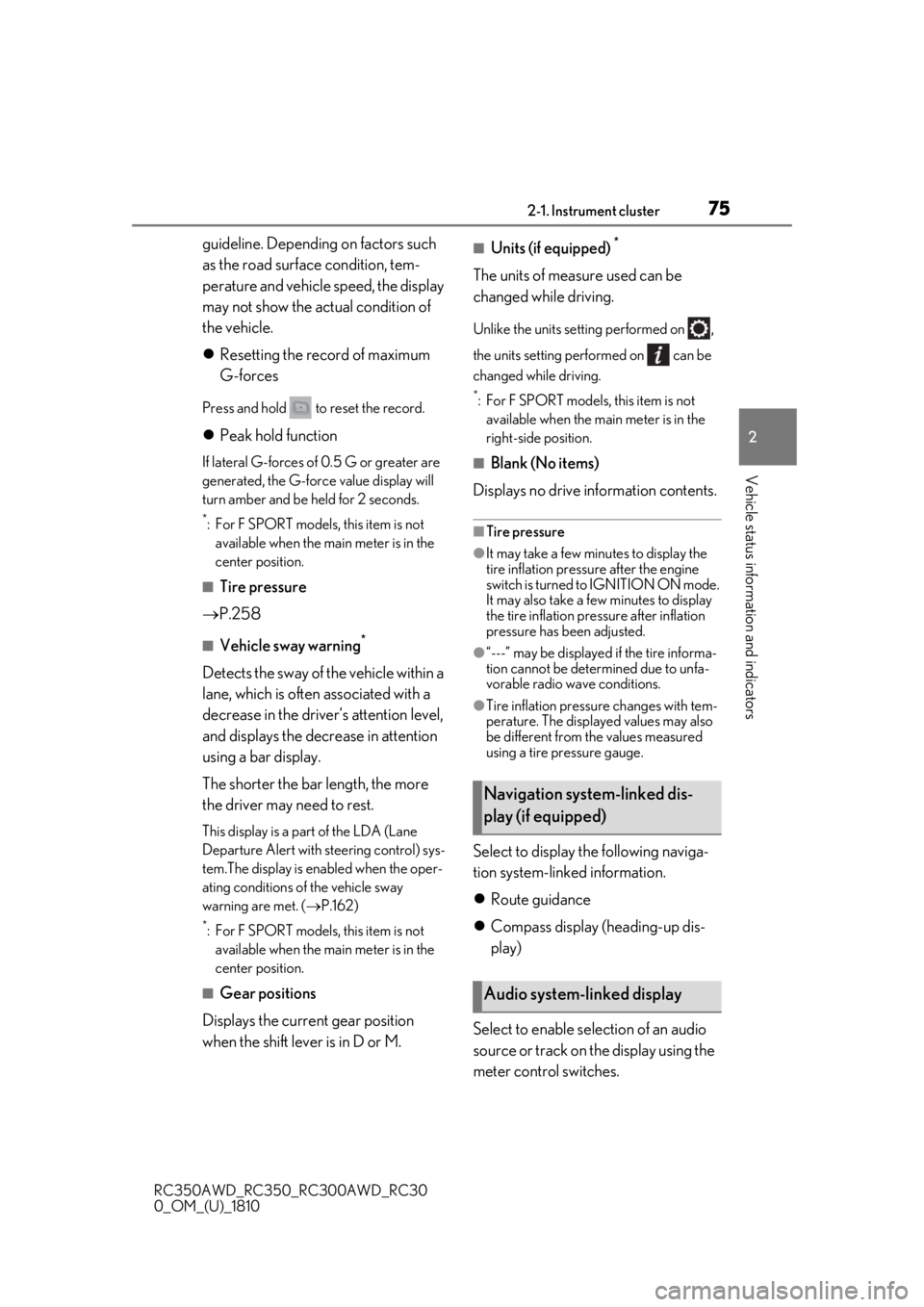
Resetting the record of maximum
G-forces
Press and hold to reset the record.
Peak hold function
If lateral G-forces of 0.5 G or greater are
generated, the G-forc e value display will
turn amber and be held for 2 seconds.
*: For F SPORT models, this item is not available when the ma in meter is in the
center position.
■Tire pressure
P.258
■Vehicle sway warning*
Detects the sway of the vehicle within a
lane, which is often associated with a
decrease in the driver’s attention level,
and displays the decrease in attention
using a bar display.
The shorter the bar length, the more
the driver may need to rest.
This display is a part of the LDA (Lane
Departure Alert with steering control) sys-
tem.The display is enabled when the oper-
ating conditions of the vehicle sway
warning are met. ( P.162)
*: For F SPORT models, this item is not
available when the ma in meter is in the
center position.
■Gear positions
Displays the current gear position
when the shift lever is in D or M.
■Units (if equipped) *
The units of measure used can be
changed while driving.
Unlike the units sett ing performed on ,
the units setting performed on can be
changed while driving.
*: For F SPORT models, this item is not available when the main meter is in the
right-side position.
■Blank (No items)
Displays no drive information contents.
■Tire pressure
●It may take a few minutes to display the
tire inflation pressu re after the engine
switch is turned to IGNITION ON mode.
It may also take a few minutes to display
the tire inflation pressure after inflation
pressure has b een adjusted.
●“---” may be displayed if the tire informa-
tion cannot be determined due to unfa-
vorable radio wave conditions.
●Tire inflation pressure changes with tem-
perature. The displaye d values may also
be different from the values measured
using a tire pressure gauge.
Select to display the following naviga-
tion system-linked information.
Route guidance
Compass display (heading-up dis-
play)
Select to enable se lection of an audio
source or track on the display using the
meter control switches.
Navigation system-linked dis-
play (if equipped)
Audio system-linked display
Page 200 of 390
2005-1. Remote Touch/Display
RC350AWD_RC350_RC300AWD_RC30
0_OM_(U)_1810
5-1.Remote Touch/Display
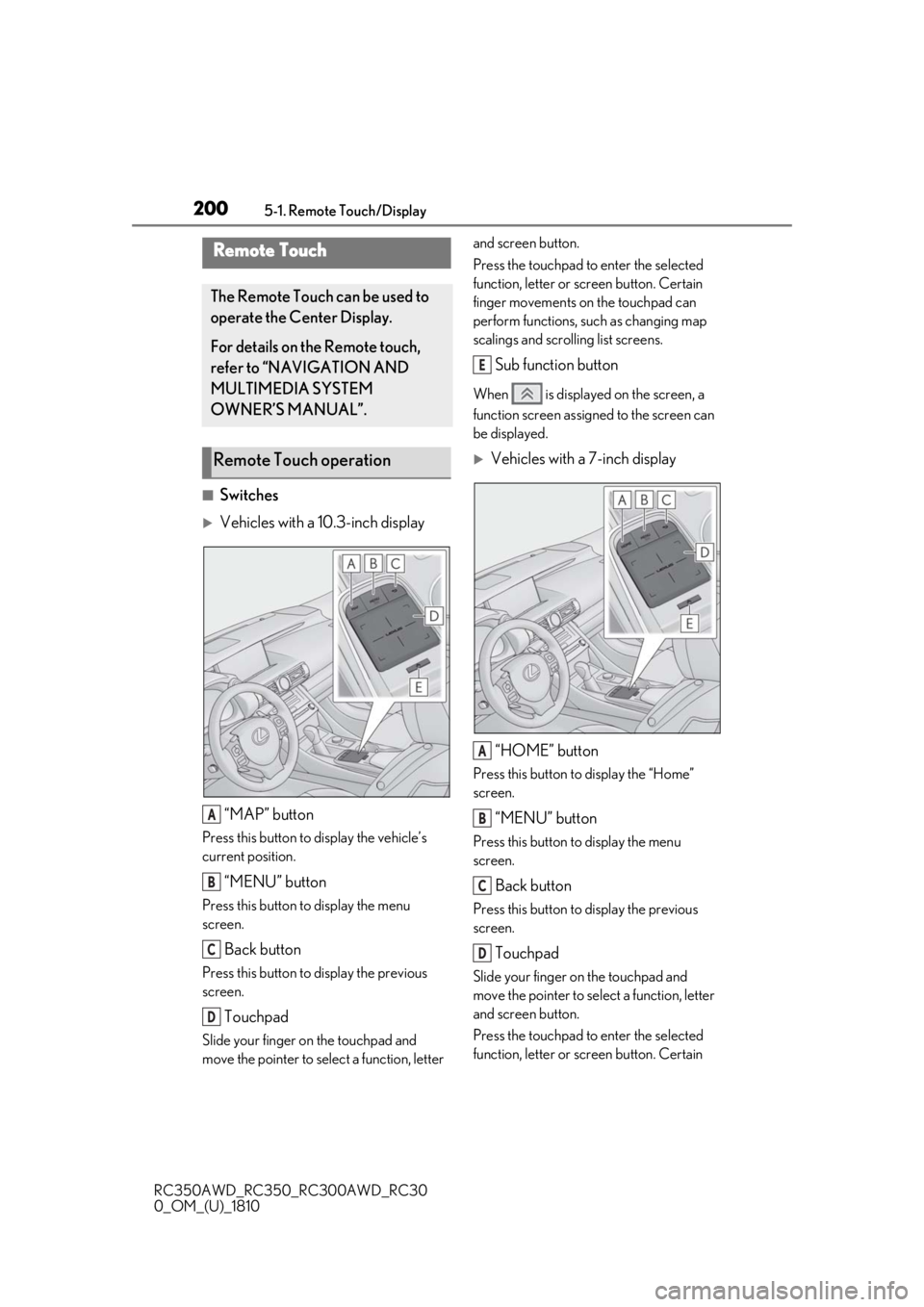
■Switches
Vehicles with a 10.3-inch display“MAP” button
Press this button to display the vehicle’s
current position.
“MENU” button
Press this button to display the menu
screen.
Back button
Press this button to display the previous
screen.
Touchpad
Slide your finger on the touchpad and
move the pointer to select a function, letter and screen button.
Press the touchpad to enter the selected
function, letter or screen button. Certain
finger movements on the touchpad can
perform functions, su
ch as changing map
scalings and scrolling list screens.
Sub function button
When is displayed on the screen, a
function screen assigned to the screen can
be displayed.
Vehicles with a 7-inch display
“HOME” button
Press this button to display the “Home”
screen.
“MENU” button
Press this button to display the menu
screen.
Back button
Press this button to display the previous
screen.
Touchpad
Slide your finger on the touchpad and
move the pointer to select a function, letter
and screen button.
Press the touchpad to enter the selected
function, letter or screen button. Certain
Remote Touch
The Remote Touch can be used to
operate the Center Display.
For details on the Remote touch,
refer to “NAVIGATION AND
MULTIMEDIA SYSTEM
OWNER’S MANUAL”.
Remote Touch operation
A
B
C
D
E
A
B
C
D
Page 203 of 390
2035-1. Remote Touch/Display
RC350AWD_RC350_RC300AWD_RC30
0_OM_(U)_1810
5
Interior features
*1: Refer to the “NAVIGATION AND MULTIMEDIA SYSTEM OWNER’S
MANUAL”.
*2: This function is not available on some models.
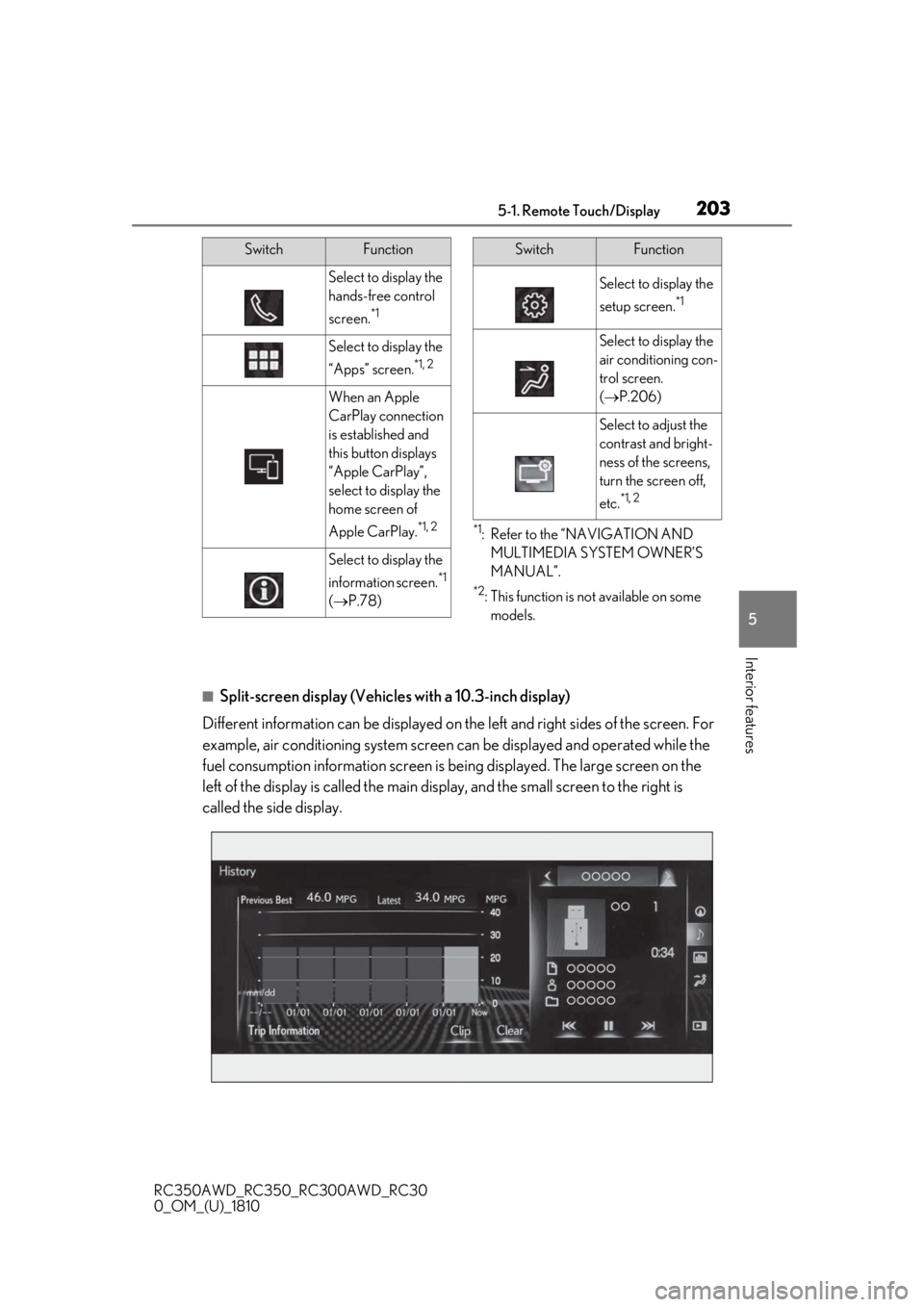
■Split-screen display (Vehicles with a 10.3-inch display)
Different information can be displayed on the left and right sides of the screen. For
example, air conditioning system screen can be displayed and operated while the
fuel consumption information screen is be ing displayed. The large screen on the
left of the display is called the main display, and the small screen to the right is
called the side display.
Select to display the
hands-free control
screen.
*1
Select to display the
“Apps” screen.
*1, 2
When an Apple
CarPlay connection
is established and
this button displays
“Apple CarPlay”,
select to display the
home screen of
Apple CarPlay.
*1, 2
Select to display the
information screen.
*1
( P.78)
SwitchFunction
Select to display the
setup screen.
*1
Select to display the
air conditioning con-
trol screen.
( P.206)
Select to adjust the
contrast and bright-
ness of the screens,
turn the screen off,
etc.
*1, 2
SwitchFunction
Page 204 of 390
2045-1. Remote Touch/Display
RC350AWD_RC350_RC300AWD_RC30
0_OM_(U)_1810
■Main display (Vehicles with a
10.3-inch display)
For details about the functions and
operation of the main display, refer to
the respective section and “NAVIGA-
TION AND MULTIMEDIA SYSTEM
OWNER’S MANUAL”.
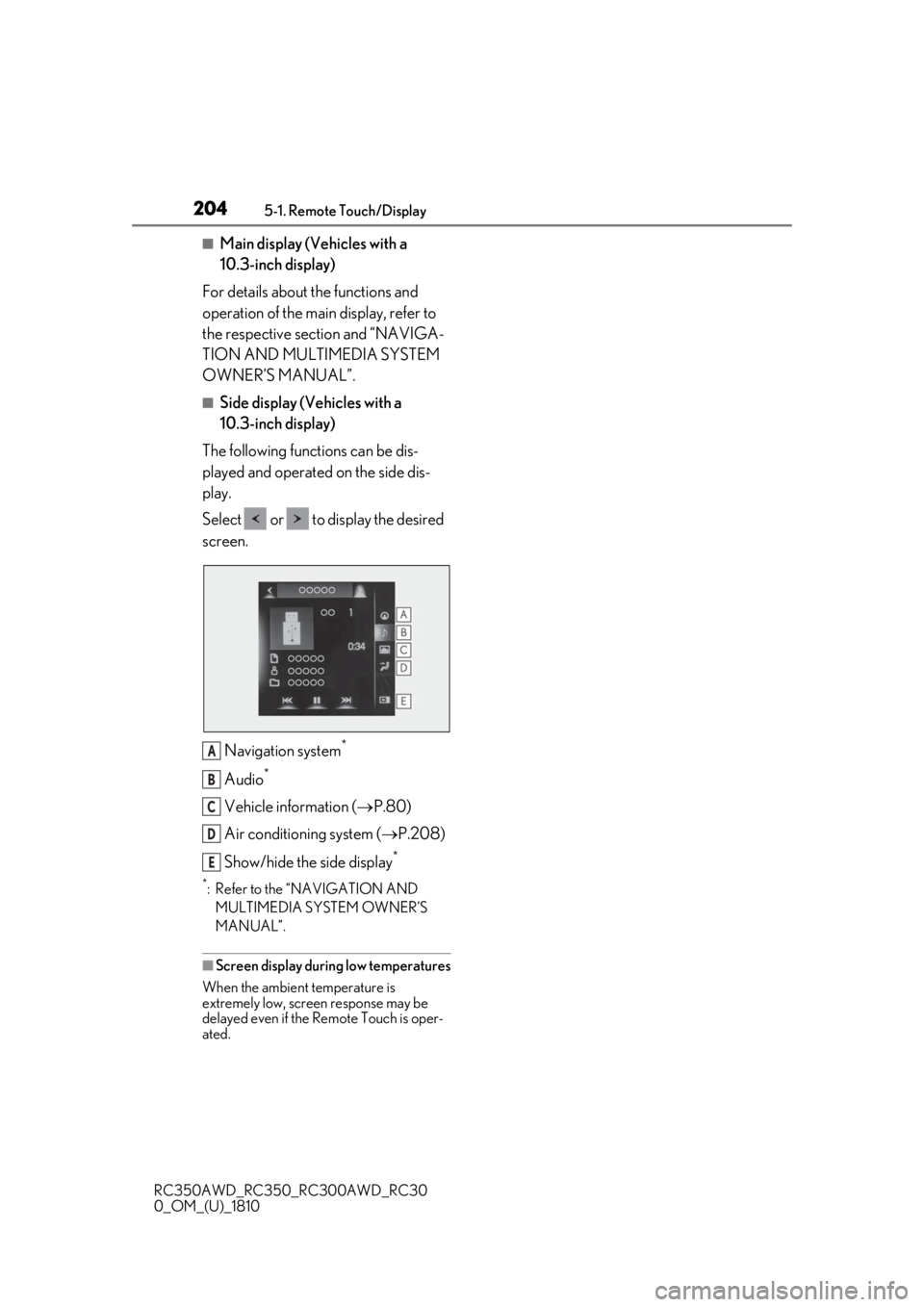
■Side display (Vehicles with a
10.3-inch display)
The following functions can be dis-
played and operated on the side dis-
play.
Select or to display the desired
screen.
Navigation system
*
Audio*
Vehicle information ( P.80)
Air conditioning system ( P.208)
Show/hide the side display
*
*: Refer to the “NAVIGATION AND MULTIMEDIA SYSTEM OWNER’S
MANUAL”.
■Screen display during low temperatures
When the ambient temperature is
extremely low, screen response may be
delayed even if the Re mote Touch is oper-
ated.
A
B
C
D
E
Page 210 of 390
2105-2. Using the air conditioning system
RC350AWD_RC350_RC300AWD_RC30
0_OM_(U)_1810your Lexus dealer.
*: The doors that can recall the driving
position memory are changed at the
same time.
■Using automatic mode
Fan speed is adjusted automatically accord-
ing to the temperature setting and the
ambient conditions.
Therefore, the fan may stop for a while until
warm or cool air is ready to flow immedi-
ately after is pressed or “AUTO” is
selected.
■Using the voice command system
Air conditioning system can be operated
using voice commands. Fo r details, refer to
the “NAVIGATION AND MULTIMEDIA
SYSTEM OWNER’S MANUAL”.
■Fogging up of the windows
The windows will easily fog up when the
humidity in the vehicle is high. Turning (“A/C”) on will dehumidify the air
from the outlets and defog the windshield
effectively.
●If you turn (“A/C”) off, the win-
dows may fog up more easily.
●The windows may fog up if the recircu-
lated air mode is used.
■Outside/recirculated air mode
●When driving on dusty roads such as tun-
nels or in heavy traffic, set the out-
side/recirculated air mode button to the
recirculated air mode. This is effective in
preventing outside air from entering the
vehicle interior. During cooling opera-
tion, setting the recirculated air mode will
also cool the vehicle interior effectively.
●Outside/recirculated air mode may auto-
matically switch de pending on the tem-
perature setting or the inside
temperature.
■When the outside temperature exceeds
75°F (24°C) and the air conditioning
system is on
●In order to reduce the air conditioning
power consumption, the air conditioning system may switch to recirculated air
mode automatically. This may also
reduce fuel consumption.
●Recirculated air mode is selected as a
default mode when the engine switch is
turned to IGNITION ON mode.
●It is possible to switch to outside air mode
at any time by pressing
.
■Automatic mode for air intake control
In automatic mode, the system detects
exhaust gas and other pollutants and auto-
matically switches between outside air and
recirculated air modes.
When the dehumidification function is off,
and the fan is operating, turning automatic
mode on will activate the dehumidification
function.
■Operation of the air conditioning sys-
tem in Eco drive mode
In Eco drive mode, the air conditioning sys-
tem is controlled as follows to prioritize fuel
efficiency:
●Engine speed and compressor operation
controlled to restrict heating/cooling
capacity
●Fan speed restricted when automatic
mode is selected
To improve air condit ioning performance,
perform the following operations:
●Adjust the fan speed
●Turn off Eco drive mode
■When the outside temperature falls to
nearly 32°F (0°C)
The dehumidification function may not
operate even when is pressed or
“A/C” is selected.
■Ventilation and air conditioning odors
●To let fresh air in, set the air conditioning
system to the outside air mode.
●During use, various odors from inside and
outside the vehicle may enter into and
accumulate in the air conditioning sys-
tem. This may then cause odor to be
emitted from the vents.
Page 302 of 390
3007-2. Steps to take in an emergency
RC350AWD_RC350_RC300AWD_RC30
0_OM_(U)_1810
■When the spare tire is equipped
The vehicle becomes lower when driving
with the spare tire compared to when driv-
ing with standard tires.
■If you have a flat rear tire on a road cov-
ered with snow or ice (vehicles with
front and rear tires of the same size
except for vehicles with LDH and
19-inch tires)
Install the spare tire on one of the front
wheels of the vehicle. Perform the following
steps and fit tire chains to the rear tires:
1
Replace a front tire with the spare tire.
2
Replace the flat rear tire with the tire
removed from the front of the vehicle.
3
Fit tire chains to the rear tires.
WARNING
■When using the spare tire
●Remember that the spare tire provided
is specifically desi gned for use with
your vehicle. Do not use your spare
tire on another vehicle.
●Do not use more than one spare tire
simultaneously.
●Replace the spare tire with a standard
tire as soon as possible.
●Avoid sudden acceleration, abrupt
steering, sudden braking and shifting
operations that cause sudden engine
braking.
■When the spare tire is attached
The vehicle speed may not be correctly
detected, and the following systems may
not operate correctly:
• ABS & Brake assist
• VSC
• TRAC
• Dynamic radar cruise control
• PCS
• EPS
• Adaptive Variable Suspension System (if equipped)
• LDA (Lane Departure Alert with steering control)
• VGRS (if equipped)
• LDH (Lexus Dynamic Handling sys- tem) (if equipped)
• DRS (Dynamic Rear Steering) (if equipped)
• VDIM (Vehicle Dynamics Integrated Management)
• Tire pressure warning system
• Lexus parking assist monitor
• Intuitive parking assist (if equipped)
• Navigation system (if equipped)
Also, not only can the following system
not be utilized fully, bu t it may even nega-
tively affect the drive-train components:
• AWD system (if equipped)
■Speed limit when using the spare tire
Do not drive at speeds in excess of 50
mph (80 km/h) when a spare tire is
installed on the vehicle.
The spare tire is not designed for driving
at high speeds. Failure to observe this
precaution may lead to an accident caus-
ing death or serious injury.
■After using the tools and jack
Before driving, make sure all the tools
and jack are securely in place in their
storage location to reduce the possibility
of personal injury during a collision or
sudden braking.