cruise control LEXUS RC300 2020 Owners Manual
[x] Cancel search | Manufacturer: LEXUS, Model Year: 2020, Model line: RC300, Model: LEXUS RC300 2020Pages: 390, PDF Size: 8.65 MB
Page 3 of 390
3TABLE OF CONTENTS
1
2
3
4
5
6
7
8
9
4-2. Driving proceduresEngine (ignition) switch .............. 125
Automatic transmission.............. 129
Turn signal lever............................. 134
Parking brake ................................. 135
ASC (Active Sound Control) ............................................................ 135
4-3. Operating the lights and wipers Headlight switch ............................ 137
Automatic High Beam ................ 139
Windshield wipers and washer ............................................................ 142
4-4. Refueling Opening the fuel tank cap......... 149
4-5. Using the driving support systems Lexus Safety System + ................ 152
PCS (Pre-Collision System)..... 156
LDA (Lane Departure Alert with steering control) ......................... 163
Dynamic radar cruise control ............................................................ 170
Intuitive parking assist ................. 178
BSM (Blind Spot Monitor) ........ 184
Driving mode select switch....... 192
Driving assist systems .................. 194
4-6. Driving tips Winter driving tips ........................ 198
5-1. Remote Touch/Display Remote Touch ............................... 202
Center Display .............................. 204
5-2. Using the air conditioning system Automatic air conditioning system........................................................... 207Heated steering wheel/seat heat-
ers/seat ventilators..................... 214
5-3. Using the interior lights Interior lights list ............................. 217
5-4. Using the storage features List of storage features ................ 219
Trunk features ................................. 221
5-5. Using the other interior features Other interior features ............... 222
Garage door opener .................. 224
Compass .......................................... 229
6-1. Maintenance and care Cleaning and protecting the vehi-cle exterior................................... 234
Cleaning and protecting the vehi- cle interior .................................... 237
6-2. Maintenance Maintenance re quirements .....240
General maintenance.................. 241
Emission inspection and mainte- nance (I/M) programs ............. 244
6-3. Do-it-yourself maintenance Do-it-yourself service precautions.......................................................... 245
Hood .................................................. 247
Positioning a floor jack ............... 247
Engine compartment ................. 249
Tires ................................................... 257
Tire inflation pressure................. 263
Wheels
............................................. 265
Air conditioning filter ................. 266
Electronic key battery ................ 267
5Interior features
6Maintenance and care
Page 16 of 390
16Pictorial index
Outside rear view mirror switches ................................................................... P.108
Door lock switches .................................................................................................. P.88
Power window switches ......................................................................................... P.110
Window lock switch ................................................................................................. P.111
Tire pressure warning reset switch...................................................................P.262
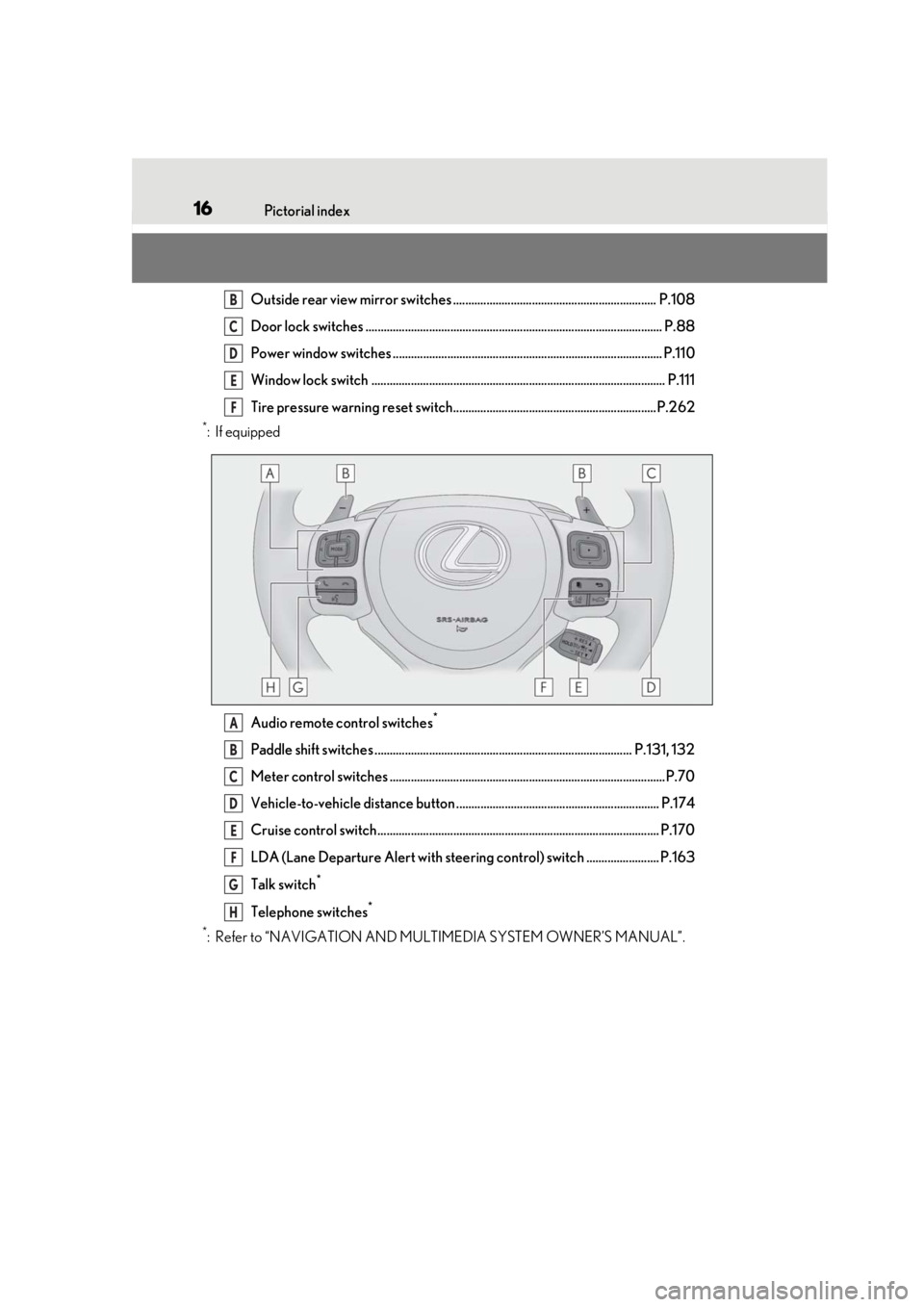
*:If equippedAudio remote control switches
*
Paddle shift switches ..................................................................................... P.131, 132
Meter control switches ...........................................................................................P.70
Vehicle-to-vehicle distance button ................................................................... P.174
Cruise control switch............................................................................................. P.170
LDA (Lane Departure Alert with steering control) switch ........................ P.163
Talk switch
*
Telephone switches*
*
: Refer to “NAVIGATION AND MULTIMEDIA SYSTEM OWNER’S MANUAL”.
B
C
D
E
F
A
B
C
D
E
F
G
H
Page 62 of 390
622-1. Instrument cluster
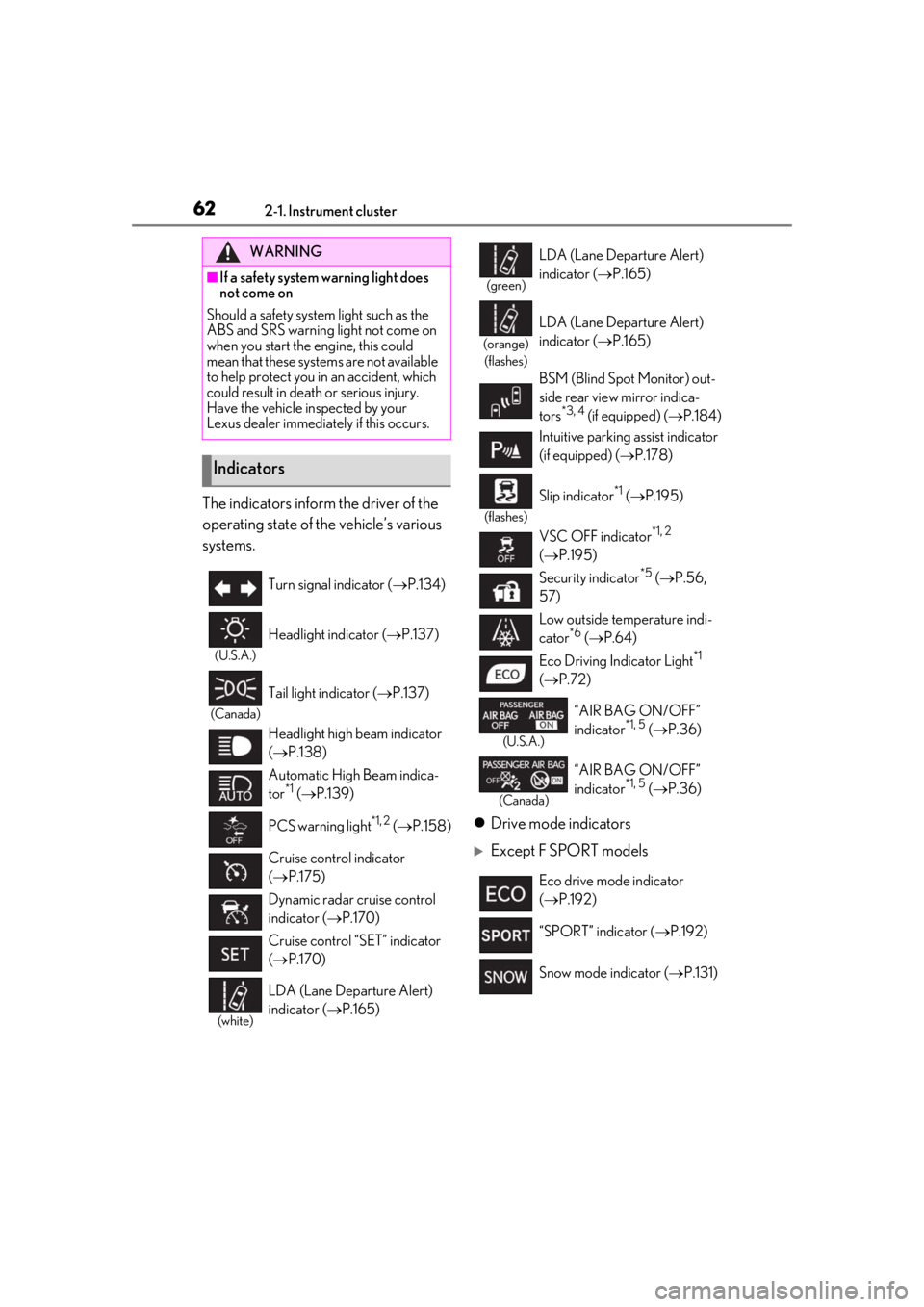
The indicators inform the driver of the
operating state of the vehicle’s various
systems.Drive mode indicators
Except F SPORT models
WARNING
■If a safety system warning light does
not come on
Should a safety system light such as the
ABS and SRS warning light not come on
when you start the engine, this could
mean that these systems are not available
to help protect you in an accident, which
could result in death or serious injury.
Have the vehicle inspected by your
Lexus dealer immediately if this occurs.
Indicators
Turn signal indicator ( P.134)
(U.S.A.)
Headlight indicator ( P.137)
(Canada)
Tail light indicator ( P.137)
Headlight high beam indicator
( P.138)
Automatic High Beam indica-
tor
*1 ( P.139)
PCS warning light
*1, 2 ( P.158)
Cruise control indicator
( P.175)
Dynamic radar cruise control
indicator ( P.170)
Cruise control “SET” indicator
( P.170)
(white)
LDA (Lane Departure Alert)
indicator ( P.165)
(green)
LDA (Lane Departure Alert)
indicator ( P.165)
(orange)
(flashes)
LDA (Lane Departure Alert)
indicator ( P.165)
BSM (Blind Spot Monitor) out-
side rear view mirror indica-
tors
*3, 4 (if equipped) ( P.184)
Intuitive parking assist indicator
(if equipped) ( P.178)
(flashes)
Slip indicator*1 ( P.195)
VSC OFF indicator
*1, 2
( P.195)
Security indicator
*5 ( P.56,
57)
Low outside temperature indi-
cator
*6 ( P.64)
Eco Driving Indicator Light
*1
( P.72)
(U.S.A.)
“AIR BAG ON/OFF”
indicator*1, 5 ( P.36)
(Canada)
“AIR BAG ON/OFF”
indicator*1, 5 ( P.36)
Eco drive mode indicator
( P.192)
“SPORT” indicator ( P.192)
Snow mode indicator ( P.131)
Page 74 of 390
742-1. Instrument cluster
using a tire pressure gauge.
Select to display the following naviga-
tion system-linked information.
Route guidance
Compass display (heading-up dis-
play)
Select to enable selection of an audio
source or track on the display using the
meter control switches.
Select to display the operational status
of the following systems:
LDA (Lane Departure Alert with
steering control) ( P.163)
Dynamic radar cruise control
( P.170)
Select to display warning messages
and measures to be taken if a malfunc-
tion is detected. ( P.292)
The settings of the following items can
be changed using the meter control
switches.
For functions that can be enabled or
disabled, the function switches between on and off each time is
pressed.
■LDA (Lane Departure Alert
with steering control) ( P.163)
Select to set up the following items.
Steering Assist
Select to enable/dis able steering wheel
assistance.
Alert
Select to set a vibrator or buzzer as the
notification method used to warn the
driver.
Sensitivity
Select to set the warning sensitivity.
Sway warning
Select to enable/disable the vehicle sway
warning.
Sway sensitivity
Select to set the vehicle sway warning sen-
sitivity.
■PCS (Pre-Collision System)
( P.156)
Select to set up the following items.
PCS
Select to enable/disable the pre-collision
system.
Warning sensitivity
Select to change the warning timing.
■Speed indicator (F SPORT mod-
els) ( P.66)
Select to set up the following items.
Speed Indicator
Select to enable/disable the speed indica-
tor.
Navigation system-linked dis-
play (if equipped)
Audio system-linked display
Driving assist system information
Warning message display
Settings display
Page 115 of 390
115
4
4
Driving
Driving
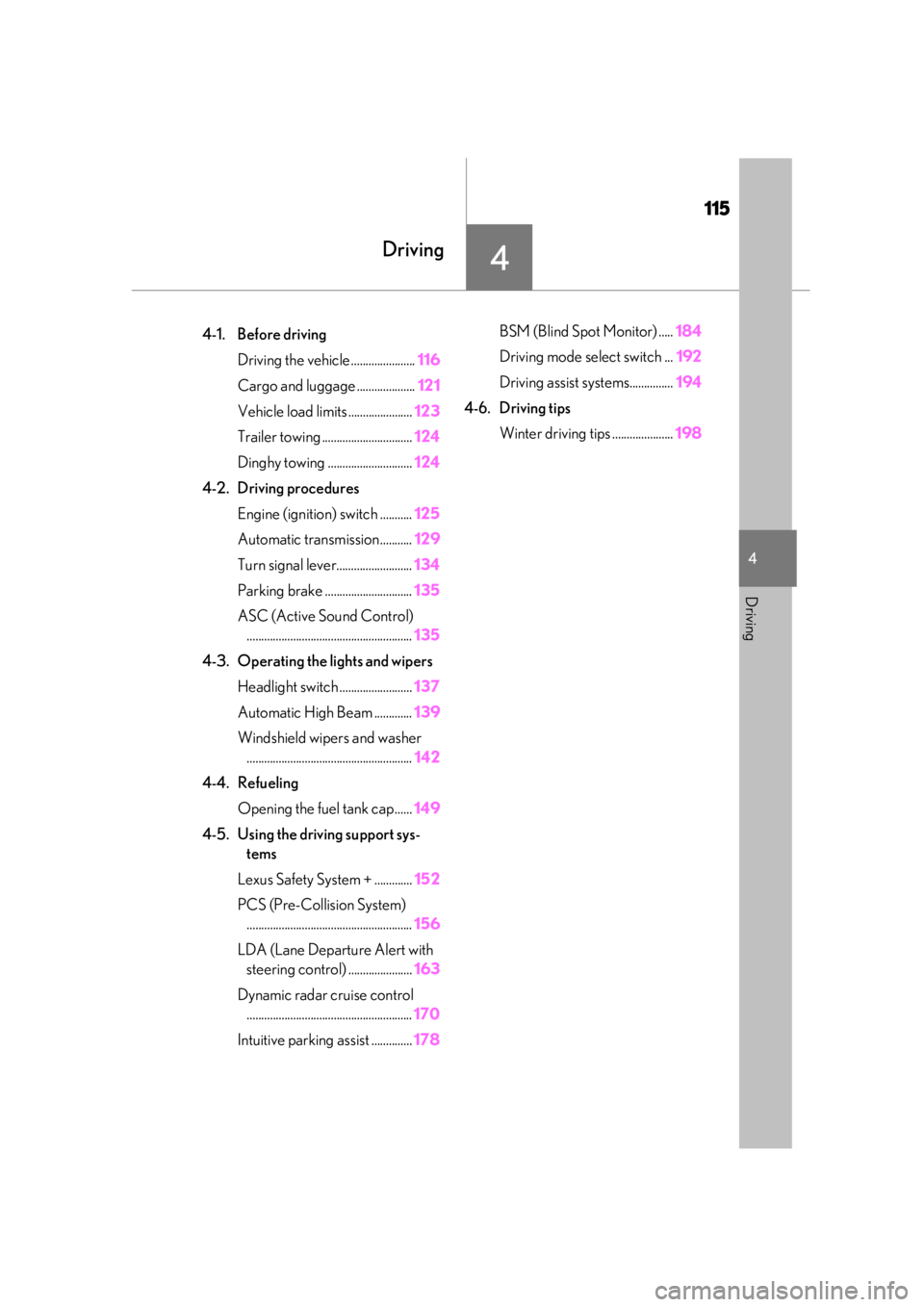
.4-1. Before drivingDriving the vehicle ...................... 116
Cargo and luggage .................... 121
Vehicle load limits ...................... 123
Trailer towing ............................... 124
Dinghy towing ............................. 124
4-2. Driving procedures Engine (ignition) switch ........... 125
Automatic transmission........... 129
Turn signal lever.......................... 134
Parking brake .............................. 135
ASC (Active Sound Control) ......................................................... 135
4-3. Operating the lights and wipers Headlight switch ......................... 137
Automatic High Beam ............. 139
Windshield wipers and washer ......................................................... 142
4-4. Refueling Opening the fuel tank cap...... 149
4-5. Using the driving support sys- tems
Lexus Safety System + ............. 152
PCS (Pre-Collision System) ......................................................... 156
LDA (Lane Departure Alert with steering control) ...................... 163
Dynamic radar cruise control ......................................................... 170
Intuitive parking assist .............. 178BSM (Blind Spot Monitor) .....
184
Driving mode select switch ... 192
Driving assist systems............... 194
4-6. Driving tips Winter driving tips ..................... 198
Page 129 of 390
1294-2. Driving procedures
4
Driving
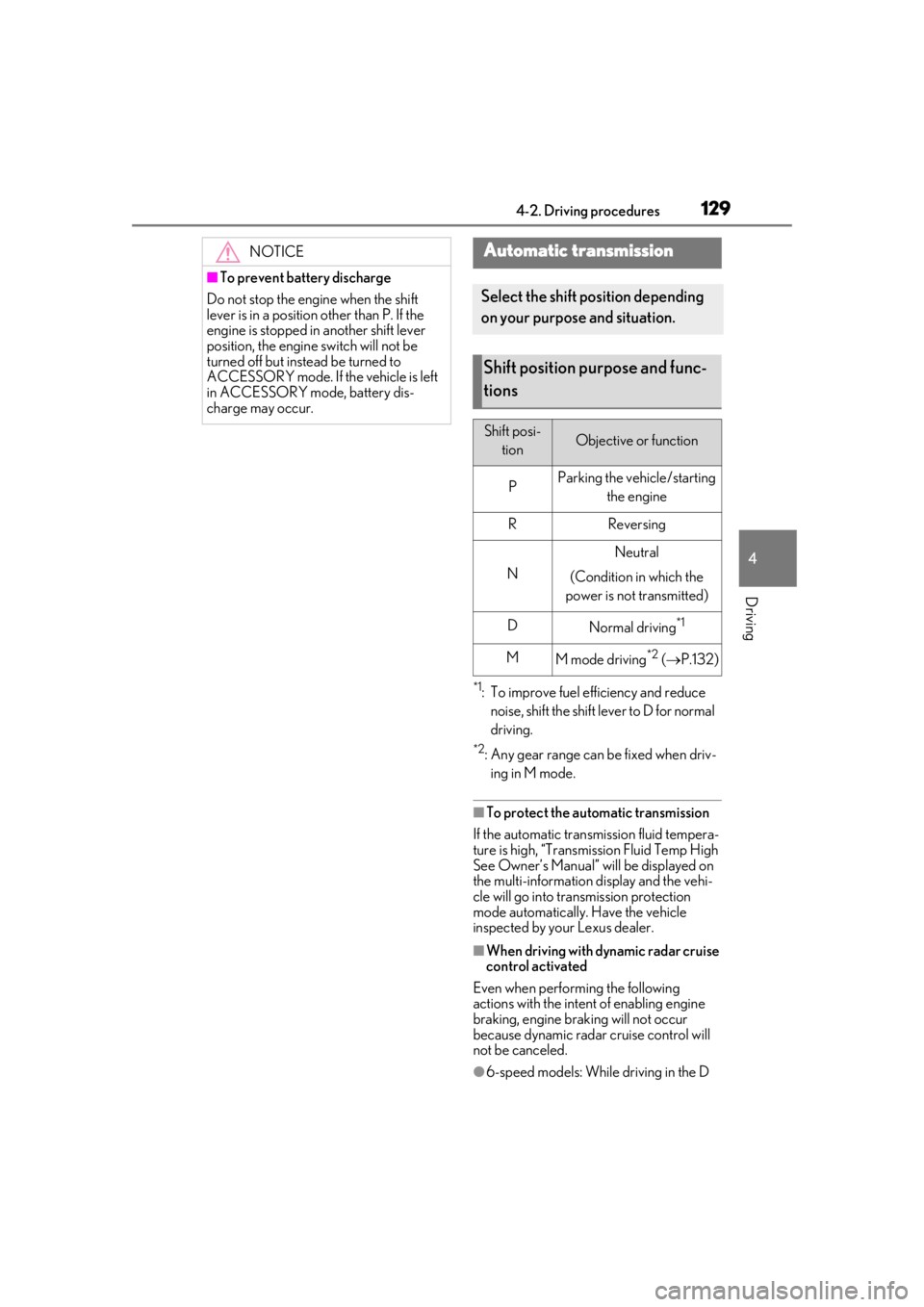
*1: To improve fuel efficiency and reduce noise, shift the shift lever to D for normal
driving.
*2: Any gear range can be fixed when driv-ing in M mode.
■To protect the automatic transmission
If the automatic transmission fluid tempera-
ture is high, “Transmission Fluid Temp High
See Owner’s Manual” will be displayed on
the multi-information display and the vehi-
cle will go into transmission protection
mode automatically. Have the vehicle
inspected by your Lexus dealer.
■When driving with dynamic radar cruise
control activated
Even when performing the following
actions with the intent of enabling engine
braking, engine braking will not occur
because dynamic radar cruise control will
not be canceled.
●6-speed models: While driving in the D
NOTICE
■To prevent battery discharge
Do not stop the engine when the shift
lever is in a position other than P. If the
engine is stopped in another shift lever
position, the engine switch will not be
turned off but instead be turned to
ACCESSORY mode. If the vehicle is left
in ACCESSORY mode, battery dis-
charge may occur.
Automatic transmission
Select the shift position depending
on your purpose and situation.
Shift position purpose and func-
tions
Shift posi- tionObjective or function
PParking the vehicle/starting the engine
RReversing
N
Neutral
(Condition in which the
power is not transmitted)
DNormal driving*1
MM mode driving*2 ( P.132)
Page 152 of 390
1524-5. Using the driving support systems
4-5.Using the driving support systems
■PCS (Pre-Collision System)
P.156
■LDA (Lane Departure Alert with
steering control)
P.163
■Automatic High Beam
P.139
■Dynamic radar cruise control
P.170
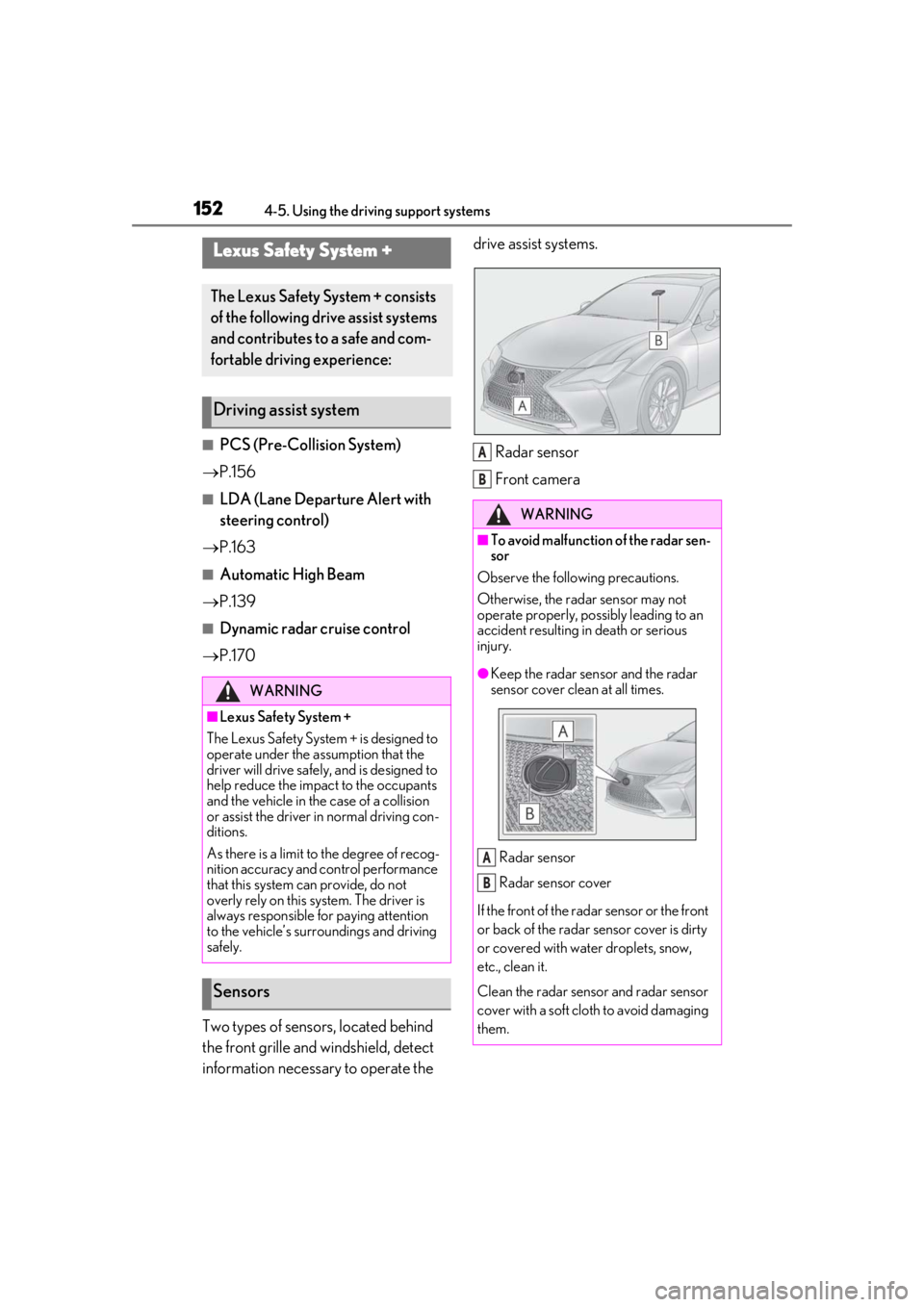
Two types of sensors, located behind
the front grille and windshield, detect
information necessary to operate the drive assist systems.
Radar sensor
Front camera
Lexus Safety System +
The Lexus Safety Sy stem + consists
of the following drive assist systems
and contributes to a safe and com-
fortable driving experience:
Driving assist system
WARNING
■Lexus Safety System +
The Lexus Safety System + is designed to
operate under the assumption that the
driver will drive safely, and is designed to
help reduce the impact to the occupants
and the vehicle in the case of a collision
or assist the driver in normal driving con-
ditions.
As there is a limit to the degree of recog-
nition accuracy and control performance
that this system can provide, do not
overly rely on this system. The driver is
always responsible for paying attention
to the vehicle’s surro undings and driving
safely.
Sensors
WARNING
■To avoid malfunction of the radar sen-
sor
Observe the following precautions.
Otherwise, the radar sensor may not
operate properly, possibly leading to an
accident resulting in death or serious
injury.
●Keep the radar sensor and the radar
sensor cover clean at all times.
Radar sensor
Radar sensor cover
If the front of the rada r sensor or the front
or back of the radar sensor cover is dirty
or covered with water droplets, snow,
etc., clean it.
Clean the radar sensor and radar sensor
cover with a soft cloth to avoid damaging
them.
A
B
A
B
Page 170 of 390
1704-5. Using the driving support systems
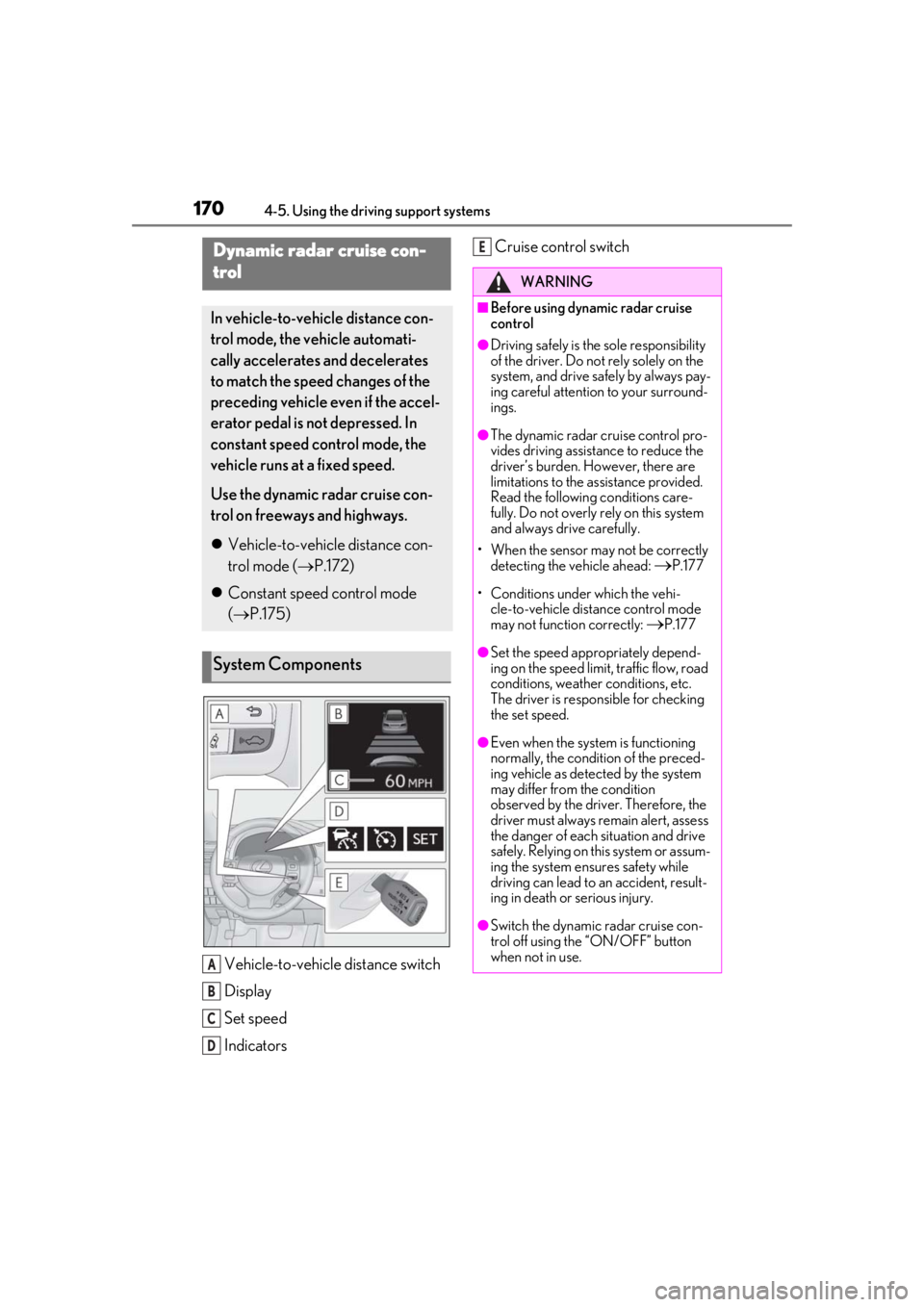
Vehicle-to-vehicle distance switch
Display
Set speed
IndicatorsCruise control switch
Dynamic radar cruise con-
trol
In vehicle-to-vehicle distance con-
trol mode, the vehicle automati-
cally accelerates and decelerates
to match the speed changes of the
preceding vehicle even if the accel-
erator pedal is not depressed. In
constant speed control mode, the
vehicle runs at a fixed speed.
Use the dynamic radar cruise con-
trol on freeways and highways.
Vehicle-to-vehicle distance con-
trol mode ( P.172)
Constant speed control mode
( P.175)
System Components
A
B
C
D
WARNING
■Before using dynamic radar cruise
control
●Driving safely is the sole responsibility
of the driver. Do not rely solely on the
system, and drive safely by always pay-
ing careful attention to your surround-
ings.
●The dynamic radar cruise control pro-
vides driving assistance to reduce the
driver’s burden. However, there are
limitations to the assistance provided.
Read the following conditions care-
fully. Do not overly rely on this system
and always drive carefully.
• When the sensor ma y not be correctly
detecting the vehicle ahead:
P.177
• Conditions under which the vehi- cle-to-vehicle distance control mode
may not function correctly:
P.177
●Set the speed appropriately depend-
ing on the speed limit, traffic flow, road
conditions, weather conditions, etc.
The driver is responsible for checking
the set speed.
●Even when the system is functioning
normally, the condition of the preced-
ing vehicle as detected by the system
may differ from the condition
observed by the driver. Therefore, the
driver must always remain alert, assess
the danger of each situation and drive
safely. Relying on this system or assum-
ing the system ensures safety while
driving can lead to an accident, result-
ing in death or serious injury.
●Switch the dynamic radar cruise con-
trol off using the “ON/OFF” button
when not in use.
E
Page 171 of 390
1714-5. Using the driving support systems
4
Driving
WARNING
■Cautions regarding the driving assist
systems
Observe the following precautions, as
there are limitations to the assistance
provided by the system.
Failure to do so may cause an accident
resulting in death or serious injury.
●Assisting the driver to measure follow-
ing distance
The dynamic radar cruise control is only
intended to help the driver in determin-
ing the following distance between the
driver’s own vehicle and a designated
vehicle traveling ahead. It is not a mecha-
nism that allows careless or inattentive
driving, and it is not a system that can
assist the driver in low-visibility condi-
tions. It is still necessary for driver to pay
close attention to the vehicle’s surround-
ings.
●Assisting the driver to judge proper
following distance
The dynamic radar cruise control deter-
mines whether the following distance
between the driver’s own vehicle and a
designated vehicle traveling ahead is
within a set range. It is not capable of
making any other type of judgement.
Therefore, it is abso lutely necessary for
the driver to remain vigilant and to deter-
mine whether or not there is a possibility
of danger in any given situation.
●Assisting the driver to operate the
vehicle
The dynamic radar cruise control has
limited capability to prevent or avoid a
collision with a vehicle traveling ahead.
Therefore, if there is ever any danger, the
driver must take immediate and direct
control of the vehicle and act appropri-
ately in order to ensure the safety of all
involved.
■Situations unsuitable for dynamic
radar cruise control
Do not use dynamic radar cruise control
in any of the following situations.
Doing so may result in inappropriate
speed control and could cause an acci-
dent resulting in death or serious injury.
●Roads where there are pedestrians,
cyclists, etc.
●In heavy traffic
●On roads with sharp bends
●On winding roads
●On slippery roads, such as those cov-
ered with rain, ice or snow
●On steep downhills, or where there
are sudden changes between sharp up
and down gradients
Vehicle speed may exceed the set
speed when driving down a steep hill.
●At entrances to freeways and highways
●When weather conditions are bad
enough that they may prevent the sen-
sors from detectin g correctly (fog,
snow, sandstorm, heavy rain, etc.)
●When there is rain, snow, etc. on the
front surface of th e radar sensor or
camera sensor
●In traffic conditions that require fre-
quent repeated acceleration and
deceleration
●During emergency towing
●When an approach warning buzzer is
heard often
Page 173 of 390
1734-5. Using the driving support systems
4
Driving
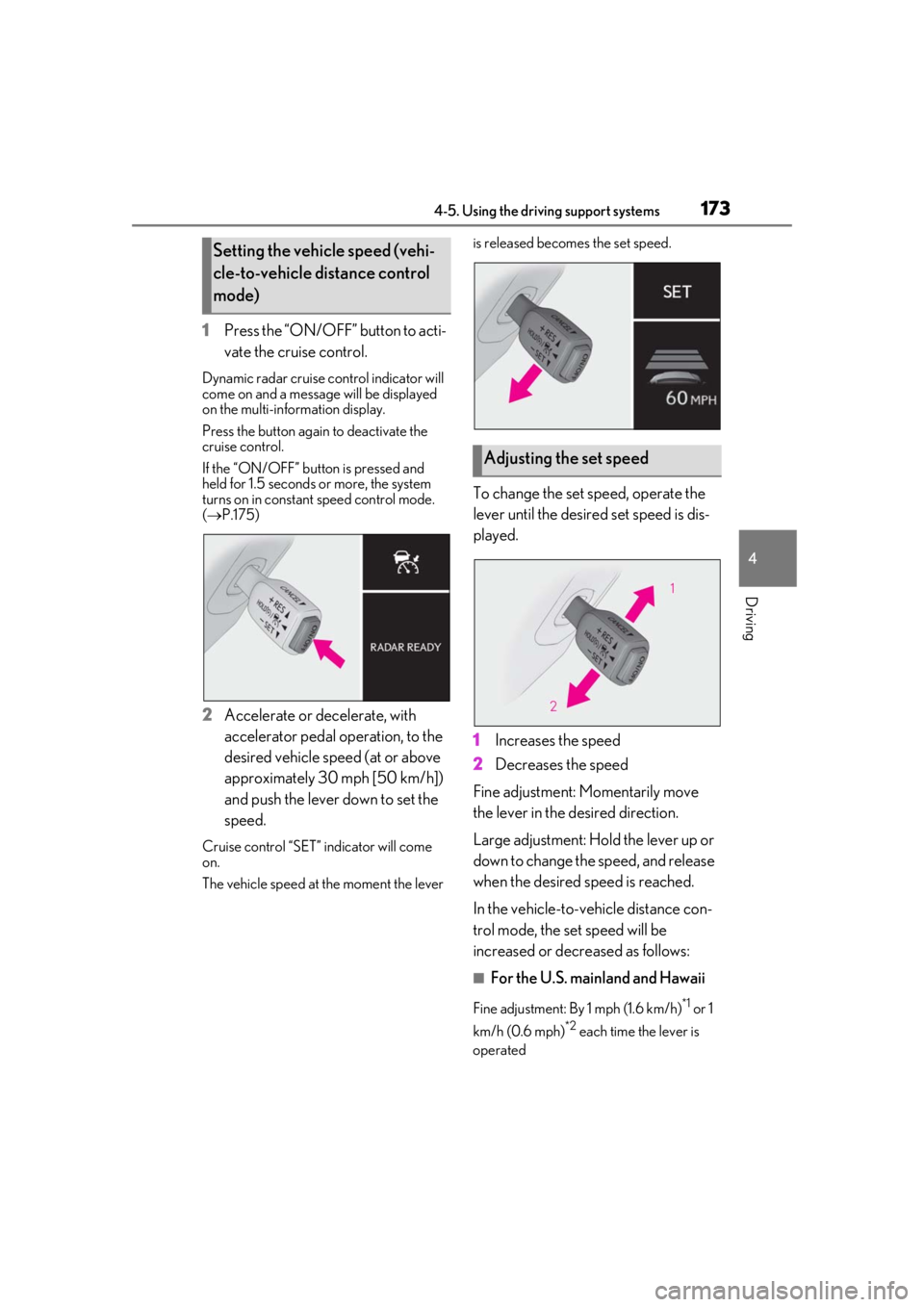
1Press the “ON/OFF” button to acti-
vate the cruise control.
Dynamic radar cruise control indicator will
come on and a message will be displayed
on the multi-information display.
Press the button again to deactivate the
cruise control.
If the “ON/OFF” button is pressed and
held for 1.5 seconds or more, the system
turns on in constant speed control mode.
( P.175)
2 Accelerate or decelerate, with
accelerator pedal operation, to the
desired vehicle speed (at or above
approximately 30 mph [50 km/h])
and push the lever down to set the
speed.
Cruise control “SET” indicator will come
on.
The vehicle speed at the moment the lever is released beco
mes the set speed.
To change the set speed, operate the
lever until the desired set speed is dis-
played.
1Increases the speed
2 Decreases the speed
Fine adjustment: Momentarily move
the lever in the desired direction.
Large adjustment: Hold the lever up or
down to change the speed, and release
when the desired speed is reached.
In the vehicle-to-vehicle distance con-
trol mode, the set speed will be
increased or decreased as follows:
■For the U.S. mainland and Hawaii
Fine adjustment: By 1 mph (1.6 km/h)*1 or 1
km/h (0.6 mph)
*2 each time the lever is
operated
Setting the vehicle speed (vehi-
cle-to-vehicle distance control
mode)
Adjusting the set speed