lights LEXUS RC300 2021 Owner's Guide
[x] Cancel search | Manufacturer: LEXUS, Model Year: 2021, Model line: RC300, Model: LEXUS RC300 2021Pages: 400, PDF Size: 7.9 MB
Page 152 of 400
1524-3. Operating the lights and wipers
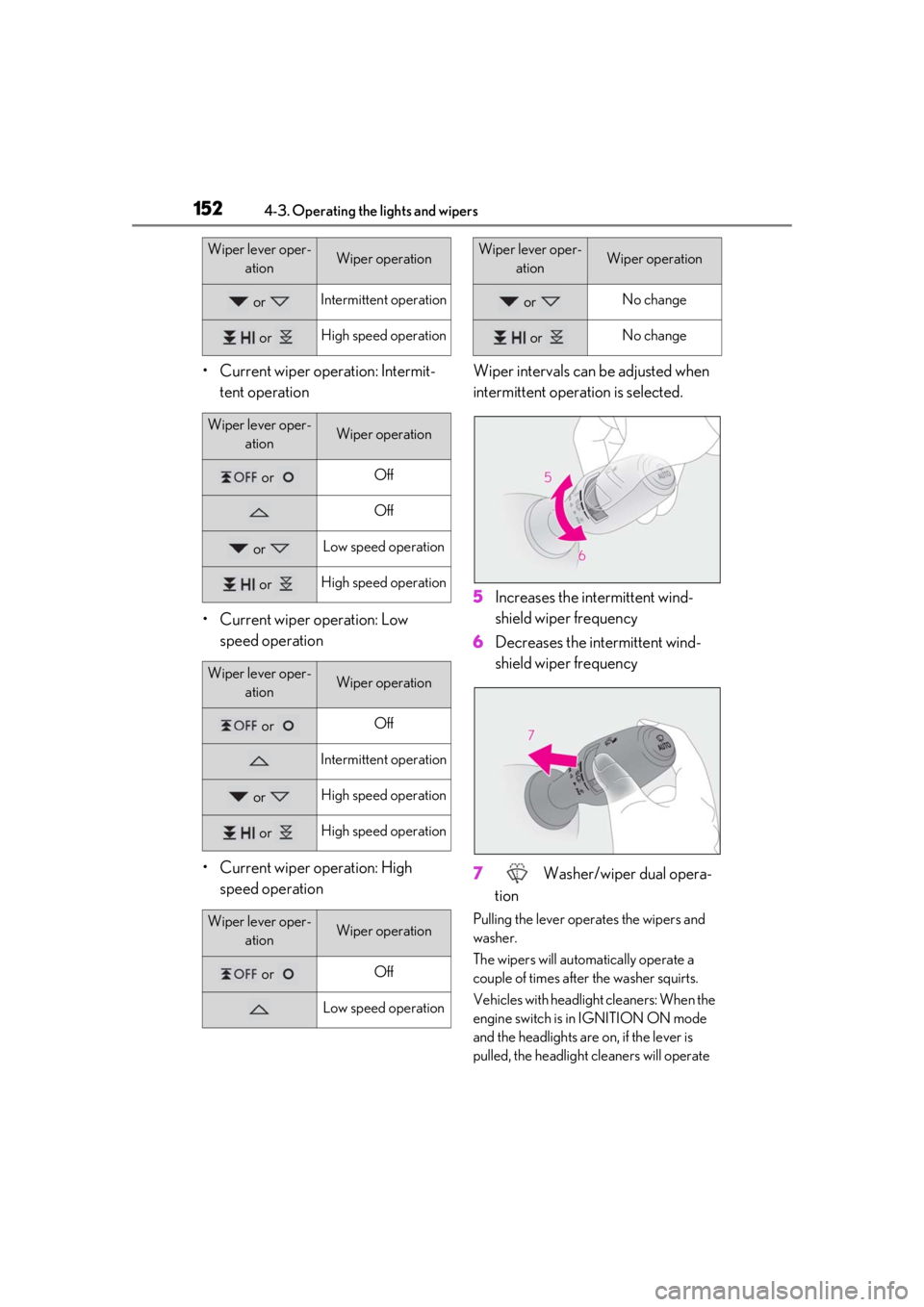
• Current wiper operation: Intermit-tent operation
• Current wiper operation: Low speed operation
• Current wiper operation: High speed operation Wiper intervals can be adjusted when
intermittent operation is selected.
5
Increases the intermittent wind-
shield wiper frequency
6 Decreases the intermittent wind-
shield wiper frequency
7 Washer/wiper dual opera-
tion
Pulling the lever operates the wipers and
washer.
The wipers will automatically operate a
couple of times after the washer squirts.
Vehicles with headlight cleaners: When the
engine switch is in IGNITION ON mode
and the headlights are on, if the lever is
pulled, the headlight cleaners will operate
or Intermittent operation
or High speed operation
Wiper lever oper-
ationWiper operation
or Off
Off
or Low speed operation
or High speed operation
Wiper lever oper-ationWiper operation
or Off
Intermittent operation
or High speed operation
or High speed operation
Wiper lever oper-ationWiper operation
or Off
Low speed operation
Wiper lever oper-ationWiper operation
or No change
or No change
Wiper lever oper- ationWiper operation
Page 153 of 400
1534-3. Operating the lights and wipers
4
Driving
once. After this, the headlight cleaners will
operate every 5th time the lever is pulled.
■The windshield wiper and washer can be
operated when
The engine switch is in IGNITION ON
mode.
■Dripping prevention wiper sweep
After performing a washing and wiping
operation several times, the wipers operate
one more time after a short delay to prevent
dripping.
However, this final wiper operation will not
be performed while driving.
■Effects of vehicle speed on wiper opera-
tion (vehicles with rain-sensing wind-
shield wipers)
Vehicle speed affects the following even
when the wipers are not in AUTO mode.
●Intermittent wiper interval
●Wiper operation when the washer is
being used (delay until drip prevention
wiper sweep occurs)
With low speed windshield wiper opera-
tion selected, wiper operation will be
switched from low speed to intermittent
wiper operation only when the vehicle is
stationary.
■Raindrop sensor (vehicles with
rain-sensing windshield wipers)
●The raindrop sensor judges the amount
of raindrops.
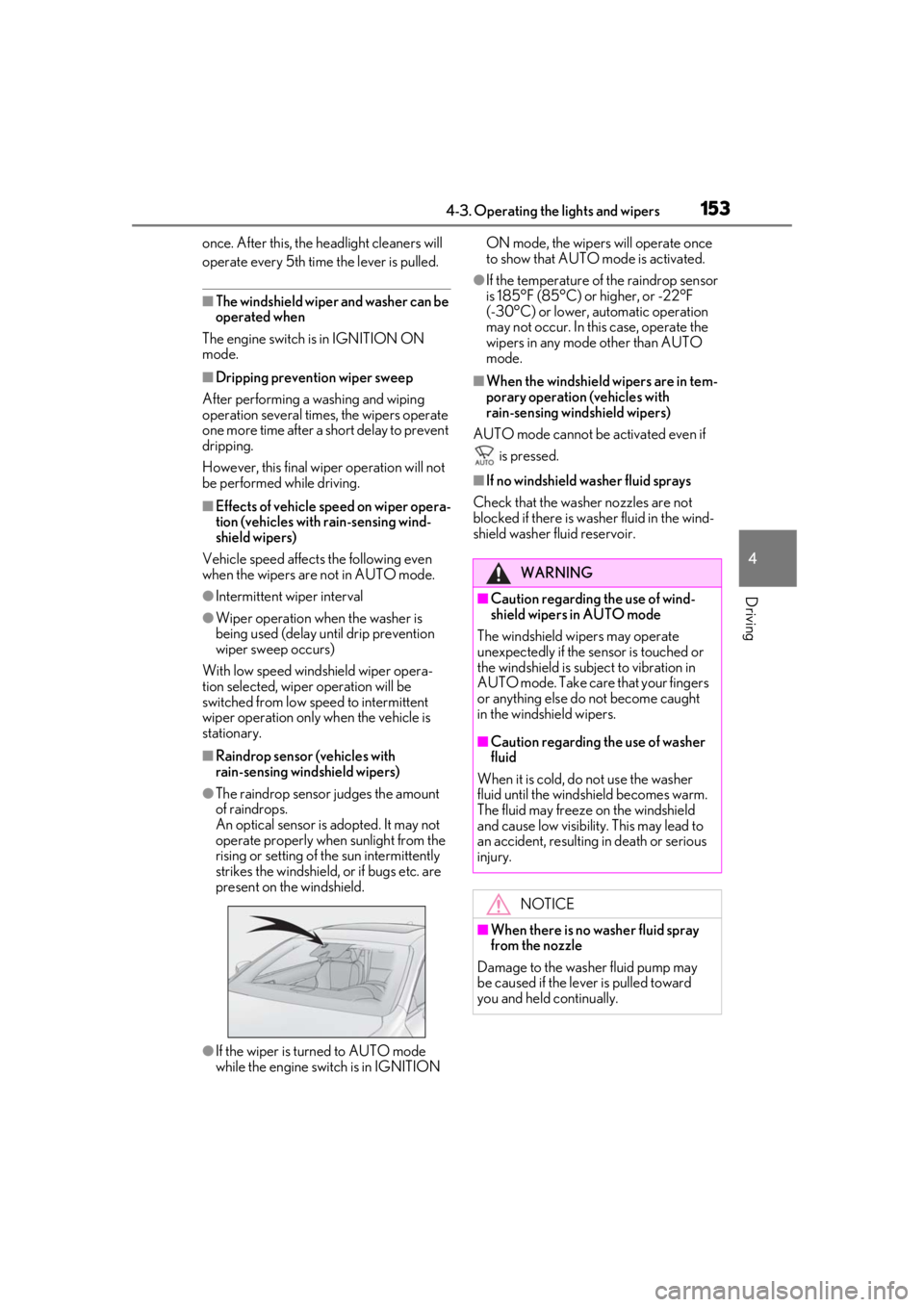
An optical sensor is adopted. It may not
operate properly when sunlight from the
rising or setting of the sun intermittently
strikes the windshield, or if bugs etc. are
present on the windshield.
●If the wiper is turned to AUTO mode
while the engine switch is in IGNITION ON mode, the wipers will operate once
to show that AUTO mode is activated.
●If the temperature of the raindrop sensor
is 185°F (85°C) or higher, or -22°F
(-30°C) or lower, automatic operation
may not occur. In this case, operate the
wipers in any mode other than AUTO
mode.
■When the windshield wipers are in tem-
porary operation (vehicles with
rain-sensing wind
shield wipers)
AUTO mode cannot be activated even if is pressed.
■If no windshield washer fluid sprays
Check that the washer nozzles are not
blocked if there is washer fluid in the wind-
shield washer fluid reservoir.
WARNING
■Caution regarding the use of wind-
shield wipers in AUTO mode
The windshield wipers may operate
unexpectedly if the sensor is touched or
the windshield is subj ect to vibration in
AUTO mode. Take care that your fingers
or anything else do not become caught
in the windshield wipers.
■Caution regarding the use of washer
fluid
When it is cold, do not use the washer
fluid until the windshield becomes warm.
The fluid may freeze on the windshield
and cause low visibility. This may lead to
an accident, resulting in death or serious
injury.
NOTICE
■When there is no washer fluid spray
from the nozzle
Damage to the washer fluid pump may
be caused if the lever is pulled toward
you and held continually.
Page 154 of 400

1544-3. Operating the lights and wipers
NOTICE
■When a nozzle becomes blocked
In this case, contact your Lexus dealer.
Do not try to clear it with a pin or other
object. The nozzle will be damaged.
Page 159 of 400
1594-5. Using the driving support systems
4
Driving
WARNING
●Do not attach accessories, stickers
(including transparent stickers) or
other items to the radar sensor, radar
sensor cover or surrounding area.
●Do not subject the radar sensor or its
surrounding area to a strong impact.
If the radar sensor, front grille, or front
bumper has been subjected to a
strong impact, have the vehicle
inspected by your Lexus dealer.
●Do not disassemble the radar sensor.
●Do not modify or paint the radar sen-
sor or radar sensor cover.
●In the following cases, the radar sensor
must be recalibrated. Contact your
Lexus dealer for details.
• When the radar sensor or front grille are removed and installed, or replaced
• When the front bumper is replaced
■To avoid malfunction of the front cam-
era
Observe the following precautions.
Otherwise, the front camera may not
operate properly, possibly leading to an
accident resulting in death or serious
injury.
●Keep the windshield clean at all times.
• If the windshield is dirty or covered with an oily film, water droplets, snow,
etc., clean the windshield.
• If a glass coating agent is applied to the windshield, it will still be necessary to
use the windshield wipers to remove
water droplets, etc. from the area of
the windshield in front of the front
camera.
• If the inner side of the windshield where the front camera is installed is
dirty, contact your Lexus dealer.
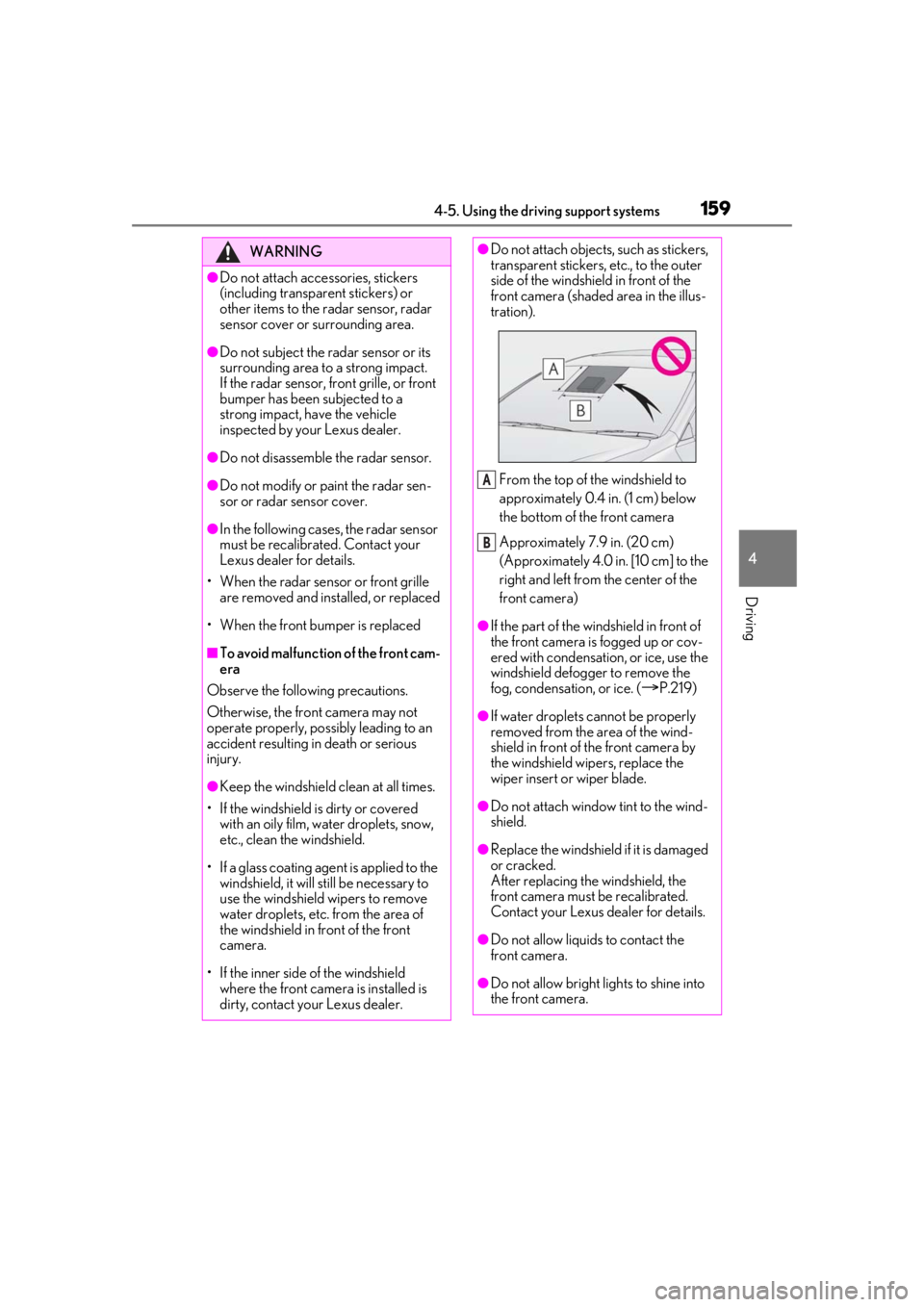
●Do not attach objects, such as stickers,
transparent stickers, etc., to the outer
side of the windshield in front of the
front camera (shaded area in the illus-
tration).
From the top of the windshield to
approximately 0.4 in. (1 cm) below
the bottom of the front camera
Approximately 7.9 in. (20 cm)
(Approximately 4.0 in. [10 cm] to the
right and left from the center of the
front camera)
●If the part of the windshield in front of
the front camera is fogged up or cov-
ered with condensation, or ice, use the
windshield defogger to remove the
fog, condensation, or ice. (
P.219)
●If water droplets cannot be properly
removed from the area of the wind-
shield in front of the front camera by
the windshield wipers, replace the
wiper insert or wiper blade.
●Do not attach window tint to the wind-
shield.
●Replace the windshield if it is damaged
or cracked.
After replacing the windshield, the
front camera must be recalibrated.
Contact your Lexus dealer for details.
●Do not allow liquids to contact the
front camera.
●Do not allow bright lights to shine into
the front camera.
A
B
Page 160 of 400
1604-5. Using the driving support systems
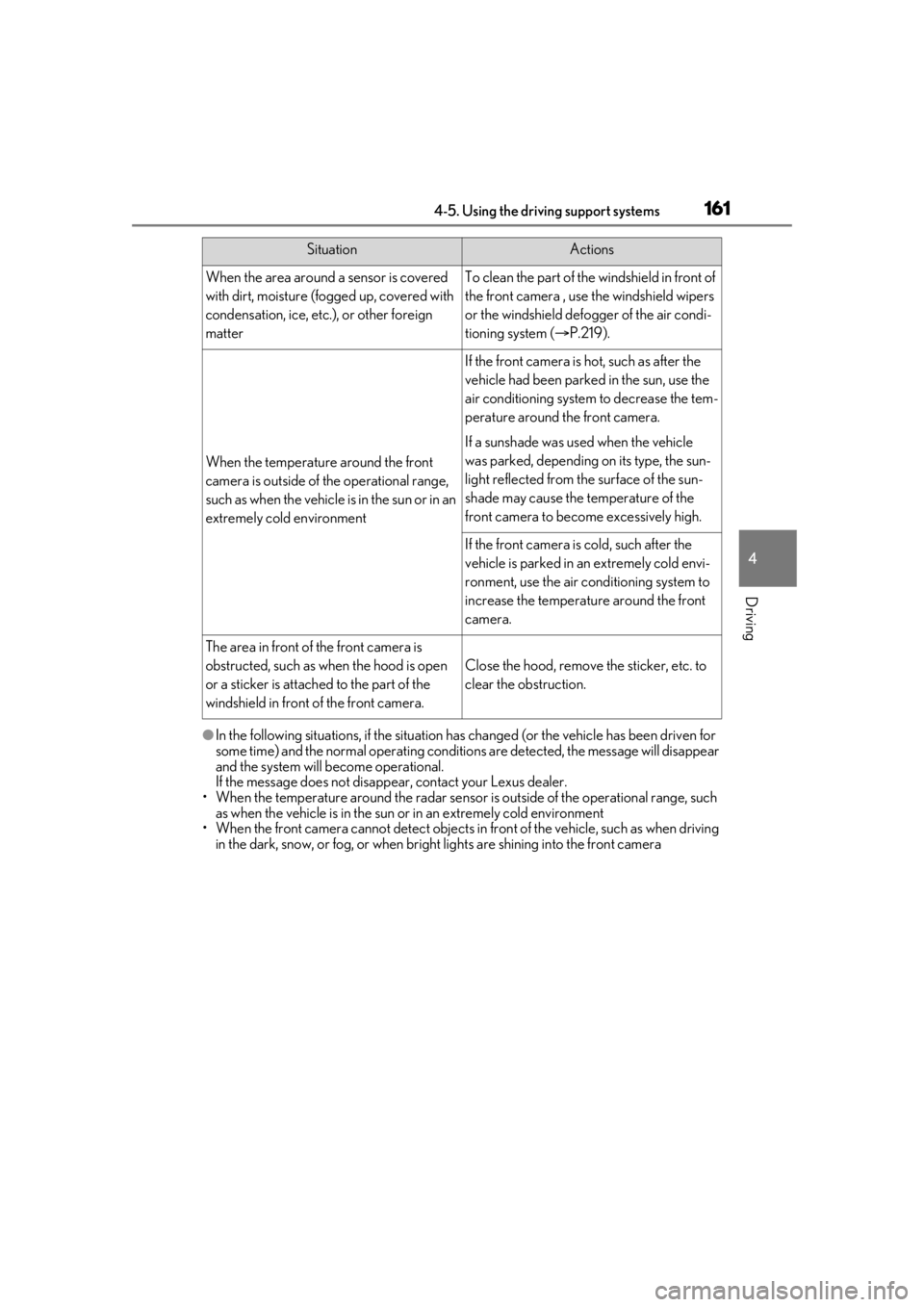
■If a warning message is displayed on the multi-information display
A system may be temporarily unavailable or there may be a malfunction in the system.
●In the following situations, perform the actions specified in the table. When the normal
operating conditions are detected, the message will disappear and the system will
become operational.
If the message does not disappea r, contact your Lexus dealer.
WARNING
●Do not dirty or damage the front cam-
era.
When cleaning the inside of the wind-
shield, do not allow glass cleaner to
contact the lens of the front camera.
Also, do not touch the lens. If the lens is
dirty or damaged, contact your Lexus
dealer.
●Do not subject the front camera to a
strong impact.
●Do not change the installation position
or direction of the front camera or
remove it.
●Do not disassemble the front camera.
●Do not modify any components of the
vehicle around the front camera
(inside rear view mirror, etc.) or ceiling.
●Do not attach any accessories to the
hood, front grille or front bumper that
may obstruct the front camera. Con-
tact your Lexus dealer for details.
●If a surfboard or other long object is to
be mounted on the roof, make sure
that it will not obstruct the front cam-
era.
●Do not modify the headlights or other
lights.
Page 161 of 400
1614-5. Using the driving support systems
4
Driving
●In the following situations, if the situation has changed (or the vehicle has been driven for
some time) and the normal operating conditions are detected, the message will disappear
and the system will become operational.
If the message does not disappear, contact your Lexus dealer.
• When the temperature around the radar sensor is outside of the operational range, such as when the vehicle is in the sun or in an extremely cold environment
• When the front camera cannot detect objects in front of the vehicle, such as when driving
in the dark, snow, or fog, or when brig ht lights are shining into the front camera
SituationActions
When the area around a sensor is covered
with dirt, moisture (f ogged up, covered with
condensation, ice, etc.), or other foreign
matterTo clean the part of the windshield in front of
the front camera , use the windshield wipers
or the windshield defo gger of the air condi-
tioning system ( P.219).
When the temperature around the front
camera is outside of the operational range,
such as when the vehicle is in the sun or in an
extremely cold environment
If the front camera is hot, such as after the
vehicle had been parked in the sun, use the
air conditioning system to decrease the tem-
perature around the front camera.
If a sunshade was used when the vehicle
was parked, depending on its type, the sun-
light reflected from the surface of the sun-
shade may cause the temperature of the
front camera to become excessively high.
If the front camera is cold, such after the
vehicle is parked in an extremely cold envi-
ronment, use the air conditioning system to
increase the temperature around the front
camera.
The area in front of the front camera is
obstructed, such as when the hood is open
or a sticker is attached to the part of the
windshield in front of the front camera.
Close the hood, remove the sticker, etc. to
clear the obstruction.
Page 167 of 400
1674-5. Using the driving support systems
4
Driving
road or a wall that may be mistaken for a
vehicle or pedestrian
• When driving near an object that reflects
radio waves, such as a large truck or
guardrail
• When driving near a TV tower, broad-
casting station, electric power plant, or
other location where strong radio waves
or electrical noise may be present
■Situations in which the system may not
operate properly
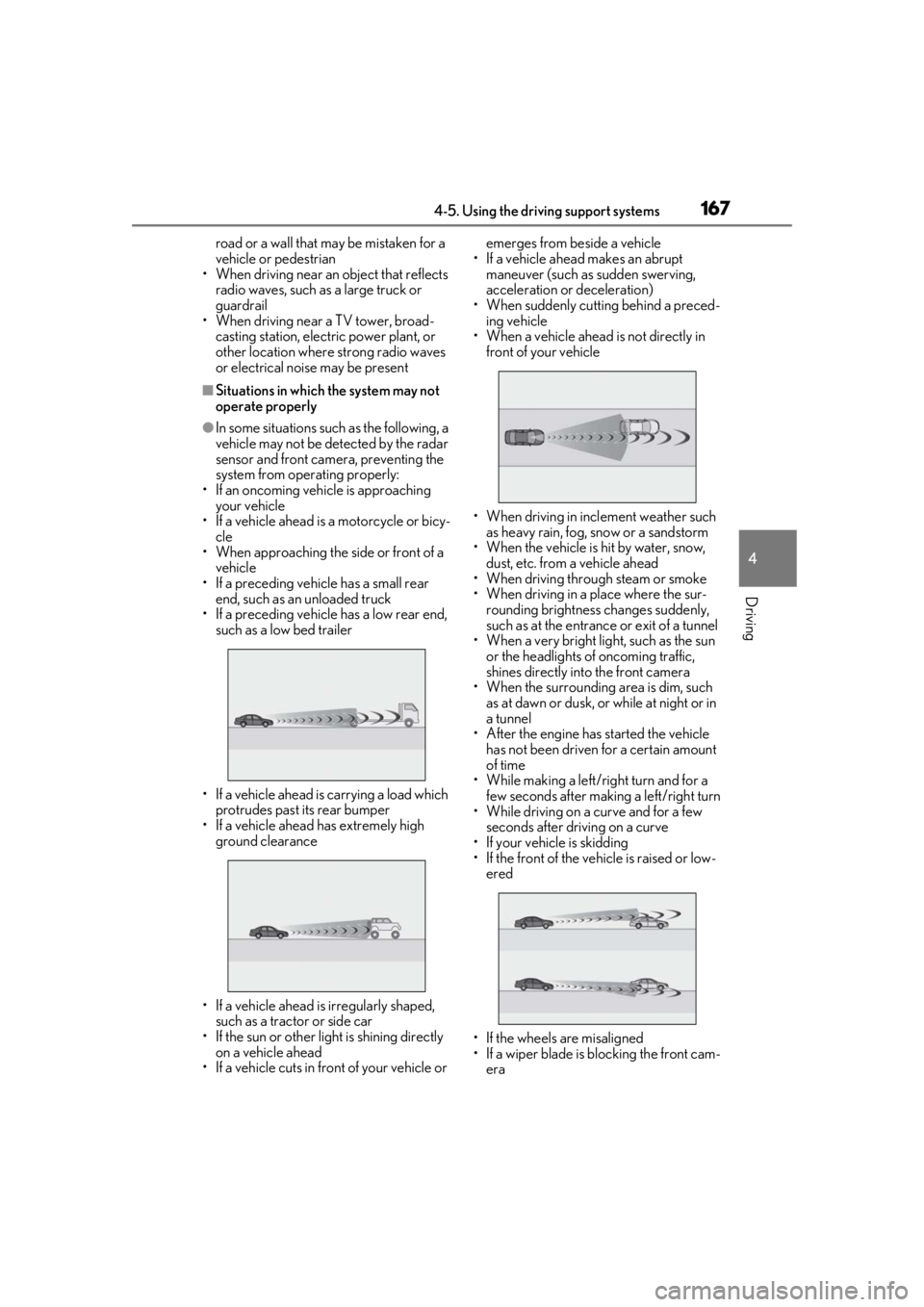
●In some situations such as the following, a
vehicle may not be detected by the radar
sensor and front camera, preventing the
system from operating properly:
• If an oncoming vehicle is approaching your vehicle
• If a vehicle ahead is a motorcycle or bicy-
cle
• When approaching the side or front of a vehicle
• If a preceding vehicle has a small rear end, such as an unloaded truck
• If a preceding vehicle has a low rear end,
such as a low bed trailer
• If a vehicle ahead is carrying a load which protrudes past its rear bumper
• If a vehicle ahead has extremely high ground clearance
• If a vehicle ahead is irregularly shaped, such as a tractor or side car
• If the sun or other light is shining directly
on a vehicle ahead
• If a vehicle cuts in front of your vehicle or emerges from beside a vehicle
• If a vehicle ahead makes an abrupt maneuver (such as sudden swerving,
acceleration or deceleration)
• When suddenly cutting behind a preced- ing vehicle
• When a vehicle ahead is not directly in front of your vehicle
• When driving in incl ement weather such
as heavy rain, fog, snow or a sandstorm
• When the vehicle is hit by water, snow,
dust, etc. from a vehicle ahead
• When driving through steam or smoke
• When driving in a place where the sur- rounding brightness changes suddenly,
such as at the entrance or exit of a tunnel
• When a very bright light, such as the sun
or the headlights of oncoming traffic,
shines directly into the front camera
• When the surrounding area is dim, such
as at dawn or dusk, or while at night or in
a tunnel
• After the engine has started the vehicle
has not been driven for a certain amount
of time
• While making a left/right turn and for a
few seconds after making a left/right turn
• While driving on a curve and for a few seconds after driving on a curve
• If your vehicle is skidding
• If the front of the vehicle is raised or low- ered
• If the wheels are misaligned
• If a wiper blade is blocking the front cam- era
Page 171 of 400
1714-5. Using the driving support systems
4
Driving
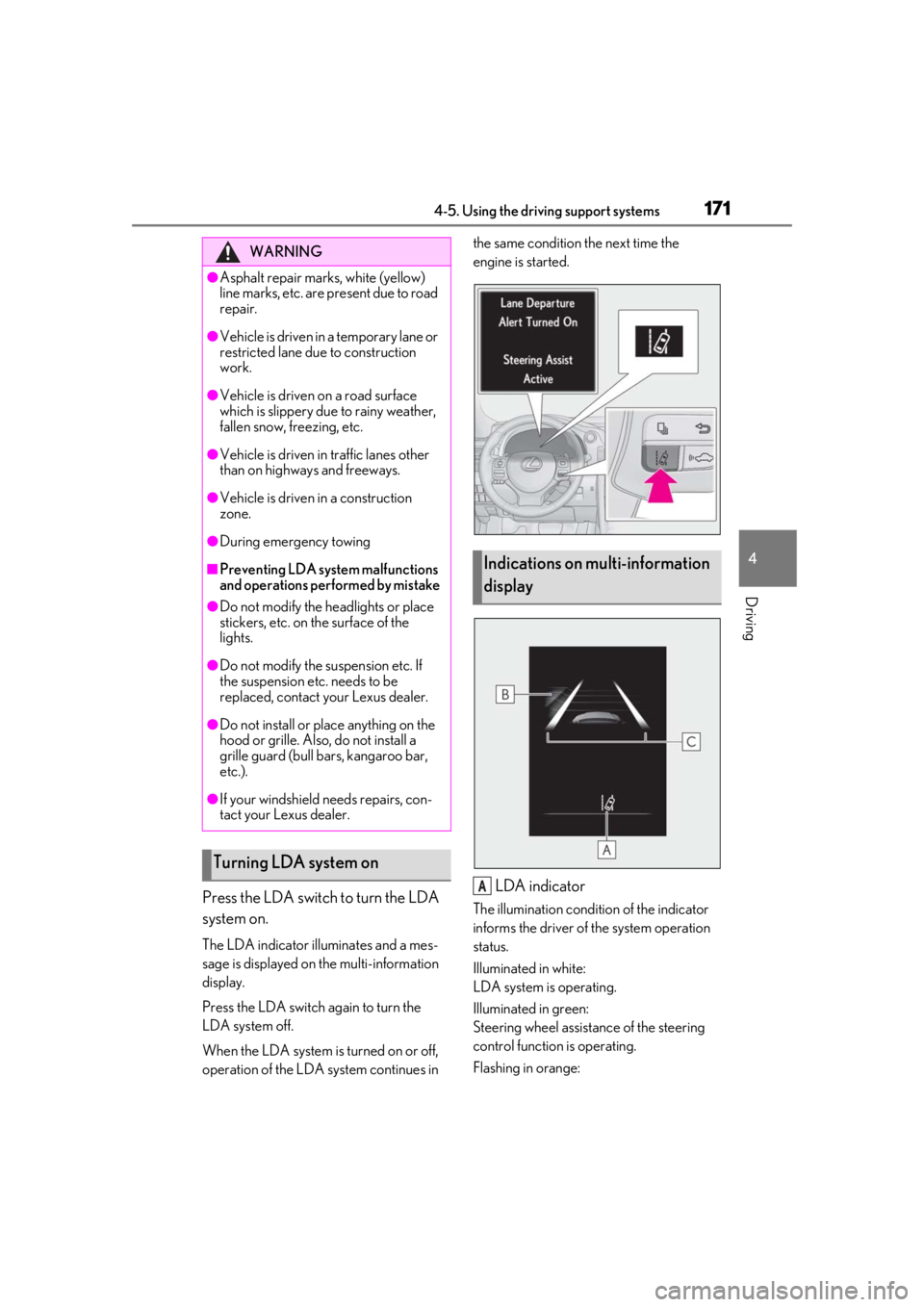
Press the LDA switch to turn the LDA
system on.
The LDA indicator illuminates and a mes-
sage is displayed on the multi-information
display.
Press the LDA switch again to turn the
LDA system off.
When the LDA system is turned on or off,
operation of the LDA system continues in the same condition the next time the
engine is started.
LDA indicator
The illumination condition of the indicator
informs the driver of the system operation
status.
Illuminated in white:
LDA system is operating.
Illuminated in green:
Steering wheel assistance of the steering
control function is operating.
Flashing in orange:
WARNING
●Asphalt repair marks, white (yellow)
line marks, etc. are present due to road
repair.
●Vehicle is driven in a temporary lane or
restricted lane due to construction
work.
●Vehicle is driven on a road surface
which is slippery due to rainy weather,
fallen snow, freezing, etc.
●Vehicle is driven in traffic lanes other
than on highways and freeways.
●Vehicle is driven in a construction
zone.
●During emergency towing
■Preventing LDA system malfunctions
and operations performed by mistake
●Do not modify the headlights or place
stickers, etc. on the surface of the
lights.
●Do not modify the suspension etc. If
the suspension etc. needs to be
replaced, contact your Lexus dealer.
●Do not install or place anything on the
hood or grille. Also, do not install a
grille guard (bull bars, kangaroo bar,
etc.).
●If your windshield needs repairs, con-
tact your Lexus dealer.
Turning LDA system on
Indications on multi-information
display
A
Page 174 of 400
1744-5. Using the driving support systems
●There are shadows on the road that run
parallel with, or cover, the white (yellow)
lines.
●The vehicle is driven in an area without
white (yellow) lines, such as in front of a
tollgate or checkpoint, or at an intersec-
tion, etc.
●The white (yellow) lines are cracked,
“Botts’ dots”, “Raised pavement marker”
or stones are present.
●The white (yellow) lines cannot be seen
or are difficult to see due to sand, etc.
●The vehicle is driven on a road surface
that is wet due to rain, puddles, etc.
●The traffic lines are yellow (which may be
more difficult to recognize than lines that
are white).
●The white (yellow) lines cross over a curb,
etc.
●The vehicle is driven on a bright surface,
such as concrete.
●The vehicle is driven on a surface that is
bright due to reflected light, etc.
●The vehicle is driven in an area where the
brightness changes suddenly, such as at
the entrances and exits of tunnels, etc.
●Light from the headlights of an oncoming
vehicle, the sun, etc. enters the camera.
●The vehicle is driven where the road
diverges, merges, etc.
●The vehicle is driven on a slope.
●The vehicle is driven on a road which tilts
left or right, or a winding road.
●The vehicle is driven on an unpaved or
rough road.
●The vehicle is driven around a sharp
curve.
●The traffic lane is excessively narrow or
wide.
●The vehicle is extremely tilted due to car-
rying heavy luggage or having improper
tire pressure.
●The distance to the preceding vehicle is
extremely short.
●The vehicle is moving up and down a
large amount due to road conditions
during driving (poor roads or road
seams).
●The headlight lenses are dirty and emit a
faint amount of light at night, or the beam
axis has deviated.
●The vehicle is struck by a crosswind.
●The vehicle has just changed lanes or
crossed an intersection.
●Snow tires, etc. are equipped.
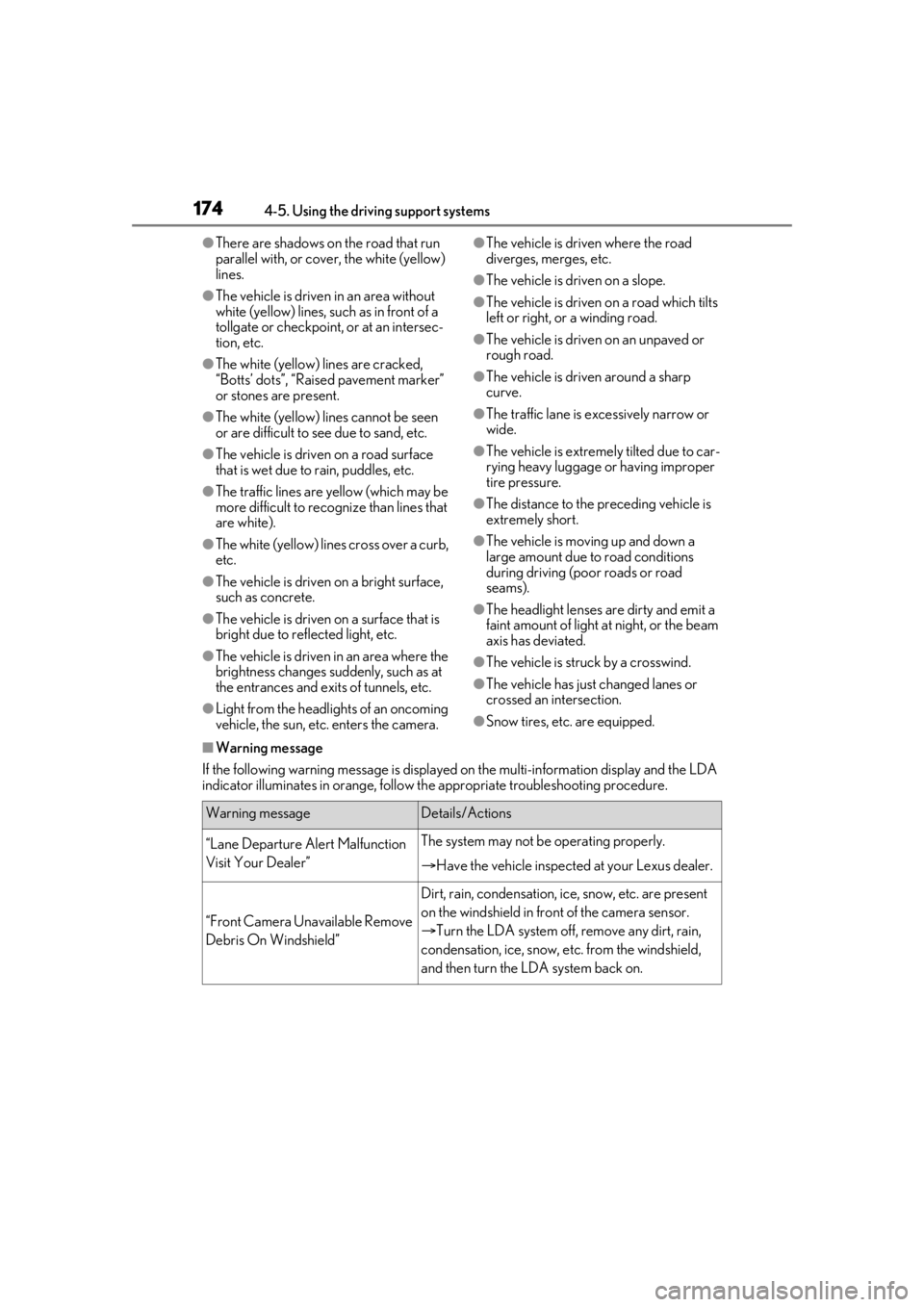
■Warning message
If the following warning messag e is displayed on the multi-information display and the LDA
indicator illuminates in orange, follow th e appropriate troubleshooting procedure.
Warning messageDetails/Actions
“Lane Departure Alert Malfunction
Visit Your Dealer”The system may not be operating properly.
Have the vehicle inspected at your Lexus dealer.
“Front Camera Unavailable Remove
Debris On Windshield”
Dirt, rain, condensation, ice, snow, etc. are present
on the windshield in front of the camera sensor.
Turn the LDA system off, remove any dirt, rain,
condensation, ice, snow, et c. from the windshield,
and then turn the LDA system back on.
Page 178 of 400
1784-5. Using the driving support systems
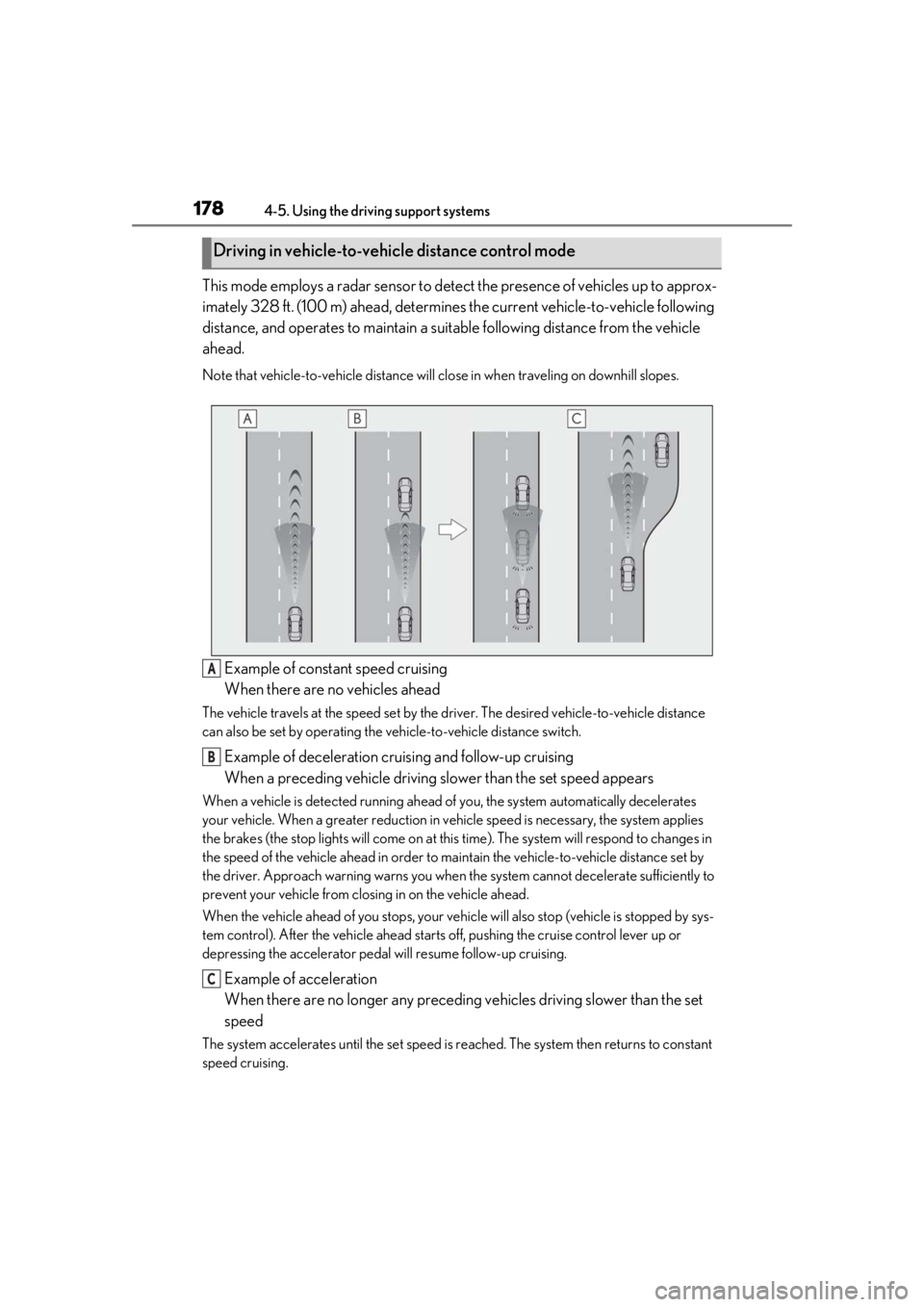
This mode employs a radar sensor to detect the presence of vehicles up to approx-
imately 328 ft. (100 m) ahead, determines the current vehicle-to-vehicle following
distance, and operates to maintain a suit able following distance from the vehicle
ahead.
Note that vehicle-to-vehicle distance will close in when traveling on downhill slopes.
Example of constant speed cruising
When there are no vehicles ahead
The vehicle travels at the speed set by the driver. The desired vehicle-to-vehicle distance
can also be set by operating the vehicle-to-vehicle distance switch.
Example of deceleration cruising and follow-up cruising
When a preceding vehicle driving slower than the set speed appears
When a vehicle is detected running ahead of you, the system automatically decelerates
your vehicle. When a greater reduction in vehicle speed is necessary, the system applies
the brakes (the stop lights will come on at this time). The system will respond to changes in
the speed of the vehicle ahead in order to maintain the vehicle-to-vehicle distance set by
the driver. Approach warning warns you when th e system cannot decelerate sufficiently to
prevent your vehicle from closing in on the vehicle ahead.
When the vehicle ahead of you stops, your vehi cle will also stop (vehicle is stopped by sys-
tem control). After the vehicle ahead starts off, pushing the cruise control lever up or
depressing the accelerator pedal will resume follow-up cruising.
Example of acceleration
When there are no longer any preceding vehicles driving slower than the set
speed
The system accelerates until the set speed is re ached. The system then returns to constant
speed cruising.
Driving in vehicle-to-vehicle distance control mode
A
B
C