warning LEXUS RC300H 2017 Service Manual
[x] Cancel search | Manufacturer: LEXUS, Model Year: 2017, Model line: RC300H, Model: LEXUS RC300H 2017Pages: 640, PDF Size: 35.53 MB
Page 109 of 640
109
2Instrument cluster
RC300h_EE(OM24740E)
2. Instrument cluster
Warning lights and
indicators.......................................110
Gauges and meters ..................... 115
Multi-information display .......... 121
Energy monitor/
consumption screen ................129
Page 110 of 640
110
RC300h_EE(OM24740E)
2. Instrument cluster
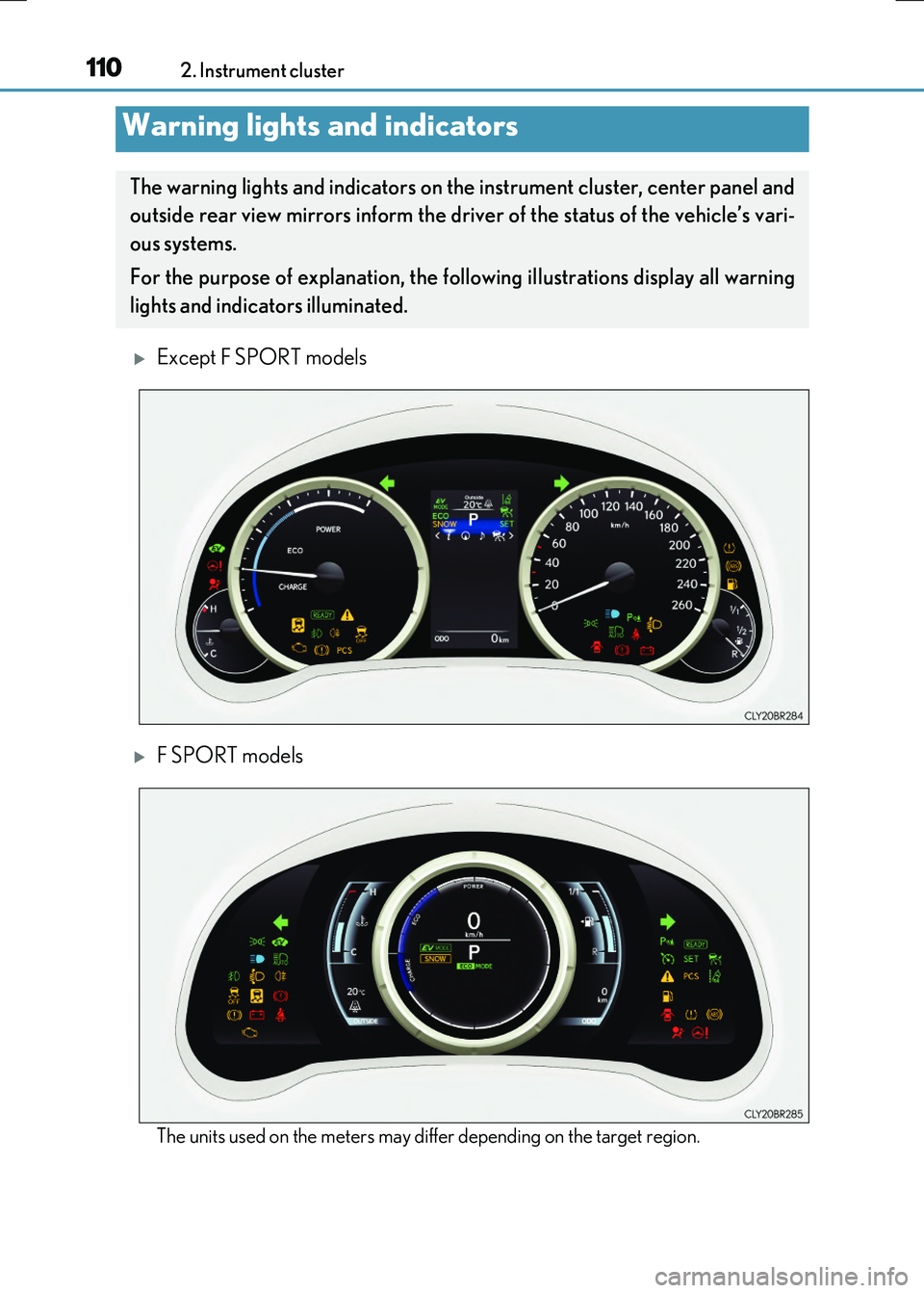
Except F SPORT models
F SPORT models
The units used on the meters may differ depending on the target region.
Warning lights and indicators
The warning lights and indicators on th e instrument cluster, center panel and
outside rear view mirrors inform the driver of the status of the vehicle’s vari-
ous systems.
For the purpose of explanation, the fo llowing illustrations display all warning
lights and indicators illuminated.
Page 111 of 640
1112. Instrument cluster
2
Instrument cluster
RC300h_EE(OM24740E)
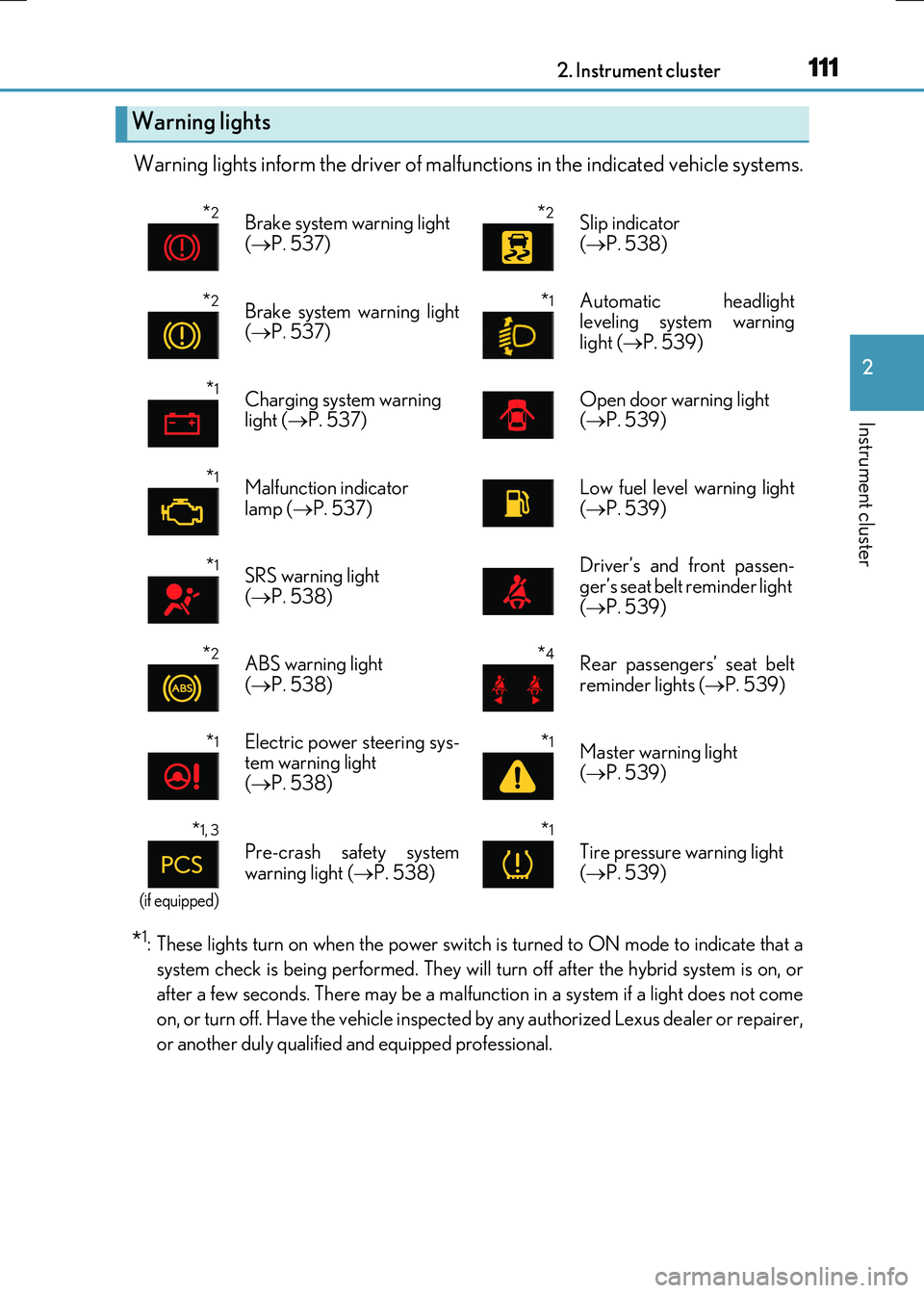
Warning lights inform the driver of malfunctions in the indicated vehicle systems.
*1: These lights turn on when the power switch is turned to ON mode to indicate that a
system check is being performed. They will turn off after the hybrid system is on, or
after a few seconds. There may be a malfunct ion in a system if a light does not come
on, or turn off. Have the vehicle inspected by any authorized Lexus dealer or repairer,
or another duly qualified and equipped professional.
Warning lights
*2Brake system warning light
( P. 537)
*2Slip indicator
( P. 538)
*2Brake system warning light ( P. 537)
*1 Automatic headlight leveling system warning
light ( P. 539)
*1Charging system warning light ( P. 537)Open door warning light ( P. 539)
*1Malfunction indicator
lamp ( P. 537)
Low fuel level warning light
( P. 539)
*1SRS warning light ( P. 538)
Driver’s and front passen- ger’s seat belt reminder light
( P. 539)
*2ABS warning light ( P. 538)
*4Rear passengers’ seat belt reminder lights ( P. 539)
*1Electric power steering sys- tem warning light( P. 538)
*1Master warning light
( P. 539)
*1, 3
(if equipped)
Pre-crash safety system
warning light ( P. 538)
*1
Tire pressure warning light
( P. 539)
Page 112 of 640
1122. Instrument cluster
RC300h_EE(OM24740E)
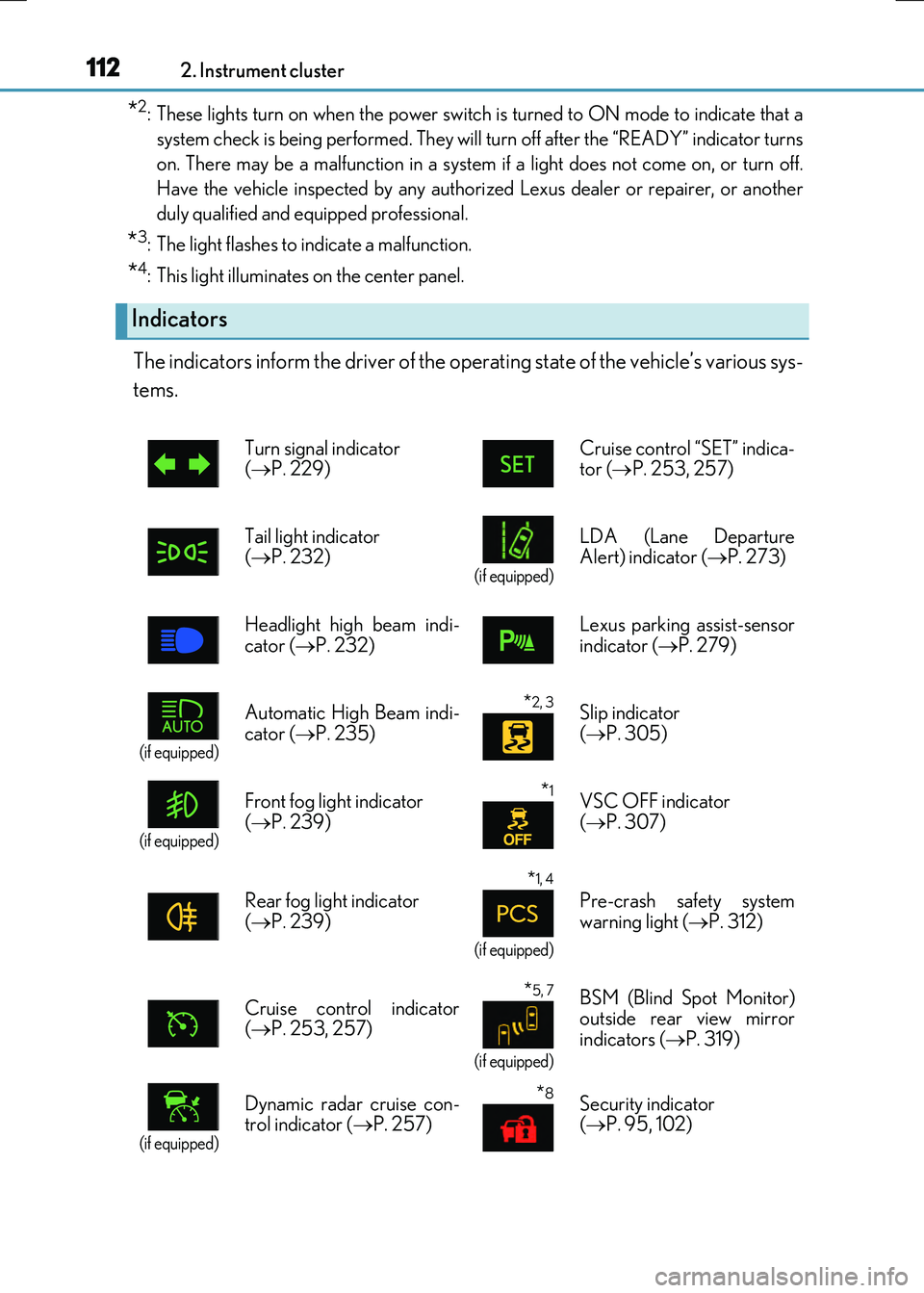
*2: These lights turn on when the power switch is turned to ON mode to indicate that a
system check is being perfor med. They will turn off after the “READY” indicator turns
on. There may be a malfunction in a system if a light does not come on, or turn off.
Have the vehicle inspected by any authorized Lexus dealer or repairer, or another
duly qualified and equipped professional.
*3: The light flashes to indicate a malfunction.
*4: This light illuminates on the center panel.
The indicators inform the driver of the operating state of the vehicle’s various sys-
tems.
Indicators
Turn signal indicator ( P. 229) Cruise control “SET” indica- tor ( P. 253, 257)
Tail light indicator ( P. 232) (if equipped)
LDA (Lane Departure Alert) indicator ( P. 273)
Headlight high beam indi-
cator ( P. 232)
Lexus parking assist-sensor
indicator ( P. 279)
(if equipped)
Automatic High Beam indi-
cator ( P. 235)
*2, 3 Slip indicator
( P. 305)
(if equipped)
Front fog light indicator
( P. 239)
*1VSC OFF indicator
( P. 307)
Rear fog light indicator ( P. 239)
*1, 4
(if equipped)
Pre-crash safety system warning light ( P. 312)
Cruise control indicator ( P. 253, 257)
*5, 7
(if equipped)
BSM (Blind Spot Monitor) outside rear view mirror
indicators ( P. 319)
(if equipped)
Dynamic radar cruise con- trol indicator ( P. 257)
*8Security indicator ( P. 95, 102)
Page 114 of 640
1142. Instrument cluster
RC300h_EE(OM24740E)
*3: The light flashes to indicate that the system is operating.
*4: The light comes on when the system is turned off. The light will flash quickly when the
system is operating.
*5: In order to confirm operation, the BSM outside rear view mirror indicators illuminate
in the following situations:
• When the power switch is turned to ON mode while the BSM main switch is turned on.• When the BSM main switch is turned on while the power switch is in ON mode.
If the system is functioning correctly, the BSM outside rear view mirror indicators will turn off after a few seconds. If the BSM outside rear view mirror indicators do not illuminate or do not turn off,
there may be a malfunction in the system. If this occurs, have the vehicle inspected by any authorized Lexus dealer or repairer,or another duly qualified and equipped professional.
*6: When the outside temperature is approximately 3°C (37°F) or lower, the indicator
will flash for approximately 10 seconds, then stay on.
*7: This light illuminates on the outside rear view mirrors.
*8: This light illuminates on the center panel.
WARNING
■If a safety system warning light does not come on
Should a safety system light such as the ABS and SRS warning light not come on when you start the hybrid system, this could mean that these systems are not available to helpprotect you in an accident, which could result in death or serious injury. Have the vehi-
cle inspected by any authorized Lexus dealer or repairer, or another duly qualified and equipped professional immediately if this occurs.
Page 116 of 640
1162. Instrument cluster
RC300h_EE(OM24740E)
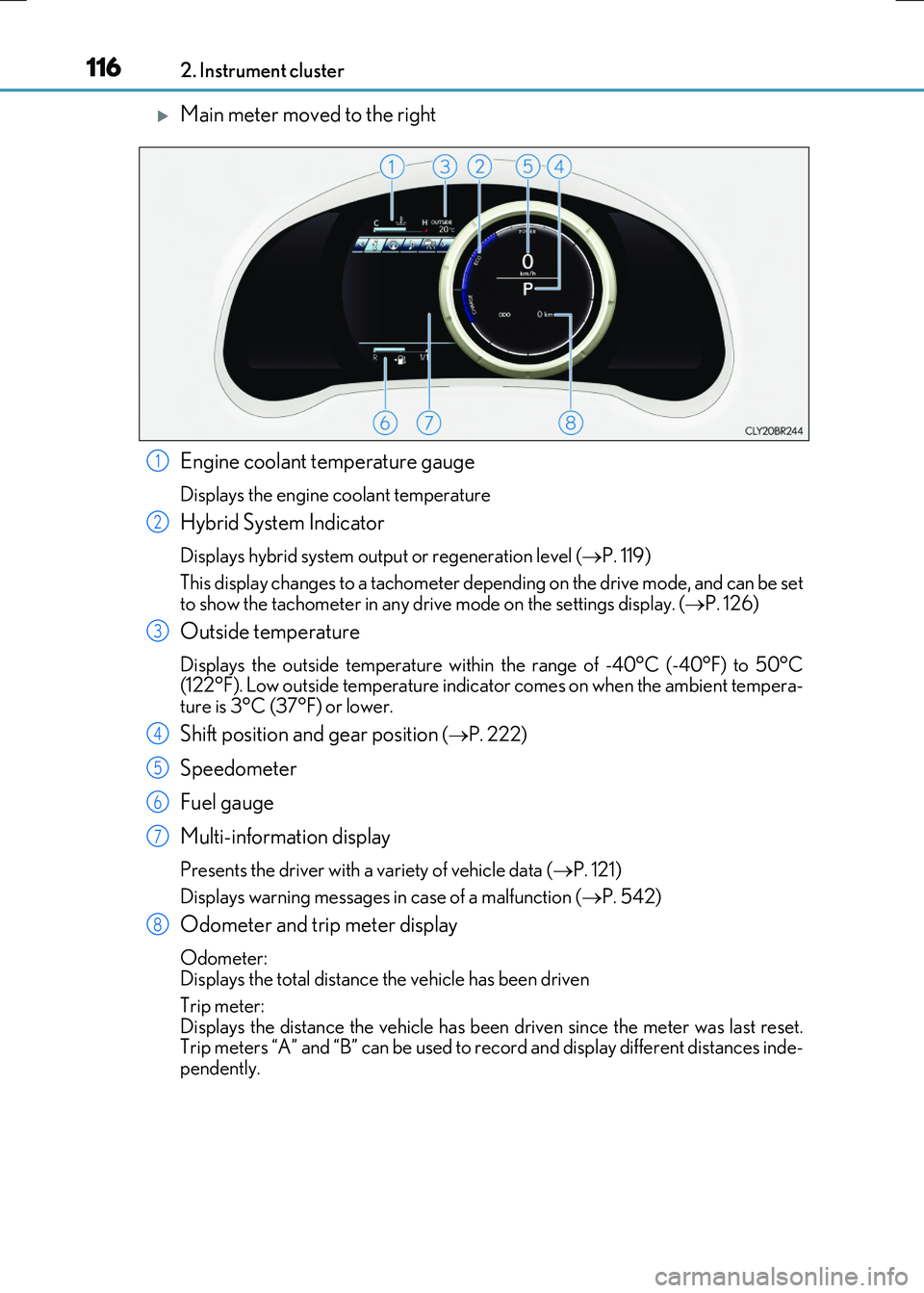
Main meter moved to the right
Engine coolant temperature gauge
Displays the engine coolant temperature
Hybrid System Indicator
Displays hybrid system output or regeneration level ( P. 119)
This display changes to a tachometer depending on the drive mode, and can be set
to show the tachometer in any drive mode on the settings display. ( P. 126)
Outside temperature
Displays the outside temperature within the range of -40°C (-40°F) to 50°C (122°F). Low outside temperature indicator comes on when the ambient tempera-ture is 3°C (37°F) or lower.
Shift position and gear position ( P. 222)
Speedometer
Fuel gauge
Multi-information display
Presents the driver with a variety of vehicle data ( P. 121)
Displays warning messages in case of a malfunction ( P. 542)
Odometer and trip meter display
Odometer: Displays the total distance the vehicle has been driven
Trip meter: Displays the distance the vehicle has been driven since the meter was last reset. Trip meters “A” and “B” can be used to record and display different distances inde-
pendently.
1
2
3
4
5
6
7
8
Page 122 of 640

1222. Instrument cluster
RC300h_EE(OM24740E)
■Menu icons
Displays the following information when an icon is selected.
Drive information ( P. 124)
Select to display various drive data.
Navigation system-linked display (if equipped)
Select to display the following navigation system-linked information. • Route guidance• Compass display (north-up display/heading-up display)
Audio system-linked display
Select to enable selection of an audio source or track on the meter using themeter control switches.
Dynamic radar cruise control operation guide
(vehicles with dynamic radar cruise control)
• Select to display operation procedures of the dynamic radar cruise control. ( P. 257) • When the vehicle is in constant speed control mode ( P. 263), the menu
icon will change to .
• Vehicles with LDA (Lane Departure Alert): If the LDA system ( P. 275) is
activated, its operational stat us will also be displayed.
LDA (Lane Departure Alert) operational status
(vehicles with LDA but without a dynamic radar cruise control)
Select to display the operational status of the LDA system. ( P. 275)
Warning message display (P. 542)
Select to display warning messages and measures to be taken if a malfunction is
detected.
Settings display ( P. 126)
Select to change the meter display settings.
Page 127 of 640
1272. Instrument cluster
2
Instrument cluster
RC300h_EE(OM24740E)
■Needle (F SPORT models)
Select to change the needle color for the tachometer.
■Rev indicator (F SPORT models)
Select to set the rev indicator on/off.
When set to on, proceed to set the engine speed at which the rev indicator will
be displayed.
Selectable engine speed range: 2000 r/min to 6000 r/min
■Rev peak (F SPORT models)
Select to set the rev peak on/off.
■Speed indicator (F SPORT models)
Select to set the speed indicator on/off.
When set to on, proceed to set the vehicle speed at which the speed indicator
will be displayed.
Selectable speed range:
Type A*1: 30 mph to 100 mph (50 km/h to 160 km/h)*3
Type B*2: 50 km/h to 200 km/h (30 mph to 125 mph)*3
*1:For U.K.
*2:Except for U.K.
*3: Always observe the legal speed limit when driving on public roads.
■Initialization
Select to reset the meter display settings. ( P. 608)
■Suspension of the settings display
In the following situations, operation of th e settings display will be temporarily sus- pended.
●When a warning message appears on the multi-information display
●When the vehicle begins to move
■Tire pressure
●It may take a few minutes to display the tire inflation pressure after the engine switch is
turned to IGNITION ON mode. It may also take a few minutes to display the tire infla- tion pressure after inflation pressure has been adjusted.
●“---” may be displayed if the tire position information cannot be determined due to
unfavorable radio wave conditions.
●Tire inflation pressure changes with temperature. The displayed values may also be dif- ferent from the values measured using a tire pressure gauge.
Page 128 of 640
1282. Instrument cluster
RC300h_EE(OM24740E)
■When disconnecting and reconnecting battery terminals
The drive information data will be reset.
■Liquid crystal display
P. 120
WARNING
■Caution for use while driving
●When operating the multi-information display while driving, pay extra attention to the safety of the area around the vehicle.
●Do not look continuously at the multi-info rmation display while driving as you may fail to see pedestrians, objects on the road, etc. ahead of the vehicle.
■The information display at low temperatures
Allow the interior of the vehicle to warm up before using the liquid crystal information display. At extremely low temperatures, th e information display monitor may respond slowly, and display changes may be delayed.
For example, there is a lag between the dr iver’s shifting and the new gear number appearing on the display. This lag could cau se the driver to downshift again, causing rapid and excessive engine braking and po ssibly an accident resulting in death or
injury.
■Cautions during setting up the display
As the hybrid system needs to be running during setting up the display, ensure that the
vehicle is parked in a place with adequate ventilation. In a closed area such as a garage, exhaust gases including harmful carbon monoxide (CO) may collect and enter thevehicle. This may lead to death or a serious health hazard.
NOTICE
■While setting up the display
To prevent battery discharge, ensure that the engine is running while setting up the dis- play features.
Page 149 of 640
1493-2. Opening, closing and locking the doors and trunk
3
Operation of each component
RC300h_EE(OM24740E)
■Impact detection door lock release system
In the event that the vehicle is subject to a strong impact, both side doors are unlocked. Depending on the force of the impact or the type of accident, however, the system may
not operate.
■Using the mechanical key
The doors can also be unlocked with the mechanical key. ( P. 578)
■Conditions affecting the operation of the smart entry & start system or wireless remote control
P. 157
■Customization
Settings (e.g. unlocking function using a key) can be changed. (Customizable features: P. 607)
WARNING
■To prevent an accident
Observe the following precautions while driving the vehicle. Failure to do so may result in a door opening and an occupant being thrown out of thevehicle, resulting in death or serious injury.
●Ensure that both side doors are properly closed.
●Do not pull the inside handle of the doors while driving. The doors may be opened even if the inside lock buttons are in locked position.
■Side window open/close function linked to door operation
Do not hold the upper edge of the side window when you close the door. Otherwise, your fingers or hand may be caught in the window.
■When using the wireless remote control and operating the power windows or moonroof
Operate the power window or moon roof after checking to make sure that there is no
possibility of any passenger having any of their body parts caught in the window or moon roof. Also, do not allow children to oper ate the wireless remote control. It is pos- sible for children and other passengers to get caught in the power window or moon
roof.