fuel LEXUS RC350 2015 User Guide
[x] Cancel search | Manufacturer: LEXUS, Model Year: 2015, Model line: RC350, Model: LEXUS RC350 2015Pages: 684, PDF Size: 9.31 MB
Page 106 of 684
1062. Instrument cluster
RC350/RCF_U (OM24636U)
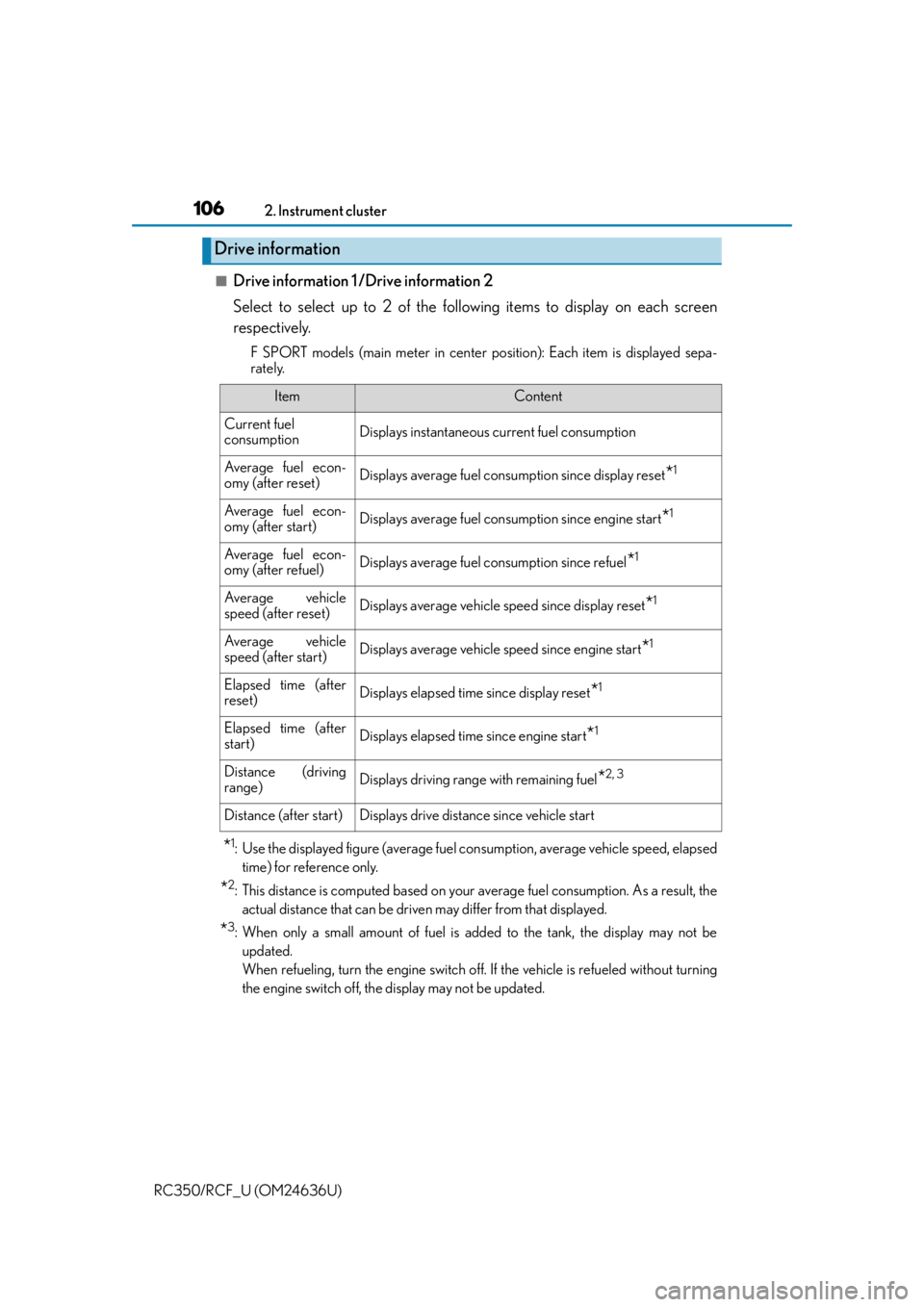
■Drive information 1 /Drive information 2
Select to select up to 2 of the follo wing items to display on each screen
respectively.
F SPORT models (main meter in center po sition): Each item is displayed sepa-
rately.
*1: Use the displayed figure (average fuel consumption, average vehicle speed, elapsed
time) for reference only.
*2: This distance is computed based on your average fuel consumption. As a result, theactual distance that can be driven may differ from that displayed.
*3: When only a small amount of fuel is added to the tank, the display may not beupdated.
When refueling, turn the engine switch off. If the vehicle is refueled without turning
the engine switch off, the display may not be updated.
Drive information
ItemContent
Current fuel
consumptionDisplays instantaneous cu rrent fuel consumption
Average fuel econ-
omy (after reset)Displays average fuel consumption since display reset*1
Average fuel econ-
omy (after start)Displays average fuel consumption since engine start*1
Average fuel econ-
omy (after refuel)Displays average fuel consumption since refuel*1
Average vehicle
speed (after reset)Displays average vehicle speed since display reset*1
Average vehicle
speed (after start)Displays average vehicle speed since engine start*1
Elapsed time (after
reset)Displays elapsed time since display reset*1
Elapsed time (after
start)Displays elapsed time since engine start*1
Distance (driving
range)Displays driving range with remaining fuel*2, 3
Distance (after start)Displays drive distance since vehicle start
Page 107 of 684
1072. Instrument cluster
2
Instrument cluster
RC350/RCF_U (OM24636U)
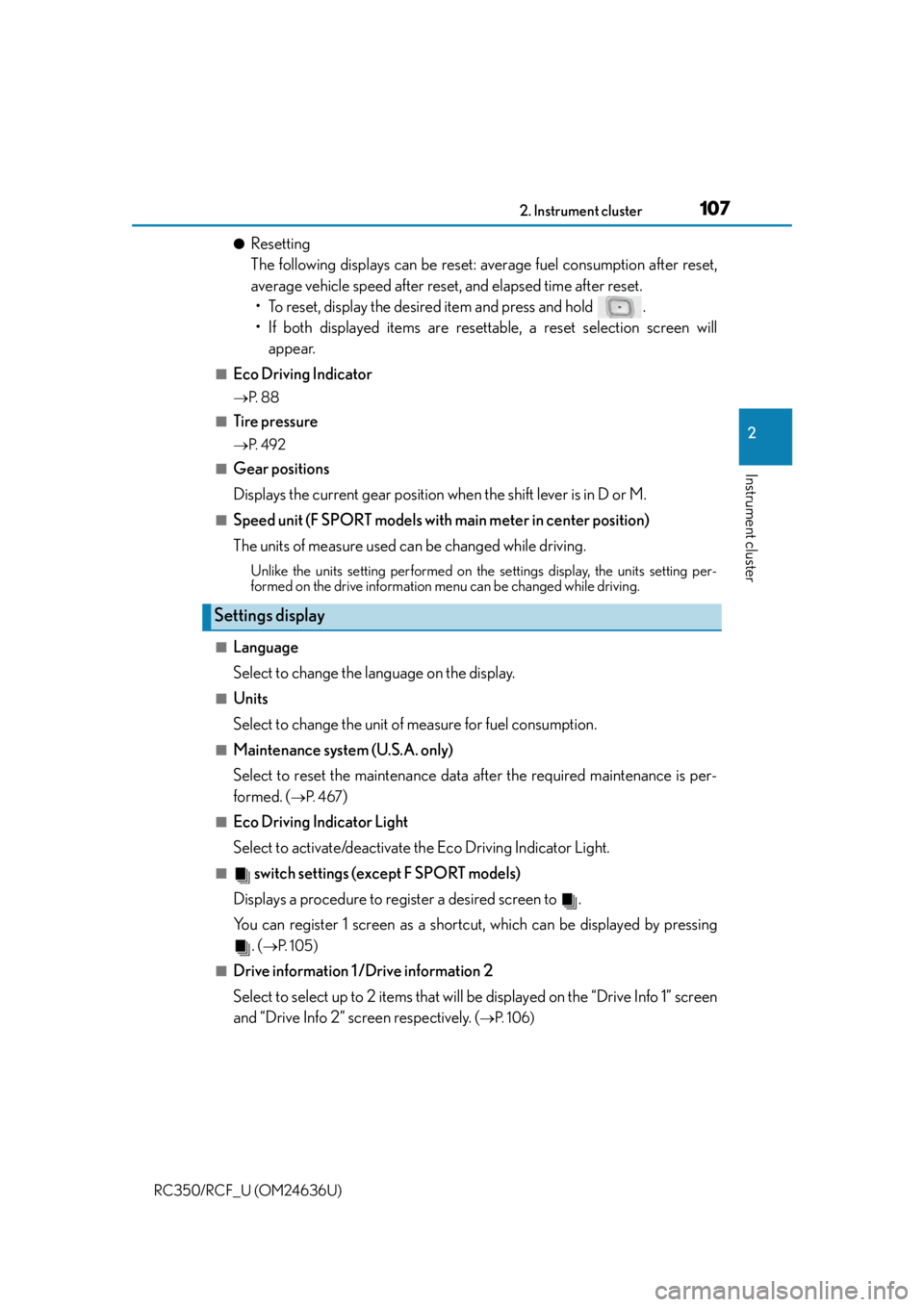
●Resetting
The following displays can be reset: average fuel consumption after reset,
average vehicle speed after reset, and elapsed time after reset.• To reset, display the desired item and press and hold .
• If both displayed items are resett able, a reset selection screen will
appear.
■Eco Driving Indicator
P. 8 8
■Tire pressure
P. 4 9 2
■Gear positions
Displays the current gear position when the shift lever is in D or M.
■Speed unit (F SPORT models with main meter in center position)
The units of measure used can be changed while driving.
Unlike the units setting performed on the settings display, the units setting per-
formed on the drive information me nu can be changed while driving.
■Language
Select to change the language on the display.
■Units
Select to change the unit of measure for fuel consumption.
■Maintenance system (U.S.A. only)
Select to reset the maintenance data after the required maintenance is per-
formed. (
P. 4 6 7)
■Eco Driving Indicator Light
Select to activate/deactivate th e Eco Driving Indicator Light.
■ switch settings (except F SPORT models)
Displays a procedure to register a desired screen to .
You can register 1 screen as a shortcut, which can be displayed by pressing . (
P. 1 0 5 )
■Drive information 1 /Drive information 2
Select to select up to 2 items that will be displayed on the “Drive Info 1” screen
and “Drive Info 2” screen respectively. (
P. 1 0 6 )
Settings display
Page 112 of 684
1122. Instrument cluster
RC350/RCF_U (OM24636U)
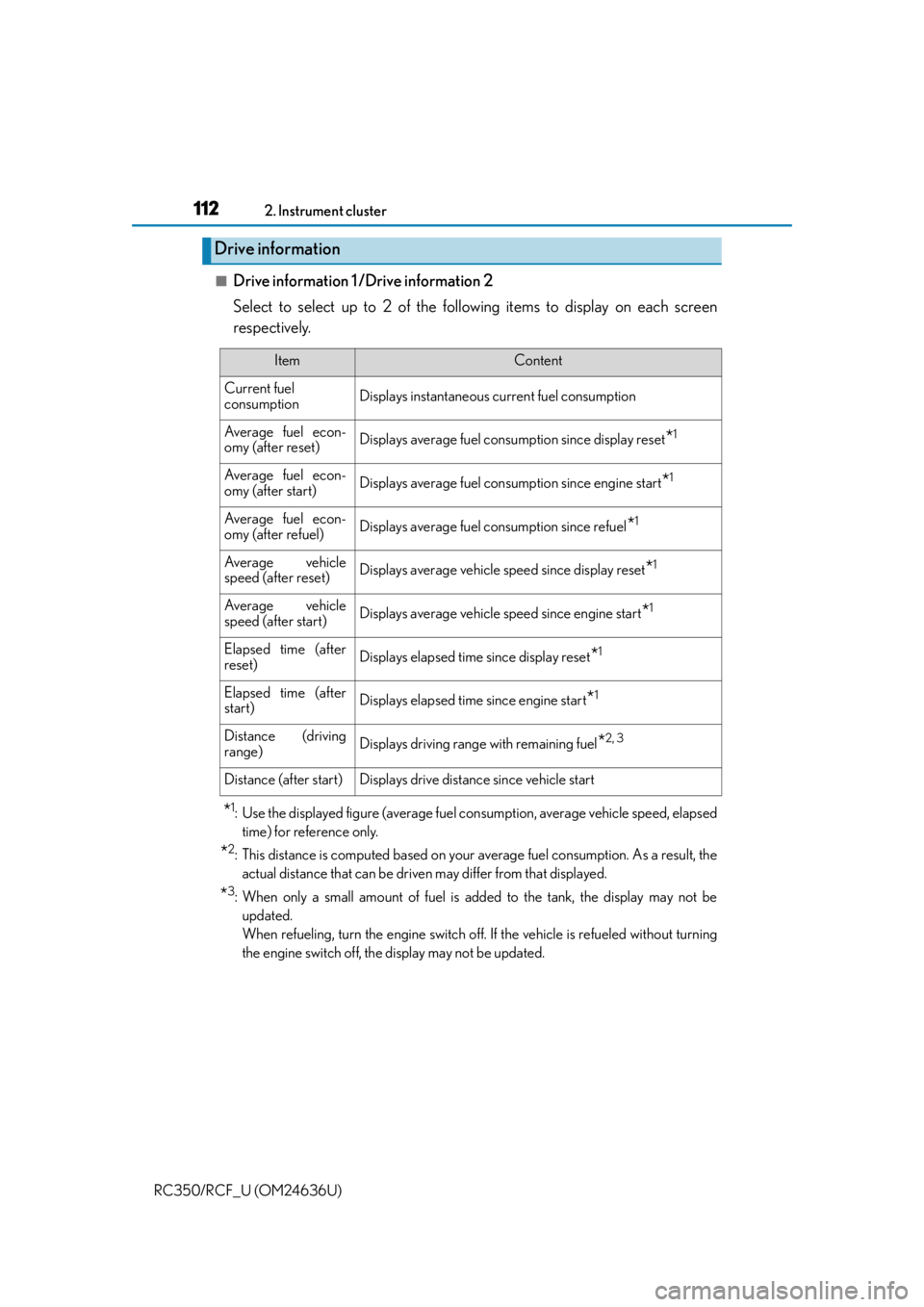
■Drive information 1 /Drive information 2
Select to select up to 2 of the follo wing items to display on each screen
respectively.
*1: Use the displayed figure (average fuel consumption, average vehicle speed, elapsed time) for reference only.
*2: This distance is computed based on your average fuel consumption. As a result, theactual distance that can be driven may differ from that displayed.
*3: When only a small amount of fuel is added to the tank, the display may not beupdated.
When refueling, turn the engine switch off. If the vehicle is refueled without turning
the engine switch off, the display may not be updated.
Drive information
ItemContent
Current fuel
consumptionDisplays instantaneous cu rrent fuel consumption
Average fuel econ-
omy (after reset)Displays average fuel consumption since display reset*1
Average fuel econ-
omy (after start)Displays average fuel consumption since engine start*1
Average fuel econ-
omy (after refuel)Displays average fuel consumption since refuel*1
Average vehicle
speed (after reset)Displays average vehicle speed since display reset*1
Average vehicle
speed (after start)Displays average vehicle speed since engine start*1
Elapsed time (after
reset)Displays elapsed time since display reset*1
Elapsed time (after
start)Displays elapsed time since engine start*1
Distance (driving
range)Displays driving range with remaining fuel*2, 3
Distance (after start)Displays drive distance since vehicle start
Page 113 of 684
1132. Instrument cluster
2
Instrument cluster
RC350/RCF_U (OM24636U)
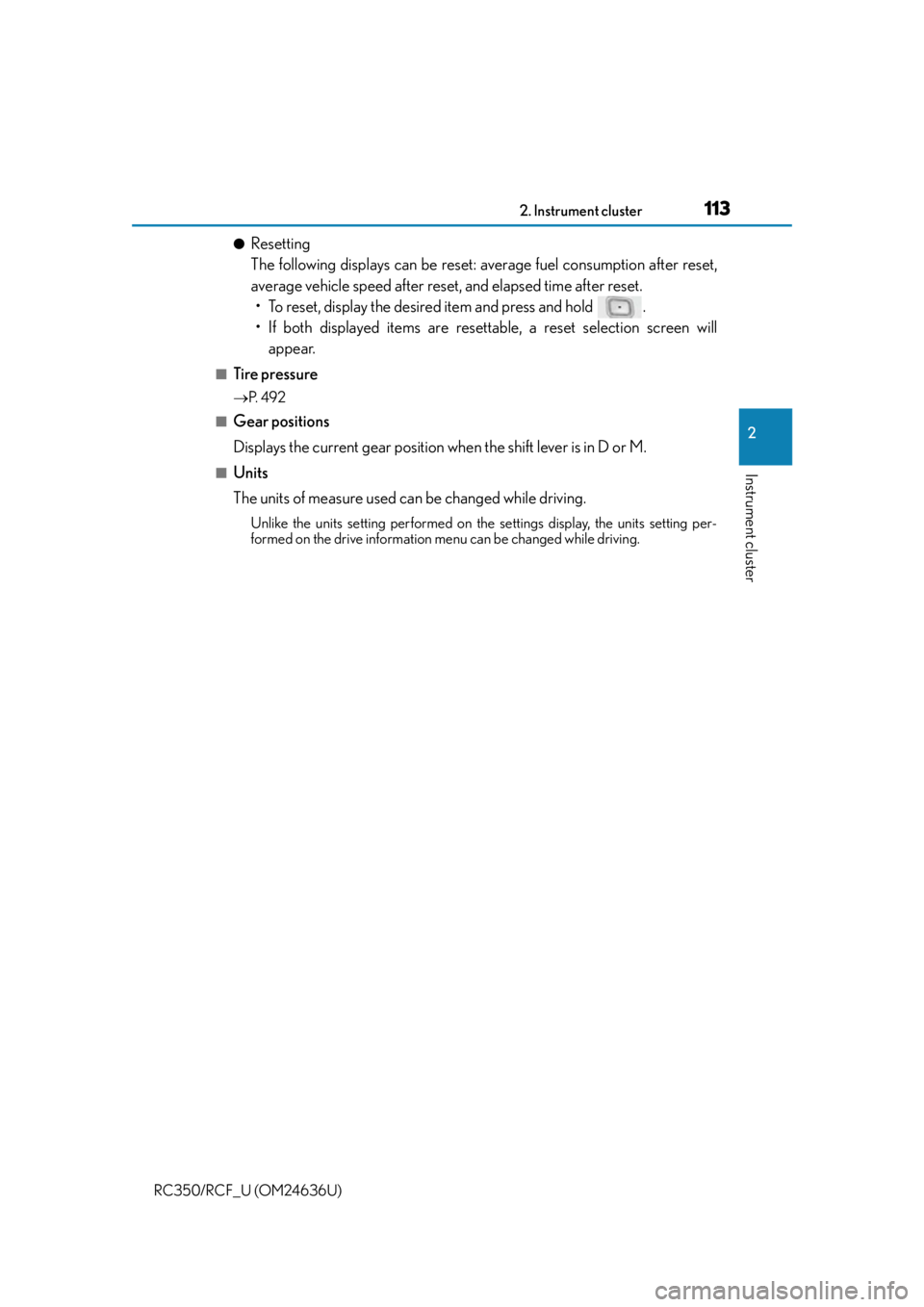
●Resetting
The following displays can be reset: average fuel consumption after reset,
average vehicle speed after reset, and elapsed time after reset.• To reset, display the desired item and press and hold .
• If both displayed items are resett able, a reset selection screen will
appear.
■Tire pressure
P. 4 9 2
■Gear positions
Displays the current gear position when the shift lever is in D or M.
■Units
The units of measure used can be changed while driving.
Unlike the units setting performed on the settings display, the units setting per-
formed on the drive information me nu can be changed while driving.
Page 119 of 684
1192. Instrument cluster
2
Instrument cluster
RC350/RCF_U (OM24636U)
■Language
Select to change the language on the display.
■Units
Select to change the unit of measure for fuel consumption.
■Maintenance system (U.S.A. only)
Select to reset the maintenance data after the required maintenance is per-
formed. (
P. 4 6 7)
■Eco Driving Indicator Light
Select to activate/deactivate th e Eco Driving Indicator Light.
■ switch settings
Displays a procedure to register a desired screen to .
You can register 1 screen as a shortcut, which can be displayed by pressing . ( P. 111)
■Drive information 1 /Drive information 2
Select to select up to 2 items that will be displayed on the “Drive Info 1” screen
and “Drive Info 2” screen respectively.
( P. 112)
■Pop-up display
Select to set the following pop-up disp lays, which may appear in some situa-
tions, on/off. • Route guidance display of the navigation system-linked system (if equipped)
• Incoming call display of the hands-free phone system
• Windshield wiper switch operation display (if equipped)
• Headlight switch operation display (if equipped)
• Dynamic radar cruise control operation display (if equipped)
• Instrument panel brightness adjustment display
• TVD control mode change display (if equipped)
• Drive mode change display
■Rev indicator
Select to set the rev indicator on/off.
When set to on, proceed to select the engine speed at which the rev indicator
will be displayed.
■Rev peak
Select to set the rev peak on/off.
Settings display
Page 123 of 684

1232. Instrument cluster
2
Instrument cluster
RC350/RCF_U (OM24636U)
Fuel consumption information
Fuel consumption information can be displayed on the navigation system
screen or the Lexus Display Audio screen.
Vehicles with a navigation systemVehicles with a Lexus Display Audio
system
Navigation system screen
“MENU” button
To u c h p a d
*
*
: For use of the Remote Touch, refer to “NAVIGATION SYSTEM OWNER’S
MANUAL”.
Lexus Display Audio screen
“MENU” button
Lexus Display Audio controller
( P. 3 2 4 )1
2
3
1
2
3
Page 124 of 684
1242. Instrument cluster
RC350/RCF_U (OM24636U)
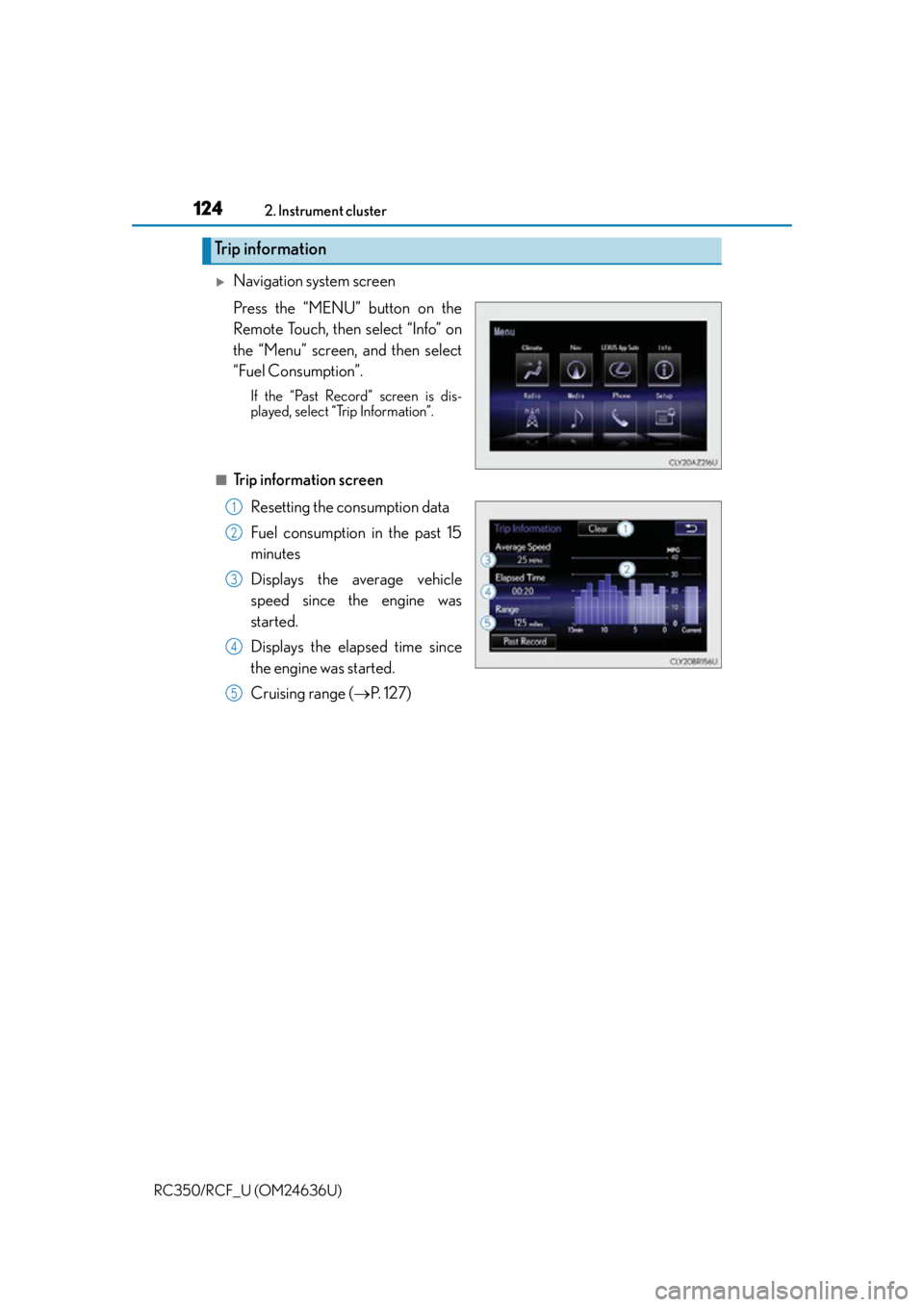
Navigation system screen
Press the “MENU” button on the
Remote Touch, then select “Info” on
the “Menu” screen, and then select
“Fuel Consumption”.
If the “Past Record” screen is dis-
played, select “Trip Information”.
■Trip information screen Resetting the consumption data
Fuel consumption in the past 15
minutes
Displays the average vehicle
speed since the engine was
started.
Displays the elapsed time since
the engine was started.
Cruising range ( P. 1 2 7 )
Trip information
1
2
3
4
5
Page 125 of 684
1252. Instrument cluster
2
Instrument cluster
RC350/RCF_U (OM24636U)
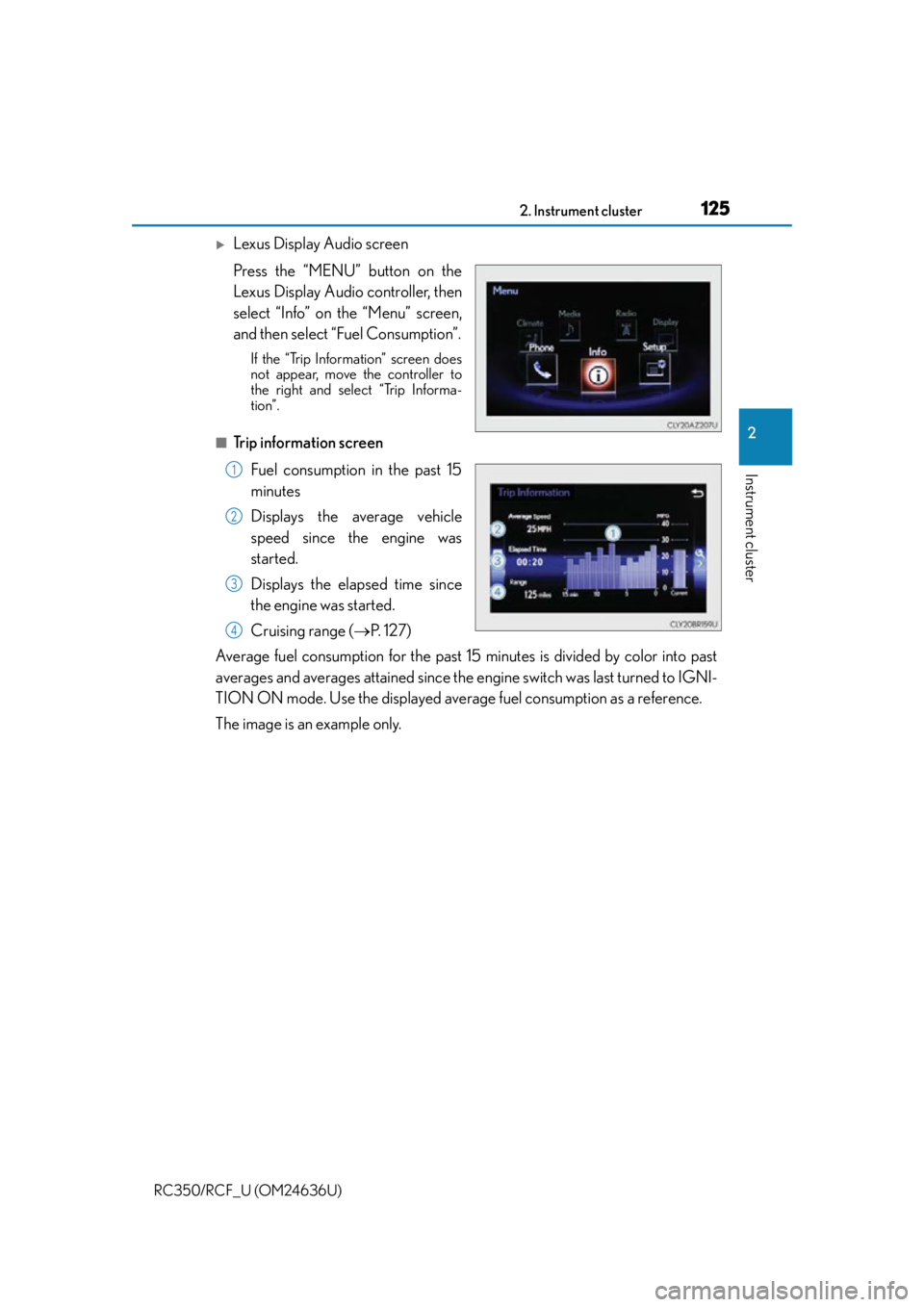
Lexus Display Audio screen
Press the “MENU” button on the
Lexus Display Audio controller, then
select “Info” on the “Menu” screen,
and then select “Fuel Consumption”.
If the “Trip Information” screen does
not appear, move the controller to
the right and select “Trip Informa-
tion”.
■Trip information screenFuel consumption in the past 15
minutes
Displays the average vehicle
speed since the engine was
started.
Displays the elapsed time since
the engine was started.
Cruising range ( P. 1 2 7 )
Average fuel consumption for the past 15 minutes is divided by color into past
averages and averages attained since the engine switch was last turned to IGNI-
TION ON mode. Use the displayed average fuel consumption as a reference.
The image is an example only.
1
2
3
4
Page 126 of 684
1262. Instrument cluster
RC350/RCF_U (OM24636U)
Navigation system screen
Press the “MENU” button on the Remote Touch, then select “Info” on the
“Menu” screen, and then select “Fuel Consumption”.
If the “Trip Information” screen is displayed, select “Past Record”.
■Past record screen Resetting the past record data
Best recorded fuel consumption
Average fuel consumption
Previous fuel consumption record
Updating the average fuel con-
sumption data
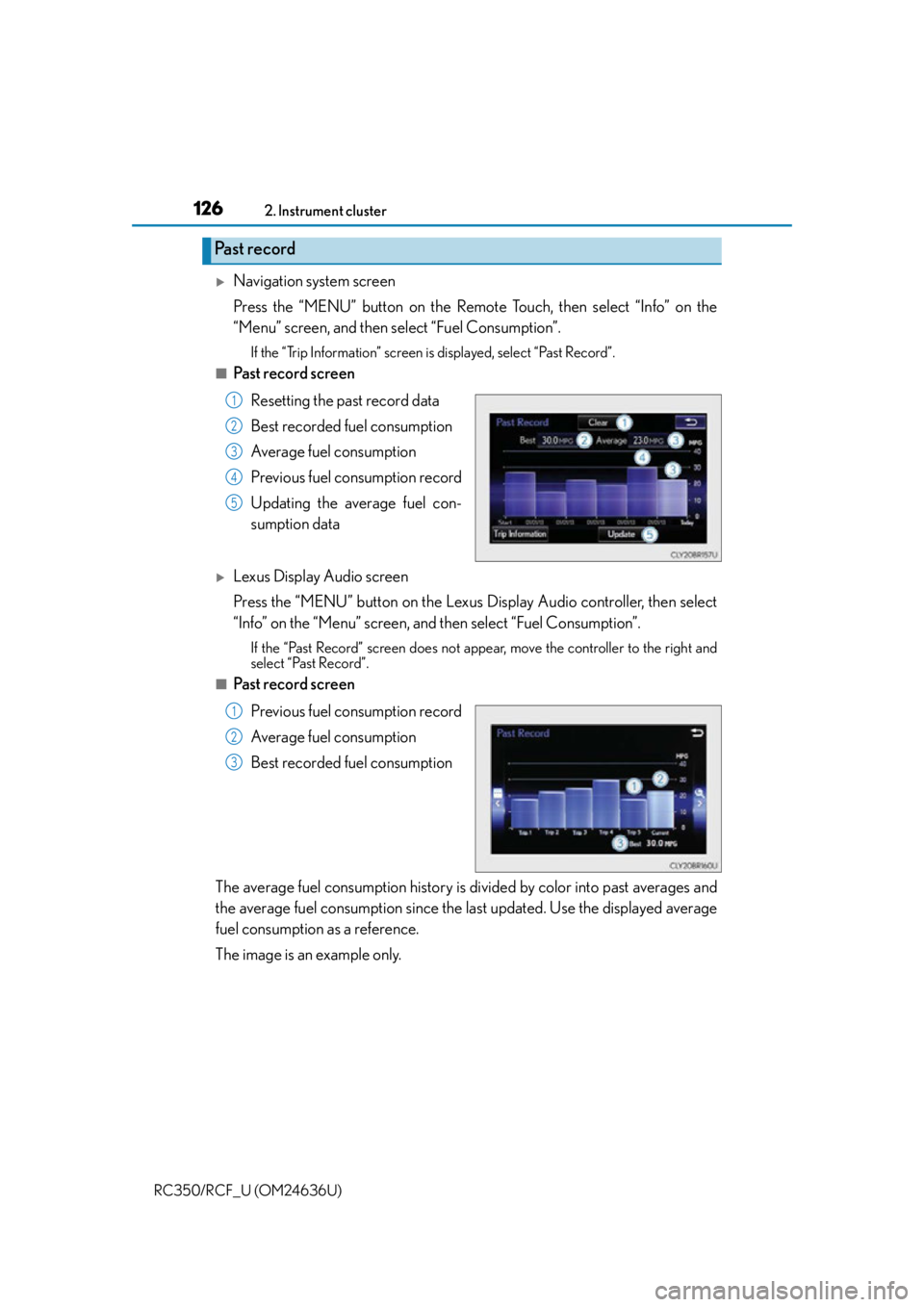
Lexus Display Audio screen
Press the “MENU” button on the Lexus Display Audio controller, then select
“Info” on the “Menu” screen, and then select “Fuel Consumption”.
If the “Past Record” screen does not appe ar, move the controller to the right and
select “Past Record”.
■Past record screen
Previous fuel consumption record
Average fuel consumption
Best recorded fuel consumption
The average fuel consumption history is di vided by color into past averages and
the average fuel consumption since the la st updated. Use the displayed average
fuel consumption as a reference.
The image is an example only.
Past record
1
2
3
4
5
1
2
3
Page 127 of 684
1272. Instrument cluster
2
Instrument cluster
RC350/RCF_U (OM24636U)
■Updating the past record data
Navigation system
Update the average fuel consumption by selecting “Update” to measure the current fuel
consumption again.
Lexus Display Audio system
Update the average fuel consumption by moving the controller to the left and select
“Update” to measure the current fuel consumption again.
■Resetting the data
Navigation system
The fuel consumption data can be deleted by selecting “Clear”.
Lexus Display Audio system
The fuel consumption data can be deleted by moving the controller to the left and select
“Clear ”.
■Cruising range
Displays the estimated maximum distance that can be driven with the quantity of fuel
remaining.
This distance is computed based on your average fuel consumption.
As a result, the actual distance that can be driven may differ from that displayed.