Bumper cover LEXUS RC350 2015 Owners Manual
[x] Cancel search | Manufacturer: LEXUS, Model Year: 2015, Model line: RC350, Model: LEXUS RC350 2015Pages: 684, PDF Size: 9.31 MB
Page 46 of 684
461-1. For safe use
RC350/RCF_U (OM24636U)
■If the SRS airbags deploy (inflate)
●Bruising and slight abrasions may result from contact with a deploying (inflating) SRS
airbag.
●A loud noise and white powder will be emitted.
●Parts of the airbag module (steering wheel hub, airbag cover and inflator) as well as the
front seats, parts of the front and rear pillar s, and roof side rails may be hot for several
minutes. The airbag itself may also be hot.
●The windshield may crack.
●For Lexus Enform Safety Connect subscribers, if the SRS airbags deploy or in the event
of a severe rear-end collision, the system is designed to send an emergency call to the
response center, notifying them of the vehicl e’s location (without needing to push the
“SOS” button) and an agent will attempt to speak with the occupants to ascertain the
level of emergency and assistance required . If the occupants are unable to communi-
cate, the agent automatically treats the call as an emergency and helps to dispatch the
necessary emergency services. ( P. 4 5 1 )
WA R N I N G
■Modification and disposal of SRS airbag system components
Do not dispose of your vehicle or perform any of the following modifications without
consulting your Lexus dealer. The SRS airb ags may malfunction or deploy (inflate)
accidentally, causing de ath or serious injury.
●Installation, removal, disassembl y and repair of the SRS airbags
●Repairs, modifications, removal or replac ement of the steering wheel, instrument
panel, dashboard, seats or seat upholstery, fr ont, side and rear pillars or roof side rails
●Repairs or modifications of the front fender, front bumper, or side of the occupant
compartment
●Installation of a grille gu ard (bull bars, kangaroo bar, etc.), snow plows, winches
●Modifications to the vehicle’s suspension system
●Installation of electronic devices such as mobile two-way radios and CD players
●Modifications to your vehicle for a person with a physical disability
Page 261 of 684

2614-5. Using the driving support systems
4
Driving
RC350/RCF_U (OM24636U)
■Sensor detection information
●RC350: The sensor’s detection areas are limited to the areas around the vehicle’s front
and rear bumpers.
●RC F: The sensor’s detection areas are limited to the areas around the vehicle’s front
corner and rear bumpers.
●Certain vehicle conditions and the surround ing environment may affect the ability of
the sensor to correctly detect obstacles. Particular instances where this may occur are
listed below.
• There is dirt, snow or ice on the sensor . (Wiping the sensors will resolve this prob-
lem.)
• The sensor is frozen. (Thawing th e area will resolve this problem.)
In especially cold weather, if a sensor is frozen the screen may show an abnormal
display, or obstacles may not be detected.
• The sensor is covered in any way.
• The vehicle is leaning co nsiderably to one side.
• On an extremely bumpy road, on an incline, on gravel, or on grass.
• The vicinity of the vehicle is noisy due to vehicle horns, motorcycle engines, air brakes of large vehicles, or other loud noises producing ultrasonic waves.
• There is another vehicle equipped with parking assist sensor in the vicinity.
• The sensor is coated with a sheet of spray or heavy rain.
• The vehicle is equipped with a fender pole or wireless antenna.
• Towing eyelets are installed.
• The bumper or sensor receives a strong impact.
• The vehicle is approaching a tall or curved curb.
• In harsh sunlight or intense cold weather.
• The area directly under the bumpers is not detected.
• If obstacles draw too close to the sensor.
• A non-genuine Lexus suspension (low ered suspension etc.) is installed.
• People may not be detected if they are wearing certain types of clothing.
In addition to the examples above, there are instances in which, because of their shape,
signs and other objects may be judged by the sensor to be closer than they are.
●The shape of the obstacle may prevent the sensor from detecting it. Pay particular
attention to the following obstacles:
• Wires, fences, ropes, etc.
• Cotton, snow and other materials that absorb sound waves
• Sharply-angled objects
•Low obstacles
• Tall obstacles with upper sections projecting outwards in the direction of your vehi-
cle
●The following situations may occur during use.
• Depending on the shape of the obstacle and other factors, the detection distance
may shorten, or detect ion may be impossible.
• Obstacles may not be detected if they are too close to the sensor.
• There will be a short delay between obst acle detection and display. Even at slow
speeds, there is a possibility that the obstacle will come within the sensor’s detection
areas before the display is shown and the warning beep sounds.
• Thin posts or objects lower than the sensor may not be detected when approached, even if they have been detected once.
• It might be difficult to hear beeps due to the volume of the audio system or air flow noise of the air conditioning system.
Page 300 of 684
3004-5. Using the driving support systems
RC350/RCF_U (OM24636U)
WA R N I N G
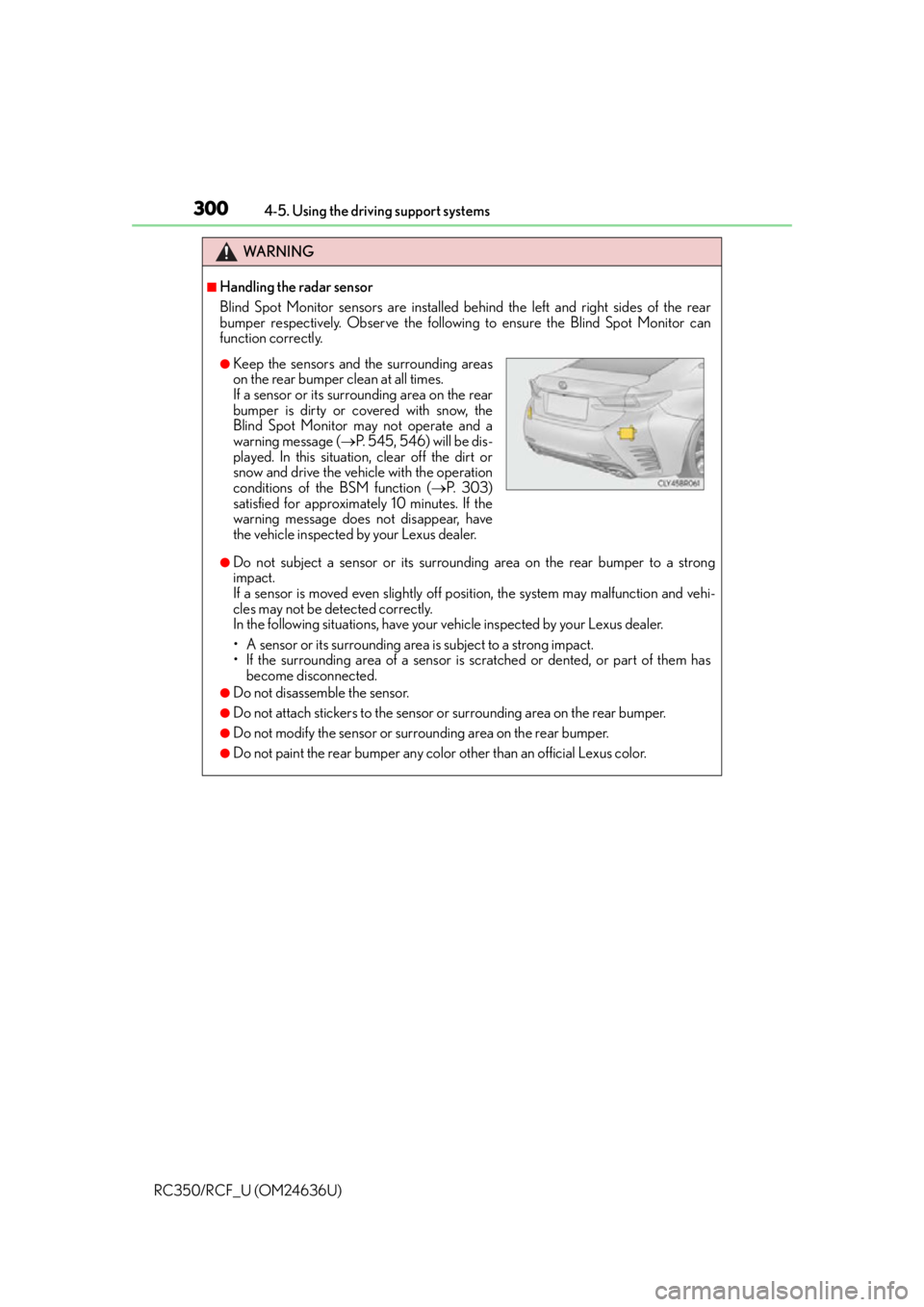
■Handling the radar sensor
Blind Spot Monitor sensors are installed be hind the left and right sides of the rear
bumper respectively. Observe the following to ensure the Blind Spot Monitor can
function correctly.
●Do not subject a sensor or its surrounding area on the rear bumper to a strong
impact.
If a sensor is moved even slightly off po sition, the system may malfunction and vehi-
cles may not be detected correctly.
In the following situations, have your vehicle inspected by your Lexus dealer.
• A sensor or its surrounding area is subject to a strong impact.
• If the surrounding area of a sensor is sc ratched or dented, or part of them has
become disconnected.
●Do not disassemble the sensor.
●Do not attach stickers to the sensor or surrounding area on the rear bumper.
●Do not modify the sensor or surrounding area on the rear bumper.
●Do not paint the rear bumper any color other than an official Lexus color.
●Keep the sensors and the surrounding areas
on the rear bumper clean at all times.
If a sensor or its surrounding area on the rear
bumper is dirty or covered with snow, the
Blind Spot Monitor may not operate and a
warning message (P. 545, 546) will be dis-
played. In this situation, clear off the dirt or
snow and drive the vehicle with the operation
conditions of the BSM function ( P. 303)
satisfied for approximately 10 minutes. If the
warning message does not disappear, have
the vehicle inspected by your Lexus dealer.
Page 304 of 684

3044-5. Using the driving support systems
RC350/RCF_U (OM24636U)
■Conditions under which the BSM function may not function correctly
●The BSM function may not detect vehicles correctly in the following situations:
• When the sensor is misaligned due to a strong impact to the sensor or its surround- ing area
• When mud, snow, ice, a sticker, etc. is covering the sensor or surrounding area on the rear bumper
• When driving on a road surface that is wet with standing water during bad weather, such as heavy rain, snow, or fog
• When multiple vehicles are approaching wi th only a small gap between each vehicle
• When the distance between your vehicle and a following vehicle is short
• When there is a significant difference in speed between your vehicle and the vehicle that enters the detection area
• When the difference in speed between your vehicle and another vehicle is changing
• When a vehicle enters a detection area traveling at about the same speed as your vehicle
• As your vehicle starts from a stop, a vehicle remains in the detection area
• When driving up and down consecutive steep in clines, such as hills, dips in the road,
etc.
• When driving on roads with sharp bends, consecutive curves, or uneven surfaces
• When vehicle lanes are wide, or when drivin g on the edge of a lane, and the vehicle
in an adjacent lane is far away from your vehicle
• When a bicycle carrier or other accessory is installed to the rear of the vehicle
• When there is a significant difference in height between your vehicle and the vehicle
that enters the detection area
• Immediately after the BSM main switch is turned on
●Instances of the BSM function unnecessarily detecting a vehicle and/or object may
increase in the following situations:
• When the sensor is misaligned due to a strong impact to the sensor or its surround- ing area
• When the distance between your vehicle and a guardrail, wall, etc. that enters the
detection area is short
• When driving up and down consecutive steep in clines, such as hills, dips in the road,
etc.
• When vehicle lanes are narrow, or when driving on the edge of a lane, and a vehicle traveling in a lane other than the ad jacent lanes enters the detection area
• When driving on roads with sharp bends, consecutive curves, or uneven surfaces
• When the tires are slipping or spinning
• When the distance between your vehicle and a following vehicle is short
• When a bicycle carrier or other accessory is installed to the rear of the vehicle
Page 308 of 684
3084-5. Using the driving support systems
RC350/RCF_U (OM24636U)
■Conditions under which the RCTA function will not detect a vehicle
The RCTA function is not designed to detect the following types of vehicles and/or
objects:
●Vehicles approaching from directly behind
●Vehicles backing up in a parking space next to your vehicle
●Guardrails, walls, signs, parked vehi cles and similar stationary objects*
●Small motorcycles, bicycles, pedestrians, etc.*
●Vehicles moving away from your vehicle
●Vehicles approaching from the parking spaces next to your vehicle*
*
: Depending on the conditions, detection of a vehicle and/or object may occur.
■Conditions under which the RCTA fu nction may not function correctly
●The RCTA function may not detect vehicles correctly in the following situations:
• When the sensor is misaligned due to a strong impact to the sensor or its surround- ing area
• When mud, snow, ice, a sticker, etc. is covering the sensor or surrounding area on
the rear bumper
• When driving on a road surface that is wet with standing water during bad weather, such as heavy rain, snow, or fog
• When multiple vehicles are approaching wi th only a small gap between each vehicle
• When a vehicle is approaching at high speed
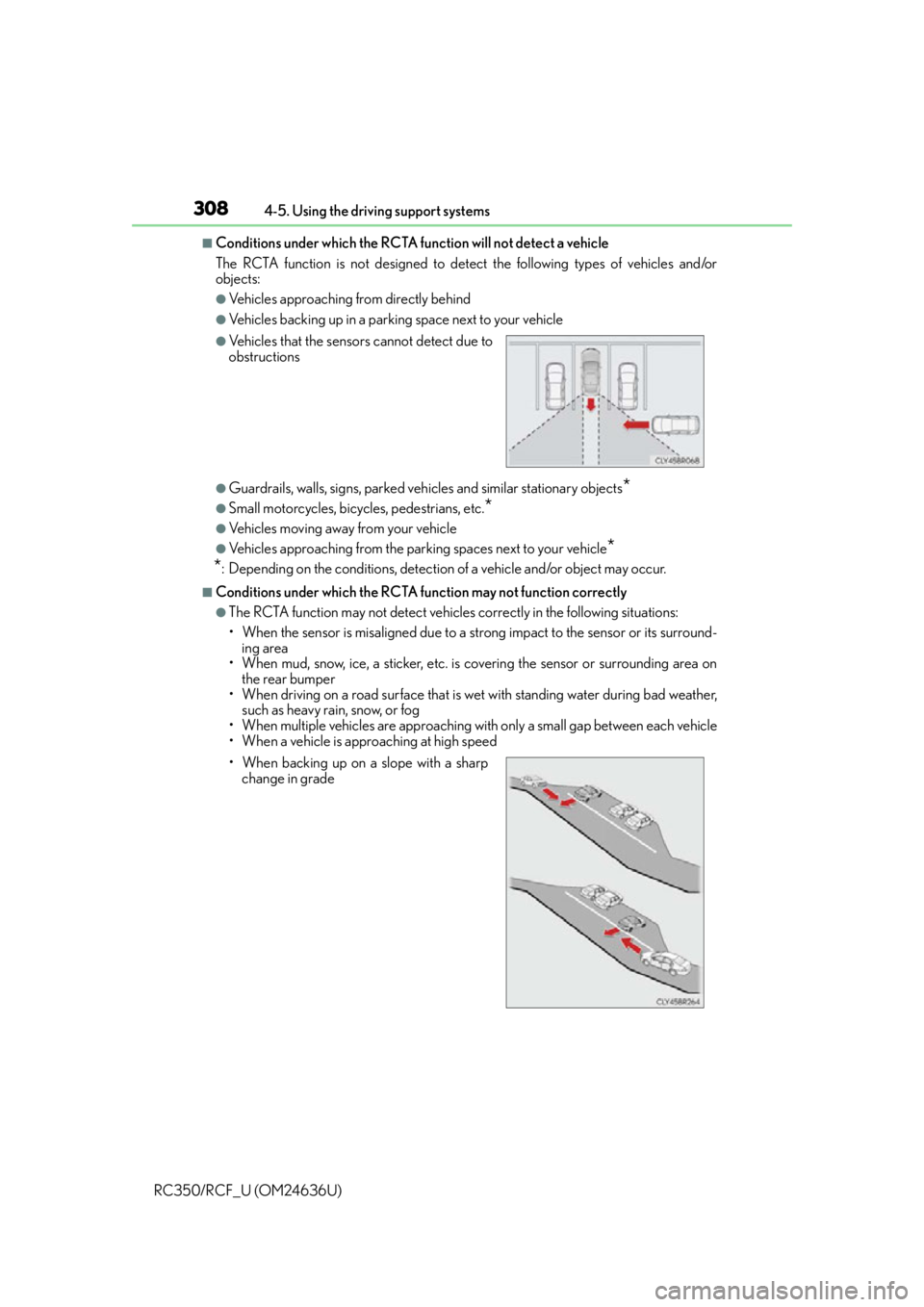
●Vehicles that the sensors cannot detect due to
obstructions
• When backing up on a slope with a sharp change in grade
Page 545 of 684
5458-2. Steps to take in an emergency
8
When trouble arises
RC350/RCF_U (OM24636U)
(If equipped)
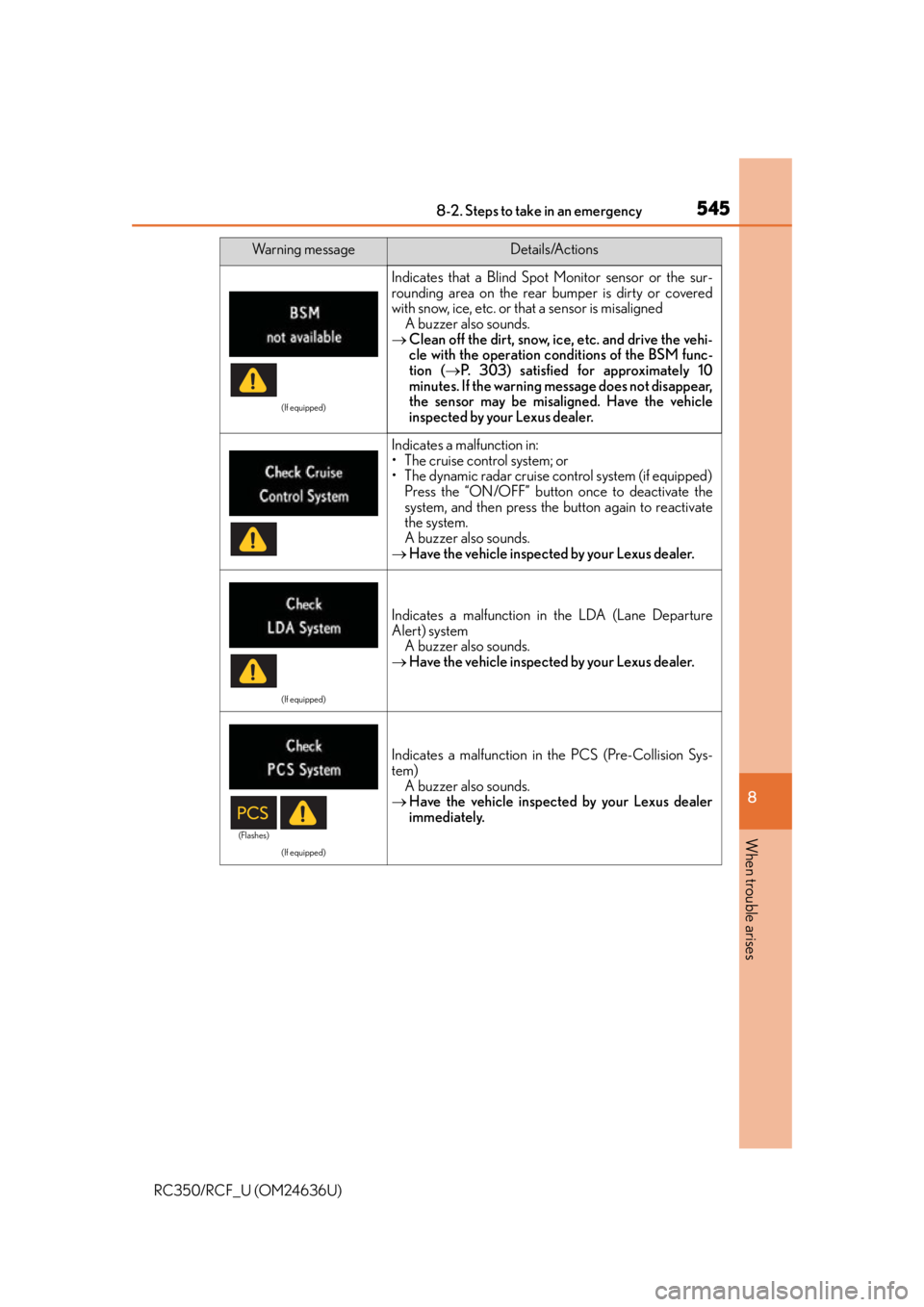
Indicates that a Blind Spot Monitor sensor or the sur-
rounding area on the rear bumper is dirty or covered
with snow, ice, etc. or that a sensor is misaligned
A buzzer also sounds.
Clean off the dirt, snow, ice, etc. and drive the vehi-
cle with the operation conditions of the BSM func-
tion ( P. 303) satisfied for approximately 10
minutes. If the warning message does not disappear,
the sensor may be misaligned. Have the vehicle
inspected by your Lexus dealer.
Indicates a malfunction in:
• The cruise control system; or
• The dynamic radar cruise control system (if equipped)
Press the “ON/OFF” button once to deactivate the
system, and then press the button again to reactivate
the system.
A buzzer also sounds.
Have the vehicle inspected by your Lexus dealer.
(If equipped)
Indicates a malfunction in the LDA (Lane Departure
Alert) system
A buzzer also sounds.
Have the vehicle inspected by your Lexus dealer.
(If equipped)
Indicates a malfunction in the PCS (Pre-Collision Sys-
tem)
A buzzer also sounds.
Have the vehicle inspected by your Lexus dealer
immediately.
Wa r n i n g m e s s a g eDetails/Actions
(Flashes)