engine LEXUS RC350 2016 Owners Manual
[x] Cancel search | Manufacturer: LEXUS, Model Year: 2016, Model line: RC350, Model: LEXUS RC350 2016Pages: 700, PDF Size: 14.12 MB
Page 226 of 700
2264-3. Operating the lights and wipers
RC350_RC300_RC200t_RC F_U (OM24671U)
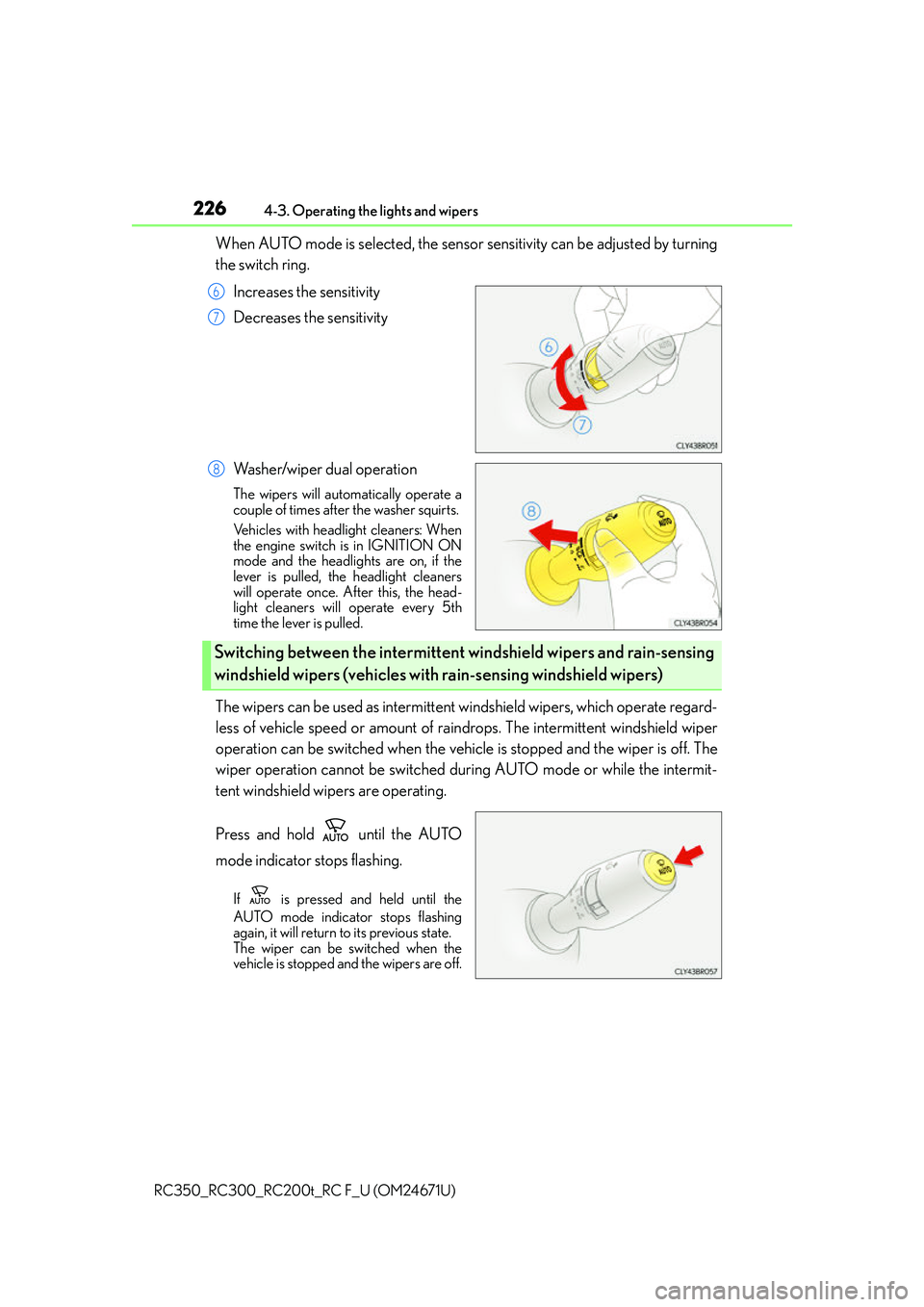
When AUTO mode is selected, the sensor sensitivity can be adjusted by turning
the switch ring.
Increases the sensitivity
Decreases the sensitivity
Washer/wiper dual operation
The wipers will automatically operate a
couple of times after the washer squirts.
Vehicles with headlight cleaners: When
the engine switch is in IGNITION ON
mode and the headlights are on, if the
lever is pulled, the headlight cleaners
will operate once. After this, the head-
light cleaners will operate every 5th
time the lever is pulled.
The wipers can be used as intermittent windshield wipers, which operate regard-
less of vehicle speed or amount of rain drops. The intermittent windshield wiper
operation can be switched when the vehicl e is stopped and the wiper is off. The
wiper operation cannot be switched during AUTO mode or while the intermit-
tent windshield wipers are operating.
Press and hold until the AUTO
mode indicator stops flashing.
If is pressed and held until the
AUTO mode indicator stops flashing
again, it will return to its previous state.
The wiper can be switched when the
vehicle is stopped and the wipers are off.
6
7
8
Switching between the intermittent wi ndshield wipers and rain-sensing
windshield wipers (vehicles with rain-sensing windshield wipers)
Page 228 of 700
2284-3. Operating the lights and wipers
RC350_RC300_RC200t_RC F_U (OM24671U)
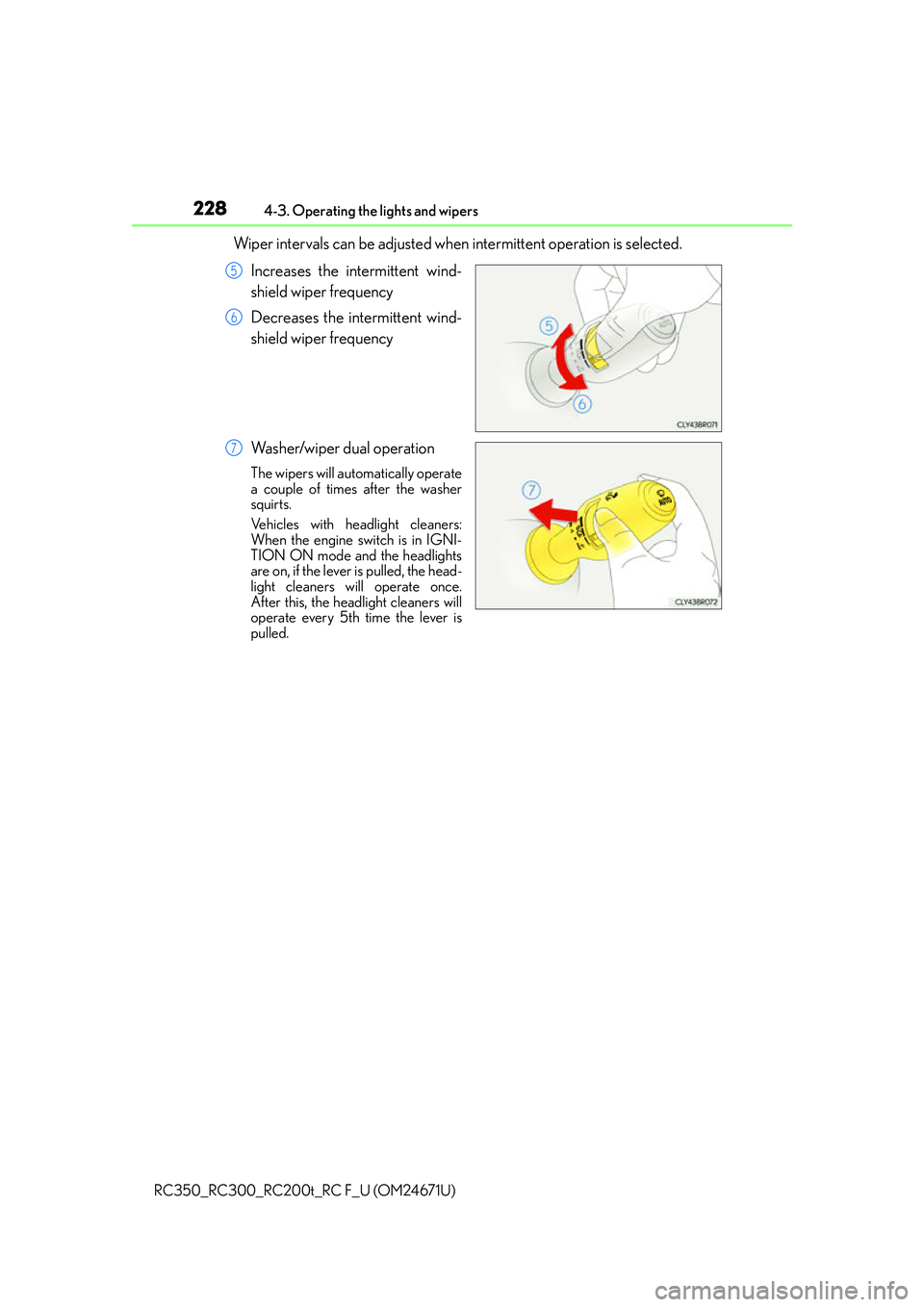
Wiper intervals can be adjusted when intermittent operation is selected. Increases the intermittent wind-
shield wiper frequency
Decreases the intermittent wind-
shield wiper frequency
Washer/wiper dual operation
The wipers will automatically operate
a couple of times after the washer
squirts.
Vehicles with headlight cleaners:
When the engine switch is in IGNI-
TION ON mode and the headlights
are on, if the lever is pulled, the head-
light cleaners will operate once.
After this, the headlight cleaners will
operate every 5th time the lever is
pulled.
5
6
7
Page 229 of 700
2294-3. Operating the lights and wipers
4
Driving
RC350_RC300_RC200t_RC F_U (OM24671U)
■The windshield wiper and washer can be operated when
The engine switch is in IGNITION ON mode.
■Dripping prevention wiper sweep
After performing a washing and wiping operation several times, the wipers operate one
more time after a short delay to prevent dripping.
However, this final wiper operation will not be performed while driving.
■Effects of vehicle speed on wiper operation (vehicles with rain-sensing windshield wip-
ers)
Vehicle speed affects the following even when the wipers are not in AUTO mode.
●Intermittent wiper interval
●Wiper operation when the washer is being used (delay until drip prevention wiper
sweep occurs)
With low speed windshield wiper operation selected, wiper operation will be switched
from low speed to intermittent wiper operat ion only when the vehicle is stationary.
■Raindrop sensor (vehicles with rain-sensing windshield wipers)
●If the wiper is turned to AUTO mode while the engine switch is in IGNITION ON
mode, the wipers will operate once to show that AUTO mode is activated.
●If the temperature of the raindrop sensor is 185°F (85°C) or higher, or -22°F (-30°C)
or lower, automatic operation may not occur. In this case, operate the wipers in any
mode other than AUTO mode.
■When the windshield wipers are in tempor ary operation (vehicles with rain-sensing
windshield wipers)
AUTO mode cannot be activated even if is pressed.
■If no windshield washer fluid sprays
Check that the washer nozzles are not blocked if there is washer fluid in the windshield
washer fluid reservoir.
■Operation guide display (vehicles with rain-sensing windshield wipers only)
When the windshield wiper swit ch is operated to activate AUTO mode or when the rain-
sensing level is adjusted, the current status is displayed on the meters for a few seconds.
( P. 110, 122)
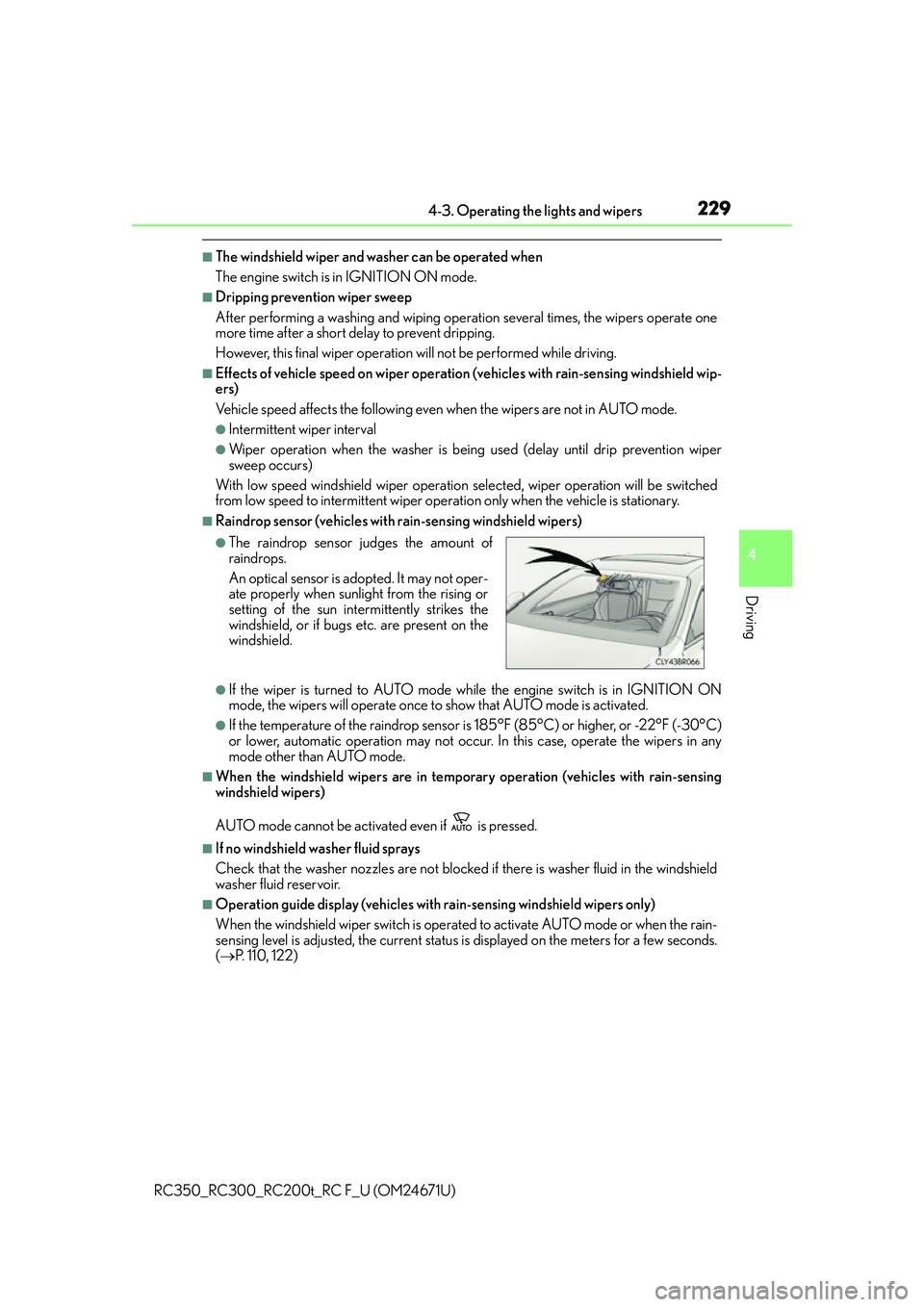
●The raindrop sensor judges the amount of
raindrops.
An optical sensor is ad opted. It may not oper-
ate properly when sunlight from the rising or
setting of the sun intermittently strikes the
windshield, or if bugs etc. are present on the
windshield.
Page 231 of 700
231
4
Driving
RC350_RC300_RC200t_RC F_U (OM24671U)4-4. Refueling
●Close both side doors and windows, and turn the engine switch off.
●Confirm the type of fuel.
■Fuel types
P. 6 3 6
■Fuel tank opening for unleaded gasoline
To help prevent incorrect fueling, your vehicle has a fuel tank opening that only accom-
modates the special nozzle on unleaded fuel pumps.
Opening the fuel tank cap
Perform the following steps to open the fuel tank cap:
Before refueling the vehicle
WA R N I N G
■When refueling the vehicle
Observe the following precautions while refu eling the vehicle. Failure to do so may
result in death or serious injury.
●After exiting the vehicle and before openin g the fuel door, touch an unpainted metal
surface to discharge any static electricity. It is important to discharge static electricity
before refueling because sparks resulting fr om static electricity can cause fuel vapors
to ignite while refueling.
●Always hold the grips on th e fuel tank cap and turn it slowly to remove it.
A whooshing sound may be heard when the fuel tank cap is loosened. Wait until the
sound cannot be heard before fully removing the cap. In hot weather, pressurized fuel
may spray out the filler neck and cause injury.
●Do not allow anyone that has not discharged static electricity from their body to come
close to an open fuel tank.
●Do not inhale vaporized fuel.
Fuel contains substances th at are harmful if inhaled.
●Do not smoke while refueling the vehicle.
Doing so may cause the fuel to ignite and cause a fire.
●Do not return to the vehicle or touch any person or object that is statically charged.
This may cause static electricity to build up, resulting in a possible ignition hazard.
■When refueling
Observe the following precautions to prevent fuel overflowing from the fuel tank:
●Securely insert the fuel nozzle into the fuel filler neck.
●Stop filling the tank after the fuel nozzle automatically clicks off.
●Do not top off the fuel tank.
Page 243 of 700
2434-5. Using the driving support systems
4
Driving
RC350_RC300_RC200t_RC F_U (OM24671U)
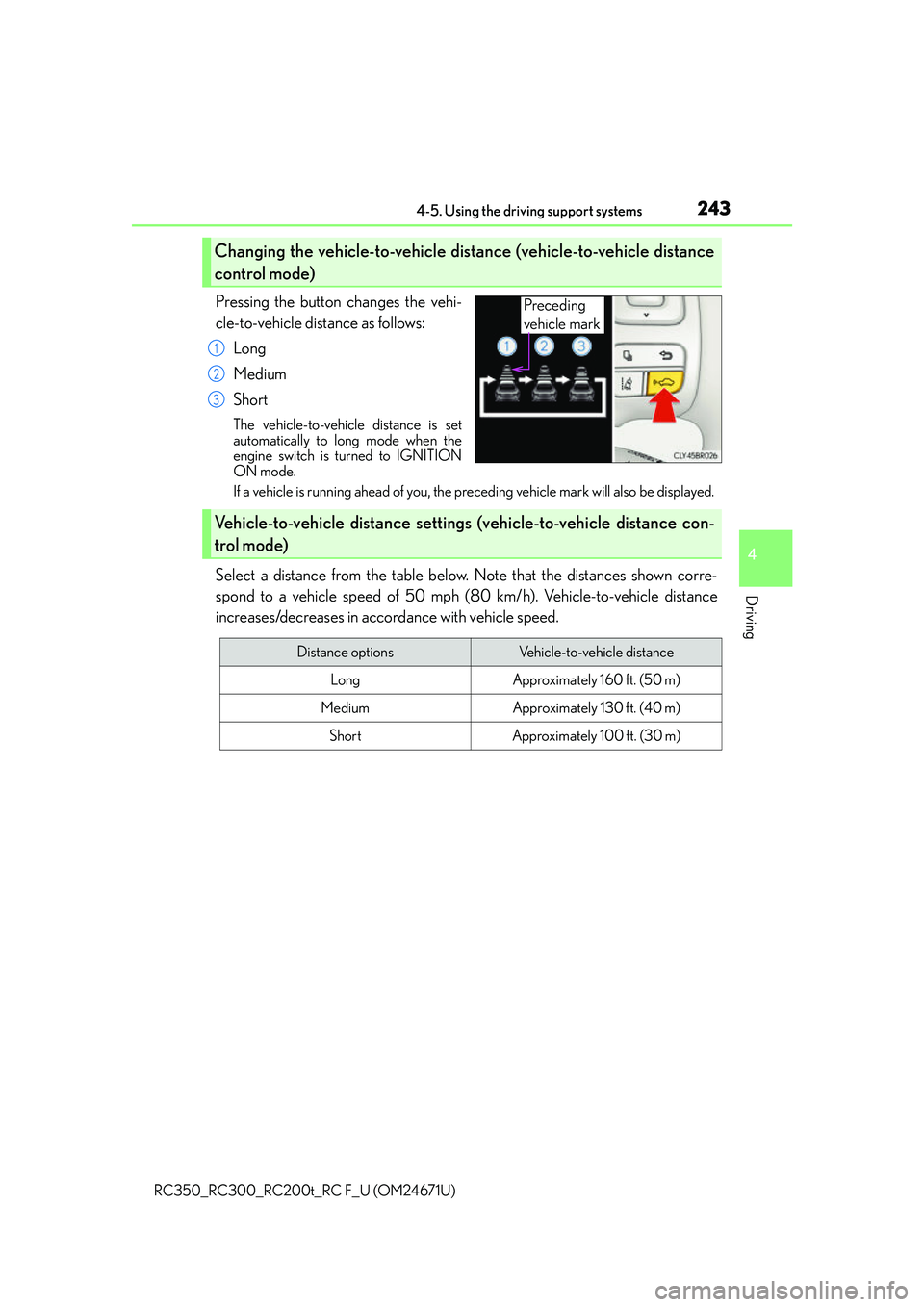
Pressing the button changes the vehi-
cle-to-vehicle distance as follows:Long
Medium
Short
The vehicle-to-vehicle distance is set
automatically to long mode when the
engine switch is turned to IGNITION
ON mode.
If a vehicle is running ahead of you, the preceding vehicle mark will also be displayed.
Select a distance from the table below. Note that the distances shown corre-
spond to a vehicle speed of 50 mph (8 0 km/h). Vehicle-to-vehicle distance
increases/decreases in accordance with vehicle speed.
Changing the vehicle-to-vehicle distance (vehicle-to-vehicle distance
control mode)
Preceding
vehicle mark
1
2
3
Vehicle-to-vehicle distance settings (vehicle-to-vehicle distance con-
trol mode)
Distance optionsVehicle-to-vehicle distance
LongApproximately 160 ft. (50 m)
MediumApproximately 130 ft. (40 m)
ShortApproximately 100 ft. (30 m)
Page 245 of 700
2454-5. Using the driving support systems
4
Driving
RC350_RC300_RC200t_RC F_U (OM24671U)
When constant speed control mode is selected, your vehicle will maintain a set
speed without controlling the vehicle-to-vehicle distance. Select this mode only
when vehicle-to-vehicle distance contro l mode does not function correctly due
to dirt, etc.
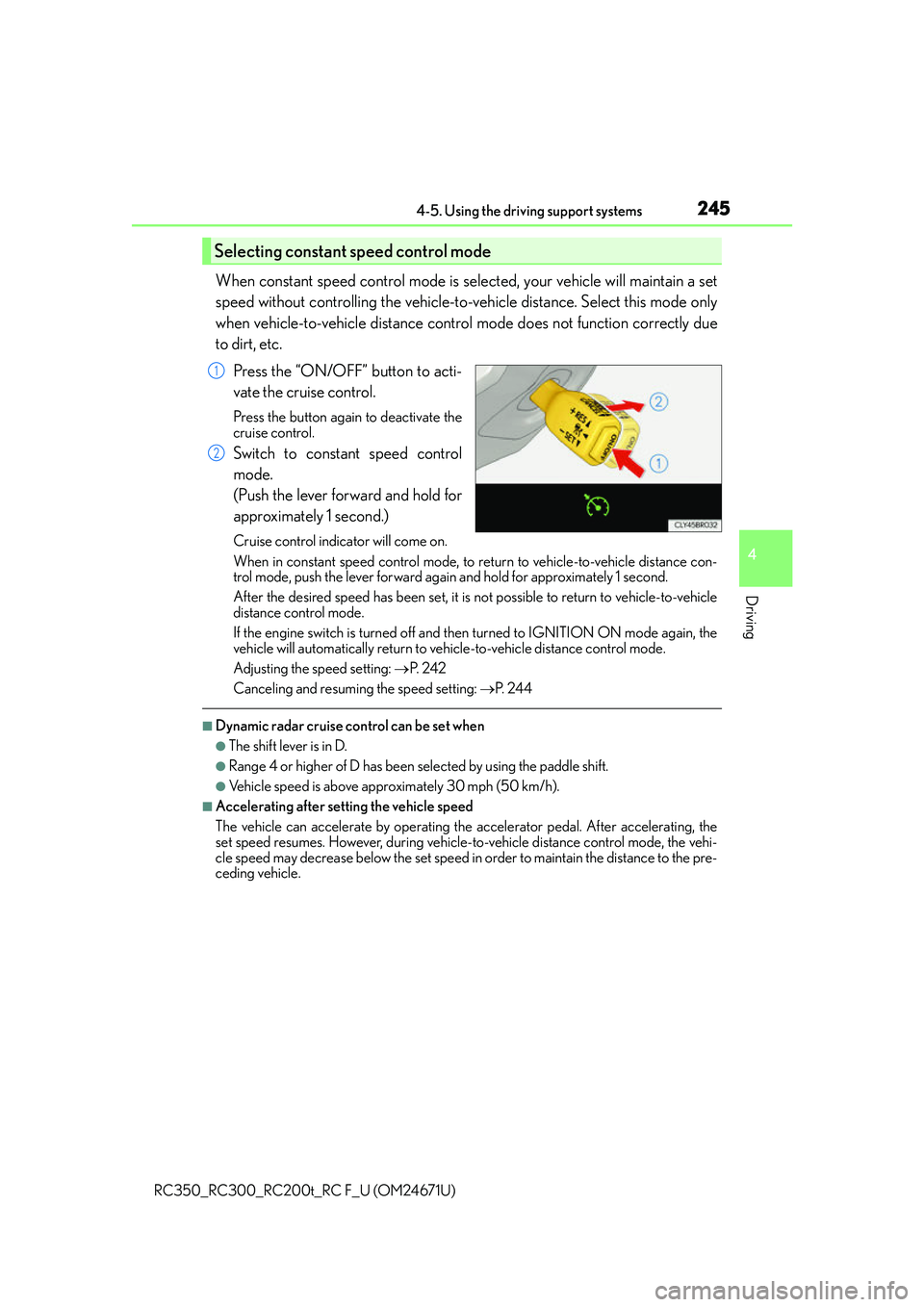
Press the “ON/OFF” button to acti-
vate the cruise control.
Press the button again to deactivate the
cruise control.
Switch to constant speed control
mode.
(Push the lever forward and hold for
approximately 1 second.)
Cruise control indicator will come on.
When in constant speed control mode, to return to vehicle-to-vehicle distance con-
trol mode, push the lever forward agai n and hold for approximately 1 second.
After the desired speed has been set, it is not possible to return to vehicle-to-vehicle
distance control mode.
If the engine switch is turned off and then turned to IGNITION ON mode again, the
vehicle will automatically return to vehicle-to-vehicle distance control mode.
Adjusting the speed setting: P. 2 4 2
Canceling and resuming the speed setting: P. 2 4 4
■Dynamic radar cruise control can be set when
●The shift lever is in D.
●Range 4 or higher of D has been se lected by using the paddle shift.
●Vehicle speed is above approximately 30 mph (50 km/h).
■Accelerating after setting the vehicle speed
The vehicle can accelerate by operating the accelerator pedal. After accelerating, the
set speed resumes. However, during vehicle-to-vehicle distance control mode, the vehi-
cle speed may decrease below the set speed in order to maintain the distance to the pre-
ceding vehicle.
Selecting constant speed control mode
1
2
Page 254 of 700
2544-5. Using the driving support systems
RC350_RC300_RC200t_RC F_U (OM24671U)
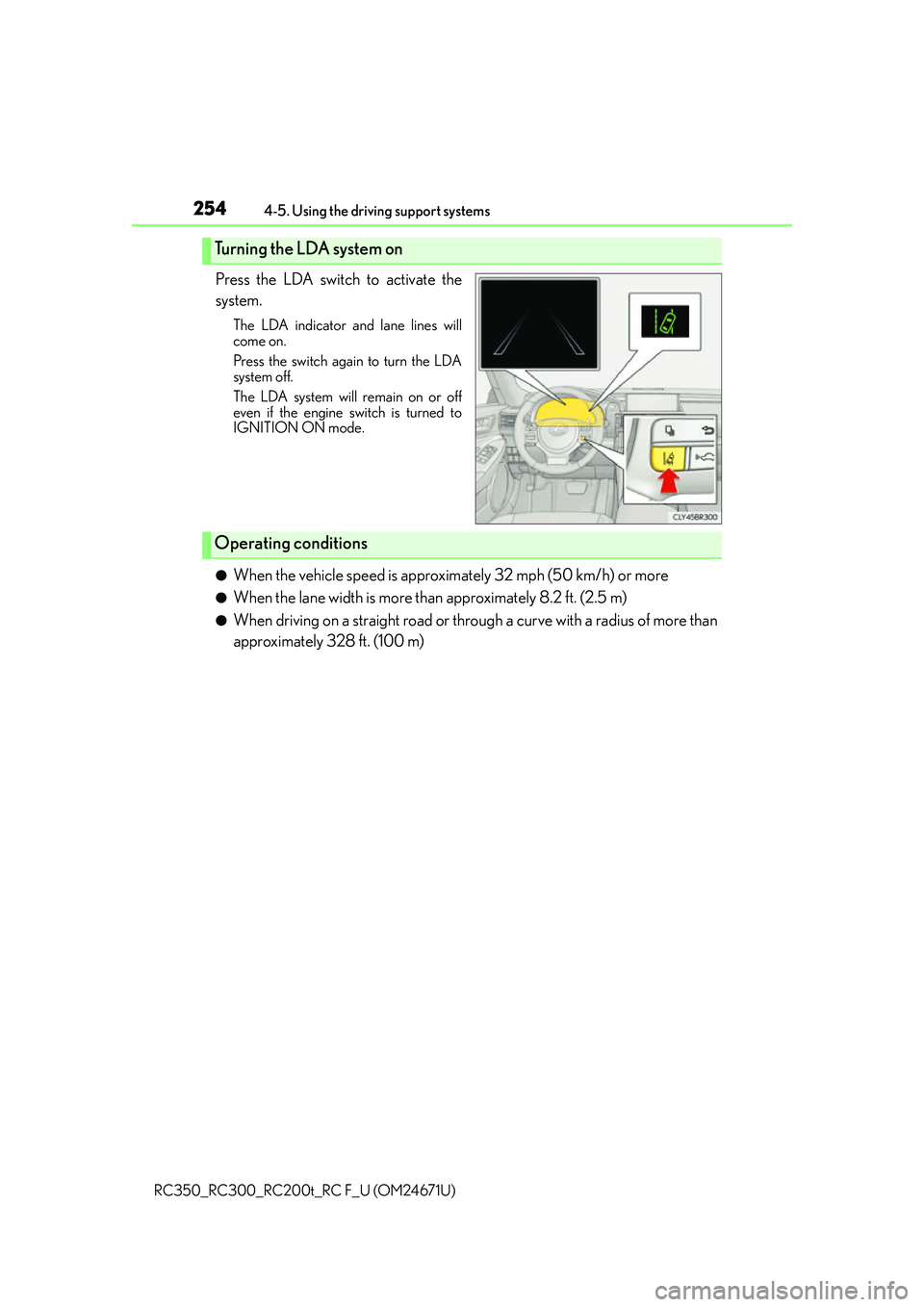
Press the LDA switch to activate the
system.
The LDA indicator and lane lines will
come on.
Press the switch again to turn the LDA
system off.
The LDA system will remain on or off
even if the engine switch is turned to
IGNITION ON mode.
●When the vehicle speed is approx imately 32 mph (50 km/h) or more
●When the lane width is more than approximately 8.2 ft. (2.5 m)
●When driving on a straight road or through a curve with a radius of more than
approximately 328 ft. (100 m)
Turning the LDA system on
Operating conditions
Page 265 of 700
2654-5. Using the driving support systems
4
Driving
RC350_RC300_RC200t_RC F_U (OM24671U)
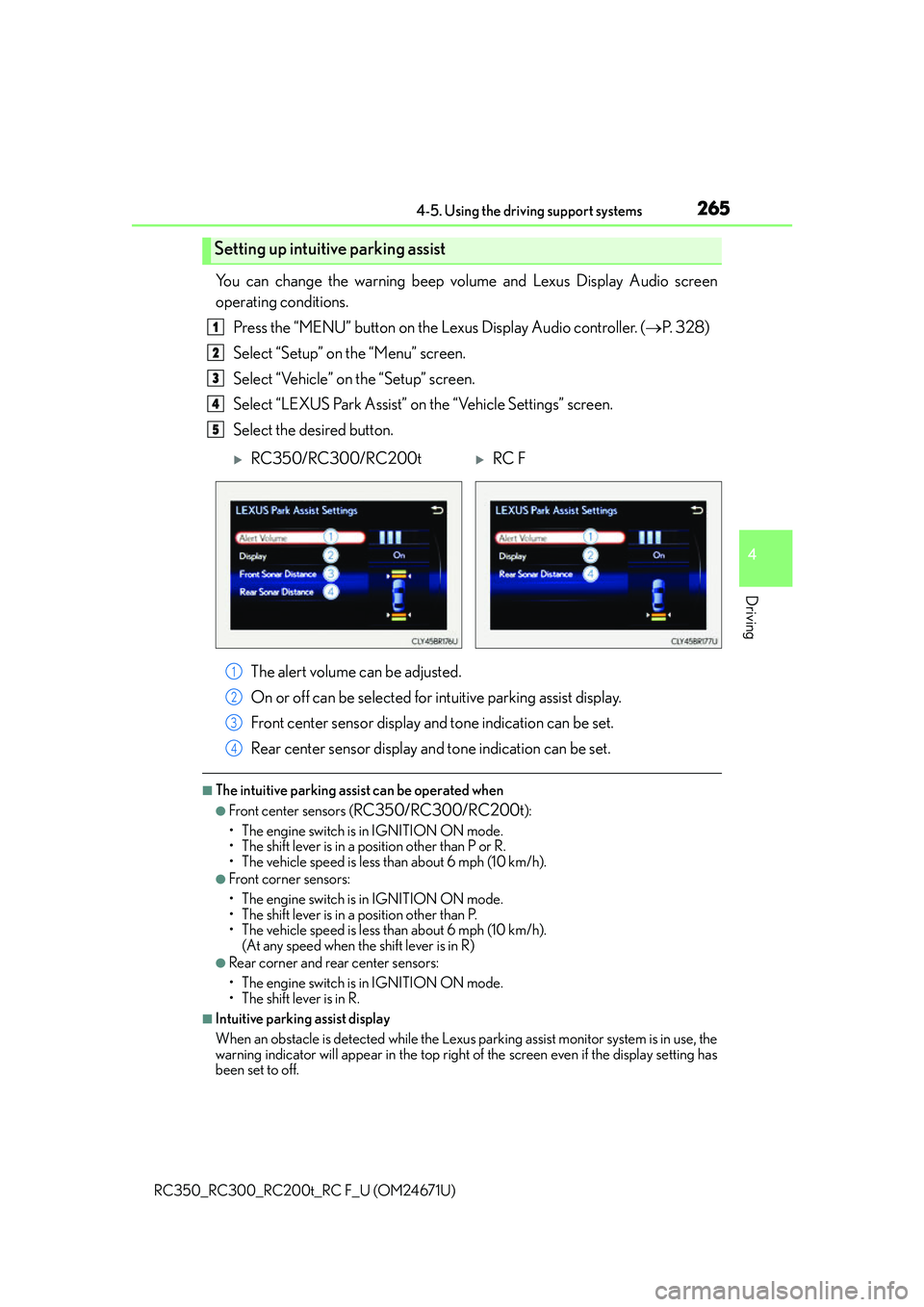
You can change the warning beep volume and Lexus Display Audio screen
operating conditions.Press the “MENU” button on the Lexus Display Audio controller. ( P. 3 2 8 )
Select “Setup” on the “Menu” screen.
Select “Vehicle” on the “Setup” screen.
Select “LEXUS Park Assist” on the “Vehicle Settings” screen.
Select the desired button.
The alert volume can be adjusted.
On or off can be selected for intuitive parking assist display.
Front center sensor display an d tone indication can be set.
Rear center sensor display an d tone indication can be set.
■The intuitive parking assist can be operated when
●Front center sensors (RC350/RC300/RC200t):
• The engine switch is in IGNITION ON mode.
• The shift lever is in a position other than P or R.
• The vehicle speed is less than about 6 mph (10 km/h).
●Front corner sensors:
• The engine switch is in IGNITION ON mode.
• The shift lever is in a position other than P.
• The vehicle speed is less than about 6 mph (10 km/h). (At any speed when the shift lever is in R)
●Rear corner and rear center sensors:
• The engine switch is in IGNITION ON mode.
• The shift lever is in R.
■Intuitive parking assist display
When an obstacle is detected while the Lexus parking assist monitor system is in use, the
warning indicator will appear in the top right of the screen even if the display setting has
been set to off.
Setting up intuitive parking assist
1
2
3
4
5
RC350/RC300/RC200tRC F
1
2
3
4
Page 266 of 700
2664-5. Using the driving support systems
RC350_RC300_RC200t_RC F_U (OM24671U)
■Sensor detectio n information
●RC350/RC300/RC200t: The sensor’s detection areas are limited to the areas
around the vehicle’s front and rear bumpers.
●RC F: The sensor’s detection areas are limited to the areas around the vehicle’s front
corner and rear bumpers.
●Certain vehicle conditions and the surround ing environment may affect the ability of
the sensor to correctly detect obstacles. Particular instances where this may occur are
listed below.
• There is dirt, snow or ice on the sensor . (Wiping the sensors will resolve this prob-
lem.)
• The sensor is frozen. (Thawing th e area will resolve this problem.)
In especially cold weather, if a sensor is frozen the screen may show an abnormal
display, or obstacles may not be detected.
• The sensor is covered in any way.
• The vehicle is leaning co nsiderably to one side.
• On an extremely bumpy road, on an incline, on gravel, or on grass.
• The vicinity of the vehicle is noisy due to vehicle horns, motorcycle engines, air brakes of large vehicles, or other loud noises producing ultrasonic waves.
• There is another vehicle equipped with parking assist sensor in the vicinity.
• The sensor is coated with a sheet of spray or heavy rain.
• The vehicle is equipped with a fender pole or wireless antenna.
• Towing eyelets are installed.
• The bumper or sensor receives a strong impact.
• The vehicle is approaching a tall or curved curb.
• In harsh sunlight or intense cold weather.
• The area directly under the bumpers is not detected.
• If obstacles draw too close to the sensor.
• A non-genuine Lexus suspension (low ered suspension etc.) is installed.
• People may not be detected if they are wearing certain types of clothing.
In addition to the examples above, there are instances in which, because of their shape,
signs and other objects may be judged by the sensor to be closer than they are.
●The shape of the obstacle may prevent the sensor from detecting it. Pay particular
attention to the following obstacles:
• Wires, fences, ropes, etc.
• Cotton, snow and other materials that absorb sound waves
• Sharply-angled objects
•Low obstacles
• Tall obstacles with upper sections projecting outwards in the direction of your vehi-
cle
●The following situations may occur during use.
• Depending on the shape of the obstacle and other factors, the detection distance
may shorten, or detect ion may be impossible.
• Obstacles may not be detected if they are too close to the sensor.
• There will be a short delay between obst acle detection and display. Even at slow
speeds, there is a possibility that the obstacle will come within the sensor’s detection
areas before the display is shown and the warning beep sounds.
• Thin posts or objects lower than the sensor may not be detected when approached, even if they have been detected once.
• It might be difficult to hear beeps due to the volume of the audio system or air flow noise of the air conditioning system.
Page 268 of 700
2684-5. Using the driving support systems
RC350_RC300_RC200t_RC F_U (OM24671U)
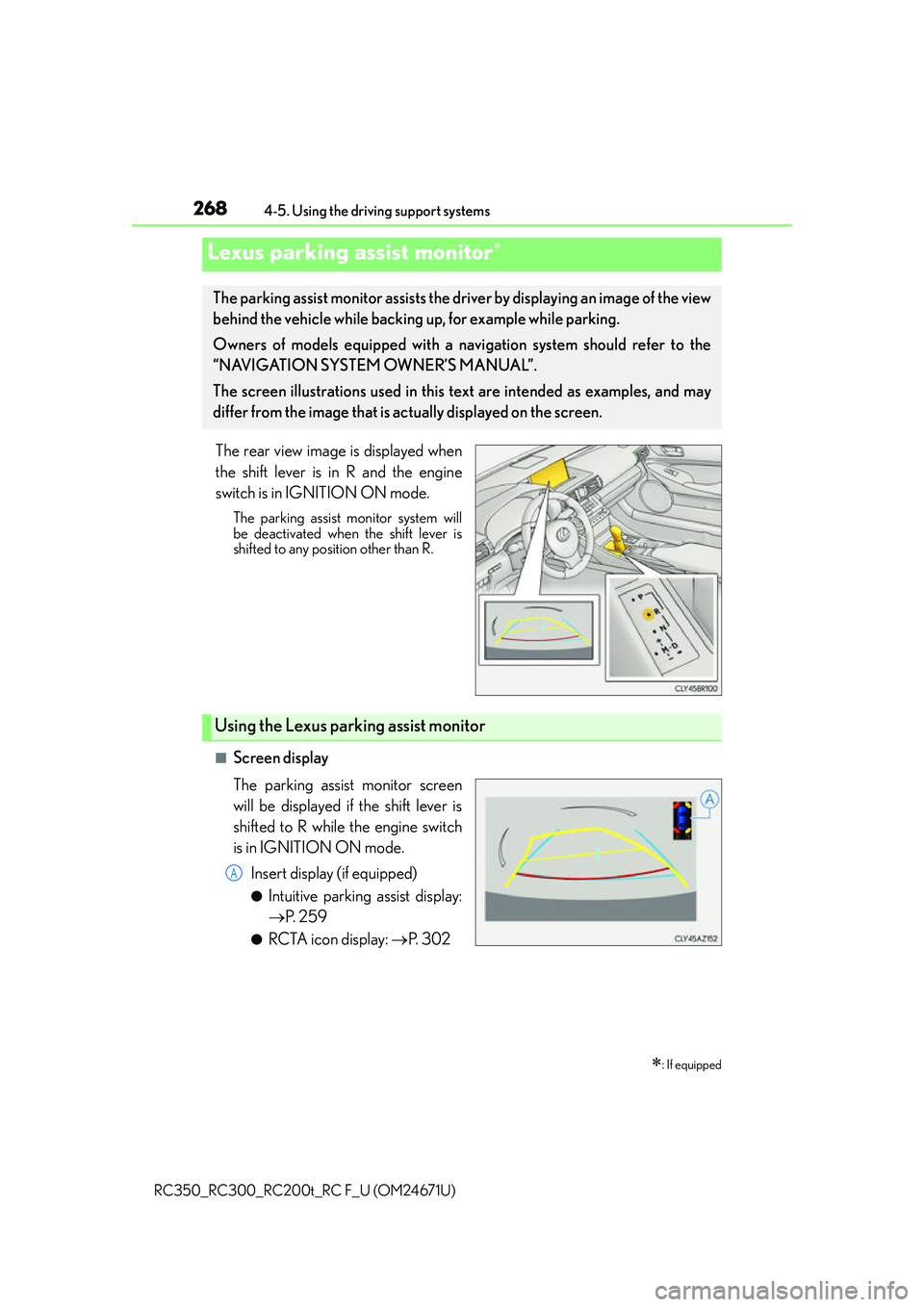
The rear view image is displayed when
the shift lever is in R and the engine
switch is in IGNITION ON mode.
The parking assist monitor system will
be deactivated when the shift lever is
shifted to any position other than R.
■Screen display
The parking assist monitor screen
will be displayed if the shift lever is
shifted to R while the engine switch
is in IGNITION ON mode. Insert display (if equipped)
●Intuitive parking assist display:
P. 2 5 9
●RCTA icon display: P. 3 0 2
Lexus parking assist monitor
: If equipped
The parking assist monitor assists the driv er by displaying an image of the view
behind the vehicle while backing up, for example while parking.
Owners of models equipped with a navi gation system should refer to the
“NAVIGATION SYSTEM OWNER’S MANUAL”.
The screen illustrations used in this text are intended as examples, and may
differ from the image that is ac tually displayed on the screen.
Using the Lexus parking assist monitor
A