door lock LEXUS RC350 2016 Workshop Manual
[x] Cancel search | Manufacturer: LEXUS, Model Year: 2016, Model line: RC350, Model: LEXUS RC350 2016Pages: 700, PDF Size: 14.12 MB
Page 600 of 700
6008-2. Steps to take in an emergency
RC350_RC300_RC200t_RC F_U (OM24671U)
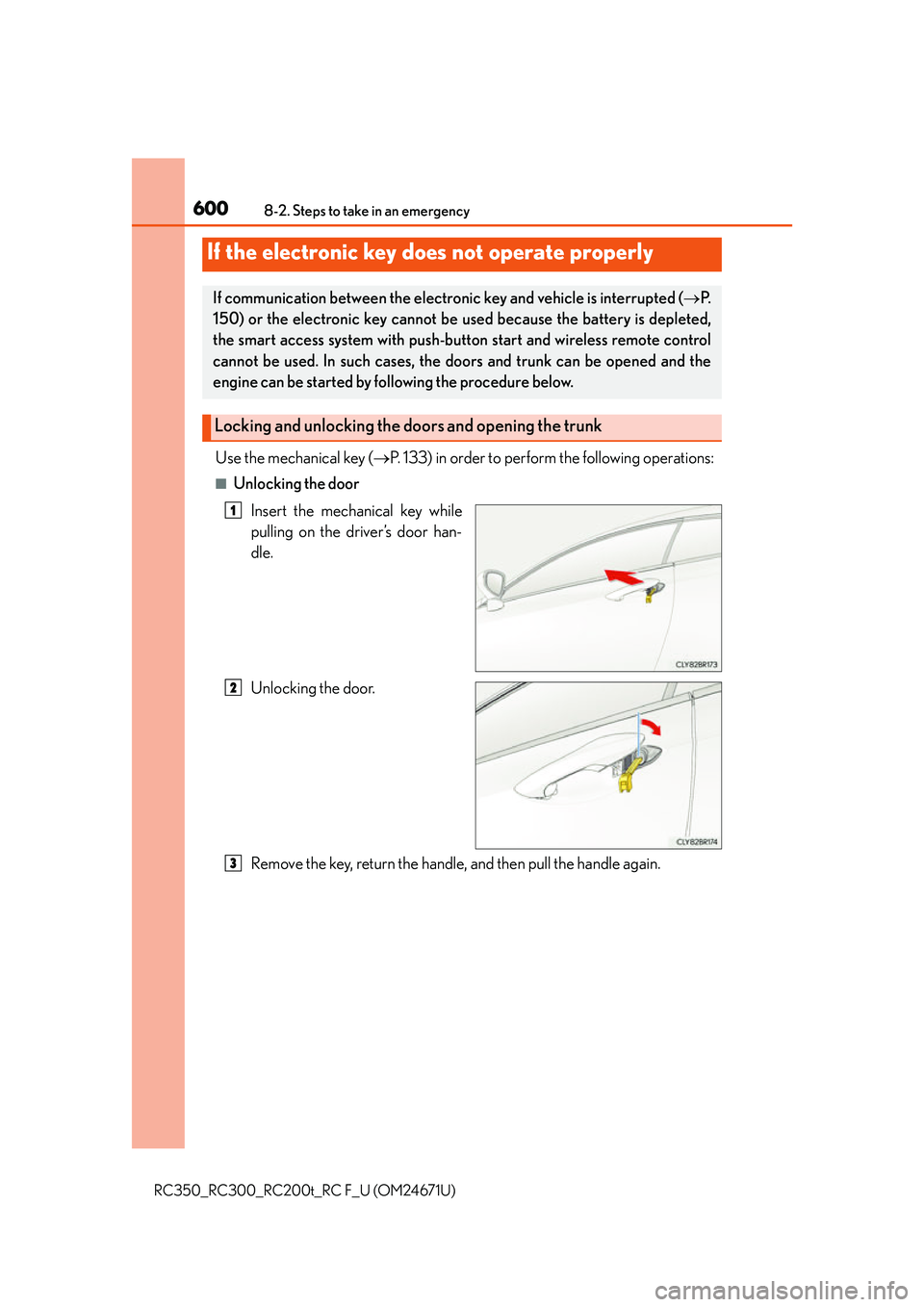
Use the mechanical key (P. 133) in order to perform the following operations:
■Unlocking the door
Insert the mechanical key while
pulling on the driver’s door han-
dle.
Unlocking the door.
Remove the key, return the handle, and then pull the handle again.
If the electronic key does not operate properly
If communication between the electronic key and vehicle is interrupted ( P.
150) or the electronic key cannot be used because the battery is depleted,
the smart access system with push-button start and wireless remote control
cannot be used. In such cases, the doors and trunk can be opened and the
engine can be started by fo llowing the procedure below.
Locking and unlocking the doors and opening the trunk
1
2
3
Page 601 of 700
6018-2. Steps to take in an emergency
8
When trouble arises
RC350_RC300_RC200t_RC F_U (OM24671U)
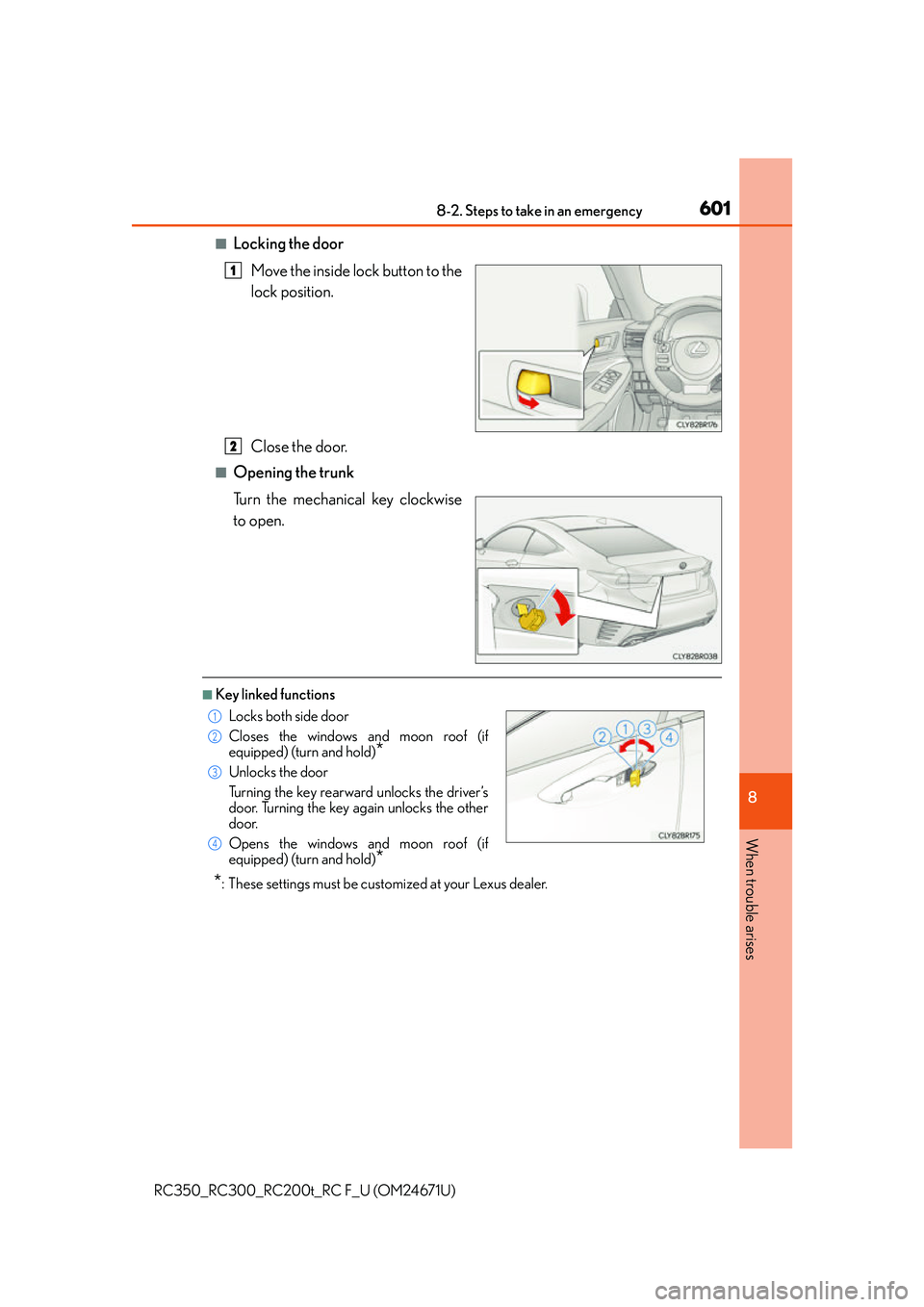
■Locking the doorMove the inside lock button to the
lock position.
Close the door.
■Opening the trunk
Turn the mechanical key clockwise
to open.
■Key linked functions
*: These settings must be cust omized at your Lexus dealer.
1
2
Locks both side door
Closes the windows and moon roof (if
equipped) (turn and hold)
*
Unlocks the door
Turning the key rearward unlocks the driver’s
door. Turning the key again unlocks the other
door.
Opens the windows and moon roof (if
equipped) (turn and hold)
*
1
22
33
44
Page 604 of 700
6048-2. Steps to take in an emergency
RC350_RC300_RC200t_RC F_U (OM24671U)
If you have a set of jumper (or booster) cables and a second vehicle with a 12-volt
battery, you can jump start your vehicle by following the steps below.
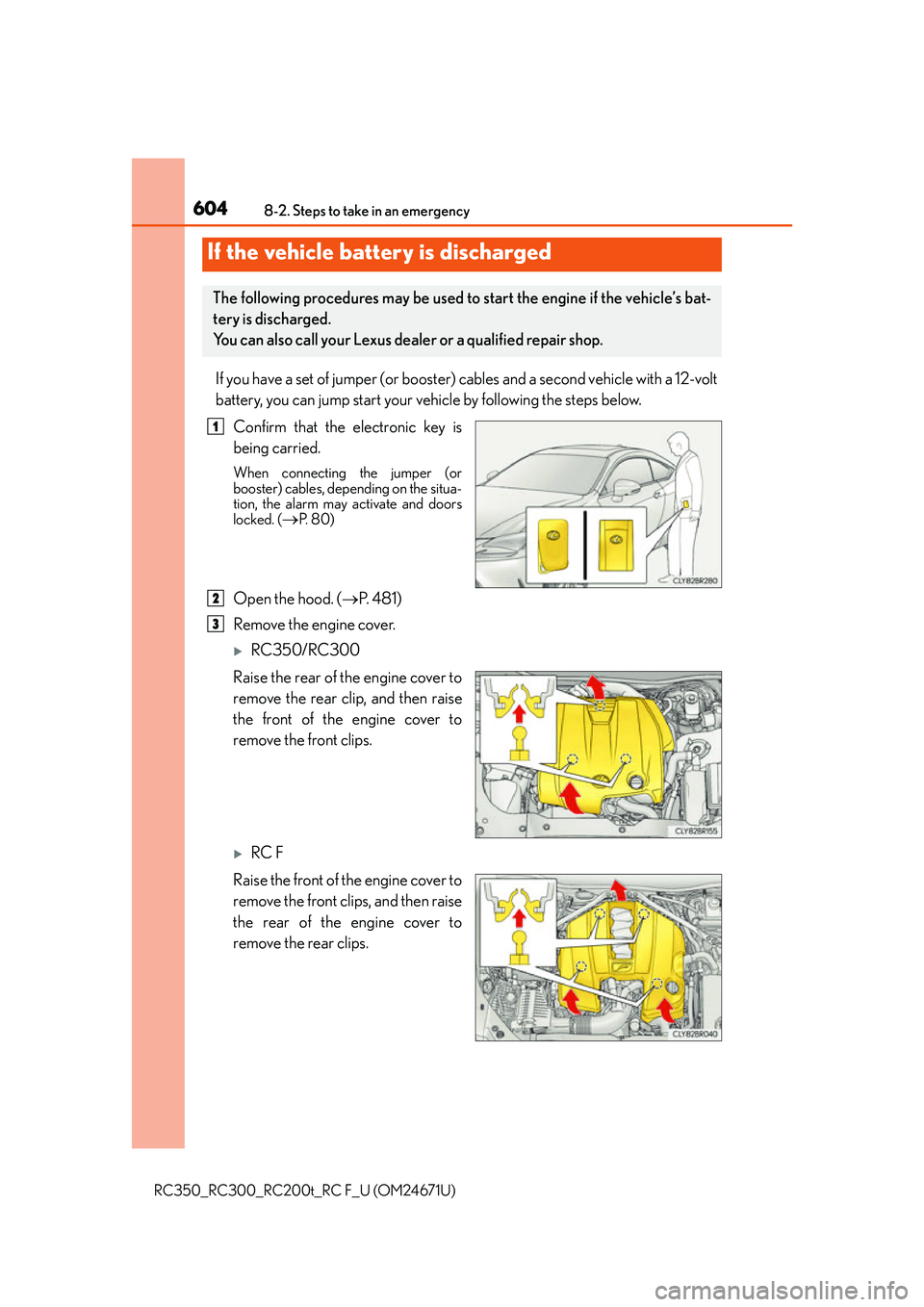
Confirm that the electronic key is
being carried.
When connecting the jumper (or
booster) cables, depending on the situa-
tion, the alarm may activate and doors
locked. (
P. 8 0 )
Open the hood. ( P. 4 8 1 )
Remove the engine cover.
RC350/RC300
Raise the rear of the engine cover to
remove the rear clip, and then raise
the front of the engine cover to
remove the front clips.
RC F
Raise the front of the engine cover to
remove the front clips, and then raise
the rear of the engine cover to
remove the rear clips.
If the vehicle battery is discharged
The following procedures may be used to start the engine if the vehicle’s bat-
tery is discharged.
You can also call your Lexus dealer or a qualified repair shop.
1
2
3
Page 606 of 700
6068-2. Steps to take in an emergency
RC350_RC300_RC200t_RC F_U (OM24671U)
Start the engine of the second vehicle. Increase the engine speed slightly and
maintain at that level for approximately 5 minutes to recharge the battery of
your vehicle.
Open and close any of the door of your vehicle with the engine switch off.
Maintain the engine speed of the second vehicle and start the engine of your
vehicle by turning the engine switch to IGNITION ON mode.
Once the vehicle’s engine has started, remove the jumper cables in the exact
reverse order from which they were connected.
Once the engine starts, have the vehicle inspected at your Lexus dealer as soon
as possible.
■Starting the engine when the battery is discharged
The engine cannot be started by push-starting.
■To prevent battery discharge
●Turn off the headlights and the audio system while the engine is off.
●Turn off any unnecessary electrical components when the vehicle is running at a low
speed for an extended period, such as in heavy traffic.
■Charging the battery
The electricity stored in the battery will discharge gradually even when the vehicle is not
in use, due to natural discharg e and the draining effects of certain electrical appliances. If
the vehicle is left for a long time, the battery may discharge, and the engine may be
unable to start. (The battery recharges automatically during driving.)
■When recharging or replacing the battery
●In some cases, it may not be possible to unlock the doors using the smart access system
with push-button start when the battery is discharged. Use the wireless remote control
or the mechanical key to lock or unlock the doors.
●The engine may not start on the first attempt after the battery has recharged but will
start normally after the second attempt. This is not a malfunction.
●The engine switch mode is memorized by the vehicle. When the battery is recon-
nected, the system will return to the mode it was in before the battery was discharged.
Before disconnecting the battery, turn the engine switch off.
If you are unsure what mode the engine switch was in before the battery discharged, be
especially careful when reconnecting the battery.
5
6
7
8
Page 655 of 700
6559-2. Customization
9
Vehicle specifications
RC350_RC300_RC200t_RC F_U (OM24671U)
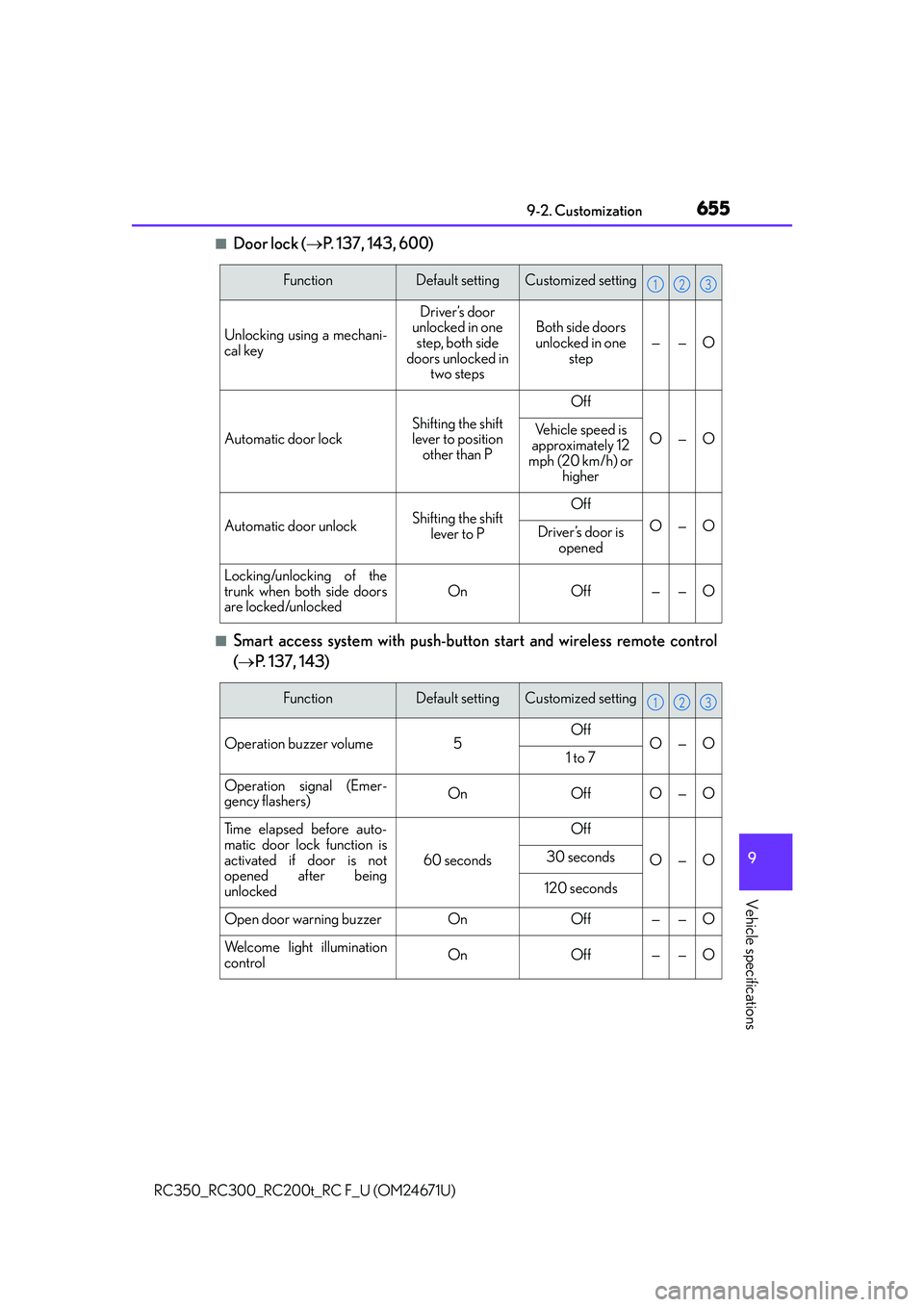
■Door lock (P. 137, 143, 600)
■Smart access system with push-button start and wireless remote control
( P. 137, 143)
FunctionDefault settingCustomized setting
Unlocking using a mechani-
cal key
Driver’s door
unlocked in one
step, both side
doors unlocked in two stepsBoth side doors
unlocked in one step
——O
Automatic door lockShifting the shift
lever to position
other than P
Off
O—OVehicle speed is
approximately 12
mph (20 km/h) or higher
Automatic door unlockShifting the shift
lever to POff
O—ODriver’s door is opened
Locking/unlocking of the
trunk when both side doors
are locked/unlocked
OnOff——O
123
FunctionDefault settingCustomized setting
Operation buzzer volume5OffO—O1 to 7
Operation signal (Emer-
gency flashers)OnOffO—O
Time elapsed before auto-
matic door lock function is
activated if door is not
opened after being
unlocked
60 seconds
Off
O—O30 seconds
120 seconds
Open door warning buzzerOnOff——O
Welcome light illumination
controlOnOff——O
123
Page 656 of 700
6569-2. Customization
RC350_RC300_RC200t_RC F_U (OM24671U)
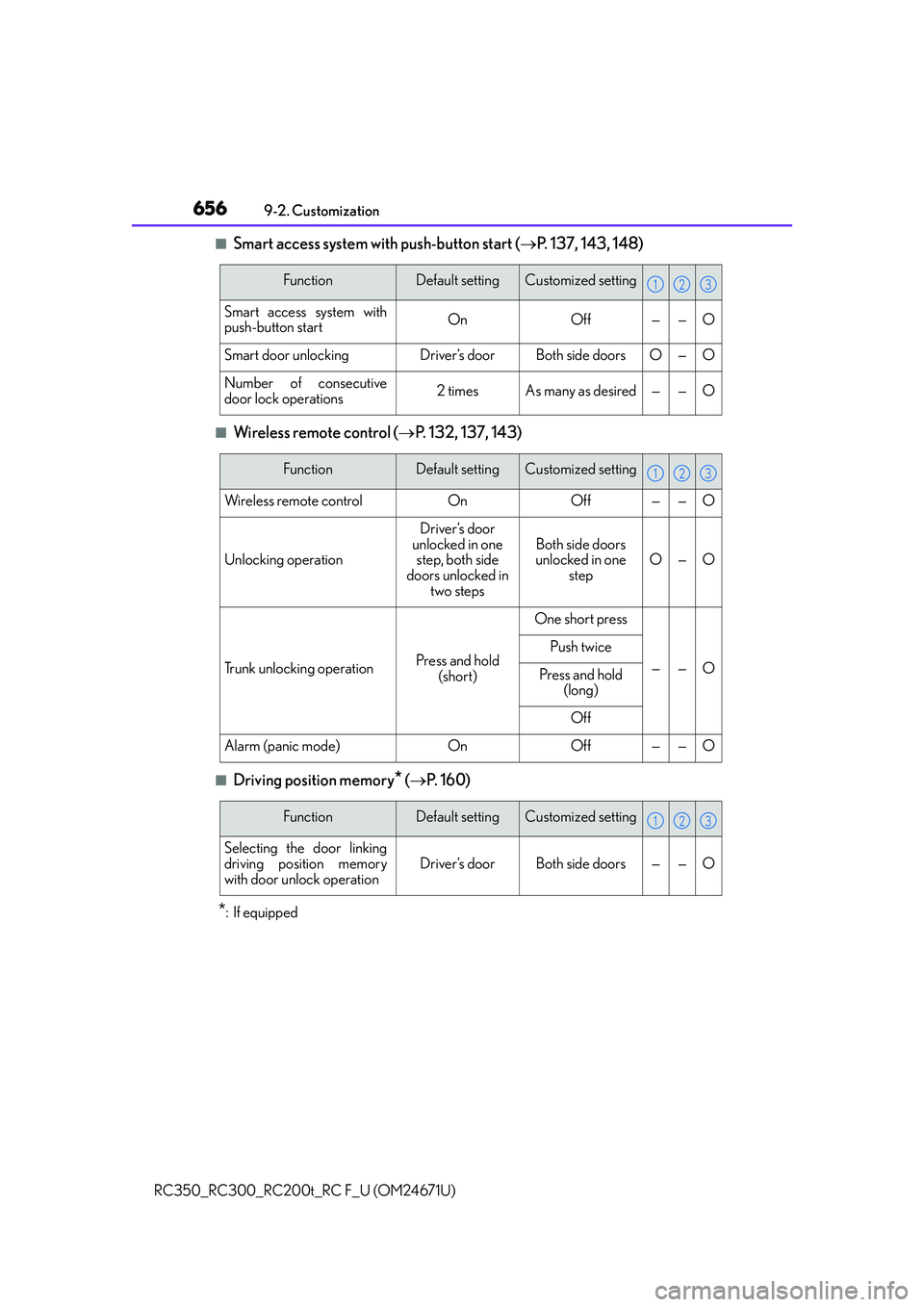
■Smart access system with push-button start ( P. 137, 143, 148)
■Wireless remote control ( P. 132, 137, 143)
■Driving position memory* ( P. 1 6 0 )
*:If equipped
FunctionDefault settingCustomized setting
Smart access system with
push-button startOnOff——O
Smart door unlockingDriver’s doorBoth side doorsO—O
Number of consecutive
door lock operations2 timesAs many as desired——O
123
FunctionDefault settingCustomized setting
Wireless remote controlOnOff——O
Unlocking operation
Driver’s door
unlocked in one step, both side
doors unlocked in two steps
Both side doors
unlocked in one
stepO—O
Trunk unlocking operationPress and hold (short)
One short press
——O
Push twice
Press and hold (long)
Off
Alarm (panic mode)OnOff——O
123
FunctionDefault settingCustomized setting
Selecting the door linking
driving position memory
with door unlock operation
Driver’s doorBoth side doors——O
123
Page 660 of 700
6609-2. Customization
RC350_RC300_RC200t_RC F_U (OM24671U)
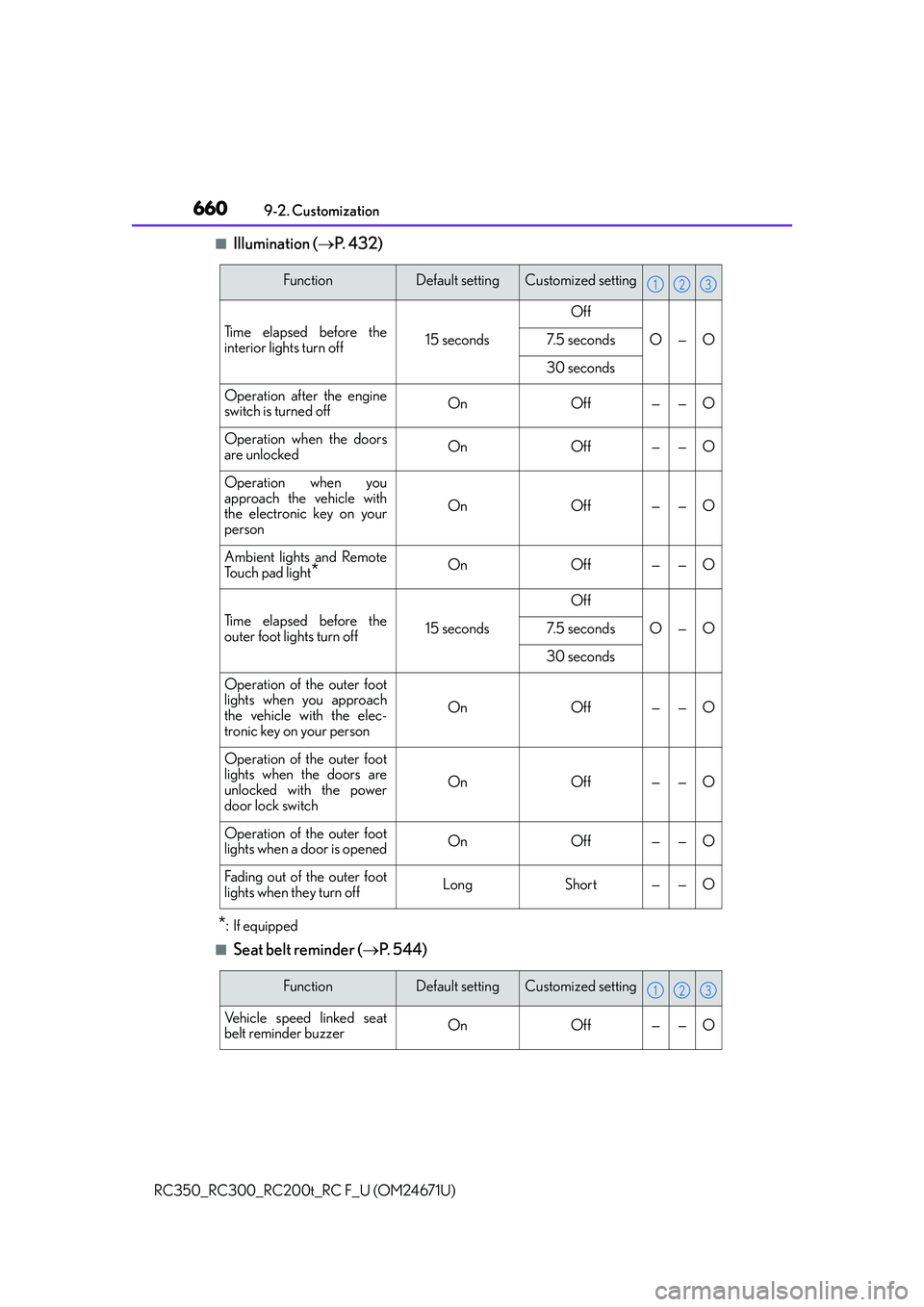
■Illumination ( P. 4 3 2 )
*:If equipped
■Seat belt reminder ( P. 544)
FunctionDefault settingCustomized setting
Time elapsed before the
interior lights turn off15 seconds
Off
O—O7. 5 s e c o n d s
30 seconds
Operation after the engine
switch is turned offOnOff——O
Operation when the doors
are unlockedOnOff——O
Operation when you
approach the vehicle with
the electronic key on your
person
OnOff——O
Ambient lights and Remote
Touch pad light
*OnOff——O
Time elapsed before the
outer foot lights turn off15 seconds
Off
O—O7. 5 s e c o n d s
30 seconds
Operation of the outer foot
lights when you approach
the vehicle with the elec-
tronic key on your person
OnOff——O
Operation of the outer foot
lights when the doors are
unlocked with the power
door lock switch
OnOff——O
Operation of the outer foot
lights when a door is openedOnOff——O
Fading out of the outer foot
lights when they turn offLongShort——O
123
FunctionDefault settingCustomized setting
Vehicle speed linked seat
belt reminder buzzerOnOff——O
123
Page 661 of 700
6619-2. Customization
9
Vehicle specifications
RC350_RC300_RC200t_RC F_U (OM24671U)
■Vehicle customization
●When the smart access system with push-button start is off, the entry unlock function
cannot be customized.
●When the doors remain closed after unlocking the doors and the timer activated auto-
matic door lock function activates, signals will be generated in accordance with the
operation buzzer volume and operational si gnal (Emergency flashers) function set-
tings.
●Some settings can be changed using a switch or the audio system screen. If a setting is
changed using a switch, the changed setting will not be reflected on the audio system
screen until the engine switch is turn ed off and then to IGNITION ON mode.
■When customizing using the Remote Touch or Lexus Display Audio controller
Stop the vehicle in a safe place, apply the parking brake, and shift the shift lever to P. Also,
to prevent battery discharge, leave the engi ne running while customizing the features.
WA R N I N G
■During customization
As the engine needs to be running during customization, ensure that the vehicle is
parked in a place with adequate ventilation. In a closed area such as a garage, exhaust
gases including harmful carbon monoxide (CO) may collect and enter the vehicle. This
may lead to death or a serious health hazard.
NOTICE
■During customization
To prevent battery discharge, ensure that the engine is running while customizing fea-
tures.
Page 676 of 700
676
RC350_RC300_RC200t_RC F_U (OM24671U)What to do if... (Troubleshooting)
What to do if... (Troubleshooting)
●If you lose your mechanical keys, ne
w genuine mechanical keys can be made
by your Lexus dealer. ( P. 1 3 4 )
●If you lose your electronic keys, the risk of vehicle theft increases significantly.
Contact your Lexus dealer immediately. ( P. 1 3 6 )
●Is the electronic key battery weak or depleted? ( P. 5 1 7 )
●Is the engine switch in IGNITION ON mode?
When locking the doors, turn the engine switch off. ( P. 2 0 0 )
●Is the electronic key left inside the vehicle?
When locking the doors, make sure that you have the electronic key on your
person.
●The function may not operate properly du e to the condition of the radio wave.
( P. 1 5 0 )
●The function to prevent the electronic ke y from being left inside the trunk will
operate and you can open the trunk as usual. Take the key out from the trunk.
( P. 1 4 5 )
If you have a problem, check the following before contacting your Lexus
dealer.
The doors cannot be locked, unlocked, opened or closed
You lose your keys
The doors cannot be locked or unlocked
The trunk lid is closed with the electronic key left inside
Page 678 of 700
678What to do if... (Troubleshooting)
RC350_RC300_RC200t_RC F_U (OM24671U)
●The seat belt reminder light is flashing
Are the driver and the front passenger wearing the seat belts? ( P. 5 4 4 )
●The parking brake indicator is on
Is the parking brake released? ( P. 2 1 1 )
Depending on the situation, other type s of warning buzzer may also sound.
( P. 5 4 3 , 5 4 9 )
●Did anyone inside the vehicle open a door during setting the alarm?
The sensor detects it and the alarm sounds. ( P. 7 9 )
Do one of the following to de activate or stop the alarms:
• Unlock the doors or open the trunk.
• Turn the engine switch to ACCESSORY or IGNITION ON mode, or start the
engine.
●Is the electronic key left inside the vehicle or the moon roof opened?
Check the message on the multi-information display. ( P. 5 4 9 )
●When a warning light turns on or a warning message is displayed, refer to
P. 5 4 3 , 5 4 9 . A warning buzzer sounds during driving
An alarm is activated and the horn sounds
A warning buzzer sounds when leaving the vehicle
A warning light turns on or a warning message is displayed