brake light LEXUS RC350 2017 User Guide
[x] Cancel search | Manufacturer: LEXUS, Model Year: 2017, Model line: RC350, Model: LEXUS RC350 2017Pages: 724, PDF Size: 15.76 MB
Page 250 of 724
2504-5. Using the driving support systems
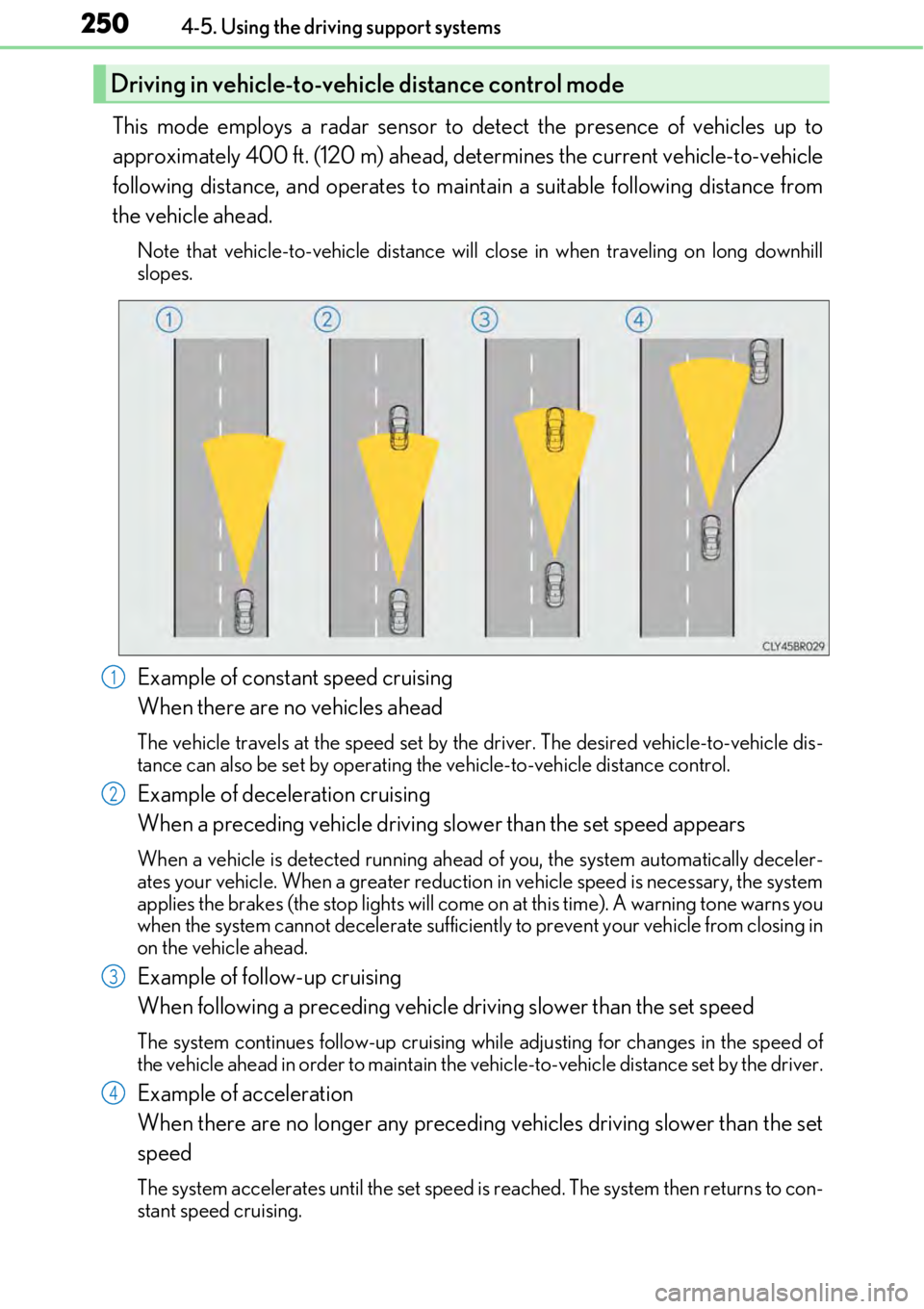
This mode employs a radar sensor to detect the presence of vehicles up to
approximately 400 ft. (120 m) ahead, determines the current vehicle-to-vehicle
following distance, and operates to main tain a suitable following distance from
the vehicle ahead.
Note that vehicle-to-vehicle distance will close in when traveling on long downhill
slopes.
Example of constant speed cruising
When there are no vehicles ahead
The vehicle travels at the speed set by the driver. The desired vehicle-to-vehicle dis-
tance can also be set by operating the vehicle-to-vehicle distance control.
Example of deceleration cruising
When a preceding vehicle driving slower than the set speed appears
When a vehicle is detected running ahead of you, the system automatically deceler-
ates your vehicle. When a greater reduction in vehicle speed is necessary, the system
applies the brakes (the stop lights will come on at this time). A warning tone warns you
when the system cannot decelerate sufficiently to prevent your vehicle from closing in
on the vehicle ahead.
Example of follow-up cruising
When following a preceding vehicle driving slower than the set speed
The system continues follow-up cruising while adjusting for chan ges in the speed of
the vehicle ahead in order to maintain the ve hicle-to-vehicle distance set by the driver.
Example of acceleration
When there are no longer any preceding vehicles driving slower than the set
speed
The system accelerates until the set speed is reached. The system then returns to con-
stant speed cruising.
Driving in vehicle-to-vehicle distance control mode
1
2
3
4
Page 298 of 724
2984-5. Using the driving support systems
◆ABS (Anti-lock Brake System)
Helps to prevent wheel lock when the brakes are applied suddenly, or if the
brakes are applied while drivin g on a slippery road surface
◆Brake assist
Generates an increased level of br aking force after the brake pedal is
depressed when the system detects a panic stop situation
◆VSC (Vehicle Stability Control)
Helps the driver to contro l skidding when swerving suddenly or turning on
slippery road surfaces
◆Enhanced VSC (Enhanced Vehicle Stability Control)
Provides cooperative control of the ABS, TRAC, VSC and EPS.
Helps to maintain directional stability when swerving on slippery road sur-
faces by controlling steering performance.
◆TRAC (Traction Control)
Helps to maintain drive power and pr event the drive wheels from spinning
when starting the vehicle or accelerating on slippery roads
◆Hill-start assist control
Helps to prevent the vehicle from rolling backward when starting on an incline
or slippery slope
◆VGRS (Variable Gear Ratio Steering) (if equipped)
Adjusts the front wheel turning angle in accordance with the vehicle speed
and steering wheel movement
◆DRS (Dynamic Rear Steering) (if equipped)
Contributes to the turning characteristi cs and responsiveness of the vehicle
by slightly adjusting the rear wheel angle of the vehicle in accordance with
steering wheel movement.
Driving assist systems
To help enhance driving safety and perf ormance, the following systems oper-
ate automatically in response to variou s driving situations. Be aware, however,
that these systems are supplementary and should not be relied upon too heav-
ily when operating the vehicle.
Page 301 of 724
3014-5. Using the driving support systems
4
Driving
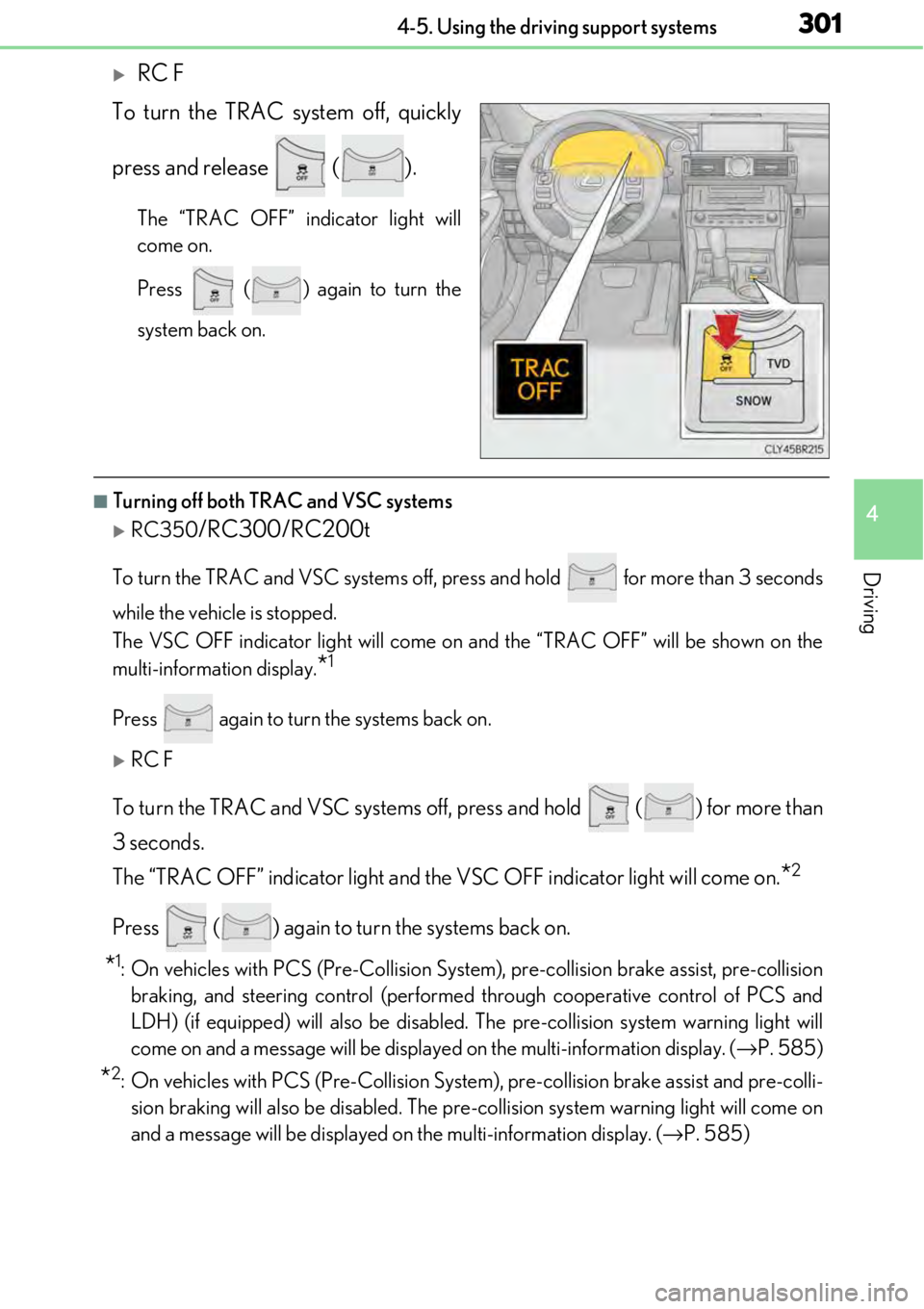
RC F
To turn the TRAC system off, quickly
press and release ( ).
The “TRAC OFF” indicator light will
come on.
Press ( ) again to turn the
system back on.
■Turning off both TRAC and VSC systems
RC350/RC300/RC200t
To turn the TRAC and VSC systems off, pr ess and hold for more than 3 seconds
while the vehicle is stopped.
The VSC OFF indicator light will come on an d the “TRAC OFF” will be shown on the
multi-information display.
*1
Press again to turn the systems back on.
RC F
To turn the TRAC and VSC systems off, press and hold ( ) for more than
3 seconds.
The “TRAC OFF” indicator li ght and the VSC OFF indicator light will come on.
*2
Press ( ) again to turn the systems back on.
*1: On vehicles with PCS (Pre-Collision System ), pre-collision brake assist, pre-collision
braking, and steering control (performed through cooperative control of PCS and
LDH) (if equipped) will also be disabled. The pre-collision system warning light will
come on and a message will be displaye d on the multi-information display. (→P. 585)
*2: On vehicles with PCS (Pre-Collision System), pre-collision brake assist and pre-colli-
sion braking will also be disabled. The pr e-collision system warning light will come on
and a message will be displayed on the multi-information display. ( →P. 585)
Page 302 of 724
3024-5. Using the driving support systems
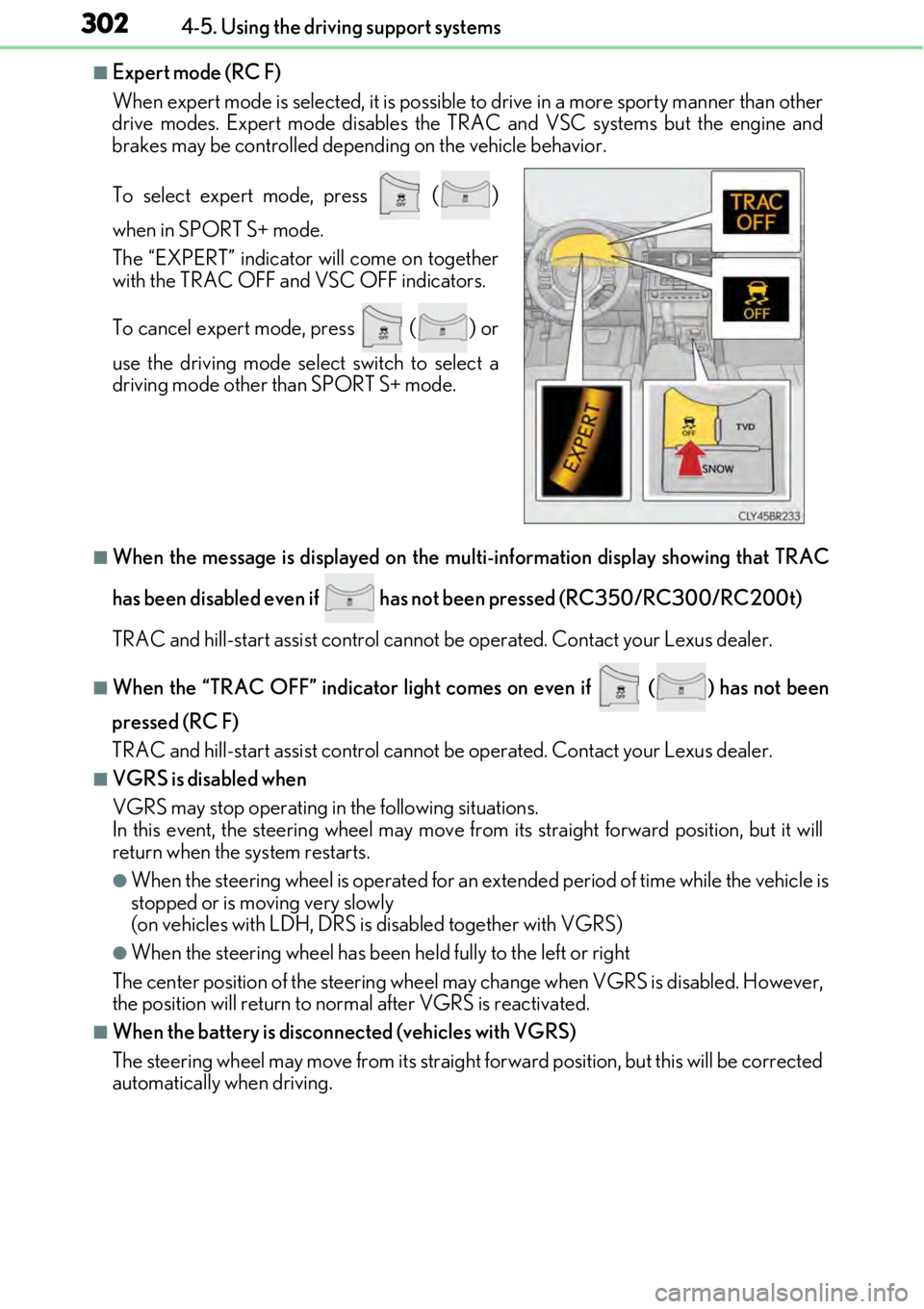
■Expert mode (RC F)
When expert mode is selected, it is possible to drive in a more sp orty manner than other
drive modes. Expert mode disables the TRAC and VSC systems but the engine and
brakes may be controlled depending on the vehicle behavior.
■When the message is displayed on the mu lti-information display showing that TRAC
has been disabled even if has not been pressed (RC350/RC300/RC200t)
TRAC and hill-start assist control cannot be operated. Contact your Lexus dealer.
■When the “TRAC OFF” indicator light comes on even if ( ) has not been
pressed (RC F)
TRAC and hill-start assist control cannot be operated. Contact your Lexus dealer.
■VGRS is disabled when
VGRS may stop operating in the following situations.
In this event, the steering wheel may move from its straight forward position, but it will
return when the system restarts.
●When the steering wheel is operated for an extended period of time while the vehicle is
stopped or is moving very slowly
(on vehicles with LDH, DRS is disabled together with VGRS)
●When the steering wheel has been held fully to the left or right
The center position of the steering wheel may change when VGRS is disabled. However,
the position will return to normal after VGRS is reactivated.
■When the battery is disconnected (vehicles with VGRS)
The steering wheel may move from its straight forward position, but this will be corrected
automatically when driving. To select expert mode, press
()
when in SPORT S+ mode.
The “EXPERT” indicator will come on together
with the TRAC OFF and VSC OFF indicators.
To cancel expert mode, press
() or
use the driving mode sele ct switch to select a
driving mode other than SPORT S+ mode.
Page 303 of 724

3034-5. Using the driving support systems
4
Driving
■Sounds and vibrations caused by the ABS, brake assist, VSC, TRAC, hill-start assist
control and VGRS systems
●A sound may be heard from the engine compartment when the brake pedal is
depressed repeatedly, when the engine is started or just after the vehicle begins to
move. This sound does not indicate that a malfunction has occurred in any of these sys-
tems.
●Any of the following conditions may occur when the above systems are operating.
None of these indicates that a malfunction has occurred.
• Vibrations may be felt through the vehicle body and steering.
• A motor sound may be heard afte r the vehicle comes to a stop.
• The brake pedal may pulsate slig htly after the ABS is activated.
• The brake pedal may move down slightly after the ABS is activated.
■EPS, VGRS and DRS operation sound
When the steering wheel is operated, a motor sound may be heard. This does not indi-
cate a malfunction.
■Reactivation of the TRAC/VSC systems
Even after the TRAC/VSC systems have been turned off, turning the engine off and then
on again will automatically reactivate the TRAC/VSC systems.
■Reactivation of the TRAC system linked to vehicle speed
When only the TRAC system is turned off, the TRAC system will turn on when vehicle
speed increases. However, wh en both TRAC/VSC systems are turned off, the systems
will not turn on even when vehicle speed increases.
■Reduced effectiveness of the EPS system
The effectiveness of the EPS system is reduced to prevent the system from overheating
when there is frequent steering input over an extended period of time. The steering
wheel may feel heavy as a result . Should this occur, refrain from excessive steering input
or stop the vehicle and turn the engine off. The EPS system should return to normal
within 10 minutes.
■Operating conditions of hill-start assist control
When the following four conditions are met, the hill-start assist control will operate:
●The shift lever is in a position other than P or N (when starting off forward/backward on
an upward incline).
●The vehicle is stopped.
●The accelerator pedal is not depressed.
●The parking brake is not engaged.
■Automatic system cancelation of hill-start assist control
The hill-start assist control will turn off in any of the following situations:
●The shift lever is moved to P or N.
●The accelerator pedal is depressed.
●The parking brake is engaged.
●Approximately 2 seconds elapse af ter the brake pedal is released.
Page 304 of 724

3044-5. Using the driving support systems
WARNING
■The ABS does not operate effectively when
●The limits of tire gripping performance have been exceeded (such as excessively
worn tires on a snow covered road).
●The vehicle hydroplanes while driving at high speed on wet or slick roads.
■Stopping distance when the ABS is operating may exceed that of normal conditions
The ABS is not designed to shorten the vehi cle’s stopping distance. Always maintain a
safe distance from the vehicle in front of you, especially in the following situations:
●When driving on dirt, grav el or snow-covered roads
●When driving with tire chains
●When driving over bumps in the road
●When driving over roads with potholes or uneven surfaces
■TRAC may not operate effectively when
Directional control and power may not be achievable wh ile driving on slippery road
surfaces, even if the TRAC system is operating.
Drive the vehicle carefully in conditions where stability and power may be lost.
■Hill- start assist control does not operate effectively when
●Do not overly rely on hill-start assist control. Hill-start assist control may not operate
effectively on steep inclines and roads covered with ice.
●Unlike the parking brake, hill-start assist co ntrol is not intended to hold the vehicle
stationary for an exte nded period of time. Do not atte mpt to use hill-start assist con-
trol to hold the vehicle on an incline, as doing so may lead to an accident.
■When the VSC is activated
The slip indicator light flashes. Always drive carefully. Reckless driving may cause an
accident. Exercise particular care when the indicator light flashes.
Page 306 of 724
3064-5. Using the driving support systems
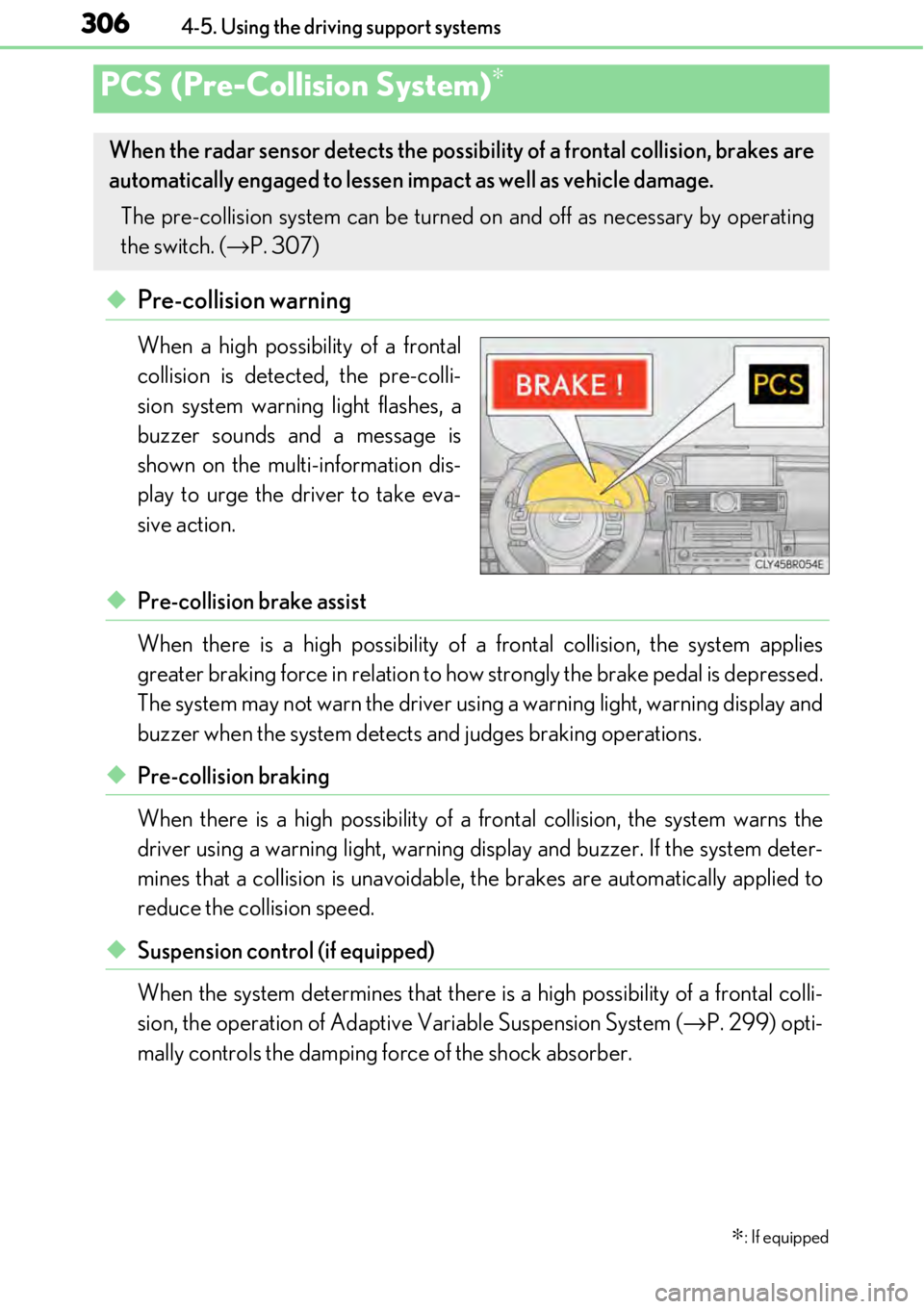
◆Pre-collision warning
When a high possibility of a frontal
collision is detected, the pre-colli-
sion system warning light flashes, a
buzzer sounds and a message is
shown on the multi-information dis-
play to urge the driver to take eva-
sive action.
◆Pre-collision brake assist
When there is a high possibility of a frontal collision, the system applies
greater braking force in relation to how strongly the brake pedal is depressed.
The system may not warn the driver us ing a warning light, warning display and
buzzer when the system detects and judges braking operations.
◆Pre-collision braking
When there is a high possibility of a frontal collision, the system warns the
driver using a warning light, warning display and buzzer. If the system deter-
mines that a collision is unavoidable, the brakes are automatically applied to
reduce the collision speed.
◆Suspension control (if equipped)
When the system determines that there is a high possibility of a frontal colli-
sion, the operation of Adaptive Variable Suspension System ( →P. 299) opti-
mally controls the damping force of the shock absorber.
PCS (Pre-Collision System)∗
∗
: If equipped
When the radar sensor detects the possibi lity of a frontal collision, brakes are
automatically engaged to lessen impact as well as vehicle damage.
The pre-collision system can be turned on and off as necessary by operating
the switch. ( →P. 307)
Page 309 of 724

3094-5. Using the driving support systems
4
Driving
■Conditions that may trigger the system even if there is no danger of a collision
In any of the following situations where the frontal area of the radar sensor is inter-
rupted, the radar sensor may detect possibility of a frontal collision and the system
may be activated.
●When passing by an oncoming vehicle in a curve or a turn to the right or the left
●When rapidly approaching an obstacle ahead (e.g. preceding vehicle, toll gate barrier,
etc.)
●When there is a structural object (billboar d, low ceiling, fluorescent light, etc.) above
the uphill road ahead
●When driving on a narrow road or throug h under a low overhead structure (bridge,
tunnel, fly-under, etc.)
●When driving on an uneven road surface
●When there is a metal object, bump, or protrusion on the road surface
●When vehicle’s front part is raised or lowered depending on loading conditions
●When the direction of radar sensor is misa ligned by strong impact applied on an area
around the radar sensor, etc.
●When there is an obstacle (guard rail, etc.) by the roadside at the entrance to a curve
●When the front of your vehicle is pointing upwards (caused by putting a heavy load in
the trunk etc.)
When the system is activated in the situations described above, there is also a possibility
that the brakes may be applied wi th a force greater than normal.
■Obstacles not detected
The sensor cannot detect plastic obstacles such as traffic cones. There may also be occa-
sions when the sensor cannot de tect pedestrians, animals, bicycles, motorcycles, trees,
or snowdrifts.
■Situations in which the pre-collision system does not function properly
The system may not function effectively in situations such as the following:
●On roads with sharp bends or uneven surfaces
●If a vehicle suddenly moves in front of yo ur vehicle, such as at an intersection
●If a vehicle suddenly cuts in front of your vehicle, such as when overtaking
●In inclement weather such as heavy rain, fog, snow or sand storms
●If the vehicle is skidding when VSC is not operating
●When your vehicle is steeply inclined
●When only part of your vehicle’s front end collides with, or contacts, a vehicle or object
in a frontal collision
●When the radar sensor moves off position du e to its surrounding area being subjected
to a strong impact
●When an obstacle suddenly appears in front of the vehicle due to the steering wheel
being turned sharply or another cause
■Automatic cancelation of the pre-collision system
When a malfunction occurs due to sensor cont amination, etc. that results in the sensors
being unable to detect obstac les, the pre-collision system will be automatically disabled.
In this case, the system will not activate even if there is a collision possibility.
Page 311 of 724

3114-5. Using the driving support systems
4
Driving
WARNING
■Limitations of the pre-collision system
●The driver is solely responsible for safe driving. Always drive safely, taking care to
observe your surroundings.
Do not use the pre-collision system instea d of normal braking operations under any
circumstances. This system will not prevent collisions or lessen damage or injuries in
all cases. Do not overly rely on this syst em. Failure to do so may cause an accident,
resulting in death or serious injury.
●This system has been designed to help av oid and reduce the impact of collisions.
However, the system operates differently depending on the situation ( →P. 308,
309). As a result, the same level of performance may not be expected in all cases.
Also, the pre-collision brakes may not operate if the driver is depressing the brake
pedal or turning the steering wheel, as the system will determine such conditions as
collision avoidance operations.
●As the pre-collision system is designed to assist the driver in safe driving, it may oper-
ate under sporty driving conditions, whic h may cause an accident. For this reason
under sporty driving conditions, it is reco mmended that this system be disabled by
using the PCS OFF switch.
■Handling the radar sensor
Observe the following to ensure the pre-co llision system can function effectively.
Otherwise, the system may not function correctly and could result in an accident.
●Keep the sensor and grille cover clean at all times.
Clean the sensor and grille cover with a soft cloth so you do not mark or damage
them.
●Do not subject the sensor or surrounding area to a strong impact.
If the sensor moves even s lightly off position, the system may become inaccurate or
malfunction. If the sensor or surrounding area is subject to a strong impact, always
have the area inspected and adjusted by your Lexus dealer.
●Do not disassemble the sensor.
●Do not attach accessories or stickers to the sensor, grille cover or surrounding area.
●Do not modify or paint the sensor and grille cover.
●If the radar sensor needs to be replaced, contact your Lexus dealer.
Page 332 of 724
3324-6. Driving tips
Perform the following according to the driving conditions:
●Do not try to forcibly open a window or move a wiper that is frozen. Pour
warm water over the frozen area to me lt the ice. Wipe away the water imme-
diately to prevent it from freezing.
●To ensure proper operation of the c limate control system fan, remove any
snow that has accumulated on the air inlet vents in front of the windshield.
●Check for and remove any excess ice or snow that may have accumulated on
the exterior lights, vehicle’s roof, chassi s, around the tires or on the brakes.
●Remove any snow or mud from the bottom of your shoes before getting in the
vehicle.
Accelerate the vehicle slowly, keep a sa fe distance between you and the vehicle
ahead, and drive at a reduced spee d suitable to road conditions.
●Park the vehicle and move the shift lever to P without setting the parking
brake. The parking brake may freeze up, preventing it from being released. If
the vehicle is parked without setting the parking brake, make sure to block the
wheels.
Failure to do so may be dangerous because it may cause the vehicle to move
unexpectedly, possibly leading to an accident.
●If the vehicle is parked without setting the parking brake, confirm that the shift
lever cannot be moved out of P
*.
*: The shift lever will be locked if it is atte mpted to be shifted from P to any other posi-
tion without depressing the brake pedal. If the shift lever can be shifted from P, there
may be a problem with the shift lock sy stem. Have the vehicle inspected by your
Lexus dealer immediately.
Before driving the vehicle
When driving the vehicle
When parking the vehicle