change time LEXUS RC350 2017 User Guide
[x] Cancel search | Manufacturer: LEXUS, Model Year: 2017, Model line: RC350, Model: LEXUS RC350 2017Pages: 724, PDF Size: 15.76 MB
Page 189 of 724

1893-5. Opening, closing the windows and moon roof
3
Operation of each component
■If the moon roof does not move normally
If the moon roof does not open or close normally or the automatic opening function does
not operate, perform the follo wing initialization procedure.
Turn the engine switch to IGNITION ON mode.
Operate the moon roof.
Depending on the kind of malfunction perform either of the following:
If the moon roof does not open wh en the “OPEN” switch is pressed
Press and hold the “DOWN” switch or “CLO SE” switch until the moon roof is com-
pletely closed.
The moon roof will open and close a fe w times before it closes completely.
Confirm that the moon roof has comple tely stopped and release the switch.
If the moon roof does not open completely automatically even though it tilts up and
opens while the “OPEN” switch is being pressed and held
Press and hold the “OPEN” switch until the moon roof opens completely.
Press and hold the “CLOSE” switch unti l the moon roof closes completely.
Press and hold the “UP” switch unti l the moon roof tilts up and stops.
Press and hold the “DOWN” switch until th e moon roof tilts down and stops at the
completely closed position.
If you release the switch while the moon roof is moving, perform the procedure again
from the beginning.
If, after performing the above procedures corr ectly, the moon roof still does not open or
close normally or the automatic opening func tion does not operate, have the vehicle
inspected by your Lexus dealer.
■Moon roof open warning buzzer
The buzzer sounds and a message is shown on the multi-information display in the instru-
ment cluster when the engine switch is turned off and the driver’s door is opened with the
moon roof open.
■Customization
Settings (e.g. linked door lock operation) can be changed.
(Customizable features: →P. 673)
1
2
3
4
3
4
5
6
Page 200 of 724

2004-1. Before driving
NOTICE
■When driving the vehicle
●Do not depress the accelerator and brake pedals at the same time while driving, as
this may restrain the engine output.
●Do not use the accelerator pedal or depre ss the accelerator and brake pedals at the
same time to hold the vehicle on a hill.
■When parking the vehicle
Always set the parking brake, and shift the sh ift lever to P. Failure to do so may cause
the vehicle to move or the vehicle may accelerate suddenly if the accelerator pedal is
accidentally depressed.
■Avoiding damage to vehicle parts
●Do not turn the steering wheel fully in either direction and hold it there for an
extended period of time.
Doing so may damage the power steering motor.
●When driving over bumps in the road, drive as slowly as possible to avoid damaging
the wheels, underside of the vehicle, etc.
●RC200t: Make sure to idle the engine immediately after high-load driving. Stop the
engine only after the turb ocharger has cooled down.
Failure to do so may cause damage to the turbocharger.
■If you get a flat tire while driving
A flat or damaged tire may cause the following situations . Hold the steering wheel
firmly and gradually depress the brake pedal to slow down the vehicle.
●It may be difficult to control your vehicle.
●The vehicle will make abnormal sounds or vibrations.
●The vehicle will lean abnormally.
Information on what to do in case of a flat tire ( →P. 592, 606)
■When encountering flooded roads
Do not drive on a road that has flooded af ter heavy rain etc. Doing so may cause the
following serious damage to the vehicle:
●Engine stalling
●Short in electrical components
●Engine damage caused by water immersion
In the event that you drive on a flooded road and the vehicle is flooded, be sure to have
your Lexus dealer check the following:
●Brake function
●Changes in quantity and quality of oil and fluid used for the engine, transmission,
transfer (AWD models), differential, etc.
●Lubricant condition for the propeller shaft, bearings and suspension joints (where
possible), and the function of all joints, bearings, etc.
Page 208 of 724
2084-2. Driving procedures
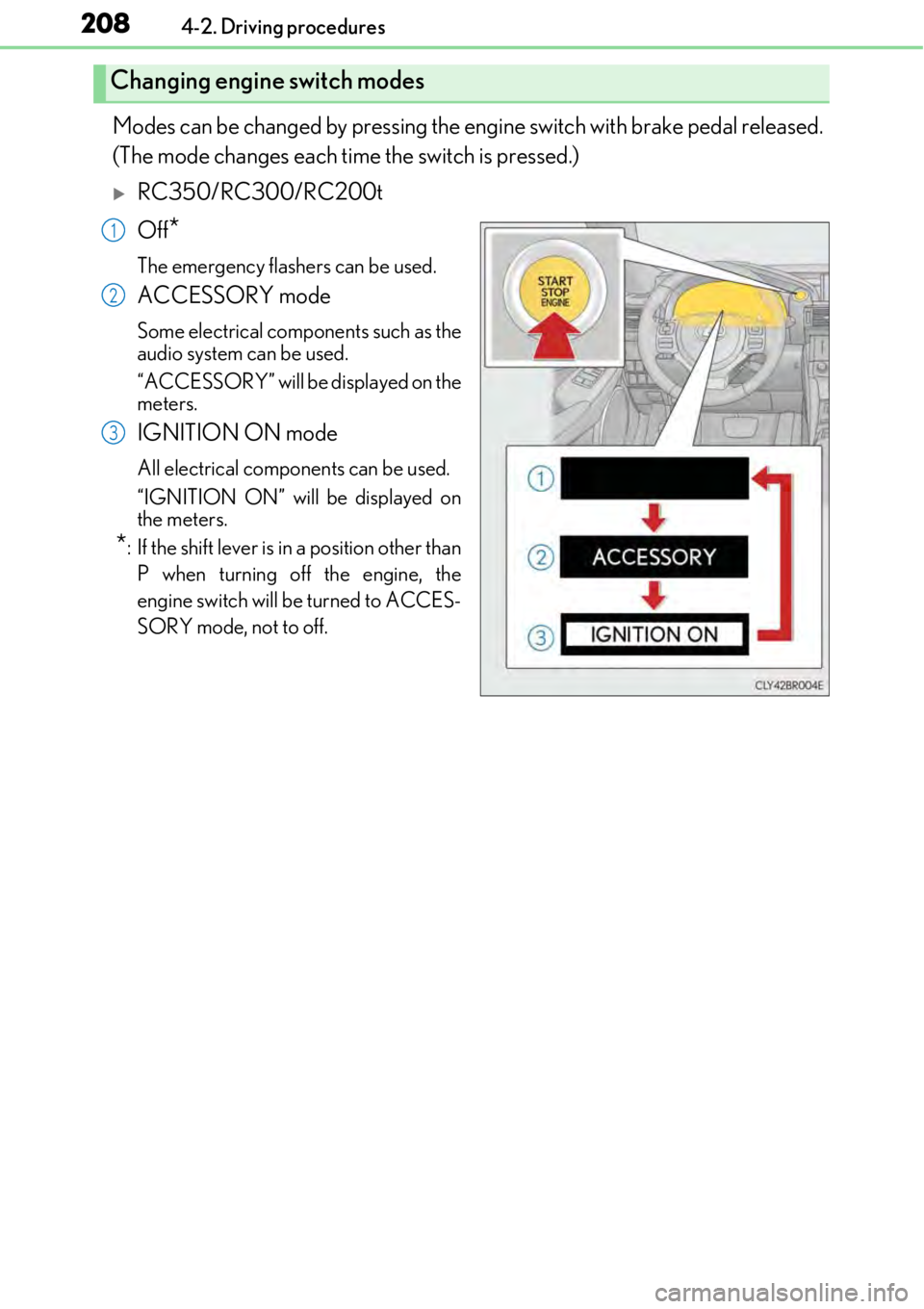
Modes can be changed by pressing the engine switch with brake pedal released.
(The mode changes each time the switch is pressed.)
RC350/RC300/RC200t
Off
*
The emergency flashers can be used.
ACCESSORY mode
Some electrical components such as the
audio system can be used.
“ACCESSORY” will be displayed on the
meters.
IGNITION ON mode
All electrical components can be used.
“IGNITION ON” will be displayed on
the meters.
*: If the shift le ver is in a position other than
P when turning off the engine, the
engine switch will be turned to ACCES-
SORY mode, not to off.
Changing engine switch modes
1
2
3
Page 211 of 724

2114-2. Driving procedures
4
Driving
■Operation of the engine switch
●If the switch is not pressed shortly and firmly, the engine switch mode may not change
or the engine may not start.
●If attempting to restart the engine immediately after turning the engine switch off, the
engine may not start in some cases. After turning the engine switch off, please wait a
few seconds before restarting the engine.
■If the smart access system wi th push-button start has been deactivated by a customized
setting
→ P. 622
WARNING
■When starting the engine
Always start the engine while sitting in the driver’s seat. Do not depress the accelerator
pedal while starting the engine under any circumstances.
Doing so may cause an accident resu lting in death or serious injury.
■Caution while driving
If engine failure occurs while the vehicle is moving, do not lock or open the doors until
the vehicle reaches a safe and complete stop. Activation of the steering lock in this cir-
cumstance may lead to an accident, re sulting in death or serious injury.
■Stopping the engine in an emergency
If you want to stop the engine in an emergency while driving the vehicle, press and hold
the engine switch for more than 2 seconds, or press it briefly 3 times or more in succes-
sion. ( →P. 555)
However, do not touch the engi ne switch while driving except in an emergency. Turning
the engine off while driving will not cause lo ss of steering or braking control, but the
power assist to these systems will be lost. Th is will make it more difficult to steer and
brake, so you should pull over and stop the vehicle as soon as it is safe to do so.
Page 216 of 724
2164-2. Driving procedures
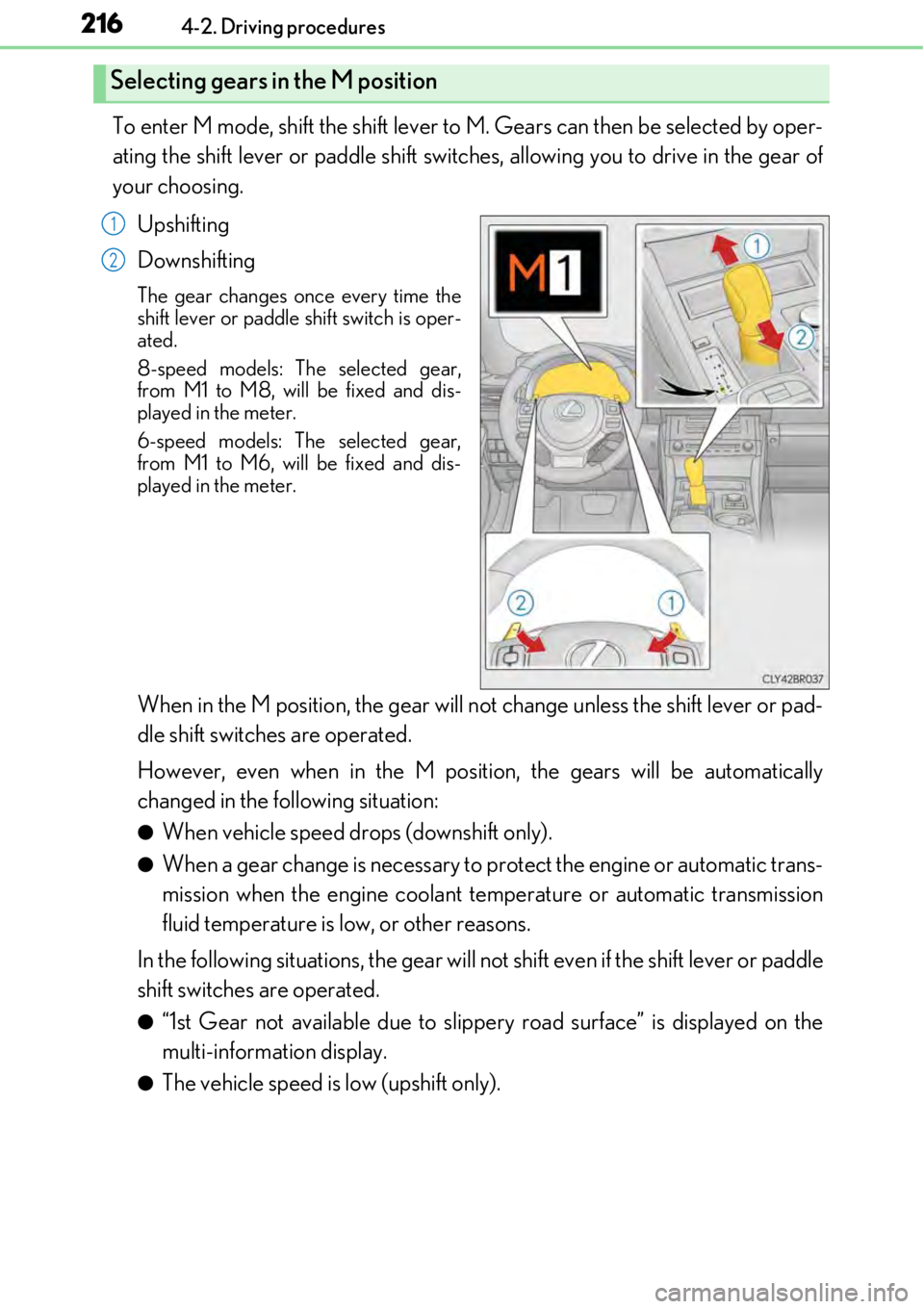
To enter M mode, shift the shift lever to M. Gears can then be selected by oper-
ating the shift lever or paddle shift switch es, allowing you to drive in the gear of
your choosing.
Upshifting
Downshifting
The gear changes once every time the
shift lever or paddle shift switch is oper-
ated.
8-speed models: Th e selected gear,
from M1 to M8, will be fixed and dis-
played in the meter.
6-speed models: The selected gear,
from M1 to M6, will be fixed and dis-
played in the meter.
When in the M position, the gear will not change unless the shift lever \
or pad-
dle shift switches are operated.
However, even when in the M positi on, the gears will be automatically
changed in the following situation:
●When vehicle speed drops (downshift only).
●When a gear change is necessary to protect the engine or automatic trans-
mission when the engine coolant temperature or automatic transmission
fluid temperature is low, or other reasons.
In the following situations, the gear will no t shift even if the shift lever or paddle
shift switches are operated.
●“1st Gear not available due to slippe ry road surface” is displayed on the
multi-information display.
●The vehicle speed is low (upshift only).
Selecting gears in the M position
1
2
Page 220 of 724
2204-2. Driving procedures
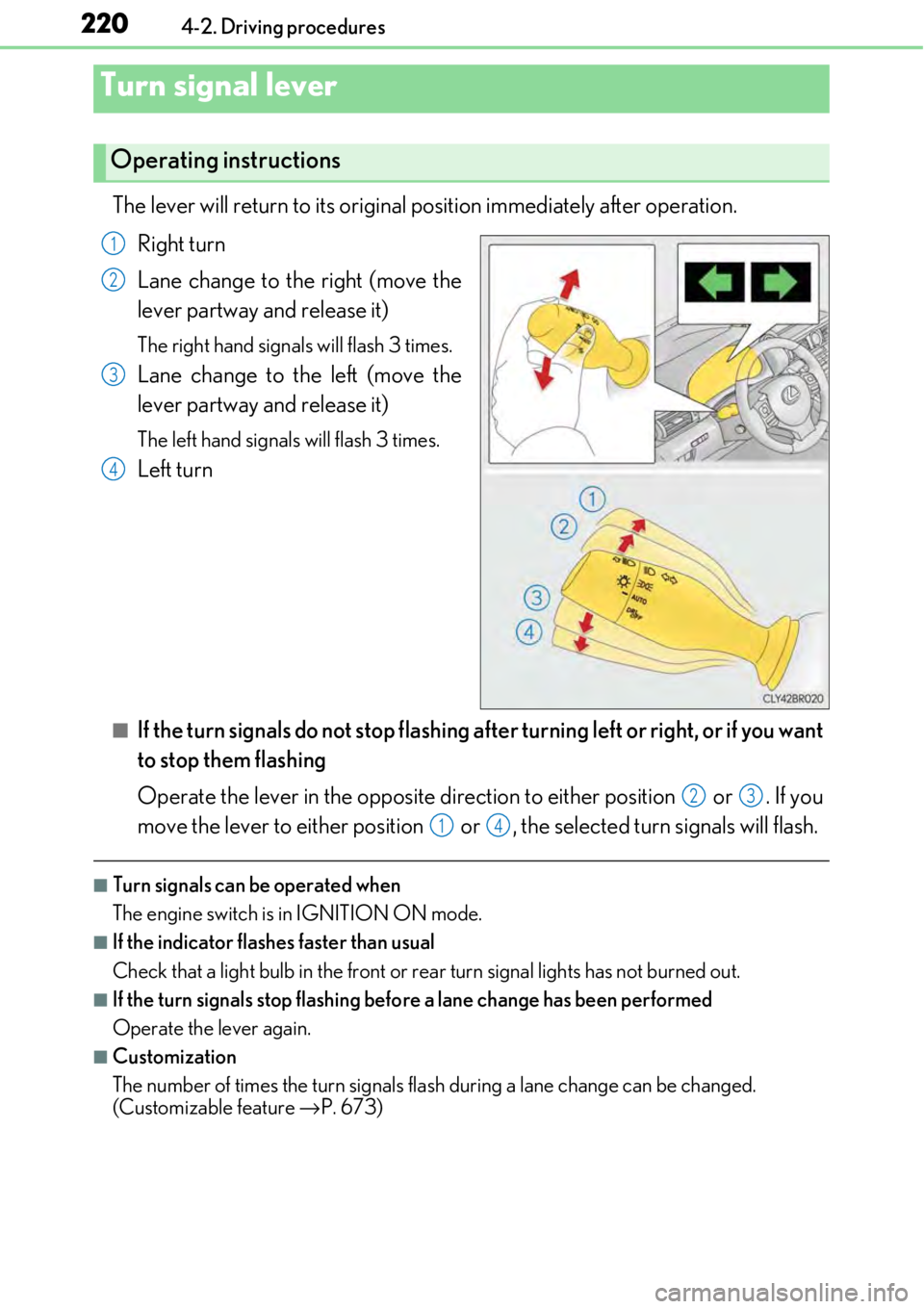
The lever will return to its original position immediately after operation.Right turn
Lane change to the right (move the
lever partway and release it)
The right hand signals will flash 3 times.
Lane change to the left (move the
lever partway and release it)
The left hand signals will flash 3 times.
Left turn
■If the turn signals do not stop flashing af ter turning left or right, or if you want
to stop them flashing
Operate the lever in the opposite direct ion to either position or . If you
move the lever to either position or , the selected turn signals will flash.
■Turn signals can be operated when
The engine switch is in IGNITION ON mode.
■If the indicator flashes faster than usual
Check that a light bulb in the front or rear turn signal lights has not burned out.
■If the turn signals stop flashing befo re a lane change has been performed
Operate the lever again.
■Customization
The number of times the turn signals flas h during a lane change can be changed.
(Customizable feature →P. 673)
Turn signal lever
Operating instructions
1
2
3
4
23
14
Page 246 of 724
2464-5. Using the driving support systems
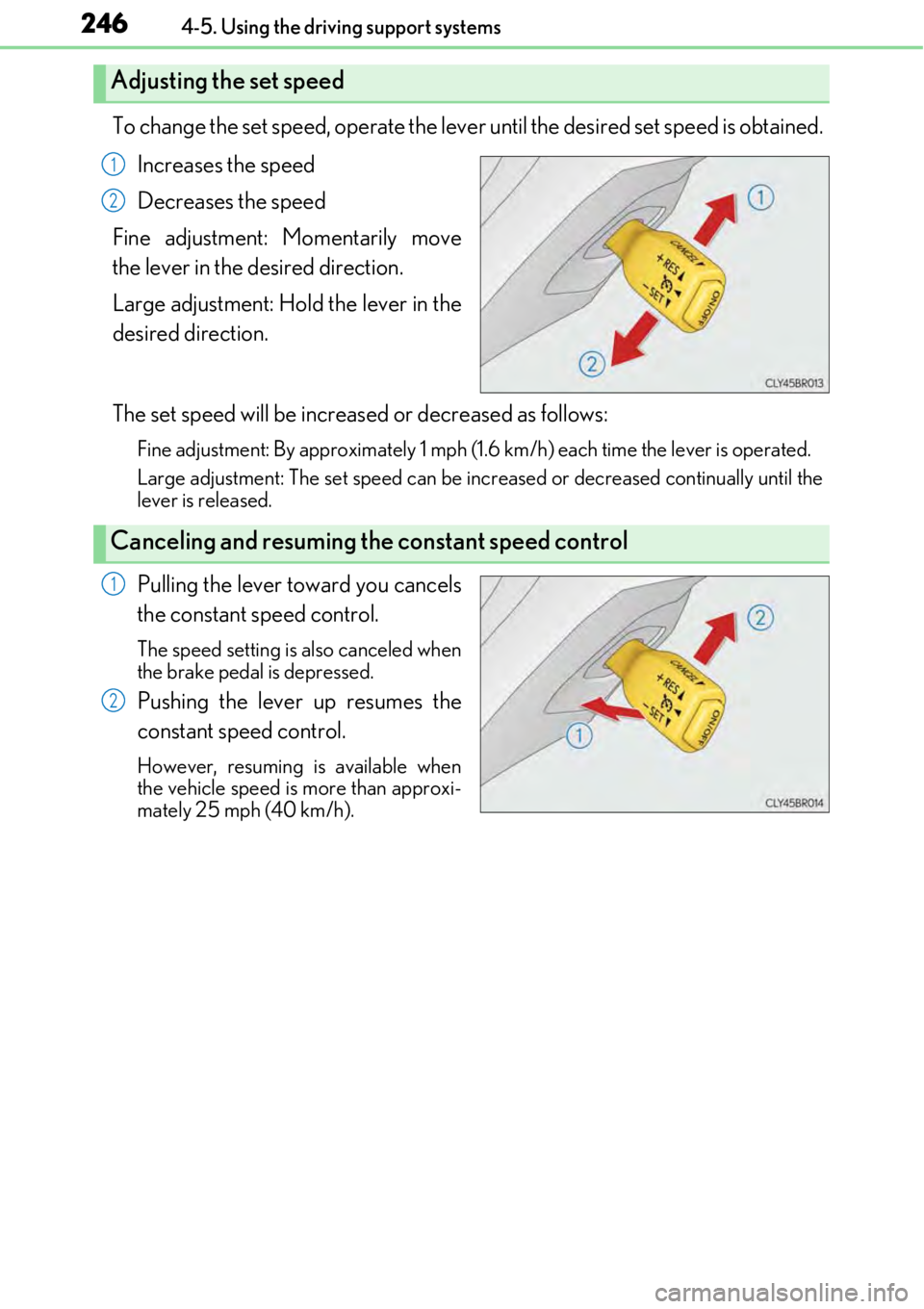
To change the set speed, operate the lever until the desired set speed is obtained.
Increases the speed
Decreases the speed
Fine adjustment: Momentarily move
the lever in the desired direction.
Large adjustment: Hold the lever in the
desired direction.
The set speed will be increased or decreased as follows:
Fine adjustment: By approximately 1 mph (1. 6 km/h) each time the lever is operated.
Large adjustment: The set speed can be increased or decreased continually until the
lever is released.
Pulling the lever toward you cancels
the constant speed control.
The speed setting is also canceled when
the brake pedal is depressed.
Pushing the lever up resumes the
constant speed control.
However, resuming is available when
the vehicle speed is more than approxi-
mately 25 mph (40 km/h).
Adjusting the set speed
1
2
Canceling and resuming the constant speed control
1
2
Page 252 of 724
2524-5. Using the driving support systems
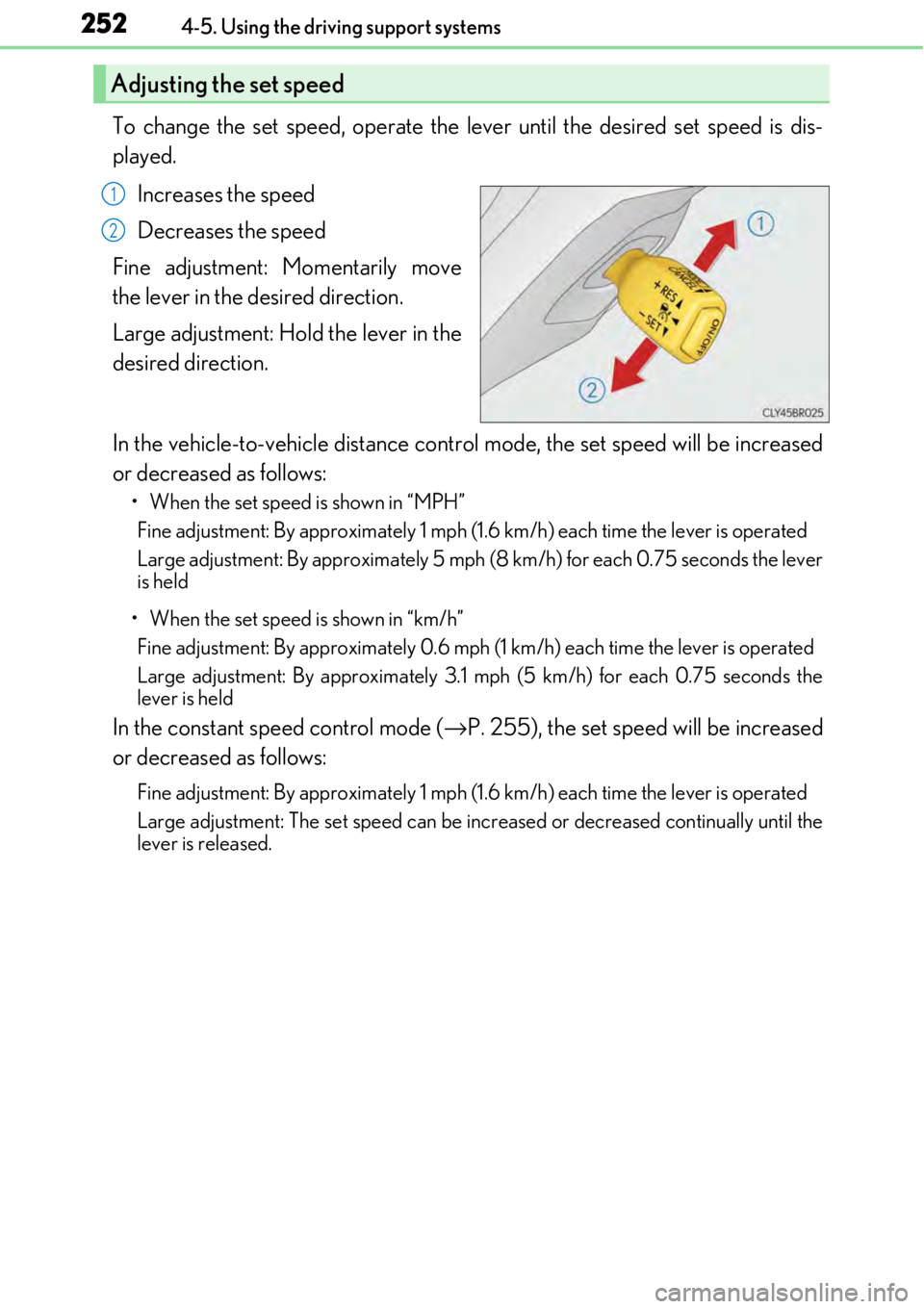
To change the set speed, operate the lever until the desired set speed is dis-
played.Increases the speed
Decreases the speed
Fine adjustment: Momentarily move
the lever in the desired direction.
Large adjustment: Hold the lever in the
desired direction.
In the vehicle-to-vehicle distance cont rol mode, the set speed will be increased
or decreased as follows:
• When the set speed is shown in “MPH”
Fine adjustment: By approximately 1 mph (1. 6 km/h) each time the lever is operated
Large adjustment: By approximately 5 mph (8 km/h) for each 0.75 seconds the lever
is held
• When the set speed is shown in “km/h” Fine adjustment: By approxim ately 0.6 mph (1 km/h) each time the lever is operated
Large adjustment: By approx imately 3.1 mph (5 km/h) for each 0.75 seconds the
lever is held
In the constant speed control mode (→ P. 255), the set speed will be increased
or decreased as follows:
Fine adjustment: By approximately 1 mph (1. 6 km/h) each time the lever is operated
Large adjustment: The set speed can be increased or decreased continually until the
lever is released.
Adjusting the set speed
1
2
Page 268 of 724
2684-5. Using the driving support systems
NOTICE
■To prevent damage to or incorrect operation of the LDA system
●Do not modify the headlights or attach stickers to the surface of the lights.
●Do not modify the suspension.
If any suspension parts need to be replaced, contact your Lexus dealer.
●Do not install or place anything on the hood or the grille. Also, do not install a grille
guard (bull bars, kangaroo bar etc.).
●If your windshield needs repair s, contact your Lexus dealer.
■Camera sensor
Observe the following to ensure that the LDA system functions correctly.
●Keep the windshield clean at all times.
Performance could be affected if the windshield is dirty, or if raindrops, condensation
or ice are adhering to the windshield.
●Do not spill liquid onto the camera sensor.
●Do not attach window tinting to the windshield.
●Do not install an antenna in front of the camera lens.
●If the area of the windshield in front of the camera sensor is fogged up, use the wind-
shield defogger to remove the fog.
When it is cold, setting the heater to blow air to the feet only may cause the area of
the windshield in front of the camera sensor to fog up. Th is will have a negative effect
on the images.
●Do not scratch the camera lens, or let it get dirty.
When cleaning the inside of the windshield , be careful not to get any glass cleaner
etc. on the lens. Also, do not touch the lens.
For lens repair, contact your Lexus dealer.
●Do not change the installation position or direction of the camera sensor or remove it.
The direction of the camera sensor is precisely adjusted.
●Do not subject the camera sensor to strong impact or force, and do not disassemble
the camera sensor.
●If the windshield needs to be re placed, contact your Lexus dealer.
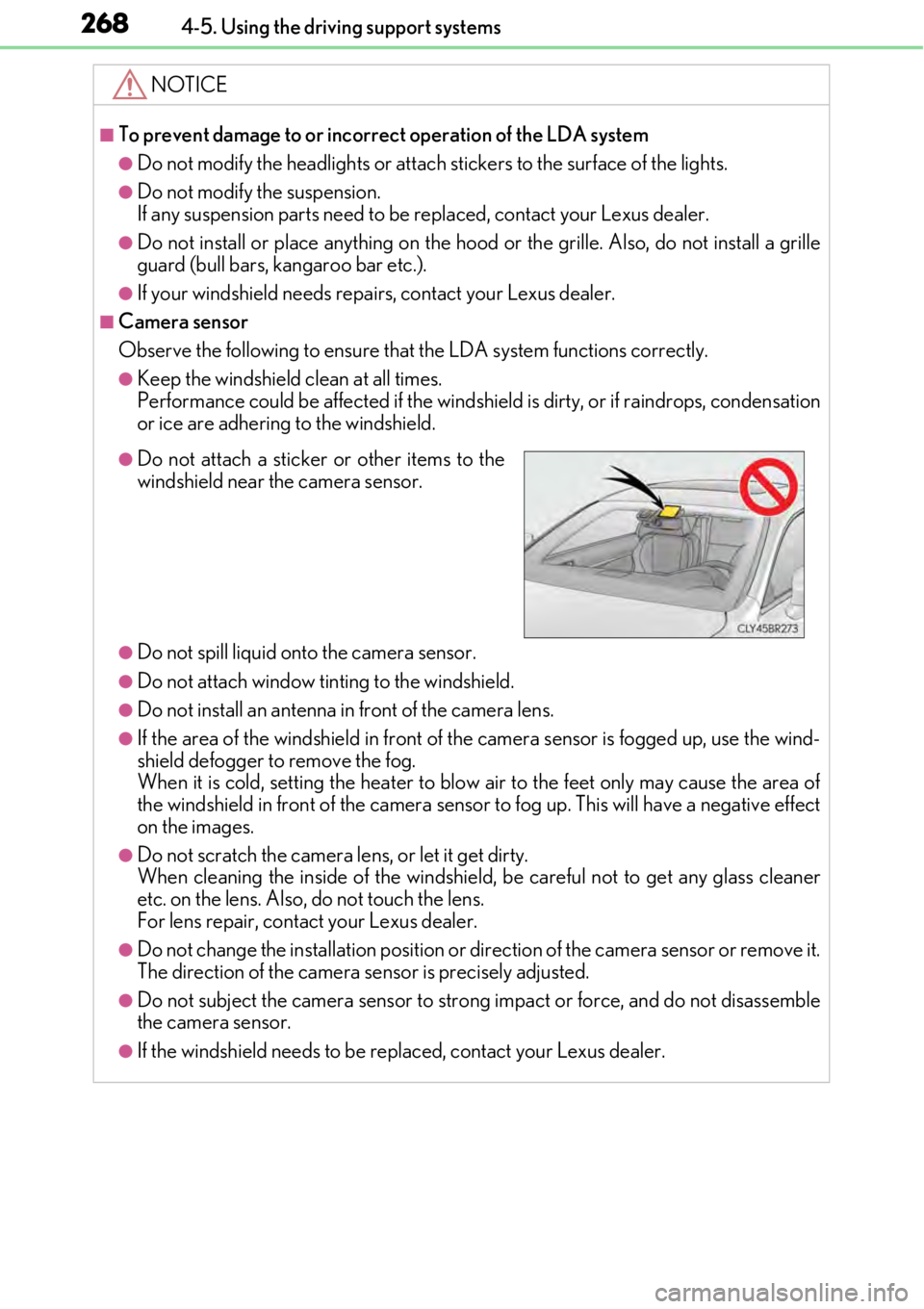
●Do not attach a sticker or other items to the
windshield near the camera sensor.
Page 302 of 724
3024-5. Using the driving support systems
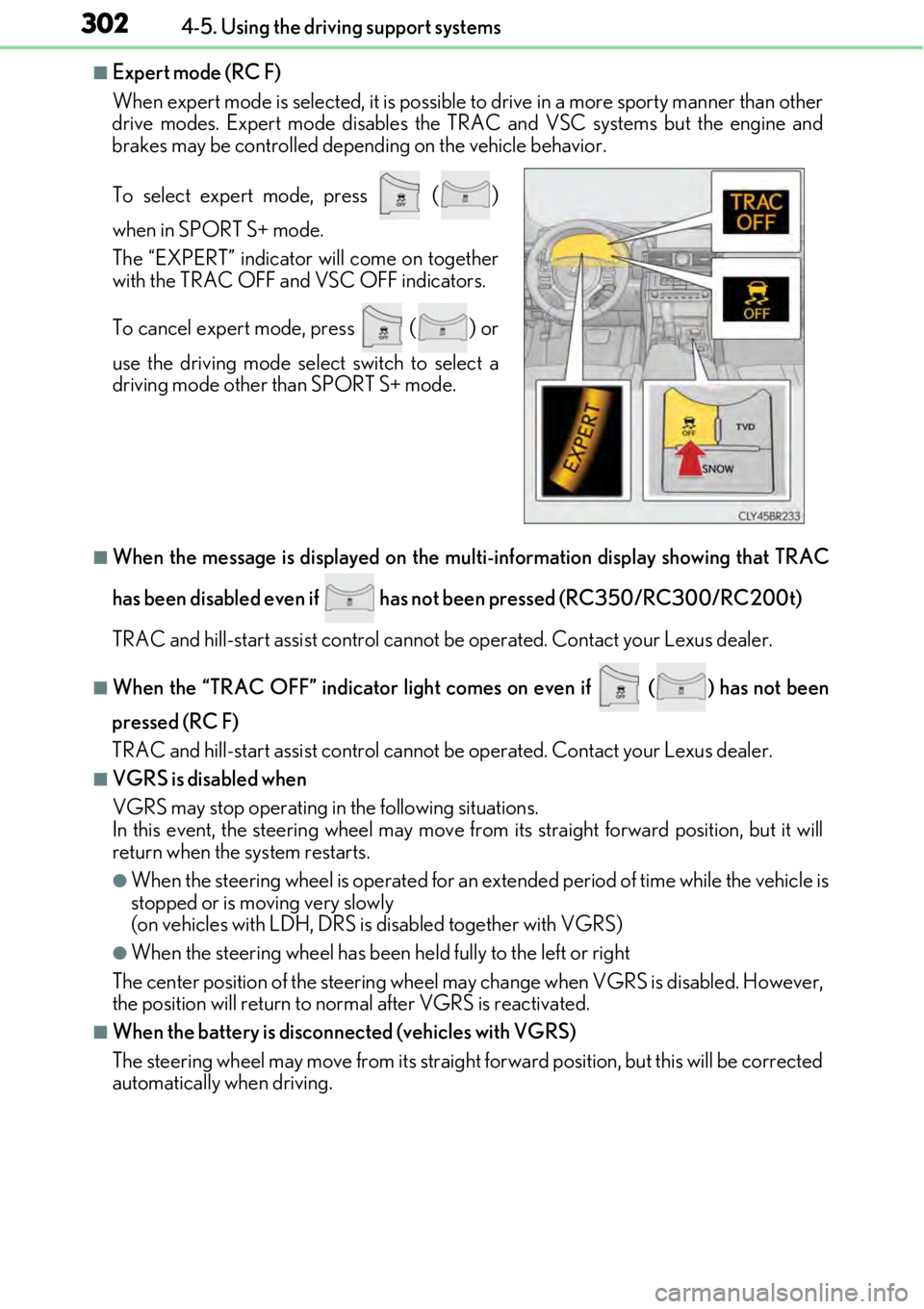
■Expert mode (RC F)
When expert mode is selected, it is possible to drive in a more sp orty manner than other
drive modes. Expert mode disables the TRAC and VSC systems but the engine and
brakes may be controlled depending on the vehicle behavior.
■When the message is displayed on the mu lti-information display showing that TRAC
has been disabled even if has not been pressed (RC350/RC300/RC200t)
TRAC and hill-start assist control cannot be operated. Contact your Lexus dealer.
■When the “TRAC OFF” indicator light comes on even if ( ) has not been
pressed (RC F)
TRAC and hill-start assist control cannot be operated. Contact your Lexus dealer.
■VGRS is disabled when
VGRS may stop operating in the following situations.
In this event, the steering wheel may move from its straight forward position, but it will
return when the system restarts.
●When the steering wheel is operated for an extended period of time while the vehicle is
stopped or is moving very slowly
(on vehicles with LDH, DRS is disabled together with VGRS)
●When the steering wheel has been held fully to the left or right
The center position of the steering wheel may change when VGRS is disabled. However,
the position will return to normal after VGRS is reactivated.
■When the battery is disconnected (vehicles with VGRS)
The steering wheel may move from its straight forward position, but this will be corrected
automatically when driving. To select expert mode, press
()
when in SPORT S+ mode.
The “EXPERT” indicator will come on together
with the TRAC OFF and VSC OFF indicators.
To cancel expert mode, press
() or
use the driving mode sele ct switch to select a
driving mode other than SPORT S+ mode.