fuel consumption LEXUS RC350 2017 User Guide
[x] Cancel search | Manufacturer: LEXUS, Model Year: 2017, Model line: RC350, Model: LEXUS RC350 2017Pages: 724, PDF Size: 15.76 MB
Page 131 of 724
1312. Instrument cluster
2
Instrument cluster
Navigation system screen
Press the “MENU” button on the Remote Touch, then select “Info” on the
“Menu” screen, and then select “Fuel Consumption”.
If the “Past Record” screen is disp layed, select “Trip Information”.
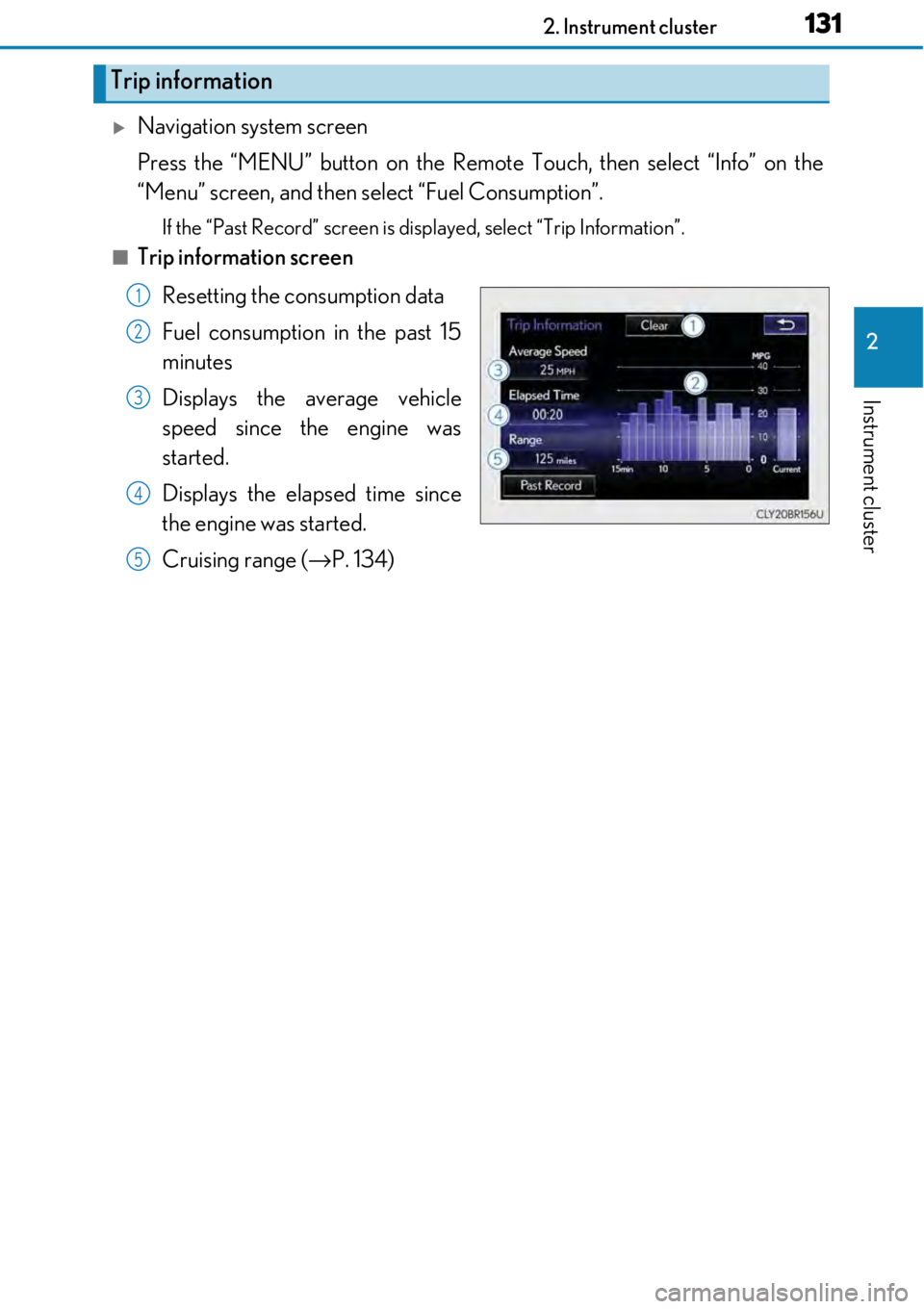
■Trip information screen
Resetting the consumption data
Fuel consumption in the past 15
minutes
Displays the average vehicle
speed since the engine was
started.
Displays the elapsed time since
the engine was started.
Cruising range ( →P. 134)
Trip information
1
2
3
4
5
Page 132 of 724
1322. Instrument cluster
Lexus Display Audio screen
Press the “MENU” button on the Lexus Display Audio controller, then select
“Info” on the “Menu” screen, and then select “Fuel Consumption”.
If the “Trip Information” screen does no t appear, move the controller to the right
and select “Trip Information”.
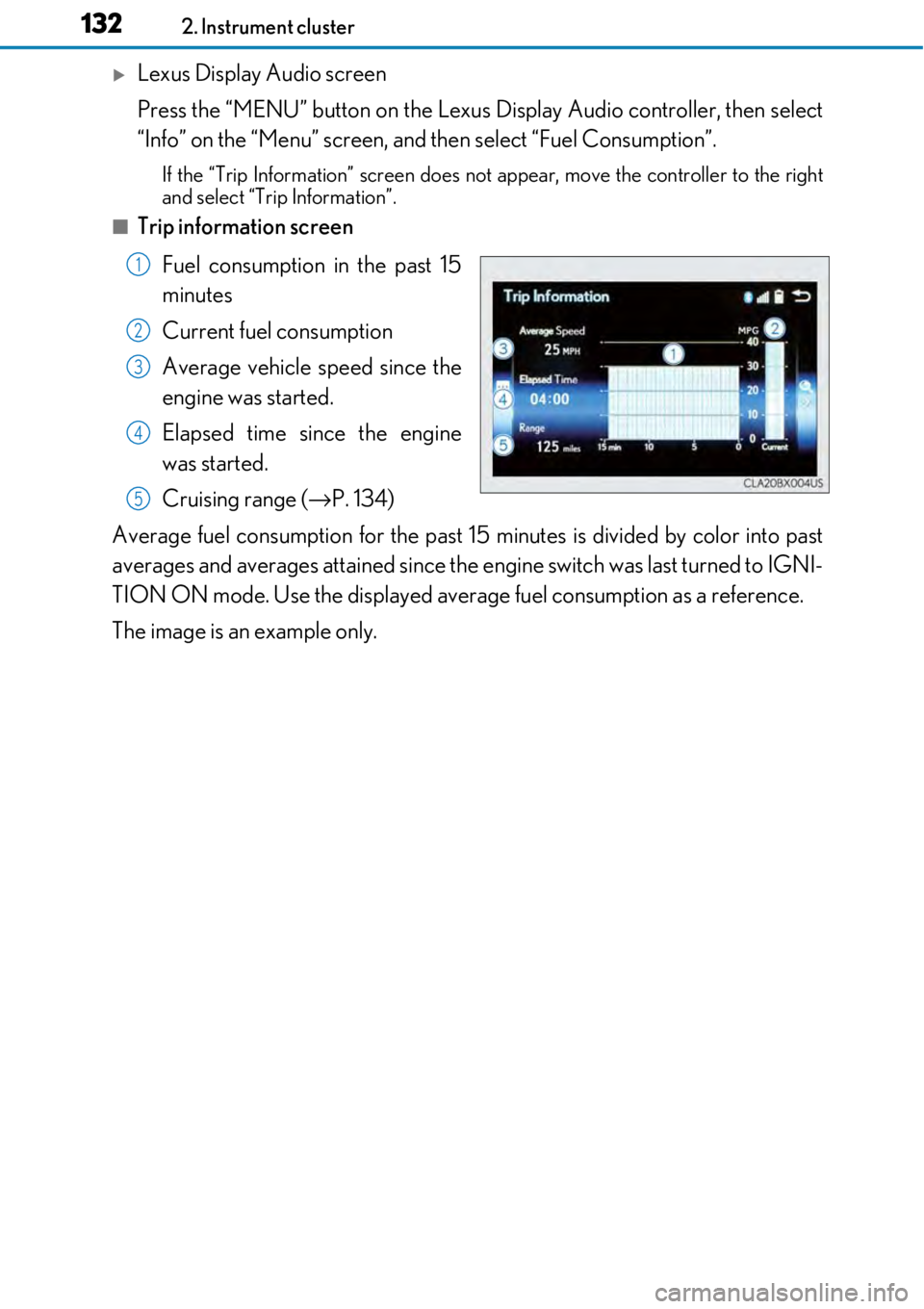
■Trip information screen
Fuel consumption in the past 15
minutes
Current fuel consumption
Average vehicle speed since the
engine was started.
Elapsed time since the engine
was started.
Cruising range ( →P. 134)
Average fuel consumption for the past 15 minutes is divided by color into past
averages and averages attained since the engine switch was last turned to IGNI-
TION ON mode. Use the displayed average fuel consumption as a reference.
The image is an example only.
1
2
3
4
5
Page 133 of 724
1332. Instrument cluster
2
Instrument cluster
Navigation system screen
Press the “MENU” button on the Remote Touch, then select “Info” on the
“Menu” screen, and then select “Fuel Consumption”.
If the “Trip Information” screen is displayed, select “Past Record”.
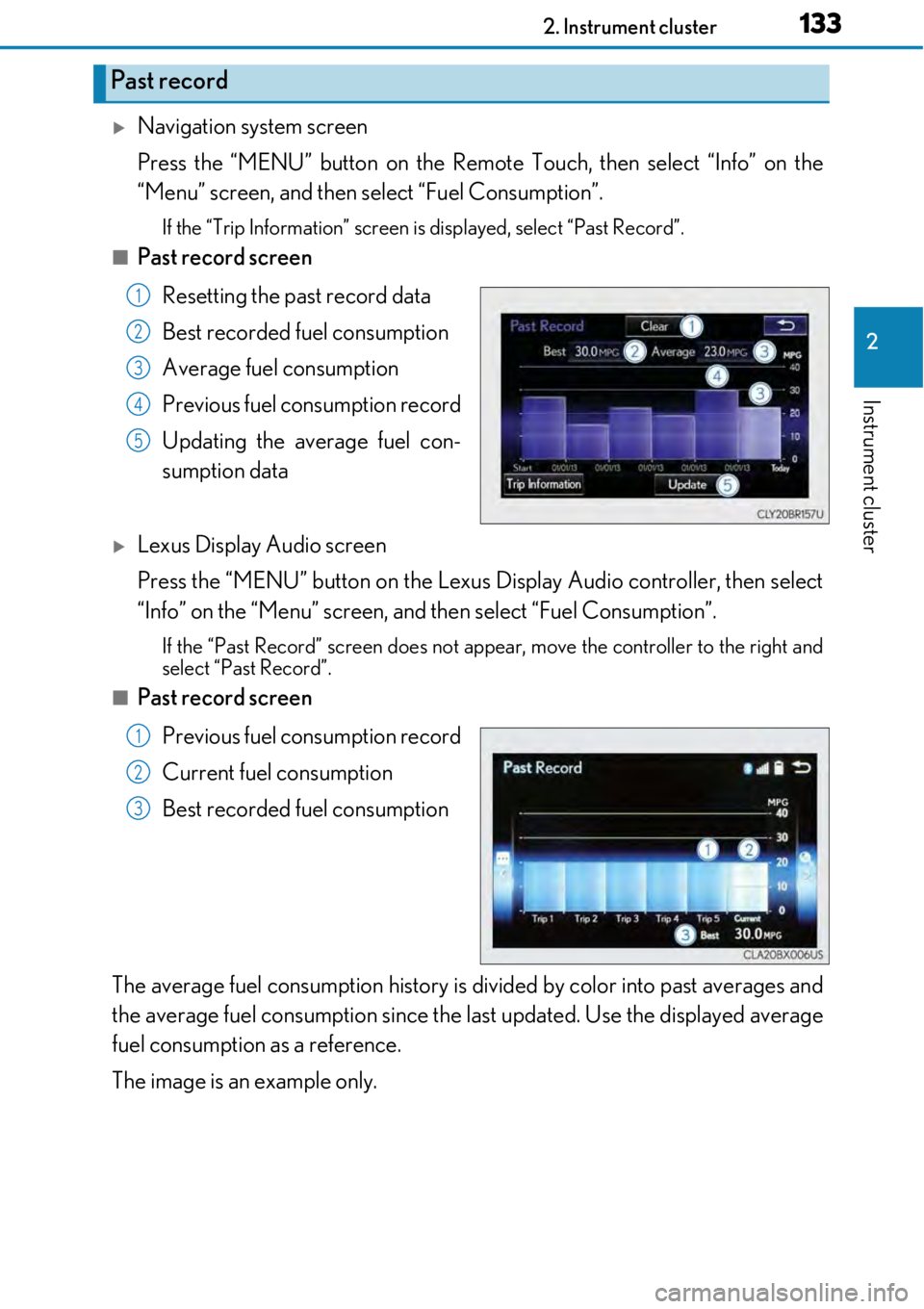
■Past record screen
Resetting the past record data
Best recorded fuel consumption
Average fuel consumption
Previous fuel consumption record
Updating the average fuel con-
sumption data
Lexus Display Audio screen
Press the “MENU” button on the Lexus Display Audio controller, then select
“Info” on the “Menu” screen, and then select “Fuel Consumption”.
If the “Past Record” screen does not appear, move the controller to the right and
select “Past Record”.
■Past record screen
Previous fuel consumption record
Current fuel consumption
Best recorded fuel consumption
The average fuel consumption history is di vided by color into past averages and
the average fuel consumption since the last updated. Use the displayed average
fuel consumption as a reference.
The image is an example only.
Past record
1
2
3
4
5
1
2
3
Page 134 of 724

1342. Instrument cluster
■Updating the past record data
Navigation system
Update the average fuel cons umption by selecting “Update” to measure the current fuel
consumption again.
Lexus Display Audio system
Update the average fuel consumption by mo ving the controller to the left and select
“Update” to measure the curre nt fuel consumption again.
■Resetting the data
Navigation system
The fuel consumption data can be deleted by selecting “Clear”.
Lexus Display Audio system
The fuel consumption data can be deleted by moving the controller to the left and select
“Clear”.
■Cruising range
Displays the estimated maximum distance that can be driven with the quantity of fuel
remaining.
This distance is computed based on your average fuel consumption.
As a result, the actual distance that can be driven may differ from that displayed.
Page 423 of 724
423
5
Lexus Display Audio system
5-12. Other function
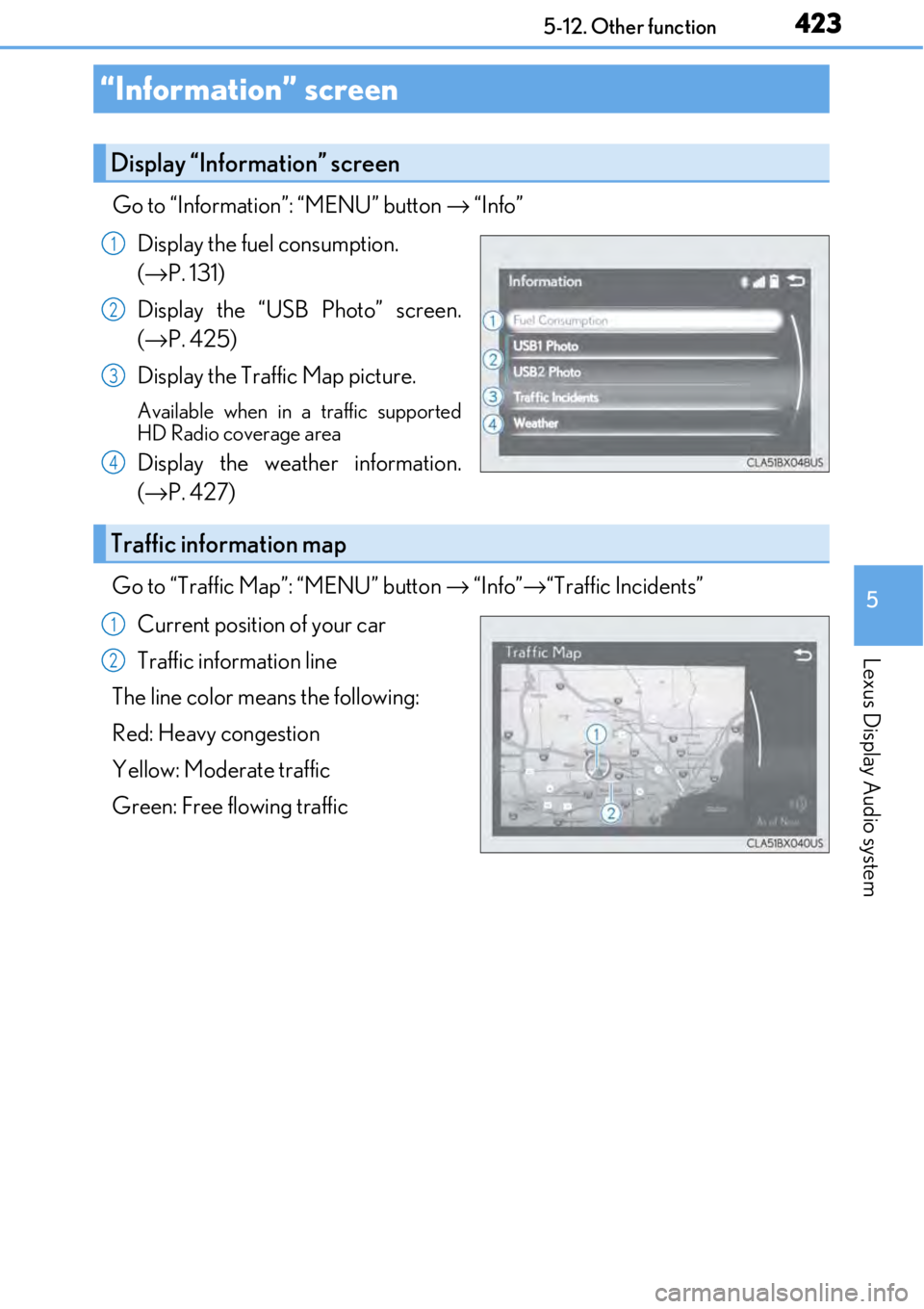
Go to “Information”: “MENU” button → “Info”
Display the fuel consumption.
(→ P. 131)
Display the “USB Photo” screen.
(→ P. 425)
Display the Traffic Map picture.
Available when in a traffic supported
HD Radio coverage area
Display the weather information.
(→ P. 427)
Go to “Traffic Map”: “MENU” button → “Info” →“Traffic Incidents”
Current position of your car
Traffic information line
The line color means the following:
Red: Heavy congestion
Yellow: Moderate traffic
Green: Free flowing traffic
“Information” screen
Display “Information” screen
1
2
3
4
Traffic information map
1
2
Page 442 of 724
4426-1. Using the air conditioning system
■Registering air conditioning settings to electronic keys (vehicles with driving position
memory)
●Unlocking the vehicle using an electronic ke y and turning the engine switch to IGNI-
TION ON mode will recall that key's re gistered air conditioning settings.
●When the engine switch is turned off, the current air conditioning settings will automat-
ically be registered to the electronic key that was used to unlock the vehicle.
●The system may not operate correctly if more th an one electronic key is in the vicinity or
if the smart access system with push-button start is used to unlock a passenger door.
●The doors that can recall the air conditioning setting* when unlocked using the smart
access system with push-button start can be changed. For details, contact your Lexus
dealer.
*: The doors that can recall the driving posi tion memory are changed at the same time.
■Using automatic mode
Fan speed is adjusted automatically according to the temperature setting and the ambi-
ent conditions.
Therefore, the fan may stop for a while until wa rm or cool air is ready to flow immediately
after is pressed or “AUTO” is selected.
■Using the voice command system (vehicles with a navigation system)
Air conditioning system can be operated using voice commands. For details, refer to the
“NAVIGATION SYSTEM OWNER’S MANUAL”.
■Fogging up of the windows
The windows will easily fog up when the hu midity in the vehicle is high. Turning
(“A/C”) on will dehumidify the air from the outlets and defog the windshield effectively.
●If you turn (“A/C”) off, the windows may fog up more easily.
●The windows may fog up if the recirculated air mode is used.
■Outside/recirculated air mode
●When driving on dusty roads such as tunnels or in heavy traffic, set the outside/recircu-
lated air mode button to the recirculated air mode. This is effective in preventing out-
side air from enteri ng the vehicle interior. During cooling operation, setting the
recirculated air mode will also cool the vehicle interior effectively.
●Outside/recirculated air mode may automa tically switch depending on the tempera-
ture setting or the inside temperature.
■When the outside temperature exceeds 75 °F (24 °C) and the air conditioning system
is on
●In order to reduce the air co nditioning power consumption, the air conditioning system
may switch to recirculated air mode automa tically. This may also reduce fuel consump-
tion.
●Recirculated air mode is selected as a defaul t mode when the engine switch is turned to
IGNITION ON mode.
●It is possible to switch to outside air mode at any time by pressing .
Page 705 of 724

705Alphabetical index
Child safety ................................................ 57Airbag precautions .............................. 42
Battery precautions ............... 515, 629
Child restraint system ........................ 58
How your child should wear the seat belt .......................................... 36
Installing child restraints.................... 58
Moon roof precautions.................... 190
Power window lock switch ............ 183
Power window precautions .......... 186
Removed electronic key battery precautions.............. 539
Seat belt extender precautions ........................................... 39
Seat belt precautions ..........................38
Seat heater precautions..................445
Trunk precautions............................... 150 Cleaning ...................................... 480, 485
Aluminum wheels ................................481
Exterior .................................................. 480
Interior .....................................................485
Seat belts................................................486
Clock......................................................... 456
Coat hooks ............................................. 459
Compass ................................................. 468
Condenser................................................. 511
Console box ............................................452
Cooling system ..................................... 509 Engine overheating ..........................630
Cruise control Cruise control ..................................... 245
Dynamic radar cruise control ..... 249
Cup holders............................................ 453
Current fuel consumption ........... 112, 119
Curtain shield airbags ........................... 40
Customizable features .......................673
Page 709 of 724

709Alphabetical index
Front turn signal lights ........................ 220Replacing light bulbs .......... 545, 550
Turn signal lever .................................220
Wattage ..................................................657
Fuel ............................................................... 241 Capacity .................................................644
Fuel gauge ..................................... 96, 102
Fuel pump shut off system............ 564
Information ........................................... 658
Refueling...................................................241
Type ............................................. 644, 658
Warning light ...................................... 566
Fuel consumption Average fuel economy ..............112, 119
Current fuel consumption ........112, 119
Fuel filler door .......................................... 241 If the fuel filler door cannot be opened ......................... 243
Refueling...................................................241
Fuel gauge ........................................ 96, 102
Fuel pump shut off system................. 564
Fuses .......................................................... 540 Garage door opener.......................... 460
Gauges.............................................. 96, 102
Glove box ................................................452
Glove box light.......................................452G