audio settings LEXUS RC350 2017 Owner's Manual
[x] Cancel search | Manufacturer: LEXUS, Model Year: 2017, Model line: RC350, Model: LEXUS RC350 2017Pages: 724, PDF Size: 15.76 MB
Page 391 of 724
3915-7. Connecting Bluetooth®
5
Lexus Display Audio system
Go to “Bluetooth* Setup”: “MENU” button → “Setup” → “Bluetooth*”
Select the desired device and then select “Device Info”.
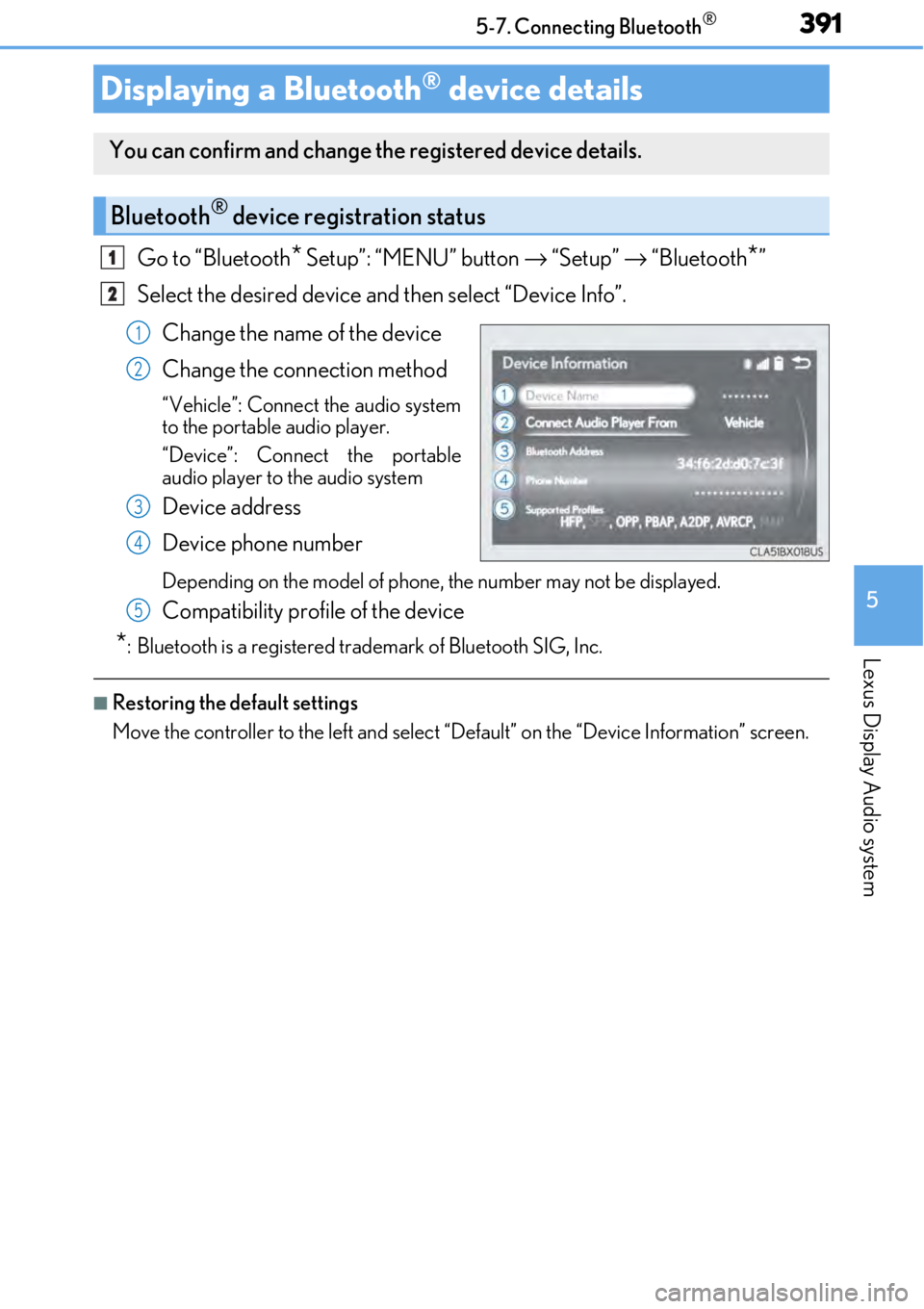
Change the name of the device
Change the connection method
“Vehicle”: Connect the audio system
to the portable audio player.
“Device”: Connect the portable
audio player to the audio system
Device address
Device phone number
Depending on the model of phone, the number may not be displayed.
Compatibility profile of the device
*: Bluetooth is a registered trademark of Bluetooth SIG, Inc.
■Restoring the default settings
Move the controller to the left and select “D efault” on the “Device Information” screen.
Displaying a Bluetooth® device details
You can confirm and change the registered device details.
Bluetooth® device registration status
1
2
1
2
3
4
5
Page 392 of 724
3925-7. Connecting Bluetooth®
Go to “Bluetooth* Setup”: “MENU” button → “Setup” → “Bluetooth*”
Move the controller to the left an d then select “System Settings”.
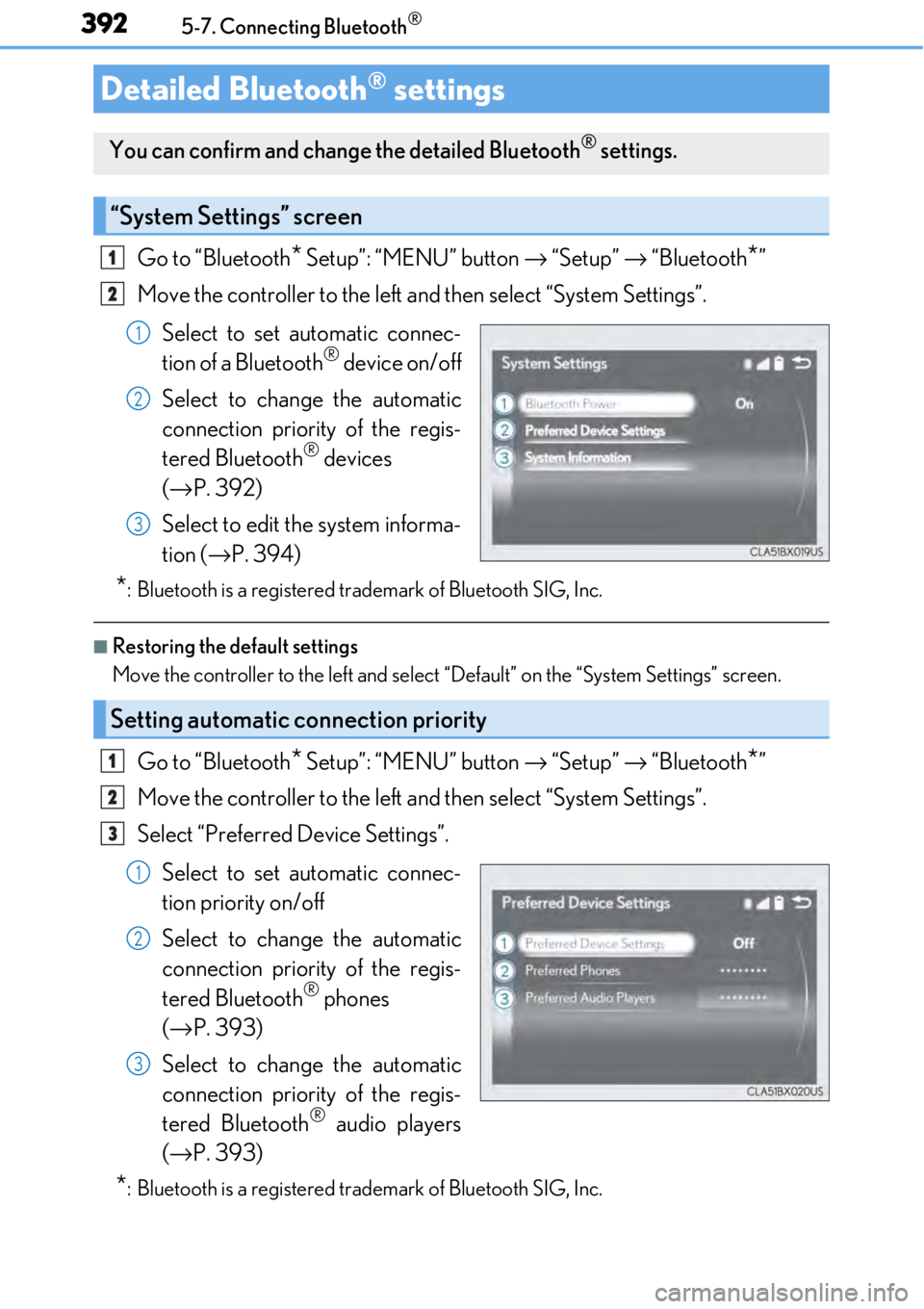
Select to set automatic connec-
tion of a Bluetooth
® device on/off
Select to change the automatic
connection priority of the regis-
tered Bluetooth
® devices
(→ P. 392)
Select to edit the system informa-
tion ( →P. 394)
*: Bluetooth is a registered trademark of Bluetooth SIG, Inc.
■Restoring the default settings
Move the controller to the left and select “Default” on the “System Settings” screen.
Go to “Bluetooth* Setup”: “MENU” button → “Setup” → “Bluetooth*”
Move the controller to the left an d then select “System Settings”.
Select “Preferred Device Settings”.
Select to set automatic connec-
tion priority on/off
Select to change the automatic
connection priority of the regis-
tered Bluetooth
® phones
(→ P. 393)
Select to change the automatic
connection priority of the regis-
tered Bluetooth
® audio players
(→ P. 393)
*: Bluetooth is a registered trademark of Bluetooth SIG, Inc.
Detailed Bluetooth® settings
You can confirm and change the detailed Bluetooth® settings.
“System Settings” screen
1
2
1
2
3
Setting automatic connection priority
1
2
3
1
2
3
Page 393 of 724
3935-7. Connecting Bluetooth®
5
Lexus Display Audio system
■Restoring the default settings
Move the controller to the left and select “Default” on the “Preferred Device Settings”
screen.
Go to “Bluetooth* Setup”: “MENU” button → “Setup” → “Bluetooth*”
Move the controller to the left an d then select “System Settings”.
Select “Preferred Device Settings”.
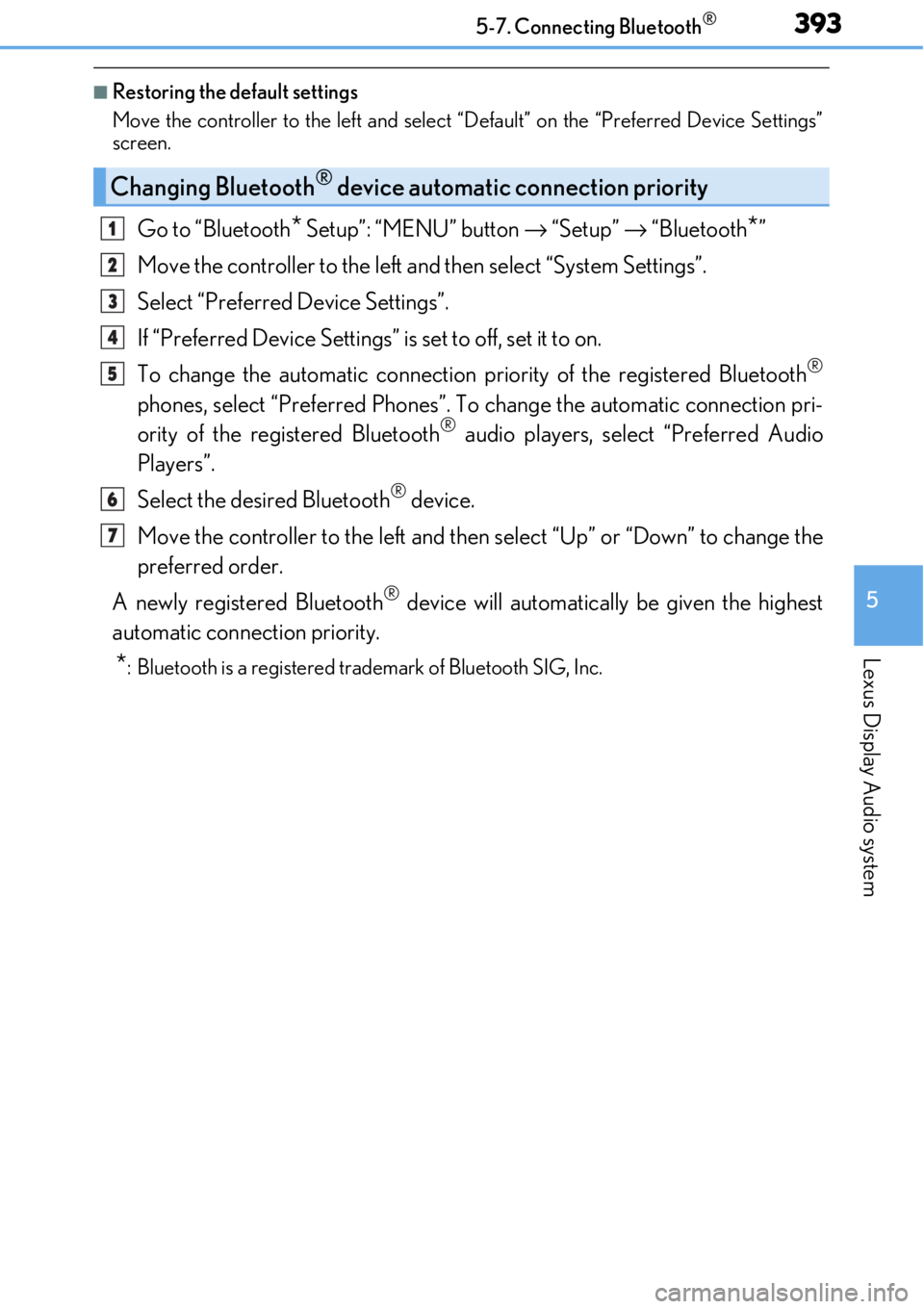
If “Preferred Device Settings” is set to off, set it to on.
To change the automatic connection pr iority of the registered Bluetooth
®
phones, select “Preferred Phones”. To change the automatic connection pri-
ority of the registered Bluetooth® audio players, select “Preferred Audio
Players”.
Select the desired Bluetooth
® device.
Move the controller to the left and then select “Up” or “Down” to change the
preferred order.
A newly registered Bluetooth
® device will automatically be given the highest
automatic connection priority.
*: Bluetooth is a registered trademark of Bluetooth SIG, Inc.
Changing Bluetooth® device automatic connection priority
1
2
3
4
5
6
7
Page 394 of 724
3945-7. Connecting Bluetooth®
Go to “Bluetooth* Setup”: “MENU” button → “Setup” → “Bluetooth*”
Move the controller to the left an d then select “System Settings”.
Select “System Information”.
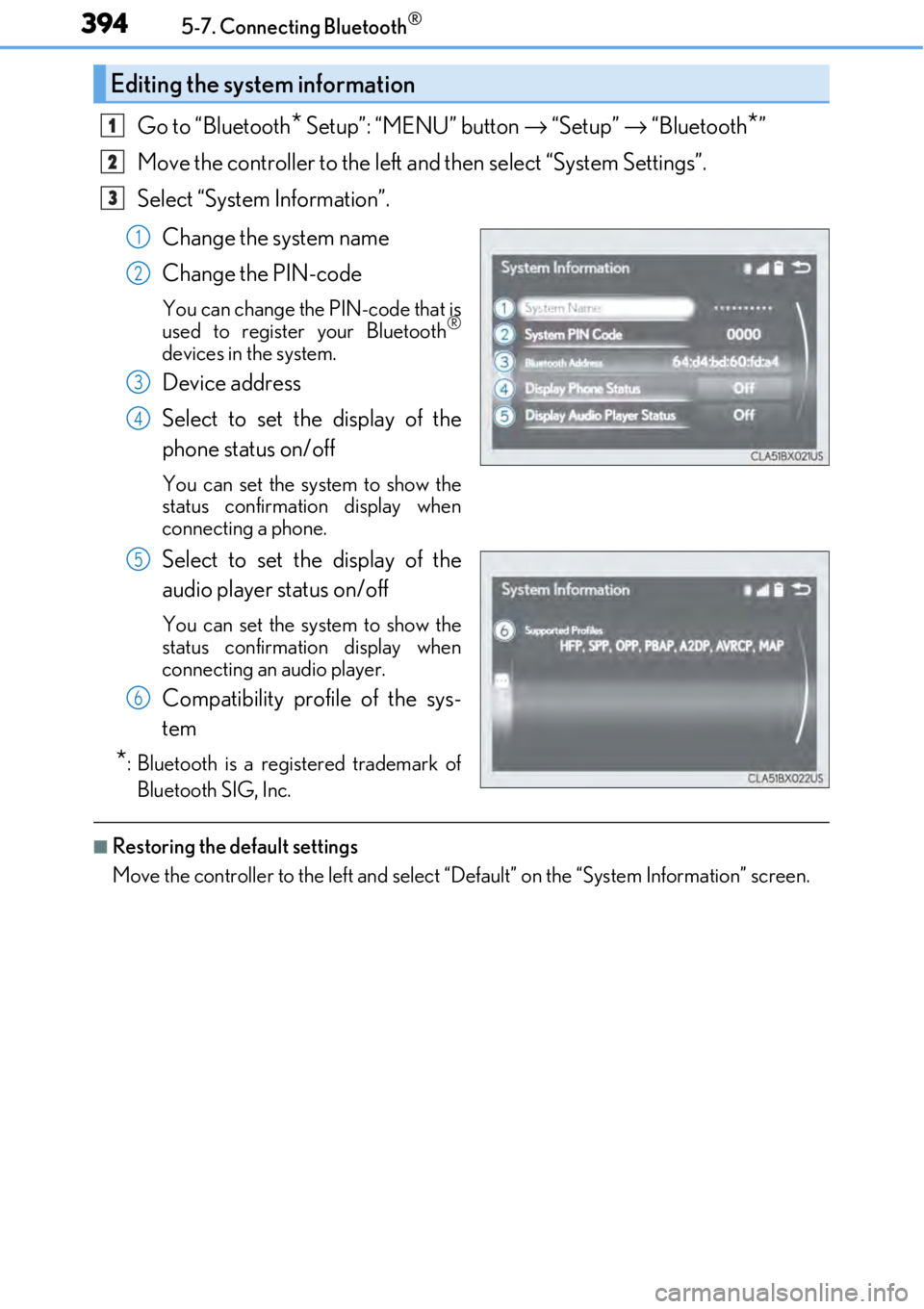
Change the system name
Change the PIN-code
You can change the PIN-code that is
used to register your Bluetooth®
devices in the system.
Device address
Select to set the display of the
phone status on/off
You can set the system to show the
status confirmation display when
connecting a phone.
Select to set the display of the
audio player status on/off
You can set the system to show the
status confirmation display when
connecting an audio player.
Compatibility profile of the sys-
tem
*: Bluetooth is a registered trademark ofBluetooth SIG, Inc.
■Restoring the default settings
Move the controller to the left and select “D efault” on the “System Information” screen.
Editing the system information
1
2
3
1
2
3
4
5
6
Page 409 of 724
4095-9. Bluetooth® Phone
5
Lexus Display Audio system
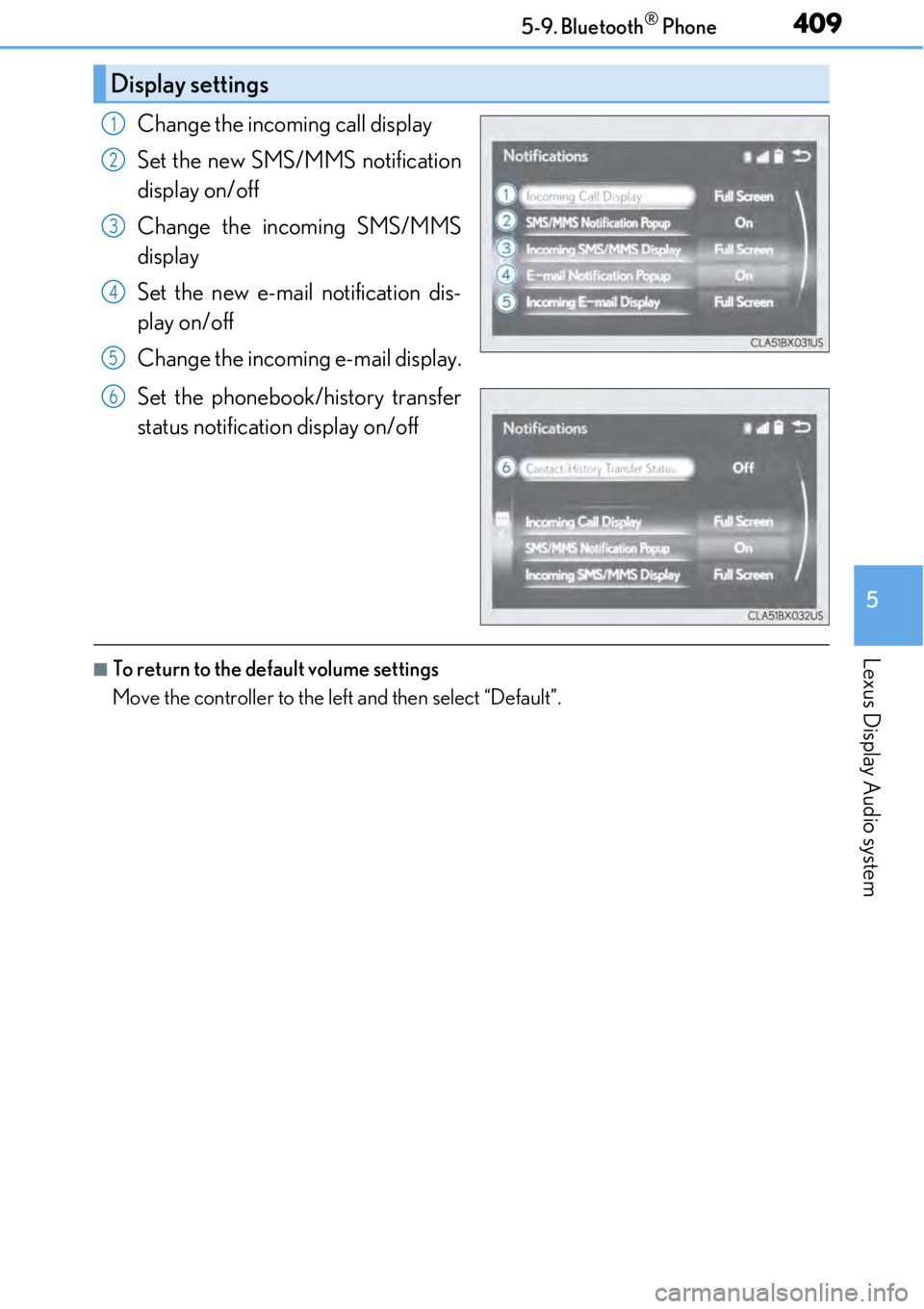
Change the incoming call display
Set the new SMS/MMS notification
display on/off
Change the incoming SMS/MMS
display
Set the new e-mail notification dis-
play on/off
Change the incoming e-mail display.
Set the phonebook/history transfer
status notification display on/off
■To return to the default volume settings
Move the controller to the left and then select “Default”.
Display settings
1
2
3
4
5
6
Page 411 of 724
4115-10. Phonebook
5
Lexus Display Audio system
■Return to the default settings
Move the controller to the left and select “Default”.
You can transfer the phone numbers in your Bluetooth® phone to the system.
Operation methods differ between PBAP compatible and PBAP incompatible
Bluetooth
® phones. If your cellular phone does not support either PBAP or
OPP services, you canno t transfer contacts.
For PBAP compatible Bluetooth® phones
Go to “Automatic Transfer”: “MENU” button → “Setup” → “Phone” → “Con-
tacts/Call History” → “Automatic Transfer”
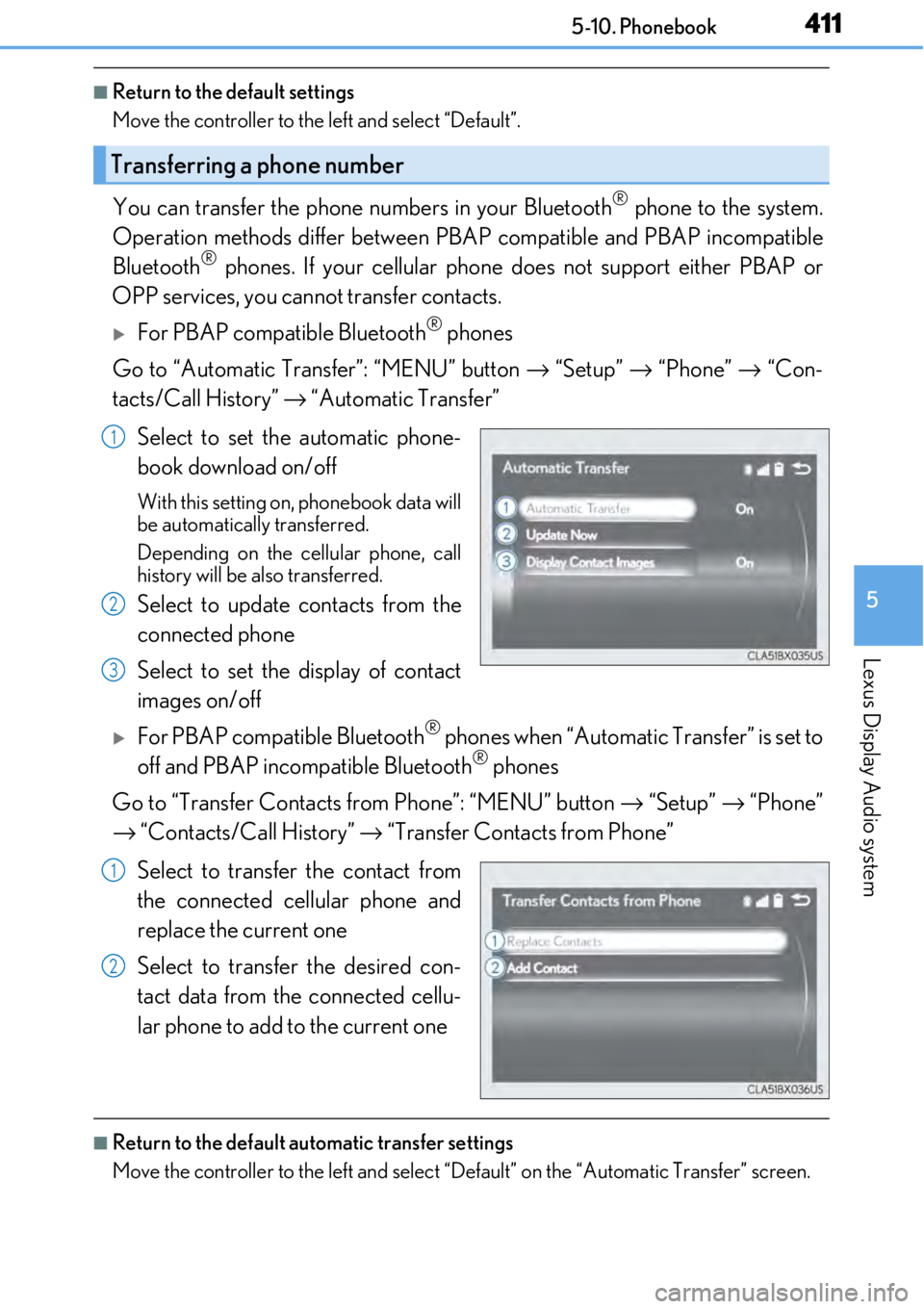
Select to set the automatic phone-
book download on/off
With this setting on, phonebook data will
be automatically transferred.
Depending on the cellular phone, call
history will be also transferred.
Select to update contacts from the
connected phone
Select to set the display of contact
images on/off
For PBAP compatible Bluetooth® phones when “Automatic Transfer” is set to
off and PBAP incompatible Bluetooth® phones
Go to “Transfer Contacts from Phone”: “MENU” button → “Setup” → “Phone”
→ “Contacts/Call History” → “Transfer Contacts from Phone”
Select to transfer the contact from
the connected cellular phone and
replace the current one
Select to transfer the desired con-
tact data from the connected cellu-
lar phone to add to the current one
■Return to the default automatic transfer settings
Move the controller to the left and select “D efault” on the “Automatic Transfer” screen.
Transferring a phone number
1
2
3
1
2
Page 413 of 724
4135-10. Phonebook
5
Lexus Display Audio system
Go to “Messaging”: “MENU” button → “Setup” → “Phone” → “Messaging”
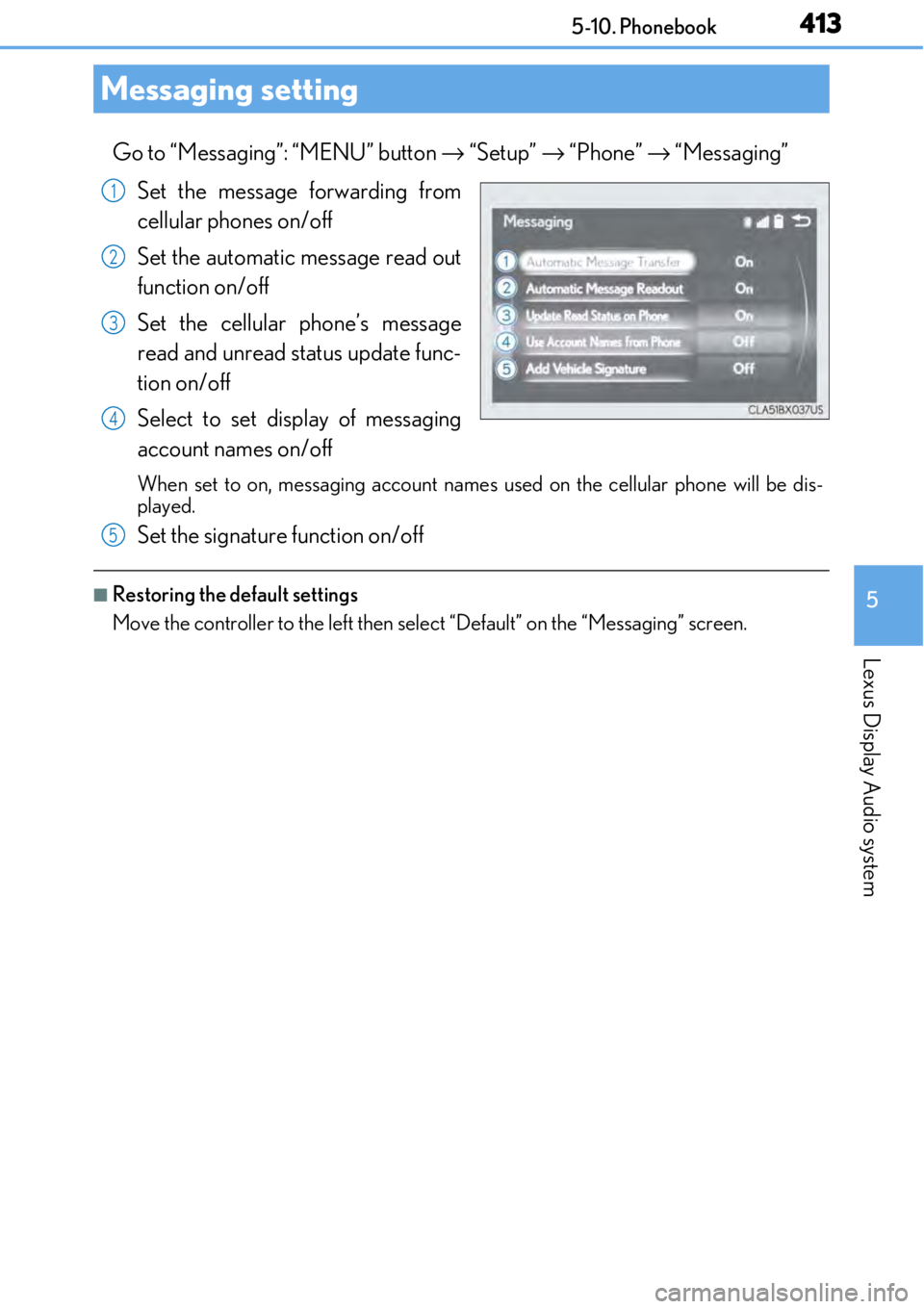
Set the message forwarding from
cellular phones on/off
Set the automatic message read out
function on/off
Set the cellular phone’s message
read and unread status update func-
tion on/off
Select to set display of messaging
account names on/off
When set to on, messaging account names used on the cellular phone will be dis-
played.
Set the signature function on/off
■Restoring the default settings
Move the controller to the left then select “Default” on the “Messaging” screen.
Messaging setting
1
2
3
4
5
Page 428 of 724
4285-12. Other function
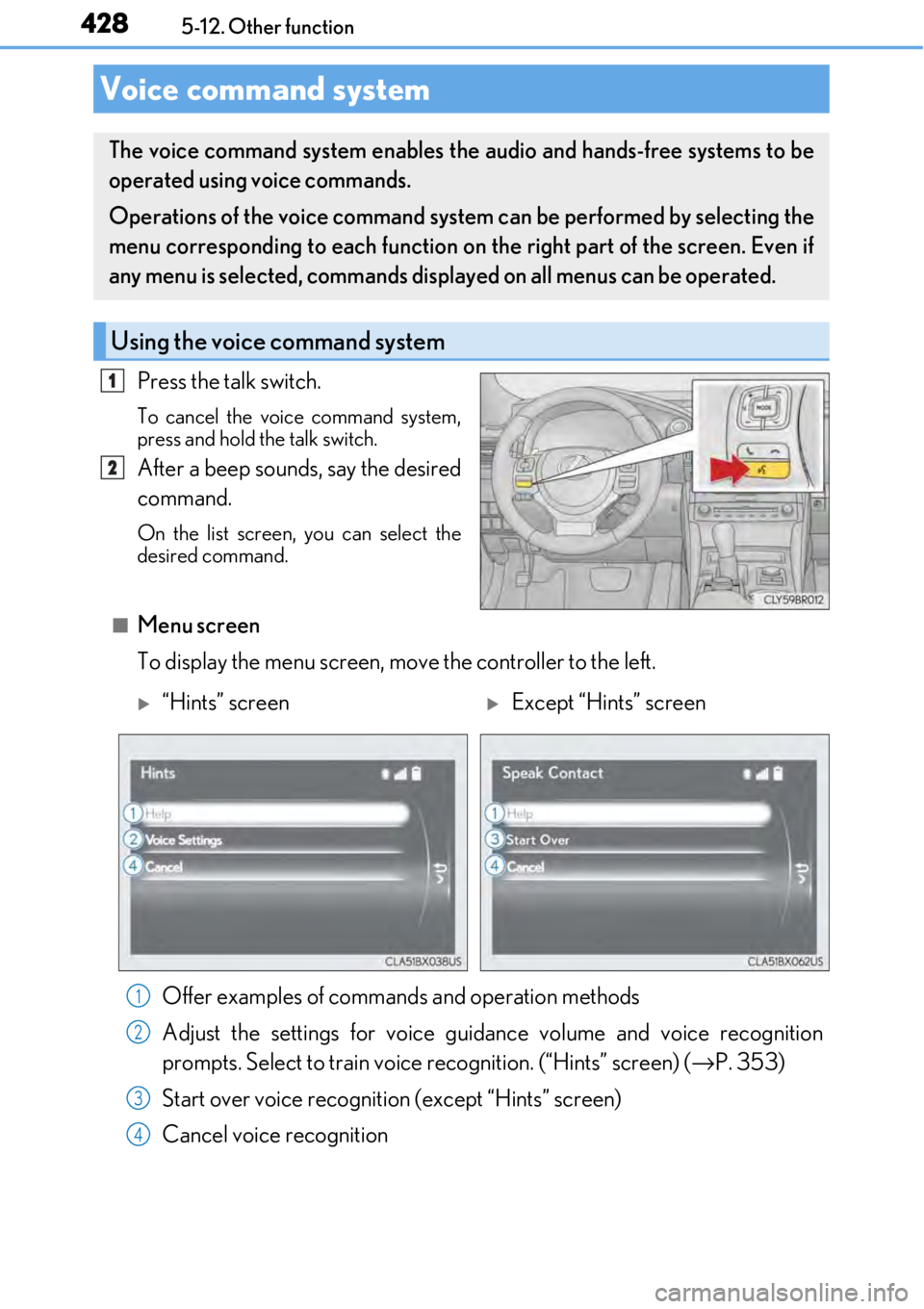
Press the talk switch.
To cancel the voice command system,
press and hold the talk switch.
After a beep sounds, say the desired
command.
On the list screen, you can select the
desired command.
■Menu screen
To display the menu screen, move the controller to the left.
Voice command system
The voice command system enables the audio and hands-free systems to be
operated using voice commands.
Operations of the voice command system can be performed by selecting the
menu corresponding to each function on the right part of the screen. Even if
any menu is selected, commands displayed on all menus can be operated.
Using the voice command system
1
2
“Hints” screenExcept “Hints” screen
Offer examples of commands and operation methods
Adjust the settings for voice guidance volume and voice recognition
prompts. Select to train voice recognition. (“Hints” screen) (→ P. 353)
Start over voice recognition (except “Hints” screen)
Cancel voice recognition
1
2
3
4
Page 673 of 724
673
9
Vehicle specifications
9-2. Customization
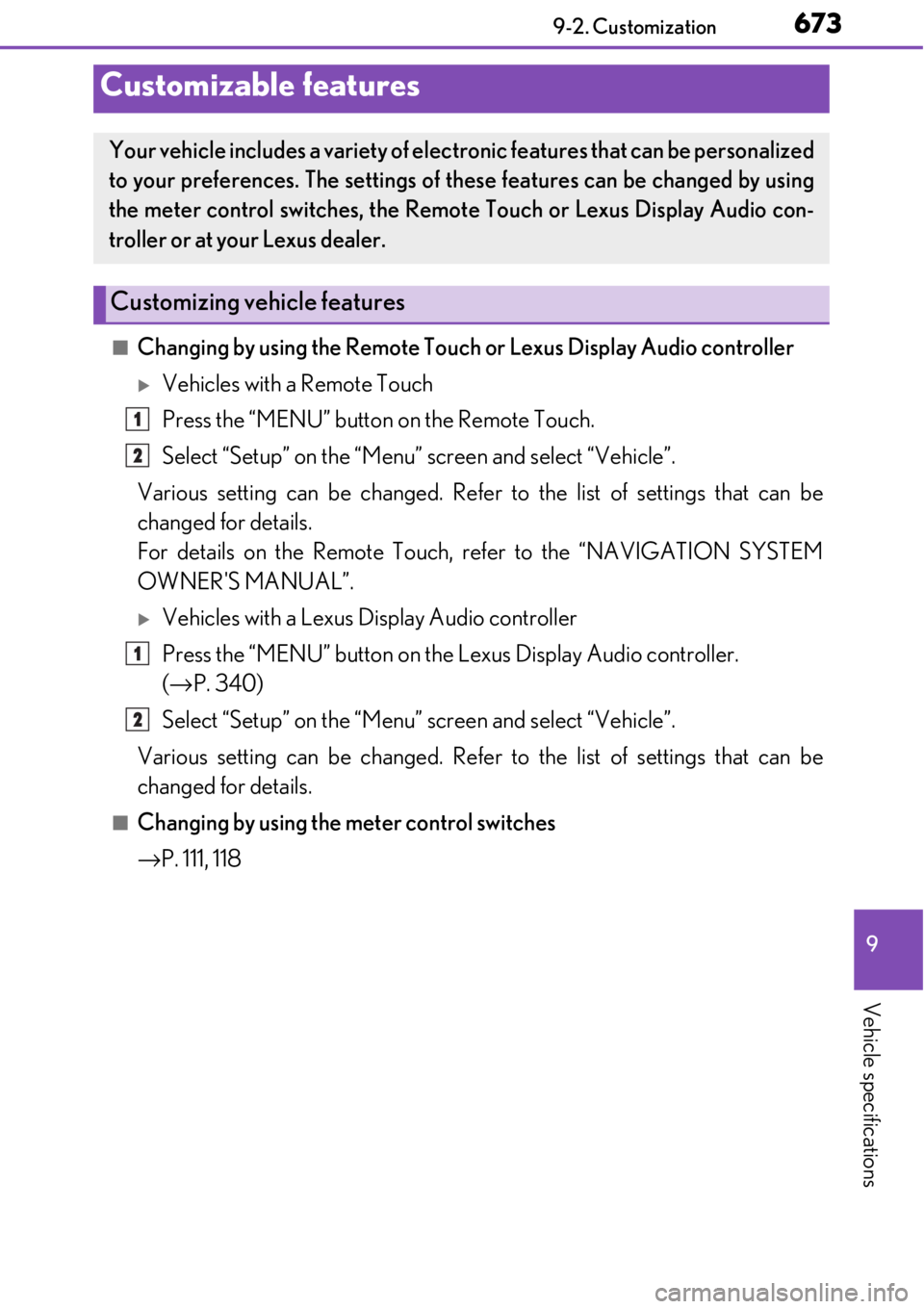
■Changing by using the Remote Touch or Lexus Display Audio controller
Vehicles with a Remote Touch
Press the “MENU” button on the Remote Touch.
Select “Setup” on the “Menu” screen and select “Vehicle”.
Various setting can be changed. Refer to the list of settings that can be
changed for details.
For details on the Remote Touch, refer to the “NAVIGATION SYSTEM
OWNER'S MANUAL”.
Vehicles with a Lexus Display Audio controller
Press the “MENU” button on the Lexus Display Audio controller.
(→ P. 340)
Select “Setup” on the “Menu” screen and select “Vehicle”.
Various setting can be changed. Refer to the list of settings that can be
changed for details.
■Changing by using the meter control switches
→ P. 111, 118
Customizable features
Your vehicle includes a variety of elec tronic features that can be personalized
to your preferences. The settings of these features can be changed by using
the meter control switches, the Remote Touch or Lexus Display Audio con-
troller or at your Lexus dealer.
Customizing vehicle features
1
2
1
2
Page 674 of 724
6749-2. Customization
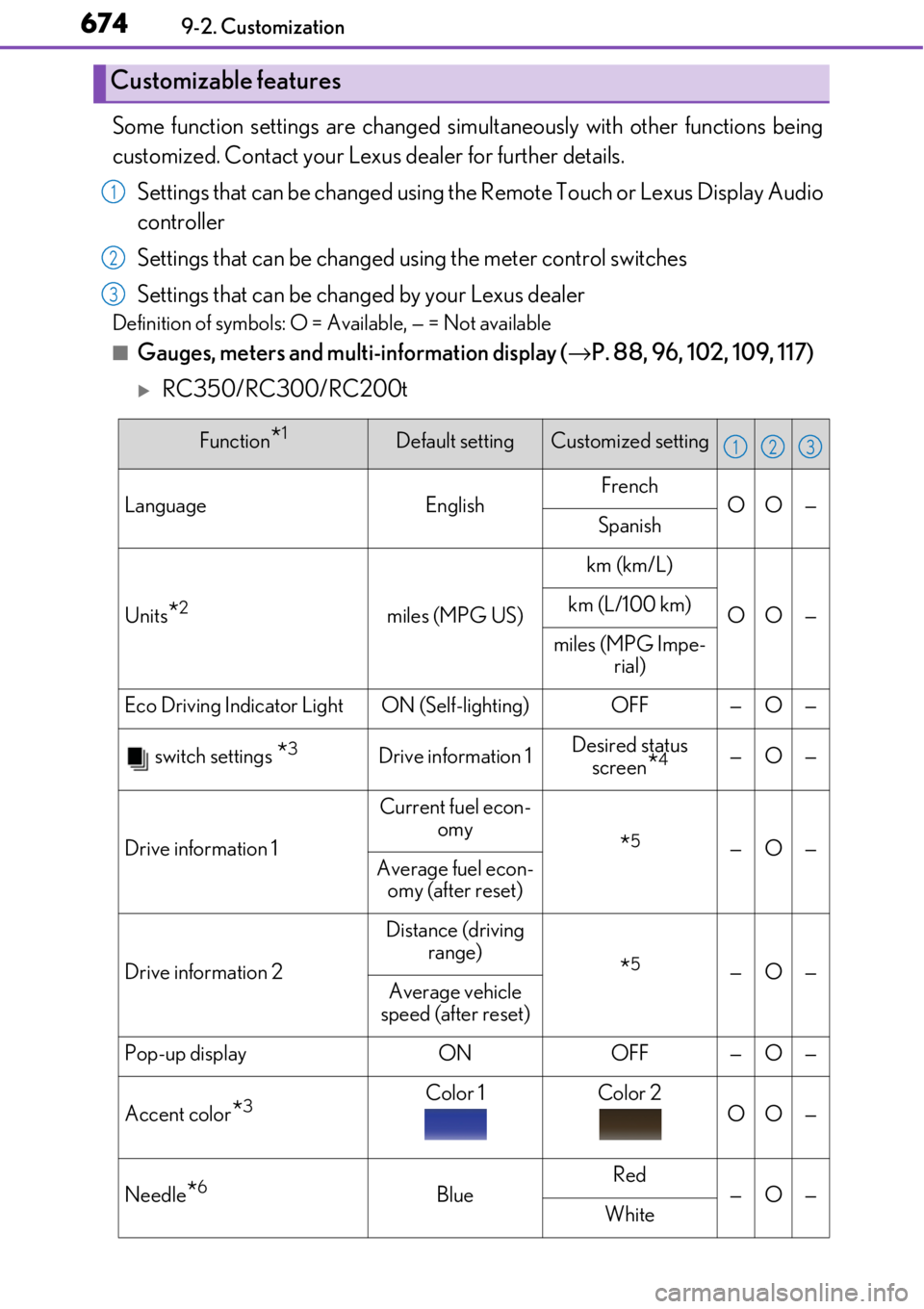
Some function settings are changed simultaneously with other functions being
customized. Contact your Lexus dealer for further details.
Settings that can be changed using th e Remote Touch or Lexus Display Audio
controller
Settings that can be changed using the meter control switches
Settings that can be changed by your Lexus dealer
Definition of symbols: O = Available, — = Not available
■Gauges, meters and multi-information display ( →P. 88, 96, 102, 109, 117)
RC350/RC300/RC200t
Customizable features
1
2
3
Function*1Default settingCustomized setting
LanguageEnglishFrenchOO—Spanish
Units*2miles (MPG US)
km (km/L)
OO—km (L/100 km)
miles (MPG Impe-
rial)
Eco Driving Indicator LightON (Self-lighting)OFF—O—
switch settings *3Drive information 1Desired status screen
*4—O—
Drive information 1
Current fuel econ- omy
*5—O—Average fuel econ-
omy (after reset)
Drive information 2
Distance (driving range)
*5—O—Average vehicle
speed (after reset)
Pop-up displayONOFF—O—
Accent color*3Color 1Color 2OO—
Needle*6BlueRed—O—White
123