warning lights LEXUS RC350 2018 User Guide
[x] Cancel search | Manufacturer: LEXUS, Model Year: 2018, Model line: RC350, Model: LEXUS RC350 2018Pages: 636, PDF Size: 6.92 MB
Page 83 of 636
83
Instrument cluster2
RC350_RC300 AWD_RC300_RC F_U(OM24748U)
2. Instrument cluster
Warning lights and indicators ....................................... 84
Gauges and meters (RC350/RC300)......................91
Gauges and meters (RC F) ...... 96
Multi-information display (RC350/RC300).................. 103
Multi-information display (RC F) .............................................118
Fuel consumption information ................................. 135
Page 84 of 636
84
RC350_RC300 AWD_RC300_RC F_U(OM24748U)
2. Instrument cluster
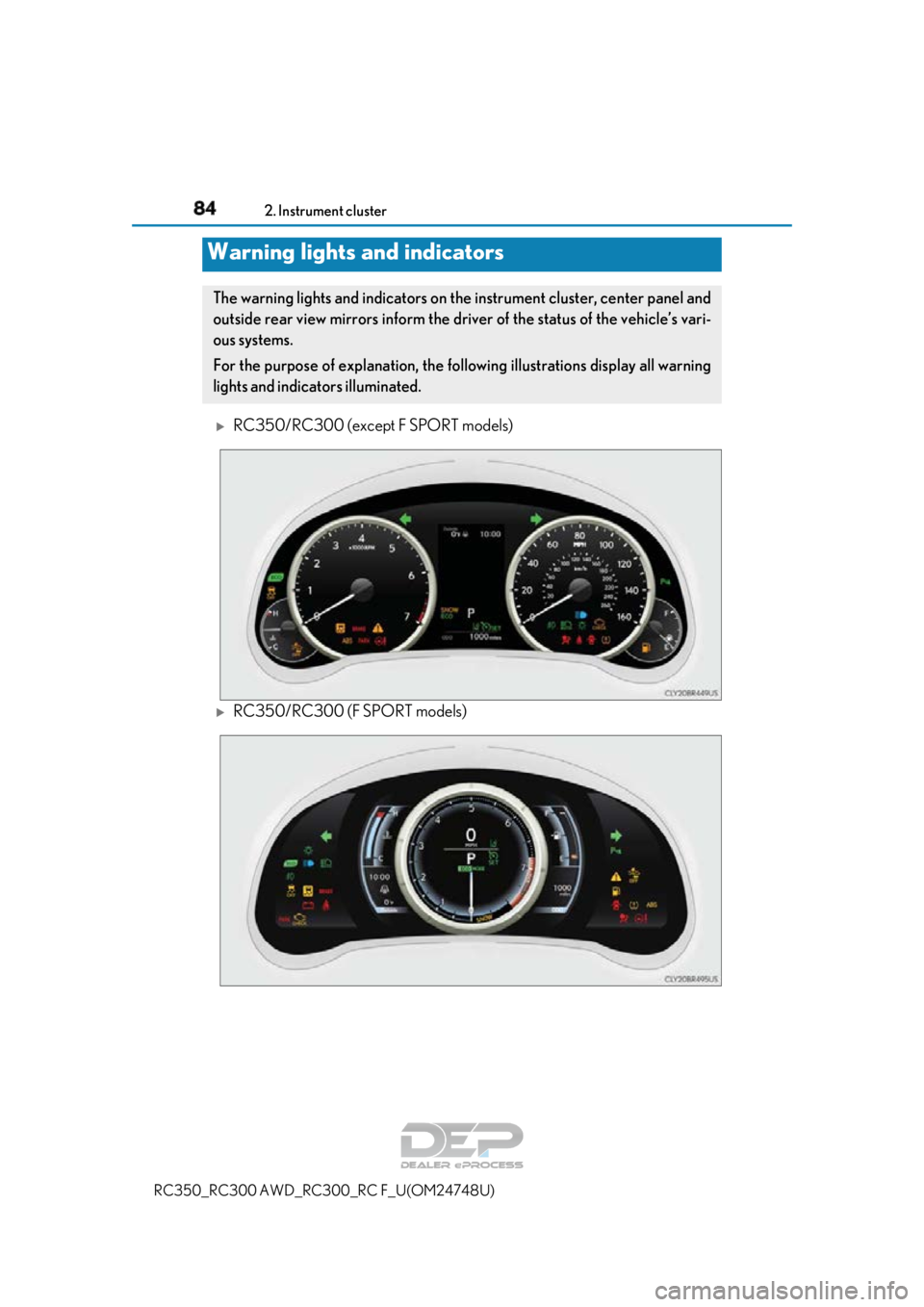
RC350/RC300 (except F SPORT models)
RC350/RC300 (F SPORT models)
Warning lights and indicators
The warning lights and indicators on the instrument cluster, center panel and
outside rear view mirrors inform the driver of the status of the vehicle’s vari-
ous systems.
For the purpose of explanation, the following illustrations display all warning
lights and indicators illuminated.
Page 86 of 636
862. Instrument cluster
RC350_RC300 AWD_RC3 00_RC F_U(OM24748U)
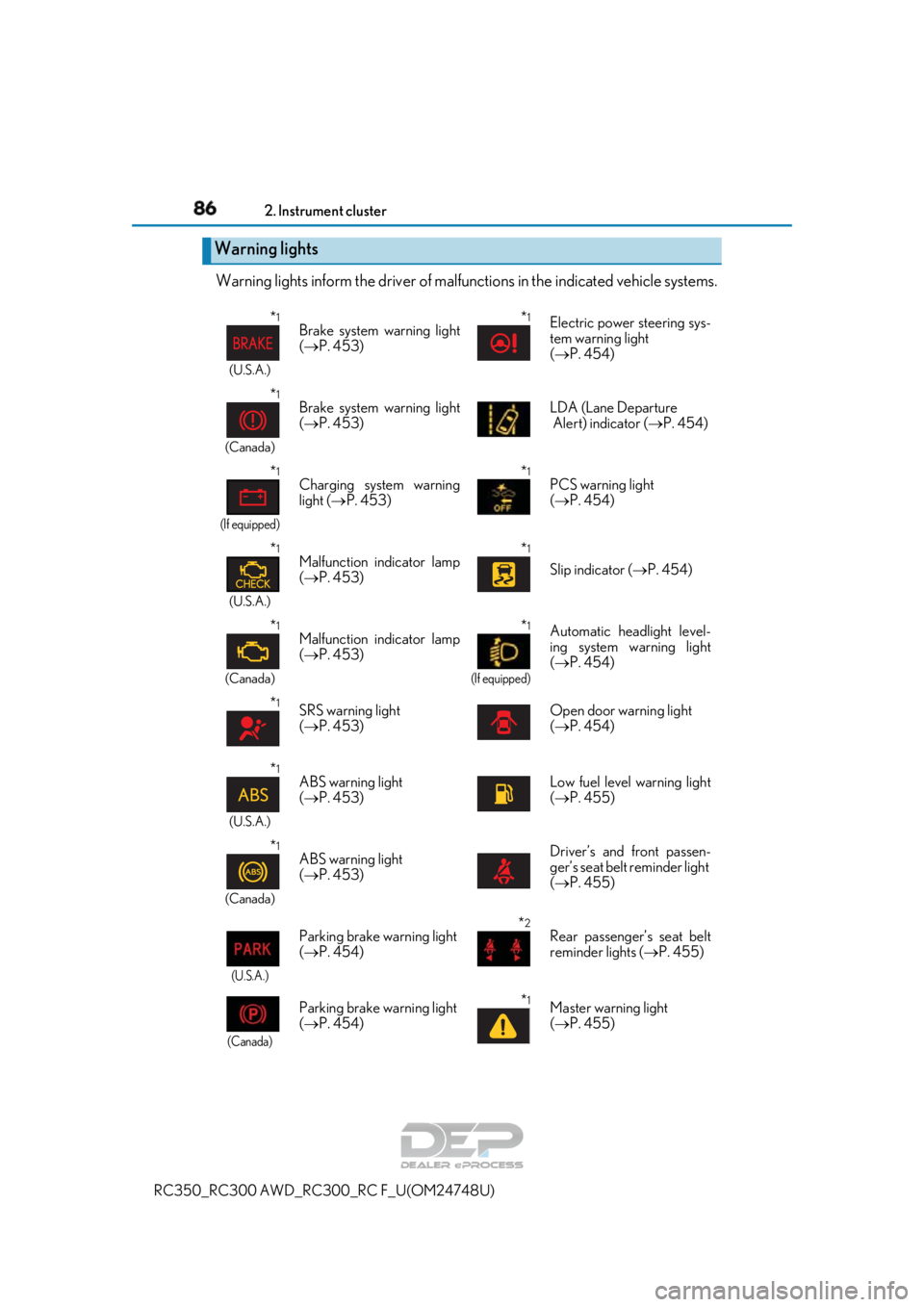
Warning lights inform the driver of malfunctions in the indicated vehicle systems.
Warning lights
*1
(U.S.A.)
Brake system warning light
( P. 453)*1Electric power steering sys-
tem warning light
( P. 454)
*1
(Canada)
Brake system warning light
( P. 453) LDA (Lane Departure
Alert) indicator (
P. 454)
*1
(If equipped)
Charging system warning
light ( P. 453)*1PCS warning light
( P. 454)
*1
(U.S.A.)
Malfunction indicator lamp
( P. 453)*1
Slip indicator ( P. 454)
*1
(Canada)
Malfunction indicator lamp
( P. 453)*1
(If equipped)
Automatic headlight level-
ing system warning light
( P. 454)
*1SRS warning light
( P. 453)Open door warning light
( P. 454)
*1
(U.S.A.)
ABS warning light
( P. 453)Low fuel level warning light
( P. 455)
*1
(Canada)
ABS warning light
( P. 453)Driver’s and front passen-
ger’s seat belt reminder light
( P. 455)
(U.S.A.)
Parking brake warning light
( P. 454)*2Rear passenger’s seat belt
reminder lights ( P. 455)
(Canada)
Parking brake warning light
( P. 454)*1Master warning light
( P. 455)
Page 87 of 636
872. Instrument cluster
2
Instrument cluster
RC350_RC300 AWD_RC300_RC F_U(OM24748U)
*1: These lights turn on when the engine switch is turned to IGNITION ON mode to
indicate that a system check is being performed. They will turn off after the engine is
started, or after a few seconds. There may be a malfunction in a system if a light does
not come on, or turn off. Have the ve hicle inspected by your Lexus dealer.
*2: This light illuminates on the center panel.
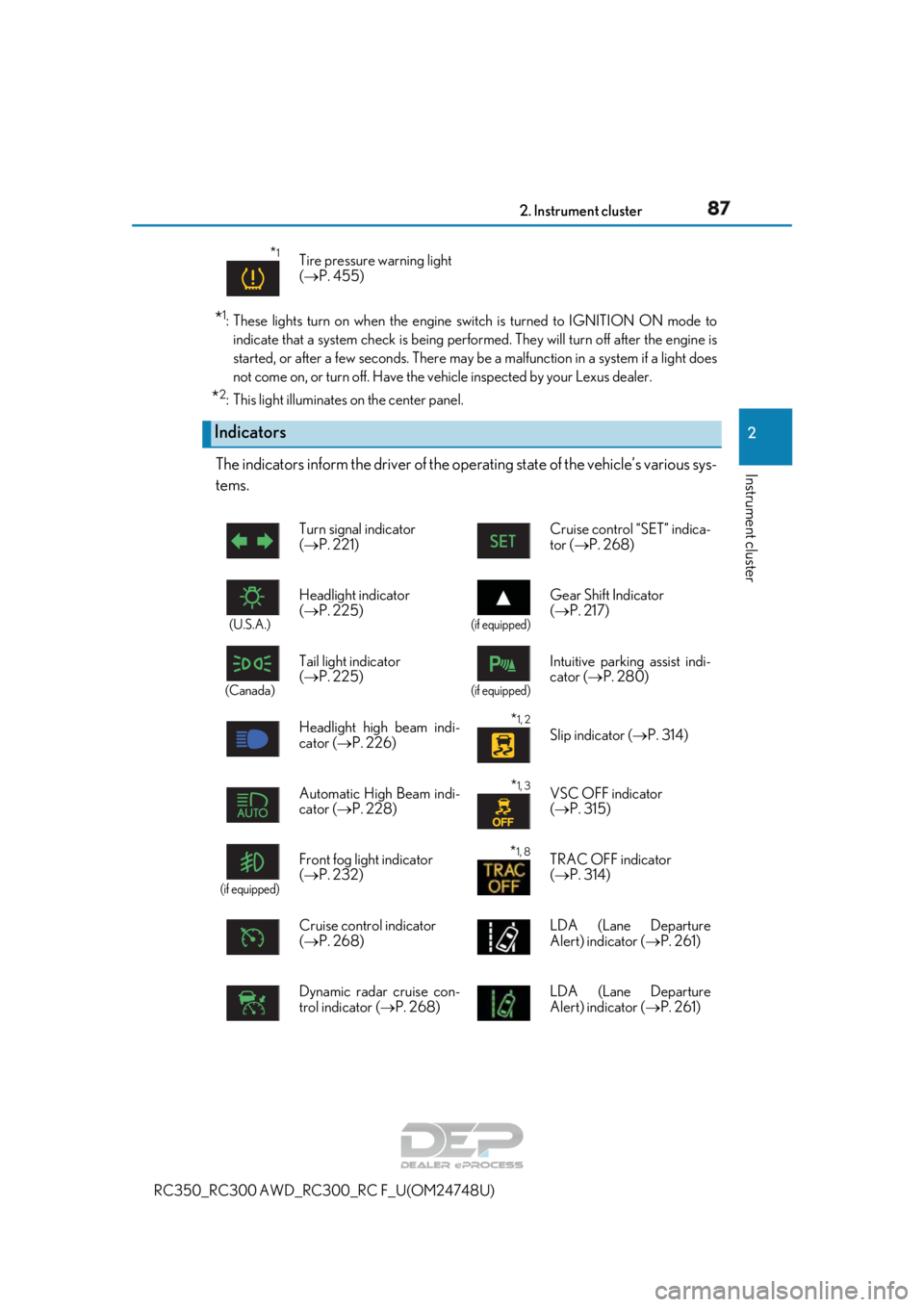
The indicators inform the driver of the op erating state of the vehicle’s various sys-
tems.
*1Tire pressure warning light
( P. 455)
Indicators
Turn signal indicator
( P. 221) Cruise control “SET” indica-
tor (P. 268)
(U.S.A.)
Headlight indicator
(
P. 225)
(if equipped)
Gear Shift Indicator
( P. 217)
(Canada)
Tail light indicator
( P. 225)
(if equipped)
Intuitive parkin g assist indi-
cator ( P. 280)
Headlight high beam indi-
cator ( P. 226)
*1, 2 Slip indicator ( P. 314)
Automatic High Beam indi-
cator ( P. 228)
*1, 3VSC OFF indicator
( P. 315)
(if equipped)
Front fog light indicator
( P. 232)*1, 8TRAC OFF indicator
( P. 314)
Cruise control indicator
( P. 268) LDA (Lane Departure
Alert) indicator (
P. 261)
Dynamic radar cruise con-
trol indicator ( P. 268) LDA (Lane Departure
Alert) indicator (
P. 261)
Page 228 of 636
2284-3. Operating the lights and wipers
RC350_RC300 AWD_RC3 00_RC F_U(OM24748U)
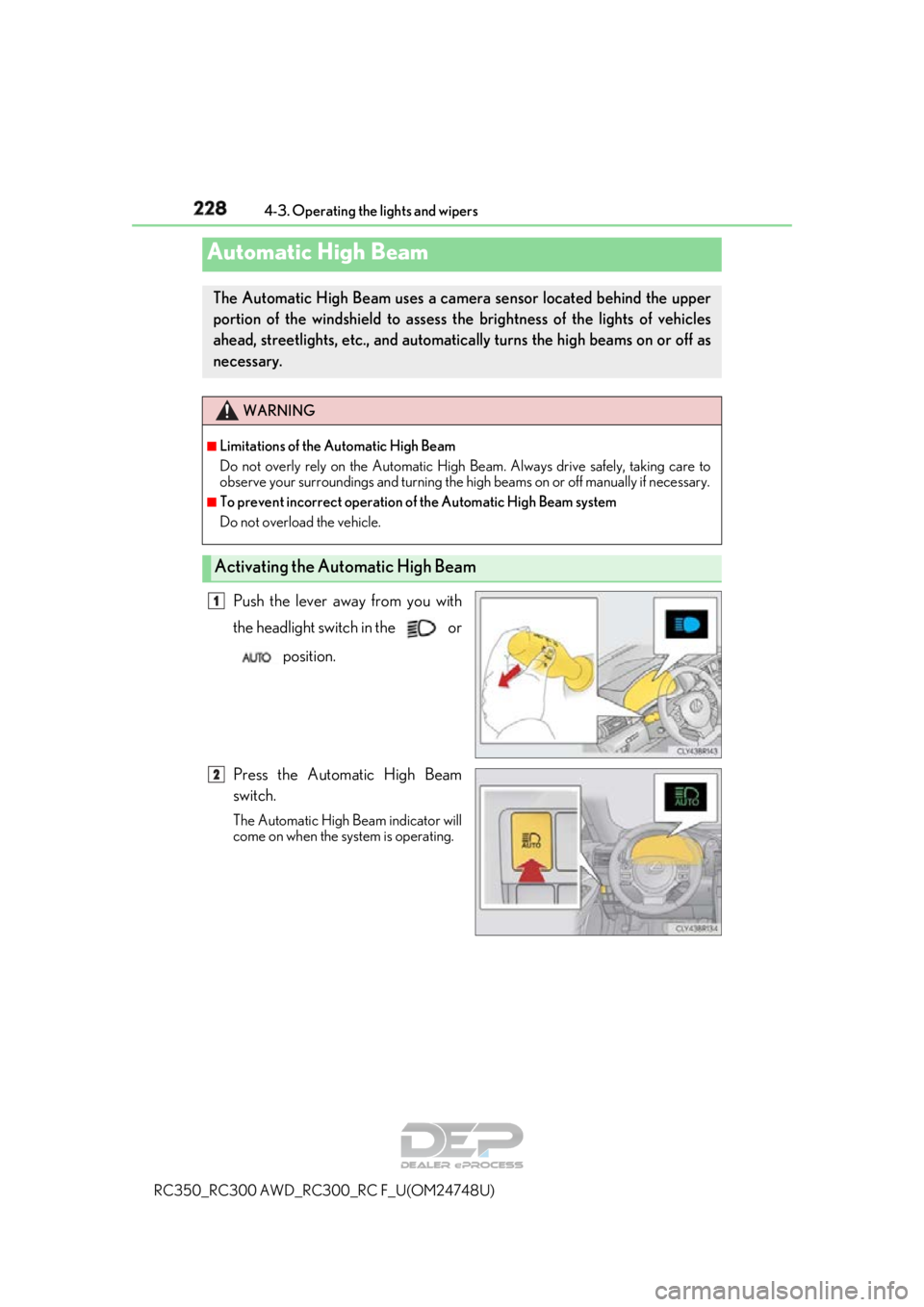
Push the lever away from you with
the headlight switch in the or
position.
Press the Automatic High Beam
switch.
The Automatic High Beam indicator will
come on when the system is operating.
Automatic High Beam
The Automatic High Beam uses a came ra sensor located behind the upper
portion of the windshield to assess the brightness of the lights of vehicles
ahead, streetlights, etc., and automatica lly turns the high beams on or off as
necessary.
WARNING
■Limitations of the Automatic High Beam
Do not overly rely on the Automatic High Beam. Always drive safely, taking care to
observe your surroundings and turning the hi gh beams on or off manually if necessary.
■To prevent incorrect operation of the Automatic High Beam system
Do not overload the vehicle.
Activating the Automatic High Beam
1
2
Page 240 of 636
2404-3. Operating the lights and wipers
RC350_RC300 AWD_RC3 00_RC F_U(OM24748U)
WARNING
■Caution regarding the use of windshield wipers in AUTO mode
The windshield wipers may operate unexpectedly if the sensor is touched or the wind-
shield is subject to vibration in AUTO mode. Take care that your fingers or anything
else do not become caught in the windshield wipers.
■Caution regarding the use of washer fluid
When it is cold, do not use the washer fl uid until the windshield becomes warm. The
fluid may freeze on the windshield and cause lo w visibility. This may lead to an accident,
resulting in death or serious injury.
NOTICE
■When the windshield is dry
Do not use the wipers, as they may damage the windshield.
■When there is no washer fluid spray from the nozzle
Damage to the washer fluid pump may be cau sed if the lever is pulled toward you and
held continually.
■When a nozzle becomes blocked
In this case, contact your Lexus dealer.
Do not try to clear it with a pin or other object. The nozzle will be damaged.
Page 249 of 636
2494-5. Using the driving support systems
4
Driving
RC350_RC300 AWD_RC300_RC F_U(OM24748U)
WARNING
●Do not attach window tinting to the windshield.
●Replace the windshield if it is damaged or cracked.
If the windshield needs to be re placed, contact your Lexus dealer.
●Do not get the camera sensor wet.
●Do not allow bright lights to shine into the camera sensor.
●Do not dirty or damage the camera sensor.
When cleaning the inside of the windshield , do not allow glass cleaner to contact the
lens. Also, do not touch the lens.
If the lens is dirty or damaged, contact your Lexus dealer.
●Do not subject the camera sensor to a strong impact.
●Do not change the installation position or direction of the camera sensor or remove it.
●Do not disassemble the camera sensor.
●Do not modify any components of the vehi cle around the camera sensor (inside rear
view mirror, et c.) or ceiling.
●Do not attach any accessories that may obstruct the camera sensor to the hood, front
grille or front bumper. Contact your Lexus dealer for details.
●If a surfboard or other long object is to be mounted on the roof, make sure that it will
not obstruct the camera sensor.
●Do not modify the head lights or other lights.
Page 263 of 636
2634-5. Using the driving support systems
4
Driving
RC350_RC300 AWD_RC300_RC F_U(OM24748U)
WARNING
■Before using LDA system
Do not rely solely upon the LDA system. The LDA system does not automatically drive
the vehicle or reduce the amount of attention that must be paid to the area in front of
the vehicle. The driver must always assume full responsibility for driving safely by pay-
ing careful attention to the surrounding cond itions and operating the steering wheel to
correct the path of the vehicle. Also, the driver must take adequate breaks when
fatigued, such as from driving for a long period of time.
Failure to perform appropriate driving operat ions and pay careful attention may lead to
an accident, resulting in death or serious injury.
■To avoid operating LDA system by mistake
When not using the LDA system, use the LDA switch to turn the system off.
■Situations unsuitable for LDA system
Do not use the LDA system in the following situations.
The system may not operate properly and lead to an accident, resulting in death or
serious injury.
●A spare tire, tire chains, etc. are equipped.
●When the tires have been excessively worn, or when the tire inflation pressure is low.
●Tires which differ by structure, manufacturer, brand or tread pattern are used.
●Objects or patterns that could be mistaken for white (yellow) lines are present on the
side of the road (guardrails, cu rbs, reflective poles, etc.).
●Vehicle is driven on a snow-covered road.
●White (yellow) lines are difficult to see due to rain, snow, fog, dust, etc.
●Asphalt repair marks, white (yellow) line marks, etc. are present due to road repair.
●Vehicle is driven in a temporary lane or restricted lane due to construction work.
●Vehicle is driven on a road surface which is slippery due to rainy weather, fallen snow,
freezing, etc.
●Vehicle is driven in traffic lanes ot her than on highways and freeways.
●Vehicle is driven in a construction zone.
●During emergency towing
■Preventing LDA system malfunctions and operations performed by mistake
●Do not modify the headlights or place stickers, etc. on the surface of the lights.
●Do not modify the suspension etc. If the suspension etc. needs to be replaced, con-
tact your Lexus dealer.
●Do not install or place anything on the hood or grille. Also, do not install a grille guard
(bull bars, kangaroo bar, etc.).
●If your windshield needs repair s, contact your Lexus dealer.
Page 267 of 636
2674-5. Using the driving support systems
4
Driving
RC350_RC300 AWD_RC300_RC F_U(OM24748U)
■White (yellow) lines are only on one side of road
The LDA system will not operate for the side on which white (yellow) lines could not be
recognized.
■Conditions in which functions may not operate properly
In the following situations, the camera sensor may not detect white (yellow) lines and var-
ious functions may not operate normally.
●There are shadows on the road that run parallel with, or cover, the white (yellow) lines.
●The vehicle is driven in an ar ea without white (yellow) lines, such as in front of a tollgate
or checkpoint, or at an intersection, etc.
●The white (yellow) lines are cracked, “Botts ’ dots”, “Raised pavement marker” or stones
are present.
●The white (yellow) lines cannot be seen or are difficult to see due to sand, etc.
●The vehicle is driven on a road surface that is wet due to rain, puddles, etc.
●The traffic lines are yellow (which may be more difficult to recognize than lines that are
white).
●The white (yellow) lines cross over a curb, etc.
●The vehicle is driven on a bright surface, such as concrete.
●The vehicle is driven on a surface that is bright due to reflected light, etc.
●The vehicle is driven in an area where the brightness changes suddenly, such as at the
entrances and exits of tunnels, etc.
●Light from the headlights of an oncoming vehicle, the sun, etc. enters the camera.
●The vehicle is driven where the road diverges, merges, etc.
●The vehicle is driven on a slope.
●The vehicle is driven on a road which tilts left or right, or a winding road.
●The vehicle is driven on an unpaved or rough road.
●The vehicle is driven around a sharp curve.
●The traffic lane is excessively narrow or wide.
●The vehicle is extremely tilted due to carry ing heavy luggage or having improper tire
pressure.
●The distance to the preceding vehicle is extremely short.
●The vehicle is moving up and down a large am ount due to road conditions during driv-
ing (poor roads or road seams).
●The headlight lenses are dirty and emit a faint amount of light at night, or the beam axis
has deviated.
●The vehicle is struck by a crosswind.
●The vehicle has just changed lane s or crossed an intersection.
●Snow tires, etc. are equipped.
■Warning message
Warning messages are used to indicate a syst em malfunction or to inform the driver of
the need for caution while driving. ( P. 460)
■Customization
Some functions can be customized ( P. 111)
Page 271 of 636
2714-5. Using the driving support systems
4
Driving
RC350_RC300 AWD_RC300_RC F_U(OM24748U)
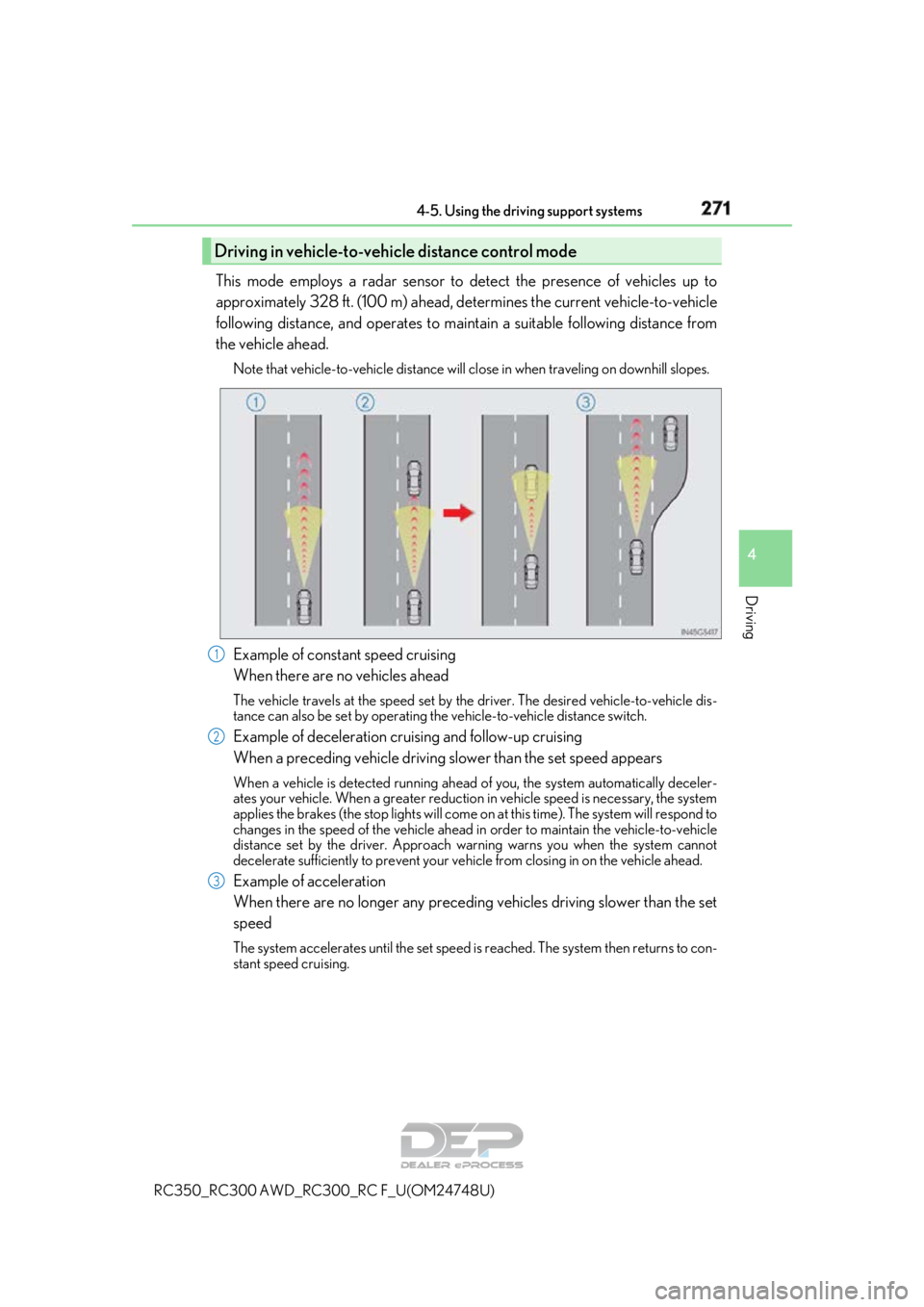
This mode employs a radar sensor to detect the presence of vehicles up to
approximately 328 ft. (100 m) ahead, de termines the current vehicle-to-vehicle
following distance, and operates to main tain a suitable following distance from
the vehicle ahead.
Note that vehicle-to-vehicle distance will cl ose in when traveling on downhill slopes.
Example of constant speed cruising
When there are no vehicles ahead
The vehicle travels at the speed set by the driver. The desired vehicle-to-vehicle dis-
tance can also be set by operating the vehicle-to-vehicle distance switch.
Example of deceleration cruising and follow-up cruising
When a preceding vehicle driving slower than the set speed appears
When a vehicle is detected running ahead of you, the system automatically deceler-
ates your vehicle. When a greater reduction in vehicle speed is necessary, the system
applies the brakes (the stop lights will come on at this time). The system will respond to
changes in the speed of the vehicle ahead in order to maintain the vehicle-to-vehicle
distance set by the driver. Approach warning warns you when the system cannot
decelerate sufficie ntly to prevent your vehicle from closing in on the vehicle ahead.
Example of acceleration
When there are no longer any preceding vehicles driving slower than the set
speed
The system accelerates until the set speed is reached. The system then returns to con-
stant speed cruising.
Driving in vehicle-to-vehicle distance control mode
1
2
3