battery LEXUS RC350 2018 Owner's Manual
[x] Cancel search | Manufacturer: LEXUS, Model Year: 2018, Model line: RC350, Model: LEXUS RC350 2018Pages: 636, PDF Size: 6.92 MB
Page 309 of 636
3094-5. Using the driving support systems
4
Driving
RC350_RC300 AWD_RC300_RC F_U(OM24748U)
WARNING
■When manually operating the active rear wing
Observe the following precautions before operating the active rear wing. Failure to do
so may result in death or serious injury.
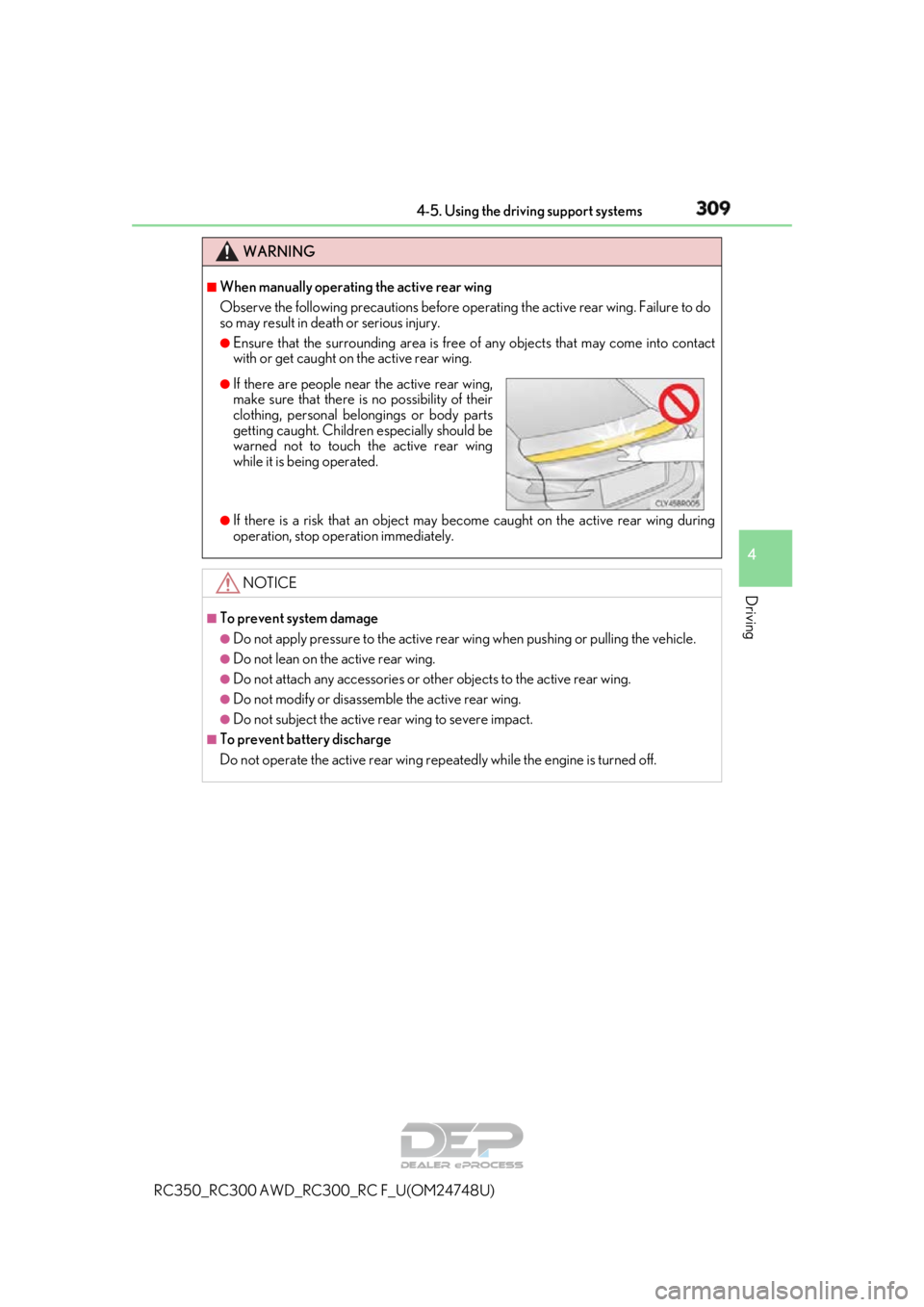
●Ensure that the surrounding area is free of any objects that may come into contact
with or get caught on the active rear wing.
●If there is a risk that an object may become caught on the active rear wing during
operation, stop operation immediately.
NOTICE
■To prevent system damage
●Do not apply pressure to the active rear wing when pushing or pulling the vehicle.
●Do not lean on the active rear wing.
●Do not attach any accessories or other objects to the active rear wing.
●Do not modify or disassemble the active rear wing.
●Do not subject the active rear wing to severe impact.
■To prevent battery discharge
Do not operate the active rear wing repeatedly while the engine is turned off.
●If there are people near the active rear wing,
make sure that there is no possibility of their
clothing, personal belongings or body parts
getting caught. Children especially should be
warned not to touch the active rear wing
while it is be ing operated.
Page 316 of 636
3164-5. Using the driving support systems
RC350_RC300 AWD_RC3 00_RC F_U(OM24748U)
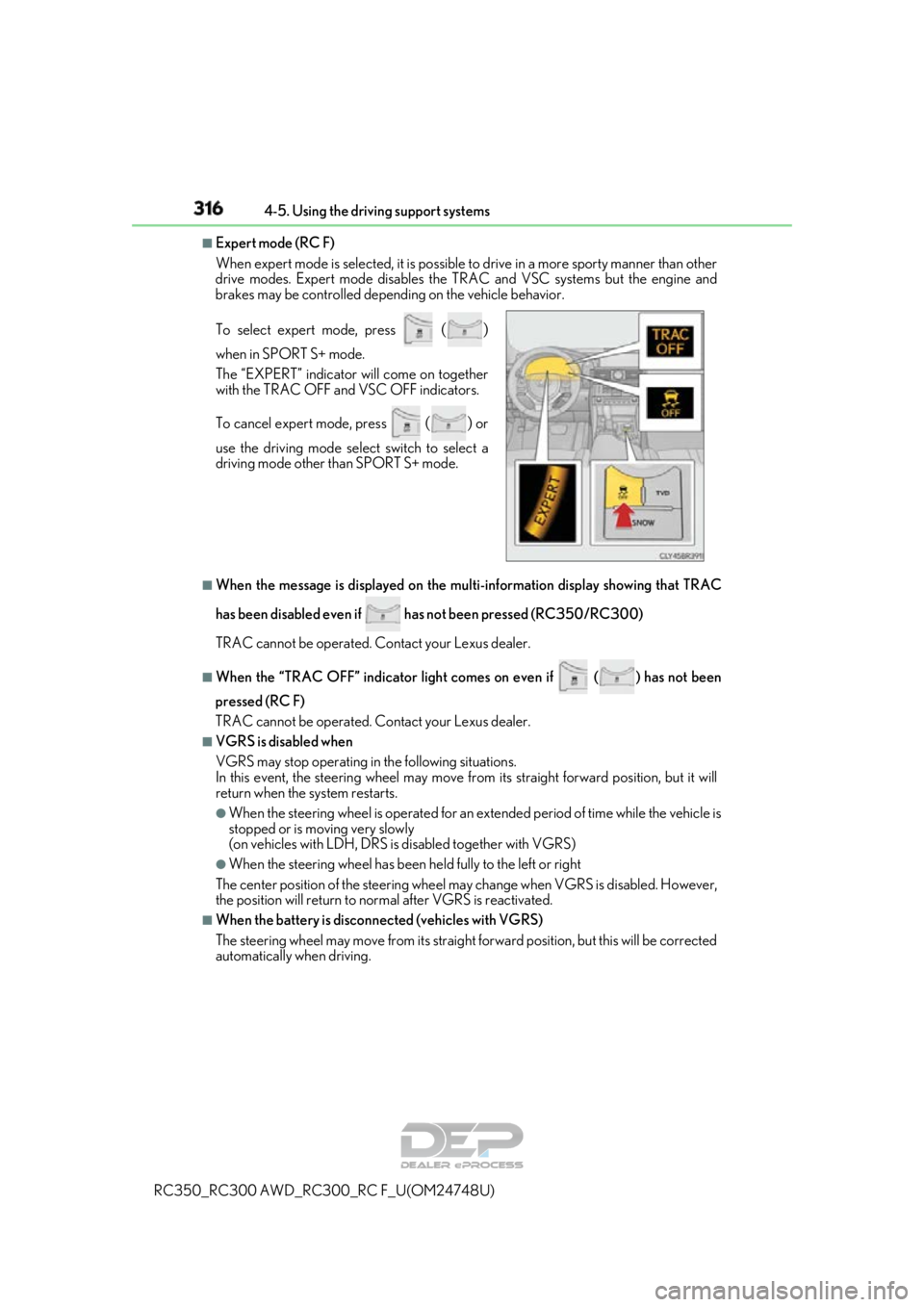
■Expert mode (RC F)
When expert mode is selected, it is possible to drive in a more sp orty manner than other
drive modes. Expert mode disables the TRAC and VSC systems but the engine and
brakes may be controlled depending on the vehicle behavior.
■When the message is displayed on the mu lti-information display showing that TRAC
has been disabled even if has not been pressed (RC350/RC300)
TRAC cannot be operated. Contact your Lexus dealer.
■When the “TRAC OFF” indicator light comes on even if ( ) has not been
pressed (RC F)
TRAC cannot be operated. Contact your Lexus dealer.
■VGRS is disabled when
VGRS may stop operating in the following situations.
In this event, the steering wheel may move from its straight forward position, but it will
return when the system restarts.
●When the steering wheel is operated for an extended period of time while the vehicle is
stopped or is moving very slowly
(on vehicles with LDH, DRS is disabled together with VGRS)
●When the steering wheel has been held fully to the left or right
The center position of the steering wheel may change when VGRS is disabled. However,
the position will return to normal after VGRS is reactivated.
■When the battery is disconnected (vehicles with VGRS)
The steering wheel may move from its straight forward position, but this will be corrected
automatically when driving. To select expert mode, press
()
when in SPORT S+ mode.
The “EXPERT” indicator will come on together
with the TRAC OFF and VSC OFF indicators.
To cancel expert mode, press
() or
use the driving mode sele ct switch to select a
driving mode other than SPORT S+ mode.
Page 320 of 636
320
RC350_RC300 AWD_RC300_RC F_U(OM24748U)
4-6. Driving tips
●Use fluids that are appropriate to
the prevailing outside temperatures.
•Engine oil
• Engine coolant
• Washer fluid
●Have a service technician inspect the condition of the battery.
●Have the vehicle fitted with four snow tires or purchase a set of tire chains for
the rear tires.
*
Ensure that all tires are the specified size and brand, and that chains match the size
of the tires.
*: Tire chains cannot be mounted on vehicles with front and rear tires of differing sizes
and vehicles with LDH and 19-inch tires.
●Use fluids that are appropriate to the prevailing outside temperatures.
•Engine oil
• Engine coolant
• Washer fluid
●Have a service technician inspect the condition of the battery.
●Have the vehicle fitted with four snow tires.
Ensure that all tires are th e specified size and brand.
Winter driving tips
Carry out the necessary preparations an d inspections before driving the vehi-
cle in winter. Always drive the vehicle in a manner appropriate to the prevail-
ing weather conditions.
Preparation for winter (RC350/RC300)
Preparation for winter (RC F)
Page 343 of 636
3435-1. Using the air conditioning system
5
Interior features
RC350_RC300 AWD_RC300_RC F_U(OM24748U)
WARNING
■To prevent the windshield from fogging up
●Do not use during cool air operation in extremely humid weather. The differ-
ence between the temperature of the outside air and that of the windshield can cause
the outer surface of the windshield to fog up, blocking your vision.
■To prevent burns
●Do not touch the rear view mirror surfaces when the outside rear view mirror defog-
gers are on.
●Do not touch the glass at lower part of the windshield or to the side of the front pillars
when the windshield wiper de-icer is on.
NOTICE
■To prevent battery discharge
Do not leave the air conditioni ng system on longer than necessary when the engine is
stopped.
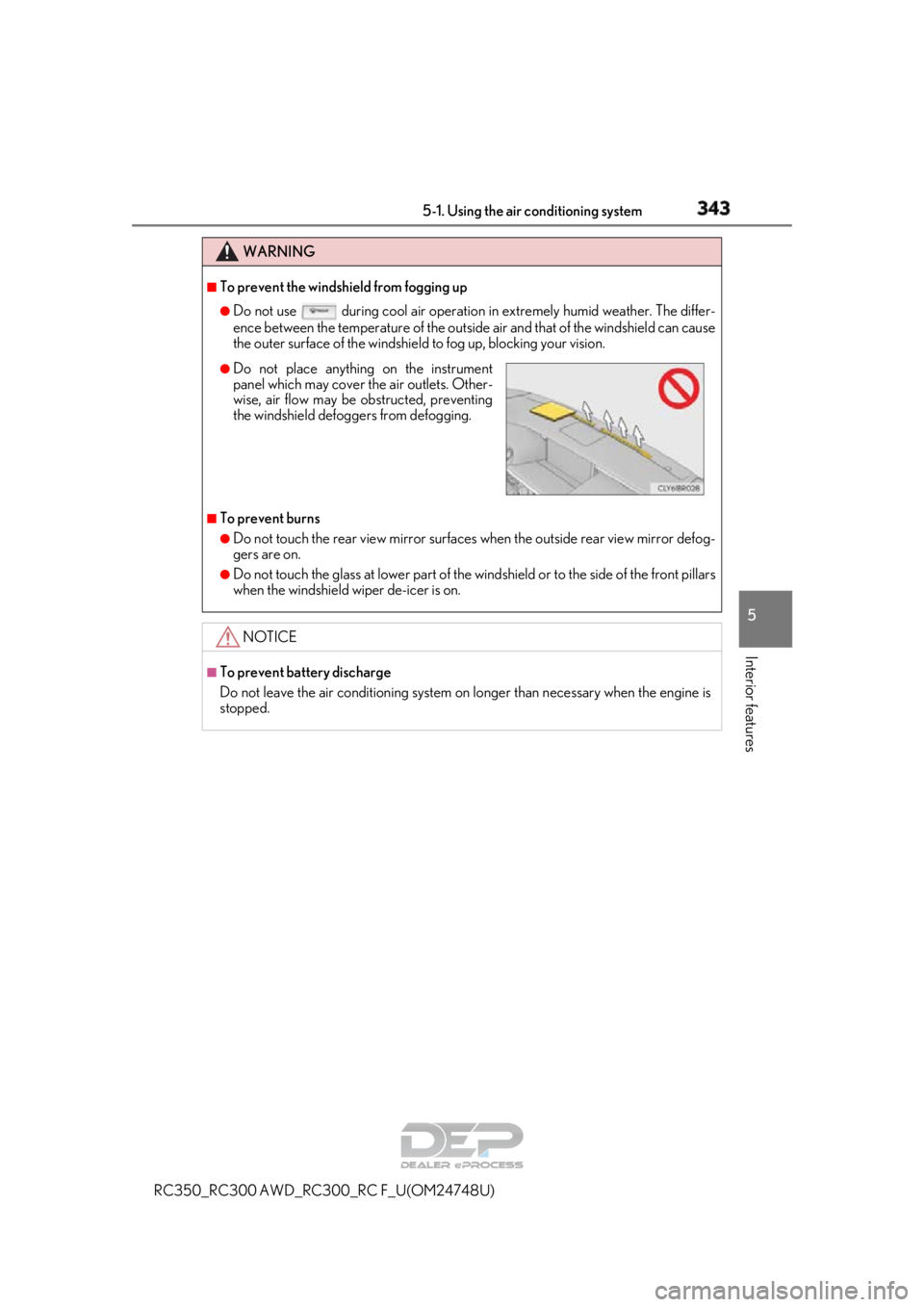
●Do not place anything on the instrument
panel which may cover th e air outlets. Other-
wise, air flow may be obstructed, preventing
the windshield defoggers from defogging.
Page 344 of 636
3445-1. Using the air conditioning system
RC350_RC300 AWD_RC3 00_RC F_U(OM24748U)
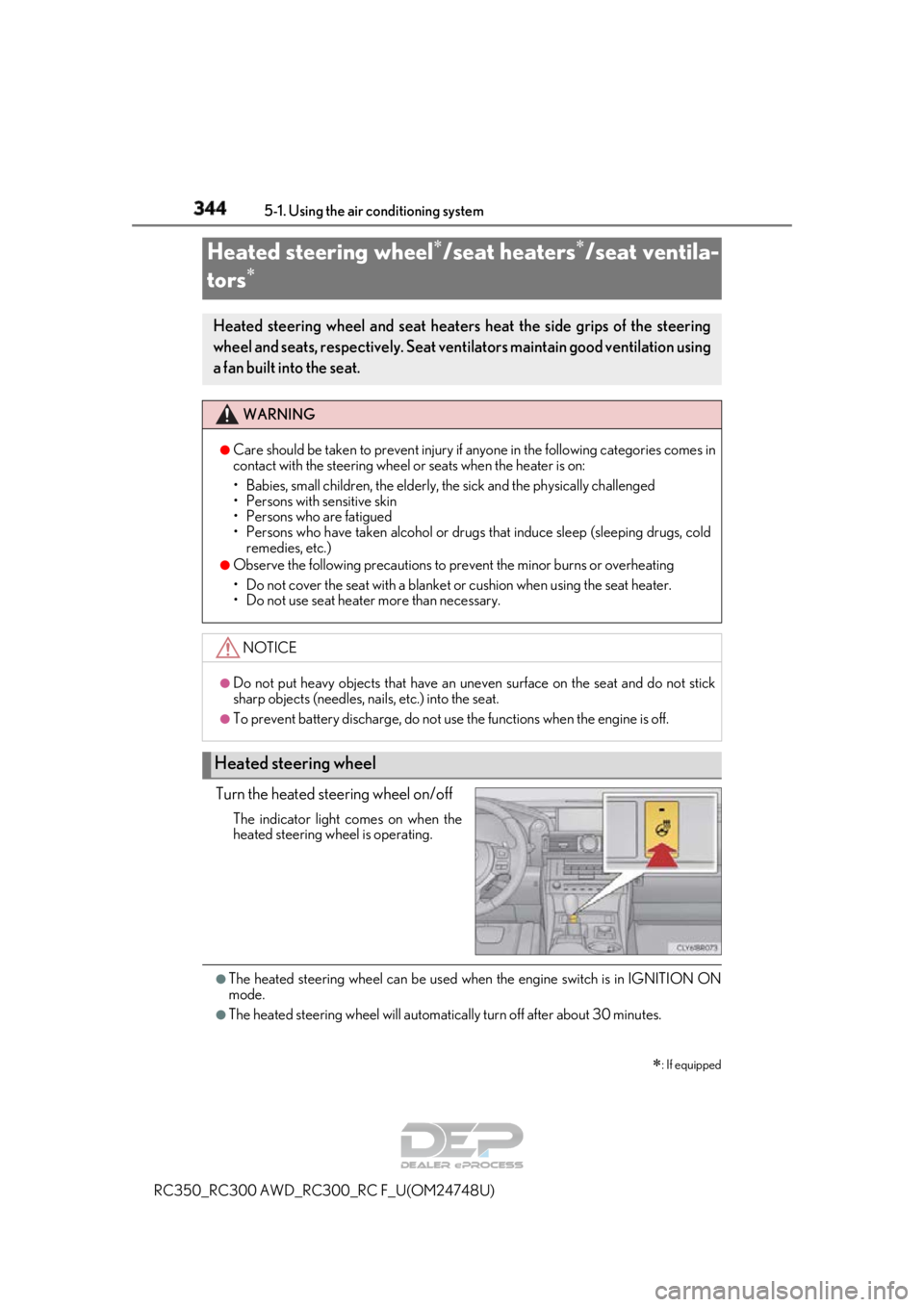
Turn the heated steering wheel on/off
The indicator light comes on when the
heated steering wheel is operating.
●The heated steering wheel can be used when the engine switch is in IGNITION ON
mode.
●The heated steering wheel will automati cally turn off after about 30 minutes.
Heated steering wheel/seat heaters/seat ventila-
tors
: If equipped
Heated steering wheel and seat heaters heat the side grips of the steering
wheel and seats, respectively. Seat ventilators maintain good ventilation using
a fan built into the seat.
WARNING
●Care should be taken to prevent injury if anyone in the following categories comes in
contact with the steering wheel or seats when the heater is on:
• Babies, small children, the elderly, the sick and the physically challenged
• Persons with sensitive skin
• Persons who are fatigued
• Persons who have taken alcohol or drugs that induce sleep (sleeping drugs, cold
remedies, etc.)
●Observe the following precautions to prevent the minor burns or overheating
• Do not cover the seat with a blanket or cushion when using the seat heater.
• Do not use seat heater more than necessary.
NOTICE
●Do not put heavy objects that have an unev en surface on the seat and do not stick
sharp objects (needles, nails, etc.) into the seat.
●To prevent battery discharge, do not us e the functions when the engine is off.
Heated steering wheel
Page 349 of 636
3495-2. Using the interior lights
RC350_RC300 AWD_RC3 00_RC F_U(OM24748U)
5
Interior features
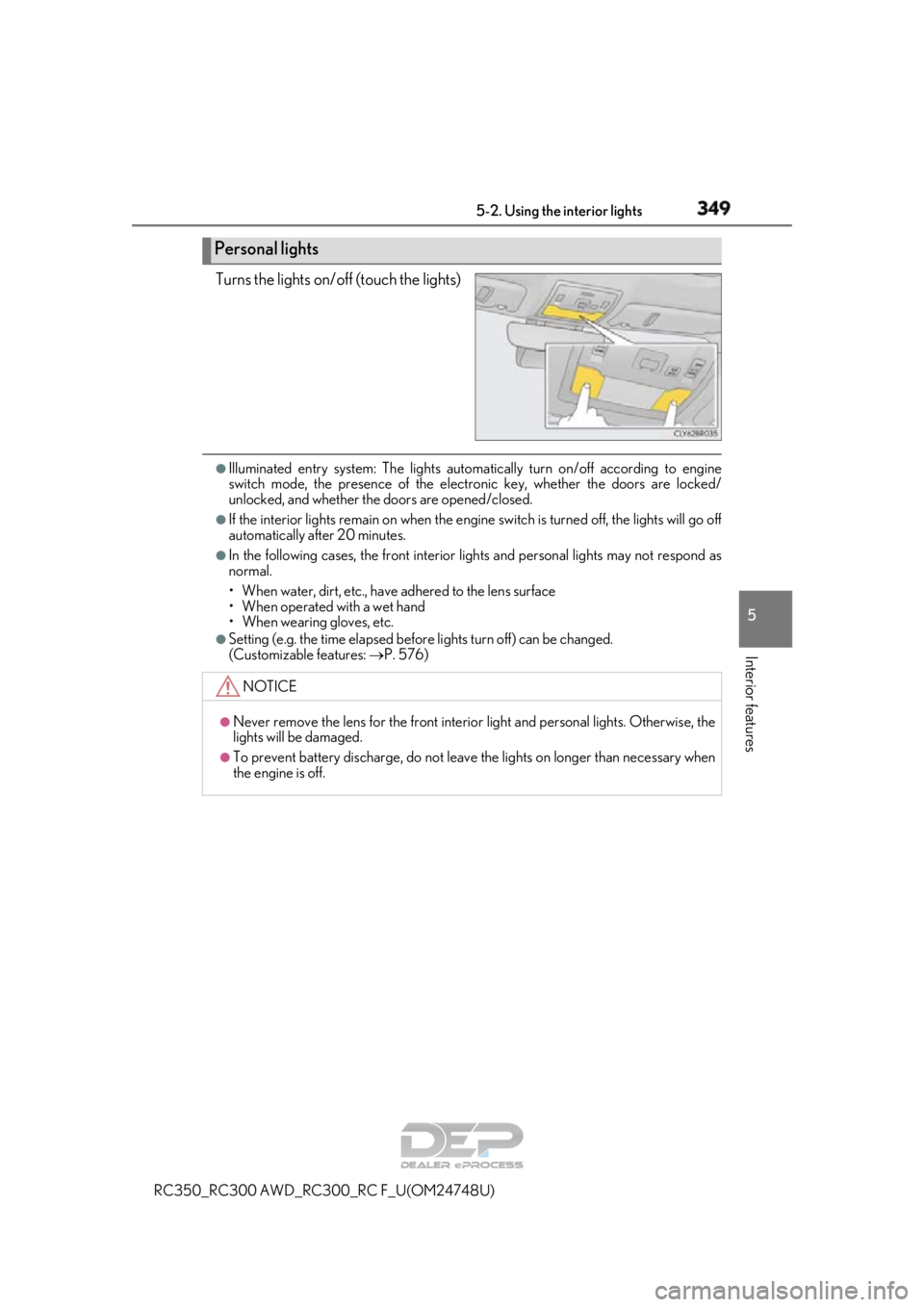
Turns the lights on/off (touch the lights)
●Illuminated entry system: The lights automatically turn on/off according to engine
switch mode, the presence of the electronic key, whether the doors are locked/
unlocked, and whether the doors are opened/closed.
●If the interior lights remain on when the engine switch is turned off, the lights will go off
automatically after 20 minutes.
●In the following cases, the front interior lights and personal lights may not respond as
normal.
• When water, dirt, etc., have adhered to the lens surface
• When operated with a wet hand
• When wearing gloves, etc.
●Setting (e.g. the time elapsed before lights turn off) can be changed.
(Customizable features: P. 576)
Personal lights
NOTICE
●Never remove the lens for the front interior light and personal lights. Otherwise, the
lights will be damaged.
●To prevent battery discharge, do not leave the lights on longer than necessary when
the engine is off.
Page 354 of 636
354
RC350_RC300 AWD_RC300_RC F_U(OM24748U)
5-4. Using the other interior features
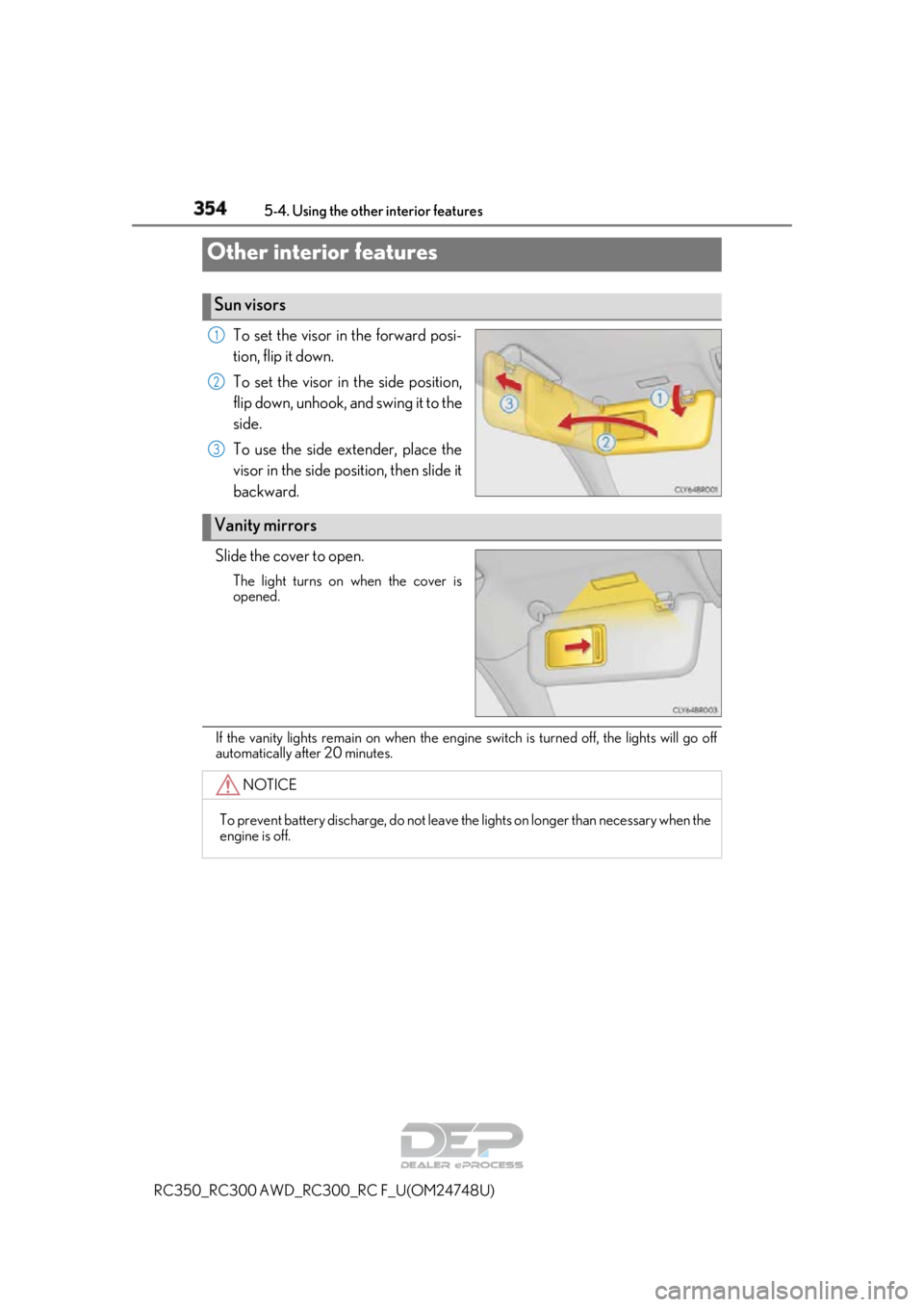
To set the visor in the forward posi-
tion, flip it down.
To set the visor in the side position,
flip down, unhook, and swing it to the
side.
To use the side extender, place the
visor in the side position, then slide it
backward.
Slide the cover to open.
The light turns on when the cover is
opened.
If the vanity lights remain on when the engine switch is turned off, the lights will go off
automatically after 20 minutes.
Other interior features
Sun visors
1
2
3
Vanity mirrors
NOTICE
To prevent battery discharge, do not leave th e lights on longer than necessary when the
engine is off.
Page 356 of 636
3565-4. Using the other interior features
RC350_RC300 AWD_RC3 00_RC F_U(OM24748U)
●The power outlet can be used when the engine switch is in ACCESSORY or IGNI-
TION ON mode.
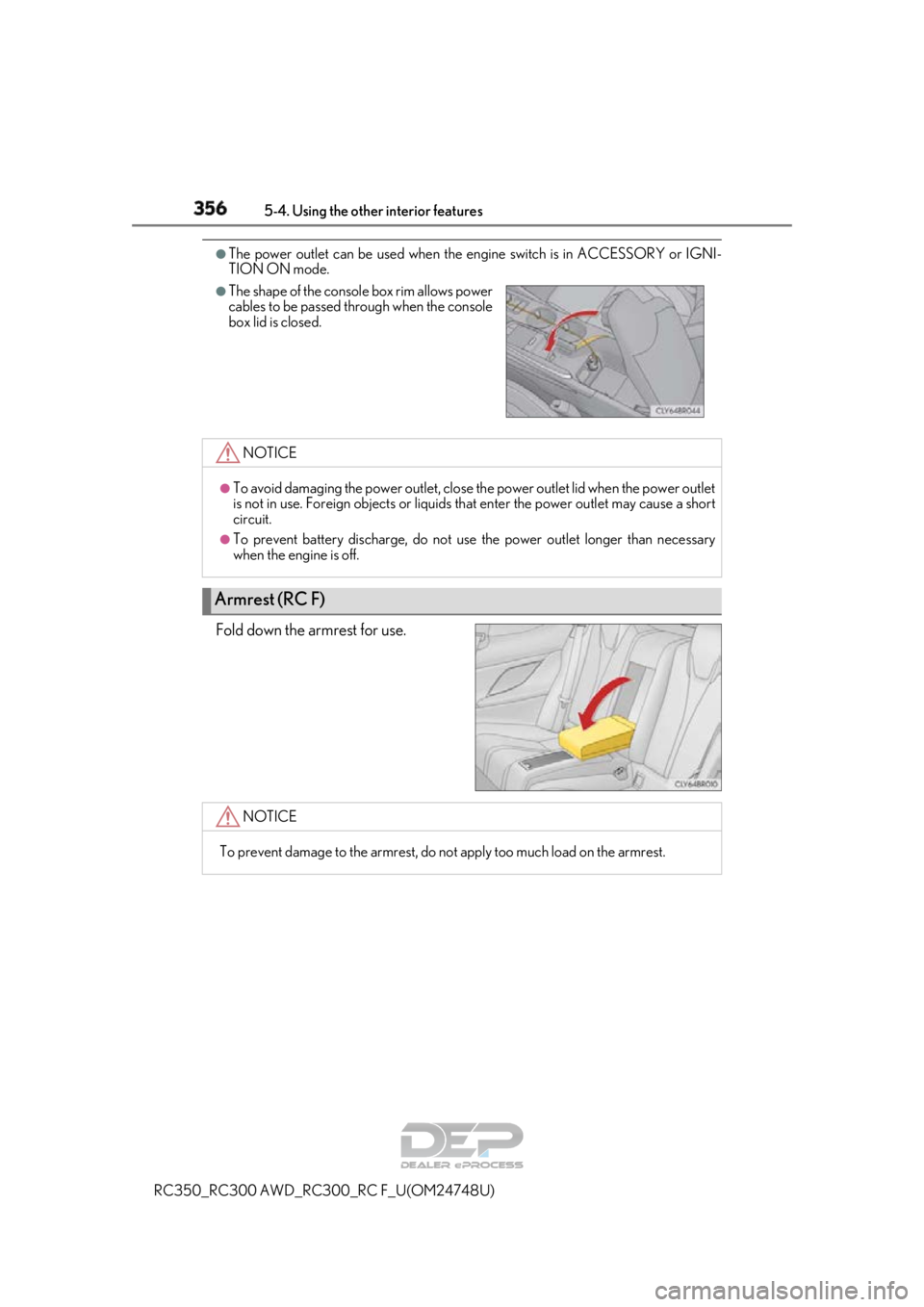
Fold down the armrest for use.
●The shape of the console box rim allows power
cables to be passed through when the console
box lid is closed.
NOTICE
●To avoid damaging the power outlet, close the power outlet lid when the power outlet
is not in use. Foreign objects or liquids th at enter the power outlet may cause a short
circuit.
●To prevent battery discharge, do not use the power outlet longer than necessary
when the engine is off.
Armrest (RC F)
NOTICE
To prevent damage to the armrest, do not apply too much load on the armrest.
Page 365 of 636
3655-4. Using the other interior features
RC350_RC300 AWD_RC3 00_RC F_U(OM24748U)
5
Interior features
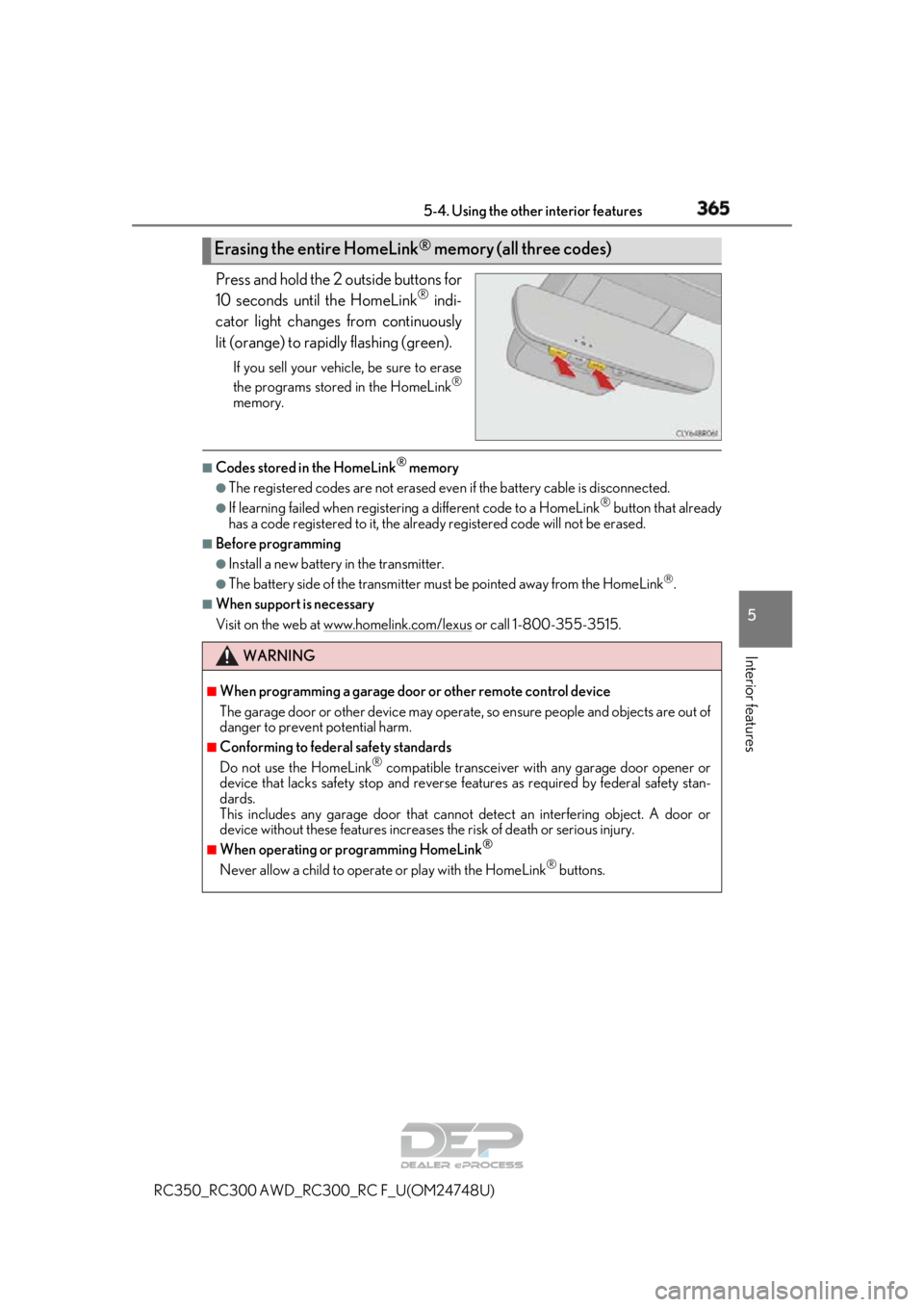
Press and hold the 2 outside buttons for
10 seconds until the HomeLink® indi-
cator light changes from continuously
lit (orange) to rapidly flashing (green).
If you sell your vehicle, be sure to erase
the programs stored in the HomeLink®
memory.
■Codes stored in the HomeLink® memory
●The registered codes are not erased even if the battery cable is disconnected.
●If learning failed when registerin g a different code to a HomeLink® button that already
has a code registered to it, the alread y registered code will not be erased.
■Before programming
●Install a new battery in the transmitter.
●The battery side of the transmitter must be pointed away from the HomeLink.
■When support is necessary
Visit on the web at www.homelink.com/lexus
or call 1-800-355-3515.
Erasing the entire HomeLink® memory (all three codes)
WARNING
■When programming a garage door or other remote control device
The garage door or other device may operat e, so ensure people and objects are out of
danger to prevent potential harm.
■Conforming to federal safety standards
Do not use the HomeLink® compatible transceiver with any garage door opener or
device that lacks safety stop and reverse features as requ ired by federal safety stan-
dards.
This includes any garage door that canno t detect an interfering object. A door or
device without these features increases the risk of death or serious injury.
■When operating or programming HomeLink®
Never allow a child to operat e or play with the HomeLink® buttons.
Page 368 of 636
3685-4. Using the other interior features
RC350_RC300 AWD_RC3 00_RC F_U(OM24748U)
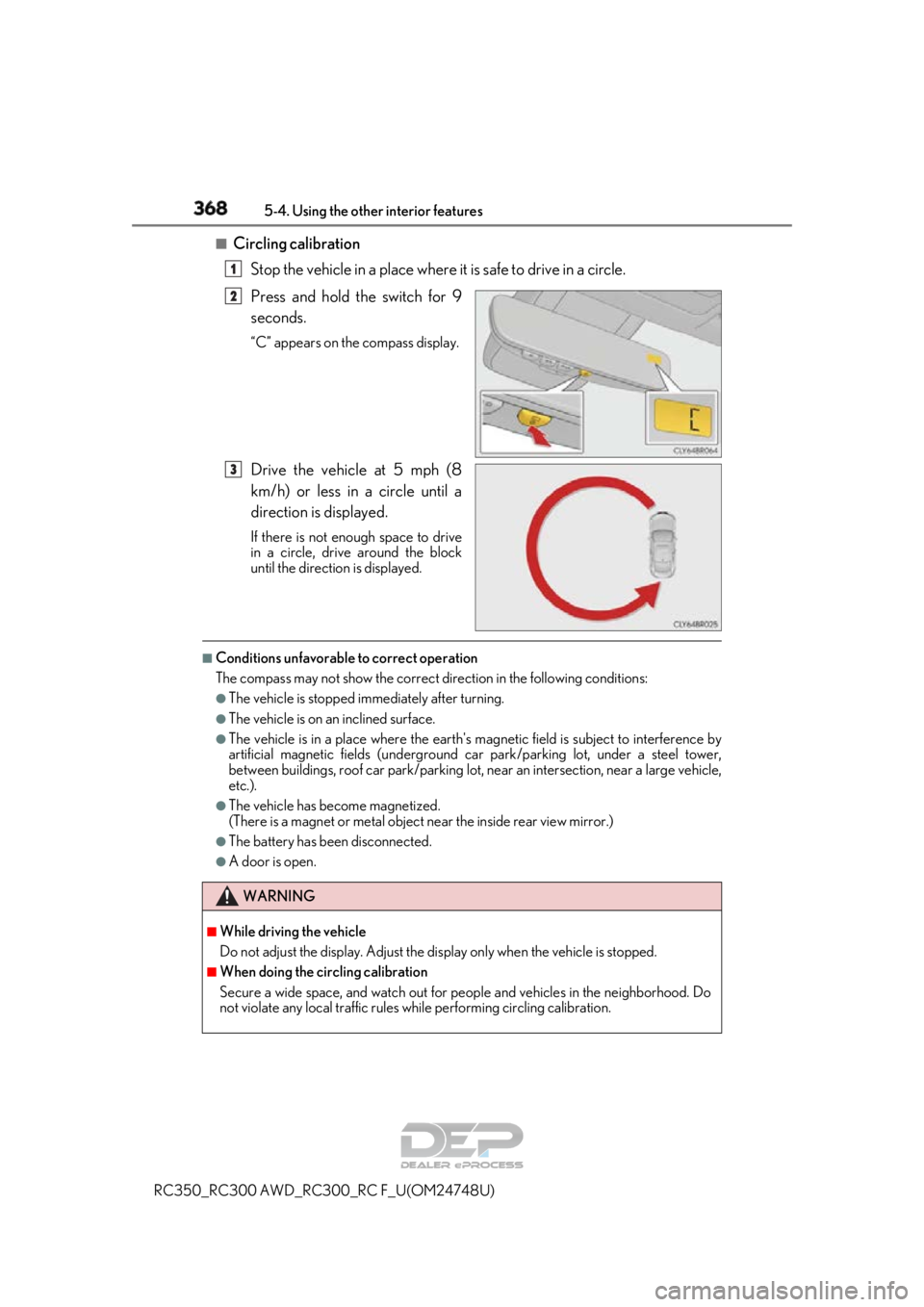
■Circling calibration
Stop the vehicle in a place where it is safe to drive in a circle.
Press and hold the switch for 9
seconds.
“C” appears on the compass display.
Drive the vehicle at 5 mph (8
km/h) or less in a circle until a
direction is displayed.
If there is not enough space to drive
in a circle, drive around the block
until the direction is displayed.
■Conditions unfavorable to correct operation
The compass may not show the correct di rection in the following conditions:
●The vehicle is stopped immediately after turning.
●The vehicle is on an inclined surface.
●The vehicle is in a place where the earth's ma gnetic field is subject to interference by
artificial magnetic fields (underground car park/parking lot, under a steel tower,
between buildings, roof car park/parking lot, near an intersection, near a large vehicle,
etc.).
●The vehicle has become magnetized.
(There is a magnet or metal object near the inside rear view mirror.)
●The battery has been disconnected.
●A door is open.
1
2
3
WARNING
■While driving the vehicle
Do not adjust the display. Adjust the di splay only when the vehicle is stopped.
■When doing the circling calibration
Secure a wide space, and watch out for pe ople and vehicles in the neighborhood. Do
not violate any local traffic rules wh ile performing circling calibration.