change time LEXUS RC350 2019 Owner's Manual
[x] Cancel search | Manufacturer: LEXUS, Model Year: 2019, Model line: RC350, Model: LEXUS RC350 2019Pages: 390, PDF Size: 7.88 MB
Page 156 of 390
1564-5. Using the driving support systems
RC350AWD_RC350_RC300AWD_RC30
0_OM_(U)_1810
■Enabling/disabling the pre-colli-
sion system
The pre-collision system can be
enabled/disabled on ( P.71) of
the multi-information display.
The system is automatically enabled each
time the engine switch is turned to IGNI-
TION ON mode.
If the system is disabled, the PCS warn-
ing light will turn on and a message will
be displayed on the multi-information
display.
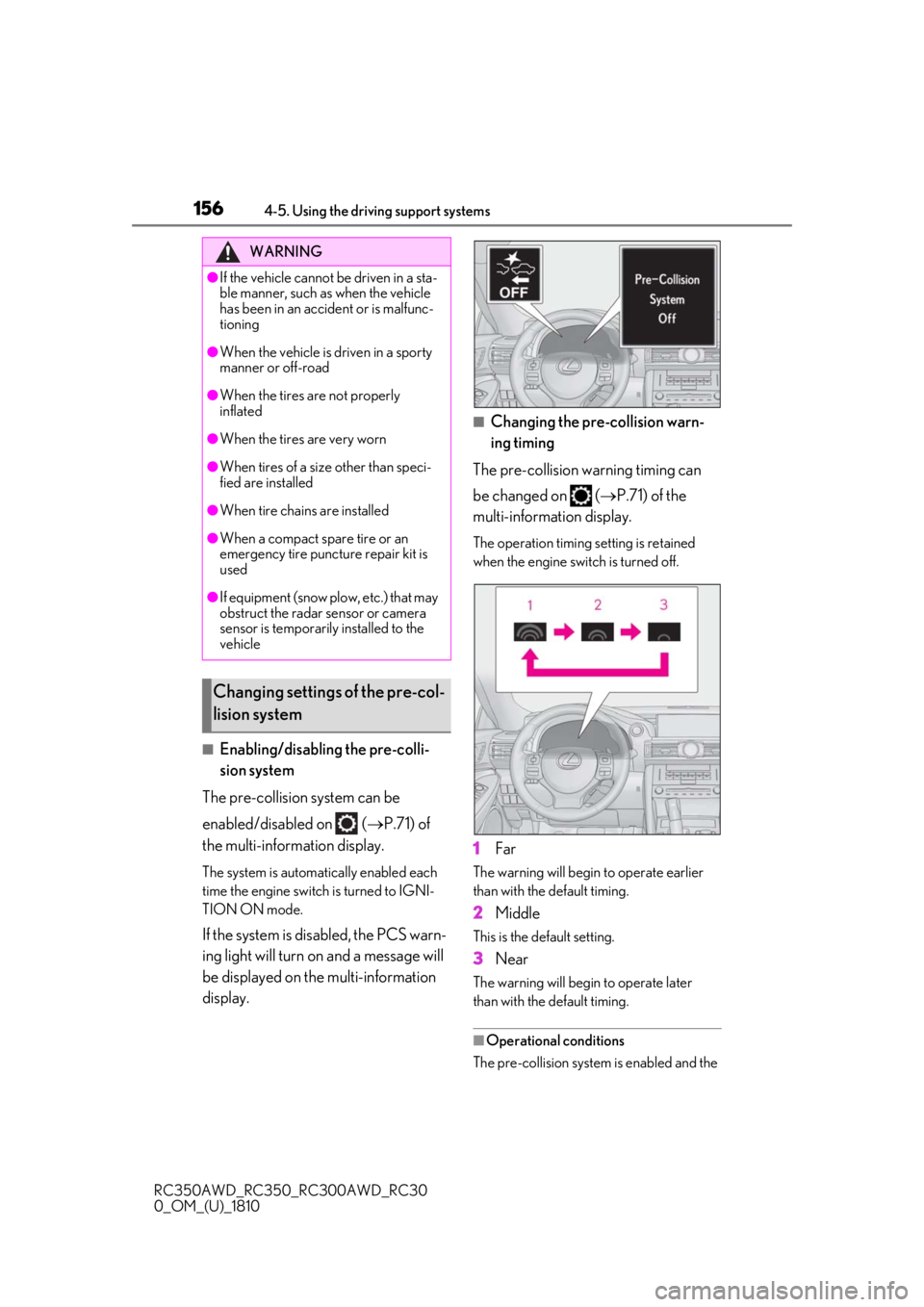
■Changing the pre-collision warn-
ing timing
The pre-collision warning timing can
be changed on ( P.71) of the
multi-information display.
The operation timing setting is retained
when the engine switch is turned off.
1Far
The warning will begin to operate earlier
than with the default timing.
2Middle
This is the default setting.
3Near
The warning will begi n to operate later
than with the default timing.
■Operational conditions
The pre-collision system is enabled and the
WARNING
●If the vehicle cannot be driven in a sta-
ble manner, such as when the vehicle
has been in an accident or is malfunc-
tioning
●When the vehicle is driven in a sporty
manner or off-road
●When the tires are not properly
inflated
●When the tires are very worn
●When tires of a size other than speci-
fied are installed
●When tire chains are installed
●When a compact spare tire or an
emergency tire puncture repair kit is
used
●If equipment (snow plow, etc.) that may
obstruct the radar sensor or camera
sensor is temporarily installed to the
vehicle
Changing settings of the pre-col-
lision system
Page 159 of 390
1594-5. Using the driving support systems
RC350AWD_RC350_RC300AWD_RC30
0_OM_(U)_1810
4
Driving
road or a wall that may be mistaken for a
vehicle or pedestrian
• When driving near an object that reflects
radio waves, such as a large truck or
guardrail
• When driving near a TV tower, broad-
casting station, electric power plant, or
other location where strong radio waves
or electrical noise may be present
■Situations in which the system may not
operate properly
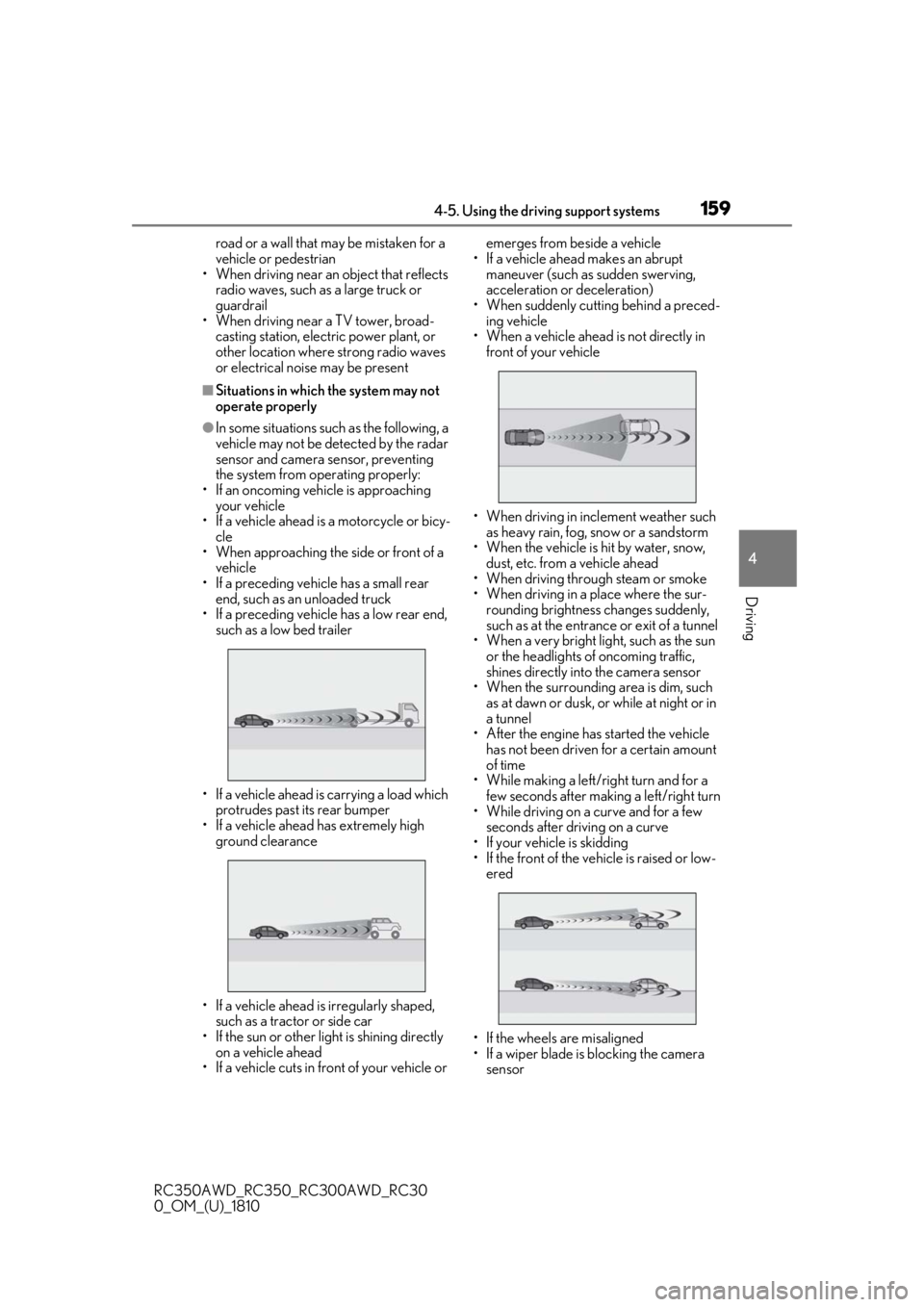
●In some situations such as the following, a
vehicle may not be detected by the radar
sensor and camera sensor, preventing
the system from operating properly:
• If an oncoming vehicle is approaching your vehicle
• If a vehicle ahead is a motorcycle or bicy-
cle
• When approaching the side or front of a vehicle
• If a preceding vehicle has a small rear end, such as an unloaded truck
• If a preceding vehicle has a low rear end,
such as a low bed trailer
• If a vehicle ahead is carrying a load which protrudes past its rear bumper
• If a vehicle ahead has extremely high ground clearance
• If a vehicle ahead is irregularly shaped, such as a tractor or side car
• If the sun or other light is shining directly
on a vehicle ahead
• If a vehicle cuts in front of your vehicle or emerges from beside a vehicle
• If a vehicle ahead makes an abrupt maneuver (such as sudden swerving,
acceleration or deceleration)
• When suddenly cutting behind a preced- ing vehicle
• When a vehicle ahead is not directly in front of your vehicle
• When driving in incl ement weather such
as heavy rain, fog, snow or a sandstorm
• When the vehicle is hit by water, snow,
dust, etc. from a vehicle ahead
• When driving through steam or smoke
• When driving in a place where the sur- rounding brightness changes suddenly,
such as at the entrance or exit of a tunnel
• When a very bright light, such as the sun
or the headlights of oncoming traffic,
shines directly into the camera sensor
• When the surrounding area is dim, such
as at dawn or dusk, or while at night or in
a tunnel
• After the engine has started the vehicle
has not been driven for a certain amount
of time
• While making a left/right turn and for a
few seconds after making a left/right turn
• While driving on a curve and for a few seconds after driving on a curve
• If your vehicle is skidding
• If the front of the vehicle is raised or low- ered
• If the wheels are misaligned
• If a wiper blade is blocking the camera sensor
Page 166 of 390
1664-5. Using the driving support systems
RC350AWD_RC350_RC300AWD_RC30
0_OM_(U)_1810brightness changes suddenly, such as at
the entrances and exits of tunnels, etc.
●Light from the headlights of an oncoming
vehicle, the sun, etc. enters the camera.
●The vehicle is driven where the road
diverges, merges, etc.
●The vehicle is driven on a slope.
●The vehicle is driven on a road which tilts
left or right, or a winding road.
●The vehicle is driven on an unpaved or
rough road.
●The vehicle is driven around a sharp
curve.
●The traffic lane is ex
cessively narrow or
wide.
●The vehicle is extremely tilted due to car-
rying heavy luggage or having improper
tire pressure.
●The distance to the preceding vehicle is
extremely short.
●The vehicle is moving up and down a
large amount due to road conditions
during driving (poor roads or road
seams).
●The headlight lenses are dirty and emit a
faint amount of light at night, or the beam
axis has deviated.
●The vehicle is struck by a crosswind.
●The vehicle has just changed lanes or
crossed an intersection.
●Snow tires, etc. are equipped.
■Warning message
If the following warning messag e is displayed on the multi-information display and the LDA
indicator illuminates in orange, follow th e appropriate troubleshooting procedure.
Warning messageDetails/Actions
“Lane Departure Alert Malfunction
Visit Your Dealer”The system may not be operating properly.
Have the vehicle inspected at your Lexus dealer.
“Front Camera Unavailable Remove
Debris On Windshield”
Dirt, rain, condensation, ice, snow, etc. are present
on the windshield in front of the camera sensor.
Turn the LDA system off, remove any dirt, rain,
condensation, ice, snow, et c. from the windshield,
and then turn the LDA system back on.
“Front Camera Unavailable”
The operation conditions of the camera sensor
(temperature, etc.) are not met.
When the operation conditions of the camera
sensor (temperature, etc.) are met, the LDA system
will become available. Turn the LDA system off, wait
for a little while, and then turn the LDA system back
on.
“Lane Departure Alert Unavailable”
The LDA system is temporarily canceled due to a
malfunction in a sensor other than the camera sen-
sor.
Turn the LDA system off and follow the appropri-
ate troubleshooting procedures for the warning
message. Afterward, drive the vehicle for a short
time, and then turn the LDA system back on.
Page 170 of 390
1704-5. Using the driving support systems
RC350AWD_RC350_RC300AWD_RC30
0_OM_(U)_1810
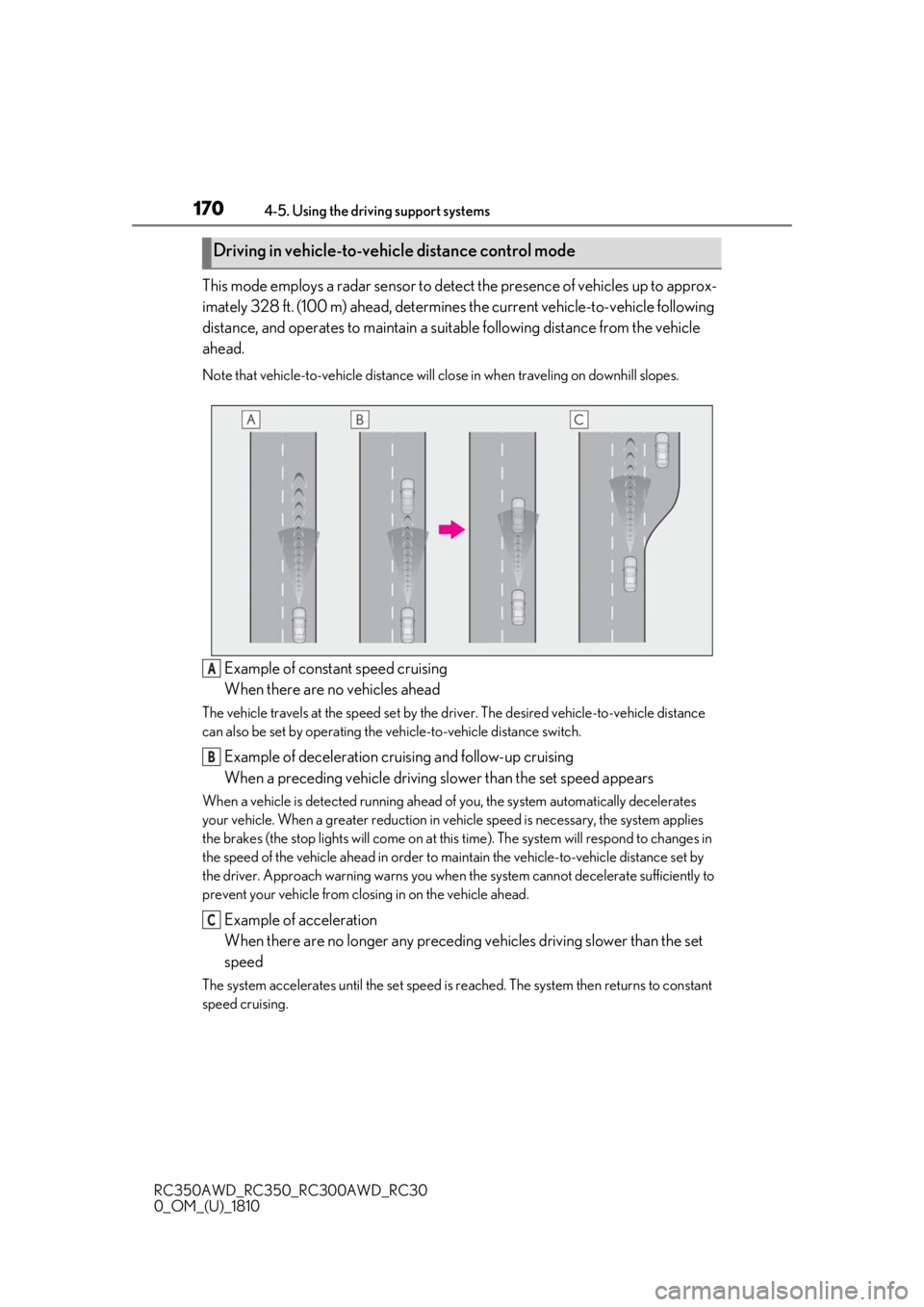
This mode employs a radar sensor to detect the presence of vehicles up to approx-
imately 328 ft. (100 m) ahead, determines the current vehicle-to-vehicle following
distance, and operates to maintain a suit able following distance from the vehicle
ahead.
Note that vehicle-to-vehicle distance will close in when traveling on downhill slopes.
Example of constant speed cruising
When there are no vehicles ahead
The vehicle travels at the speed set by the driver. The desired vehicle-to-vehicle distance
can also be set by operating the vehicle-to-vehicle distance switch.
Example of deceleration cruising and follow-up cruising
When a preceding vehicle driving slower than the set speed appears
When a vehicle is detected running ahead of you, the system automatically decelerates
your vehicle. When a greater reduction in vehicle speed is necessary, the system applies
the brakes (the stop lights will come on at this time). The sy stem will respond to changes in
the speed of the vehicle ahead in order to maintain the vehicle-to-vehicle distance set by
the driver. Approach warning warns you when th e system cannot decelerate sufficiently to
prevent your vehicle from closing in on the vehicle ahead.
Example of acceleration
When there are no longer any preceding vehicles driving slower than the set
speed
The system accelerates until the set speed is re ached. The system then returns to constant
speed cruising.
Driving in vehicle-to-vehicle distance control mode
A
B
C
Page 171 of 390
1714-5. Using the driving support systems
RC350AWD_RC350_RC300AWD_RC30
0_OM_(U)_1810
4
Driving
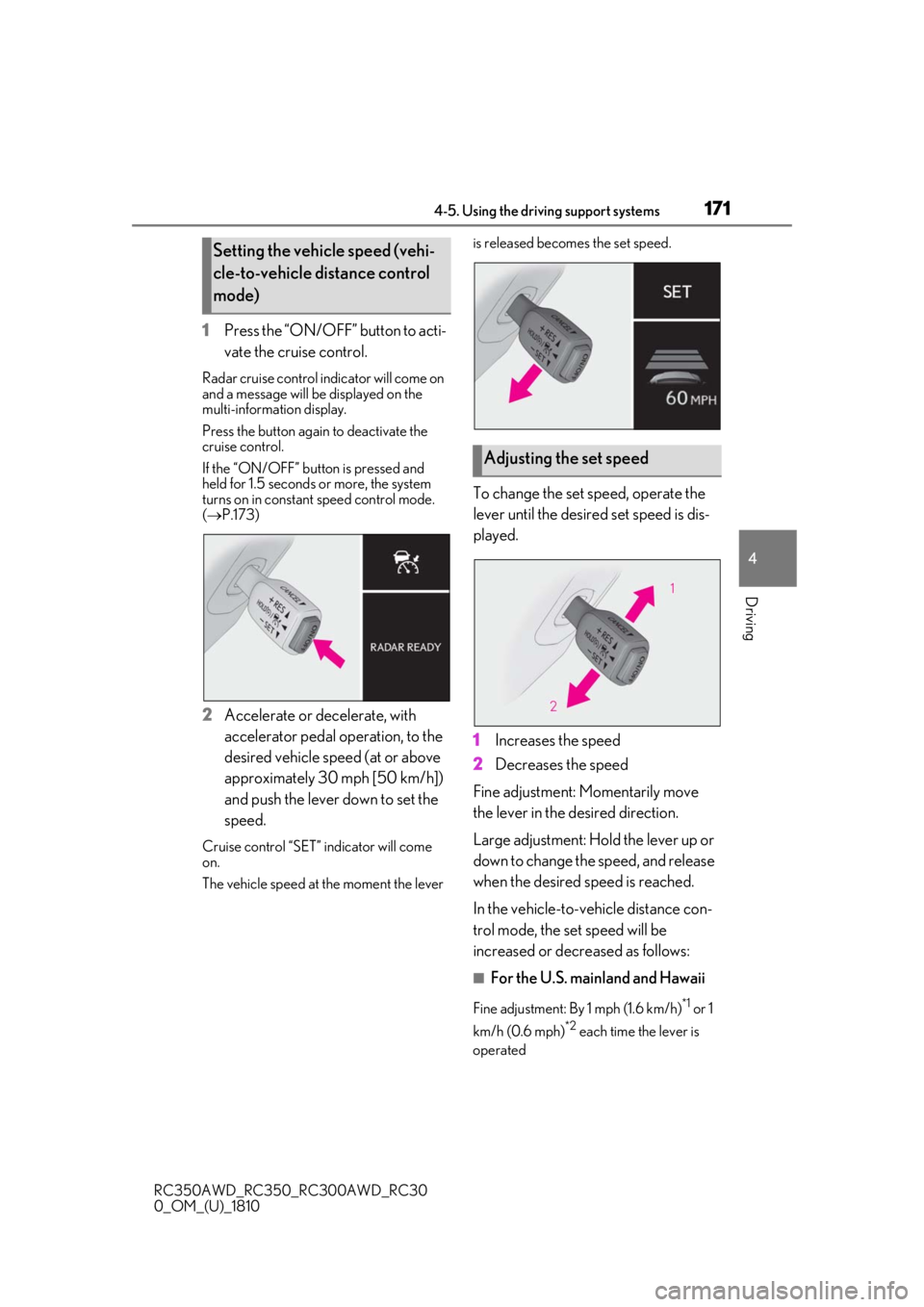
1 Press the “ON/OFF” button to acti-
vate the cruise control.
Radar cruise control indicator will come on
and a message will be displayed on the
multi-information display.
Press the button again to deactivate the
cruise control.
If the “ON/OFF” button is pressed and
held for 1.5 seconds or more, the system
turns on in constant speed control mode.
( P.173)
2 Accelerate or decelerate, with
accelerator pedal operation, to the
desired vehicle speed (at or above
approximately 30 mph [50 km/h])
and push the lever down to set the
speed.
Cruise control “SET” indicator will come
on.
The vehicle speed at the moment the lever is released beco
mes the set speed.
To change the set speed, operate the
lever until the desired set speed is dis-
played.
1Increases the speed
2 Decreases the speed
Fine adjustment: Momentarily move
the lever in the desired direction.
Large adjustment: Hold the lever up or
down to change the speed, and release
when the desired speed is reached.
In the vehicle-to-vehicle distance con-
trol mode, the set speed will be
increased or decreased as follows:
■For the U.S. mainland and Hawaii
Fine adjustment: By 1 mph (1.6 km/h)*1 or 1
km/h (0.6 mph)
*2 each time the lever is
operated
Setting the vehicle speed (vehi-
cle-to-vehicle distance control
mode)
Adjusting the set speed
Page 172 of 390

1724-5. Using the driving support systems
RC350AWD_RC350_RC300AWD_RC30
0_OM_(U)_1810Large adjustment: Increases or decreases
in 1 mph (1.6 km/h)
*1 or 1 km/h (0.6 mph)*2
increments for as long as the lever is held
■For Canada, Guam and Puerto
Rico
Fine adjustment: By 1 mph (1.6 km/h)*1 or 1
km/h (0.6 mph)
*2 each time the lever is
operated
Large adjustment: Increases or decreases
in 5 mph (8 km/h)
*1 or 5 km/h (3.1 mph)*2
increments for as long as the lever is held
In the constant speed control mode
( P.173), the set speed will be
increased or decreased as follows:
Fine adjustment: By 1 mph (1.6 km/h)*1 or
1.6 km/h (1 mph)
*2 each time the lever is
operated
Large adjustment: The speed will continue
to change while the lever is held.
*1: When the set speed is shown in “MPH”
*2: When the set speed is shown in “km/h”
Pressing the switch changes the vehi-
cle-to-vehicle distance as follows:
1 Long 2
Medium
3 Short
The vehicle-to-vehicle distance is set auto-
matically to long mode when the engine
switch is turned to IGNITION ON mode.
If a vehicle is running ahead of you, the pre-
ceding vehicle mark will also be dis-
played.
Select a distance from the table below.
Note that the distances shown corre-
spond to a vehicle speed of 50 mph
(80 km/h). Vehicle-to-vehicle distance
increases/decreases in accordance
with vehicle speed.
Changing the vehicle-to-vehicle
distance (vehicle-to-vehicle dis-
tance control mode)
Vehicle-to-vehicle distance set-
tings (vehicle-to-vehicle dis-
tance control mode)
Distance
optionsVehicle-to-vehicle dis- tance
LongApproximately 160 ft. (50
m)
MediumApproximately 130 ft. (40
m)
ShortApproximately 100 ft. (30
m)
A
Page 190 of 390
1904-5. Using the driving support systems
RC350AWD_RC350_RC300AWD_RC30
0_OM_(U)_1810
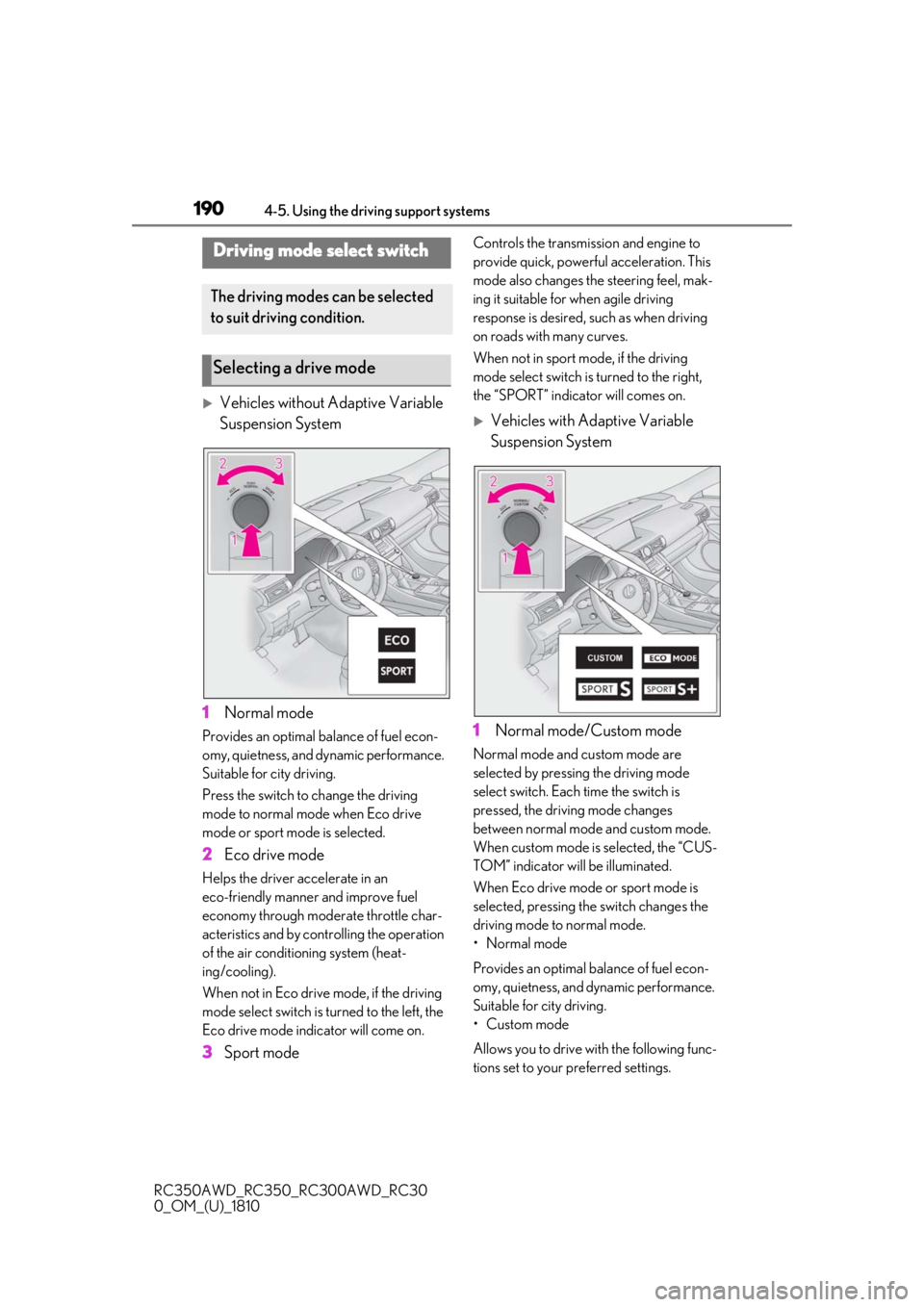
Vehicles without Adaptive Variable
Suspension System
1 Normal mode
Provides an optimal ba lance of fuel econ-
omy, quietness, and dynamic performance.
Suitable for city driving.
Press the switch to change the driving
mode to normal mode when Eco drive
mode or sport mode is selected.
2 Eco drive mode
Helps the driver accelerate in an
eco-friendly manner and improve fuel
economy through moderate throttle char-
acteristics and by controlling the operation
of the air conditioning system (heat-
ing/cooling).
When not in Eco drive mode, if the driving
mode select switch is turned to the left, the
Eco drive mode indicator will come on.
3Sport mode
Controls the transmission and engine to
provide quick, powerful acceleration. This
mode also changes the steering feel, mak-
ing it suitable for when agile driving
response is desired, such as when driving
on roads with many curves.
When not in sport mode, if the driving
mode select switch is turned to the right,
the “SPORT” indicator will comes on.
Vehicles with Adaptive Variable
Suspension System
1 Normal mode/Custom mode
Normal mode and custom mode are
selected by pressing the driving mode
select switch. Each time the switch is
pressed, the driving mode changes
between normal mode and custom mode.
When custom mode is selected, the “CUS-
TOM” indicator will be illuminated.
When Eco drive mode or sport mode is
selected, pressing th e switch changes the
driving mode to normal mode.
• Normal mode
Provides an optimal ba lance of fuel econ-
omy, quietness, and dynamic performance.
Suitable for city driving.
• Custom mode
Allows you to drive with the following func-
tions set to your preferred settings.
Driving mode select switch
The driving modes can be selected
to suit driving condition.
Selecting a drive mode
Page 194 of 390

1944-5. Using the driving support systems
RC350AWD_RC350_RC300AWD_RC30
0_OM_(U)_1810
■When the message is displayed on the
multi-information display showing that
TRAC has been disabled even if the switch has not been pressed
TRAC cannot be operated. Contact your
Lexus dealer.
■Operating conditions of hill-start assist
control
When the following four conditions are met,
the hill-start assist control will operate:
●The shift lever is in a position other than P
or N (when starting off forward/back-
ward on an upward incline).
●The vehicle is stopped.
●The accelerator pedal is not depressed.
●The parking brake is not engaged.
■Automatic system cancelation of
hill-start assist control
The hill-start assist control will turn off in any
of the following situations:
●The shift lever is moved to P or N.
●The accelerator pedal is depressed.
●The parking brake is engaged.
●Approximately 2 seconds elapse after
the brake pedal is released.
■VGRS is disabled when
VGRS may stop operating in the following
situations.
In this event, the steering wheel may move
from its straight forward position, but it will
return when the system restarts.
●When the steering wheel is operated for
an extended period of time while the
vehicle is stopped or is moving very
slowly
(on vehicles with LDH, DRS is disabled
together with VGRS)
●When the steering wheel has been held
fully to the left or right
The center position of the steering wheel
may change when VGRS is disabled. How-
ever, the position will return to normal after
VGRS is reactivated.
■When the battery is disconnected (vehi-
cles with VGRS)
The steering wheel may move from its
straight forward position, but this will be
corrected automatically when driving.
■Sounds and vibrations caused by the
ABS, brake assist, VSC, TRAC, hill-start
assist control and VGRS systems
●A sound may be heard from the engine
compartment when the brake pedal is
depressed repeatedly, when the engine is
started or just after the vehicle begins to
move. This sound does not indicate that a
malfunction has occurred in any of these
systems.
●Any of the following conditions may
occur when the above systems are oper-
ating. None of these indicates that a mal-
function has occurred.
• Vibrations may be felt through the vehicle body and steering.
• A motor sound may be heard after the
vehicle comes to a stop.
• The brake pedal may pulsate slightly after the ABS is activated.
• The brake pedal may move down slightly after the ABS is activated.
■EPS, VGRS and DRS operation sound
When the steering wheel is operated, a
motor sound (whirring sound) may be
heard. This does not indicate a malfunction.
■Reactivation of the TRAC/VSC systems
Even after the TRAC /VSC systems have
been turned off, turning the engine off and
then on again will automatically reactivate
the TRAC/VSC systems.
■Reactivation of the TRAC system linked
to vehicle speed
When only the TRAC system is turned off,
the TRAC system will turn on when vehicle
speed increases. Ho wever, when both
TRAC/VSC systems are turned off, the sys-
tems will not turn on even when vehicle
speed increases.
■Reduced effectiveness of the EPS sys-
tem
The effectiveness of the EPS system is
reduced to prevent the system from over-
heating when there is frequent steering
Page 206 of 390
2065-2. Using the air conditioning system
RC350AWD_RC350_RC300AWD_RC30
0_OM_(U)_1810
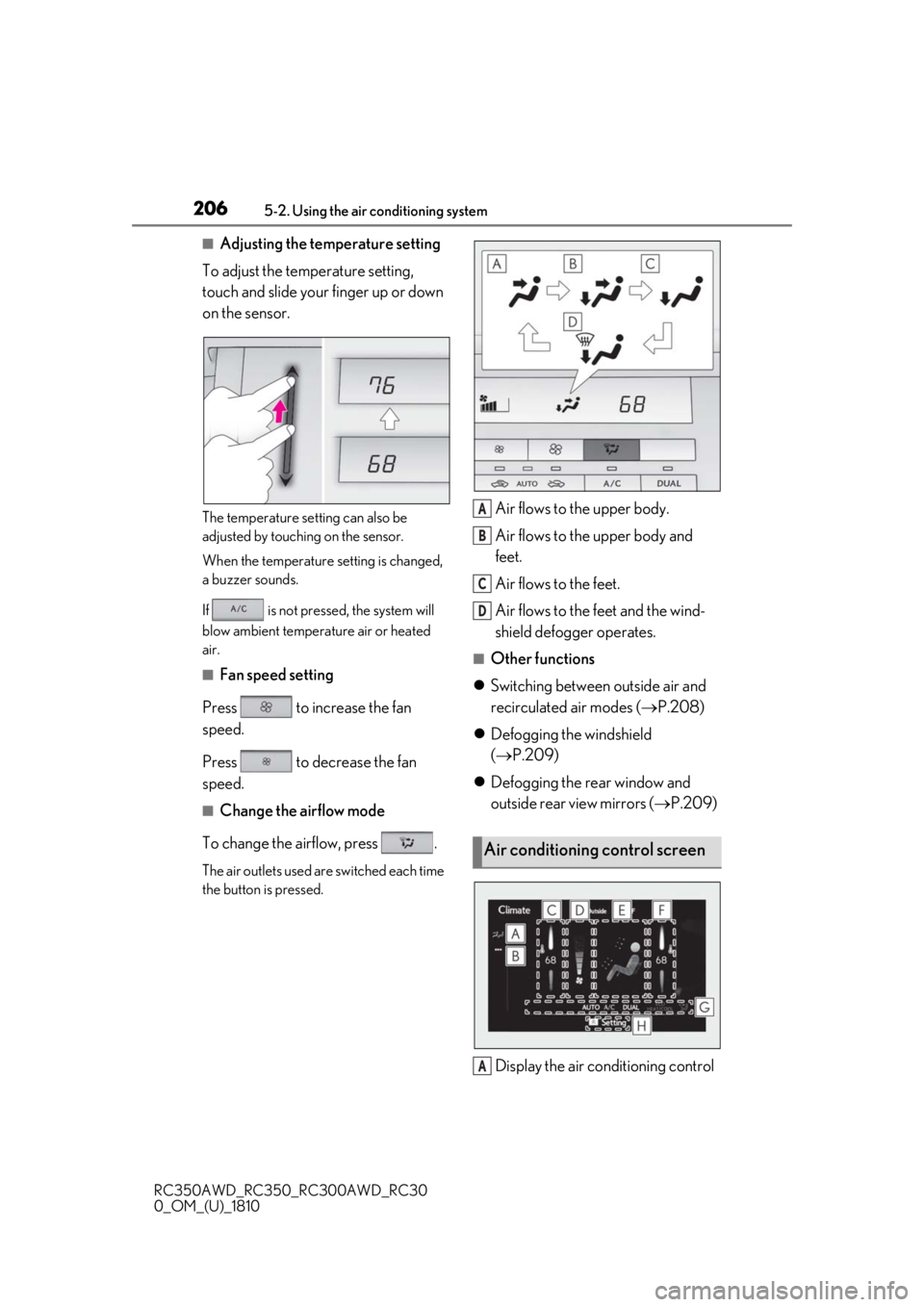
■Adjusting the temperature setting
To adjust the temperature setting,
touch and slide your finger up or down
on the sensor.
The temperature setting can also be
adjusted by touching on the sensor.
When the temperature setting is changed,
a buzzer sounds.
If is not pressed, the system will
blow ambient temperature air or heated
air.
■Fan speed setting
Press to increase the fan
speed.
Press to decrease the fan
speed.
■Change the airflow mode
To change the airflow, press .
The air outlets used are switched each time
the button is pressed.
Air flows to the upper body.
Air flows to the upper body and
feet.
Air flows to the feet.
Air flows to the feet and the wind-
shield defogger operates.
■Other functions
Switching between outside air and
recirculated air modes ( P.208)
Defogging the windshield
( P.209)
Defogging the rear window and
outside rear view mirrors ( P.209)
Display the air conditioning control
Air conditioning control screen
A
B
C
D
A
Page 209 of 390
2095-2. Using the air conditioning system
RC350AWD_RC350_RC300AWD_RC30
0_OM_(U)_1810
5
Interior features
automatically.
The indicator above the selected button
comes on.
■Micro dust and pollen filter
Pollen is removed from the air and the
air flows to the upper part of the body.
Select on the option control
screen.
When the micro dust and pollen filter is on, is displayed on the air conditioning
control screen.
In order to prevent the windshield from
fogging up when the outside air is cold, the
dehumidification function may operate.
Pollen is filtered even if the micro dust and
pollen filter is turned off.
■Defogging the windshield
Defoggers are used to defog the wind-
shield and side windows.
Press .
Set the outside/recirc ulated air mode but-
ton to outside air mode if the recirculated
air mode is used. (It may switch automati-
cally.)
To defog the windshield and the side win-
dows early, turn the air flow and tempera-
ture up.
To return to the previous mode, press
again when the windshield is
defogged.
■Defogging the rear window and
outside rear view mirrors
Defoggers are used to defog the rear
window, and to remove raindrops, dew
and frost from the outside rear view
mirrors. Press .
The defoggers will automatically turn off
after a period of time.
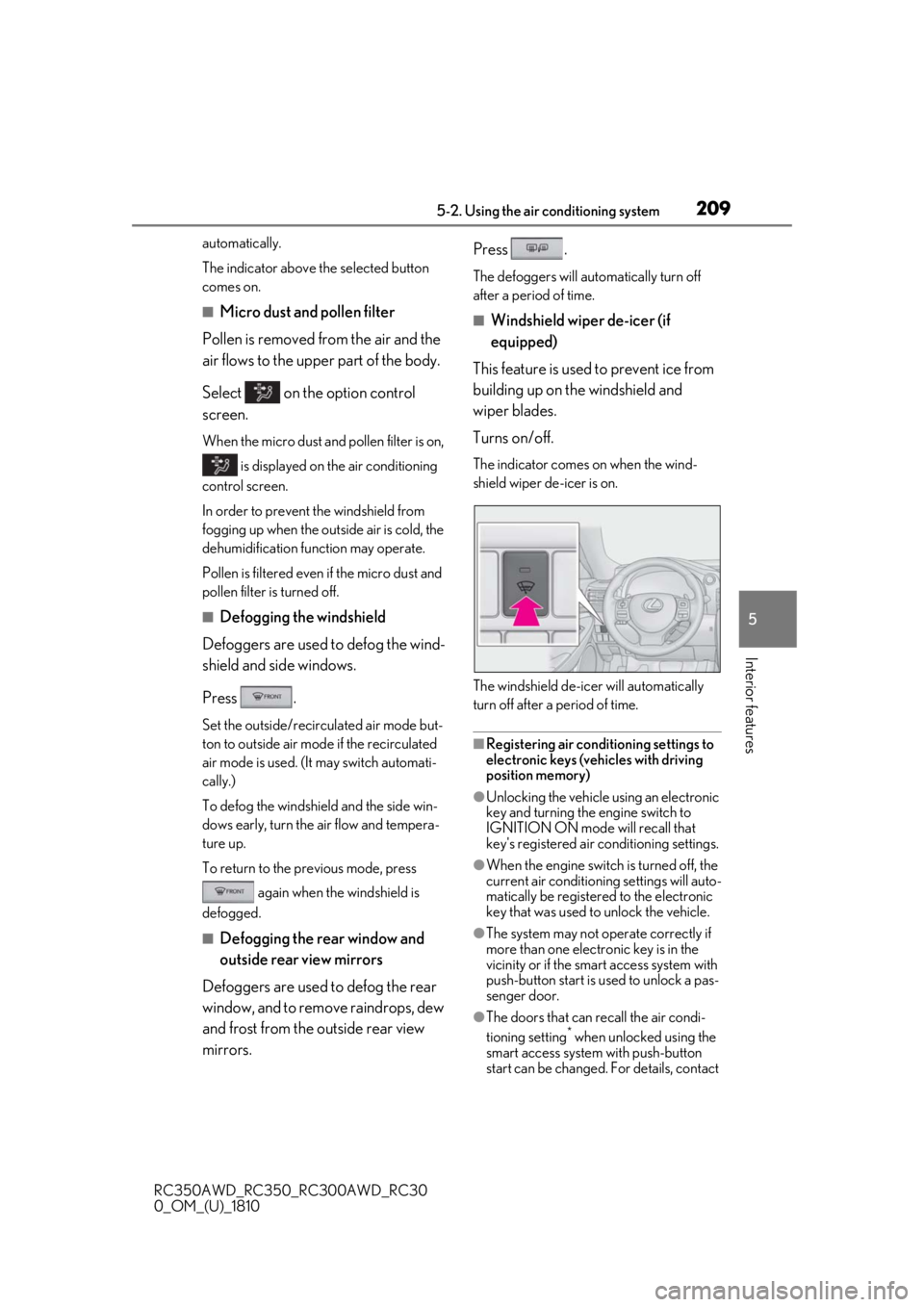
■Windshield wiper de-icer (if
equipped)
This feature is used to prevent ice from
building up on the windshield and
wiper blades.
Turns on/off.
The indicator comes on when the wind-
shield wiper de-icer is on.
The windshield de-icer will automatically
turn off after a period of time.
■Registering air conditioning settings to
electronic keys (vehicles with driving
position memory)
●Unlocking the vehicle using an electronic
key and turning the engine switch to
IGNITION ON mode will recall that
key's registered air co nditioning settings.
●When the engine switch is turned off, the
current air conditioning settings will auto-
matically be registered to the electronic
key that was used to unlock the vehicle.
●The system may not operate correctly if
more than one electr onic key is in the
vicinity or if the smart access system with
push-button start is used to unlock a pas-
senger door.
●The doors that can recall the air condi-
tioning setting* when unlocked using the
smart access system with push-button
start can be changed. For details, contact