fuel LEXUS RC350 2019 Owner's Manual
[x] Cancel search | Manufacturer: LEXUS, Model Year: 2019, Model line: RC350, Model: LEXUS RC350 2019Pages: 390, PDF Size: 7.88 MB
Page 136 of 390
1364-3. Operating the lights and wipers
RC350AWD_RC350_RC300AWD_RC30
0_OM_(U)_1810
4-3.Operating the lights and wipers
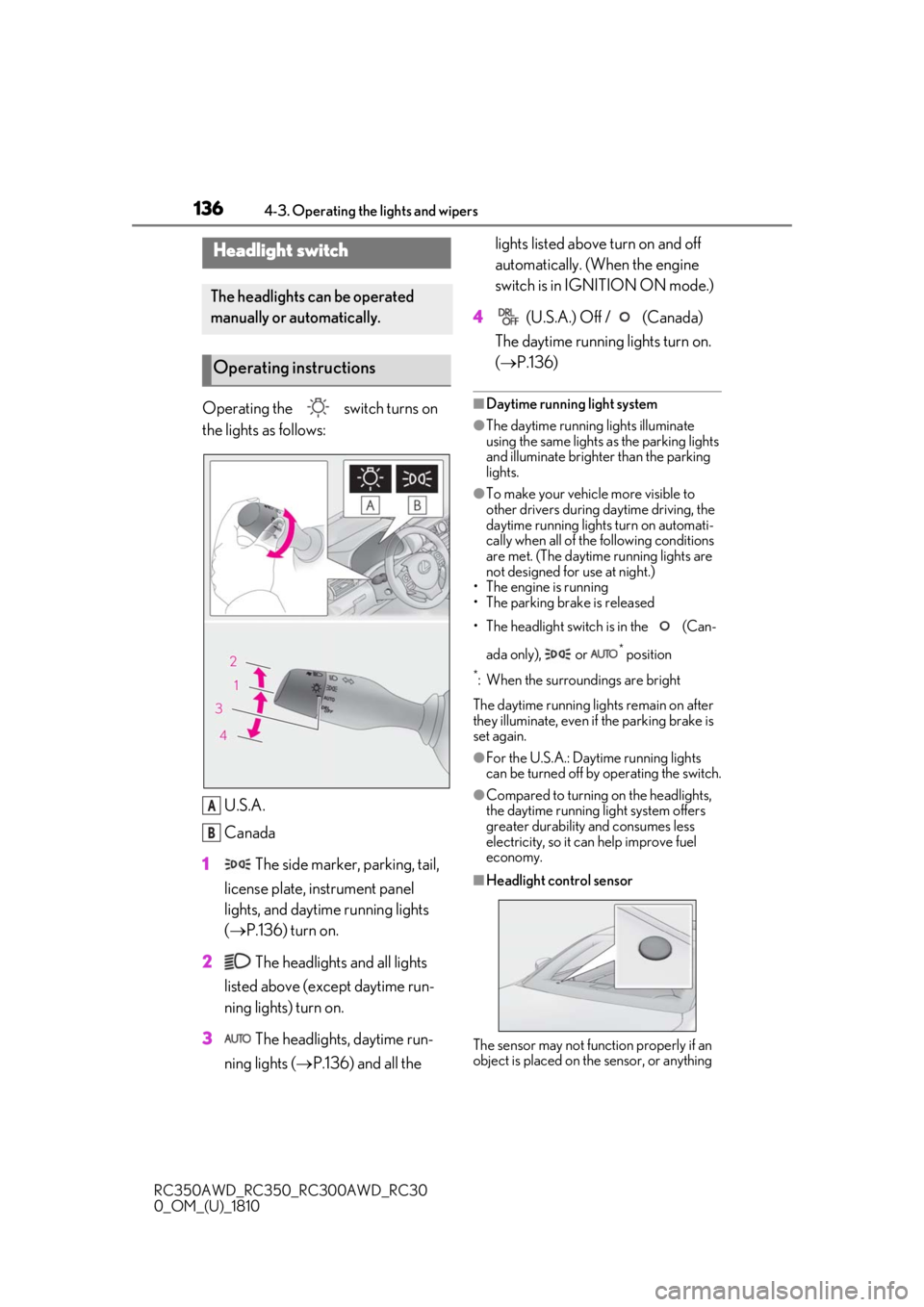
Operating the switch turns on
the lights as follows:U.S.A.
Canada
1 The side marker, parking, tail,
license plate, instrument panel
lights, and daytime running lights
( P.136) turn on.
2 The headlights and all lights
listed above (except daytime run-
ning lights) turn on.
3 The headlights, daytime run-
ning lights ( P.136) and all the lights listed above turn on and off
automatically. (When the engine
switch is in IGNITION ON mode.)
4 (U.S.A.) Off / (Canada)
The daytime running lights turn on.
( P.136)■Daytime running light system
●The daytime running lights illuminate
using the same lights as the parking lights
and illuminate brighter than the parking
lights.
●To make your vehicle more visible to
other drivers during daytime driving, the
daytime running lights turn on automati-
cally when all of the following conditions
are met. (The daytime running lights are
not designed for use at night.)
• The engine is running
• The parking brake is released
• The headlight switch is in the (Can-
ada only), or
* position
*: When the surroundings are bright
The daytime running lights remain on after
they illuminate, even if the parking brake is
set again.
●For the U.S.A.: Daytime running lights
can be turned off by operating the switch.
●Compared to turning on the headlights,
the daytime running light system offers
greater durability and consumes less
electricity, so it can help improve fuel
economy.
■Headlight control sensor
The sensor may not function properly if an
object is placed on the sensor, or anything
Headlight switch
The headlights can be operated
manually or automatically.
Operating instructions
A
B
Page 148 of 390
1484-4. Refueling
RC350AWD_RC350_RC300AWD_RC30
0_OM_(U)_1810
4-4.Refueling
Close both side doors and windows,
and turn the engine switch off.
Confirm the type of fuel.
■Fuel types
P.327
■Fuel tank opening for unleaded gasoline
To help prevent incorrect fueling, your vehi-
cle has a fuel tank opening that only accom-
modates the special nozzle on unleaded
fuel pumps.
■If the malfunction indicator lamp illumi-
nates
The malfunction indicator lamp may illumi-
nate erroneously if refueling is performed
repeatedly when the fuel tank is nearly full.
Opening the fuel tank cap
Perform the following steps to open
the fuel tank cap:
Before refueling the vehicle
WARNING
■When refueling the vehicle
Observe the following precautions while
refueling the vehicle. Failure to do so may
result in death or serious injury.
●After exiting the vehicle and before
opening the fuel door, touch an
unpainted metal surface to discharge
any static electricity. It is important to
discharge static electricity before refu-
eling because sparks resulting from
static electricity can cause fuel vapors
to ignite while refueling.
●Always hold the grips on the fuel tank
cap and turn it slowly to remove it.
A whooshing sound may be heard
when the fuel tank cap is loosened.
Wait until the sound cannot be heard
before fully removing the cap. In hot
weather, pressurized fuel may spray
out the filler neck and cause injury.
●Do not allow anyone that has not dis-
charged static electricity from their
body to come close to an open fuel
tank.
●Do not inhale vaporized fuel.
Fuel contains substances that are
harmful if inhaled.
●Do not smoke while refueling the vehi-
cle.
Doing so may cause the fuel to ignite
and cause a fire.
●Do not return to the vehicle or touch
any person or object that is statically
charged.
This may cause static electricity to
build up, resulting in a possible ignition
hazard.
■When refueling
Observe the following precautions to
prevent fuel overflowing from the fuel
tank:
●Securely insert the fuel nozzle into the
fuel filler neck.
●Stop filling the tank after the fuel noz-
zle automatically clicks off.
●Do not top off the fuel tank.
NOTICE
■Refueling
Do not spill fuel during refueling. Doing
so may damage the vehicle, such as
causing the emission control system to
operate abnormally or damaging fuel
system components or the vehicle’s
painted surface.
Page 149 of 390
1494-4. Refueling
RC350AWD_RC350_RC300AWD_RC30
0_OM_(U)_1810
4
Driving
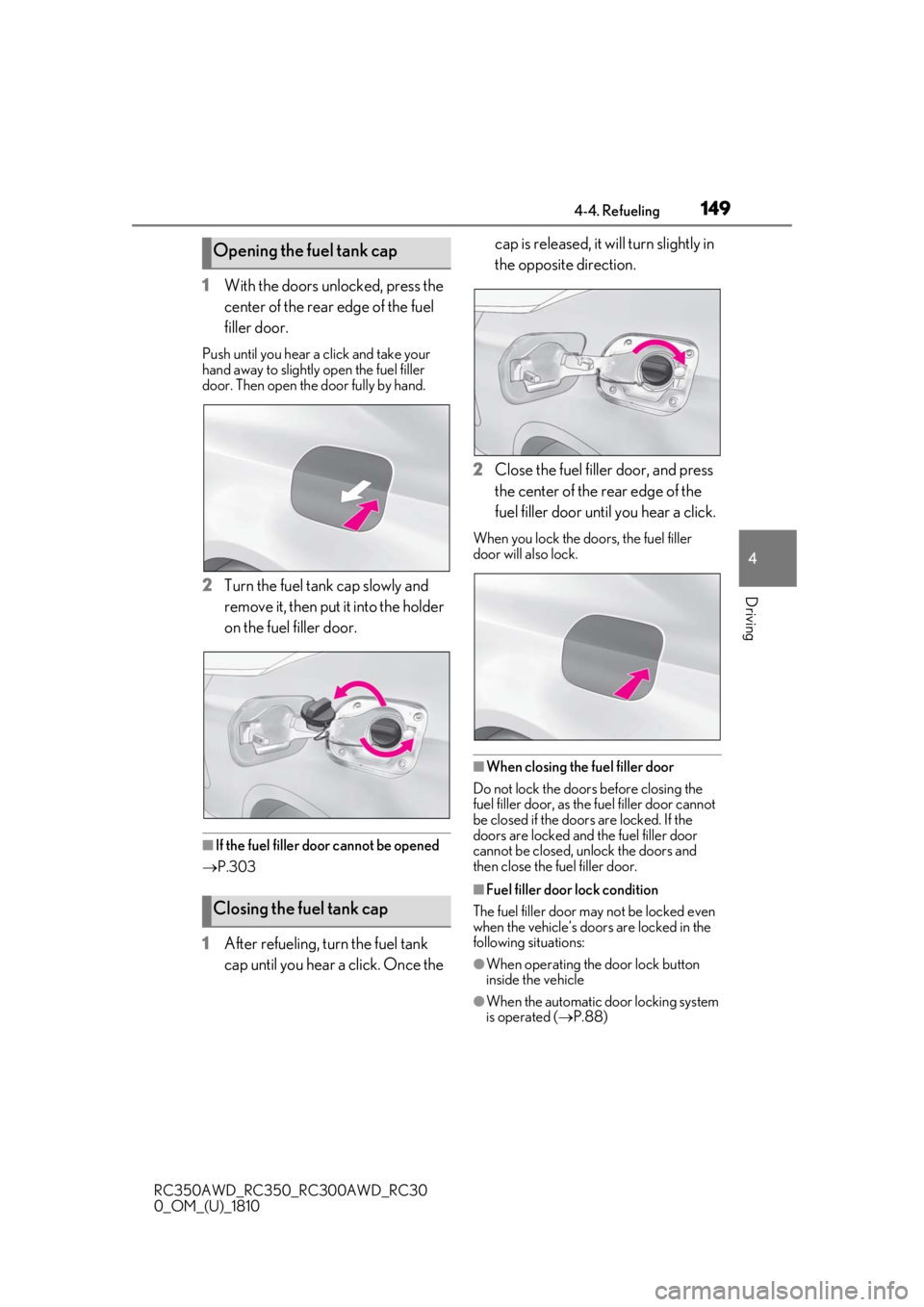
1 With the doors unlocked, press the
center of the rear edge of the fuel
filler door.
Push until you hear a click and take your
hand away to slightly open the fuel filler
door. Then open the door fully by hand.
2Turn the fuel tank cap slowly and
remove it, then put it into the holder
on the fuel filler door.
■If the fuel filler door cannot be opened
P.303
1 After refueling, turn the fuel tank
cap until you hear a click. Once the cap is released, it will turn slightly in
the opposite direction.
2 Close the fuel filler door, and press
the center of the rear edge of the
fuel filler door until you hear a click.
When you lock the doors, the fuel filler
door will also lock.
■When closing the fuel filler door
Do not lock the doors before closing the
fuel filler door, as the fuel filler door cannot
be closed if the doors are locked. If the
doors are locked and the fuel filler door
cannot be closed, unlock the doors and
then close the fuel filler door.
■Fuel filler door lock condition
The fuel filler door may not be locked even
when the vehicle’s doors are locked in the
following situations:
●When operating the door lock button
inside the vehicle
●When the automatic door locking system
is operated ( P.88)
Opening the fuel tank cap
Closing the fuel tank cap
Page 150 of 390

1504-4. Refueling
RC350AWD_RC350_RC300AWD_RC30
0_OM_(U)_1810
WARNING
■When replacing the fuel tank cap
Do not use anything but a genuine Lexus
fuel tank cap designed for your vehicle.
Doing so may cause a fire or other inci-
dent which may result in death or serious
injury.
Page 190 of 390
1904-5. Using the driving support systems
RC350AWD_RC350_RC300AWD_RC30
0_OM_(U)_1810
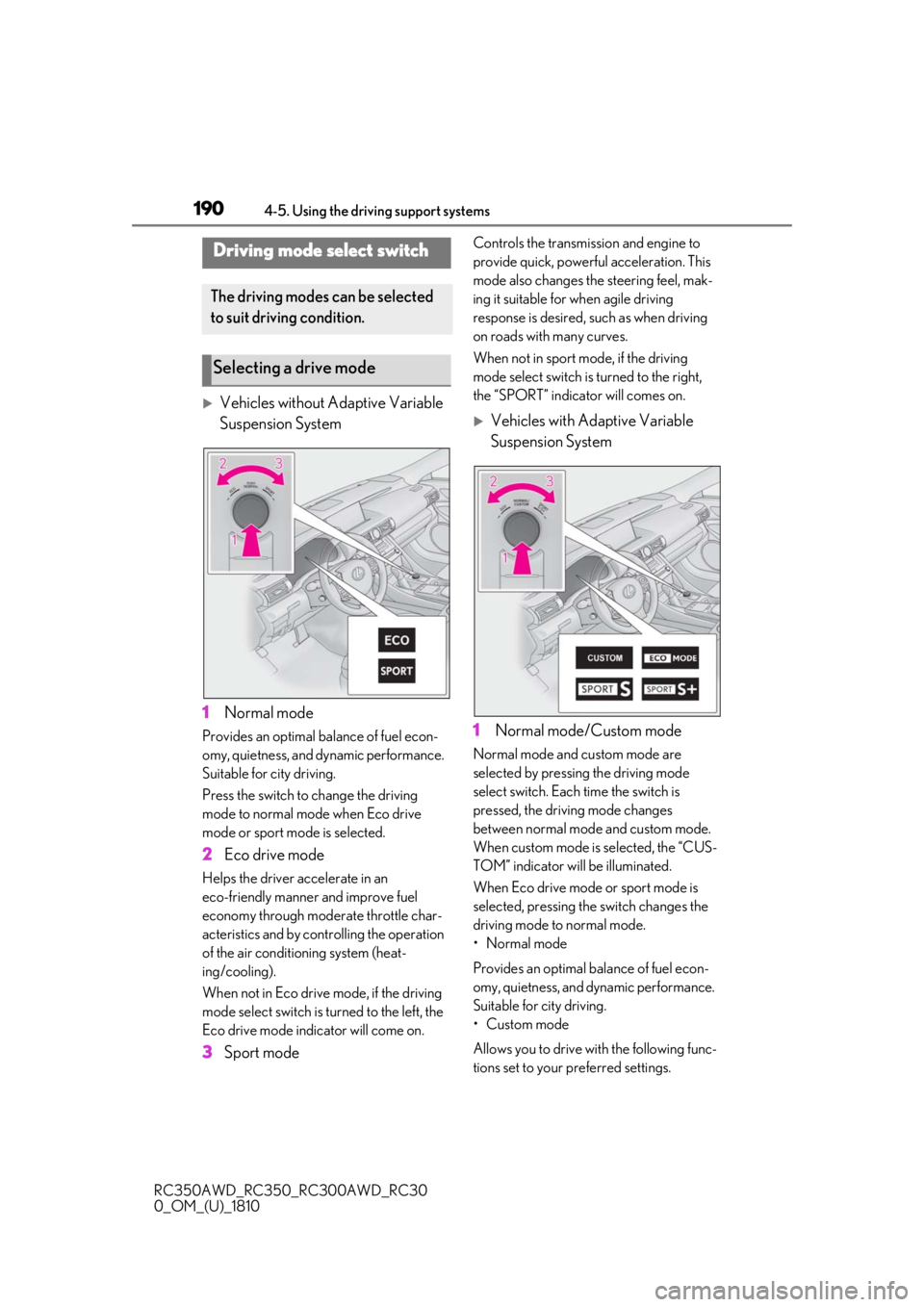
Vehicles without Adaptive Variable
Suspension System
1 Normal mode
Provides an optimal ba lance of fuel econ-
omy, quietness, and dynamic performance.
Suitable for city driving.
Press the switch to change the driving
mode to normal mode when Eco drive
mode or sport mode is selected.
2 Eco drive mode
Helps the driver accelerate in an
eco-friendly manner and improve fuel
economy through moderate throttle char-
acteristics and by controlling the operation
of the air conditioning system (heat-
ing/cooling).
When not in Eco drive mode, if the driving
mode select switch is turned to the left, the
Eco drive mode indicator will come on.
3Sport mode
Controls the transmission and engine to
provide quick, powerful acceleration. This
mode also changes the steering feel, mak-
ing it suitable for when agile driving
response is desired, such as when driving
on roads with many curves.
When not in sport mode, if the driving
mode select switch is turned to the right,
the “SPORT” indicator will comes on.
Vehicles with Adaptive Variable
Suspension System
1 Normal mode/Custom mode
Normal mode and custom mode are
selected by pressing the driving mode
select switch. Each time the switch is
pressed, the driving mode changes
between normal mode and custom mode.
When custom mode is selected, the “CUS-
TOM” indicator will be illuminated.
When Eco drive mode or sport mode is
selected, pressing th e switch changes the
driving mode to normal mode.
• Normal mode
Provides an optimal ba lance of fuel econ-
omy, quietness, and dynamic performance.
Suitable for city driving.
• Custom mode
Allows you to drive with the following func-
tions set to your preferred settings.
Driving mode select switch
The driving modes can be selected
to suit driving condition.
Selecting a drive mode
Page 191 of 390
1914-5. Using the driving support systems
RC350AWD_RC350_RC300AWD_RC30
0_OM_(U)_1810
4
Driving
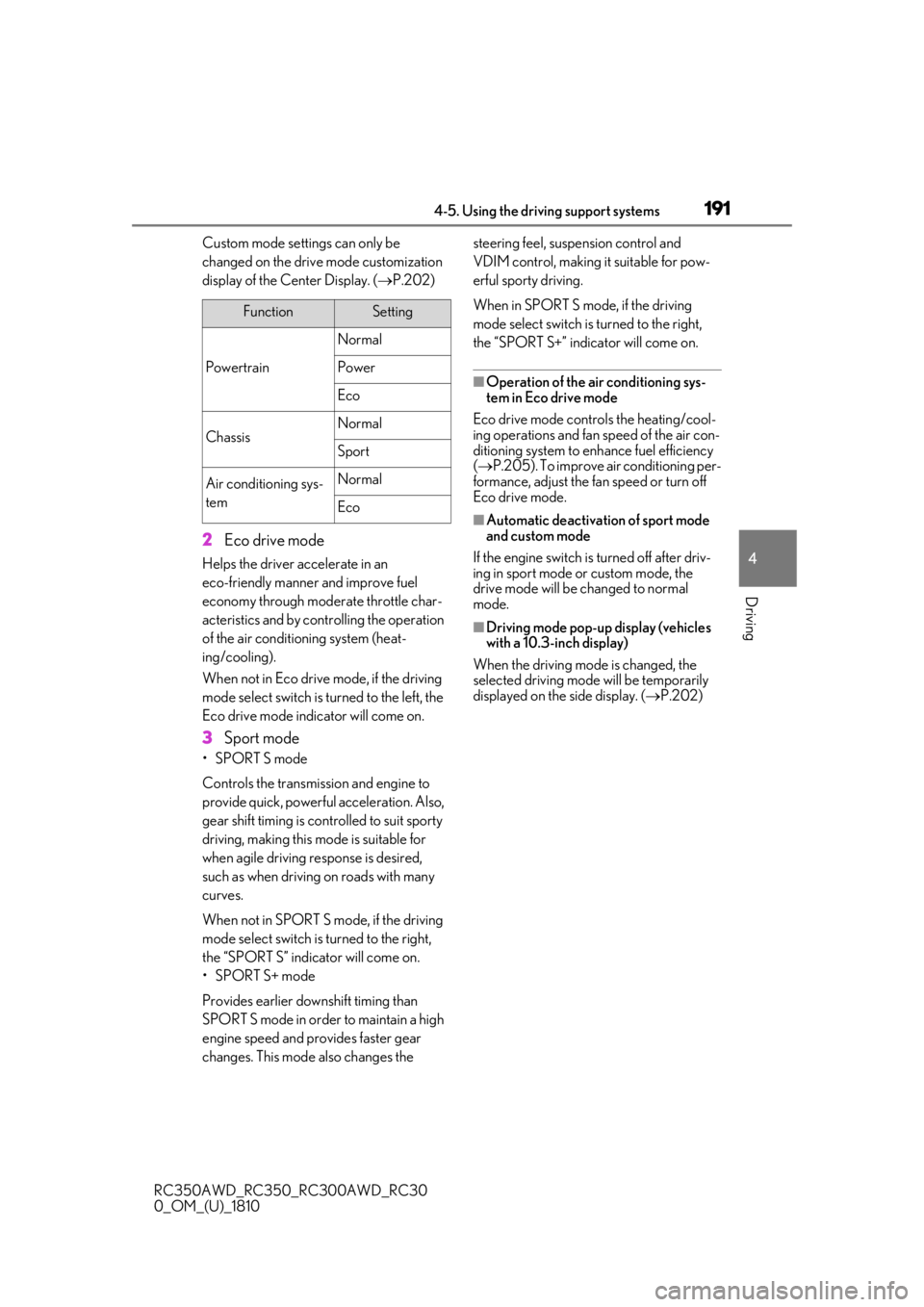
Custom mode settings can only be
changed on the drive mode customization
display of the Center Display. ( P.202)
2 Eco drive mode
Helps the driver accelerate in an
eco-friendly manner and improve fuel
economy through moderate throttle char-
acteristics and by controlling the operation
of the air conditioning system (heat-
ing/cooling).
When not in Eco drive mode, if the driving
mode select switch is turned to the left, the
Eco drive mode indicator will come on.
3Sport mode
•SPORT S mode
Controls the transmission and engine to
provide quick, powerful acceleration. Also,
gear shift timing is co ntrolled to suit sporty
driving, making this mode is suitable for
when agile driving response is desired,
such as when driving on roads with many
curves.
When not in SPORT S mode, if the driving
mode select switch is turned to the right,
the “SPORT S” indicator will come on.
•SPORT S+ mode
Provides earlier down shift timing than
SPORT S mode in order to maintain a high
engine speed and provides faster gear
changes. This mode also changes the steering feel, susp
ension control and
VDIM control, making it suitable for pow-
erful sporty driving.
When in SPORT S mode, if the driving
mode select switch is turned to the right,
the “SPORT S+” indicator will come on.
■Operation of the air conditioning sys-
tem in Eco drive mode
Eco drive mode controls the heating/cool-
ing operations and fan speed of the air con-
ditioning system to enhance fuel efficiency
( P.205). To improve air conditioning per-
formance, adjust the fan speed or turn off
Eco drive mode.
■Automatic deactivation of sport mode
and custom mode
If the engine switch is turned off after driv-
ing in sport mode or custom mode, the
drive mode will be changed to normal
mode.
■Driving mode pop-up display (vehicles
with a 10.3-inch display)
When the driving mode is changed, the
selected driving mode will be temporarily
displayed on the side display. ( P.202)
FunctionSetting
Powertrain
Normal
Power
Eco
ChassisNormal
Sport
Air conditioning sys-
temNormal
Eco
Page 203 of 390
2035-1. Remote Touch/Display
RC350AWD_RC350_RC300AWD_RC30
0_OM_(U)_1810
5
Interior features
*1: Refer to the “NAVIGATION AND MULTIMEDIA SYSTEM OWNER’S
MANUAL”.
*2: This function is not available on some models.
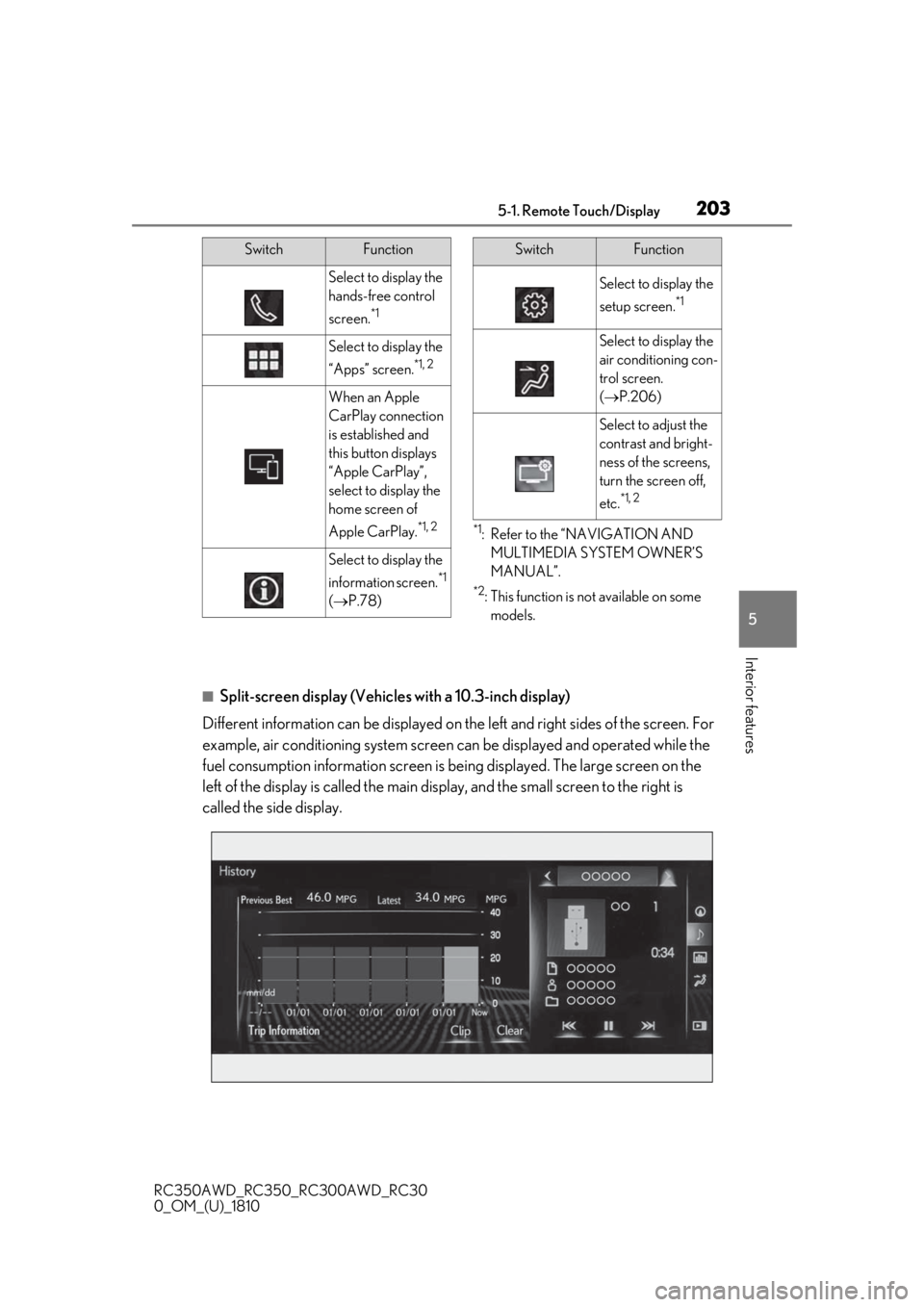
■Split-screen display (Vehicles with a 10.3-inch display)
Different information can be displayed on the left and right sides of the screen. For
example, air conditioning system screen can be displayed and operated while the
fuel consumption information screen is be ing displayed. The large screen on the
left of the display is called the main display, and the small screen to the right is
called the side display.
Select to display the
hands-free control
screen.
*1
Select to display the
“Apps” screen.
*1, 2
When an Apple
CarPlay connection
is established and
this button displays
“Apple CarPlay”,
select to display the
home screen of
Apple CarPlay.
*1, 2
Select to display the
information screen.
*1
( P.78)
SwitchFunction
Select to display the
setup screen.
*1
Select to display the
air conditioning con-
trol screen.
( P.206)
Select to adjust the
contrast and bright-
ness of the screens,
turn the screen off,
etc.
*1, 2
SwitchFunction
Page 210 of 390
2105-2. Using the air conditioning system
RC350AWD_RC350_RC300AWD_RC30
0_OM_(U)_1810your Lexus dealer.
*: The doors that can recall the driving
position memory are changed at the
same time.
■Using automatic mode
Fan speed is adjusted automatically accord-
ing to the temperature setting and the
ambient conditions.
Therefore, the fan may stop for a while until
warm or cool air is ready to flow immedi-
ately after is pressed or “AUTO” is
selected.
■Using the voice command system
Air conditioning system can be operated
using voice commands. Fo r details, refer to
the “NAVIGATION AND MULTIMEDIA
SYSTEM OWNER’S MANUAL”.
■Fogging up of the windows
The windows will easily fog up when the
humidity in the vehicle is high. Turning (“A/C”) on will dehumidify the air
from the outlets and defog the windshield
effectively.
●If you turn (“A/C”) off, the win-
dows may fog up more easily.
●The windows may fog up if the recircu-
lated air mode is used.
■Outside/recirculated air mode
●When driving on dusty roads such as tun-
nels or in heavy traffic, set the out-
side/recirculated air mode button to the
recirculated air mode. This is effective in
preventing outside air from entering the
vehicle interior. During cooling opera-
tion, setting the recirculated air mode will
also cool the vehicle interior effectively.
●Outside/recirculated air mode may auto-
matically switch de pending on the tem-
perature setting or the inside
temperature.
■When the outside temperature exceeds
75°F (24°C) and the air conditioning
system is on
●In order to reduce the air conditioning
power consumption, the air conditioning system may switch to recirculated air
mode automatically. This may also
reduce fuel consumption.
●Recirculated air mode is selected as a
default mode when the engine switch is
turned to IGNITION ON mode.
●It is possible to switch to outside air mode
at any time by pressing
.
■Automatic mode for air intake control
In automatic mode, the system detects
exhaust gas and other pollutants and auto-
matically switches between outside air and
recirculated air modes.
When the dehumidification function is off,
and the fan is operating, turning automatic
mode on will activate the dehumidification
function.
■Operation of the air conditioning sys-
tem in Eco drive mode
In Eco drive mode, the air conditioning sys-
tem is controlled as follows to prioritize fuel
efficiency:
●Engine speed and compressor operation
controlled to restrict heating/cooling
capacity
●Fan speed restricted when automatic
mode is selected
To improve air condit ioning performance,
perform the following operations:
●Adjust the fan speed
●Turn off Eco drive mode
■When the outside temperature falls to
nearly 32°F (0°C)
The dehumidification function may not
operate even when is pressed or
“A/C” is selected.
■Ventilation and air conditioning odors
●To let fresh air in, set the air conditioning
system to the outside air mode.
●During use, various odors from inside and
outside the vehicle may enter into and
accumulate in the air conditioning sys-
tem. This may then cause odor to be
emitted from the vents.
Page 238 of 390
2386-2. Maintenance
RC350AWD_RC350_RC300AWD_RC30
0_OM_(U)_1810
6-2.Maintenance
■Repair and replacement
It is recommended that genuine Lexus parts
be used for repairs to ensure performance
of each system. If non-Lexus parts are used
in replacement or if a repair shop other than
a Lexus dealer perfor ms repairs, confirm
the warranty coverage.
■Allow inspection and repairs to be per-
formed by a Lexus dealer
●Lexus technicians are well-trained spe-
cialists and are kept up to date with the
latest service information. They are well
informed about the operations of all sys-
tems on your vehicle.
●Keep a copy of the repa ir order. It proves
that the maintenance that has been per-
formed is under warra nty coverage. If any
problem should arise while your vehicle is
under warranty, your Lexus dealer will
promptly take care of it.
General maintenance should be per-
formed on a daily basis. This can be
done by yourself or by a Lexus dealer.
Scheduled maintenance should be
performed at specified intervals
according to the maintenance sched-
ule.
For details about ma intenance items and
schedules, refer to the “Warranty and Ser-
vice Guide”, “Owner’s Manual Supple-
ment” or “Scheduled Maintenance”.
■Resetting the message indicating main-
tenance is required
After the required maintenance is pre-
formed according to the maintenance
schedule, please reset the message.
To reset the message, follow the procedures
described below:
1
Select on the multi-information dis-
play. ( P.76)
2
Press the or meter control
switch on the steering wheel to select
“Vehicle Settings” then “Scheduled
Maintenance requirements
To ensure safe and economical driv-
ing, day-to-day care and regular
maintenance are essential. It is the
owner’s responsibility to perform
regular checks. Lexus recommends
the maintenance below.
WARNING
■If your vehicle is not properly main-
tained
Improper maintenanc e could result in
serious damage to the vehicle and possi-
ble death or serious injury.
■Handling of the battery
●Engine exhaust, some of its constitu-
ents, and a wide variety of automobile
components contain or emit chemicals
known to the State of California to
cause cancer and birth defects and
other reproductive harm. Work in a
well ventilated area.
●Oils, fuels and fluids contained in vehi-
cles as well as waste produced by
component wear contain or emit
chemicals known to the State of Cali-
fornia to cause cancer and birth
defects or other reproductive harm.
Avoid exposure and wash any affected
area immediately.
●Battery posts, terminals and related
accessories contain lead and lead
compounds which are known to cause
brain damage. Wash your hands after
handling. ( P.253)
General maintenance
Scheduled maintenance
Page 242 of 390
2426-2. Maintenance
RC350AWD_RC350_RC300AWD_RC30
0_OM_(U)_1810
The OBD system determines that a
problem exists somewhere in the emis-
sion control system. Your vehicle may
not pass the I/M test and may need to
be repaired. Contact your Lexus
dealer to service the vehicle.
When the battery is disconnected
or discharged
Readiness codes that are set during ordi-
nary driving are erased.Also, depending
on your driving habits, the readiness codes
may not be completely set.
When the fuel tank cap is loose
The malfunction indicator lamp comes on
indicating a temporary malfunction and
your vehicle may not pass the I/M test.
The error code in the OBD system will
not be cleared unless the vehicle is
driven 40 or more times.
Contact your Lexus dealer to prepare
the vehicle for re-testing.
Emission inspection and
maintenance (I/M) pro-
grams
Some states have vehicle emission
inspection programs which include
OBD (On Board Diagnostics)
checks. The OBD system monitors
the operation of the emission con-
trol system.
If the malfunction indicator lamp
comes on
Your vehicle may not pass the
I/M test in the following situa-
tions:
When the malfunction indicator
lamp still remains on after sev-
eral driving trips
If your vehicle does not pass the
I/M test