remote control LEXUS RC350 2019 Owner's Manual
[x] Cancel search | Manufacturer: LEXUS, Model Year: 2019, Model line: RC350, Model: LEXUS RC350 2019Pages: 390, PDF Size: 7.88 MB
Page 202 of 390
2025-1. Remote Touch/Display
RC350AWD_RC350_RC300AWD_RC30
0_OM_(U)_1810
■Menu screen
Press the “MENU” button on the
Remote Touch to display the menu
screen.
The displays shown in the illustrations
are used for example only and may dif-
fer from the actual vehicle.
Vehicles with a 10.3-inch display
Vehicles with a 7-inch display
NOTICE
■To prevent damage to the Remote
Touch
Observe the following precautions. Fail-
ure to do so may cause damage to the
Remote Touch.
●Do not allow food, liquid, stickers or lit
cigarettes to contact the Remote
Touch.
●Do not subject the Remote Touch to
excessive pressure or strong impact.
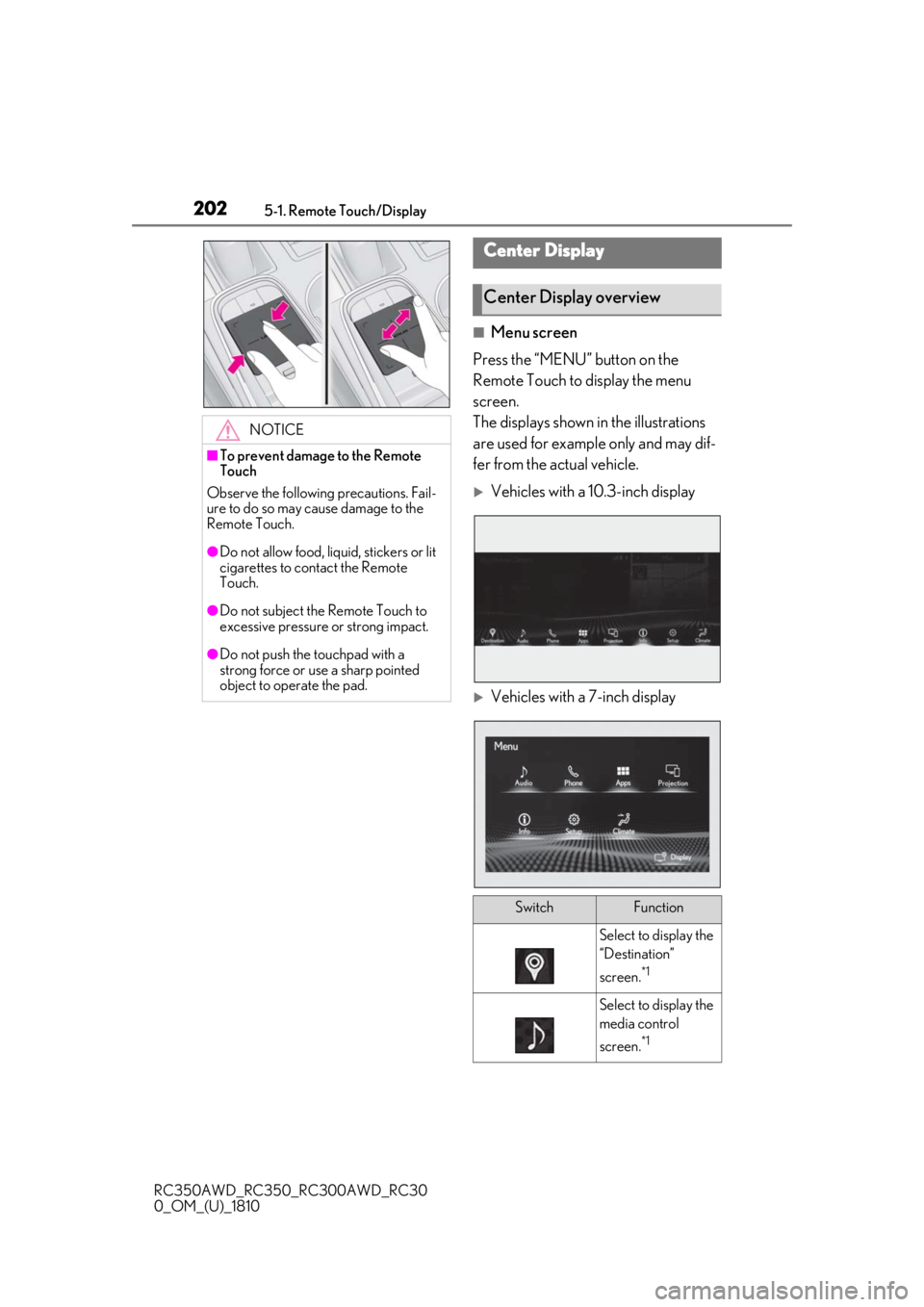
●Do not push the touchpad with a
strong force or use a sharp pointed
object to operate the pad.
Center Display
Center Display overview
SwitchFunction
Select to display the
“Destination”
screen.
*1
Select to display the
media control
screen.
*1
Page 203 of 390
2035-1. Remote Touch/Display
RC350AWD_RC350_RC300AWD_RC30
0_OM_(U)_1810
5
Interior features
*1: Refer to the “NAVIGATION AND MULTIMEDIA SYSTEM OWNER’S
MANUAL”.
*2: This function is not available on some models.
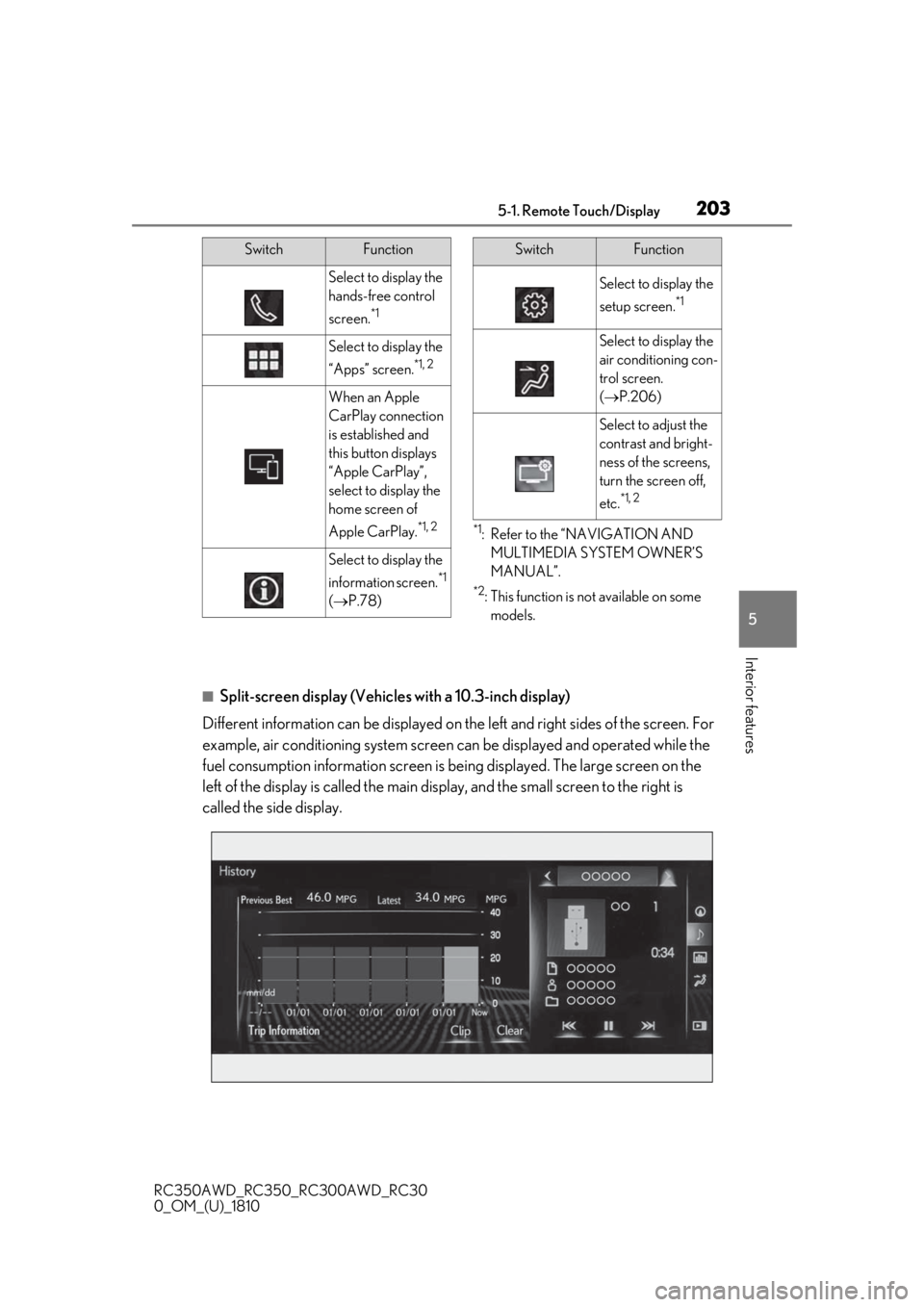
■Split-screen display (Vehicles with a 10.3-inch display)
Different information can be displayed on the left and right sides of the screen. For
example, air conditioning system screen can be displayed and operated while the
fuel consumption information screen is be ing displayed. The large screen on the
left of the display is called the main display, and the small screen to the right is
called the side display.
Select to display the
hands-free control
screen.
*1
Select to display the
“Apps” screen.
*1, 2
When an Apple
CarPlay connection
is established and
this button displays
“Apple CarPlay”,
select to display the
home screen of
Apple CarPlay.
*1, 2
Select to display the
information screen.
*1
( P.78)
SwitchFunction
Select to display the
setup screen.
*1
Select to display the
air conditioning con-
trol screen.
( P.206)
Select to adjust the
contrast and bright-
ness of the screens,
turn the screen off,
etc.
*1, 2
SwitchFunction
Page 205 of 390
2055-2. Using the air conditioning system
RC350AWD_RC350_RC300AWD_RC30
0_OM_(U)_1810
5
Interior features
5-2.Using the air conditioning system
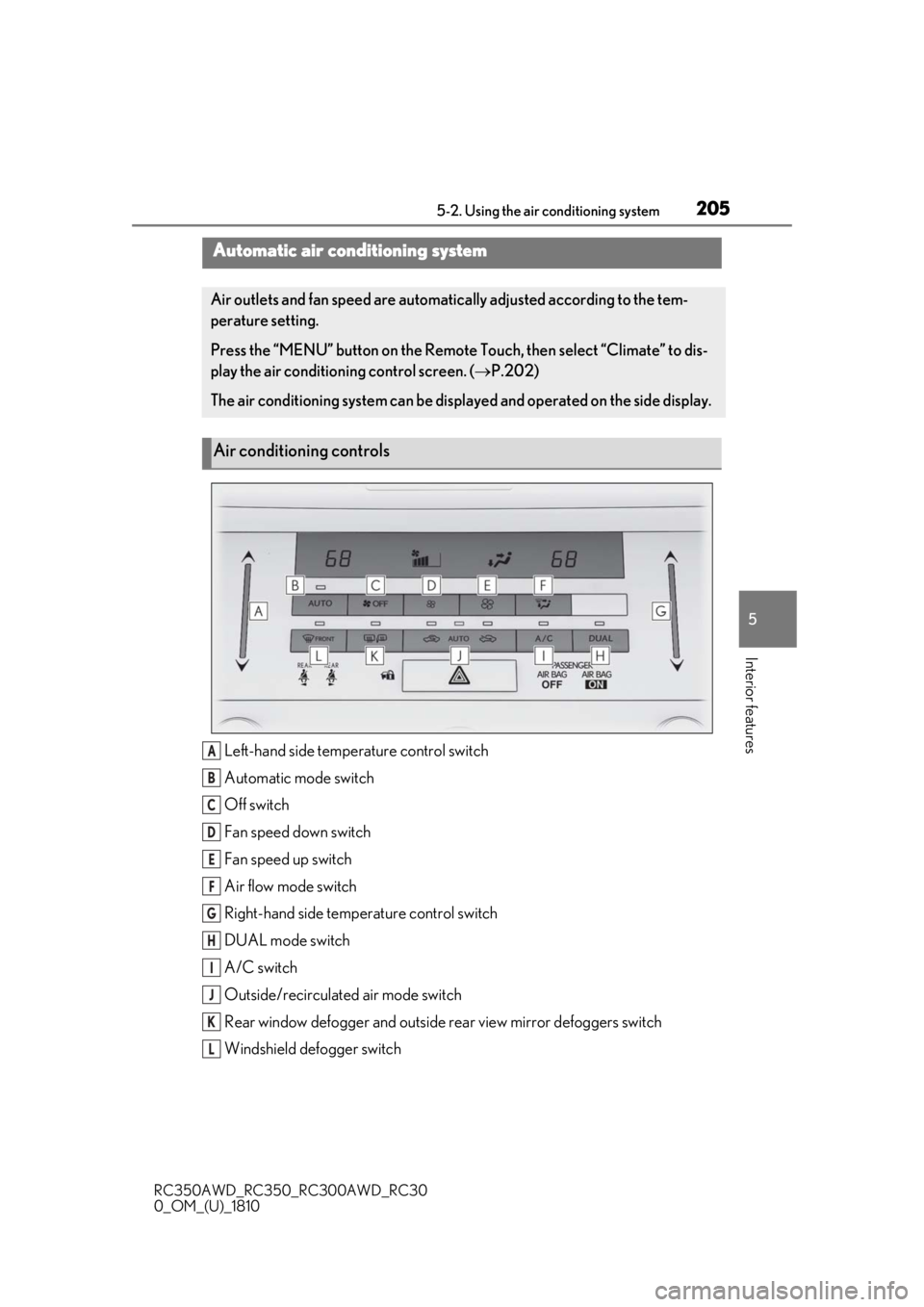
Left-hand side temperature control switch
Automatic mode switch
Off switch
Fan speed down switch
Fan speed up switch
Air flow mode switch
Right-hand side temp erature control switch
DUAL mode switch
A/C switch
Outside/recirculated air mode switch
Rear window defogger and outside rear view mirror defoggers switch
Windshield defogger switch
Automatic air conditioning system
Air outlets and fan speed are automati cally adjusted according to the tem-
perature setting.
Press the “MENU” button on the Remote Touch, then select “Climate” to dis-
play the air conditioning control screen. ( P.202)
The air conditioning system can be displa yed and operated on the side display.
Air conditioning controls
A
B
C
D
E
F
G
H
I
J
K
L
Page 207 of 390
2075-2. Using the air conditioning system
RC350AWD_RC350_RC300AWD_RC30
0_OM_(U)_1810
5
Interior features
screen
Display the option control screen
( P.207)
Adjust the left-hand side tempera-
ture setting
Adjust the fan speed setting
Select the air flow mode
Adjust the right-hand side tem-
perature setting
Function on/off indicators
When the function is on, the indicator illu-
minates on the control screen.
Display the sub function menu
( P.207)
Using the Remote Touch, select the button
on the screen and activate it by pressing on
or double tapping the Remote Touch Pad.
■Option control screen
Select on the air conditioning con-
trol screen to display the option control
screen. The functions can be switched
on and off.
Adjusting the temperature for
driver and passenger seats sepa-
rately (“DUAL” mode) ( P.208)
Select to set eco mode on/off
( P.210)
Set cooling and dehumidification function on/off
If the “A/C” indicator is turned off, the sys-
tem will blow ambient temperature air or
heated air.
Removing pollen from the air
(Micro dust and pollen filter)
(
P.209)
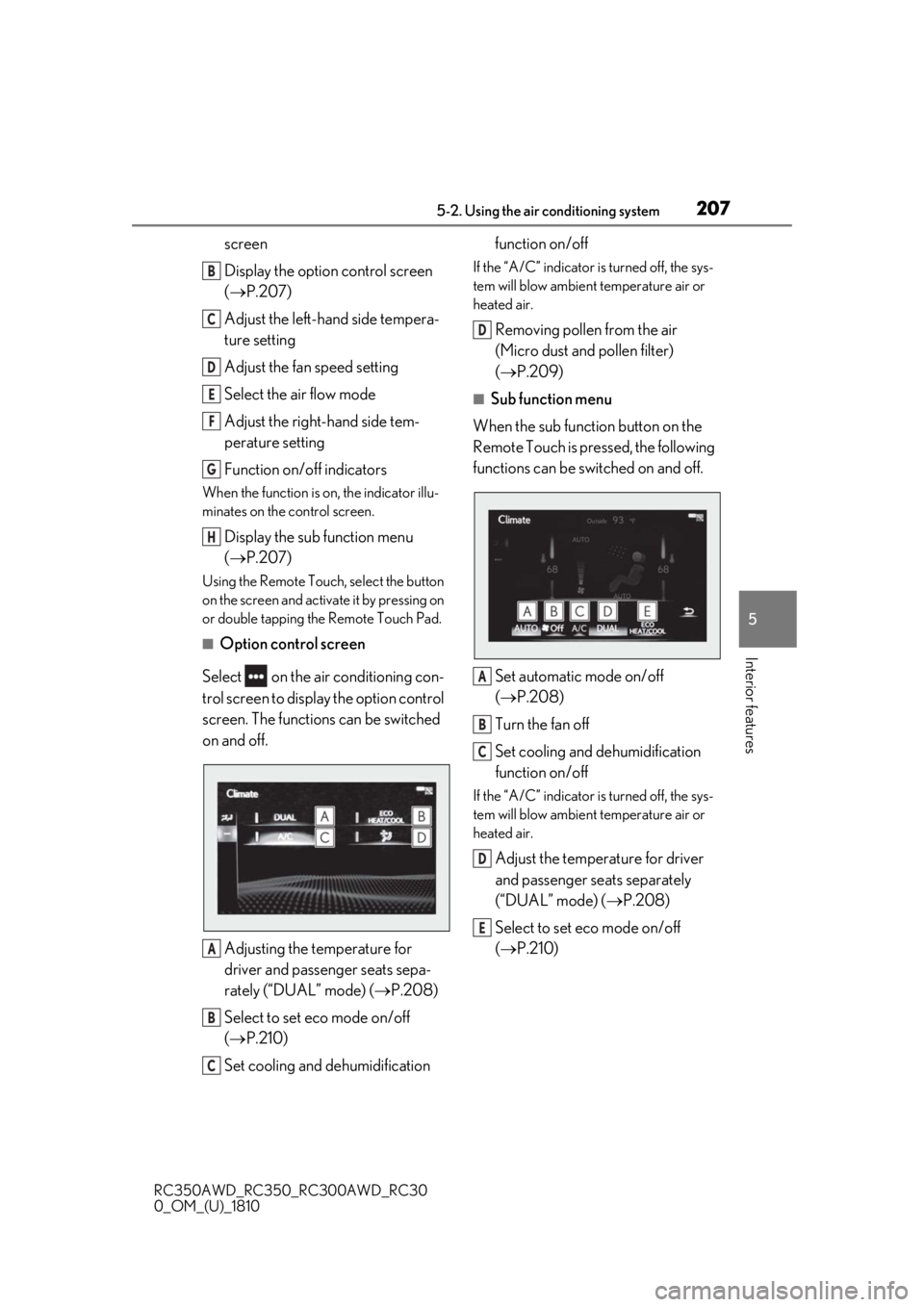
■Sub function menu
When the sub function button on the
Remote Touch is pressed, the following
functions can be switched on and off.
Set automatic mode on/off
(P.208)
Turn the fan off
Set cooling and dehumidification
function on/off
If the “A/C” indicator is turned off, the sys-
tem will blow ambient temperature air or
heated air.
Adjust the temperature for driver
and passenger seats separately
(“DUAL” mode) ( P.208)
Select to set eco mode on/off
( P.210)
B
C
D
E
F
G
H
A
B
C
D
A
B
C
D
E
Page 222 of 390
2225-5. Using the other interior features
RC350AWD_RC350_RC300AWD_RC30
0_OM_(U)_1810
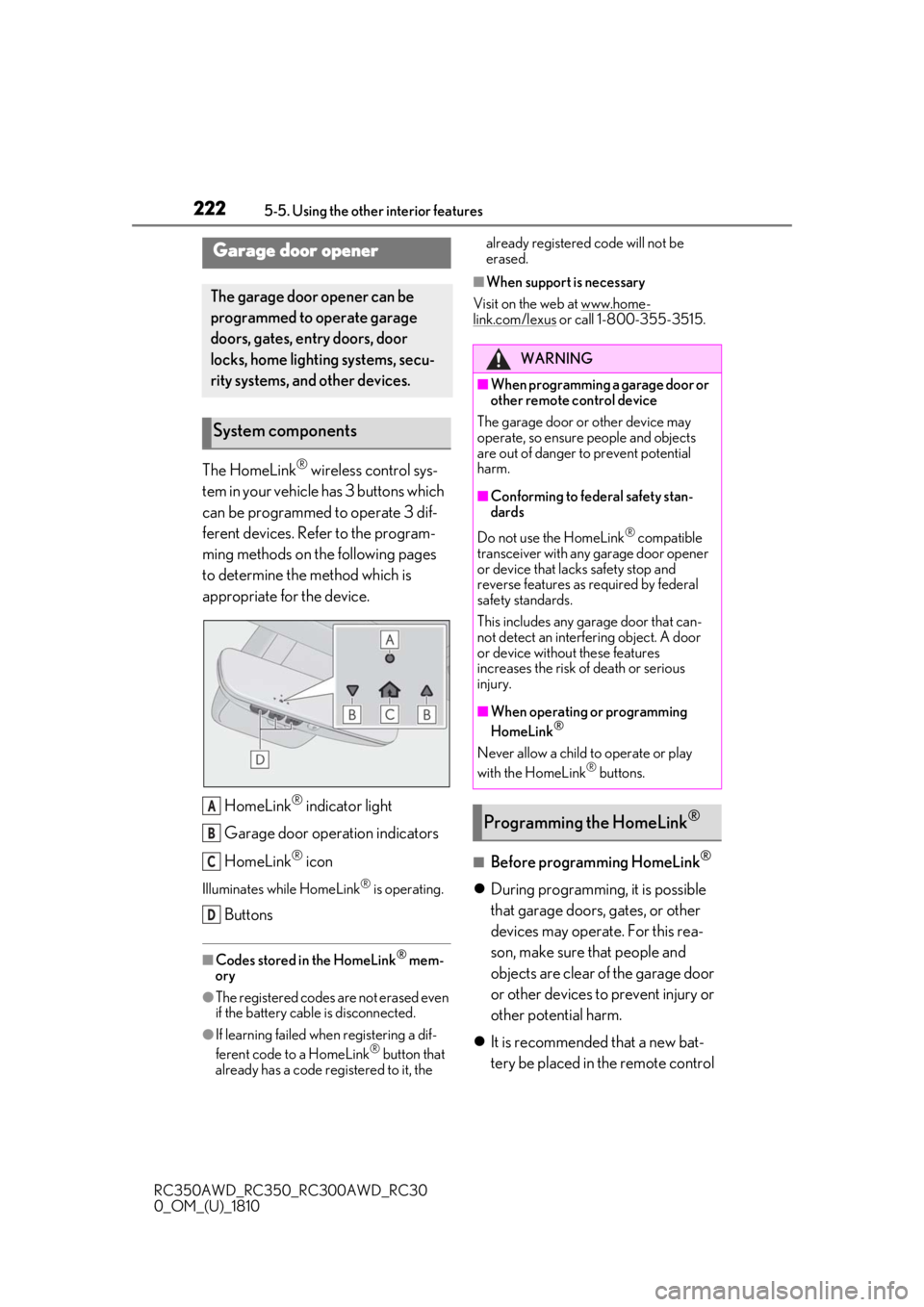
The HomeLink® wireless control sys-
tem in your vehicle has 3 buttons which
can be programmed to operate 3 dif-
ferent devices. Refer to the program-
ming methods on the following pages
to determine the method which is
appropriate for the device.
HomeLink
® indicator light
Garage door operation indicators
HomeLink
® icon
Illuminates while HomeLink® is operating.
Buttons
■Codes stored in the HomeLink® mem-
ory
●The registered codes are not erased even
if the battery cable is disconnected.
●If learning failed wh en registering a dif-
ferent code to a HomeLink® button that
already has a code registered to it, the already registered code will not be
erased.
■When support is necessary
Visit on the web at www.home-
link.com/lexus or call 1-800-355-3515.
■Before programming HomeLink®
During programming, it is possible
that garage doors, gates, or other
devices may operate. For this rea-
son, make sure that people and
objects are clear of the garage door
or other devices to prevent injury or
other potential harm.
It is recommended that a new bat-
tery be placed in the remote control
Garage door opener
The garage door opener can be
programmed to operate garage
doors, gates, entry doors, door
locks, home lighting systems, secu-
rity systems, and other devices.
System components
A
B
C
D
WARNING
■When programming a garage door or
other remote control device
The garage door or other device may
operate, so ensure people and objects
are out of danger to prevent potential
harm.
■Conforming to federal safety stan-
dards
Do not use the HomeLink
® compatible
transceiver with any garage door opener
or device that lacks safety stop and
reverse features as required by federal
safety standards.
This includes any garage door that can-
not detect an interf ering object. A door
or device without these features
increases the risk of death or serious
injury.
■When operating or programming
HomeLink®
Never allow a child to operate or play
with the HomeLink® buttons.
Programming the HomeLink®
Page 223 of 390
2235-5. Using the other interior features
RC350AWD_RC350_RC300AWD_RC30
0_OM_(U)_1810
5
Interior features
transmitter for more accurate pro-
gramming.
Garage door opener motors manu-
factured after 1995 may be
equipped with rolling code protec-
tion. If this is the case, you may need
a stepladder or other sturdy, safe
device to reach the “Learn” or
“Smart” button on the garage door
opener motor.
■Programming HomeLink®
Steps 1 through 3 must be performed
within 60 seconds, otherwise the indi-
cator light will stop flashing and pro-
gramming will not be able to be
completed.
1 Press and release the HomeLink
®
button you want to program and
check that the HomeLink
® indica-
tor light flashes (orange).
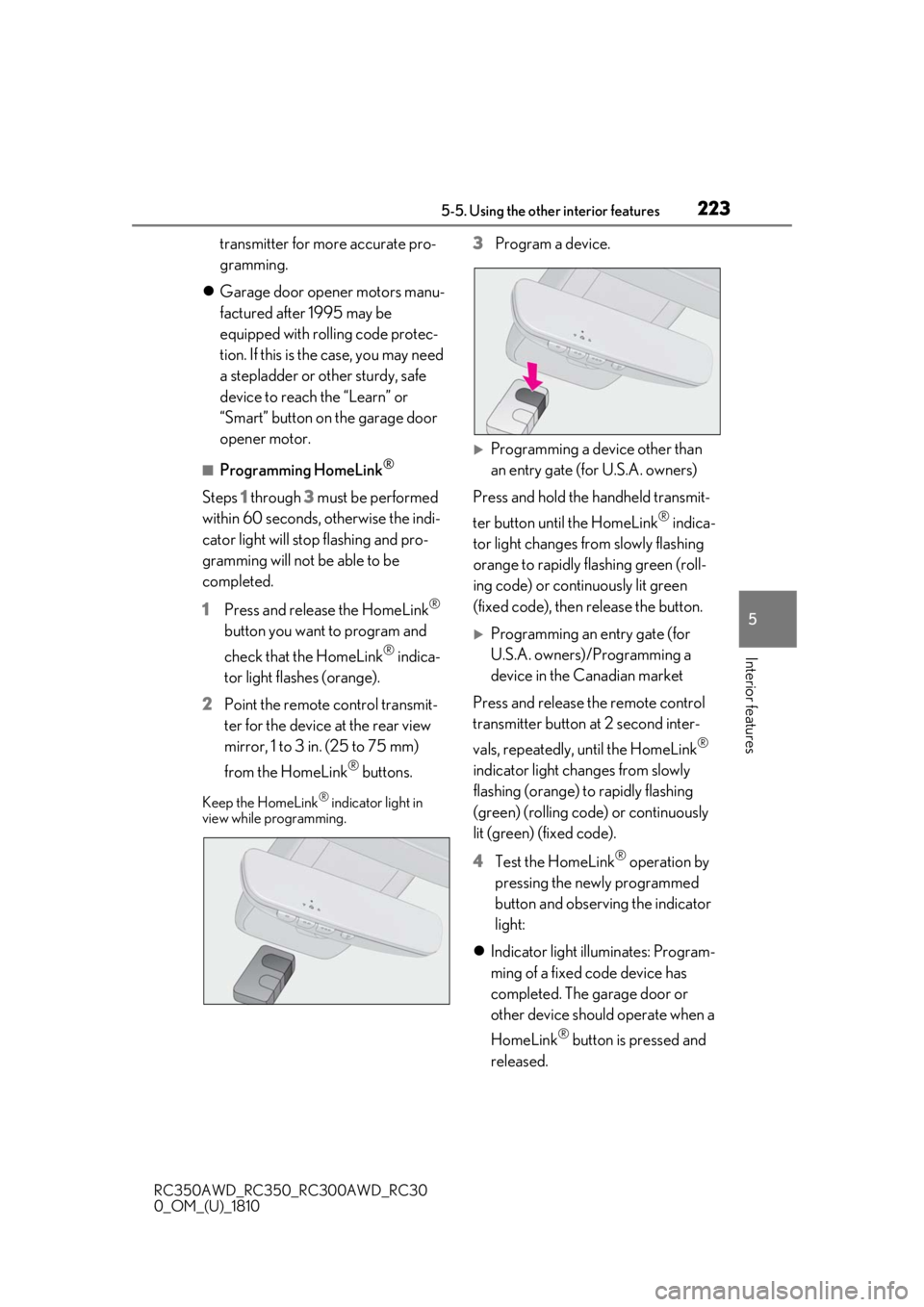
2 Point the remote control transmit-
ter for the device at the rear view
mirror, 1 to 3 in. (25 to 75 mm)
from the HomeLink
® buttons.
Keep the HomeLink® indicator light in
view while programming.
3 Program a device.
Programming a device other than
an entry gate (for U.S.A. owners)
Press and hold the handheld transmit-
ter button until the HomeLink
® indica-
tor light changes from slowly flashing
orange to rapidly flashing green (roll-
ing code) or continuously lit green
(fixed code), then release the button.
Programming an entry gate (for
U.S.A. owners)/Programming a
device in the Canadian market
Press and release the remote control
transmitter button at 2 second inter-
vals, repeatedly, until the HomeLink
®
indicator light changes from slowly
flashing (orange) to rapidly flashing
(green) (rolling code) or continuously
lit (green) (fixed code).
4 Test the HomeLink
® operation by
pressing the newly programmed
button and observing the indicator
light:
Indicator light illuminates: Program-
ming of a fixed code device has
completed. The garage door or
other device should operate when a
HomeLink
® button is pressed and
released.
Page 253 of 390
2536-3. Do-it-yourself maintenance
RC350AWD_RC350_RC300AWD_RC30
0_OM_(U)_1810
6
Maintenance and care
■Brake fluid can absorb moisture from
the air
Excess moisture in the brake fluid can cause
a dangerous loss of braking efficiency. Use
only newly opened brake fluid.
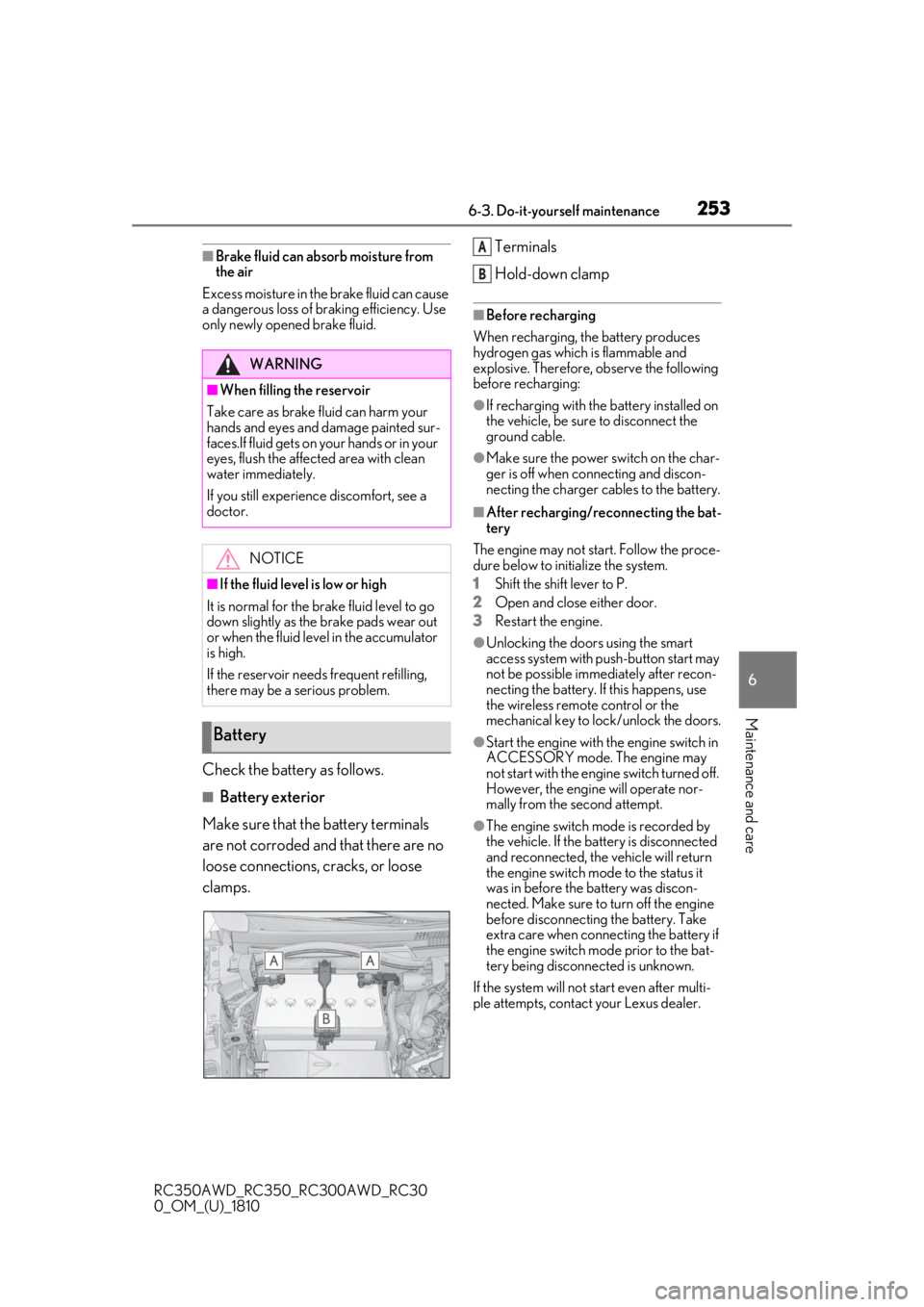
Check the battery as follows.
■Battery exterior
Make sure that the battery terminals
are not corroded and that there are no
loose connections, cracks, or loose
clamps. Terminals
Hold-down clamp
■Before recharging
When recharging, the battery produces
hydrogen gas which is flammable and
explosive. Therefore, observe the following
before recharging:
●If recharging with the battery installed on
the vehicle, be sure to disconnect the
ground cable.
●Make sure the power switch on the char-
ger is off when connecting and discon-
necting the charger cables to the battery.
■After recharging/reconnecting the bat-
tery
The engine may not start. Follow the proce-
dure below to initialize the system.
1
Shift the shift lever to P.
2
Open and close either door.
3
Restart the engine.
●Unlocking the doors using the smart
access system with pu sh-button start may
not be possible immediately after recon-
necting the battery. If this happens, use
the wireless remote control or the
mechanical key to lock/unlock the doors.
●Start the engine with the engine switch in
ACCESSORY mode. The engine may
not start with the engine switch turned off.
However, the engine will operate nor-
mally from the second attempt.
●The engine switch mode is recorded by
the vehicle. If the battery is disconnected
and reconnected, the vehicle will return
the engine switch mode to the status it
was in before the battery was discon-
nected. Make sure to turn off the engine
before disconnecting the battery. Take
extra care when connecting the battery if
the engine switch mode prior to the bat-
tery being disconnected is unknown.
If the system will not start even after multi-
ple attempts, contact your Lexus dealer.
WARNING
■When filling the reservoir
Take care as brake fluid can harm your
hands and eyes and damage painted sur-
faces.If fluid gets on your hands or in your
eyes, flush the affected area with clean
water immediately.
If you still experience discomfort, see a
doctor.
NOTICE
■If the fluid level is low or high
It is normal for the brake fluid level to go
down slightly as the brake pads wear out
or when the fluid level in the accumulator
is high.
If the reservoir need s frequent refilling,
there may be a serious problem.
Battery
A
B
Page 265 of 390
2656-3. Do-it-yourself maintenance
RC350AWD_RC350_RC300AWD_RC30
0_OM_(U)_1810
6
Maintenance and care
When an air conditioning odor comes out
continuously, replace the air conditioning
filter.
■If the electronic key battery is depleted
The following symptoms may occur:
●The smart access system with push-but-
ton start and wireless remote control will
not function properly.
●The operational range will be reduced.
■When the card key battery needs to be
replaced (if equipped)
The battery for the card key is available only
at Lexus dealers. Your Lexus dealer can
replace the battery for you.
Flathead screwdriver
Small flathead screwdriver
Lithium battery CR2032
■Use a CR2032 lithium battery
●Batteries can be purchased at your Lexus
dealer, local electrical appliance shops or
camera stores.
●Replace only with the same or equivalent
type recommended by the manufacturer.
●Dispose of used batteries according to
local laws.
NOTICE
■When using the air conditioning sys-
tem
Make sure that a filter is always installed.
Using the air conditioning system without
a filter may cause damage to the system.
Electronic key battery
Replace the battery with a new one
if it is depleted.
As the key may be damaged if the
following procedure is not per-
formed properly, it is recom-
mended that key battery
replacement be performed by your
Lexus dealer.
Items to prepare
Page 266 of 390
2666-3. Do-it-yourself maintenance
RC350AWD_RC350_RC300AWD_RC30
0_OM_(U)_1810
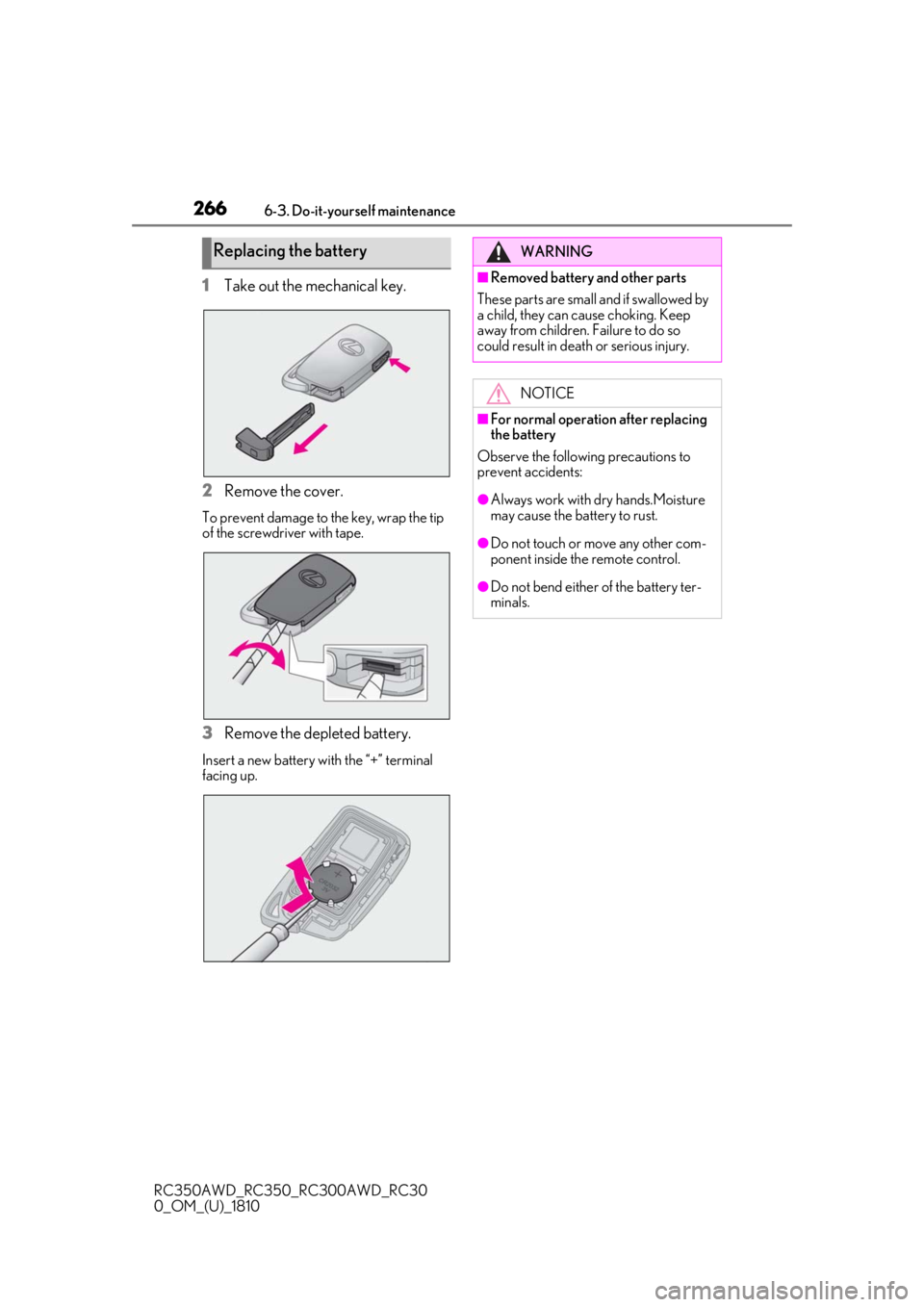
1Take out the mechanical key.
2
Remove the cover.
To prevent damage to the key, wrap the tip
of the screwdriver with tape.
3Remove the depleted battery.
Insert a new battery with the “+” terminal
facing up.
Replacing the batteryWARNING
■Removed battery and other parts
These parts are small and if swallowed by
a child, they can cause choking. Keep
away from children. Failure to do so
could result in death or serious injury.
NOTICE
■For normal operation after replacing
the battery
Observe the following precautions to
prevent accidents:
●Always work with dry hands.Moisture
may cause the battery to rust.
●Do not touch or move any other com-
ponent inside the remote control.
●Do not bend either of the battery ter-
minals.
Page 306 of 390
3047-2. Steps to take in an emergency
RC350AWD_RC350_RC300AWD_RC30
0_OM_(U)_1810
■When the electronic key does not work
properly
●Make sure that the smart access system
with push-button start has not been deac-
tivated in the customization setting. If it is
off, turn the function on.
●Check if battery-saving mode is set. If it is
set, cancel the function. ( P.94)
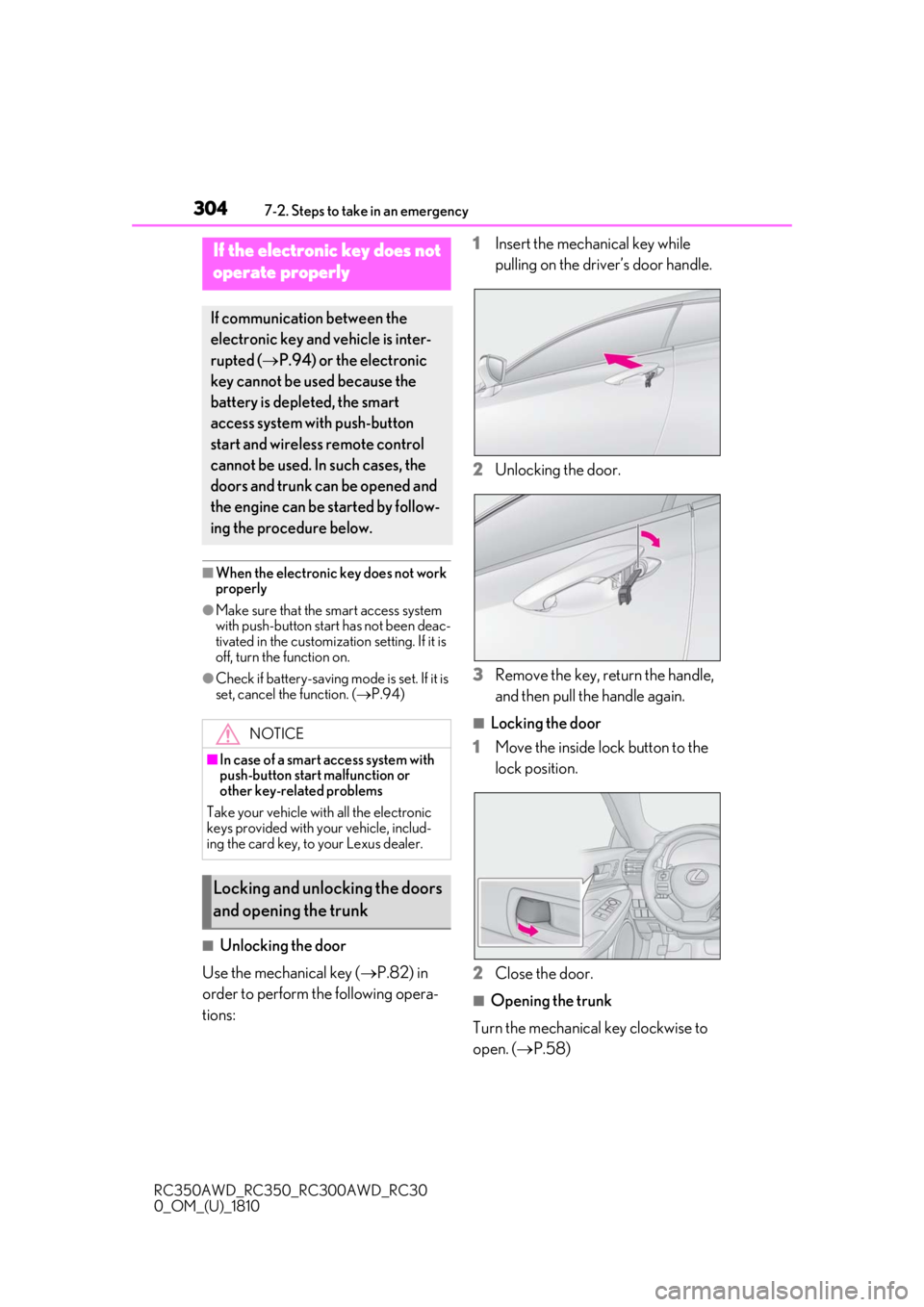
■Unlocking the door
Use the mechanical key ( P.82) in
order to perform the following opera-
tions: 1
Insert the mechanical key while
pulling on the driver’s door handle.
2
Unlocking the door.
3
Remove the key, return the handle,
and then pull the handle again.
■Locking the door
1
Move the inside lock button to the
lock position.
2
Close the door.
■Opening the trunk
Turn the mechanical key clockwise to
open. ( P.58)
If the electronic key does not
o
perate properly
If communication between the
electronic key and vehicle is inter-
rupted ( P.94) or the electronic
key cannot be used because the
battery is depleted, the smart
access system with push-button
start and wireless remote control
cannot be used. In such cases, the
doors and trunk can be opened and
the engine can be started by follow-
ing the procedure below.
NOTICE
■In case of a smart access system with
push-button start malfunction or
other key-related problems
Take your vehicle with all the electronic
keys provided with your vehicle, includ-
ing the card key, to your Lexus dealer.
Locking and unlocking the doors
and opening the trunk