warning LEXUS RC350 2019 Service Manual
[x] Cancel search | Manufacturer: LEXUS, Model Year: 2019, Model line: RC350, Model: LEXUS RC350 2019Pages: 390, PDF Size: 7.88 MB
Page 70 of 390
702-1. Instrument cluster
RC350AWD_RC350_RC300AWD_RC30
0_OM_(U)_1810outside temperature may not be dis-
played, or the display may take longer
than normal to change:
• When stopped, or driving at low speeds (less than 12 mph [20 km/h])
• When the outside temperature has
changed suddenly (at the entrance/exit of
a garage, tunnel, etc.)
●When “_ _”or “E” is displayed, the system
may be malfunctioning.
Take your vehicle to your Lexus dealer.
■Pop-up display
●In some situations, su ch as when a switch
operation is performed, a pop-up display
will be temporarily displayed on the
multi-information display or the odome-
ter/trip meter screen (F SPORT models).
●Some pop-up displays can be set on/off.
( P.76)
■Customization
The meter display can be customized on
the multi-information display. ( P.339)
■Display items
Odometer
Displays the total distance the vehicle has
been driven.
Trip meter A/trip meter B
Displays the distance the vehicle has been
driven since the meter was last reset. Trip
meters A and B can be used to record and
display different distances independently.
Distance until next engine oil
change
Displays the distance the vehicle can be
driven until an oil change is necessary.
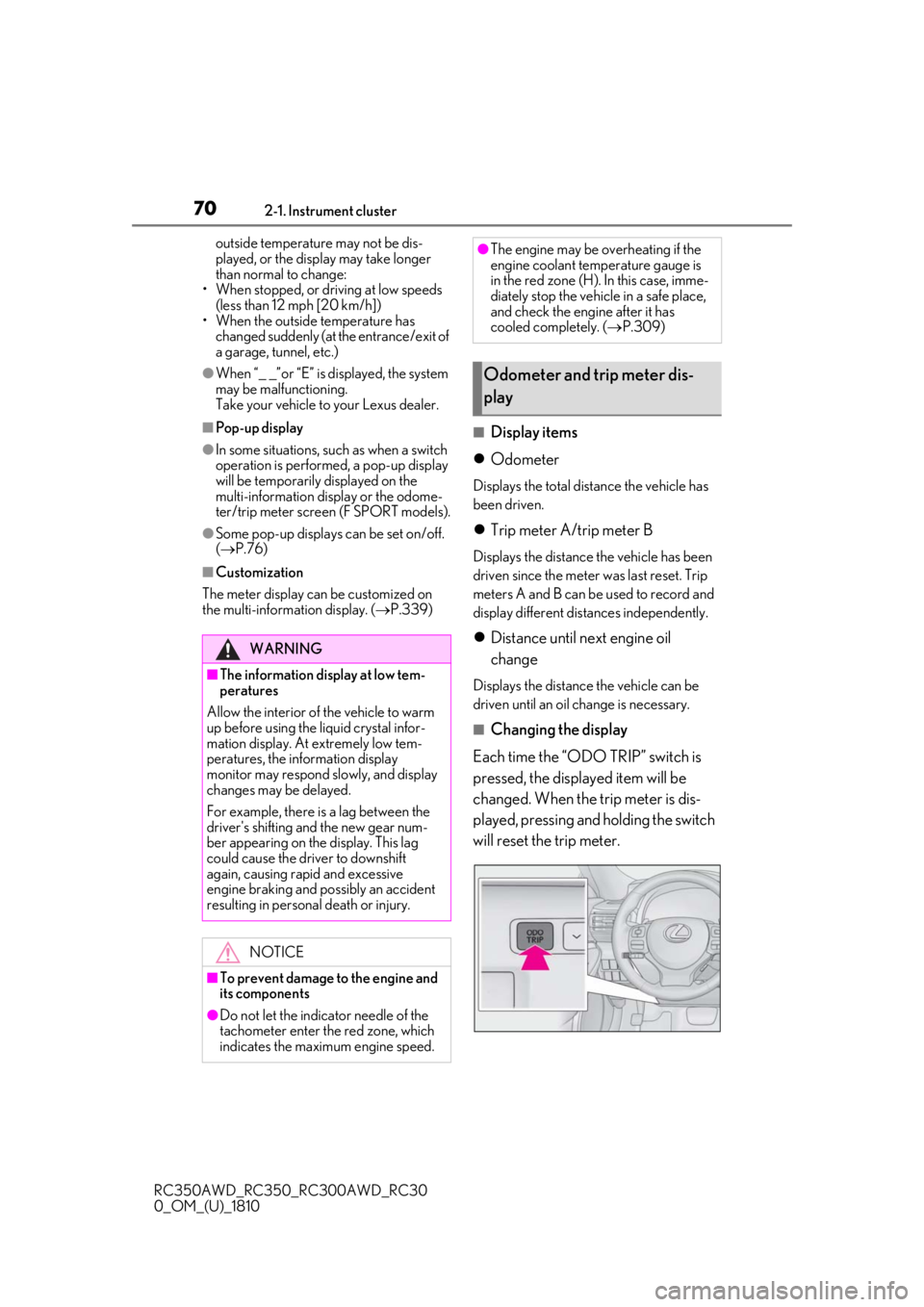
■Changing the display
Each time the “ODO TRIP” switch is
pressed, the displayed item will be
changed. When the trip meter is dis-
played, pressing and holding the switch
will reset the trip meter.
WARNING
■The information display at low tem-
peratures
Allow the interior of the vehicle to warm
up before using the liquid crystal infor-
mation display. At extremely low tem-
peratures, the information display
monitor may respond slowly, and display
changes may be delayed.
For example, there is a lag between the
driver's shifting and the new gear num-
ber appearing on the display. This lag
could cause the driver to downshift
again, causing rapid and excessive
engine braking and possibly an accident
resulting in personal death or injury.
NOTICE
■To prevent damage to the engine and
its components
●Do not let the indicator needle of the
tachometer enter the red zone, which
indicates the maximum engine speed.
●The engine may be overheating if the
engine coolant temperature gauge is
in the red zone (H). In this case, imme-
diately stop the vehicle in a safe place,
and check the engine after it has
cooled completely. ( P.309)
Odometer and trip meter dis-
play
Page 71 of 390
712-1. Instrument cluster
RC350AWD_RC350_RC300AWD_RC30
0_OM_(U)_1810
2
Vehicle status information and indicators
■Pop-up display
In some situations the following will be
temporarily displayed:
Distance until next engine oil
change
Distance until the next engine oil change
will displayed when a warning message
indicating that oil ma intenance should be
performed soon or is required is displayed.
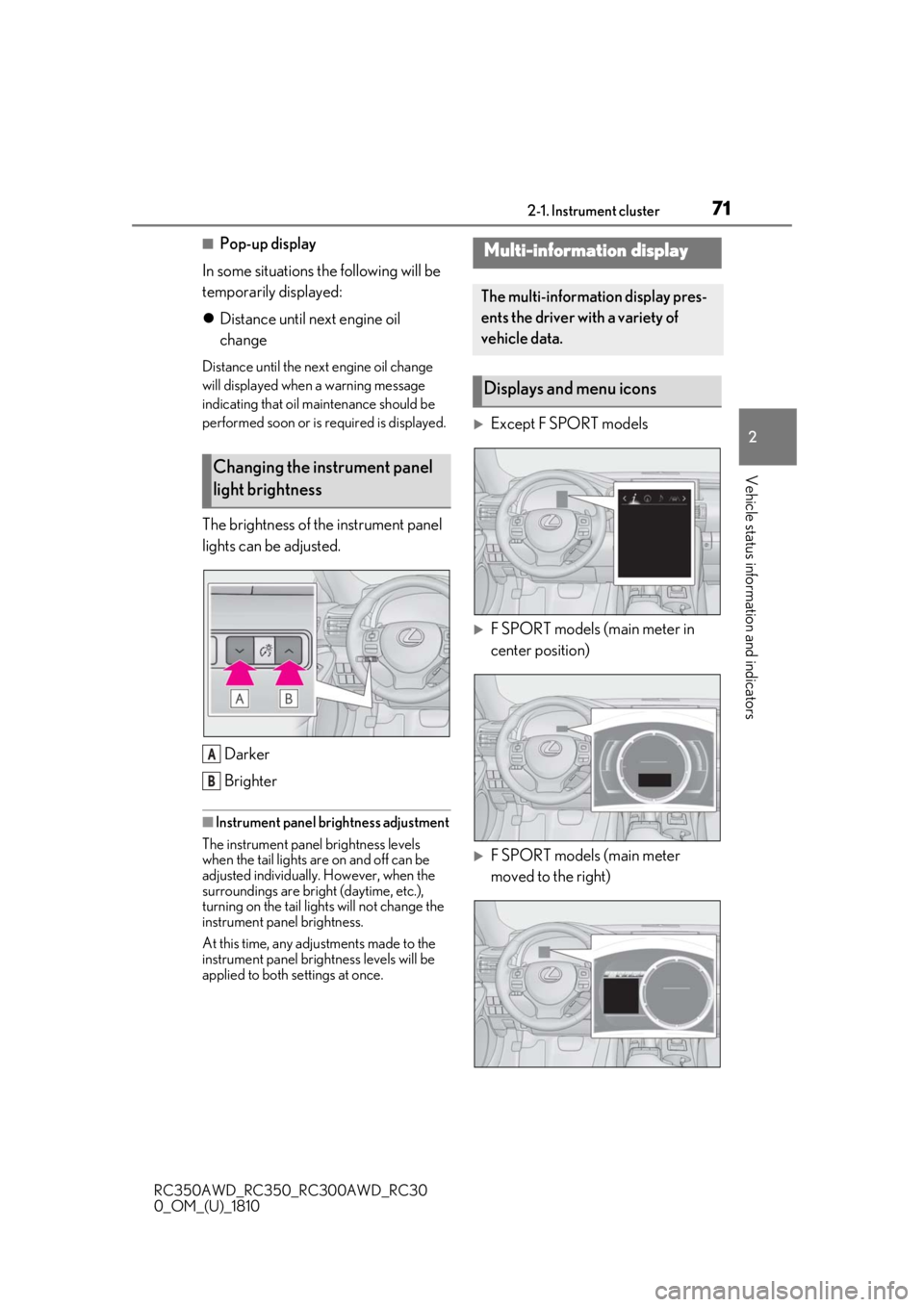
The brightness of the instrument panel
lights can be adjusted.
Darker
Brighter
■Instrument panel brightness adjustment
The instrument panel brightness levels
when the tail lights are on and off can be
adjusted individually. However, when the
surroundings are bright (daytime, etc.),
turning on the tail lights will not change the
instrument panel brightness.
At this time, any adjustments made to the
instrument panel brig htness levels will be
applied to both settings at once.
Except F SPORT models
F SPORT models (main meter in
center position)
F SPORT models (main meter
moved to the right)
Changing the instrument panel
light brightness
A
B
Multi-information display
The multi-information display pres-
ents the driver with a variety of
vehicle data.
Displays and menu icons
Page 72 of 390
722-1. Instrument cluster
RC350AWD_RC350_RC300AWD_RC30
0_OM_(U)_1810
■Menu icons
■Liquid crystal display
P.70
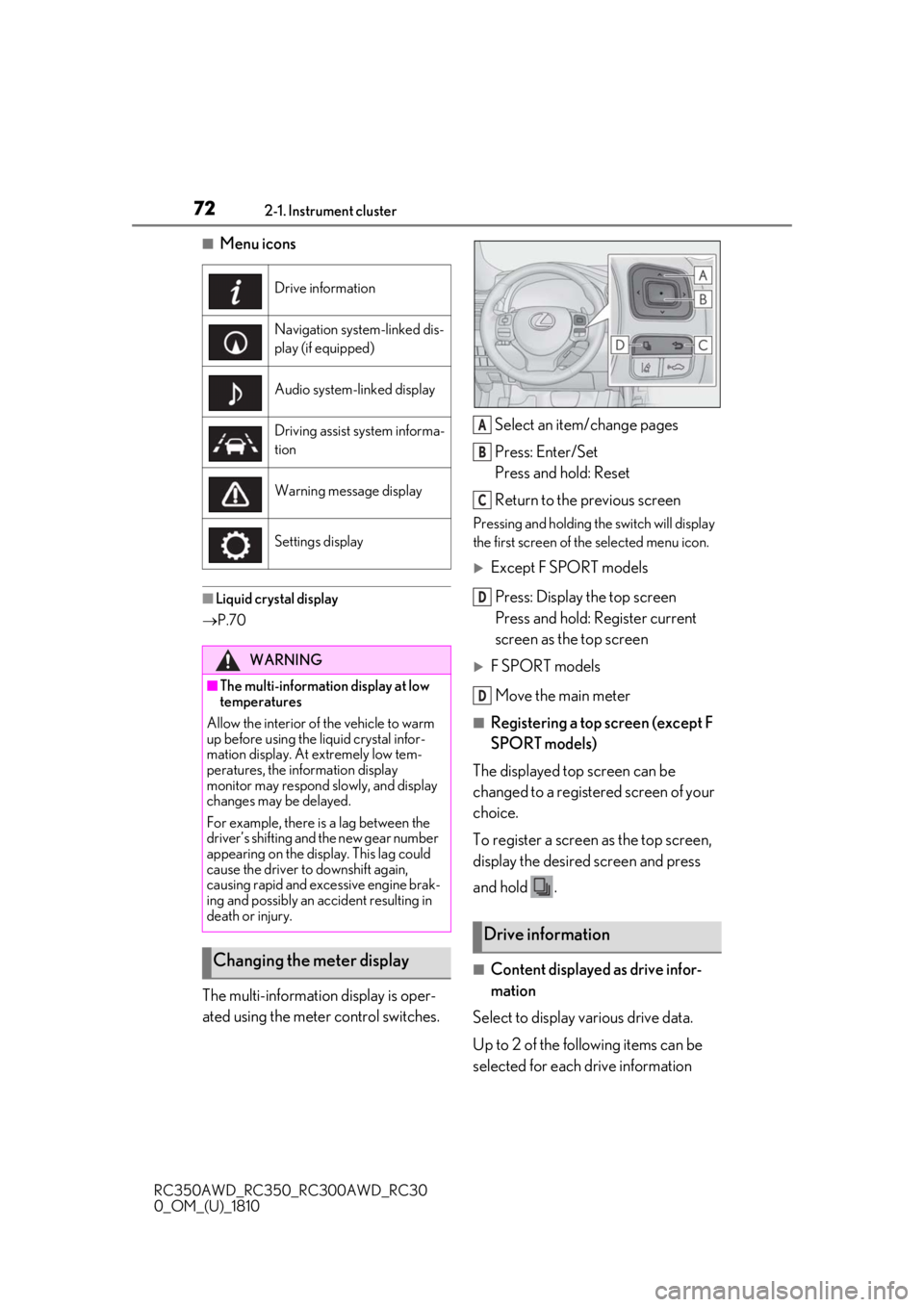
The multi-information display is oper-
ated using the meter control switches. Select an item/change pages
Press: Enter/Set
Press and hold: Reset
Return to the previous screen
Pressing and holding the switch will display
the first screen of the selected menu icon.
Except F SPORT models
Press: Display the top screen
Press and hold: Register current
screen as the top screen
F SPORT modelsMove the main meter
■Registering a top screen (except F
SPORT models)
The displayed top screen can be
changed to a registered screen of your
choice.
To register a screen as the top screen,
display the desired screen and press
and hold .
■Content displayed as drive infor-
mation
Select to display various drive data.
Up to 2 of the following items can be
selected for each drive information
Drive information
Navigation system-linked dis-
play (if equipped)
Audio system-linked display
Driving assist system informa-
tion
Warning message display
Settings display
WARNING
■The multi-information display at low
temperatures
Allow the interior of the vehicle to warm
up before using the liquid crystal infor-
mation display. At extremely low tem-
peratures, the information display
monitor may respond slowly, and display
changes may be delayed.
For example, there is a lag between the
driver’s shifting and the new gear number
appearing on the display. This lag could
cause the driver to downshift again,
causing rapid and excessive engine brak-
ing and possibly an accident resulting in
death or injury.
Changing the meter display
Drive information
A
B
C
D
D
Page 74 of 390
742-1. Instrument cluster
RC350AWD_RC350_RC300AWD_RC30
0_OM_(U)_1810driving), the Eco Driving Indicator Light
will turn on. When
the acceleration
exceeds the Zone of Eco driving, or when
the vehicle is stopped, the light turns off.
Eco Driving Indicator Zone Display
Suggests the Zone of Eco driving with cur-
rent Eco driving ratio based on accelera-
tion.
Eco driving ratio based on acceler-
ation
If the acceleration exceeds the Zone of
Eco driving, the right side of the Eco Driv-
ing Indicator Zone Display will illuminate.
At this time, the Eco Driving Indicator Light
will turn off.
Zone of Eco driving
Eco Driving Indicator will not operate
under the following conditions:
The shift lever is in any position
other than D.
A paddle shift switch is operated.
Neither normal mode nor Eco
mode is selected. ( P.190)
The vehicle speed is approximately
80 mph (130 km/h) or higher.
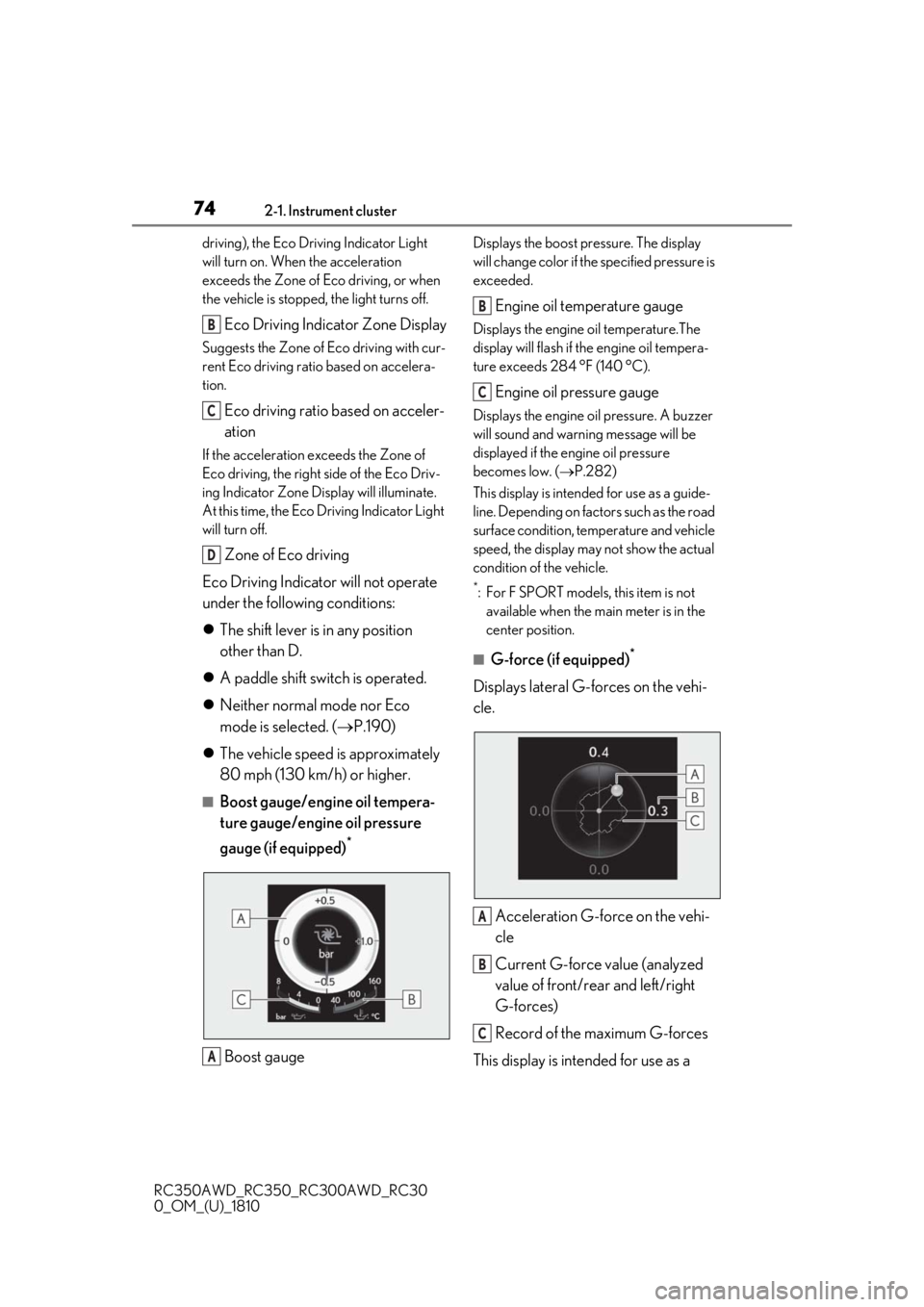
■Boost gauge/engine oil tempera-
ture gauge/engine oil pressure
gauge (if equipped)
*
Boost gauge
Displays the boost pressure. The display
will change color if th e specified pressure is
exceeded.
Engine oil temperature gauge
Displays the engine oil temperature.The
display will flash if the engine oil tempera-
ture exceeds 284 °F (140 °C).
Engine oil pressure gauge
Displays the engine oil pressure. A buzzer
will sound and warning message will be
displayed if the engine oil pressure
becomes low. ( P.282)
This display is intended for use as a guide-
line. Depending on fact ors such as the road
surface condition, temperature and vehicle
speed, the display may not show the actual
condition of the vehicle.
*: For F SPORT models, this item is not available when the main meter is in the
center position.
■G-force (if equipped)*
Displays lateral G-forces on the vehi-
cle.
Acceleration G-force on the vehi-
cle
Current G-force value (analyzed
value of front/rear and left/right
G-forces)
Record of the maximum G-forces
This display is intended for use as a
B
C
D
A
B
C
A
B
C
Page 75 of 390
752-1. Instrument cluster
RC350AWD_RC350_RC300AWD_RC30
0_OM_(U)_1810
2
Vehicle status information and indicators
guideline. Depending on factors such
as the road surface condition, tem-
perature and vehicle speed, the display
may not show the actual condition of
the vehicle.
Resetting the record of maximum
G-forces
Press and hold to reset the record.
Peak hold function
If lateral G-forces of 0.5 G or greater are
generated, the G-forc e value display will
turn amber and be held for 2 seconds.
*: For F SPORT models, this item is not available when the ma in meter is in the
center position.
■Tire pressure
P.258
■Vehicle sway warning*
Detects the sway of the vehicle within a
lane, which is often associated with a
decrease in the driver’s attention level,
and displays the decrease in attention
using a bar display.
The shorter the bar length, the more
the driver may need to rest.
This display is a part of the LDA (Lane
Departure Alert with steering control) sys-
tem.The display is enabled when the oper-
ating conditions of the vehicle sway
warning are met. ( P.162)
*: For F SPORT models, this item is not
available when the ma in meter is in the
center position.
■Gear positions
Displays the current gear position
when the shift lever is in D or M.
■Units (if equipped) *
The units of measure used can be
changed while driving.
Unlike the units sett ing performed on ,
the units setting performed on can be
changed while driving.
*: For F SPORT models, this item is not available when the main meter is in the
right-side position.
■Blank (No items)
Displays no drive information contents.
■Tire pressure
●It may take a few minutes to display the
tire inflation pressu re after the engine
switch is turned to IGNITION ON mode.
It may also take a few minutes to display
the tire inflation pressure after inflation
pressure has b een adjusted.
●“---” may be displayed if the tire informa-
tion cannot be determined due to unfa-
vorable radio wave conditions.
●Tire inflation pressure changes with tem-
perature. The displaye d values may also
be different from the values measured
using a tire pressure gauge.
Select to display the following naviga-
tion system-linked information.
Route guidance
Compass display (heading-up dis-
play)
Select to enable se lection of an audio
source or track on the display using the
meter control switches.
Navigation system-linked dis-
play (if equipped)
Audio system-linked display
Page 76 of 390
762-1. Instrument cluster
RC350AWD_RC350_RC300AWD_RC30
0_OM_(U)_1810
Select to display the operational status
of the following systems:
LDA (Lane Departure Alert with
steering control) ( P.161)
Dynamic radar cruise control
( P.168)
Select to display warning messages
and measures to be taken if a malfunc-
tion is detected. ( P.290)
The settings of the following items can
be changed using the meter control
switches.
For functions that can be enabled or
disabled, the function switches
between on and off each time is
pressed.
■LDA (Lane Departure Alert
with steering control) ( P.161)
Select to set up the following items.
Steering Assist
Select to enable/disable steering wheel
assistance.
Alert
Select to set a vibrator or buzzer as the
notification method used to warn the
driver.
Sensitivity
Select to set the warning sensitivity.
Sway warning
Select to enable/disable the vehicle sway
warning.
Sway sensitivity
Select to set the vehicle sway warning sen-
sitivity.
■PCS (Pre-Collision System)
( P.154)
Select to set up the following items.
PCS
Select to enable/disable the pre-collision
system.
Warning sensitivity
Select to change the warning timing.
■Speed indicator (F SPORT mod-
els) ( P.68)
Select to set up the following items.
Speed Indicator
Select to enable/disable the speed indica-
tor.
Speed Setting*
Select to set the desi red vehicle speed at
which the speed indicator will begin to be
displayed.
*: Always observe the legal speed limit
when driving on public roads.
■Clock ( P.66)
Select to switch between 12-hour dis-
play and 24-hour display.
■Vehicle Settings
Scheduled Maintenance ( P.238)
Select to reset the message indicating
maintenance is required, after the required
maintenance is performed.
Oil maintenance ( P.250)
Select to reset the engine oil maintenance
Driving assist system information
Warning message display
Settings display
Page 77 of 390
772-1. Instrument cluster
RC350AWD_RC350_RC300AWD_RC30
0_OM_(U)_1810
2
Vehicle status information and indicators
information (message indicating mainte-
nance is required and distance until the
next oil change) after engine oil mainte-
nance is performed.
■Meter settings
Language
Select to change the language on the dis-
play.
Units
Select to change the units of measure dis-
played.
Eco Driving Indicator Light
( P.73)
Select to enable/disable the Eco Driving
Indicator Light.
Switch settings (except F
SPORT models)
Displays a procedure to register a desired
screen to
.
You can register 1 screen as a shortcut,
which can be displayed by pressing
.
Drive information screen ( P.72)
Select to choose betwee n 2 items that will
be displayed on each drive information
screen (“Drive info 1”, “Drive Info 2” and
“Drive Info 3”) respectively.
Pop-up display ( P.70)
Select to enable/dis able the pop-up dis-
play.
• Intersection guidance (if equipped)
• Incoming calls
• Audio Feedback (F SPORT)
• Volume Feedback (F SPORT)
•Brightness adjustment
Color (except F SPORT models)
Select to set the color of the cursor on the
multi-information display.
Needle (F SPORT models)
Select to set the tachometer needle color.
Rev indicator (F SPORT models)
( P.69)
• Select to enable/disable the Rev indica-
tor.
• Select to set the desired engine speed at which the Rev indicator will begin to be
displayed.
Rev peak (F SPORT models)
( P.69)
Select to enable/disable the Rev peak.
Default setting
Select to reset the meter display settings to
the default setting.
■Background color of the indicator/shift
position display area (except F SPORT
models)
The background color of the indicator/shift
position display area is changed according
to the driving mode as follows ( P.190):
●Eco drive mode: Blue
●Sport mode: Red
■G-force display (if equipped)
The G-force values may not be zero even
when the vehicle is parked, such as when it
is parked on an incline.
■Suspension of the settings display
●Some settings cannot be changed while
driving. When changing settings, park
the vehicle in a safe place.
●If a warning message is displayed, opera-
tion of the settings display will be sus-
pended.
Page 78 of 390
782-1. Instrument cluster
RC350AWD_RC350_RC300AWD_RC30
0_OM_(U)_1810
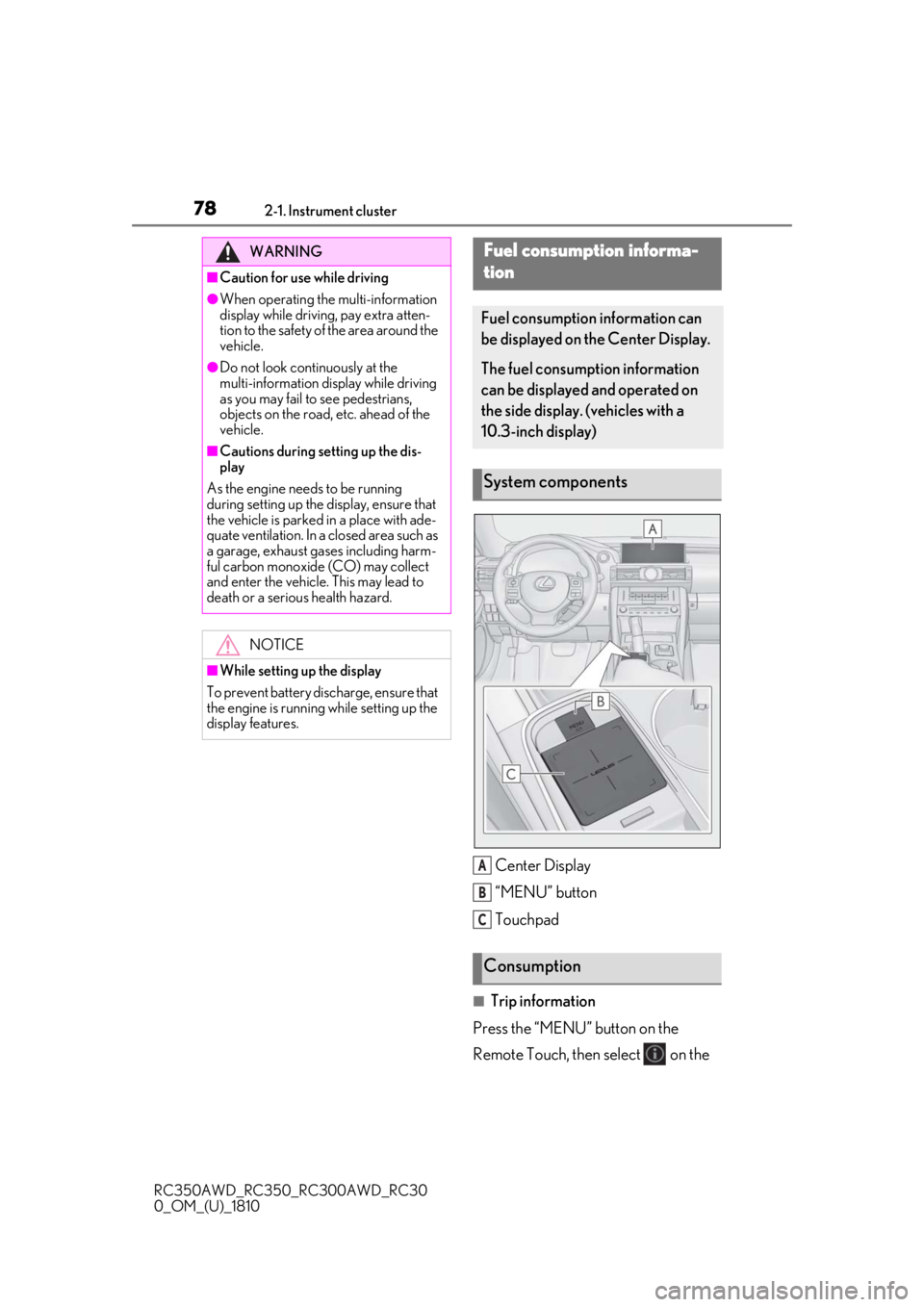
Center Display
“MENU” button
Touchpad
■Trip information
Press the “MENU” button on the
Remote Touch, then select on the
WARNING
■Caution for use while driving
●When operating the multi-information
display while driving, pay extra atten-
tion to the safety of the area around the
vehicle.
●Do not look continuously at the
multi-information di splay while driving
as you may fail to see pedestrians,
objects on the road, etc. ahead of the
vehicle.
■Cautions during setting up the dis-
play
As the engine needs to be running
during setting up the display, ensure that
the vehicle is parked in a place with ade-
quate ventilation. In a closed area such as
a garage, exhaust gases including harm-
ful carbon monoxide (CO) may collect
and enter the vehicle. This may lead to
death or a serious health hazard.
NOTICE
■While setting up the display
To prevent battery discharge, ensure that
the engine is running while setting up the
display features.
Fuel consumption informa-
tion
Fuel consumption information can
be displayed on the Center Display.
The fuel consumption information
can be displayed and operated on
the side display. (vehicles with a
10.3-inch display)
System components
Consumption
A
B
C
Page 87 of 390
873-2. Opening, closing and locking the doors and trunk
RC350AWD_RC350_RC300AWD_RC30
0_OM_(U)_1810
3
Before driving
To prevent unintended triggering of the
alarm, unlock the doors using the wireless
remote control and open and close a door
once after the settings have been changed.
(If a door is not opened within 60 seconds
after is pressed, the doors will be
locked again and the alarm will automati-
cally be set.)
In a case that the alarm is triggered, imme-
diately stop the alarm. ( P.58)
■Impact detection door lock release sys-
tem
In the event that the vehicle is subject to a
strong impact, both side doors are
unlocked. Depending on the force of the
impact or the type of accident, however, the
system may not operate.
■Operation signals
A buzzer sounds and the emergency flash-
ers flash to indicate that the doors have
been locked/unlocked. (Locked: once;
Unlocked: twice)
A buzzer sounds to indicate that the win-
dows and moon roof are operating.
■Welcome light illumination control
The side marker, parking, tail and license
plate lights automatically turn on at night when the doors are unlocked using the
entry function or wireless remote control if
the light switch is in the position.
■Security feature
If a door is not opened within approximately
60 seconds after the vehicle is unlocked,
the security feature automatically locks the
vehicle again.
■When the door cannot be locked by the
lock sensor on the surface of the door
handle
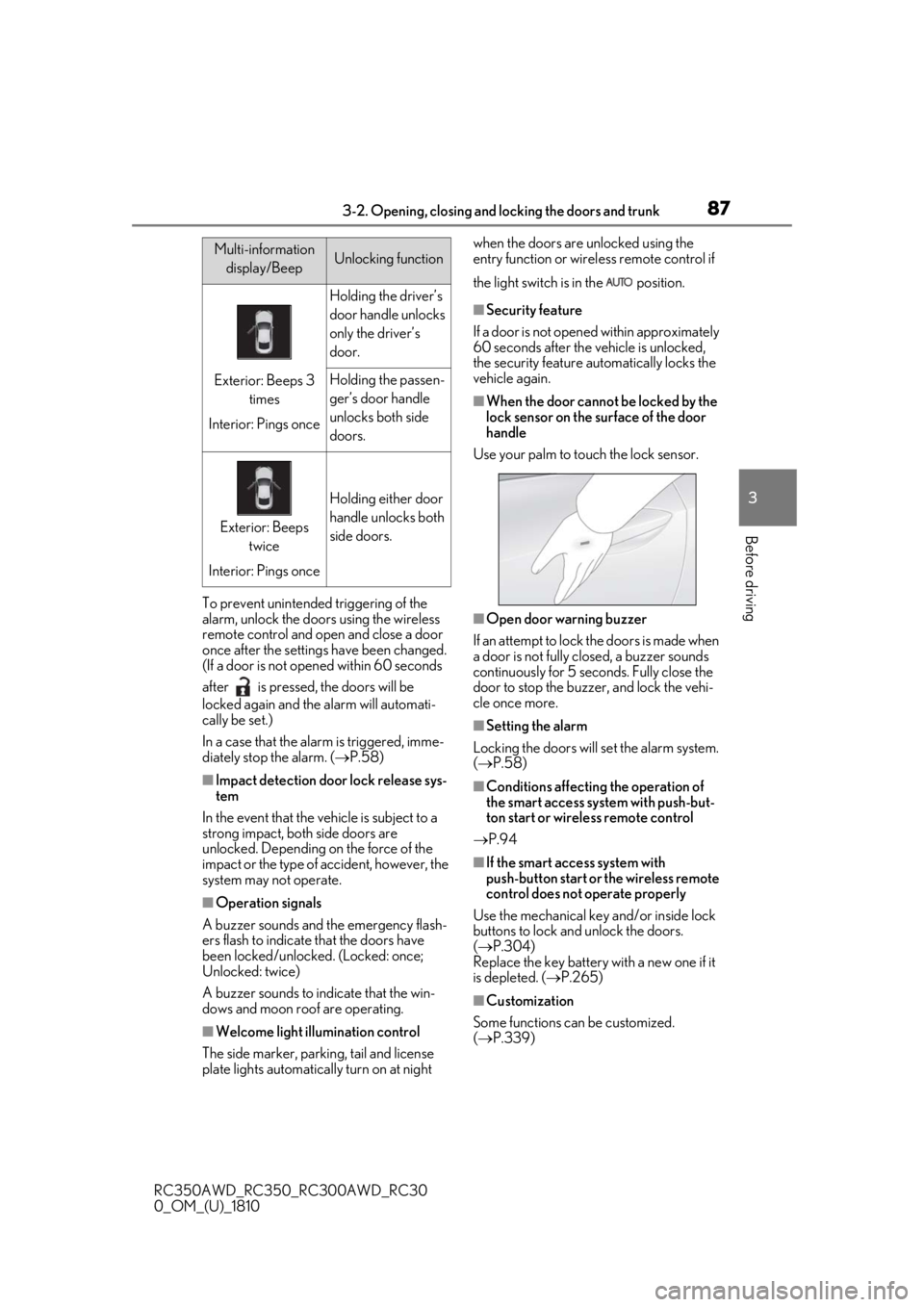
Use your palm to touch the lock sensor.
■Open door warning buzzer
If an attempt to lock the doors is made when
a door is not fully closed, a buzzer sounds
continuously for 5 seconds. Fully close the
door to stop the buzzer, and lock the vehi-
cle once more.
■Setting the alarm
Locking the doors will set the alarm system.
( P.58)
■Conditions affecting the operation of
the smart access system with push-but-
ton start or wireless remote control
P.94
■If the smart access system with
push-button start or the wireless remote
control does not operate properly
Use the mechanical key and/or inside lock
buttons to lock and unlock the doors.
( P.304)
Replace the key battery with a new one if it
is depleted. ( P.265)
■Customization
Some functions can be customized.
( P.339)
Multi-information
display/BeepUnlocking function
Exterior: Beeps 3 times
Interior: Pings once
Holding the driver’s
door handle unlocks
only the driver’s
door.
Holding the passen-
ger’s door handle
unlocks both side
doors.
Exterior: Beeps twice
Interior: Pings once
Holding either door
handle unlocks both
side doors.
Page 88 of 390
883-2. Opening, closing and locking the doors and trunk
RC350AWD_RC350_RC300AWD_RC30
0_OM_(U)_1810
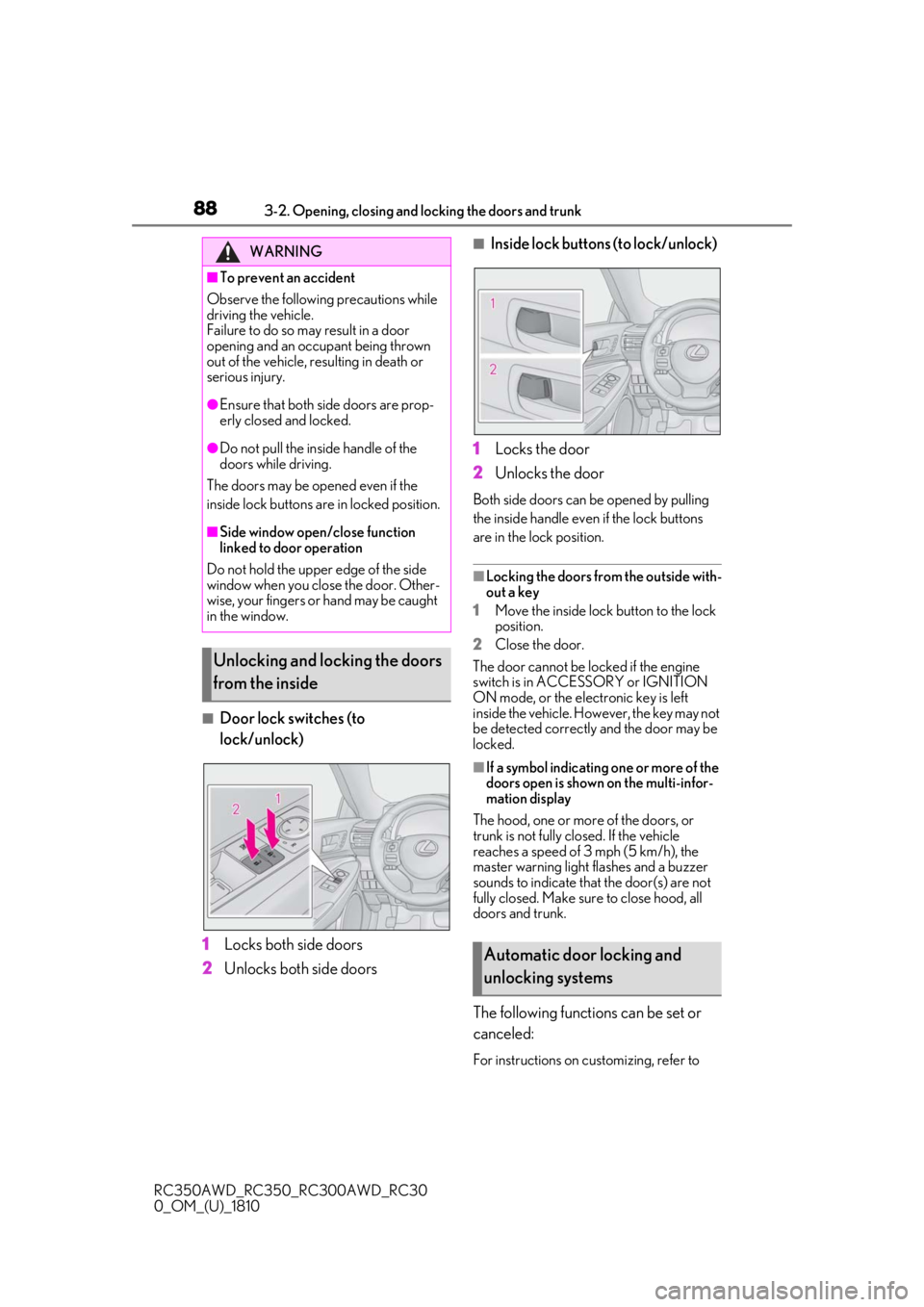
■Door lock switches (to
lock/unlock)
1
Locks both side doors
2
Unlocks both side doors
■Inside lock buttons (to lock/unlock)
1
Locks the door
2
Unlocks the door
Both side doors can be opened by pulling
the inside handle even if the lock buttons
are in the lock position.
■Locking the doors from the outside with-
out a key
1
Move the inside lock button to the lock
position.
2
Close the door.
The door cannot be locked if the engine
switch is in ACCESSORY or IGNITION
ON mode, or the electronic key is left
inside the vehicle. However, the key may not
be detected correctly and the door may be
locked.
■If a symbol indicating one or more of the
doors open is shown on the multi-infor-
mation display
The hood, one or more of the doors, or
trunk is not fully closed. If the vehicle
reaches a speed of 3 mph (5 km/h), the
master warning light flashes and a buzzer
sounds to indicate that the door(s) are not
fully closed. Make sure to close hood, all
doors and trunk.
The following functions can be set or
canceled:
For instructions on customizing, refer to
WARNING
■To prevent an accident
Observe the following precautions while
driving the vehicle.
Failure to do so may result in a door
opening and an occupant being thrown
out of the vehicle, re sulting in death or
serious injury.
●Ensure that both side doors are prop-
erly closed and locked.
●Do not pull the inside handle of the
doors while driving.
The doors may be opened even if the
inside lock buttons are in locked position.
■Side window open/close function
linked to door operation
Do not hold the upper edge of the side
window when you close the door. Other-
wise, your fingers or hand may be caught
in the window.
Unlocking and locking the doors
from the inside
Automatic door locking and
unlocking systems